door lock DODGE DAKOTA 2011 3.G User Guide
[x] Cancel search | Manufacturer: DODGE, Model Year: 2011, Model line: DAKOTA, Model: DODGE DAKOTA 2011 3.GPages: 76, PDF Size: 4.62 MB
Page 3 of 76
INTRODUCTION/WELCOME
Welcome From Chrysler Group LLC . . . 2
CONTROLS AT A GLANCE
Driver Cockpit...............4
Instrument Cluster ............6
GETTING STARTED
KeyFOB ..................8
Remote Start................8
Theft Alarm ................9
Seat Belt ..................9
Supplemental Restraint System (SRS) —
Airbags .................. 10
Child Restraints ............. 11
Front Seats ................ 14
Heated Seats .............. 16
Tilt Steering Column .......... 17
OPERATING YOUR VEHICLE
Turn Signals/Wiper/Washer/High
Beams Lever............... 18
Headlight Switch ............ 19
Speed Control .............. 20
Climate Controls ............. 21
Wind Buffeting .............. 21
ELECTRONICS
Non-Touch-Screen Radios ....... 22
Steering Wheel Audio Controls .... 25
Uconnect™ Phone ........... 25
Uconnect™ Voice Command ...... 27
Programmable Features ........ 28
Universal Garage Door Opener
(HomeLink
®)............... 29
Power Outlets .............. 31
OFF-ROAD CAPABILITIES
Four-Wheel Drive Operation ...... 32
UTILITY
Rear Crate 'N Go®Storage....... 33 Rear Cargo Area Utility Rails
...... 33
Tailgate .................. 33
Trailer Towing Weights (Maximum
Trailer Weight Ratings) ......... 34
Recreational Towing (Behind
Motorhome, Etc.) ............ 34
Brake/Transmission Interlock
System .................. 36
WHAT TO DO IN EMERGENCIES
24-Hour Towing Assistance ...... 37
Instrument Cluster Warning Lights . . 37
If Your Engine Overheats ........ 40
Jacking And Tire Changing ....... 42
Jump-Starting .............. 47
Emergency Tow Hooks ......... 49
Towing A Disabled Vehicle ....... 50
Freeing A Stuck Vehicle ......... 51
Event Data Recorder (EDR) ....... 52
MAINTAINING YOUR VEHICLE
Opening The Hood........... 53
Engine Compartment .......... 54
Fluids And Capacities .......... 56
Maintenance Chart ........... 58
Fuses ................... 61
Tire Pressures .............. 64
Wheel And Wheel Trim Care ...... 64
Exterior Bulbs .............. 65
CONSUMER ASSISTANCE
Chrysler Group LLC Customer Center . 66
Chrysler Canada Inc. Customer Center 66
Assistance For The Hearing Impaired . 66
Publications Ordering .......... 66
Reporting Safety Defects In
The 50 United States And
Washington, D.C. ............ 67
MOPAR ACCESSORIES
Authentic Accessories By MOPAR®.. 68
INDEX.................. 69
TABLE OF CONTENTS
Page 10 of 76
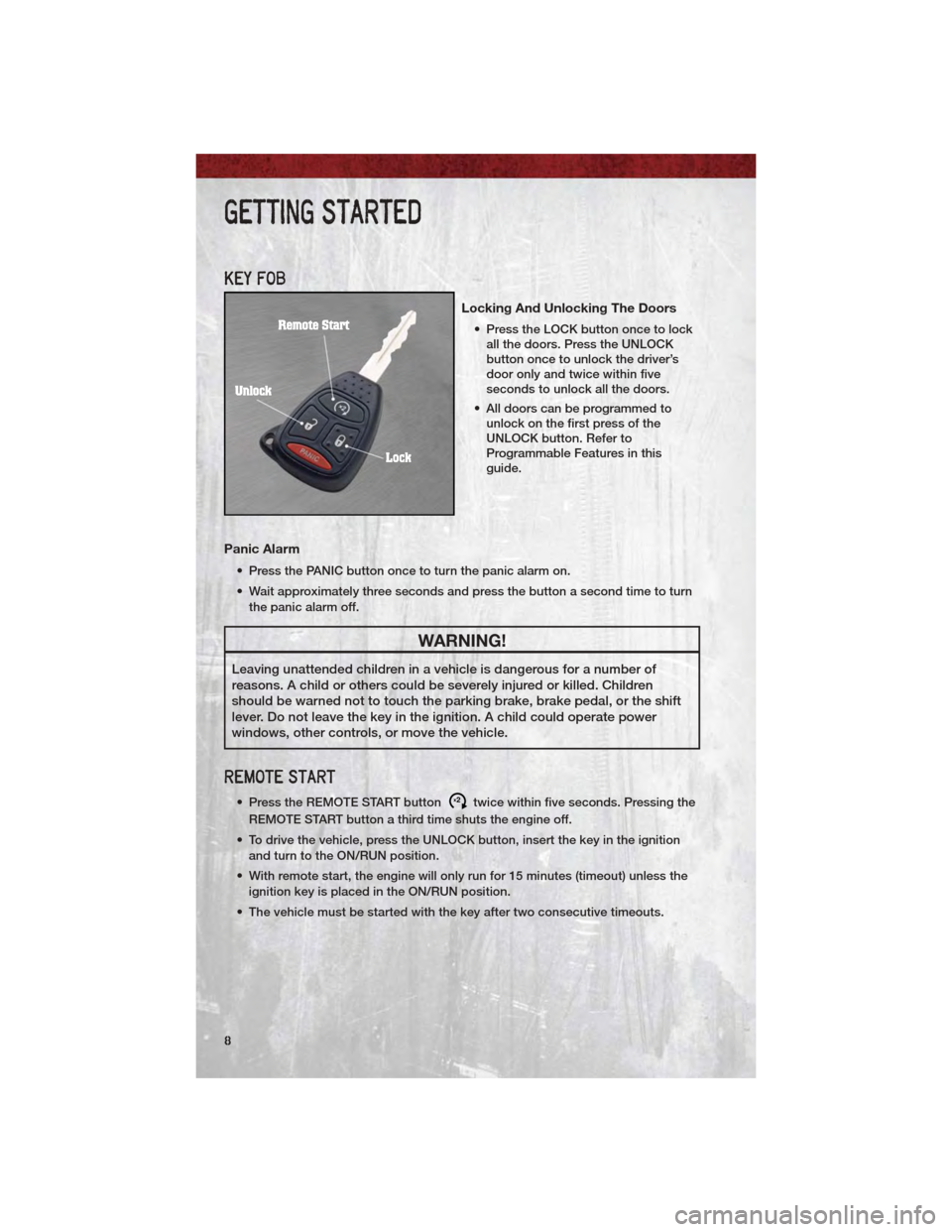
KEY FOB
Locking And Unlocking The Doors
• Press the LOCK button once to lockall the doors. Press the UNLOCK
button once to unlock the driver’s
door only and twice within five
seconds to unlock all the doors.
• All doors can be programmed to unlock on the first press of the
UNLOCK button. Refer to
Programmable Features in this
guide.
Panic Alarm
• Press the PANIC button once to turn the panic alarm on.
• Wait approximately three seconds and press the button a second time to turn
the panic alarm off.
WARNING!
Leaving unattended children in a vehicle is dangerous for a number of
reasons. A child or others could be severely injured or killed. Children
should be warned not to touch the parking brake, brake pedal, or the shift
lever. Do not leave the key in the ignition. A child could operate power
windows, other controls, or move the vehicle.
REMOTE START
• Press the REMOTE START buttonx2twice within five seconds. Pressing the
REMOTE START button a third time shuts the engine off.
• To drive the vehicle, press the UNLOCK button, insert the key in the ignition and turn to the ON/RUN position.
• With remote start, the engine will only run for 15 minutes (timeout) unless the ignition key is placed in the ON/RUN position.
• The vehicle must be started with the key after two consecutive timeouts.
GETTING STARTED
8
Page 11 of 76
WARNING!
• Do not start or run an engine in a closed garage or confined area.Exhaust gas contains Carbon Monoxide (CO) which is odorless and
colorless. Carbon Monoxide is poisonous and can cause serious injury or
death when inhaled.
• Keep Key Fob transmitters away from children. Operation of the Remote Start System, windows, door locks or other controls could cause serious
injury or death.
THEFT ALARM
To Arm
• Press the Key Fob LOCK button or the power door lock switch while the door
is open.
To Disarm
• Press the Key Fob UNLOCK button and turn the ignition to the ON/RUNposition.
SEAT BELT
• Be sure everyone in your vehicle is in a seat and using a seat belt properly.
• Position the lap belt across your thighs, below your abdomen. To remove slackin the lap portion, pull up a bit on the shoulder belt. To loosen the lap belt if it
is too tight, tilt the latch plate and pull on the lap belt. A snug belt reduces the
risk of sliding under the belt in a collision.
• Position the shoulder belt on your chest so that it is comfortable and not resting on your neck. The retractor will withdraw any slack in the belt.
• A shoulder belt placed behind you will not protect you from injury during a collision. You are more likely to hit your head in a collision if you do not wear
your shoulder belt. The lap and shoulder belt are meant to be used together.
• A belt that is too loose will not protect you properly. In a sudden stop you could move too far forward, increasing the possibility of injury. Wear your seat
belt snugly.
• A frayed or torn belt could rip apart in a collision and leave you with no protection. Inspect the belt system periodically, checking for cuts, frays, or
loose parts. Damaged parts must be replaced immediately. Do not
disassemble or modify the system. Seat belt assemblies must be replaced
after a collision if they have been damaged (bent retractor, torn webbing, etc.).
• The seat belts for both front seating positions are equipped with pretensioning devices that are designed to remove slack from the seat belt in the event of a
collision.
• A deployed pretensioner or a deployed airbag must be replaced immediately.
GETTING STARTED
9
Page 30 of 76
• For vehicles equipped with Video Entertainment System (VES)™, refer to theUconnect™ Voice Command section of the Uconnect™ User's Manual on the
DVD for further details.
• For vehicles not equipped with VES™, refer to your vehicle Owner's Manual on the DVD for Uconnect™ Voice Command information.
NOTE: To access the tutorial, press the Voice Command button
.Afterthe
BEEP, say “tutorial”. Press any hard-key/button or touch the display (Touch-Screen
radio) to cancel the tutorial.
WARNING!
Any voice commanded system should be used only in safe driving
conditions following local laws and phone use. All attention should be kept
on the roadway ahead. Failure to do so may result in a collision causing you
and others to be severely injured or killed.
PROGRAMMABLE FEATURES
• The following features may be programmed using the Key Fob transmitter or the ignition switch and driver's door lock switch.
NOTE: Pressing the LOCK button while you are inside the vehicle will activate the
Vehicle Security Alarm. Opening a door with the Vehicle Security Alarm activated
will cause the alarm to sound. Press the UNLOCK button to deactivate the Vehicle
Security Alarm.
Unlock On First Press
• To unlock either the driver's side, or all doors, on the first press of the UNLOCK button:
• Press and hold the LOCK button for at least 4 seconds, but no longer than
10 seconds. Then, press and hold the UNLOCK button while still holding the
LOCK button.
• Release both buttons at the same time.
Auto Unlock Doors On Exit
• To have all of the vehicle doors unlock when any door is opened: • Enter your vehicle and close all the doors.
• Fasten your seatbelt.
• Within 15 seconds, cycle the ignition switch between LOCK and ON andthen back to LOCK four times, ending up in the LOCK position (do not start
the engine).
• Press the power door UNLOCK switch to unlock the doors. A single chime will indicate that programming is complete.
ELECTRONICS
28
Page 31 of 76
Auto Door Lock
• To have the doors lock automatically when the vehicle’s speed exceeds15 mph (24 km/h):
• Enter your vehicle and close all the doors.
• Fasten your seatbelt.
• Within 10 seconds, cycle the ignition switch between LOCK and ON and
then back to LOCK four times, ending up in the LOCK position (do not start
the engine).
• Press the power door LOCK switch to lock the doors. A single chime will indicate that programming is complete.
Sound Horn With Lock
• To turn the horn chirp on or off when the doors are locked:
• Press the LOCK button for at least 4 seconds, but no longer than 6 seconds.Then, press the PANIC button while still holding the LOCK button. A single
chime will sound to indicate that this feature has changed.
• Release both buttons at the same time.
Flashing Lights With Lock
• The turn signal lights flashing when the doors are locked or unlocked feature can be turned on or off. To turn this feature on or off:
• Press and hold the UNLOCK button for at least 4 seconds, but no longer
than 6 seconds. Then, press and hold the LOCK button while still holding
the UNLOCK button. A single chime will sound to indicate that this feature
has changed.
• Release both buttons at the same time.
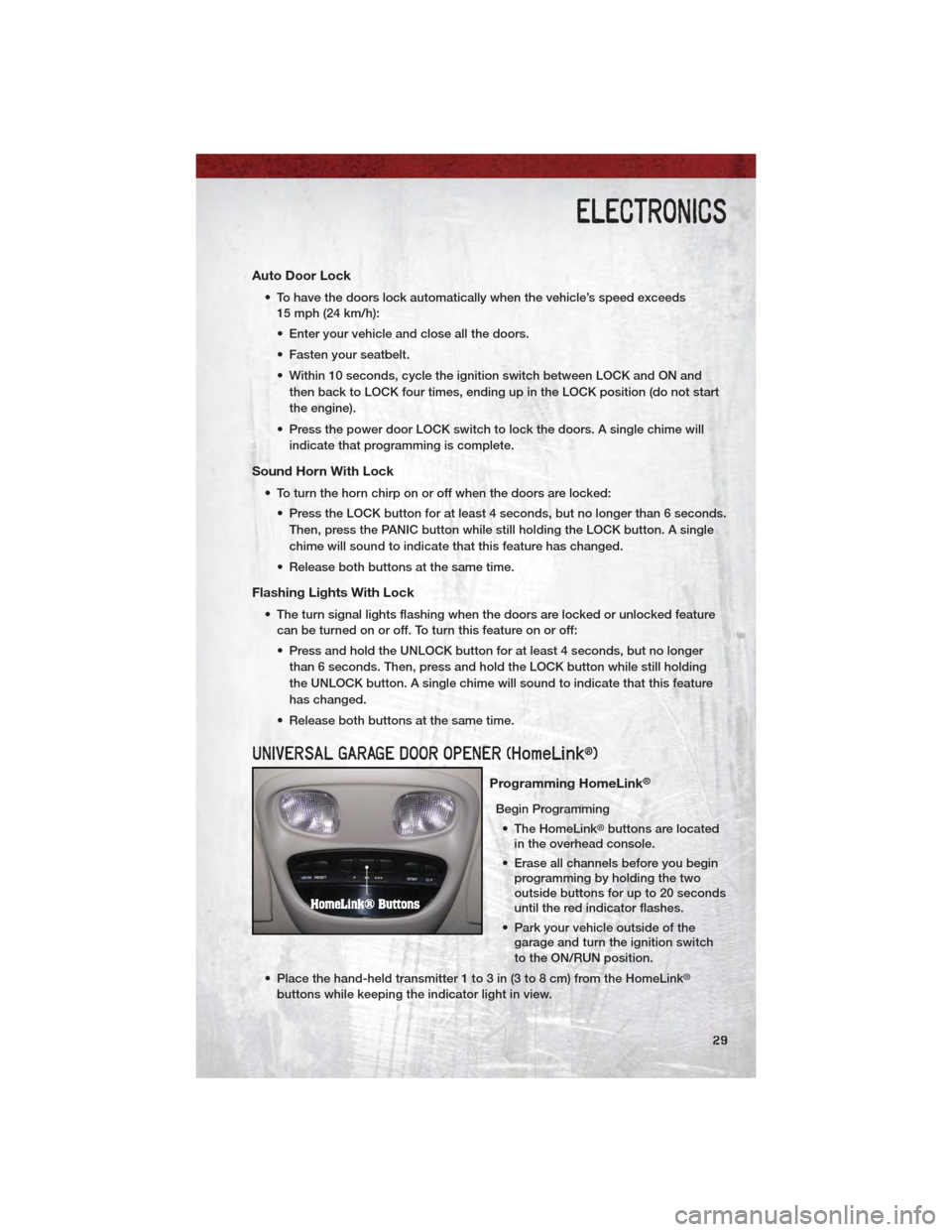
UNIVERSAL GARAGE DOOR OPENER (HomeLink®)
Programming HomeLink®
Begin Programming • The HomeLink
®buttons are located
in the overhead console.
• Erase all channels before you begin programming by holding the two
outside buttons for up to 20 seconds
until the red indicator flashes.
• Park your vehicle outside of the garage and turn the ignition switch
to the ON/RUN position.
• Place the hand-held transmitter 1 to 3 in (3 to 8 cm) from the HomeLink
®
buttons while keeping the indicator light in view.
ELECTRONICS
29
Page 64 of 76
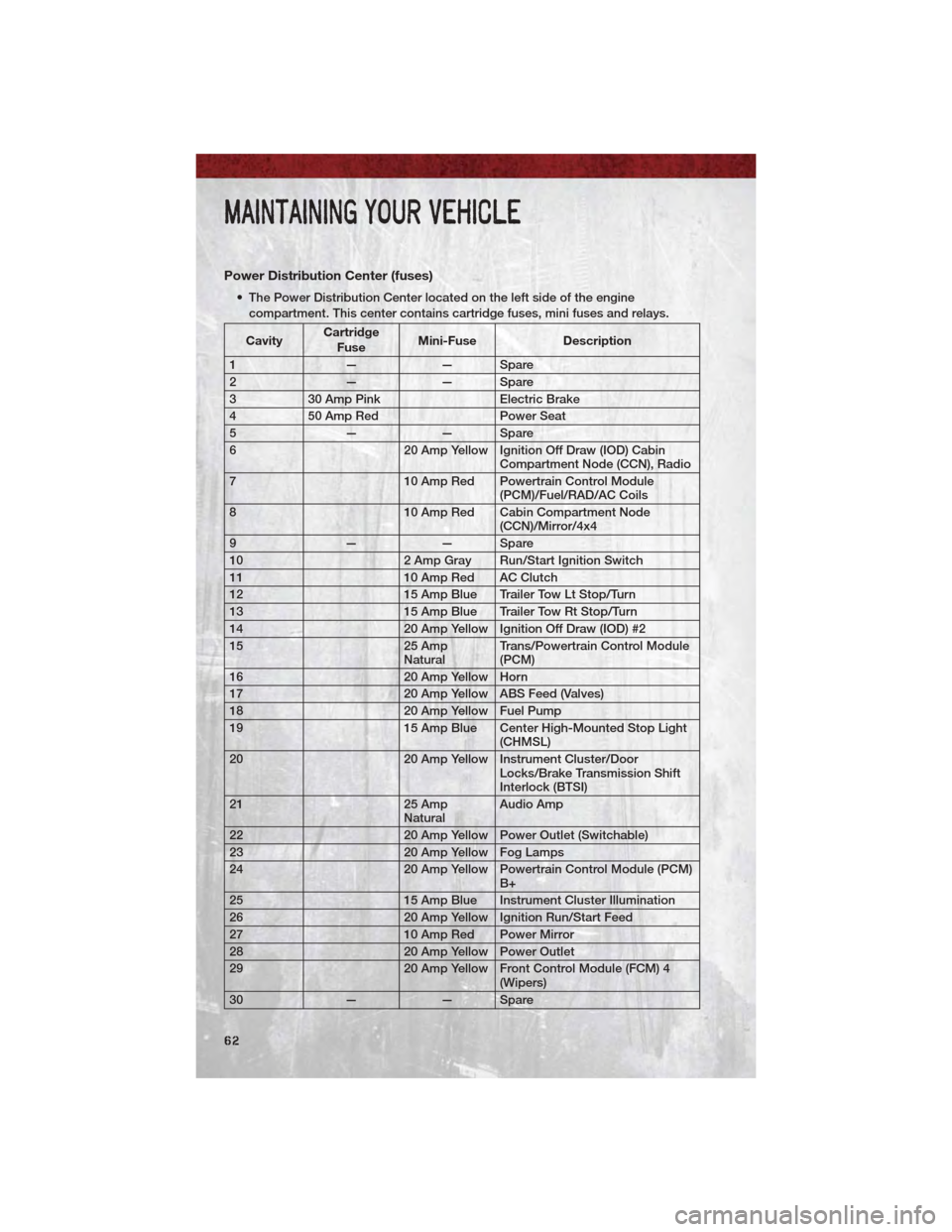
Power Distribution Center (fuses)
• The Power Distribution Center located on the left side of the enginecompartment. This center contains cartridge fuses, mini fuses and relays.
Cavity Cartridge
Fuse Mini-Fuse
Description
1 —— Spare
2 —— Spare
3 30 Amp Pink Electric Brake
4 50 Amp Red Power Seat
5 —— Spare
6 20 Amp Yellow Ignition Off Draw (IOD) Cabin
Compartment Node (CCN), Radio
7 10 Amp Red Powertrain Control Module
(PCM)/Fuel/RAD/AC Coils
8 10 Amp Red Cabin Compartment Node
(CCN)/Mirror/4x4
9 —— Spare
10 2 Amp Gray Run/Start Ignition Switch
11 10 Amp Red AC Clutch
12 15 Amp Blue Trailer Tow Lt Stop/Turn
13 15 Amp Blue Trailer Tow Rt Stop/Turn
14 20 Amp Yellow Ignition Off Draw (IOD) #2
15 25 Amp
Natural Trans/Powertrain Control Module
(PCM)
16 20 Amp Yellow Horn
17 20 Amp Yellow ABS Feed (Valves)
18 20 Amp Yellow Fuel Pump
19 15 Amp Blue Center High-Mounted Stop Light
(CHMSL)
20 20 Amp Yellow Instrument Cluster/Door
Locks/Brake Transmission Shift
Interlock (BTSI)
21 25 Amp
Natural Audio Amp
22 20 Amp Yellow Power Outlet (Switchable)
23 20 Amp Yellow Fog Lamps
24 20 Amp Yellow Powertrain Control Module (PCM)
B+
25 15 Amp Blue Instrument Cluster Illumination
26 20 Amp Yellow Ignition Run/Start Feed
27 10 Amp Red Power Mirror
28 20 Amp Yellow Power Outlet
29 20 Amp Yellow Front Control Module (FCM) 4
(Wipers)
30 —— Spare
MAINTAINING YOUR VEHICLE
62
Page 71 of 76
Air Conditioning............21
Airbag ..................10
Alarm, Panic ...............8
Anti-Lock Brake System (ABS) . 39,40
Arming Theft System (Security
Alarm) ...................9
Audio Settings ...........23,24
Automatic Headlights .........19
Automatic Transmission FluidType ..............56
AxleFluid ................56
Battery Charging System Light .......39
Belts, Seat ................9
BrakeFluid ...............56
Brake System WarningLight ............38
Brake/Transmission Interlock ....36
Bulb Replacement ...........65
Cargo Compartment .........33
CargoLight ...............19
Change Oil Indicator .........40
Charging System Light ........39
Check Engine Light (Malfunction
IndicatorLight) .............39
ChildRestraint .............11
Child Restraint Tether Anchors . . . 11
Climate Control ............21
Clock Setting ..............24
Cooling System Coolant Capacity ..........56
Crates Rear Convenience Storage ....33
Cruise Control (Speed Control) . . . 20
CruiseLight ..............20
Customer Assistance .........66
Defects, Reporting ..........67
Defroster, Rear Window .......21
Defroster, Windshield .........21
Dimmer Control ............19
Dimmer Switch, Headlight ......19
Disarming, Theft System ........9
Driver Cockpit ..............4 Electronic Speed Control (Cruise
Control)
.................20
Electronic Throttle Control Warning
Light ...................39
Engine Compartment ............54
Malfunction Indicator (Check
Engine) ................39
OilSelection .............56
Overheating .............40
Event Data Recorder .........52
ExteriorLights .............65
Fluid Capacities ............56
Fluids ..................56
FogLights ...............19
Four Wheel Drive Operation .....32
FreeingAStuckVehicle .......51
Front Heated Seats ..........16
Fuel Filler Cap (Gas Cap) ........40
Specifications ............56
Fuses ..................61
Garage Door Opener (HomeLink
®).29
Gas Cap (Fuel Filler Cap) .......40
Headlights Automatic ..............19
Dimmer Switch ...........19
High Beam ..............18
Heated Seats ..............16
High Beam/Low Beam Select
(Dimmer) Switch ............18
HomeLink
®(Garage Door Opener)
Transmitter ...............29
Hood Release .............53
Instrument Cluster ...........6
Indicators ...............7
Instrument Cluster Warning
Lights .................6,37
Intermittent Wipers (Delay Wipers) . 18
Introduction ...............2
Jack Location .............42
Jump Starting .............47
INDEX
69