light DODGE DART 2013 PF / 1.G Owner's Guide
[x] Cancel search | Manufacturer: DODGE, Model Year: 2013, Model line: DART, Model: DODGE DART 2013 PF / 1.GPages: 132, PDF Size: 4.13 MB
Page 100 of 132
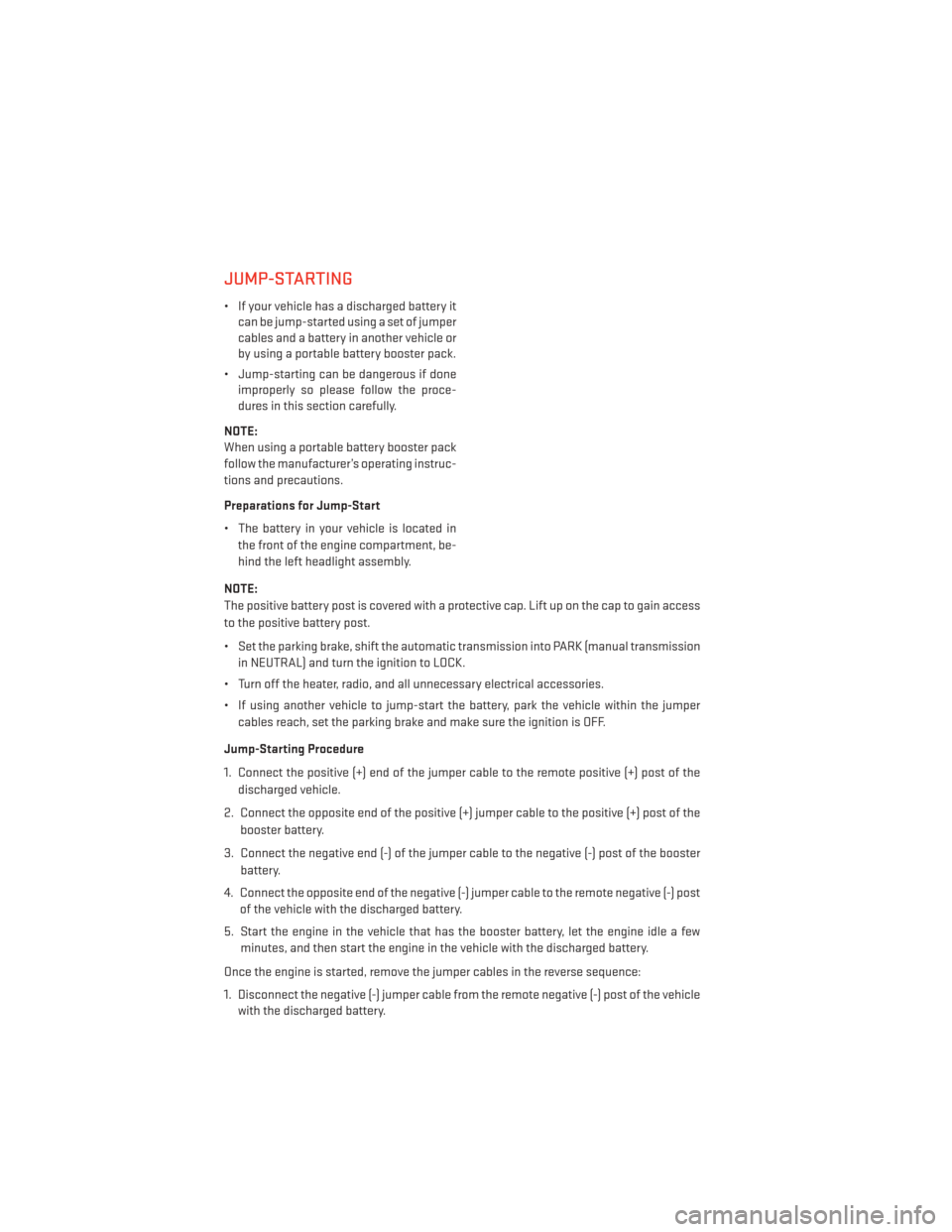
JUMP-STARTING
• If your vehicle has a discharged battery itcan be jump-started using a set of jumper
cables and a battery in another vehicle or
by using a portable battery booster pack.
• Jump-starting can be dangerous if done improperly so please follow the proce-
dures in this section carefully.
NOTE:
When using a portable battery booster pack
follow the manufacturer’s operating instruc-
tions and precautions.
Preparations for Jump-Start
• The battery in your vehicle is located in the front of the engine compartment, be-
hind the left headlight assembly.
NOTE:
The positive battery post is covered with a protective cap. Lift up on the cap to gain access
to the positive battery post.
• Set the parking brake, shift the automatic transmission into PARK (manual transmission in NEUTRAL) and turn the ignition to LOCK.
• Turn off the heater, radio, and all unnecessary electrical accessories.
• If using another vehicle to jump-start the battery, park the vehicle within the jumper cables reach, set the parking brake and make sure the ignition is OFF.
Jump-Starting Procedure
1. Connect the positive (+) end of the jumper cable to the remote positive (+) post of the discharged vehicle.
2. Connect the opposite end of the positive (+) jumper cable to the positive (+) post of the booster battery.
3. Connect the negative end (-) of the jumper cable to the negative (-) post of the booster battery.
4. Connect the opposite end of the negative (-) jumper cable to the remote negative (-) post of the vehicle with the discharged battery.
5. Start the engine in the vehicle that has the booster battery, let the engine idle a few minutes, and then start the engine in the vehicle with the discharged battery.
Once the engine is started, remove the jumper cables in the reverse sequence:
1. Disconnect the negative (-) jumper cable from the remote negative (-) post of the vehicle with the discharged battery.
WHAT TO DO IN EMERGENCIES
98
Page 106 of 132
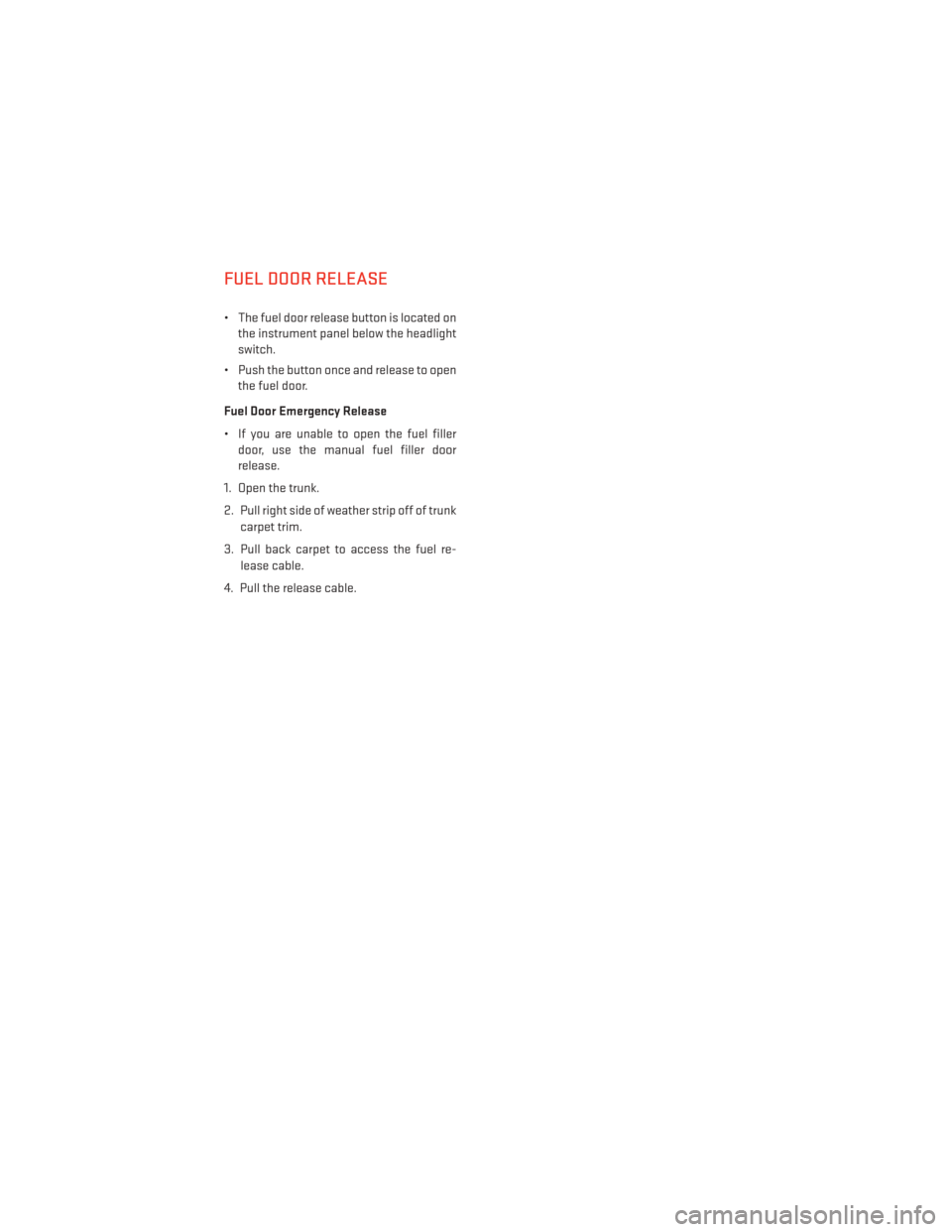
FUEL DOOR RELEASE
• The fuel door release button is located onthe instrument panel below the headlight
switch.
• Push the button once and release to open the fuel door.
Fuel Door Emergency Release
• If you are unable to open the fuel filler door, use the manual fuel filler door
release.
1. Open the trunk.
2. Pull right side of weather strip off of trunk carpet trim.
3. Pull back carpet to access the fuel re- lease cable.
4. Pull the release cable.
MAINTAINING YOUR VEHICLE
104
Page 113 of 132
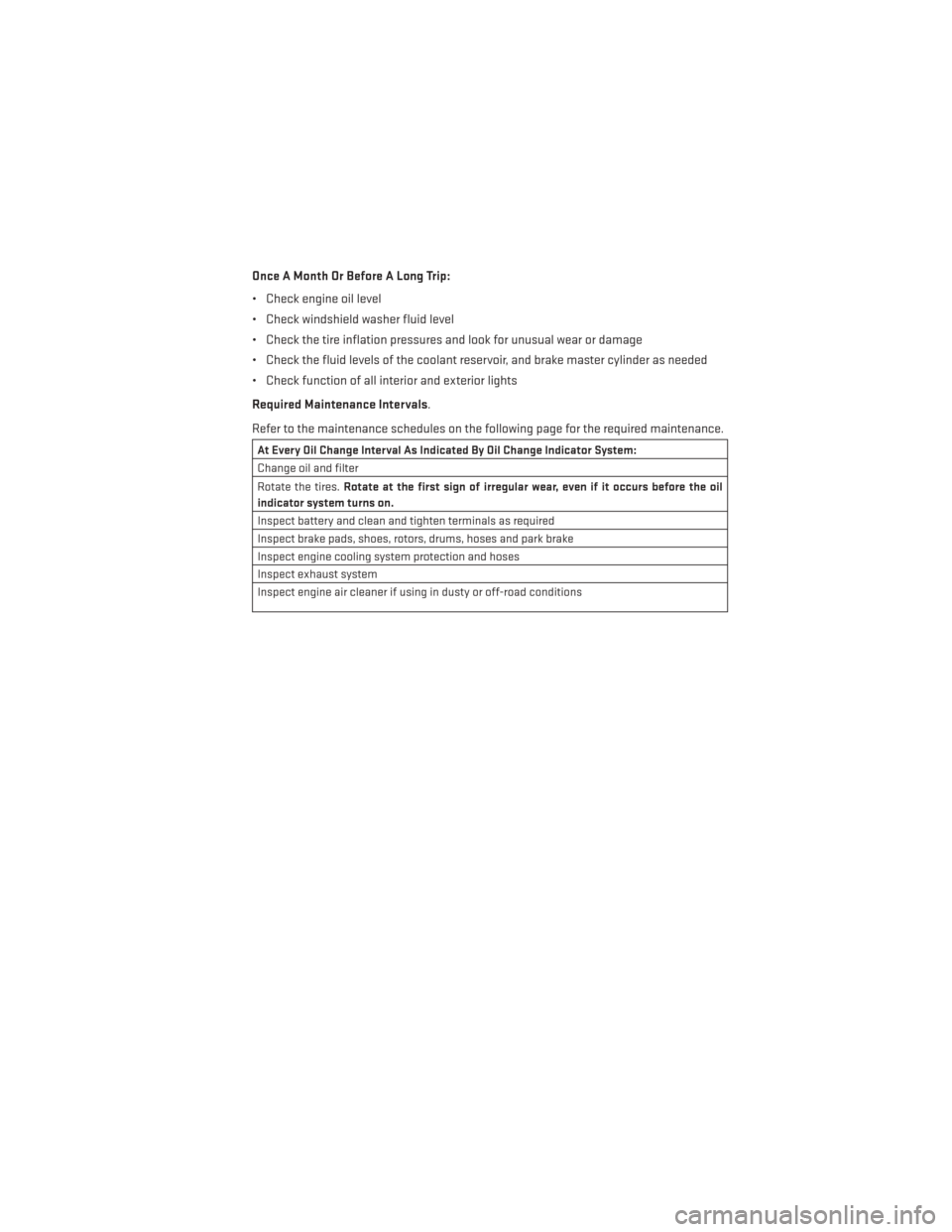
Once A Month Or Before A Long Trip:
• Check engine oil level
• Check windshield washer fluid level
• Check the tire inflation pressures and look for unusual wear or damage
• Check the fluid levels of the coolant reservoir, and brake master cylinder as needed
• Check function of all interior and exterior lights
Required Maintenance Intervals.
Refer to the maintenance schedules on the following page for the required maintenance.
At Every Oil Change Interval As Indicated By Oil Change Indicator System:
Change oil and filter
Rotate the tires.Rotate at the first sign of irregular wear, even if it occurs before the oil
indicator system turns on.
Inspect battery and clean and tighten terminals as required
Inspect brake pads, shoes, rotors, drums, hoses and park brake
Inspect engine cooling system protection and hoses
Inspect exhaust system
Inspect engine air cleaner if using in dusty or off-road conditions
MAINTAINING YOUR VEHICLE
111
Page 119 of 132
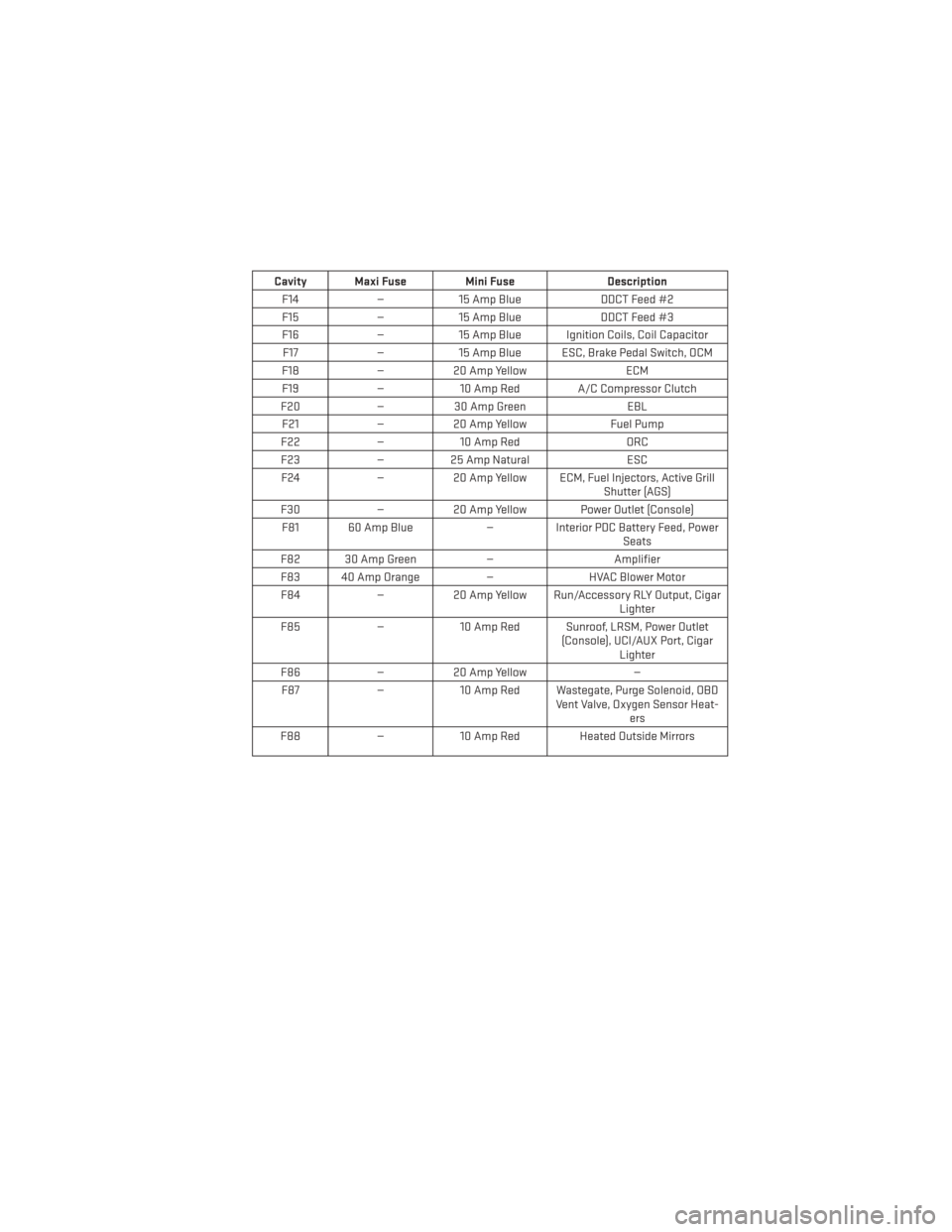
Cavity Maxi Fuse Mini FuseDescription
F14 —15 Amp Blue DDCT Feed #2
F15 —15 Amp Blue DDCT Feed #3
F16 —15 Amp Blue Ignition Coils, Coil Capacitor
F17 —15 Amp Blue ESC, Brake Pedal Switch, OCM
F18 —20 Amp Yellow ECM
F19 —10 Amp Red A/C Compressor Clutch
F20 —30 Amp Green EBL
F21 —20 Amp Yellow Fuel Pump
F22 —10 Amp Red ORC
F23 —25 Amp Natural ESC
F24 —20 Amp Yellow ECM, Fuel Injectors, Active Grill
Shutter (AGS)
F30 —20 Amp Yellow Power Outlet (Console)
F81 60 Amp Blue —Interior PDC Battery Feed, Power
Seats
F82 30 Amp Green —Amplifier
F83 40 Amp Orange —HVAC Blower Motor
F84 —20 Amp Yellow Run/Accessory RLY Output, Cigar
Lighter
F85 —10 Amp Red Sunroof, LRSM, Power Outlet
(Console), UCI/AUX Port, CigarLighter
F86 —20 Amp Yellow —
F87 —10 Amp Red Wastegate, Purge Solenoid, OBD
Vent Valve, Oxygen Sensor Heat-ers
F88 —10 Amp Red Heated Outside Mirrors
MAINTAINING YOUR VEHICLE
117
Page 121 of 132
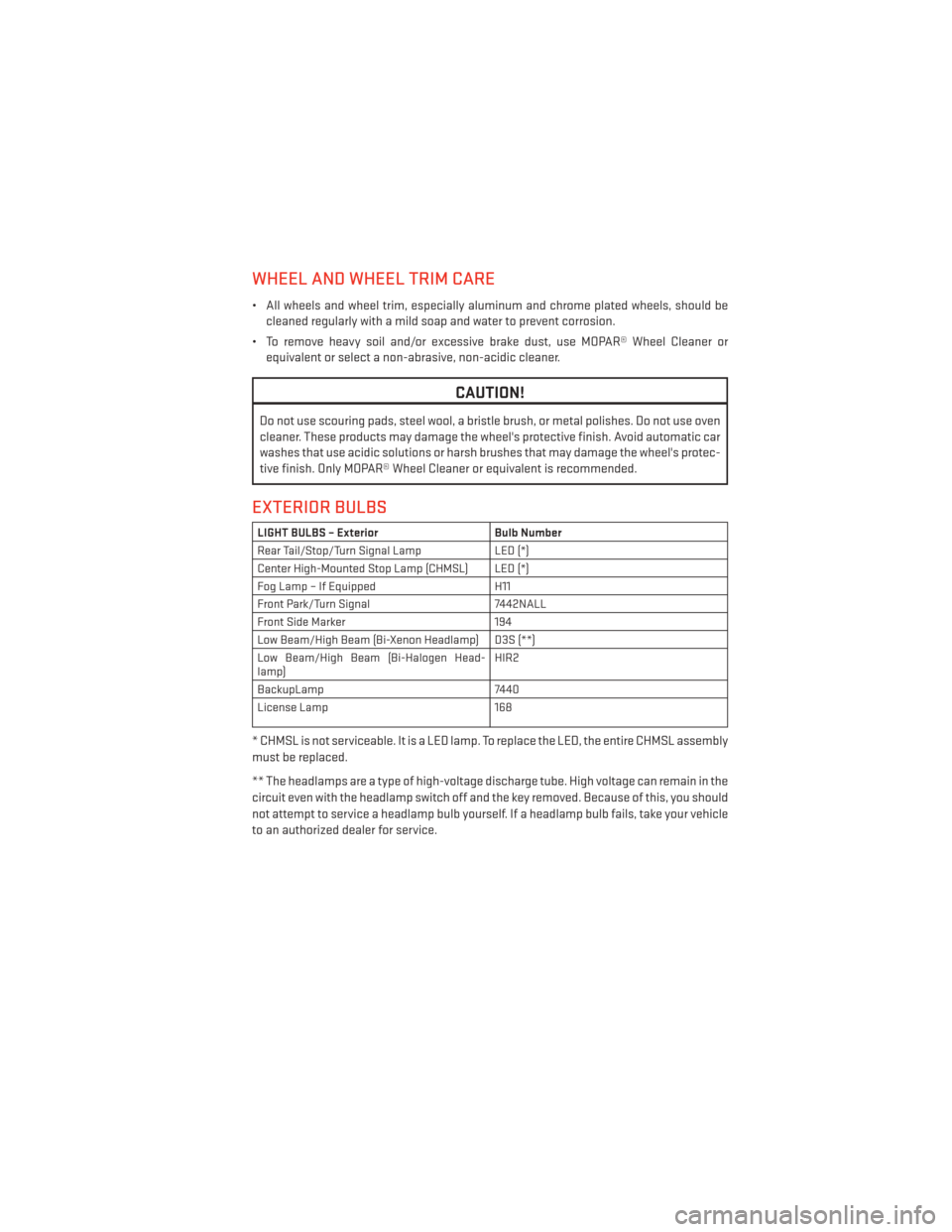
WHEEL AND WHEEL TRIM CARE
• All wheels and wheel trim, especially aluminum and chrome plated wheels, should becleaned regularly with a mild soap and water to prevent corrosion.
• To remove heavy soil and/or excessive brake dust, use MOPAR® Wheel Cleaner or equivalent or select a non-abrasive, non-acidic cleaner.
CAUTION!
Do not use scouring pads, steel wool, a bristle brush, or metal polishes. Do not use oven
cleaner. These products may damage the wheel's protective finish. Avoid automatic car
washes that use acidic solutions or harsh brushes that may damage the wheel's protec-
tive finish. Only MOPAR® Wheel Cleaner or equivalent is recommended.
EXTERIOR BULBS
LIGHT BULBS – Exterior Bulb Number
Rear Tail/Stop/Turn Signal Lamp LED (*)
Center High-Mounted Stop Lamp (CHMSL) LED (*)
Fog Lamp – If Equipped H11
Front Park/Turn Signal 7442NALL
Front Side Marker 194
Low Beam/High Beam (Bi-Xenon Headlamp) D3S (**)
Low Beam/High Beam (Bi-Halogen Head-
lamp) HIR2
BackupLamp 7440
License Lamp 168
* CHMSL is not serviceable. It is a LED lamp. To replace the LED, the entire CHMSL assembly
must be replaced.
** The headlamps are a type of high-voltage discharge tube. High voltage can remain in the
circuit even with the headlamp switch off and the key removed. Because of this, you should
not attempt to service a headlamp bulb yourself. If a headlamp bulb fails, take your vehicle
to an authorized dealer for service.
MAINTAINING YOUR VEHICLE
119
Page 124 of 132
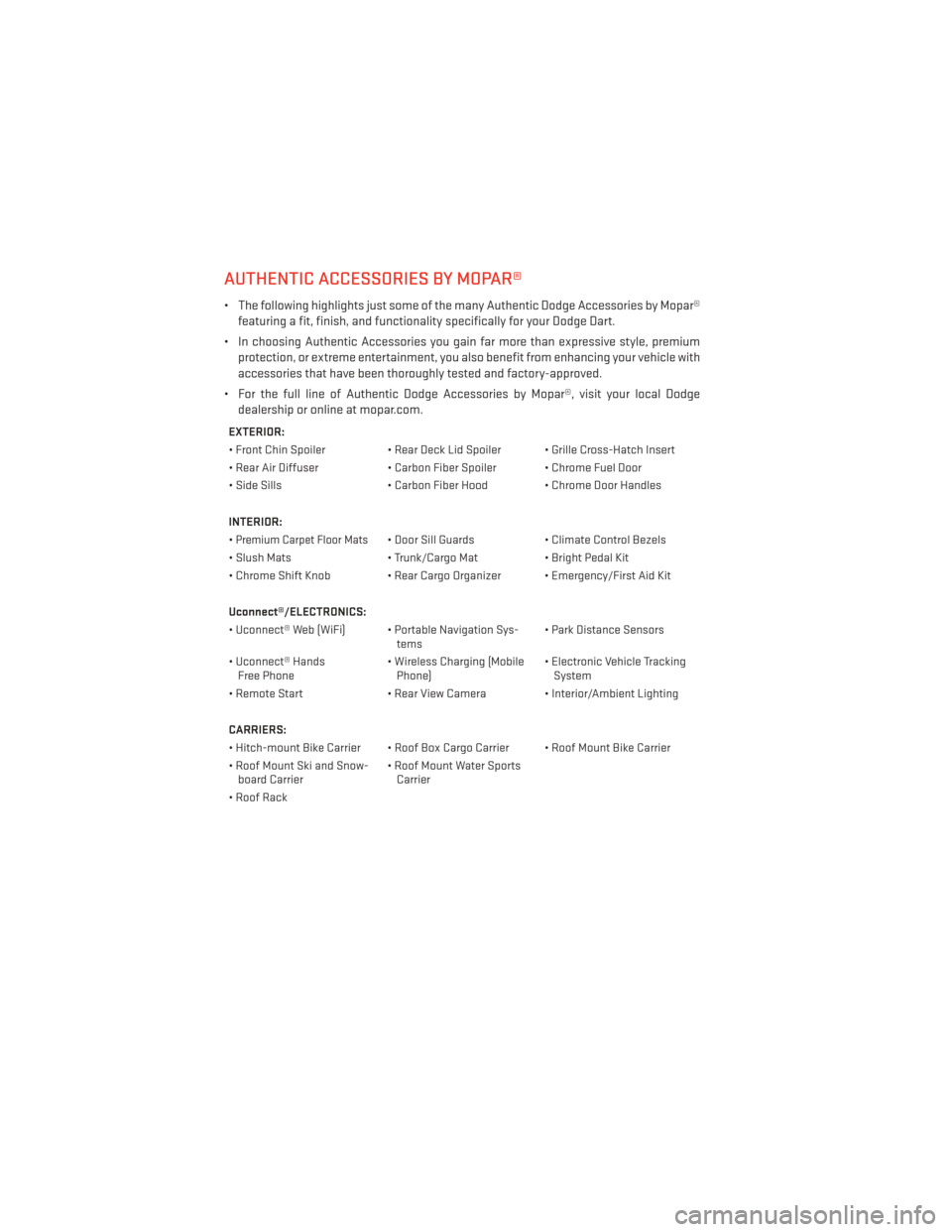
AUTHENTIC ACCESSORIES BY MOPAR®
• The following highlights just some of the many Authentic Dodge Accessories by Mopar®featuring a fit, finish, and functionality specifically for your Dodge Dart.
• In choosing Authentic Accessories you gain far more than expressive style, premium protection, or extreme entertainment, you also benefit from enhancing your vehicle with
accessories that have been thoroughly tested and factory-approved.
• For the full line of Authentic Dodge Accessories by Mopar®, visit your local Dodge dealership or online at mopar.com.
EXTERIOR:
• Front Chin Spoiler • Rear Deck Lid Spoiler • Grille Cross-Hatch Insert
• Rear Air Diffuser • Carbon Fiber Spoiler • Chrome Fuel Door
• Side Sills • Carbon Fiber Hood • Chrome Door Handles
INTERIOR:
•
Premium Carpet Floor Mats• Door Sill Guards • Climate Control Bezels
• Slush Mats • Trunk/Cargo Mat• Bright Pedal Kit
• Chrome Shift Knob • Rear Cargo Organizer • Emergency/First Aid Kit
Uconnect®/ELECTRONICS:
• Uconnect® Web (WiFi) • Portable Navigation Sys- tems• Park Distance Sensors
• Uconnect® Hands Free Phone • Wireless Charging (Mobile
Phone) • Electronic Vehicle Tracking
System
• Remote Start • Rear View Camera • Interior/Ambient Lighting
CARRIERS:
• Hitch-mount Bike Carrier • Roof Box Cargo Carrier • Roof Mount Bike Carrier
• Roof Mount Ski and Snow- board Carrier • Roof Mount Water Sports
Carrier
• Roof Rack
MOPAR ACCESSORIES
122
Page 125 of 132
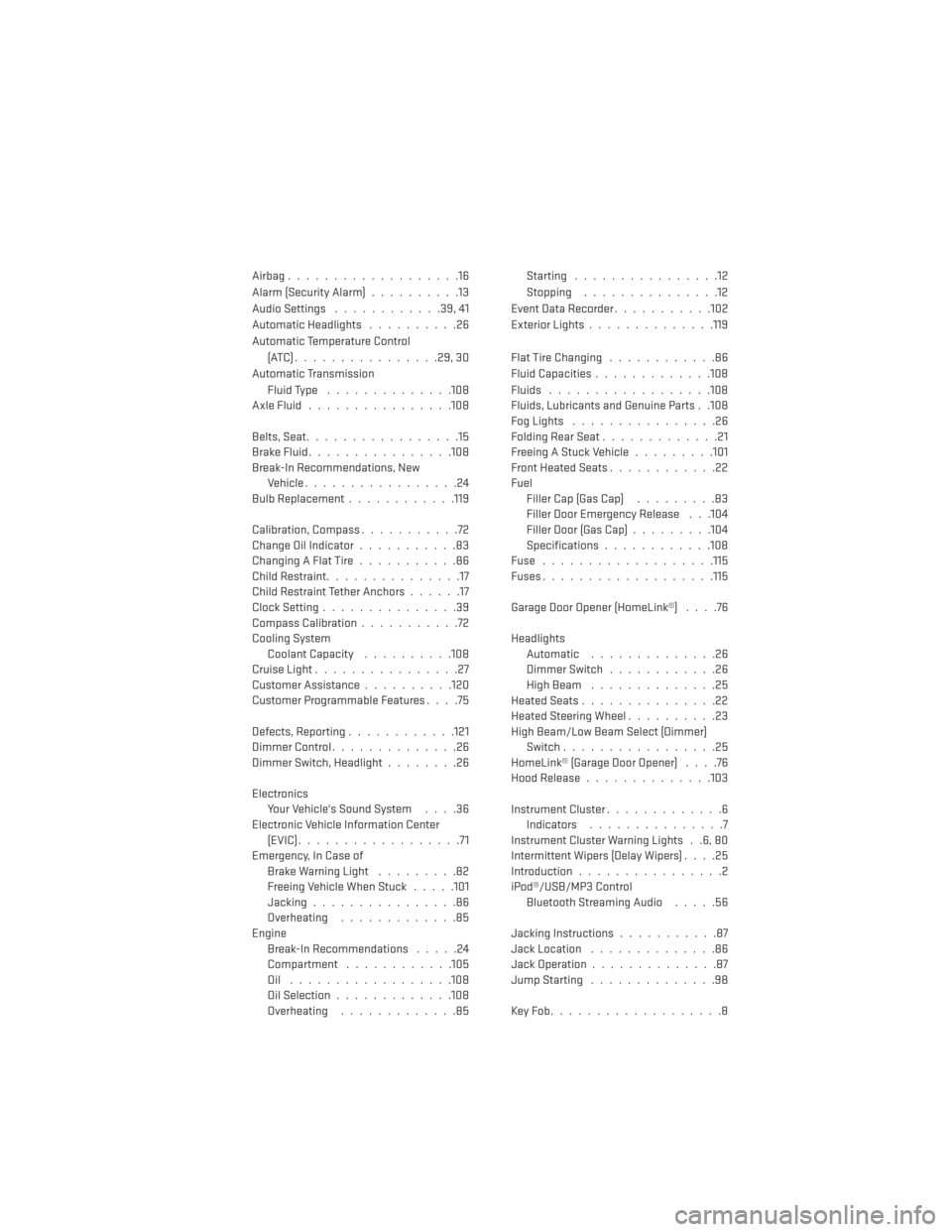
Airbag...................16
Alarm (Security Alarm)..........13
Audio Settings ............39,41
Automatic Headlights ..........26
Automatic Temperature Control (ATC)................29,30
Automatic Transmission Fluid Type ..............108
AxleFluid................108
Belts, Seat .................15
BrakeFluid................108
Break-In Recommendations, New Vehicle .................24
BulbReplacement........... .119
Calibration, Compass ...........72
Change Oil Indicator ...........83
Changing A Flat Tire ...........86
Child Restraint ...............17
Child Restraint Tether Anchors ......17
Clock Setting ...............39
Compass Calibration ...........72
Cooling System Coolant Capacity ..........108
Cruise Light ................27
Customer Assistance ..........120
Customer Programmable Features ....75
Defects, Reporting ............121
Dimmer Control ..............26
Dimmer Switch, Headlight ........26
Electronics Your Vehicle's Sound System ....36
Electronic Vehicle Information Center (EVIC)..................71
Emergency, In Case of Brake Warning Light .........82
Freeing Vehicle When Stuck .....101
Jacking ................86
Overheating .............85
Engine Break-In Recommendations .....24
Compartment ............105
Oil ..................108
Oil Selection .............108
Overheating .............85 Starting ................12
Stopping
...............12
EventDataRecorder...........102
Exterior Lights ..............119
FlatTireChanging ............86
Fluid Capacities .............108
Fluids ..................108
Fluids, Lubricants and Genuine Parts . .108
FogLights ................26
Folding Rear Seat .............21
Freeing A Stuck Vehicle .........101
Front Heated Seats ............22
Fuel Filler Cap (Gas Cap) .........83
Filler Door Emergency Release . . .104
Filler Door (Gas Cap) .........104
Specifications ............108
Fuse ...................115
Fuses.................. .115
Garage Door Opener (HomeLink®) ....76
Headlights Automatic ..............
26
Dimmer Switch ............26
HighBeam ..............25
Heated Seats ...............22
Heated Steering Wheel ..........23
High Beam/Low Beam Select (Dimmer) Switch .................25
HomeLink® (Garage Door Opener) ....76
Hood Release ..............103
Instrument Cluster .............6
Indicators ...............7
Instrument Cluster Warning Lights . .6, 80
Intermittent Wipers (Delay Wipers) ....25
Introduction ................2
iPod®/USB/MP3 Control Bluetooth Streaming Audio .....56
Jacking Instructions ...........87
Jack Location ..............86
Jack Operation ..............87
Jump Starting ..............98
KeyFob...................8
INDEX
123
Page 126 of 132
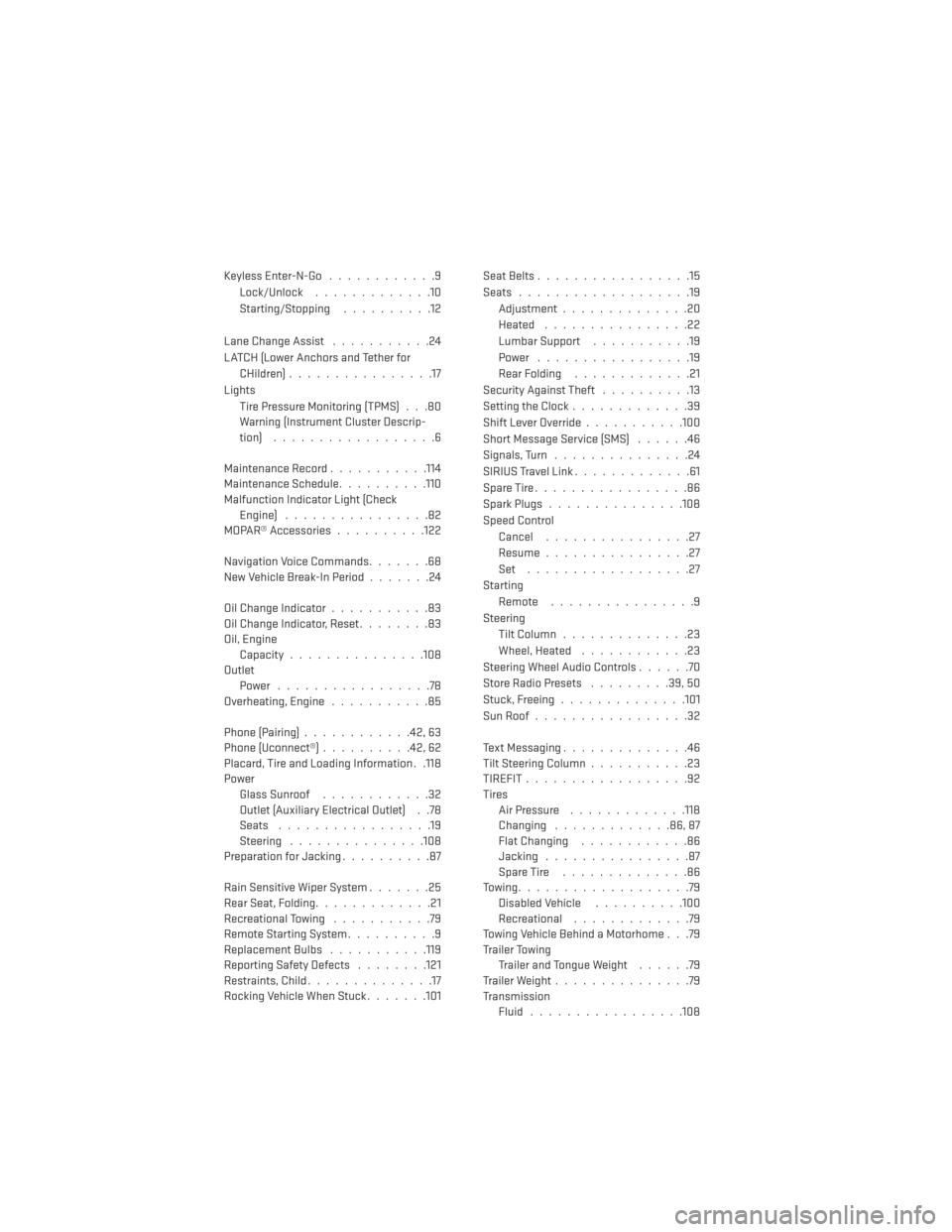
Keyless Enter-N-Go............9
Lock/Unlock .............10
Starting/Stopping ..........12
Lane Change Assist ...........24
LATCH (Lower Anchors and Tether for CHildren) ................17
Lights Tire Pressure Monitoring (TPMS) . . .80
Warning (Instrument Cluster Descrip-
tion) ..................6
Maintenance Record ...........114
Maintenance Schedule ..........110
Malfunction Indicator Light (Check Engine) ................82
MOPAR® Accessories ..........122
Navigation Voice Commands .......68
New Vehicle Break-In Period .......24
Oil Change Indicator ...........83
Oil Change Indicator, Reset ........83
Oil, Engine Capacity...............108
Outlet Power .................78
Overheating, Engine ...........85
Phone (Pairing) ............42,63
Phone (Uconnect®) ..........42,62
Placard, Tire and Loading Information . .118
Power Glass Sunroof ............32
Outlet (Auxiliary Electrical Outlet) . .78
Seats .................19
Steering ...............108
Preparation for Jacking ..........87
Rain Sensitive Wiper System .......25
Rear Seat, Folding .............21
Recreational Towing ...........79
Remote Starting System ..........9
ReplacementBulbs .......... .119
Reporting Safety Defects ........121
Restraints, Child ..............17
Rocking Vehicle When Stuck .......101Seat Belts
.................15
Seats ...................19
Adjustment..............20
Heated ................22
Lumbar Support ...........19
Power .................19
Rear Folding .............21
Security Against Theft ..........13
Setting the Clock .............39
Shift Lever Override ...........100
Short Message Service (SMS) ......46
Signals, Turn ...............24
SIRIUSTravelLink.............61
SpareTire.................86
SparkPlugs...............108
Speed Control Cancel ................27
Resume ................27
Set ..................27
Starting Remote ................9
Steering Tilt Column ..............23
Wheel, Heated ............23
Steering Wheel Audio Controls ......70
Store Radio Presets .........39,50
Stuck,
Freeing ..............101
SunRoof.................32
Text Messaging ..............46
Tilt Steering Column ...........23
TIREFIT..................92
Tires Air Pressure .............118
Changing .............86,87
Flat Changing ............86
Jacking ................87
SpareTire ..............86
Towing...................79 Disabled Vehicle ..........100
Recreational .............79
Towing Vehicle Behind a Motorhome . . .79
Trailer Towing Trailer and Tongue Weight ......79
Trailer Weight ...............79
Transmission Fluid .................108
INDEX
124
Page 129 of 132
• How do I operate the Steering Wheel Audio Controls? pg. 70
• How do I configure my Universal Garage Door Opener (HomeLink)? pg. 76
UTILITY
• How do I know how much I can tow with my Dodge Dart? pg. 79
WHAT TO DO IN EMERGENCIES
• What do I do if my TPMS warning light comes on? pg. 80
• How do I change a flat tire? pg. 86
• How do I Jump-Start my vehicle? pg. 98
MAINTAINING YOUR VEHICLE
• Where is my Fuse Block located? pg. 115
• What type of oil do I use? pg. 108
• How often should I change my engine’s oil? pg. 110
• What should my tire pressure be set at? pg. 118
NOTES
127