ignition DODGE DURANGO 2004 2.G Owner's Manual
[x] Cancel search | Manufacturer: DODGE, Model Year: 2004, Model line: DURANGO, Model: DODGE DURANGO 2004 2.GPages: 386, PDF Size: 6.22 MB
Page 73 of 386
WARNING!
Vehicles and other objects seen in the right side
convex mirror will look smaller and farther away
than they really are. Relying too much on your right
side mirror could cause you to collide with another
vehicle or other object. Use your inside mirror when
judging the size or distance of a vehicle seen in the
right side mirror.
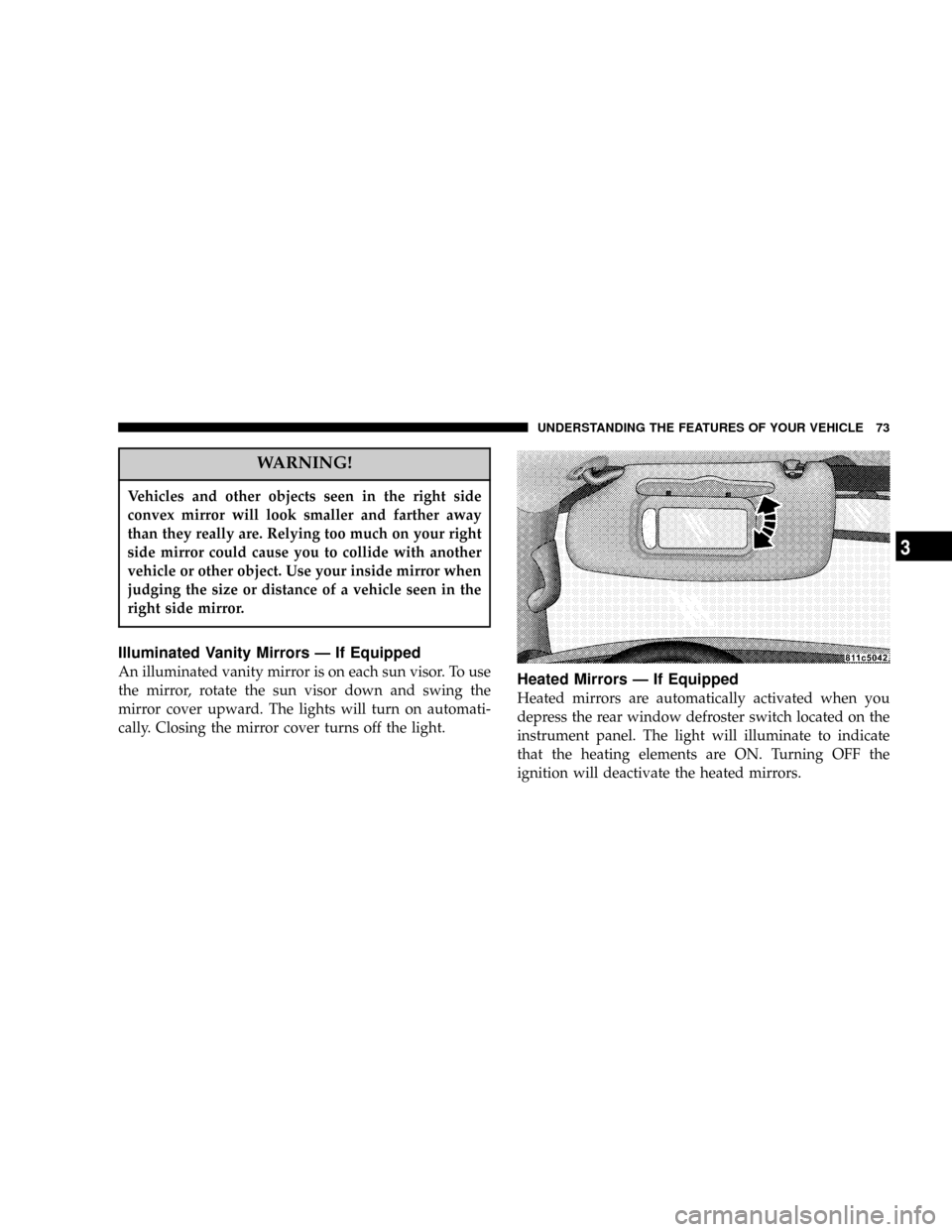
Illuminated Vanity Mirrors Ð If Equipped
An illuminated vanity mirror is on each sun visor. To use
the mirror, rotate the sun visor down and swing the
mirror cover upward. The lights will turn on automati-
cally. Closing the mirror cover turns off the light.Heated Mirrors Ð If Equipped
Heated mirrors are automatically activated when you
depress the rear window defroster switch located on the
instrument panel. The light will illuminate to indicate
that the heating elements are ON. Turning OFF the
ignition will deactivate the heated mirrors.
UNDERSTANDING THE FEATURES OF YOUR VEHICLE 73
3
Page 90 of 386

Front Heated Seats Ð If Equipped
This feature heats the driver and front passenger seats.
The controls for the front heated seats are located on the
center of the instrument panel, below the climate con-
trols. The heated seat system allows the driver and frontpassenger to select from two different levels of supple-
mental electrical seat heating, or no seat heating to suit
their individual comfort requirements.
With the ignition switch in the RUN position, depressing
the heated seat switch rocker to its momentary High or
Low position provides power to the heated seat element
and maintains the requested temperature setting. If the
heated seat switch is depressed to a different position
(Low or High) than the currently selected state, the
requested temperature setting will change to a new
selection. If the heated seat switch is depressed a second
time to the same position as the currently selected state,
the seat heater will turn off.
NOTE:The high heat setting will operate for approxi-
mately a two hour duration. After two hours, the system
will automatically transition to the low heat setting. The
low heat setting will operate for a two hour duration,
90 UNDERSTANDING THE FEATURES OF YOUR VEHICLE
Page 99 of 386

4. Adjust the Automatic Temperature Control (ATC)
while the ATC is in Auto mode.
5. Press and release the SET (S) button located on the
driver's door.
6. Within 5 seconds, press and release memory button 1
or 2 on the driver's door. The next step must be per-
formed within 10 seconds if you desire to also use a
Remote Keyless Entry transmitter to recall memory po-
sitions.
7. Press and release the LOCK button on one of the
transmitters.
8. Insert the ignition key and turn the ignition switch to
the ON position.
9. Repeat the above steps to set the next memory posi-
tion using the other numbered memory button or to link
another Remote Keyless Entry transmitter to memory.Memory Position Recall
NOTE:
²The driver's seat belt must be unbuckled to recall
memory positions.
²The vehicle must be in Park to recall memory posi-
tions.
²Not all motors may be moved at one time. Please refer
to the 8-way power seat description.
To recall the memory settings for driver one, press
memory button number 1 on the driver's door or the
Unlock button on the Remote Keyless Entry transmitter
linked to memory position 1.
To recall the memory setting for driver two, press
memory button number 2 on the driver's door or the
Unlock button on the Remote Keyless Entry transmitter
linked to memory position 2.
UNDERSTANDING THE FEATURES OF YOUR VEHICLE 99
3
Page 100 of 386

A recall can be cancelled by pressing any of the memory
buttons on the drivers door during a recall (S, 1, or 2), or
pressing any one of the power seat buttons, or pressing
the adjustable pedals button, or pressing either the LOCK
or UNLOCK button on the remote keyless entry trans-
mitter when not in the ignition switch. When a recall is
cancelled, the driver's seat, and the pedals stop moving.
A delay of one second will occur before another recall can
be selected.
To Disable A Transmitter Linked to Memory
1. Turn the ignition switch to the OFF position and
remove the key.
2. Press and release the memory SET (S) button located
on the driver's door.
3. Within 10 seconds, press and release the UNLOCK
button on the Remote Keyless Entry transmitter.To disable another transmitter linked to either memory
position, repeat steps 1-3 for each transmitter.
NOTE:The capability to link Remote Keyless Entry
transmitters to memory is enabled when delivered from
the factory. The capability to link Remote Keyless Entry
transmitters to memory can be disabled (or later reen-
abled) by a qualified DaimlerChrysler representative.
Self-Limiting Control
To improve vehicle reliability, the memory system in-
cludes a self-limiting control for full travel positioning of
power seat and Adjustable Pedal movement (all direc-
tions). This self-limiting control may however develop an
unintended movement limitation if an obstruction is
encountered at sometime during usage. One example of
such an occurrence may include a box or package ob-
structing the full rearward movement of the driver's seat.
Once the obstruction is removed, the self-limiting control
may be restored to maximum position. The self-limiting
100 UNDERSTANDING THE FEATURES OF YOUR VEHICLE
Page 101 of 386

control may be restored by first reaching the recently
limited or obstructed position, then release and reactivate
the same button or buttons. Continued seat travel beyond
the obstructed position will indicate the recently encoun-
tered self-limitation has been cleared.
Driver Easy Exit and Easy Entry Control
This additional feature provides automatic driver's seat
positioning which will enhance driver mobility out of
and into the vehicle. The seat cushion will move rear-
ward approximately 2.5 inches (60 mm) when the key is
removed from the ignition switch. The seat will move
forward approximately 2.5 inches (60 mm) when the key
is placed into the ignition and turned out of the LOCK
position, only when the seatbelt is unbuckled. Each
stored memory setting will have an associated Easy Exit
and Easy Entry position. The Easy Exit and Easy Entry
feature may be automatically disabled if the seat is
positioned rearward enough and no benefit from moving
the seat any farther rearward.NOTE:The Easy Exit Easy Entry feature is not enabled
when delivered from the factory. The Easy Exit Easy
Entry feature may be enabled (or later disabled) by a
qualified DaimlerChrysler service representative.
Tilt Mirrors in Reverse
This additional feature provides automatic outside mir-
ror positioning which will aid the driver's view of the
ground rearward of the front doors. The outside mirrors
will move slightly downward from the present position
when the vehicle is shifted into Reverse position. The
outside mirrors will then return to the original position
when the vehicle is shifted out of Reverse position. Each
stored memory setting will have an associated Tilt Mir-
rors in Reverse position.
NOTE:The tilt mirrors in Reverse feature is not enabled
when delivered from the factory. The Tilt Mirrors in
Reverse feature may be enabled (or later disabled) by a
qualified DaimlerChrysler service representative.
UNDERSTANDING THE FEATURES OF YOUR VEHICLE 101
3
Page 105 of 386

all the way down to the OFF detent will cause all the
interior lights to go out. This allows the doors to stay
open for extended periods of time without discharging
the vehicle's battery.
The brightness of the instrument panel lighting can be
regulated by rotating the dimmer control up (brighter) or
down (dimmer). When the headlights are ON you can
supplement the brightness of the odometer, trip odom-
eter, radio and overhead console by rotating the control
up until you hear a click. This feature is termed the
9Parade9mode and is useful when headlights are re-
quired during the day.
Battery Saver
To protect the life of your vehicle's battery, Load Shed-
ding is provided for both the interior and exterior lights.If the ignition is off and any door is left ajar for eight
minutes or the dimmer control is rotated upwards for
eight minutes, the interior lights will automatically turn
off.
If the headlights remain on while the ignition is cycled
off, the exterior lights will automatically turn off after 8
minutes. If the headlights are turned on and left on for 8
minutes while the ignition is off, the exterior lights will
automatically turn off.
NOTE:Battery Saver mode is cancelled if the ignition is
ON.
NOTE:While the engine is running, the system will
deactivate the Fog Lights and Heated seats if a low
battery system voltage is detected.
UNDERSTANDING THE FEATURES OF YOUR VEHICLE 105
3
Page 106 of 386

Headlight Delay
To aid in your exit, your vehicle is equipped with a
headlight delay that will leave the headlights on for 90
seconds. This delay is initiated when the ignition is
cycled off while the headlight switch is on, and then the
headlight switch is cycled off. The headlights will remain
on for 90 seconds. Headlight delay can be cancelled by
either turning the headlight switch ON then OFF or by
turning the ignition ON.
NOTE:This feature can be disabled by your authorized
dealer.
Automatic Headlights Ð If Equipped
Automatic Headlights can be activated by rotating the
rotary headlight switch to the symbol ªA.º The head-
lights will turn on when the ignition is in the ON or
START position and the ambient light sensor indicates
that the headlights should be activated. The headlights
will turn off if the headlight switch is rotated to the off
position or 90 seconds after the ignition is turned to OFF.
Headlights, Parking Lights, Panel Lights
When the headlight switch is rotated to the first position
to the right, the parking lights, taillights, side marker
lights, license plate light and instrument panel lights are
all turned on. The headlights will turn ON when the
switch is rotated to the second position.
Your vehicle is equipped with plastic headlight lenses
that are lighter and less susceptible to stone breakage
than glass headlights.
Plastic is not as scratch resistant as glass and therefore
different lens cleaning procedures must be followed.
To minimize the possibility of scratching the lenses and
reducing light output, avoid wiping with a dry cloth. To
remove road dirt, wash with a mild soap solution fol-
lowed by rinsing.
Do not use abrasive cleaning components, solvents, steel
wool or other abrasive materials to clean the lenses.
106 UNDERSTANDING THE FEATURES OF YOUR VEHICLE
Page 107 of 386

Illuminated Entry
Headlights turn on for 90 seconds, when the Remote
Keyless Entry UNLOCK button is pressed.
NOTE:This feature can be activated by your authorized
dealer.
Daytime Running Lights (Canada Only)
The headlights on your Durango will illuminate when
the engine is started. This provides a constant ªLights
ONº condition until the ignition is turned OFF. The lights
illuminate at reduced intensity. If the parking brake is
applied the Daytime Running Lights will turn off. If the
headlights are activated, the Daytime Running Lights
feature will transition to the normal headlight operating
mode.
Lights-on Reminder
If the headlights, parking lights, or courtesy lights are left
On, after the ignition is turned Off, a chime will sound
when the driver's door is opened.
Fog Lights Ð If Equipped
The foglights are turned ON by placing the headlight
rotary control in the parking light, headlight, or Auto
UNDERSTANDING THE FEATURES OF YOUR VEHICLE 107
3
Page 111 of 386
WARNING!
Sudden loss of visibility through the windshield
could lead to an accident. You might not see other
vehicles or other obstacles. To avoid sudden icing of
the windshield during freezing weather, warm the
windshield with defroster before and during wind-
shield washer use.
NOTE:If the front wiper is operating when the ignition
is turned off, the wiper will automatically return to the
9Park9position. When the vehicle is restarted, the wipers
will resume operation.
Windshield Washers
To use the washer, push in on the washer knob on the end
of the multifunction control lever and hold while spray is
desired. If the washer knob is depressed while in the
delay range, the wiper will operate for several seconds
after the washer knob is released. It will then resume the
intermittent interval previously selected. If the washer
knob is pushed, for a period greater than 1 second, while
in the OFF position, the wiper will wipe approximately
three wipes, after the wash knob is released.
To prevent freeze-up of your windshield washer system
in cold weather, select a solution or mixture that meets or
exceeds the temperature range of your climate. This
rating information can be found on most washer fluid
containers.
UNDERSTANDING THE FEATURES OF YOUR VEHICLE 111
3
Page 113 of 386

To turn the system back ON, press the switch a second
time until the traction control Indicator turns OFF.
NOTE:
²The traction control Indicator comes on each time the
ignition switch is turned ON. This will occur even if
you used the switch to turn the system OFF.
²The Traction Control system will make buzzing or
clicking sounds when in operation.
TILT STEERING COLUMN
To tilt the column, push down on the lever below the turn
signal control and move the wheel up or down, as
desired.
UNDERSTANDING THE FEATURES OF YOUR VEHICLE 113
3