battery DODGE DURANGO 2004 2.G Owners Manual
[x] Cancel search | Manufacturer: DODGE, Model Year: 2004, Model line: DURANGO, Model: DODGE DURANGO 2004 2.GPages: 386, PDF Size: 6.22 MB
Page 7 of 386

THINGS TO KNOW BEFORE STARTING YOUR VEHICLE
CONTENTS
mA Word About Your Keys.................. 9
NKey-In-Ignition Reminder................ 9
NSentry Key Ð If Equipped................ 9
mIgnition And Steering Lock.................12
NIgnition Accessory Delay Feature...........13
mIlluminated Entry........................13
NVehicles Equipped With Power Door Locks....13
mDoor Locks............................13
NManual Door Locks.....................13NPower Door Locks.....................14
NChild Protection Door Lock...............17
mRemote Keyless Entry.....................19
NTo Unlock The Doors And Liftgate..........19
NTo Lock The Doors And Liftgate............20
NUsing The Panic Alarm..................21
NGeneral Information....................22
NProgramming Additional Transmitters........22
NBattery Replacement....................24
2
Page 13 of 386

NOTE:The steering wheel will lock when the key is
removed, and the steering wheel is turned around 115
degrees clockwise or 65 degrees counterclockwise from
the center position.
Ignition Accessory Delay Feature
When the ignition is turned to OFF/LOCK position the
accessory features on the vehicle will continue to operate
for ten minutes or until the driver's door is opened. The
accessory features are: Power Windows, Sunroof, and
Radio. This feature can be turned off by the dealer.
ILLUMINATED ENTRY
Vehicles Equipped With Power Door Locks
All interior lights will illuminate in the vehicle when the
doors are unlocked using the key fob.The interior lights will remain on for 30 seconds after the
last door is closed, or until all doors are closed and either
the ignition is turned to the ON position or a key fob
LOCK button is pressed.
There is also a battery saver feature that will turn the
interior lights off after 8 minutes if the ignition is OFF
and a door is left open or the dimmer control is in the
interior lights ON position.
DOOR LOCKS
Manual Door Locks
All the doors can be ªmanuallyº locked from the inside
by pushing down the door lock plunger, located at the
rear of the door. Both front doors may be opened from the
inside with the door lock plunger in the down or locked
position.
THINGS TO KNOW BEFORE STARTING YOUR VEHICLE 13
2
Page 24 of 386

Battery Replacement
The recommended replacement battery is CR2032.
1. If the key fob is equipped with a screw, remove the
screw. With the transmitter buttons facing down, use a
flat blade to pry the two halves of the transmitter apart.
Make sure not to damage the elastomer seal during
removal.2. Remove and replace the batteries. Avoid touching the
new batteries with your fingers. Skin oils may cause
battery deterioration. If you touch a battery, clean it with
rubbing alcohol.
3. To assemble the transmitter case, snap the two halves
together.
NOTE:If the key fob is equipped with a screw, reinstall
and tighten the screw until snug.
SECURITY ALARM SYSTEM Ð IF EQUIPPED
This system monitors the vehicle doors, liftgate, and
ignition for unauthorized operation. When the alarm is
activated, the system provides both audible and visual
signals. The horn will sound repeatedly for 3 minutes
and the headlights and security light in the instrument
cluster will flash for an additional 15 minutes. The engine
will not run until the system is disarmed.
24 THINGS TO KNOW BEFORE STARTING YOUR VEHICLE
Page 66 of 386

NFront Seats Manual Seat Recliners...........87
NManual Lumbar Support Adjustment Ð
If Equipped..........................88
NAdjustable Head Restraints Ð All Seating
Positions............................88
N8 - Way Driver's Power Seat Ð If Equipped . . .89
N4 - Way Passenger's Power Seat Ð
If Equipped..........................89
NFront Heated Seats Ð If Equipped..........90
NSecond Row 40/20/40 Seat Ð
Fold And Tumble......................91
NThird Row Seat Bench Ð If Equipped........93
NThird Seat 50/50 Split Seat Ð If Equipped....96
mDriver Memory System Ð If Equipped........97NSetting Memory Positions And Linking Remote
Keyless Entry Transmitter To Memory........98
NMemory Position Recall..................99
NTo Disable A Transmitter Linked To Memory . . 100
NSelf-Limiting Control...................100
NDriver Easy Exit And Easy Entry Control....101
NTilt Mirrors In Reverse.................101
mTo Open And Close The Hood.............102
mLights...............................103
NInterior Lights.......................104
NBattery Saver........................105
NHeadlight Delay......................106
NAutomatic Headlights Ð If Equipped.......106
66 UNDERSTANDING THE FEATURES OF YOUR VEHICLE
Page 69 of 386

NElectrical Outlet Use With Engine Off
(Battery Fed Configuration)..............136
mFloor Console.........................137NFloor Console Features.................137
mFactory Installed Roof Luggage RackÐ
If Equipped...........................139
UNDERSTANDING THE FEATURES OF YOUR VEHICLE 69
3
Page 84 of 386

are pressing a number on your keypad to navigate
through a menu structure or to enter a number for a
pager.
Barge In - Overriding Prompts
The 'Voice Recognition' button can be used when you
wish to skip part of a prompt and issue your voice
recognition command immediately. For example, if a
prompt is playing9Would you like to pair a phone, clear
a{9, you could press the 'Voice Recognition' button and
say9Pair A Phone9to select that option without having to
listen to the rest of the voice prompt.
Language Selection
To change the language that the UConnectŸ system is
using, press the 'Phone' button and say the name of the
language you wish to switch to (English, EspaÞol, or
FranÕais as equipped). After selecting one of the lan-
guages, all prompts and voice commands will be in the
selected language.
Turning Confirmation Prompts On/Off
Turning confirmation prompts off will stop the system
from confirming your choices (e.g. the UConnectŸ sys-
tem will not repeat a phone number before you dial it).
²Press the 'Phone' button to begin.
²After the9Ready9prompt, say9Setup Confirmation9.
The UConnectŸ system will play the current confir-
mation prompt status and you will be given the choice
to change it.
Low Signal, Battery Strength, and Roam
Notification
The UConnectŸ system will provide notification to
inform you if your cellular phone is in roaming status,
has low signal strength, or has a low battery when you
are trying to place a phone call.
84 UNDERSTANDING THE FEATURES OF YOUR VEHICLE
Page 105 of 386

all the way down to the OFF detent will cause all the
interior lights to go out. This allows the doors to stay
open for extended periods of time without discharging
the vehicle's battery.
The brightness of the instrument panel lighting can be
regulated by rotating the dimmer control up (brighter) or
down (dimmer). When the headlights are ON you can
supplement the brightness of the odometer, trip odom-
eter, radio and overhead console by rotating the control
up until you hear a click. This feature is termed the
9Parade9mode and is useful when headlights are re-
quired during the day.
Battery Saver
To protect the life of your vehicle's battery, Load Shed-
ding is provided for both the interior and exterior lights.If the ignition is off and any door is left ajar for eight
minutes or the dimmer control is rotated upwards for
eight minutes, the interior lights will automatically turn
off.
If the headlights remain on while the ignition is cycled
off, the exterior lights will automatically turn off after 8
minutes. If the headlights are turned on and left on for 8
minutes while the ignition is off, the exterior lights will
automatically turn off.
NOTE:Battery Saver mode is cancelled if the ignition is
ON.
NOTE:While the engine is running, the system will
deactivate the Fog Lights and Heated seats if a low
battery system voltage is detected.
UNDERSTANDING THE FEATURES OF YOUR VEHICLE 105
3
Page 126 of 386

To set the variance: Turn the ignition ON and set the
display to ªCompass/Temperature.º Press and hold the
RESET button approximately five seconds. The last vari-
ance zone number will be displayed. Press the STEP
button to select the new variance zone and press the
RESET button to resume normal operation.
Outside Temperature
Because the ambient temperature sensor is located un-
derhood, engine temperature can influence the displayed
temperature, therefore, temperature readings are slowly
updated when the vehicle speed is below 20 mph (30
km/h) or during stop and go driving.
GARAGE DOOR OPENER Ð IF EQUIPPED
The HomeLinktUniversal Transceiver replaces up to
three remote controls (hand held transmitters) that oper-
ate devices such as garage door openers, motorized
gates, or home lighting. It triggers these devices at the
push of a button. The Universal Transceiver operates off
your vehicle's battery and charging system; no batteries
are needed.
126 UNDERSTANDING THE FEATURES OF YOUR VEHICLE
Page 128 of 386
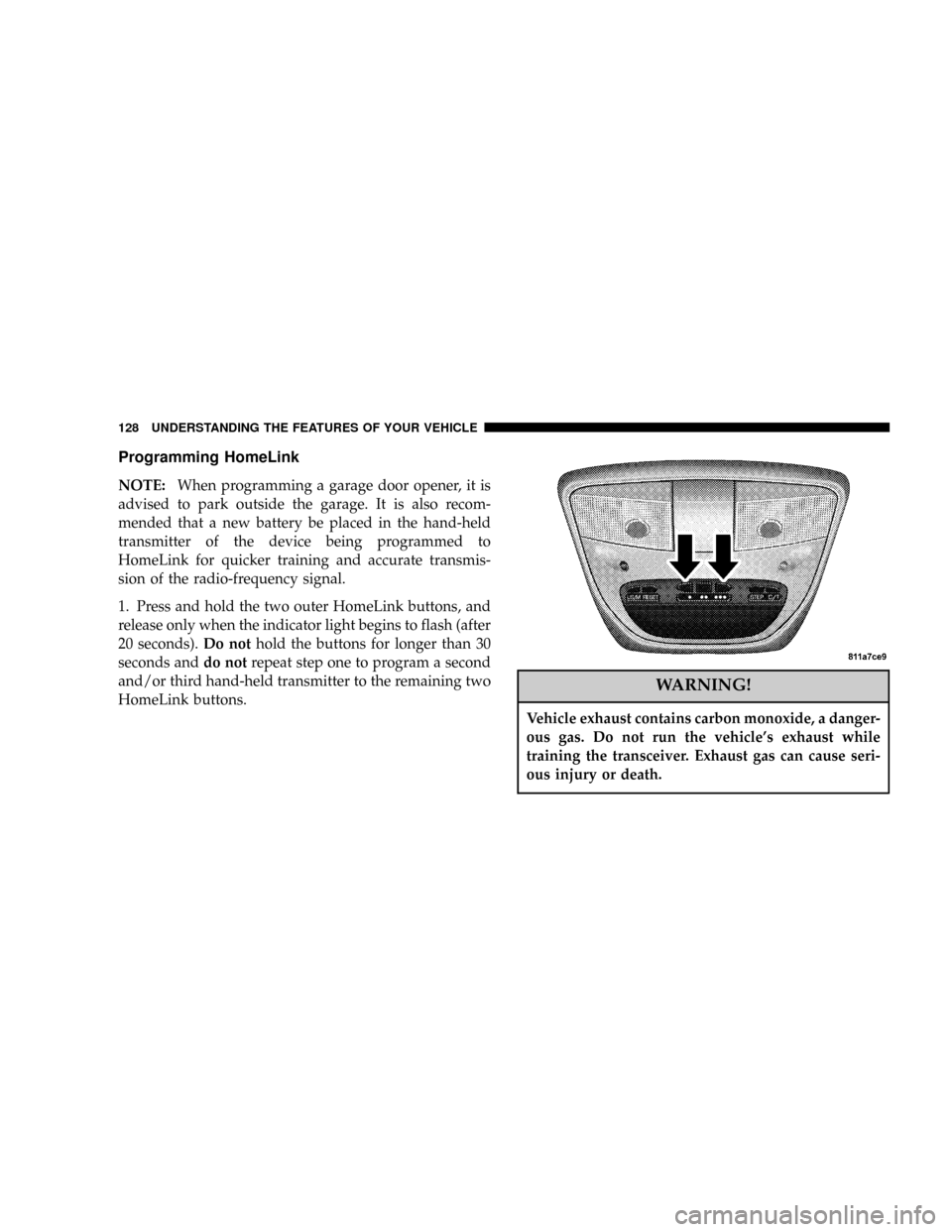
Programming HomeLink
NOTE:When programming a garage door opener, it is
advised to park outside the garage. It is also recom-
mended that a new battery be placed in the hand-held
transmitter of the device being programmed to
HomeLink for quicker training and accurate transmis-
sion of the radio-frequency signal.
1. Press and hold the two outer HomeLink buttons, and
release only when the indicator light begins to flash (after
20 seconds).Do nothold the buttons for longer than 30
seconds anddo notrepeat step one to program a second
and/or third hand-held transmitter to the remaining two
HomeLink buttons.
WARNING!
Vehicle exhaust contains carbon monoxide, a danger-
ous gas. Do not run the vehicle's exhaust while
training the transceiver. Exhaust gas can cause seri-
ous injury or death.
128 UNDERSTANDING THE FEATURES OF YOUR VEHICLE
Page 135 of 386

the rear windows open, open the front and rear windows
together to minimize the buffeting. If the buffeting occurs
with the sunroof open, adjust the sunroof opening to
minimize the buffeting or open any window.
Sunroof Maintenance
Use only a nonabrasive cleaner and a soft cloth to clean
the glass panel.
ELECTRICAL POWER OUTLETS
This vehicle has three auxiliary power outlets that can
provide up to 20 Amps of current for accessories de-
signed for use with the standard power outlet adapters.
The outlet located in the lower portion of the instrument
panel has a snap on a plastic cap so that it can be covered
when not in use. As a safety precaution, the outlet in the
instrument panel only operates with the ignition switch
ON. When the optional Cigar Lighter heating element isused, it heats when pushed in and pops out automati-
cally when ready for use.To preserve the heating
element, do not hold the lighter in the heating position.
There are two additional 12 V/(20 total Amps for both
outlets) power outlets, one located in the storage bin of
the center console and another located in the right rear
cargo area. These outlets can be reconfigured by the
customer to operate only when the ignition is ON
(switched battery fed) or with the ignition ON or OFF
(battery fed) to allow for cellular telephone charging and
or operation while the ignition is off.
NOTE:All accessories connected to these outlets should
be removed or turned OFF when the vehicle is not in use
to protect the battery against discharge (unless the cus-
tomer has reconfigured the fuse block to switched battery
feed).
UNDERSTANDING THE FEATURES OF YOUR VEHICLE 135
3