wheel DODGE DURANGO 2008 2.G User Guide
[x] Cancel search | Manufacturer: DODGE, Model Year: 2008, Model line: DURANGO, Model: DODGE DURANGO 2008 2.GPages: 481, PDF Size: 7.75 MB
Page 143 of 481

Turn Signal Auto-Mode
Tap the multi-function control lever once and the turn
signal (left or right) will flash 3 times, and automatically
turn off.
Passing Light
You can signal another vehicle with your headlights by
partially pulling the multifunction lever toward the steer-
ing wheel. This will momentarily allow the high and low
beams to energize at the same time. Within one second
the headlights will switch to high beams.
High Beam / Low Beam Select Switch
Pull the multifunction control lever fully toward the
steering wheel to switch the headlights from HIGH or
LOW beam.Dimmer Lever
UNDERSTANDING THE FEATURES OF YOUR VEHICLE 143
3
Page 147 of 481
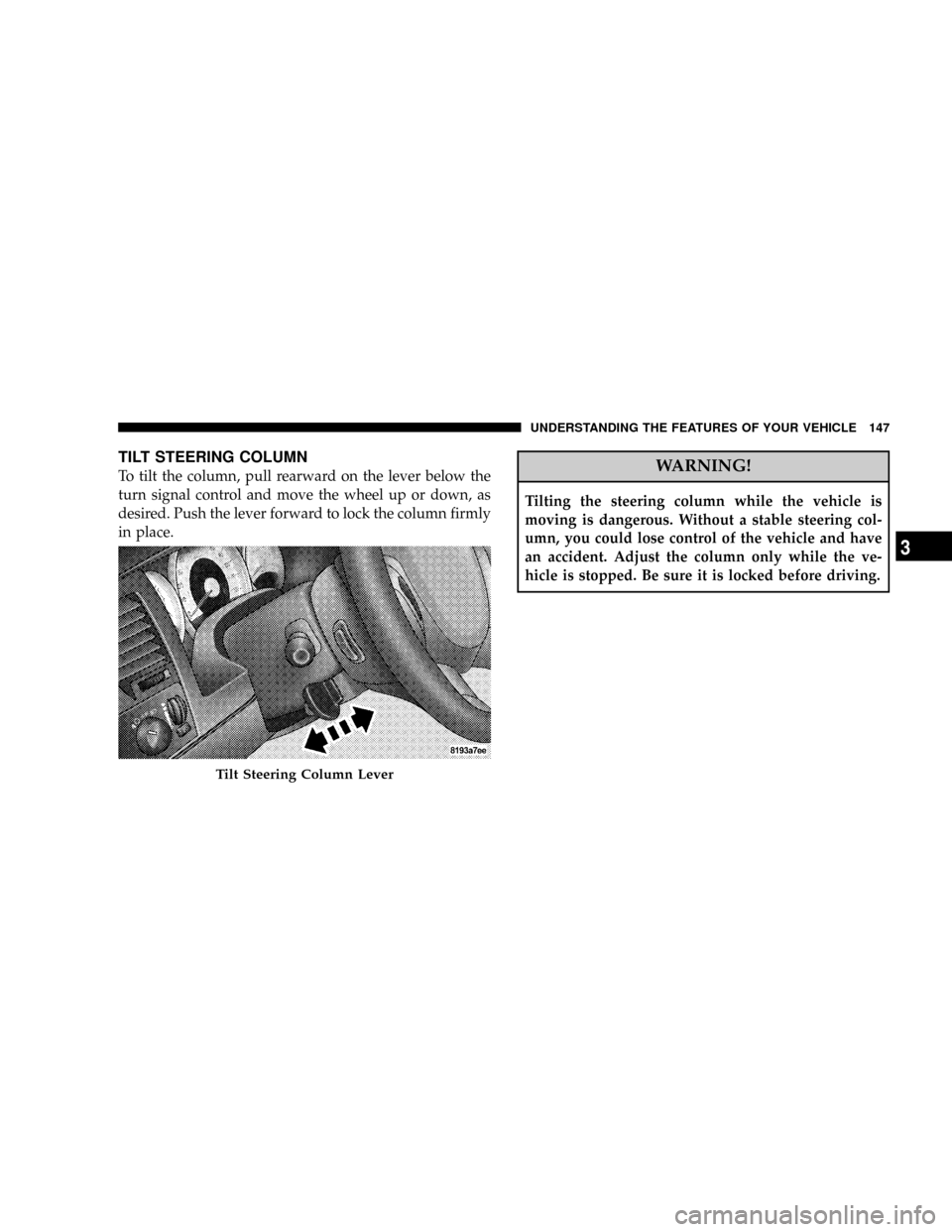
TILT STEERING COLUMN
To tilt the column, pull rearward on the lever below the
turn signal control and move the wheel up or down, as
desired. Push the lever forward to lock the column firmly
in place.WARNING!
Tilting the steering column while the vehicle is
moving is dangerous. Without a stable steering col-
umn, you could lose control of the vehicle and have
an accident. Adjust the column only while the ve-
hicle is stopped. Be sure it is locked before driving.
Tilt Steering Column Lever
UNDERSTANDING THE FEATURES OF YOUR VEHICLE 147
3
Page 148 of 481

DRIVER ADJUSTABLE PEDALS Ð IF EQUIPPED
The power adjustable accelerator and brake pedals allow
the driver to establish a comfortable position relative to
the steering wheel and pedals.
Adjustment
1. Position the driver seat so that you are at least 10
inches (254 mm) away from the airbag located in the
center of the steering wheel.
2. Fasten and adjust the seatbelts.
3. Move the adjustable pedal switch, located to the left of
the steering column near the parking brake release, up to
move the pedals toward the driver or down to move the
pedals away from the driver.
4. The pedalscannotbe adjusted when the vehicle is in
R (Reverse) or when the Speed Control is SET.
Adjustable Pedals Switch
148 UNDERSTANDING THE FEATURES OF YOUR VEHICLE
Page 149 of 481

CAUTION!
Do not place any article under the adjustable pedals
or impede its ability to move as it may cause damage
to the pedal controls. Pedal travel may become lim-
ited if movement is stopped by an obstruction in the
adjustable pedal's path.
ELECTRONIC SPEED CONTROL Ð IF EQUIPPED
When engaged, this device takes over accelerator opera-
tion at speeds greater than (refer to the table below for
the speed for your specific engine). The controls are
mounted on the steering wheel.
To Activate
NOTE:The Vehicle Speed Control System has been
designed to shut down if multiple speed control switch
buttons (i.e. SET and CANCEL) are operated simulta-
neously in order to ensure proper operation. The System
UNDERSTANDING THE FEATURES OF YOUR VEHICLE 149
3
Page 202 of 481

As an added safety feature, your vehicle has been
equipped with a tire pressure monitoring system (TPMS)
that illuminates a low tire pressure telltale when one or
more of your tires are significantly under-inflated. Ac-
cordingly, when the low tire pressure telltale illuminates,
you should stop and check your tires as soon as possible,
and inflate them to the proper pressure. Driving on a
significantly under-inflated tire causes the tire to over-
heat and can lead to tire failure. Under-inflation also
reduces fuel efficiency and tire tread life, and may affect
the vehicle's handling and stopping ability.
Please note that the TPMS is not a substitute for proper
tire maintenance, and it is the driver 's responsibility to
maintain correct tire pressure, even if under-inflation has
not reached the level to trigger illumination of the TPMS
low tire pressure telltale.
Your vehicle has also been equipped with a TPMS
malfunction indicator to indicate when the system is notoperating properly. The TPMS malfunction indicator is
combined with the low tire pressure telltale. When the
system detects a malfunction, the telltale will flash for
approximately one minute and then remain continuously
illuminated. This sequence will continue upon subse-
quent vehicle start-ups as long as the malfunction exists.
When the malfunction indicator is illuminated, the sys-
tem may not be able to detect or signal low tire pressure
as intended. TPMS malfunctions may occur for a variety
of reasons, including the installation of replacement or
alternate tires or wheels on the vehicle that prevent the
TPMS from functioning properly. Always check the
TPMS malfunction telltale after replacing one or more
tires or wheels on your vehicle to ensure that the replace-
ment or alternate tires and wheels allow the TPMS to
continue to function properly.
202 INSTRUMENT PANEL AND CONTROLS
Page 203 of 481

CAUTION!
The TPMS has been optimized for the original
equipment tires and wheels. TPMS pressures and
warning have been established for the tire size
equipped on your vehicle. Undesirable system opera-
tion or sensor damage may result when using re-
placement equipment that is not of the same size,
type, and/or style. Aftermarket wheels can cause
sensor damage. Do not use tire sealant from a can, or
balance beads if your vehicle is equipped with a
TPMS, as damage to the sensors may result.
25. Airbag Indicator
The indicator lights and remains lit for 6 to 8
seconds when the ignition is first turned ON. If
the light does not come on when the ignition isfirst turned on, or the light stays on or comes on while
driving, have the airbag system checked by an autho-
rized dealer.
26. 4WD Indicator
Indicates when transfer case is in 4WD position.
27. SVC (Service) 4WD Indicator
The SVC 4WD lights will come on when the ignition key
is turned to the ON position and will stay on for 2
seconds. If the light stays on or comes on during driving,
it means that the 4WD system is not functioning properly
and that service is required.
28. Cruise Light (Speed Control)
This indicator lights when the electronic speed control
system is turned on.
29. TOW/HAUL
The TOW/HAUL button is located at the end of the gear
shift lever. This light will illuminate when the TOW/
HAUL button has been selected.
INSTRUMENT PANEL AND CONTROLS 203
4
Page 205 of 481

RADIO GENERAL INFORMATION
Radio Broadcast Signals
Your new radio will provide excellent reception under
most operating conditions. Like any system, however, car
radios have performance limitations, due to mobile op-
eration and natural phenomena, which might lead you to
believe your sound system is malfunctioning. To help
you understand and save you concern about these ªap-
parentº malfunctions, you must understand a point or
two about the transmission and reception of radio sig-
nals.
Two Types of Signals
There are two basic types of radio signals... AM or
Amplitude Modulation, in which the transmitted sound
causes the amplitude, or height, of the radio waves to
vary... and FM or Frequency Modulation, in which the
frequency of the wave is varied to carry the sound.
Electrical Disturbances
Radio waves may pick up electrical disturbances during
transmission. They mainly affect the wave amplitude,
and thus remain a part of the AM reception. They
interfere very little with the frequency variations that
carry the FM signal.
AM Reception
AM sound is based on wave amplitude, so AM reception
can be disrupted by such things as lightning, power lines
and neon signs.
FM Reception
Because FM transmission is based on frequency varia-
tions, interference that consists of amplitude variations
can be filtered out, leaving the reception relatively clear,
which is the major feature of FM radio.
NOTE:The radio, steering wheel radio controls (if
equipped), and 6 disc CD/DVD changer (if equipped)
INSTRUMENT PANEL AND CONTROLS 205
4
Page 241 of 481

Play Mode
When switched to UCI mode the iPodtwill be inPlay
mode. In thisPlay mode, you may use the following
buttons on the radio faceplate to control the iPodtand
display data:
TUNE/SCROLL Knob
Use the ªTUNE/SCROLLº knob to go to the next or
previous track.
The ªTUNE/SCROLLº knob functions similar to the
scroll wheel on the iPodt.
Turning it clockwise (forward) by one click while playing
a track skips to the next track.
Turning it counterclockwise (backward) by one click
during the first 2 seconds of the track will jump to the
previous track in the list and turning this button at any
other time in the track will jump to the beginning of the
current track.RW (Rewind) Button
Press and hold the ªRWº button to move backward in the
current track. Holding the ªRWº button long enough will
take you back to the beginning of the current track.
Pressing and releasing the ªRWº button will go back 5
seconds of the current track.
FF (Fast Forward) Button
Press and hold the ªFFº button to move forward in the
current track.
Pressing and releasing the ªFFº button will go forward 5
seconds of the current track.
SEEK Buttons
Use the ªSEEKº buttons to move to the previous or the
next track.
If the left (down) button is pressed during the first 2
seconds of the current track, it will go back to the
INSTRUMENT PANEL AND CONTROLS 241
4
Page 243 of 481

List or Browse Mode
DuringPlaymode, pressing any of the following buttons
will take you toListmode.Listmode enables you to
scroll through the list of menus and tracks on the iPodt.
TUNE/SCROLL Knob
In theListmode, the ªTUNE/SCROLLº knob functions
in a similar manner as the scroll wheel on the iPodt.
Turning the ªTUNE/SCROLLº knob clockwise (forward)
and counter-clockwise (backward) scrolls through lists,
displaying the track detail on the radio display. Once you
have the track to be played highlighted on the radio
display, press the ªTUNE/SCROLLº knob to select and
start playing the track. By turning the ªTUNE/SCROLLº
knob fast, you can jump through the list faster. During
fast scroll, you may notice a slight delay in updating the
information on the radio display.
During all List modes, the iPodtwill display all lists in
ªwrap-aroundº mode. So if the track you wish to select isat the bottom of the list, you just turn the ªTUNE/
SCROLLº knob backwards (counter-clockwise) to get to
the track faster.
Radio Preset Buttons
In theListmode, the radio preset buttons are used as
shortcuts to the following lists on the iPodt.
²1 ± Playlists
²2 ± Artists
²3 ± Albums
²4 ± Genres
²5 - Audiobooks
²6 ± Podcasts
After pressing a preset button, you will see the list you
are in on the top line and the first item in that list on the
second line.
INSTRUMENT PANEL AND CONTROLS 243
4
Page 249 of 481

REMOTE SOUND SYSTEM CONTROLS Ð IF
EQUIPPED
The remote sound system controls are located on the rear
surface of the steering wheel. The left- and right-hand
controls are rocker-type switches with a push-button in
the center of each switch. Reach behind the steering
wheel to access the switches.
Right-Hand Switch Functions
²
Press the top of the switch to increase the volume.
²Press the bottom of the switch to decrease the volume.
²Press the button in the center of the switch to change
modes (i.e., AM, FM, etc).
Left-Hand Switch Functions for Radio Operation
²
Press the top of the switch to SEEK the next listenable
station up from the current setting.
²Press the bottom of the switch to SEEK the next
listenable station down from the current setting.
²Press the button in the center of the switch to tune to
the next preset that you have programmed.
Remote Sound Controls
INSTRUMENT PANEL AND CONTROLS 249
4