light DODGE DURANGO 2011 3.G Owners Manual
[x] Cancel search | Manufacturer: DODGE, Model Year: 2011, Model line: DURANGO, Model: DODGE DURANGO 2011 3.GPages: 576, PDF Size: 3.57 MB
Page 431 of 576
Trailer Hitch Classification
Your vehicle may be factory equipped for safe towing of
trailers weighing over 3,500 lbs (1 587 kg) with the
optional Trailer Tow Prep Package. See your authorized
dealer for package content.
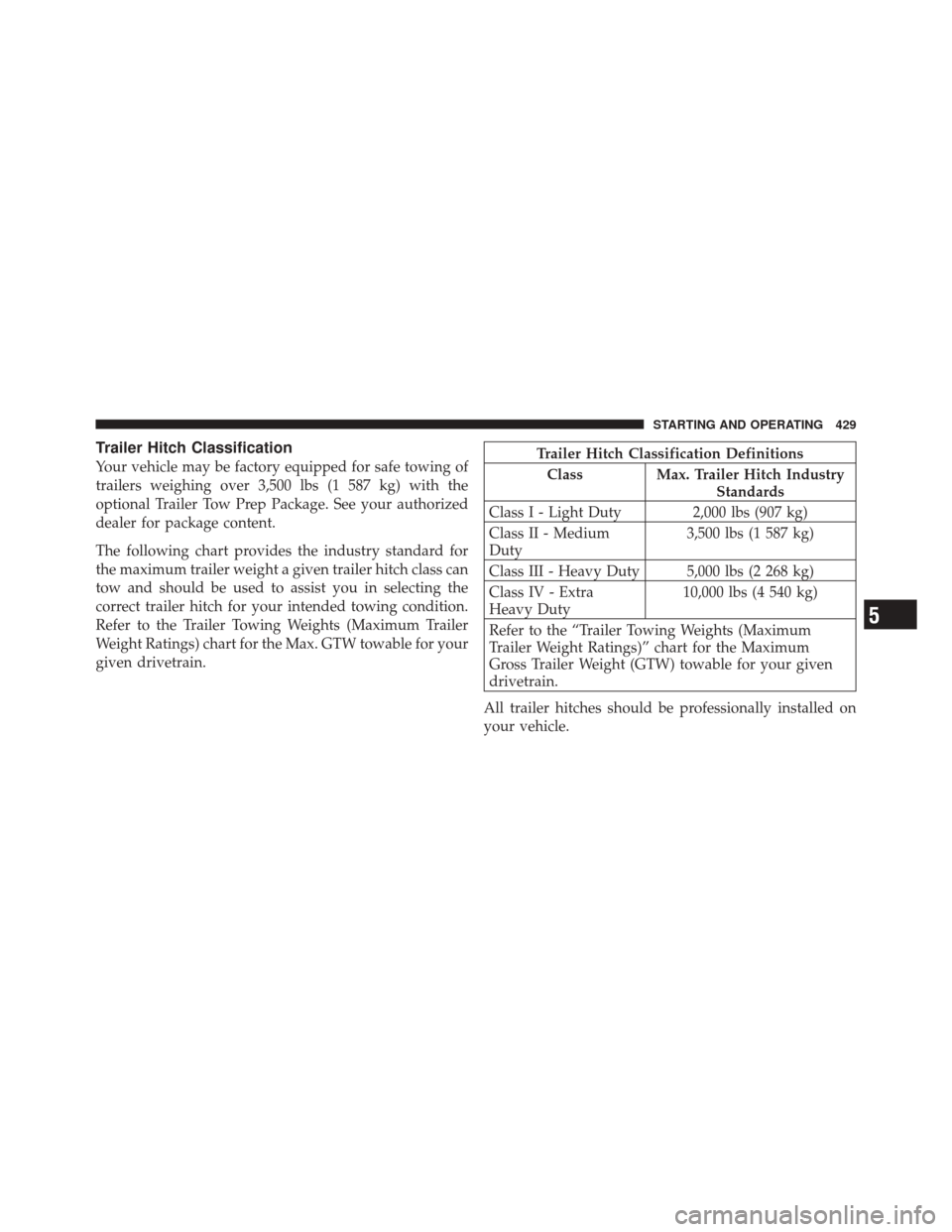
The following chart provides the industry standard for
the maximum trailer weight a given trailer hitch class can
tow and should be used to assist you in selecting the
correct trailer hitch for your intended towing condition.
Refer to the Trailer Towing Weights (Maximum Trailer
Weight Ratings) chart for the Max. GTW towable for your
given drivetrain.Trailer Hitch Classification DefinitionsClass Max. Trailer Hitch Industry Standards
Class I - Light Duty 2,000 lbs (907 kg)
Class II - Medium
Duty 3,500 lbs (1 587 kg)
Class III - Heavy Duty 5,000 lbs (2 268 kg)
Class IV - Extra
Heavy Duty 10,000 lbs (4 540 kg)
Refer to the “Trailer Towing Weights (Maximum
Trailer Weight Ratings)” chart for the Maximum
Gross Trailer Weight (GTW) towable for your given
drivetrain.
All trailer hitches should be professionally installed on
your vehicle.
5
STARTING AND OPERATING 429
Page 437 of 576
CAUTION!
If the trailer weighs more than 1,000 lbs (454 kg)
loaded, it should have its own brakes and they
should be of adequate capacity. Failure to do this
could lead to accelerated brake lining wear, higher
brake pedal effort, and longer stopping distances.
WARNING!
•Do not connect trailer brakes to your vehicle’s
hydraulic brake lines. It can overload your brake
system and cause it to fail. You might not have
brakes when you need them and could have a
collision.(Continued)
WARNING! (Continued)
•Towing any trailer will increase your stopping
distance. When towing, you should allow for ad-
ditional space between your vehicle and the ve-
hicle in front of you. Failure to do so could result
in a collision.
Towing Requirements – Trailer Lights And Wiring
Whenever you pull a trailer, regardless of the trailer size,
stop lights and turn signals on the trailer are required for
motoring safety.
The Trailer Tow Package includes both a seven-pin and a
four-pin connector at the rear of the vehicle.5
STARTING AND OPERATING 435
Page 439 of 576
Towing Tips
Before setting out on a trip, practice turning, stopping
and backing the trailer in an area away from heavy
traffic.
Automatic Transmission
The DRIVE range can be selected when towing. How-
ever, if frequent shifting occurs while in this range, the
TOW/HAUL mode (if equipped), or a lower gear range,
should be selected.
NOTE:Using the TOW/HAUL mode (if equipped) or
selecting a lower gear range (using the Electronic Range
Select (ERS) feature) while operating the vehicle under
heavy operating conditions, will improve performance
and extend transmission life by reducing excessive shift-
ing and heat buildup. This action will also provide better
engine braking. The transmission fluid and filter should be changed if
you REGULARLY tow a trailer for more than 45 minutes
of continuous operation. Refer to “Maintenance Sched-
ule” for the proper maintenance intervals.
NOTE:
Check the transmission fluid level before towing
(5.7L engine).
Electronic Speed Control – If Equipped
Do not use in hilly terrain or with heavy loads.
When using the speed control, if you experience speed
drops greater than 10 mph (16 km/h), disengage until
you can get back to cruising speed.
Use speed control in flat terrain and with light loads to
maximize fuel efficiency.
5
STARTING AND OPERATING 437
Page 445 of 576
6. Shift the transmission into NEUTRAL.
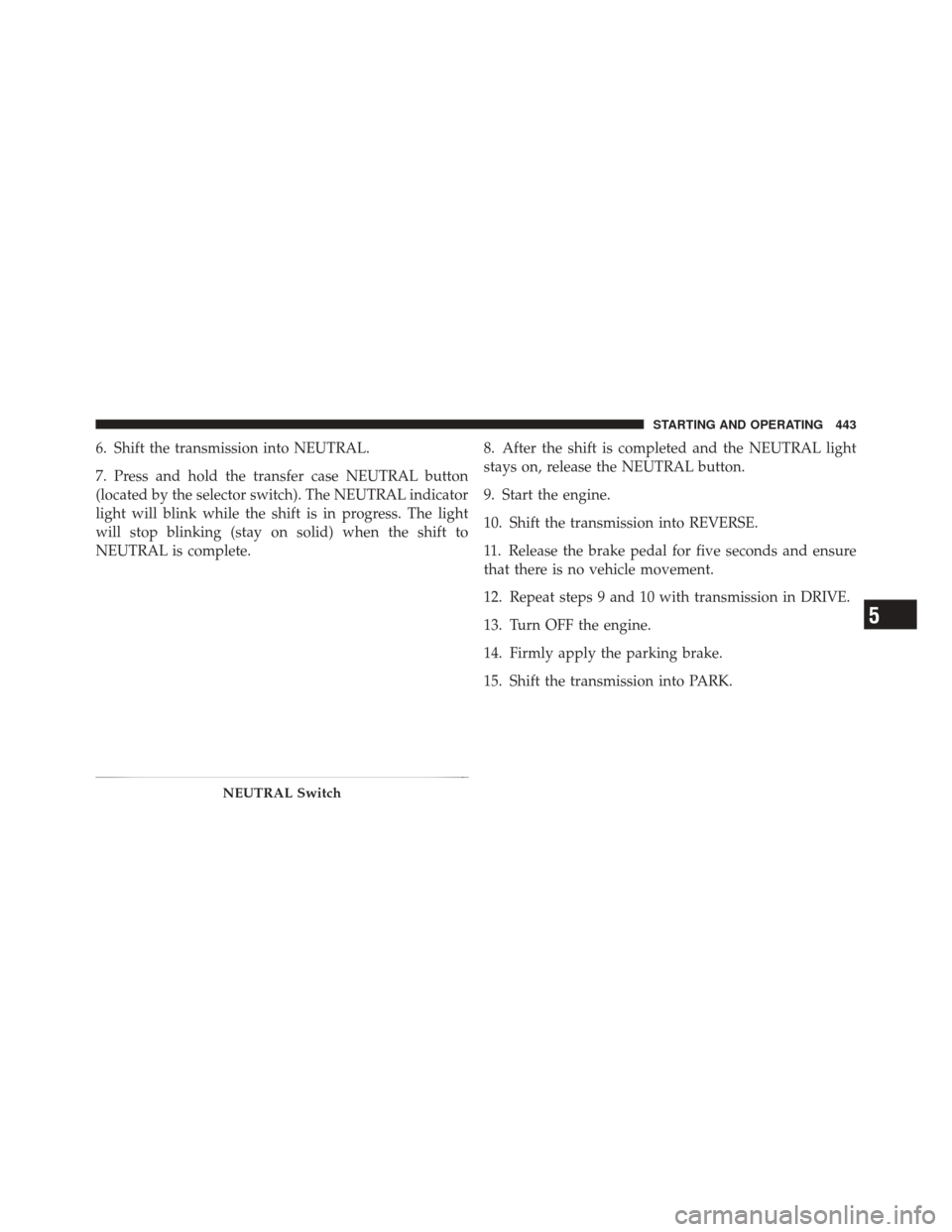
7. Press and hold the transfer case NEUTRAL button
(located by the selector switch). The NEUTRAL indicator
light will blink while the shift is in progress. The light
will stop blinking (stay on solid) when the shift to
NEUTRAL is complete.8. After the shift is completed and the NEUTRAL light
stays on, release the NEUTRAL button.
9. Start the engine.
10. Shift the transmission into REVERSE.
11. Release the brake pedal for five seconds and ensure
that there is no vehicle movement.
12. Repeat steps 9 and 10 with transmission in DRIVE.
13. Turn OFF the engine.
14. Firmly apply the parking brake.
15. Shift the transmission into PARK.
NEUTRAL Switch
5
STARTING AND OPERATING 443
Page 446 of 576
CAUTION!
Damage to the transmission may occur if the trans-
mission is shifted into PARK with the transfer case in
NEUTRAL and the engine running. With the transfer
case in NEUTRAL, ensure that the engine is OFF
prior to shifting the transmission into PARK.
16. Remove the key fob from the ignition switch.
17. Attach the vehicle to the tow vehicle using a suitable
tow bar.
18. Release the parking brake.
NOTE:
•Steps 1 through 6 are requirements that must be met
prior to pressing the NEUTRAL button, and must
continue to be met until the shift has been completed.
If any of these requirements are not met prior to
pressing the NEUTRAL button or are no longer met during the shift, the NEUTRAL indicator light will
flash continuously until all requirements are met or
until the NEUTRAL button is released.
•The ignition switch must be in the ON/RUN position
for a shift to take place and for the position indicator
lights to be operable. If the ignition switch is not in the
ON/RUN position, the shift will not take place and no
position indicator lights will be on or flashing.
•A flashing NEUTRAL indicator light indicates that
shift requirements have not been met.
Shifting Out Of Neutral
Use the following procedure to prepare your vehicle for
normal usage:
1. Bring the vehicle to a complete stop, leaving it con-
nected to the tow vehicle.
2. Firmly apply the parking brake.
444 STARTING AND OPERATING
Page 447 of 576
3. Insert the key fob into the ignition switch and turn it to
the ON/RUN position, but do not start the engine.
4. Press and hold the brake pedal.
5. Shift the transmission into NEUTRAL.
6. Press and hold the transfer case NEUTRAL button
(located by the selector switch) until the NEUTRAL
indicator light turns off.7. After the NEUTRAL indicator light turns off, release
the NEUTRAL button.
8. After the NEUTRAL button has been released, the
transfer case will shift to the position identified by the
selector switch.
NEUTRAL Switch
5
STARTING AND OPERATING 445
Page 448 of 576
NOTE:When shifting out of transfer case NEUTRAL,
turning the engine OFF may be required to avoid gear
clash.
9. Shift transmission into PARK.
10. Release the brake pedal.
11. Disconnect vehicle from the tow vehicle.
12. Start the engine.
13. Press and hold the brake pedal.
14. Release the parking brake.
15. Shift the transmission into gear, and check that the
vehicle operates normally.
16. The Keyless Enter-N-Go button (if equipped) may
now be reinstalled if desired. Refer to “Starting
Procedures/Keyless Enter-N-Go” in “Starting and Oper-
ating” for further information. NOTE:
•Steps 1 through 5 are requirements that must be met
prior to pressing the transfer case NEUTRAL button
and must continue to be met until the shift has been
completed. If any of these requirements are not met
prior to pressing the NEUTRAL button, or are no
longer met during the shift, the NEUTRAL indicator
light will flash continuously until all requirements are
met or until the NEUTRAL button is released.
•The ignition switch must be in the ON/RUN position
for a transfer case shift to take place and for the
position indicator lights to be operable. If the ignition
switch is not in the ON/RUN position, the shift will
not take place and no position indicator lights will be
on or flashing.
•A flashing NEUTRAL position indicator light indicates
that shift requirements have not been met.
446 STARTING AND OPERATING
Page 461 of 576
5. Raise the vehicle by turning the jack screw clockwise.
Raise the vehicle just enough to remove the flat tire.
WARNING!
Raising the vehicle higher than necessary can make
the vehicle less stable. It could slip off the jack and
hurt someone near it. Raise the vehicle only enough
to remove the tire.
6. Remove the lug nuts and wheel.
7. Install the spare wheel/tire on the vehicle and install
the lug nuts with the cone-shaped end toward the wheel.
Lightly tighten the nuts.
WARNING!
To avoid the risk of forcing the vehicle off the jack,
do not fully tighten the wheel nuts until the vehicle
has been lowered. Failure to follow this warning may
result in personal injury.
Rear Jacking Location6
WHAT TO DO IN EMERGENCIES 459
Page 479 of 576
ONBOARD DIAGNOSTIC SYSTEM — OBD II
Your vehicle is equipped with a sophisticated onboard
diagnostic system called OBD II. This system monitors
the performance of the emissions, engine, and automatic
transmission control systems. When these systems are
operating properly, your vehicle will provide excellent
performance and fuel economy, as well as engine emis-
sions well within current government regulations.
If any of these systems require service, the OBD II system
will turn on the “Malfunction Indicator Light” (MIL). It
will also store diagnostic codes and other information to
assist your service technician in making repairs. Al-
though your vehicle will usually be drivable and not
need towing, see your authorized dealer for service as
soon as possible.CAUTION!
•Prolonged driving with the MIL on could cause
further damage to the emission control system. It
could also affect fuel economy and drivability. The
vehicle must be serviced before any emissions
tests can be performed.
•If the MIL is flashing while the engine is running,
severe catalytic converter damage and power loss
will soon occur. Immediate service is required.
Loose Fuel Filler Cap Message
If the vehicle diagnostic system determines
that the fuel filler cap is loose, improperly
installed, or damaged, a loose gascap indicator
will display in the EVIC telltale display area.
Refer to “Electronic Vehicle Information Center (EVIC)”
in “Understanding Your Instrument Panel” for further
information. Tighten the fuel filler cap properly and press
7
MAINTAINING YOUR VEHICLE 477
Page 480 of 576
the SELECT button to turn off the message. If the
problem continues, the message will appear the next time
the vehicle is started.
A loose, improperly installed, or damaged fuel filler cap
may also turn on the Malfunction Indicator Light (MIL).
EMISSIONS INSPECTION AND MAINTENANCE
PROGRAMS
In some localities, it may be a legal requirement to pass
an inspection of your vehicle’s emissions control system.
Failure to pass could prevent vehicle registration.For states that require an Inspection and Mainte-
nance (I/M), this check verifies the “Malfunction
Indicator Light (MIL)” is functioning and is not
on when the engine is running, and that the OBD II
system is ready for testing. Normally, the OBD II system will be ready. The OBD II
system may
notbe ready if your vehicle was recently
serviced, recently had a dead battery or a battery replace-
ment. If the OBD II system should be determined not
ready for the I/M test, your vehicle may fail the test.
Your vehicle has a simple ignition key-actuated test,
which you can use prior to going to the test station. To
check if your vehicle’s OBD II system is ready, you must
do the following:
1. Turn the ignition switch to the ON position, but do not
crank or start the engine.
2. If you crank or start the engine, you will have to start
this test over.
3. As soon as you turn the ignition switch to the ON
position, you will see the MIL symbol come on as part of
a normal bulb check.
478 MAINTAINING YOUR VEHICLE