climate control DODGE DURANGO 2011 3.G User Guide
[x] Cancel search | Manufacturer: DODGE, Model Year: 2011, Model line: DURANGO, Model: DODGE DURANGO 2011 3.GPages: 576, PDF Size: 3.57 MB
Page 323 of 576
6. Right Front Seat Occupant Temperature Display
This display shows the temperature setting for the right
front seat occupant.
7. Front Defrost Button
Press and release to change the current setting, the
indicator illuminates when ON. Performing this function
will cause the ATC to switch into manual mode. The
blower will engage immediately if the Defrost mode is
selected.
8. Passenger Temperature Control Up Button
Provides the passenger with independent temperature
control. Push the button for warmer temperature set-
tings.
9. Passenger Temperature Control Down Button
Provides the passenger with independent temperature
control. Push the button for cooler temperature settings.10. Auto Temperature Control Button
Controls airflow temperature, distribution, volume, and
the amount of air recirculation automatically. Press and
release to select. Refer to “Automatic Operation” for
more information. Performing this function will cause
the ATC to switch between manual mode and automatic
modes.
11. Blower Control
There are seven blower speeds, the blower speed in-
creases as you move the control to the right from the
lowest blower setting. Performing this function will
cause the ATC to switch into manual mode.
12. Climate Control ON/OFF Button
Press and release to turn the Climate Control ON/OFF
13. Mode Control Button
Press and release to select between Modes (Panel, Bi-
Level, Floor, Mix). Performing this function will cause the
ATC to switch into manual mode.
4
UNDERSTANDING YOUR INSTRUMENT PANEL 321
Page 324 of 576
14. SYNC Button
Press and release to control the temperature setting for
both zones from the driver temperature control.
15. Driver Temperature Control Down Button
Provides the driver with independent temperature con-
trol. Push the button for cooler temperature settings.
16. Driver Temperature Control Up Button
Provides the driver with independent temperature con-
trol. Push the button for warmer temperature settings.
17. Rear Control Button
Provides the rear seat occupants with independent
blower and temperature control. Push the button to
activate the rear climate control and allow the rear seat
occupants control of the rear blower and temperature
settings.Automatic Operation
1. Press the AUTO button on the Automatic Temperature
Control (ATC) Panel.
2. Next, adjust the temperature you would like the
system to maintain by adjusting the driver and front
passenger temperature control buttons. Once the desired
temperature is displayed, the system will achieve and
automatically maintain that comfort level.
3. When the system is set up for your comfort level, it is
not necessary to change the settings. You will experience
the greatest efficiency by simply allowing the system to
function automatically.
NOTE:
•It is not necessary to move the temperature settings for
cold or hot vehicles. The system automatically adjusts
the temperature, mode and fan speed to provide
comfort as quickly as possible.
322 UNDERSTANDING YOUR INSTRUMENT PANEL
Page 328 of 576
Rear Climate Control — If Equipped
The Rear Climate Control system has floor air outlets,
and overhead outlets at each outboard rear seating
position. The unit provides warm or cool air through the
floor and upper outlets.
The rear blower and temperature controls for the rear
seat passengers are located in the headliner, near the
center of the vehicle.
If the rear system is off, changing the rear setting to a
position other than off will turn the rear system on. If
both the front and rear systems are off, turning the rear
system on from the rear controls will also turn on the
front system on.
Rear Blower Control
The primary control for the rear blower is on the front
climate control unit, located on the instrument panel.
Rear Manual Climate Controls
1 – Rear Blower3 – Rear Temperature
2 – Rear Climate Control Icon
326 UNDERSTANDING YOUR INSTRUMENT PANEL
Page 329 of 576
Only when the Rear Control Icon is illuminated do the
second row seat occupants have control of the rear
blower speed.
The rear blower control, located in the rear overhead
console, has an off position and a range of blower speeds.
This allows the second row seat occupants to control the
volume of air circulated in the rear of the vehicle.
CAUTION!
Interior air enters the Rear Manual Climate Control
system through an intake grille, located in the right
side trim panel behind the third row seats. The
heater outlets are located in the right side trim panel,
just behind the sliding door. Do not block or place
objects directly in front of the inlet grille or heater
outlets. The electrical system could overload, causing
damage to the blower motor.
Rear Temperature Control
Only when the Rear Control Icon is illuminated do the
second row seat occupants have control of the rear mode
control knob.
To change the temperature in the rear of the vehicle,
rotate the temperature control knob counterclockwise for
cold air, and clockwise for heated air.
Rear Mode Control
Headliner ModeAir comes from the outlets in the headliner. Each of
these outlets can be individually adjusted to direct
the flow of air. Moving the air vanes of the outlets to one
side will shut off the airflow.
Bi-Level Mode Air comes from both the headliner outlets and the
floor outlets.
4
UNDERSTANDING YOUR INSTRUMENT PANEL 327
Page 450 of 576
HAZARD WARNING FLASHERS
The Hazard Warning flasher switch is located on the
switch bank just above the climate controls.Press the switch to turn on the Hazard Warning
flasher. When the switch is activated, all directional
turn signals will flash on and off to warn oncoming
traffic of an emergency. Press the switch a second time to
turn off the Hazard Warning flashers.
This is an emergency warning system and it should not
be used when the vehicle is in motion. Use it when your
vehicle is disabled and it is creating a safety hazard for
other motorists.
When you must leave the vehicle to seek assistance, the
Hazard Warning flashers will continue to operate even
though the ignition is placed in the OFF position.
NOTE: With extended use the Hazard Warning flashers
may wear down your battery.
IF YOUR ENGINE OVERHEATS
In any of the following situations, you can reduce the
potential for overheating by taking the appropriate ac-
tion.
•On the highways — slow down.
•In city traffic — while stopped, place the transmission
in NEUTRAL, but do not increase the engine idle
speed.
NOTE: There are steps that you can take to slow down
an impending overheat condition:
•If your air conditioner (A/C) is on, turn it off. The A/C
system adds heat to the engine cooling system and
turning the A/C off can help remove this heat.
448 WHAT TO DO IN EMERGENCIES
Page 518 of 576
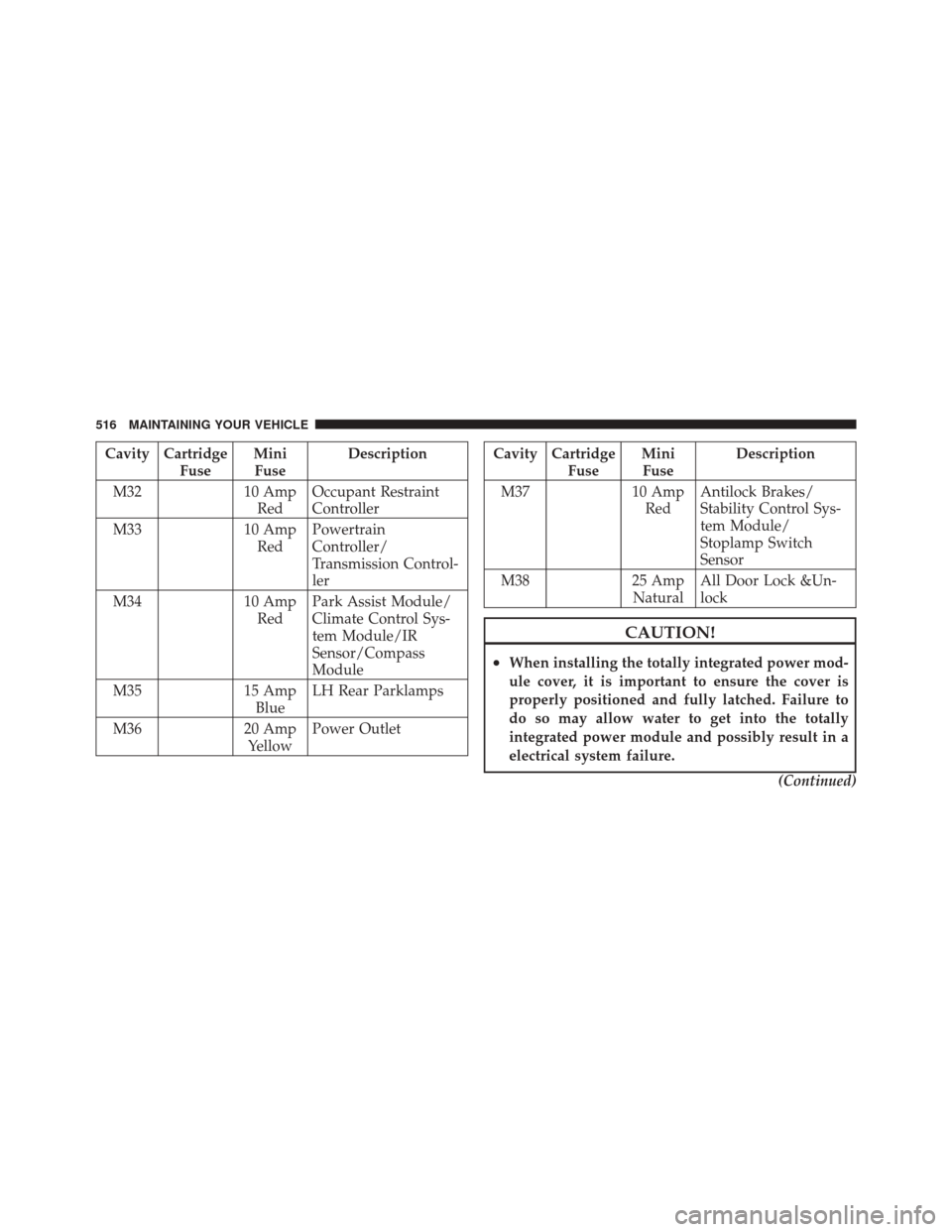
Cavity CartridgeFuseMini
Fuse Description
M32 10 Amp
Red Occupant Restraint
Controller
M33 10 Amp
Red Powertrain
Controller/
Transmission Control-
ler
M34 10 Amp
Red Park Assist Module/
Climate Control Sys-
tem Module/IR
Sensor/Compass
Module
M35 15 Amp
Blue LH Rear Parklamps
M36 20 Amp
Yellow Power OutletCavity Cartridge
FuseMini
Fuse Description
M37 10 Amp
Red Antilock Brakes/
Stability Control Sys-
tem Module/
Stoplamp Switch
Sensor
M38 25 Amp
Natural All Door Lock &Un-
lock
CAUTION!
•When installing the totally integrated power mod-
ule cover, it is important to ensure the cover is
properly positioned and fully latched. Failure to
do so may allow water to get into the totally
integrated power module and possibly result in a
electrical system failure.
(Continued)
516 MAINTAINING YOUR VEHICLE
Page 553 of 576

DEPARTMENT OF TRANSPORTATION UNIFORM
TIRE QUALITY GRADES
The following tire grading categories were established by
the National Highway Traffic Safety Administration. The
specific grade rating assigned by the tire’s manufacturer
in each category is shown on the sidewall of the tires on
your vehicle.
All passenger car tires must conform to Federal safety
requirements in addition to these grades.
Treadwear
The Treadwear grade is a comparative rating, based on
the wear rate of the tire when tested under controlled
conditions on a specified government test course. For
example, a tire graded 150 would wear one and one-half
times as well on the government course as a tire graded
100. The relative performance of tires depends upon the
actual conditions of their use, however, and may departsignificantly from the norm due to variations in driving
habits, service practices, and differences in road charac-
teristics and climate.
Traction Grades
The Traction grades, from highest to lowest, are AA, A, B,
and C. These grades represent the tire’s ability to stop on
wet pavement, as measured under controlled conditions
on specified government test surfaces of asphalt and
concrete. A tire marked C may have poor traction perfor-
mance.
WARNING!
The traction grade assigned to this tire is based on
straight-ahead braking traction tests, and does not
include acceleration, cornering, hydroplaning, or
peak traction characteristics.
9
IF YOU NEED CONSUMER ASSISTANCE 551
Page 558 of 576
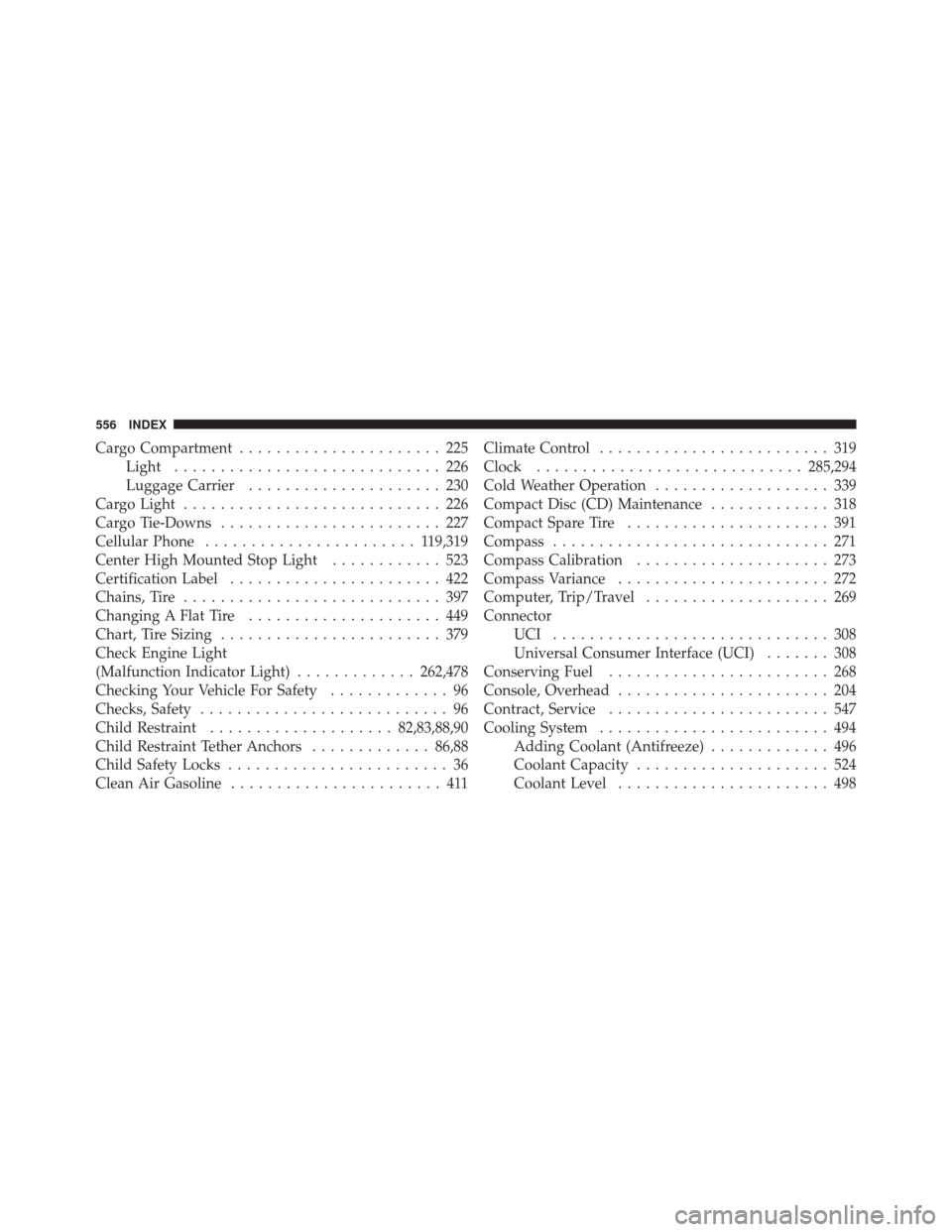
Cargo Compartment...................... 225
Light ............................. 226
Luggage Carrier ..................... 230
Cargo Light ............................ 226
Cargo Tie-Downs ........................ 227
Cellular Phone ....................... 1 19,319
Center High Mounted Stop Light ............ 523
Certification Label ....................... 422
Chains, Tire ............................ 397
Changing A Flat Tire ..................... 449
Chart, Tire Sizing ........................ 379
Check Engine Light
(Malfunction Indicator Light) .............262,478
Checking Your Vehicle For Safety ............. 96
Checks, Safety ........................... 96
Child Restraint .................... 82,83,88,90
Child Restraint Tether Anchors .............86,88
Child Safety Locks ........................ 36
Clean Air Gasoline ....................... 411 Climate Control
......................... 319
Clock ............................. 285,294
Cold Weather Operation ................... 339
Compact Disc (CD) Maintenance ............. 318
Compact Spare Tire ...................... 391
Compass .............................. 271
Compass Calibration ..................... 273
Compass Variance ....................... 272
Computer, Trip/Travel .................... 269
Connector UCI .............................. 308
Universal Consumer Interface (UCI) ....... 308
Conserving Fuel ........................ 268
Console, Overhead ....................... 204
Contract, Service ........................ 547
Cooling System ......................... 494
Adding Coolant (Antifreeze) ............. 496
Coolant Capacity ..................... 524
Coolant Level ....................... 498
556 INDEX