trailer DODGE DURANGO 2012 3.G User Guide
[x] Cancel search | Manufacturer: DODGE, Model Year: 2012, Model line: DURANGO, Model: DODGE DURANGO 2012 3.GPages: 686, PDF Size: 4.46 MB
Page 439 of 686
WARNING!
Do not coast in NEUTRAL and never turn off the
ignition to coast down a hill. These are unsafe
practices that limit your response to changing traffic
or road conditions. You might lose control of the
vehicle and have a collision.
CAUTION!
Towing the vehicle, coasting, or driving for any other
reason with the transmission in NEUTRAL can result
in severe transmission damage. Refer to “Recre-
ational Towing” in “Starting And Operating” and
“Towing A Disabled Vehicle” in “What To Do In
Emergencies” for further information.
DRIVE
This range should be used for most city and highway
driving. It provides the smoothest upshifts and down-
shifts, and the best fuel economy. The transmission
automatically upshifts through underdrive first, second,
and third gears, direct fourth gear and overdrive fifth
gear. The DRIVE position provides optimum driving
characteristics under all normal operating conditions.
When frequent transmission shifting occurs (such as
when operating the vehicle under heavy loading condi-
tions, in hilly terrain, traveling into strong head winds, or
while towing heavy trailers), use the Electronic Range
Select (ERS) feature (refer to “Electronic Range Select
(ERS)” in this section) to select a lower gear range. Under
these conditions, using a lower gear range will improve
performance and extend transmission life by reducing
excessive shifting and heat buildup.
5
STARTING AND OPERATING 437
Page 447 of 686
To access all six available gears, you must use the
Electronic Range Select (ERS) feature (refer to “Electronic
Range Select (ERS)” in this section).
When frequent transmission shifting occurs (such as
when operating the vehicle under heavy loading condi-
tions, in hilly terrain, traveling into strong head winds, or
while towing heavy trailers), use the Electronic Range
Select (ERS) feature (refer to “Electronic Range Select
(ERS)” in this section) to select a lower gear range. Under
these conditions, using a lower gear range will improve
performance and extend transmission life by reducing
excessive shifting and heat buildup.
If the transmission operating temperature exceeds nor-
mal operating limits, the powertrain controller will
modify the transmission shift schedule and expand the
range of torque converter clutch engagement. This is
done to prevent transmission damage due to overheat-
ing.If the transmission becomes extremely hot, the “Trans-
mission Temperature Warning Light” may illuminate and
the transmission may downshift out of Overdrive until
the transmission cools down.
NOTE:
Use caution when operating a heavily loaded
vehicle at low speeds (such as towing a trailer up a steep
grade, or in stop-and-go traffic) during hot weather. In
these conditions, torque converter slip can impose a
significant additional heat load on the cooling system.
Downshifting the transmission to the lowest possible
gear (when climbing a grade), or shifting to NEUTRAL
(when stopped in heavy traffic) can help to reduce this
excess heat generation.
During cold temperatures, transmission operation may
be modified depending on engine and transmission
temperature as well as vehicle speed. This feature im-
proves warm up time of the engine and transmission to
achieve maximum efficiency. Engagement of both the
5
STARTING AND OPERATING 445
Page 449 of 686
If the transmission cannot be reset, authorized dealer
service is required.
Electronic Range Select (ERS) Operation
The Electronic Range Select (ERS) shift control allows the
driver to limit the highest available gear when the shift
lever is in the DRIVE position. For example, if you shift
the transmission into 3 (third gear), the transmission will
never shift above third gear, but will shift down into
second and first gear normally.
Use of ERS (or TOW/HAUL mode) also enables an
additional underdrive gear which is not normally used
during through-gear accelerations. This additional gear
can improve vehicle performance and cooling capability
when towing a trailer on certain grades. In ERS mode,
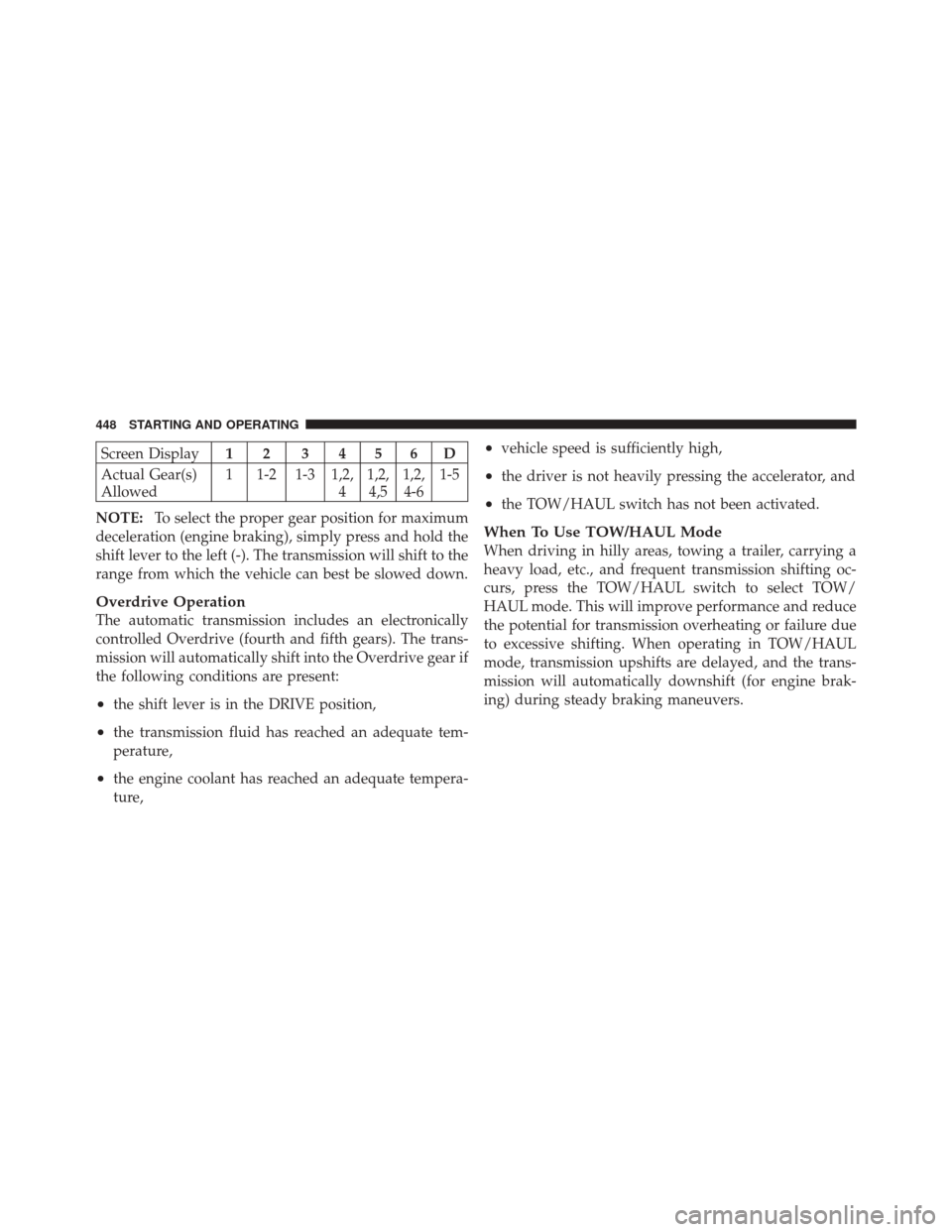
gears 1 though 3 are underdrive gears, and ERS 4 is direct
drive. ERS 5 and 6 (Overdrive gears ) are the same as the
normal fourth and fifth gears.You can switch between DRIVE and ERS mode at any
vehicle speed. When the shift lever is in the DRIVE
position, the transmission will operate automatically,
shifting between all available gears. Tapping the shift
lever to the left (-) will activate ERS mode, display the
current gear in the instrument cluster, and maintain that
gear as the top available gear. Once in ERS mode, tapping
the shift lever to the left (-) or right (+) will change the top
available gear.
To exit ERS mode, simply press and hold the shift lever to
the right (+) until “D” is once again displayed in the shift
lever position indicator in the instrument cluster.
WARNING!
Do not downshift for additional engine braking on a
slippery surface. The drive wheels could lose their
grip and the vehicle could skid, causing an accident
or personal injury.
5
STARTING AND OPERATING 447
Page 450 of 686
Screen Display12 3456D
Actual Gear(s)
Allowed 1 1-2 1-3 1,2,
41,2,
4,5 1,2,
4-6 1-5
NOTE: To select the proper gear position for maximum
deceleration (engine braking), simply press and hold the
shift lever to the left (-). The transmission will shift to the
range from which the vehicle can best be slowed down.
Overdrive Operation
The automatic transmission includes an electronically
controlled Overdrive (fourth and fifth gears). The trans-
mission will automatically shift into the Overdrive gear if
the following conditions are present:
•the shift lever is in the DRIVE position,
•the transmission fluid has reached an adequate tem-
perature,
•the engine coolant has reached an adequate tempera-
ture,
•vehicle speed is sufficiently high,
•the driver is not heavily pressing the accelerator, and
•the TOW/HAUL switch has not been activated.
When To Use TOW/HAUL Mode
When driving in hilly areas, towing a trailer, carrying a
heavy load, etc., and frequent transmission shifting oc-
curs, press the TOW/HAUL switch to select TOW/
HAUL mode. This will improve performance and reduce
the potential for transmission overheating or failure due
to excessive shifting. When operating in TOW/HAUL
mode, transmission upshifts are delayed, and the trans-
mission will automatically downshift (for engine brak-
ing) during steady braking maneuvers.
448 STARTING AND OPERATING
Page 469 of 686
WARNING! (Continued)
•Do not leave the key fob in or near the vehicle, and
do not leave Keyless Enter-N-Go in the ACC or
ON/RUN mode. A child could operate power win-
dows, other controls, or move the vehicle.
•Be sure the parking brake is fully disengaged
before driving; failure to do so can lead to brake
failure and a collision.
•Always fully apply the parking brake when leav-
ing your vehicle, or it may roll and cause damage
or injury. Also be certain to leave the transmission
in PARK. Failure to do so may allow the vehicle to
roll and cause damage or injury.
CAUTION!
If the “Brake Warning Light” remains on with the
parking brake released, a brake system malfunction
is indicated. Have the brake system serviced by an
authorized dealer immediately.
ELECTRONIC BRAKE CONTROL SYSTEM
Your vehicle is equipped with an advanced electronic
brake control system that includes the Anti-Lock Brake
System (ABS), Traction Control System (TCS), Brake
Assist System (BAS), Electronic Roll Mitigation (ERM),
and Electronic Stability Control (ESC). All five of these
systems work together to enhance vehicle stability and
control in various driving conditions.
Also, your vehicle is equipped with Trailer Sway Control
(TSC), Hill Start Assist (HSA), Brake Lock Differential
(BLD), Ready Alert Braking, and Rain Brake Support.
5
STARTING AND OPERATING 467
Page 475 of 686
NOTE:To improve the vehicle’s traction when driving
with snow chains, or starting off in deep snow, sand, or
gravel, it may be desirable to switch to the “Partial Off”
mode by pressing the “ESC OFF” switch. Once the
situation requiring ESC to be switched to the “Partial Off” mode is overcome, turn ESC back on by momen-
tarily pressing the “ESC OFF” switch. This may be done
while the vehicle is in motion.
WARNING!
•When in “Partial Off” mode, the TCS functionality
of ESC, (except for the limited slip feature de-
scribed in the TCS section), has been disabled and
the “ESC Off Indicator Light” will be illuminated.
When in “Partial Off” mode, the engine power
reduction feature of TCS is disabled, and the
enhanced vehicle stability offered by the ESC
system is reduced.
•Trailer Sway Control (TSC) is disabled when the
ESC system is in the “Partial Off” mode.
ESC OFF Switch
5
STARTING AND OPERATING 473
Page 476 of 686
AWD Low Range (LOW)
Partial Off
This is the normal operating mode for ESC in AWD LOW
range. Whenever the vehicle is started in AWD LOW
range, or the transfer case (if equipped) is shifted from
AWD AUTO range or NEUTRAL to AWD LOW range,
the ESC system will be in the “Partial Off” mode.
Trailer Sway Control (TSC)
TSC uses sensors in the vehicle to recognize an exces-
sively swaying trailer and will take the appropriate
actions to attempt to stop the sway. The system may
reduce engine power and apply the brake of the appro-
priate wheel(s) to counteract the sway of the trailer. TSC
will become active automatically once an excessively
swaying trailer is recognized. Note that TSC cannot stop
all trailers from swaying. Always use caution when
towing a trailer and follow the trailer tongue weight
recommendations. Refer to “Trailer Towing” in “Startingand Operating” for further information. When TSC is
functioning, the “ESC Malfunction Indicator Light” will
flash, the engine power may be reduced and you may
feel the brakes being applied to individual wheels to
attempt to stop the trailer from swaying. TSC is disabled
when the ESC system is in the “Partial Off” mode.
WARNING!
•If TSC activates while driving, slow the vehicle
down, stop at the nearest safe location, and adjust
the trailer load to eliminate trailer sway.
•TSC is disabled when the ESC system is in the
“Partial Off” mode.
Hill Start Assist (HSA)
The HSA system is designed to assist the driver when
starting a vehicle from a stop on a hill. HSA will maintain
the level of brake pressure the driver applied for a short
period of time after the driver takes their foot off of the
474 STARTING AND OPERATING
Page 477 of 686
brake pedal. If the driver does not apply the throttle
during this short period of time, the system will release
brake pressure and the vehicle will roll down the hill. The
system will release brake pressure in proportion to the
amount of throttle applied as the vehicle starts to move in
the intended direction of travel.
HSA Activation Criteria
The following criteria must be met in order for HSA to
activate:
•Vehicle must be stopped.
•Vehicle must be on a 6% (approximate) grade or
greater hill.
•Gear selection matches vehicle uphill direction (i.e.,
vehicle facing uphill is in forward gear; vehicle back-
ing uphill is in REVERSE gear).HSA will work in REVERSE and all forward gears when
the activation criteria have been met. The system will not
activate if the vehicle is placed in NEUTRAL or PARK.
WARNING!
There may be situations on minor hills (i.e., less than
8%), with a loaded vehicle, or while pulling a trailer,
when the system will not activate and slight rolling
may occur. This could cause a collision with another
vehicle or object. Always remember the driver is
responsible for braking the vehicle.
5
STARTING AND OPERATING 475
Page 478 of 686
HSA
HSA will provide assistance when starting on a grade
when pulling a trailer.
WARNING!
•If you use a trailer brake controller with your
trailer, your trailer brakes may be activated and
deactivated with the brake switch. If so, when the
brake pedal is released, there may not be enough
brake pressure to hold the vehicle and trailer on a
hill and this could cause a collision with another
vehicle or object behind you. In order to avoid
rolling down the hill while resuming acceleration,
manually activate the trailer brake prior to releas-
ing the brake pedal. Always remember the driver
is responsible for braking the vehicle.(Continued)
WARNING! (Continued)
•HSA is not a parking brake. Always apply the
parking brake fully when leaving your vehicle.
Also, be certain to leave the transmission in PARK.
Failure to follow these warnings may cause the
vehicle to roll down the incline and could collide
with another vehicle, object or person, and cause
serious or fatal injury. Always remember to use the
parking brake while parking on a hill and that the
driver is responsible for braking the vehicle.
HSA Off
If you wish to turn off the HSA system, it can be done
using the Customer Programmable Features in the Elec-
tronic Vehicle Information Center (EVIC). Refer to “Elec-
tronic Vehicle Information Center (EVIC)” in “Under-
standing Your Instrument Panel” for further information.
476 STARTING AND OPERATING
Page 487 of 686
This placard tells you important information about
the:
1) number of people that can be carried in the vehicle
2) total weight your vehicle can carry
3) tire size designed for your vehicle
4) cold tire inflation pressures for the front, rear, and
spare tires.
Loading
The vehicle maximum load on the tire must not exceed
the load carrying capacity of the tire on your vehicle. You
will not exceed the tire’s load carrying capacity if you
adhere to the loading conditions, tire size, and cold tire
inflation pressures specified on the Tire and Loading
Information placard and in the “Vehicle Loading” section
of this manual.
NOTE:Under a maximum loaded vehicle condition,
gross axle weight ratings (GAWRs) for the front and rear axles must not be exceeded. For further information on
GAWRs, vehicle loading, and trailer towing, refer to
“Vehicle Loading” in this section.
To determine the maximum loading conditions of your
vehicle, locate the statement “The combined weight of
occupants and cargo should never exceed XXX lbs or
XXX kg” on the Tire and Loading Information placard.
The combined weight of occupants, cargo/luggage and
trailer tongue weight (if applicable) should never exceed
the weight referenced here.
Steps For Determining Correct Load Limit
1. Locate the statement “The combined weight of occu-
pants and cargo should never exceed XXX lbs or XXX kg”
on your vehicle’s placard.
2. Determine the combined weight of the driver and
passengers that will be riding in your vehicle.5
STARTING AND OPERATING 485