head DODGE DURANGO 2013 3.G Owner's Guide
[x] Cancel search | Manufacturer: DODGE, Model Year: 2013, Model line: DURANGO, Model: DODGE DURANGO 2013 3.GPages: 699, PDF Size: 5.53 MB
Page 182 of 699
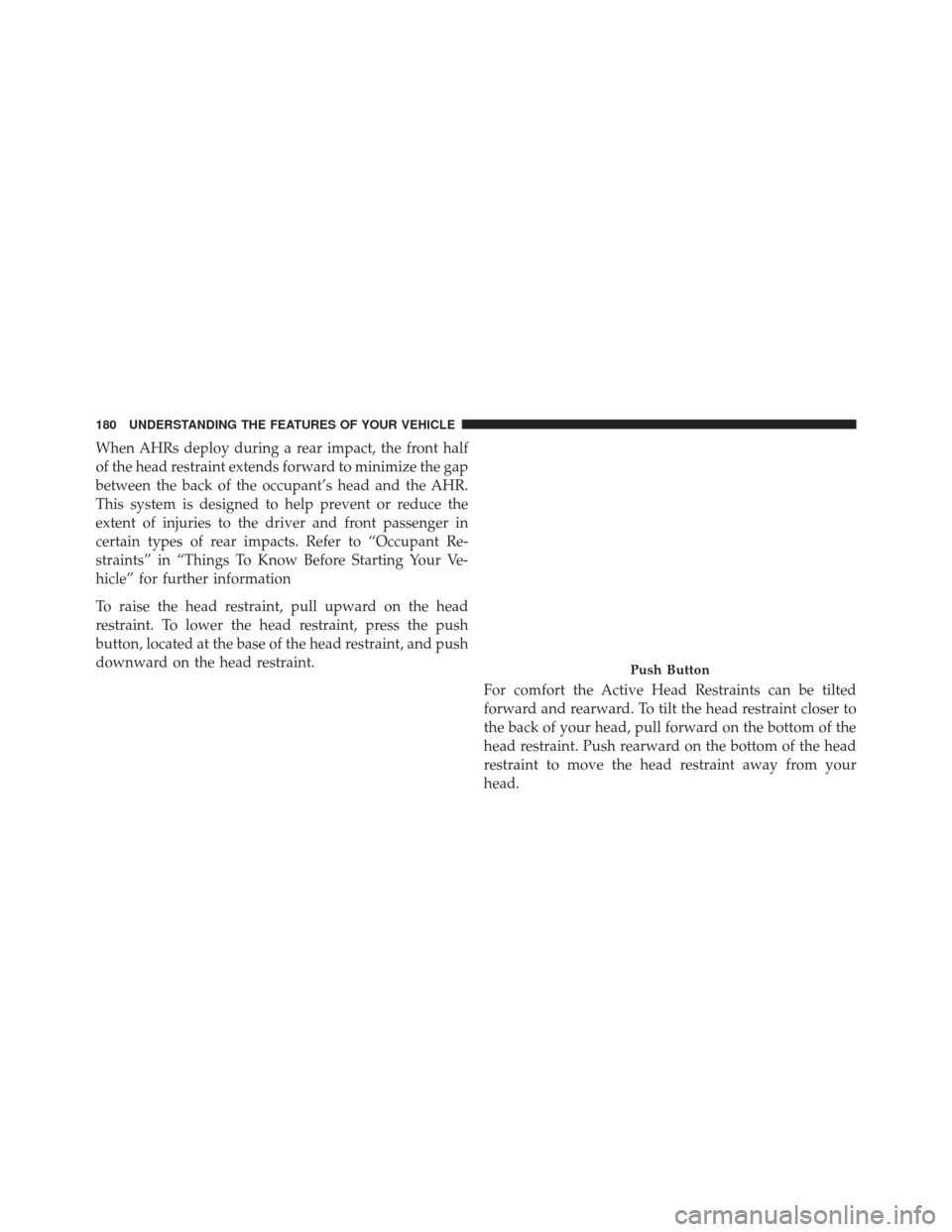
When AHRs deploy during a rear impact, the front half
of the head restraint extends forward to minimize the gap
between the back of the occupant’s head and the AHR.
This system is designed to help prevent or reduce the
extent of injuries to the driver and front passenger in
certain types of rear impacts. Refer to “Occupant Re-
straints” in “Things To Know Before Starting Your Ve-
hicle” for further information
To raise the head restraint, pull upward on the head
restraint. To lower the head restraint, press the push
button, located at the base of the head restraint, and push
downward on the head restraint.For comfort the Active Head Restraints can be tilted
forward and rearward. To tilt the head restraint closer to
the back of your head, pull forward on the bottom of the
head restraint. Push rearward on the bottom of the head
restraint to move the head restraint away from your
head.
Push Button
180 UNDERSTANDING THE FEATURES OF YOUR VEHICLE
Page 183 of 699

NOTE:
•The head restraints should only be removed by quali-
fied technicians, for service purposes only. If either of
the head restraints require removal, see your autho-
rized dealer.
Active Head Restraint (Normal Position)Active Head Restraint (Tilted)
3
UNDERSTANDING THE FEATURES OF YOUR VEHICLE 181
Page 184 of 699
•In the event of deployment of an Active Head Re-
straint, refer to “Occupant Restraints/Resetting Active
Head Restraints (AHR)” in “Things To Know Before
Starting Your Vehicle” for further information.
WARNING!
• Do not place items over the top of the Active Head
Restraint, such as coats, seat covers or portable
DVD players. These items may interfere with the
operation of the Active Head Restraint in the event
of a collision and could result in serious injury or
death.
(Continued)
WARNING! (Continued)
•Active Head Restraints may be deployed if they are
struck by an object such as a hand, foot or loose
cargo. To avoid accidental deployment of the Ac-
tive Head Restraint ensure that all cargo is secured,
as loose cargo could contact the Active Head Re-
straint during sudden stops. Failure to follow this
warning could cause personal injury if the Active
Head Restraint is deployed.
Head Restraints — Rear Seats
The head restraints on the outboard seats are not adjust-
able. They automatically fold forward when the rear seat
is folded to a load floor position but do not return to their
normal position when the rear seat is raised. After
returning either seat to its upright position, raise the head
restraint until it locks in place. The outboard headrests
are not removable.
182 UNDERSTANDING THE FEATURES OF YOUR VEHICLE
Page 185 of 699
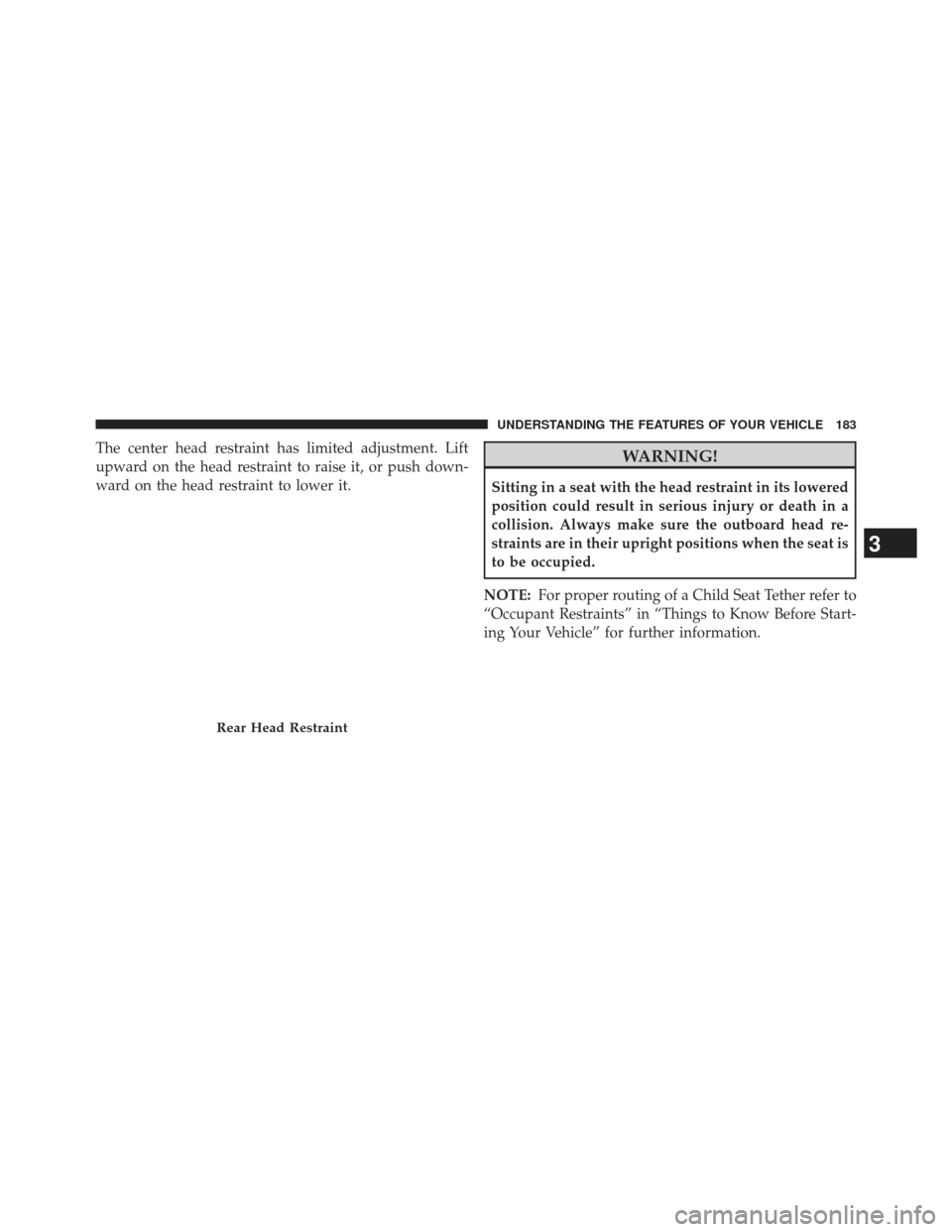
The center head restraint has limited adjustment. Lift
upward on the head restraint to raise it, or push down-
ward on the head restraint to lower it.WARNING!
Sitting in a seat with the head restraint in its lowered
position could result in serious injury or death in a
collision. Always make sure the outboard head re-
straints are in their upright positions when the seat is
to be occupied.
NOTE: For proper routing of a Child Seat Tether refer to
“Occupant Restraints” in “Things to Know Before Start-
ing Your Vehicle” for further information.
Rear Head Restraint
3
UNDERSTANDING THE FEATURES OF YOUR VEHICLE 183
Page 186 of 699
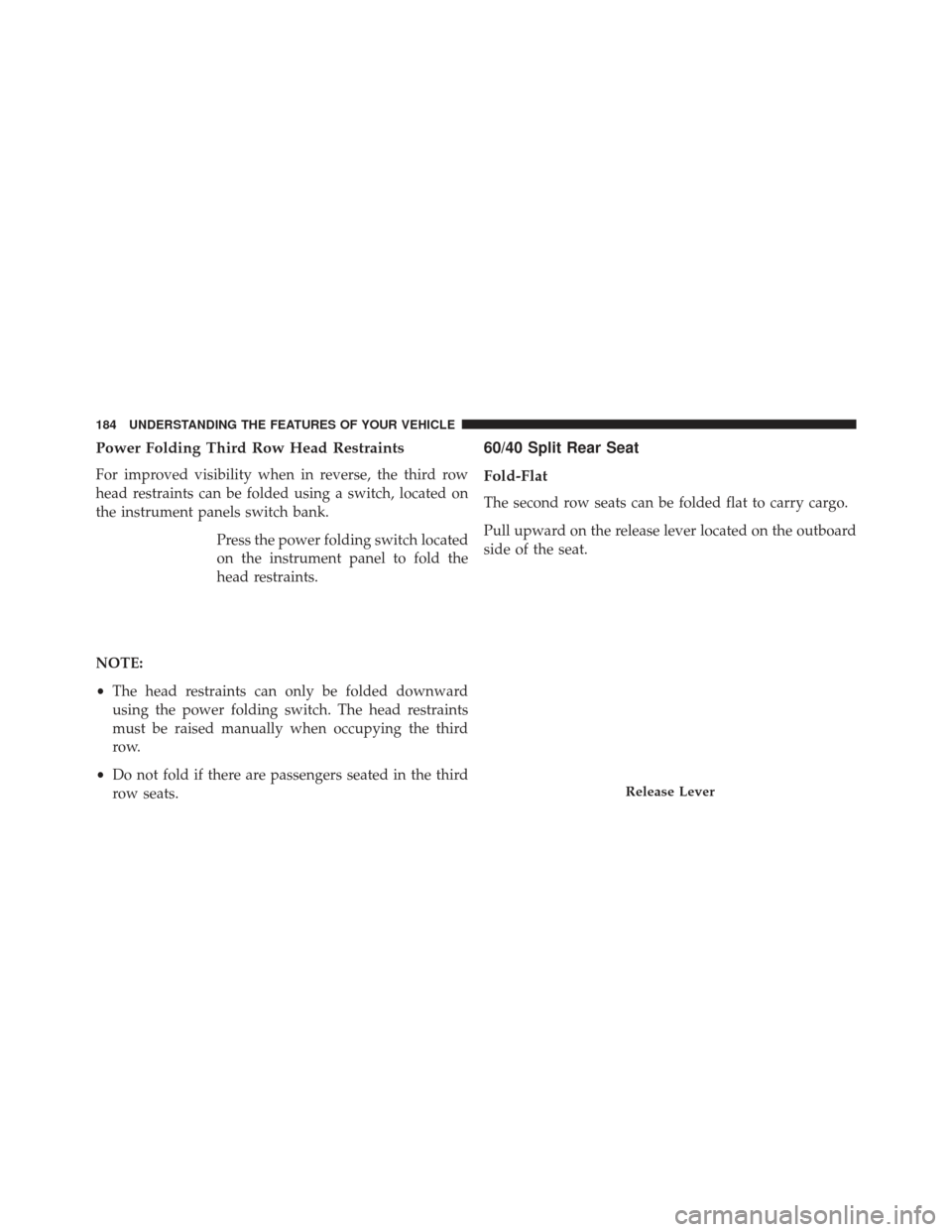
Power Folding Third Row Head Restraints
For improved visibility when in reverse, the third row
head restraints can be folded using a switch, located on
the instrument panels switch bank.Press the power folding switch located
on the instrument panel to fold the
head restraints.
NOTE:
• The head restraints can only be folded downward
using the power folding switch. The head restraints
must be raised manually when occupying the third
row.
• Do not fold if there are passengers seated in the third
row seats.
60/40 Split Rear Seat
Fold-Flat
The second row seats can be folded flat to carry cargo.
Pull upward on the release lever located on the outboard
side of the seat.
Release Lever
184 UNDERSTANDING THE FEATURES OF YOUR VEHICLE
Page 202 of 699
LIGHTS
Headlight Switch
The headlight switch is located on the left side of the
instrument panel, next to the steering wheel. The head-
light switch controls the operation of the headlights,
parking lights, instrument panel lights, cargo lights and
fog lights (if equipped).To turn on the headlights, rotate the headlight
switch clockwise. When the headlight switch is
on the parking lights, taillights, license plate
light and instrument panel lights are also
turned on. To turn off the headlights, rotate the headlight
switch back to the O (Off) position.
Headlight Switch
200 UNDERSTANDING THE FEATURES OF YOUR VEHICLE
Page 203 of 699
NOTE:
•Your vehicle is equipped with plastic headlight and
fog light (if equipped) lenses that are lighter and less
susceptible to stone breakage than glass lights. Plastic
is not as scratch resistant as glass and therefore differ-
ent lens cleaning procedures must be followed.
• To minimize the possibility of scratching the lenses
and reducing light output, avoid wiping with a dry
cloth. To remove road dirt, wash with a mild soap
solution followed by rinsing.
CAUTION!
Do not use abrasive cleaning components, solvents,
steel wool or other abrasive materials to clean the
lenses.
Automatic Headlights — If Equipped
This system automatically turns the headlights on or off
according to ambient light levels. To turn the system on,
rotate the headlight switch to the A (AUTO) position.
When the system is on, the Headlight Delay feature is
also on. This means the headlights will stay on for up to
90 seconds after you turn the ignition switch to the OFF
position. To turn the automatic headlights off, turn the
headlight switch out of the AUTO position.
NOTE: The engine must be running before the head-
lights will turn on in the Automatic Mode.
Headlights On Automatically With Wipers
If your vehicle is equipped with Automatic Headlights, it
also has this customer-programmable feature. When
your headlights are in the automatic mode and the
engine is running, they will automatically turn on when
the wiper system is on. Refer to “Electronic Vehicle
3
UNDERSTANDING THE FEATURES OF YOUR VEHICLE 201
Page 204 of 699
Information Center (EVIC)/Customer-Programmable
Features” in “Understanding Your Instrument Panel” for
further information.
If your vehicle is equipped with a “Rain Sensitive Wiper
System” and it is activated, the headlights will automati-
cally turn on after the wipers complete five wipe cycles
within approximately one minute, and they will turn off
approximately four minutes after the wipers completely
stop. Refer to “Windshield Wipers and Washers” in this
section for further information.
NOTE:When your headlights come on during the day-
time, the instrument panel lights will automatically dim
to the lower nighttime intensity. Refer to “Lights” in this
section for further information.SmartBeam™ — If Equipped
The SmartBeam™ system provides increased forward
lighting at night by automating high beam control
through the use of a digital camera mounted on the
inside rearview mirror. This camera detects vehicle spe-
cific light and automatically switches from high beams to
low beams until the approaching vehicle is out of view.
NOTE:
• If the windshield or SmartBeam™ mirror is replaced,
the SmartBeam™ mirror must be re-aimed to ensure
proper performance. See your local authorized dealer.
• Broken, muddy, or obstructed headlights and taillights
of vehicles in the field of view will cause headlights to
remain on longer (closer to the vehicle). Also, dirt, film,
and other obstructions (sticker, toll box, etc.) on the
windshield or camera lens will cause the system to
function improperly.
202 UNDERSTANDING THE FEATURES OF YOUR VEHICLE
Page 205 of 699
To Activate
1. Enable the Automatic High Beams. Refer to “Elec-tronic Vehicle Information Center (EVIC)/Customer-
Programmable Features” in “Understanding Your In-
strument Panel” for further information.
2. Turn the headlight switch to the AUTO headlight position.
3. Push the multifunction lever away from you (toward front of vehicle) to engage the high beam mode.
NOTE: This system will not activate until the vehicle is
at or above 20 mph (32 km/h).
To Deactivate
1. Pull the multifunction lever toward you (or rearward in car) to manually deactivate the system (normal
operation of low beams). 2. Push back on the multifunction lever once again to
reactivate the system.
Daytime Running Lights — If Equipped
The Daytime Running Lights (low intensity) come on
whenever the engine is running, and the transmission is
not in the PARK position. The lights will remain on until
the ignition is switched to the OFF or ACC position or the
parking brake is engaged. The headlight switch must be
used for normal nighttime driving.
Headlight Delay
To aid in your exit, your vehicle is equipped with a
headlight delay that will leave the headlights on for
approximately 90 seconds. This delay is initiated when
the ignition is turned OFF while the headlight switch is
on, and then the headlight switch is cycled off. Headlight
delay can be cancelled by either turning the headlight
switch on then off, or by turning the ignition ON.
3
UNDERSTANDING THE FEATURES OF YOUR VEHICLE 203
Page 206 of 699
The headlight delay time is programmable on vehicles
equipped with an Electronic Vehicle Information Center
(EVIC). Refer to “Electronic Vehicle Information Center
(EVIC)/Customer-Programmable Features” in “Under-
standing Your Instrument Panel” for further information.
Parking Lights And Panel Lights
To turn on the parking lights and instrument
panel lights, rotate the headlight switch clockwise.
To turn off the parking lights, rotate the headlight switch
back to the O (Off) position.
Fog Lights — If Equipped
The fog lights are turned on by rotating the headlight
switch to the parking light or headlight position and
pushing in the headlight rotary control. The fog lights will operate only when the parking lights
are on or when the vehicle headlights are on low beam.
An indicator light located in the instrument cluster will
illuminate when the fog lights are on. The fog lights will
Fog Light Operation
204 UNDERSTANDING THE FEATURES OF YOUR VEHICLE