instrument panel DODGE DURANGO 2015 3.G Owners Manual
[x] Cancel search | Manufacturer: DODGE, Model Year: 2015, Model line: DURANGO, Model: DODGE DURANGO 2015 3.GPages: 689, PDF Size: 20.05 MB
Page 450 of 689
NOTE:If shift conditions/interlocks are not met, a “To
Tow Vehicle Safely, Read Neutral Shift Procedure in
Owners Manual” message will flash from the Driver
Information Display (DID). Refer to “Driver Information
Display (DID)” in “Understanding Your Instrument
Panel” for further information.
ON-ROAD DRIVING TIPS
Utility vehicles have higher ground clearance and a
narrower track to make them capable of performing in a
wide variety of off-road applications. Specific design
characteristics give them a higher center of gravity than
ordinary cars.
An advantage of the higher ground clearance is a better
view of the road, allowing you to anticipate problems.
They are not designed for cornering at the same speeds as
conventional two-wheel drive vehicles any more than
low-slung sports cars are designed to perform satisfacto-
rily in off-road conditions. If at all possible, avoid sharp
turns or abrupt maneuvers. As with other vehicles of this
type, failure to operate this vehicle correctly may result in
loss of control or vehicle rollover.
OFF-ROAD DRIVING TIPS
When To Use LOW Range — If Equipped
When off-road driving, shift to LOW for additional
traction. This range should be limited to extreme situa-
tions such as deep snow, mud, or sand where additional
low speed pulling power is needed. Vehicle speeds in
excess of 25 mph (40 km/h) should be avoided when in
LOW range.
448 STARTING AND OPERATING
Page 456 of 689
If the “SERVICE POWER STEERING” message
and a flashing icon are displayed on the DID
screen, it indicates that the vehicle needs to be
taken to the dealer for service. It is likely the
vehicle has lost power steering assistance. Refer to
“Driver Information Display (DID)” in “Understanding
Your Instrument Panel” for further information.
If the “POWER STEERING HOT” message and an icon
are displayed on the DID screen, it indicates that extreme
steering maneuvers may have occurred, which caused an
over temperature condition in the power steering system.
You will lose power steering assistance momentarily
until the over temperature condition no longer exists.
Once driving conditions are safe, then pull over and let
vehicle idle for a few moments until the light turns off.
Refer to “Driver Information Display (DID)” in “Under-
standing Your Instrument Panel” for further information.
NOTE:
•Even if power steering assistance is no longer opera-
tional, it is still possible to steer the vehicle. Under
these conditions there will be a substantial increase in
steering effort, especially at very low vehicle speeds
and during parking maneuvers.
•If the condition persists, see your authorized dealer for
service.
5.7L Engine
The standard power steering system will give you good
vehicle response and increased ease of maneuverability
in tight spaces. The system will provide mechanical
steering capability if power assist is lost.
454 STARTING AND OPERATING
Page 459 of 689
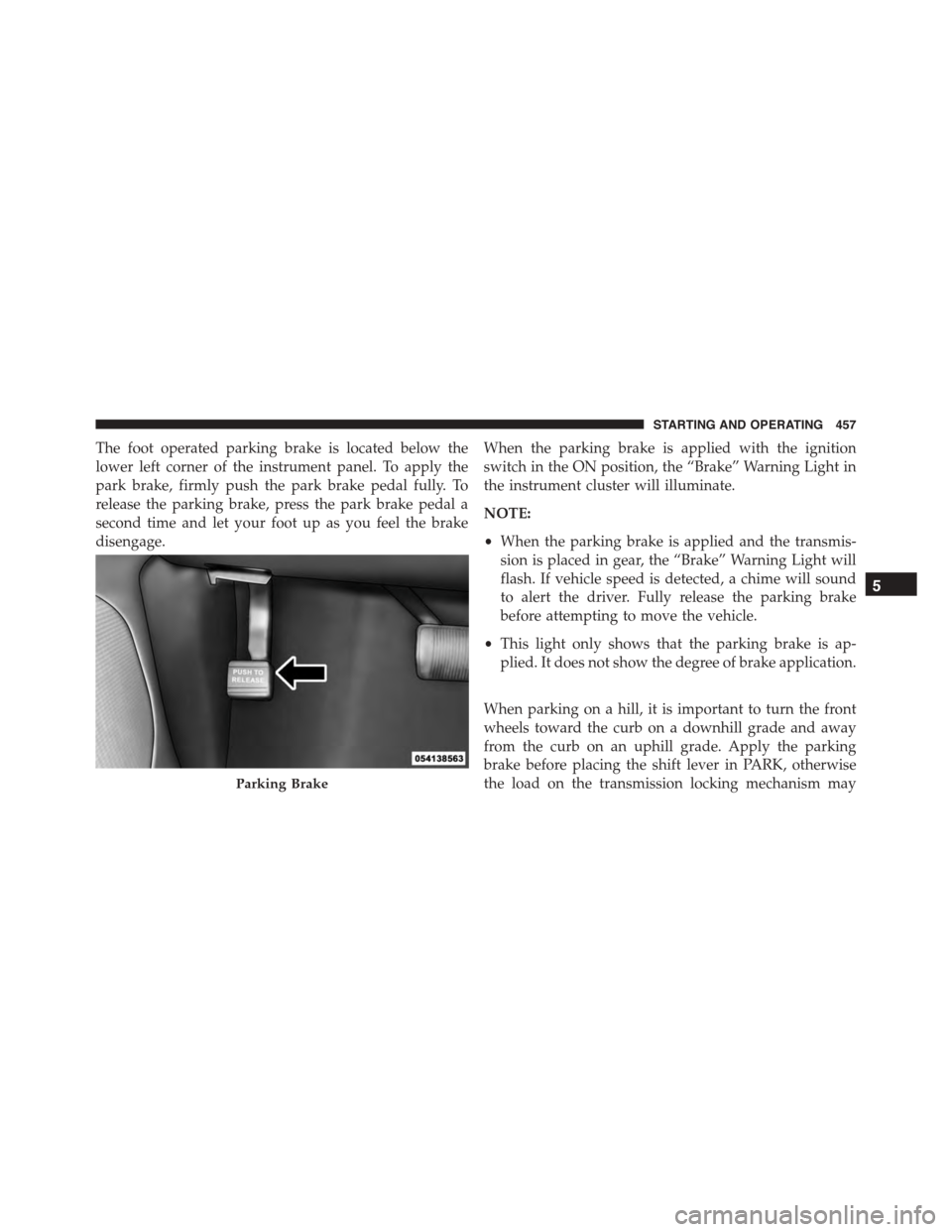
The foot operated parking brake is located below the
lower left corner of the instrument panel. To apply the
park brake, firmly push the park brake pedal fully. To
release the parking brake, press the park brake pedal a
second time and let your foot up as you feel the brake
disengage.
When the parking brake is applied with the ignition
switch in the ON position, the “Brake” Warning Light in
the instrument cluster will illuminate.
NOTE:
•When the parking brake is applied and the transmis-
sion is placed in gear, the “Brake” Warning Light will
flash. If vehicle speed is detected, a chime will sound
to alert the driver. Fully release the parking brake
before attempting to move the vehicle.
•This light only shows that the parking brake is ap-
plied. It does not show the degree of brake application.
When parking on a hill, it is important to turn the front
wheels toward the curb on a downhill grade and away
from the curb on an uphill grade. Apply the parking
brake before placing the shift lever in PARK, otherwise
the load on the transmission locking mechanism mayParking Brake
5
STARTING AND OPERATING 457
Page 471 of 689
WARNING!(Continued)
•HSA is not a parking brake. Always apply the
parking brake fully when leaving your vehicle.
Also, be certain to leave the transmission in PARK.
Failure to follow these warnings may cause the
vehicle to roll down the incline and could collide
with another vehicle, object or person, and cause
serious or fatal injury. Always remember to use the
parking brake while parking on a hill and that the
driver is responsible for braking the vehicle.
HSA Off
If you wish to turn off the HSA system, it can be done
using the Uconnect® Settings. Refer to “Uconnect® Set-
tings” in “Understanding Your Instrument Panel” for
further information.
Ready Alert Braking
Ready Alert Braking may reduce the time required to
reach full braking during emergency braking situations.
It anticipates when an emergency braking situation may
occur by monitoring how fast the throttle is released by
the driver. When the throttle is released very quickly,
Ready Alert Braking applies a small amount of brake
pressure. This brake pressure will not be noticed by the
driver. The brake system uses this brake pressure to allow
a fast brake response if the driver applies the brakes.
5
STARTING AND OPERATING 469
Page 505 of 689
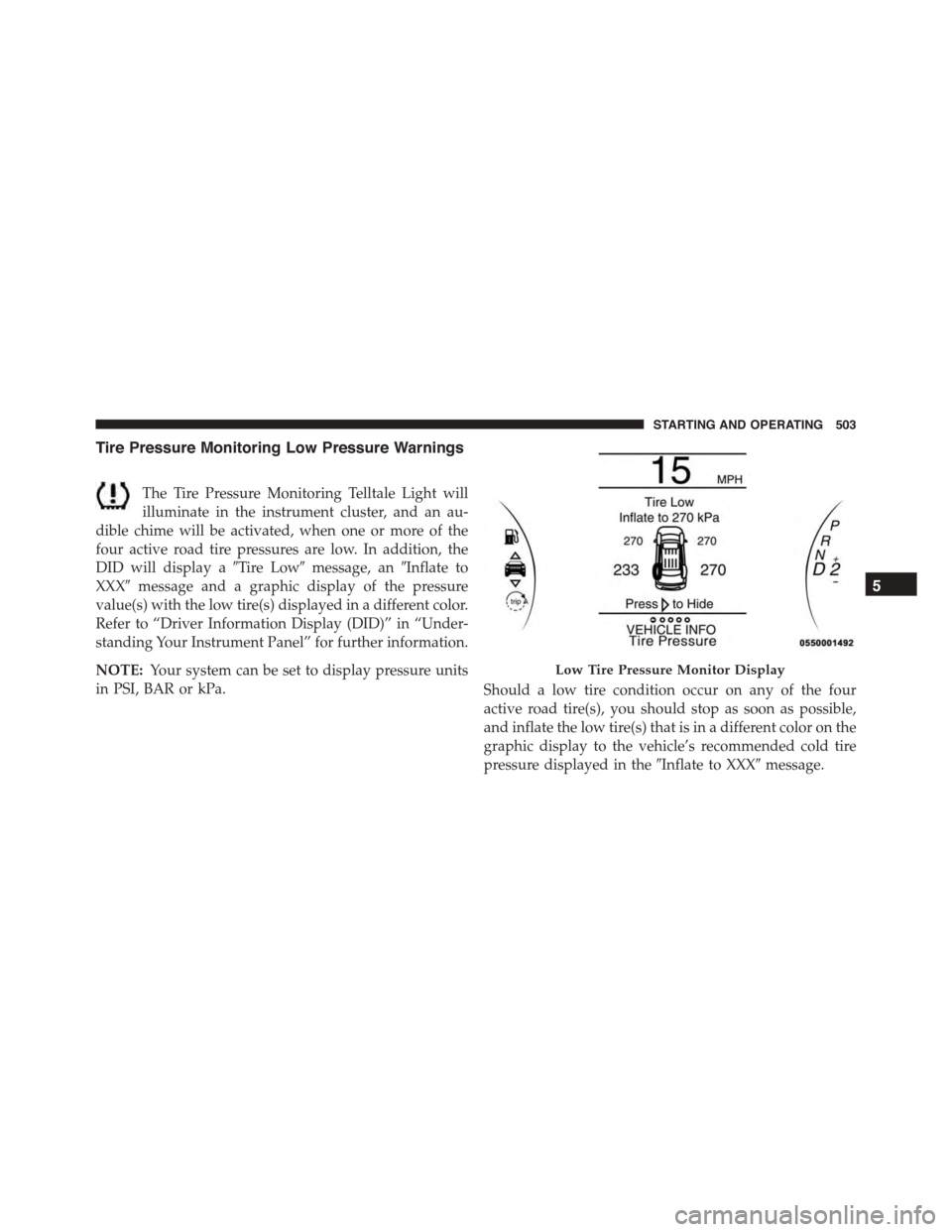
Tire Pressure Monitoring Low Pressure Warnings
The Tire Pressure Monitoring Telltale Light will
illuminate in the instrument cluster, and an au-
dible chime will be activated, when one or more of the
four active road tire pressures are low. In addition, the
DID will display a#Tire Low#message, an#Inflate to
XXX#message and a graphic display of the pressure
value(s) with the low tire(s) displayed in a different color.
Refer to “Driver Information Display (DID)” in “Under-
standing Your Instrument Panel” for further information.
NOTE:Your system can be set to display pressure units
in PSI, BAR or kPa.Should a low tire condition occur on any of the four
active road tire(s), you should stop as soon as possible,
and inflate the low tire(s) that is in a different color on the
graphic display to the vehicle’s recommended cold tire
pressure displayed in the#Inflate to XXX#message.
Low Tire Pressure Monitor Display
5
STARTING AND OPERATING 503
Page 543 of 689
CAUTION!
It is necessary to follow these steps to be certain that
the transfer case is fully in NEUTRAL (N) before
recreational towing to prevent damage to internal
parts.
1. Bring the vehicle to a complete stop, with the engine
running.
2. Press and hold the brake pedal.
3. Shift the transmission into NEUTRAL.
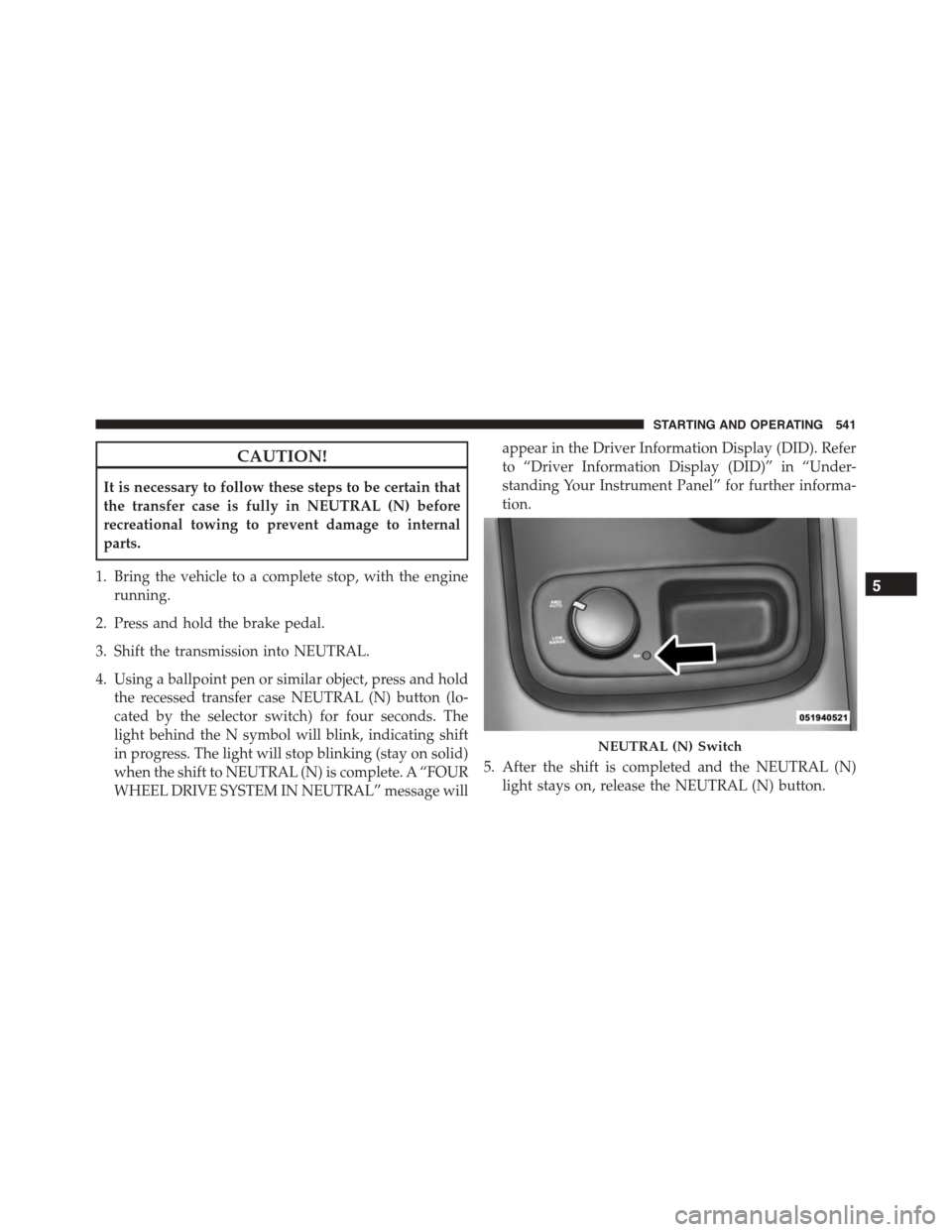
4. Using a ballpoint pen or similar object, press and hold
the recessed transfer case NEUTRAL (N) button (lo-
cated by the selector switch) for four seconds. The
light behind the N symbol will blink, indicating shift
in progress. The light will stop blinking (stay on solid)
when the shift to NEUTRAL (N) is complete. A “FOUR
WHEEL DRIVE SYSTEM IN NEUTRAL” message will
appear in the Driver Information Display (DID). Refer
to “Driver Information Display (DID)” in “Under-
standing Your Instrument Panel” for further informa-
tion.
5. After the shift is completed and the NEUTRAL (N)
light stays on, release the NEUTRAL (N) button.
NEUTRAL (N) Switch
5
STARTING AND OPERATING 541
Page 634 of 689
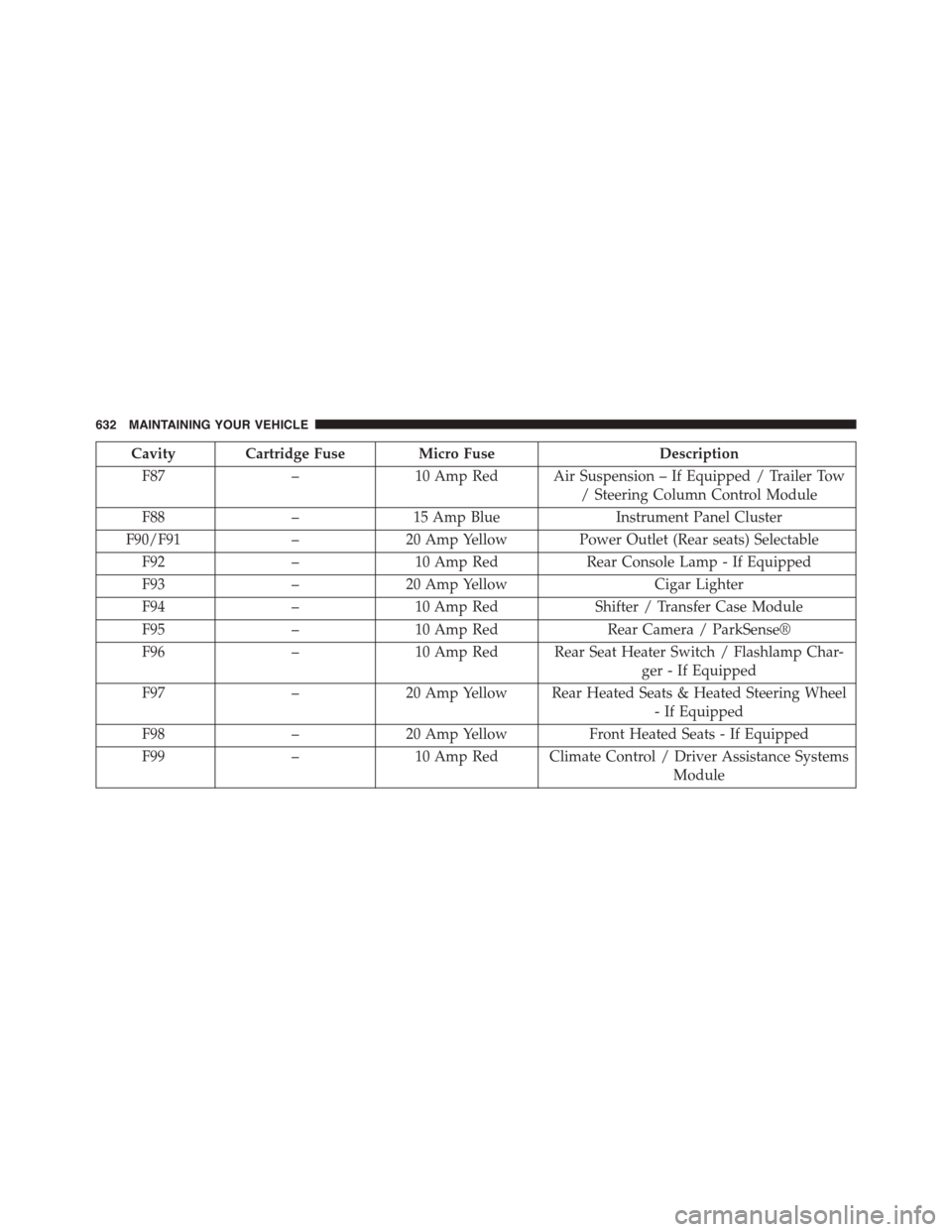
Cavity Cartridge Fuse Micro FuseDescription
F87–10 Amp Red Air Suspension – If Equipped / Trailer Tow
/ Steering Column Control Module
F88–15 Amp BlueInstrument Panel Cluster
F90/F91–20 Amp Yellow Power Outlet (Rear seats) Selectable
F92–10 Amp RedRear Console Lamp - If Equipped
F93–20 Amp YellowCigar Lighter
F94–10 Amp RedShifter / Transfer Case Module
F95–10 Amp RedRear Camera / ParkSense®
F96–10 Amp Red Rear Seat Heater Switch / Flashlamp Char-
ger - If Equipped
F97–20 Amp Yellow Rear Heated Seats & Heated Steering Wheel
- If Equipped
F98–20 Amp YellowFront Heated Seats - If Equipped
F99–10 Amp Red Climate Control / Driver Assistance Systems
Module
632 MAINTAINING YOUR VEHICLE
Page 635 of 689
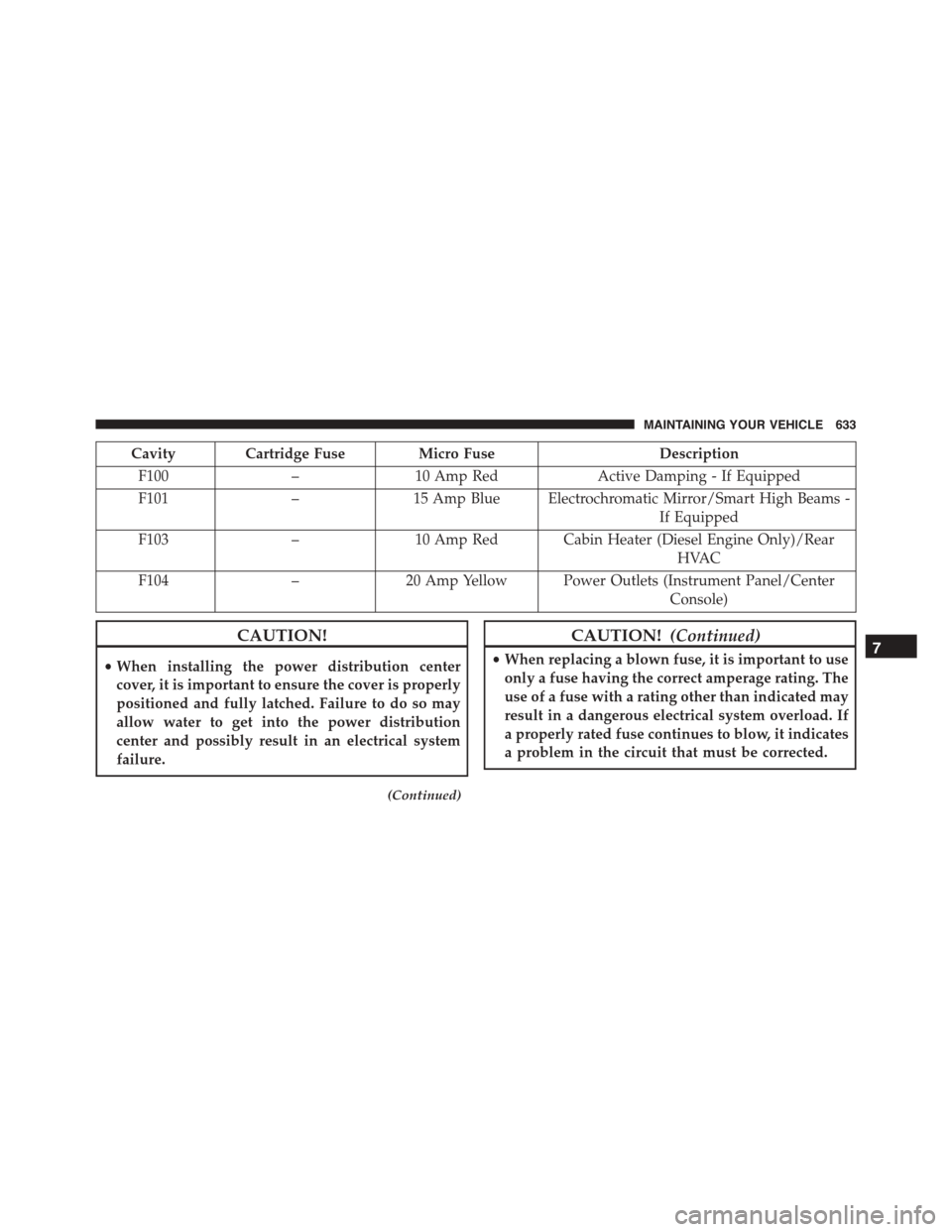
Cavity Cartridge Fuse Micro FuseDescription
F100–10 Amp RedActive Damping - If Equipped
F101–15 Amp Blue Electrochromatic Mirror/Smart High Beams -
If Equipped
F103–10 Amp Red Cabin Heater (Diesel Engine Only)/Rear
HVAC
F104–20 Amp Yellow Power Outlets (Instrument Panel/Center
Console)
CAUTION!
•When installing the power distribution center
cover, it is important to ensure the cover is properly
positioned and fully latched. Failure to do so may
allow water to get into the power distribution
center and possibly result in an electrical system
failure.
(Continued)
CAUTION!(Continued)
•When replacing a blown fuse, it is important to use
only a fuse having the correct amperage rating. The
use of a fuse with a rating other than indicated may
result in a dangerous electrical system overload. If
a properly rated fuse continues to blow, it indicates
a problem in the circuit that must be corrected.
7
MAINTAINING YOUR VEHICLE 633
Page 676 of 689
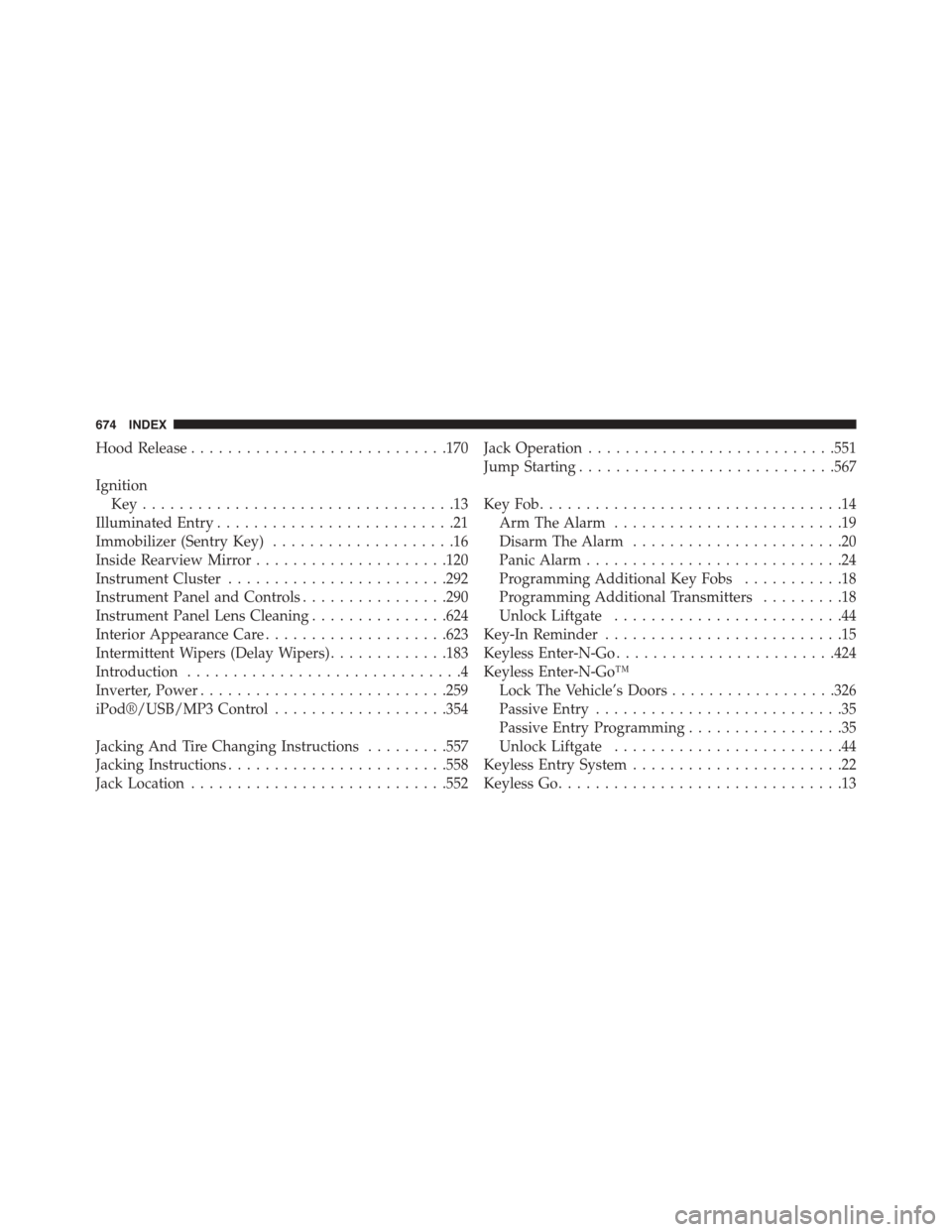
Hood Release............................170
Ignition
Key . . . . . . . . . . . . . . . . . . . . . . . . . . . . . . . . . .13
Illuminated Entry..........................21
Immobilizer (Sentry Key)....................16
Inside Rearview Mirror.....................120
Instrument Cluster........................292
Instrument Panel and Controls................290
Instrument Panel Lens Cleaning...............624
Interior Appearance Care....................623
Intermittent Wipers (Delay Wipers).............183
Introduction..............................4
Inverter, Power...........................259
iPod®/USB/MP3 Control...................354
Jacking And Tire Changing Instructions.........557
Jacking Instructions........................558
Jack Location............................552
Jack Operation...........................551
Jump Starting............................567
Key Fob . . . . . . . . . . . . . . . . . . . . . . . . . . . . . . . . .14
Arm The Alarm.........................19
Disarm The Alarm.......................20
Panic Alarm............................24
Programming Additional Key Fobs...........18
Programming Additional Transmitters.........18
Unlock Liftgate.........................44
Key-In Reminder..........................15
Keyless Enter-N-Go........................424
Keyless Enter-N-Go™
Lock The Vehicle’s Doors..................326
Passive Entry...........................35
Passive Entry Programming.................35
Unlock Liftgate.........................44
Keyless Entry System.......................22
Keyless Go...............................13
674 INDEX