ignition DODGE DURANGO 2015 3.G Owner's Manual
[x] Cancel search | Manufacturer: DODGE, Model Year: 2015, Model line: DURANGO, Model: DODGE DURANGO 2015 3.GPages: 689, PDF Size: 20.05 MB
Page 80 of 689
System Reset Procedure
In order to reset the Enhanced Accident Response System
functions after an event, the ignition switch must be
changed from ignition START or ON/RUN to ignition
OFF.
Air Bag Warning Light
The air bags must be ready to inflate for your
protection in a collision. The Occupant Re-
straint Controller (ORC) monitors the internal
circuits and interconnecting wiring associated
with air bag system electrical components.
The ORC monitors the readiness of the electronic parts of
the air bag system whenever the ignition is in the START
or ON/RUN position. If the ignition is in the OFF
position or in the ACC position, the air bag system is not
on and the air bags will not inflate.
The ORC contains a backup power supply system that
may deploy the air bags even if the battery loses power or
it becomes disconnected prior to deployment.
The ORC turns on the Air Bag Warning Light in the
instrument panel for approximately four to eight seconds
for a self-check when the ignition is first placed in the
ON/RUN position. After the self-check, the Air Bag
Warning Light will turn off. If the ORC detects a mal-
function in any part of the system, it turns on the Air Bag
Warning Light, either momentarily or continuously. A
single chime will sound to alert you if the light comes on
again after initial startup.
The ORC also includes diagnostics that will illuminate
the instrument panel Air Bag Warning Light if a malfunc-
tion is detected that could affect the air bag system. The
diagnostics also record the nature of the malfunction.
While the air bag system is designed to be maintenance
78 THINGS TO KNOW BEFORE STARTING YOUR VEHICLE
Page 81 of 689
free, if any of the following occurs, have an authorized
dealer service the air bag system immediately.
•The Air Bag Warning Light does not come on during
the four to eight seconds when the ignition is first
placed in the ON/RUN position.
•The Air Bag Warning Light remains on after the four to
eight-second interval.
•The Air Bag Warning Light comes on intermittently or
remains on while driving.
NOTE:If the speedometer, tachometer, or any engine
related gauges are not working, the Occupant Restraint
Controller (ORC) may also be disabled. In this condition
the air bags may not be ready to inflate for your protec-
tion. Have an authorized dealer service the air bag
system immediately.
WARNING!
Ignoring the Air Bag Warning Light in your instru-
ment panel could mean you won’t have the air bags
to protect you in a collision. If the light does not come
on as a bulb check when the ignition is first placed in
the on position, and stays on after you start the
vehicle, or if it comes on as you drive, have an
authorized dealer service the air bag system immedi-
ately.
2
THINGS TO KNOW BEFORE STARTING YOUR VEHICLE 79
Page 112 of 689
Whenever a change is noticed in the sound of the exhaust
system, when exhaust fumes can be detected inside the
vehicle, or when the underside or rear of the vehicle is
damaged, have a competent mechanic inspect the com-
plete exhaust system and adjacent body areas for broken,
damaged, deteriorated, or mispositioned parts. Open
seams or loose connections could permit exhaust fumes
to seep into the passenger compartment. In addition,
inspect the exhaust system each time the vehicle is raised
for lubrication or oil change. Replace as required.
Safety Checks You Should Make Inside The
Vehicle
Seat Belts
Inspect the seat belt system periodically, checking for
cuts, frays, and loose parts. Damaged parts must be
replaced immediately. Do not disassemble or modify the
system.
Front seat belt assemblies must be replaced after a
collision. Rear seat belt assemblies must be replaced after
a collision if they have been damaged (i.e., bent retractor,
torn webbing, etc.). If there is any question regarding seat
belt or retractor condition, replace the seat belt.
Air Bag Warning Light
The light should come on and remain on for
four to eight seconds as a bulb check when the
ignition switch is first turned ON. If the light is
not lit during starting, see your authorized
dealer. If the light stays on, flickers, or comes on while
driving, have the system checked by an authorized
dealer.
Defroster
Check operation by selecting the defrost mode and place
the blower control on high speed. You should be able to
11 0 T H I N G S TO K N O W B E F O R E S TA R T I N G Y O U R V E H I C L E
Page 120 of 689

▫Troubleshooting Tips...................249
▫General Information....................250
!POWER SUNROOF — IF EQUIPPED........251
▫Opening Sunroof — Express..............252
▫Opening Sunroof — Manual Mode.........252
▫Closing Sunroof — Express...............252
▫Closing Sunroof — Manual Mode..........252
▫Pinch Protect Feature...................253
▫Venting Sunroof — Express..............253
▫Sunshade Operation....................253
▫Wind Buffeting.......................253
▫Sunroof Maintenance...................254
▫Ignition OFF Operation.................254
!ELECTRICAL POWER OUTLETS...........254
!POWER INVERTER — IF EQUIPPED........259
!CUPHOLDERS........................261
▫Front Seat Cupholders..................261
▫Rear Cupholders.....................261
!STORAGE............................263
▫Glove Compartment...................263
▫Door Storage.........................264
▫Front Center Console...................264
▫Rear Full Center Console — If Equipped.....265
▫Rear Mini Center Console — If Equipped . . . .269
!CARGO AREA FEATURES................269
▫Rechargeable Flashlight.................269
11 8 U N D E R S TA N D I N G T H E F E AT U R E S O F Y O U R V E H I C L E
Page 127 of 689
WARNING!(Continued)
•The 9-1-1 Call system is embedded into the vehi-
cle’s electrical system. Do not add aftermarket
electrical equipment to the vehicle’s electrical sys-
tem. This may prevent your vehicle from sending a
signal to initiate an emergency call. To avoid inter-
ference that can cause the 9-1-1 Call system to fail,
never add aftermarket equipment (e.g., two-way
mobile radio, CB radio, data recorder, etc.) to your
vehicle’s electrical system or modify the antennas
on your vehicle. IF YOUR VEHICLE LOSES BAT-
TERY POWER FOR ANY REASON (INCLUDING
DURING OR AFTER AN ACCIDENT), THE
UCONNECT FEATURES, APPS AND SERVICES,
AMONG OTHERS, WILL NOT OPERATE.
(Continued)
WARNING!(Continued)
•Modifications to any part of the 9-1-1 Call system
could cause the air bag system to fail when you
need it. You could be injured if the air bag system
is not there to help protect you.
9-1-1 Call System Limitations
Vehicles sold in Canada and MexicoDO NOThave 9-1-1
Call system capabilities.
9-1-1 or other emergency line operators in Canada and
Mexico may not answer or respond to 9-1-1 system calls.
If the 9-1-1 Call system detects a malfunction, any of the
following may occur at the time the malfunction is
detected, and at the beginning of each ignition cycle:
•The Rearview Mirror light located between the Assist
and 9-1-1 buttons will continuously be illuminated
red.
3
UNDERSTANDING THE FEATURES OF YOUR VEHICLE 125
Page 128 of 689
•The Phone Screen will display the following message
“Vehicle phone requires service. Please contact your
dealer.”
•An In-Vehicle Audio message will state “Vehicle phone
requires service. Please contact your dealer.”
WARNING!
•Ignoring the Rearview Mirror light could mean you
will not have 9-1-1 Call services. If the Rearview
Mirror light is illuminated, have an authorized
dealer service the 9-1-1 Call system immediately.
(Continued)
WARNING!(Continued)
•The Occupant Restraint Control module turns on
the Air Bag Warning Light on the instrument panel
if a malfunction in any part of the system is
detected. If the Air Bag Warning Light is illumi-
nated, the air bag system may not be working
properly and the 9-1-1 system may not be able to
send a signal to a 9-1-1 operator. If the Air Bag
Warning Light is illuminated, have an authorized
dealer service the ORC system immediately.
Even if the 9-1-1 Call system is fully functional, factors
beyond Chrysler Group LLC’s control may prevent or
stop the 9-1-1 Call system operation. These include, but
are not limited to, the following factors:
•Delayed accessories mode is active.
•The ignition is in the OFF position.
126 UNDERSTANDING THE FEATURES OF YOUR VEHICLE
Page 167 of 689
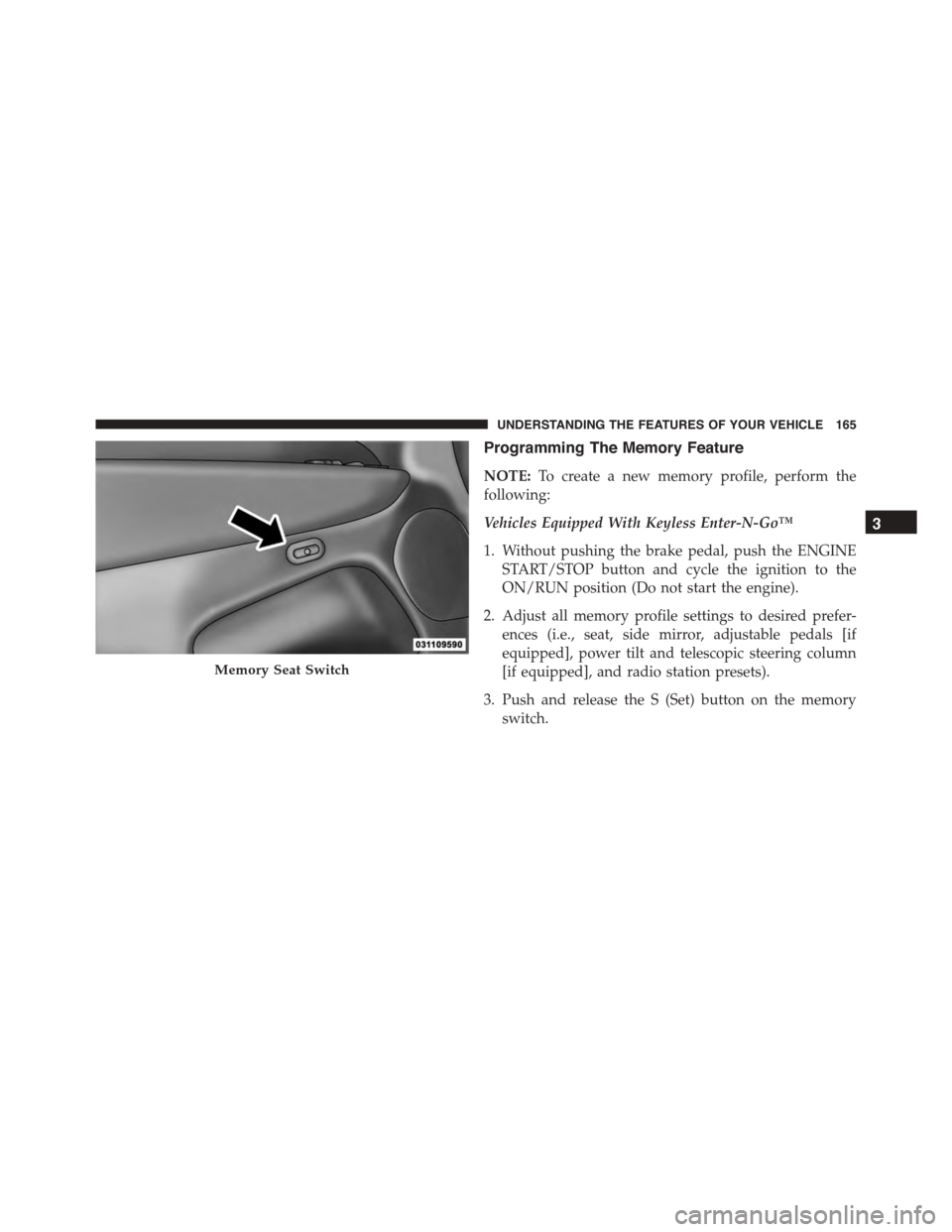
Programming The Memory Feature
NOTE:To create a new memory profile, perform the
following:
Vehicles Equipped With Keyless Enter-N-Go™
1. Without pushing the brake pedal, push the ENGINE
START/STOP button and cycle the ignition to the
ON/RUN position (Do not start the engine).
2. Adjust all memory profile settings to desired prefer-
ences (i.e., seat, side mirror, adjustable pedals [if
equipped], power tilt and telescopic steering column
[if equipped], and radio station presets).
3. Push and release the S (Set) button on the memory
switch.
Memory Seat Switch
3
UNDERSTANDING THE FEATURES OF YOUR VEHICLE 165
Page 168 of 689
4. Within five seconds, push and release either of the
memory buttons (1) or (2). The Driver Information
Display (DID) will display which memory position
has been set.
Vehicles Not Equipped With Keyless Enter-N-Go™
1. Insert the ignition key fob, and turn the ignition switch
to the ON/RUN position.
2. Adjust all memory profile settings to desired prefer-
ences (i.e., seat, side mirror, adjustable pedals [if
equipped], power tilt and telescopic steering column
[if equipped], and radio station presets).
3. Push and release the S (Set) button on the memory
switch.
4. Within five seconds, push and release either of the
memory buttons (1) or (2). The Driver Information
Display (DID) will display which memory position
has been set.
NOTE:
•Memory profiles can be set without the vehicle in
PARK, but the vehicle must be in PARK to recall a
memory profile.
•The Recall Memory with the “Memory To FOB” fea-
ture can be enabled through the Uconnect® system
screen. Refer to “Customer- Programmable Features —
Uconnect® Access 8.4 Settings ” in “Understanding
Your Instrument Panel” for further information.
Linking And Unlinking The Remote Keyless Entry
Transmitter To Memory
Your RKE transmitters can be programmed to recall one
of two pre-programmed memory profiles by pushng the
UNLOCK button on the RKE transmitter.
166 UNDERSTANDING THE FEATURES OF YOUR VEHICLE
Page 169 of 689
NOTE:Before programming your RKE transmitters you
must select the “Memory To FOB” feature through the
Uconnect® system screen. Refer to “Uconnect® Settings ”
in “Understanding Your Instrument Panel” for further
information.
To program your RKE transmitters, perform the follow-
ing:
1. Cycle the vehicles ignition to the OFF position.
2. Select a desired memory profile (1) or (2).
NOTE:If a memory profile has not already been set,
refer to#Programming The Memory Feature#in this
section for instructions on how to set a memory profile.
3. Once the profile has been recalled, push and release
the SET (S) button on the memory switch.
4. Within five seconds, push and release button (1) or (2)
accordingly. “Memory Profile Set” (1 or 2) will display
in the instrument cluster.
5. Push and release the LOCK button on the RKE trans-
mitter within 10 seconds.
NOTE:Your RKE transmitters can be unlinked to your
memory settings by pushing the SET (S) button, and
within 10 seconds, followed by pushing the UNLOCK
button on the RKE transmitter.
Memory Position Recall
NOTE:The vehicle must be in PARK to recall memory
positions. If a recall is attempted when the vehicle is not
in PARK, a message will be displayed in the Driver
Information Display (DID).
3
UNDERSTANDING THE FEATURES OF YOUR VEHICLE 167
Page 170 of 689

Driver One Memory Position Recall
•To recall the memory settings for driver one using the
memory switch, push MEMORY button number 1 on
the memory switch.
•To recall the memory settings for driver one using the
RKE transmitter, push the UNLOCK button on the
RKE transmitter linked to memory position 1.
Driver Two Memory Position Recall
•To recall the memory setting for driver two using the
memory switch, push MEMORY button number 2 on
the memory switch.
•To recall the memory settings for driver two using the
RKE transmitter, push the UNLOCK button on the
RKE transmitter linked to memory position 2.
A recall can be cancelled by pushing any of the MEMORY
buttons during a recall (S, 1, or 2). When a recall is
cancelled, the driver’s seat, and the power pedals (if
equipped) stop moving. A delay of one second will occur
before another recall can be selected.
Easy Entry/Exit Seat
This feature provides automatic driver seat positioning to
enhance driver mobility when entering and exiting the
vehicle.
The distance the driver seat moves depends on where
you have the driver seat positioned when you remove the
Key Fob from the ignition (or change the ignition to OFF,
for vehicles equipped with Keyless Enter-N-Go™).
•When you remove the Key Fob from the ignition (or
change the ignition to OFF, for vehicles equipped with
Keyless Enter-N-Go™), the driver seat will move
about 2.4 in (60 mm) rearward if the driver seat
position is greater than or equal to 2.7 in (67.7 mm)
168 UNDERSTANDING THE FEATURES OF YOUR VEHICLE