ignition DODGE DURANGO 2015 3.G Service Manual
[x] Cancel search | Manufacturer: DODGE, Model Year: 2015, Model line: DURANGO, Model: DODGE DURANGO 2015 3.GPages: 689, PDF Size: 20.05 MB
Page 225 of 689
To Resume Speed
To resume a previously set speed, push the RES button
and release. Resume can be used at any speed above
20 mph (32 km/h).
To Turn Off
The system will turn off and erase the set speed in
memory if:
•The Normal (Fixed Speed) Electronic Speed Control
ON/OFF button is pushed.
•The ignition is turned off.
•You engage Four-Wheel Drive Low.
•The Adaptive Cruise Control (ACC) On/Off button is
pushed.
FORWARD COLLISION WARNING (FCW) WITH
MITIGATION — IF EQUIPPED
Forward Collision Warning (FCW) With Mitigation
Operation
The Forward Collision Warning (FCW) system with
mitigation provides the driver with audible warnings,
visual warnings (within the DID), and may apply a brake
jerk to warn the driver when it detects a potential frontal
collision. The warnings and limited braking are intended
to provide the driver with enough time to react, avoid or
mitigate the potential collision.
3
UNDERSTANDING THE FEATURES OF YOUR VEHICLE 223
Page 227 of 689
NOTE:
•The minimum speed for FCW activation is 5 mph
(8 km/h).
•The FCW alerts may be triggered on objects other than
vehicles such as guard rails or sign posts based on the
course prediction. This is expected and is a part of
normal FCW activation and functionality.
•It is unsafe to test the FCW system. To prevent such
misuse of the system, after four Active Braking events
within an ignition cycle, the Active Braking portion of
FCW will be deactivated until the next ignition cycle.
•The FCW system is intended for on-road use only. If
the vehicle is taken off-road, the FCW system should
be deactivated to prevent unnecessary warnings to the
surroundings. If the vehicle enters 4WD Low Range,
the FCW system will be automatically deactivated.
WARNING!
Forward Collision Warning (FCW) is not intended to
avoid a collision on its own, nor can FCW detect
every type of potential collision. The driver has the
responsibility to avoid a collision by controlling the
vehicle via braking and steering. Failure to follow
this warning could lead to serious injury or death.
Turning FCW ON Or OFF
NOTE:The default status of FCW is “On”, this allows
the system to warn you of a possible collision with the
vehicle in front of you.
The forward collision button is located on the switch
panel below the Uconnect® display.
To turn the FCW system OFF, push the forward collision
button once to turn the system OFF (led turns on).
3
UNDERSTANDING THE FEATURES OF YOUR VEHICLE 225
Page 228 of 689
To turn the FCW system back ON, push the forward
collision button again to turn the system ON (led turns
off).
Changing the FCW status to “Off” prevents the system
from warning you of a possible collision with the vehicle
in front of you.
Changing the Active Braking status to “Off” prevents the
system from providing limited autonomous braking, or
additional brake support if the driver is not braking
adequately in the event of a potential frontal collision.
NOTE:The FCW system state is kept in memory from
one ignition cycle to the next. If the system is turned OFF,
it will remain off when the vehicle is restarted.
Changing FCW And Active Braking Status
The FCW Sensitivity And Active Braking Settings are
programmable through the Uconnect® System. Refer to
“Uconnect® Settings” in “Understanding Your Instru-
ment Panel” for further information.
The default status of FCW is the “Far” setting and the
Active Braking is the “On” setting, this allows the system
to warn you of a possible collision with the vehicle in
front of you when you are farther away and it applies
limited braking. This gives you the most reaction time to
avoid a possible collision.
Changing the FCW status to the “Near” setting, allows
the system to warn you of a possible collision with the
vehicle in front of you when you are much closer. This
setting provides less reaction time than the “Far” setting,
which allows for a more dynamic driving experience.
226 UNDERSTANDING THE FEATURES OF YOUR VEHICLE
Page 229 of 689
NOTE:
•The system will retain the last setting selected by the
driver after ignition shut down.
•FCW may not react to irrelevant objects such as
overhead objects, ground reflections, objects not in the
path of the car, stationary objects that are far away,
oncoming traffic, or leading vehicles with the same or
higher rate of speed.
•FCW will be disabled like ACC, with the unavailable
screens.
FCW Limited Warning
If the DID displays “ACC/FCW Limited Functionality”
or “ACC/FCW Limited Functionality Clean Front Wind-
shield” momentarily, there may be a condition that limits
FCW functionality. Although the vehicle is still drivable
under normal conditions, the active braking may not be
fully available. Once the condition that limited the sys-
tem performance is no longer present, the system will
return to its full performance state. If the problem per-
sists, see your authorized dealer.
Service FCW Warning
If the system turns off, and the DID displays:
•ACC/FCW Unavailable Service Required
•Cruise/FCW Unavailable Service Required
This indicates there is an internal system fault. Although
the vehicle is still drivable under normal conditions, have
the system checked by an authorized dealer.
3
UNDERSTANDING THE FEATURES OF YOUR VEHICLE 227
Page 230 of 689
PARKSENSE® REAR PARK ASSIST — IF
EQUIPPED
The ParkSense® Rear Park Assist system provides visual
and audible indications of the distance between the rear
fascia and a detected obstacle when backing up, e.g.
during a parking maneuver. Refer to ParkSense® System
Usage Precautions for limitations of this system and
recommendations.
ParkSense® will retain the last system state (enabled or
disabled) from the last ignition cycle when the ignition is
changed to the ON/RUN position.
ParkSense® can be active only when the shift lever/gear
selector is in REVERSE. If ParkSense® is enabled at this
shift lever/gear selector position, the system will remain
active until the vehicle speed is increased to approxi-
mately 7 mph (11 km/h) or above. When in REVERSE
and above the system’s operating speed, a warning will
appear within the Driver Information Display (DID)
indicating the vehicle speed is too fast. The system will
become active again if the vehicle speed is decreased to
speeds less than approximately 6 mph (9 km/h).
ParkSense® Sensors
The four ParkSense® sensors, located in the rear fascia/
bumper, monitor the area behind the vehicle that is
within the sensors’ field of view. The sensors can detect
obstacles from approximately 12 in (30 cm) up to 79 in
(200 cm) from the rear fascia/bumper in the horizontal
direction, depending on the location, type and orienta-
tion of the obstacle.
228 UNDERSTANDING THE FEATURES OF YOUR VEHICLE
Page 235 of 689
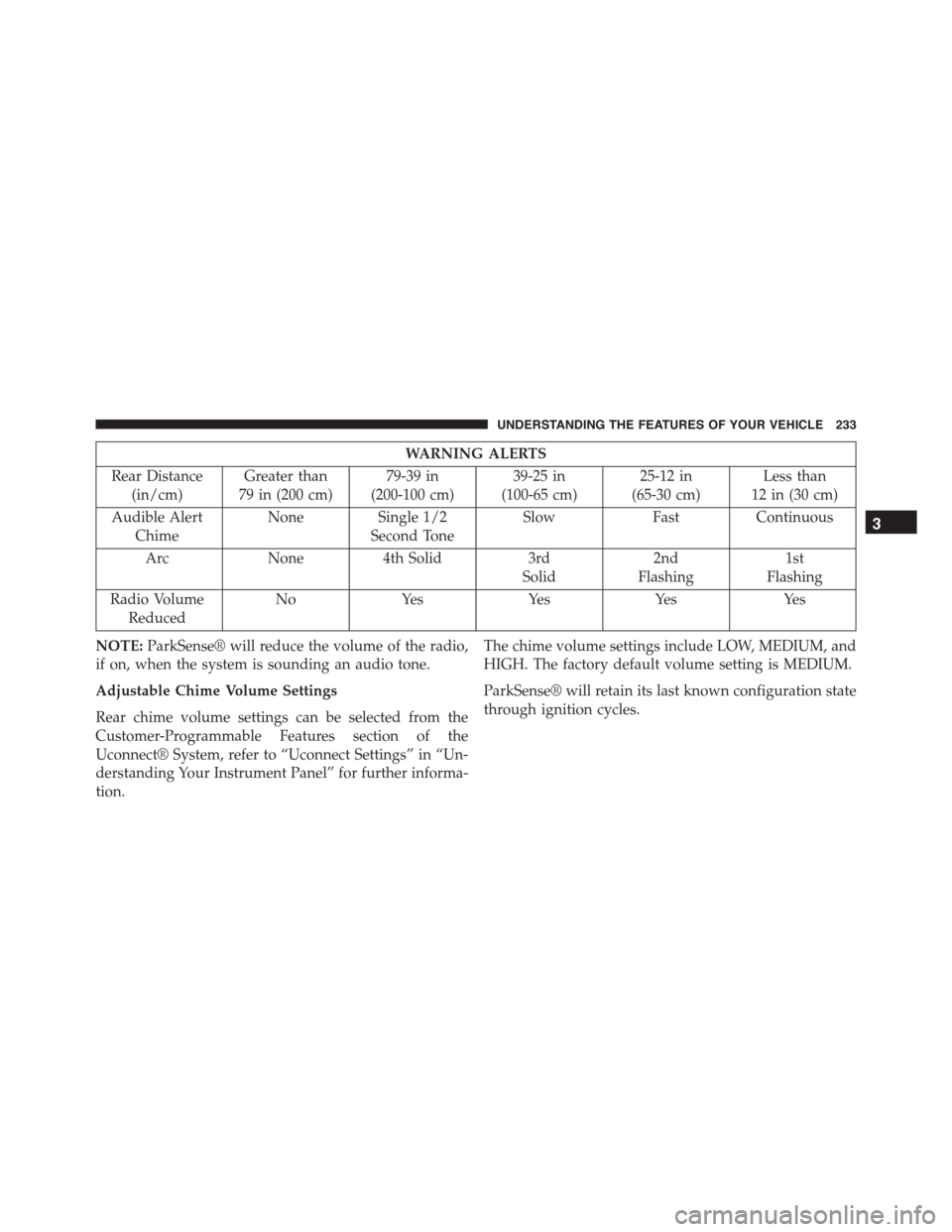
WARNING ALERTS
Rear Distance
(in/cm)
Greater than
79 in (200 cm)
79-39 in
(200-100 cm)
39-25 in
(100-65 cm)
25-12 in
(65-30 cm)
Less than
12 in (30 cm)
Audible Alert
Chime
NoneSingle 1/2
Second Tone
SlowFastContinuous
ArcNone4th Solid3rd
Solid
2nd
Flashing
1st
Flashing
Radio Volume
Reduced
NoYesYesYesYes
NOTE:ParkSense® will reduce the volume of the radio,
if on, when the system is sounding an audio tone.
Adjustable Chime Volume Settings
Rear chime volume settings can be selected from the
Customer-Programmable Features section of the
Uconnect® System, refer to “Uconnect Settings” in “Un-
derstanding Your Instrument Panel” for further informa-
tion.
The chime volume settings include LOW, MEDIUM, and
HIGH. The factory default volume setting is MEDIUM.
ParkSense® will retain its last known configuration state
through ignition cycles.
3
UNDERSTANDING THE FEATURES OF YOUR VEHICLE 233
Page 236 of 689
Enabling And Disabling ParkSense®
ParkSense® can be enabled and disabled with the
ParkSense® switch.
When the ParkSense® switch is pushed to dis-
able the system, the instrument cluster will dis-
play the “PARKSENSE OFF” message for ap-
proximately five seconds. Refer to “Driver
Information Display (DID)” in “Understanding Your In-
strument Panel” for further information. When the shift
lever/gear selector is moved to REVERSE and the system is
disabled, the DID will display the “PARKSENSE OFF”
message for as long as the vehicle is in REVERSE.
The ParkSense® switch LED will be ON when
ParkSense® is disabled or requires service. The
ParkSense® switch LED will be OFF when the system is
enabled. If the ParkSense® switch is pushed, and the
system requires service, the ParkSense® switch LED will
blink momentarily, and then the LED will be ON.
Service The ParkSense® Rear Park Assist System
During vehicle start up, when the ParkSense® Rear Park
Assist System has detected a faulted condition, the
instrument cluster will actuate a single chime, once per
ignition cycle, and it will display the “PARKSENSE
UNAVAILABLE WIPE REAR SENSORS” or the
“PARKSENSE UNAVAILABLE SERVICE REQUIRED”
message. Refer to “Driver Information Display (DID)” for
further information. When the shift lever/gear selector is
moved to REVERSE and the system has detected a
faulted condition, the DID will display the#PARKSENSE
UNAVAILABLE WIPE REAR SENSORS#or
#PARKSENSE UNAVAILABLE SERVICE REQUIRED#
message for as long as the vehicle is in REVERSE. Under
this condition, ParkSense® will not operate.
If “PARKSENSE UNAVAILABLE WIPE REAR SEN-
SORS” appears in the Driver Information Display (DID)
make sure the outer surface and the underside of the rear
fascia/bumper is clean and clear of snow, ice, mud, dirt
234 UNDERSTANDING THE FEATURES OF YOUR VEHICLE
Page 237 of 689
or other obstruction and then cycle the ignition. If the
message continues to appear, see an authorized dealer.
If “PARKSENSE UNAVAILABLE SERVICE REQUIRED”
appears in the DID, see an authorized dealer.
Cleaning The ParkSense® System
Clean the ParkSense® sensors with water, car wash soap
and a soft cloth. Do not use rough or hard cloths. Do not
scratch or poke the sensors. Otherwise, you could dam-
age the sensors.
ParkSense® System Usage Precautions
NOTE:
•Ensure that the rear bumper is free of snow, ice, mud,
dirt and debris to keep the ParkSense® system oper-
ating properly.
•Jackhammers, large trucks, and other vibrations could
affect the performance of ParkSense®.
•When you turn ParkSense® OFF, the instrument clus-
ter will display “PARKSENSE OFF” Furthermore, once
you turn ParkSense® off, it remains off until you turn
it on again, even if you cycle the ignition.
•When you move the shift lever to the REVERSE
position and ParkSense® is turned OFF, the DID will
display “PARKSENSE OFF” message for as long as the
vehicle is in REVERSE.
•ParkSense®, when on, will reduce the volume of the
radio when it is sounding a tone.
•Clean the ParkSense® sensors regularly, taking care
not to scratch or damage them. The sensors must not
be covered with ice, snow, slush, mud, dirt or debris.
Failure to do so can result in the system not working
properly. The ParkSense® system might not detect an
obstacle behind the fascia/bumper, or it could provide
a false indication that an obstacle is behind the fascia/
bumper.
3
UNDERSTANDING THE FEATURES OF YOUR VEHICLE 235
Page 239 of 689
WARNING!(Continued)
•Before using ParkSense®, it is strongly recom-
mended that the ball mount and hitch ball assem-
bly is disconnected from the vehicle when the
vehicle is not used for towing. Failure to do so can
result in injury or damage to vehicles or obstacles
because the hitch ball will be much closer to the
obstacle than the rear fascia when the loudspeaker
sounds the continuous tone. Also, the sensors
could detect the ball mount and hitch ball assem-
bly, depending on its size and shape, giving a false
indication that an obstacle is behind the vehicle.
PARKVIEW® REAR BACK UP CAMERA — IF
EQUIPPED
Your vehicle may be equipped with the ParkView® Rear
Back Up Camera that allows you to see an on-screen
image of the rear surroundings of your vehicle whenever
the shift lever/gear selector is put into REVERSE. The
image will be displayed on the Navigation/Multimedia
radio display screen along with a caution note to “check
entire surroundings” across the top of the screen. After
five seconds this note will disappear. The ParkView®
camera is located on the rear of the vehicle above the rear
License plate.
When the vehicle is shifted out of REVERSE (with camera
delay turned OFF), the rear camera mode is exited and
the navigation or audio screen appears again.
When the vehicle is shifted out of REVERSE (with camera
delay turned ON), the rear view image with dynamic
grid lines will be displayed for up to 10 seconds after
shifting out of#REVERSE#unless the forward vehicle
speed exceeds 8 mph (13 km/h), the transmission is
shifted into#PARK#or the ignition is switched to the OFF
position.
3
UNDERSTANDING THE FEATURES OF YOUR VEHICLE 237
Page 245 of 689
NOTE:HomeLink® is disabled when the Vehicle Secu-
rity Alarm is active.
Before You Begin Programming HomeLink®
Be sure that your vehicle is parked outside of the garage
before you begin programming.
For more efficient programming and accurate transmis-
sion of the radio-frequency signal it is recommended that
a new battery be placed in the hand-held transmitter of
the device that is being programmed to the HomeLink®
system.
To erase the channels place the ignition in the ON/RUN
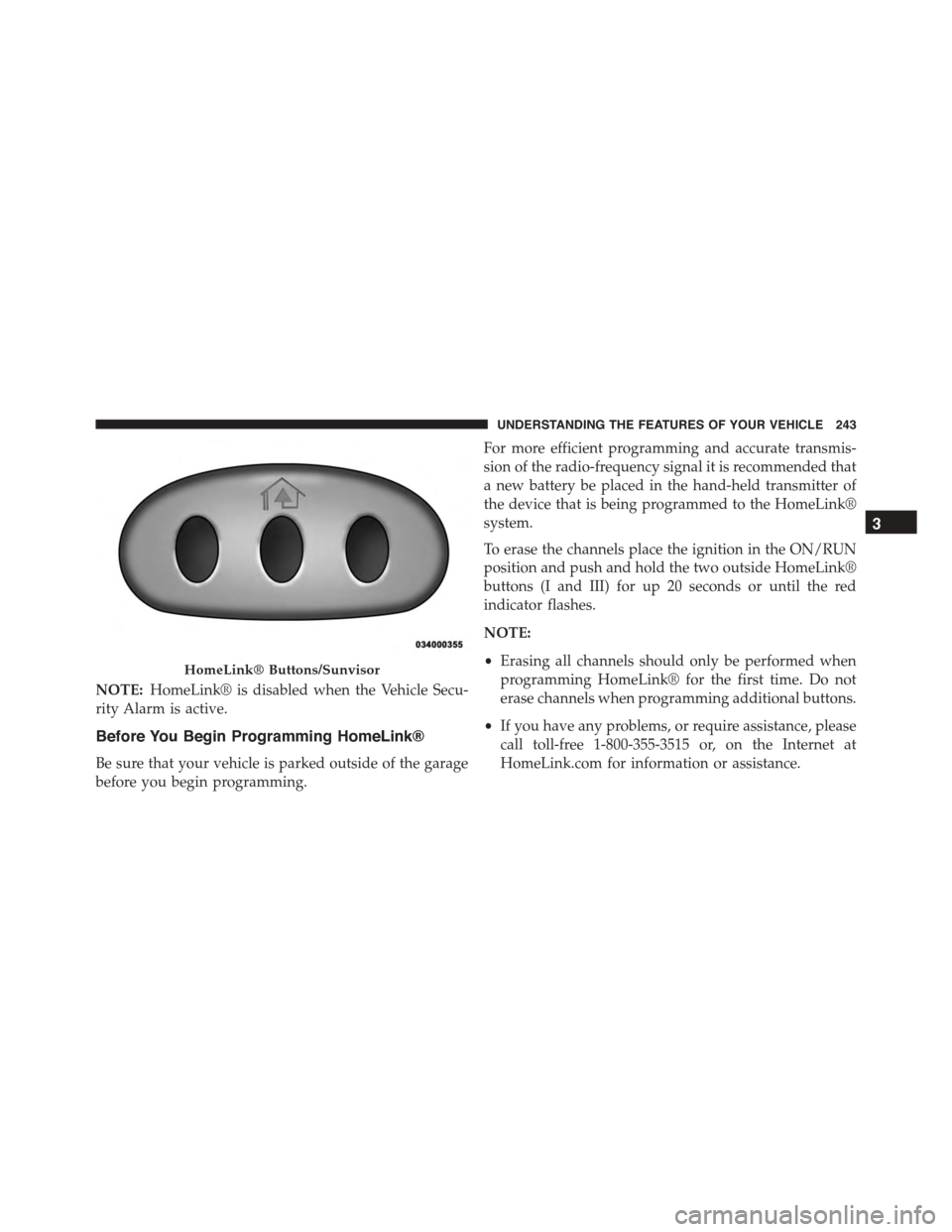
position and push and hold the two outside HomeLink®
buttons (I and III) for up 20 seconds or until the red
indicator flashes.
NOTE:
•Erasing all channels should only be performed when
programming HomeLink® for the first time. Do not
erase channels when programming additional buttons.
•If you have any problems, or require assistance, please
call toll-free 1-800-355-3515 or, on the Internet at
HomeLink.com for information or assistance.
HomeLink® Buttons/Sunvisor
3
UNDERSTANDING THE FEATURES OF YOUR VEHICLE 243