light DODGE DURANGO 2015 3.G Owners Manual
[x] Cancel search | Manufacturer: DODGE, Model Year: 2015, Model line: DURANGO, Model: DODGE DURANGO 2015 3.GPages: 689, PDF Size: 20.05 MB
Page 19 of 689
The system uses a Key Fob with a factory-mated Remote
Keyless Entry (RKE) transmitter, a Keyless Ignition Node
(KIN), and a RF receiver to prevent unauthorized vehicle
operation. Therefore, only Key Fobs that are pro-
grammed to the vehicle can be used to start and operate
the vehicle. The system will not allow the engine to crank
if an invalid Key Fob is used to start and operate the
vehicle. The system will shut the engine off in two
seconds if an invalid Key Fob is used to start the engine.
After placing the ignition to the ON/RUN position, the
Vehicle Security Light will turn on for three seconds for a
bulb check. If the light remains on after the bulb check, it
indicates that there is a problem with the electronics. In
addition, if the light begins to flash after the bulb check,
it indicates that someone used an invalid Key Fob to start
the engine. Either of these conditions will result in the
engine being shut off after two seconds.
If the Vehicle Security Light turns on during normal
vehicle operation (vehicle running for longer than 10
seconds), it indicates that there is a fault in the electron-
ics. Should this occur, have the vehicle serviced as soon
as possible by an authorized dealer.
CAUTION!
•Do not make modifications or alterations to the
immobilizer system. Modifications or alterations to
the immobilization system may result in a loss of
security protection.
•The Sentry Key® Immobilizer system is not com-
patible with some aftermarket remote starting sys-
tems. Use of these systems may result in vehicle
starting problems and loss of security protection.
All of the Key Fobs provided with your new vehicle have
been programmed to the vehicle electronics.
2
THINGS TO KNOW BEFORE STARTING YOUR VEHICLE 17
Page 21 of 689
NOTE:Changes or modifications not expressly approved
by the party responsible for compliance could void the
user’s authority to operate the equipment.
VEHICLE SECURITY ALARM — IF EQUIPPED
This Vehicle Security Alarm monitors the vehicle doors,
liftgate, and ignition for unauthorized operation. When
the alarm is activated, the interior switches for door locks
and power liftgate are disabled. The Vehicle Security
Alarm provides both audio and visual signals, the horn
will sound, the headlights will turn on, park lamps,
and/or turn signals will flash repeatedly for three min-
utes. If the disturbance is still present (driver’s door,
passenger door, other doors, ignition) after three minutes,
the headlights, park lamps, and/or turn signals will flash
for an additional 15 minutes.
NOTE:The Panic and Security alarms are quite different.
Please take a moment to activate the Panic and the
Security modes to hear the differences in the horn. In case
one should go off in the future, you will need to know
which mode has been activated in order to deactivate it.
To Arm The System
Follow these steps to arm the Vehicle Security Alarm:
1. Make sure the vehicles ignition is cycled to the “OFF”
position (refer to#Starting Procedures#in#Starting
And Operating#for further information).
•For vehicles equipped with Keyless Enter-N-Go™,
make sure the vehicle ignition system is OFF.
•For vehicles not equipped with Keyless Enter-N-
Go™, make sure the vehicle ignition system is OFF,
and the key is physically removed from the ignition.
2
THINGS TO KNOW BEFORE STARTING YOUR VEHICLE 19
Page 23 of 689
NOTE:
•The driver’s door key cylinder and the liftgate button
on the RKE transmitter cannot arm or disarm the
Vehicle Security Alarm.
•The Vehicle Security Alarm remains armed during
power liftgate entry. Pushing the liftgate button will
not disarm the Vehicle Security Alarm. If someone
enters the vehicle through the liftgate and opens any
door, the alarm will sound.
•When the Vehicle Security Alarm is armed, the interior
power door lock switches will not unlock the doors.
The Vehicle Security Alarm is designed to protect your
vehicle. However, you can create conditions where the
system will give you a false alarm. If one of the previ-
ously described arming sequences has occurred, the
Vehicle Security Alarm will arm regardless of whether
you are in the vehicle or not. If you remain in the vehicle
and open a door, the alarm will sound. If this occurs,
disarm the Vehicle Security Alarm.
If the Vehicle Security Alarm is armed and the battery
becomes disconnected, the Vehicle Security Alarm will
remain armed when the battery is reconnected; the
exterior lights will flash, and the horn will sound. If this
occurs, disarm the Vehicle Security Alarm.
Tamper Alert
If something has triggered the Vehicle Security Alarm in
your absence, the horn will sound three times, and the
exterior lights blink three times when you unlock the
doors. Check the vehicle for tampering.
ILLUMINATED ENTRY
The courtesy lights will turn on when you use the
Remote Keyless Entry (RKE) transmitter to unlock the
doors or open any door.
2
THINGS TO KNOW BEFORE STARTING YOUR VEHICLE 21
Page 24 of 689
This feature also turns on the approach lighting in the
outside mirrors — if equipped. Refer to “Mirrors” in
“Understanding The Features Of Your Vehicle” for fur-
ther information.
The lights will fade to off after approximately 30 seconds,
or they will immediately fade to off once the ignition
switch is turned to ON/RUN from the OFF position.
NOTE:
•The front courtesy overhead console and door cour-
tesy lights do not turn on if the dimmer control is in
the “Dome defeat” position (extreme bottom position).
•The Illuminated Entry system will not operate if the
dimmer control is in the “Dome defeat” position
(extreme bottom position).
REMOTE KEYLESS ENTRY (RKE)
The RKE system allows you to lock or unlock the doors,
open the power liftgate, or activate the Panic Alarm from
distances up to approximately 66 ft (20 m) using a
hand-held Key Fob with RKE transmitter. The RKE
transmitter does not need to be pointed at the vehicle to
activate the system.
NOTE:Driving at speeds 5 MPH (8 km/h) and above
disables the system from responding to all RKE transmit-
ter buttons for all RKE transmitters.
22 THINGS TO KNOW BEFORE STARTING YOUR VEHICLE
Page 25 of 689
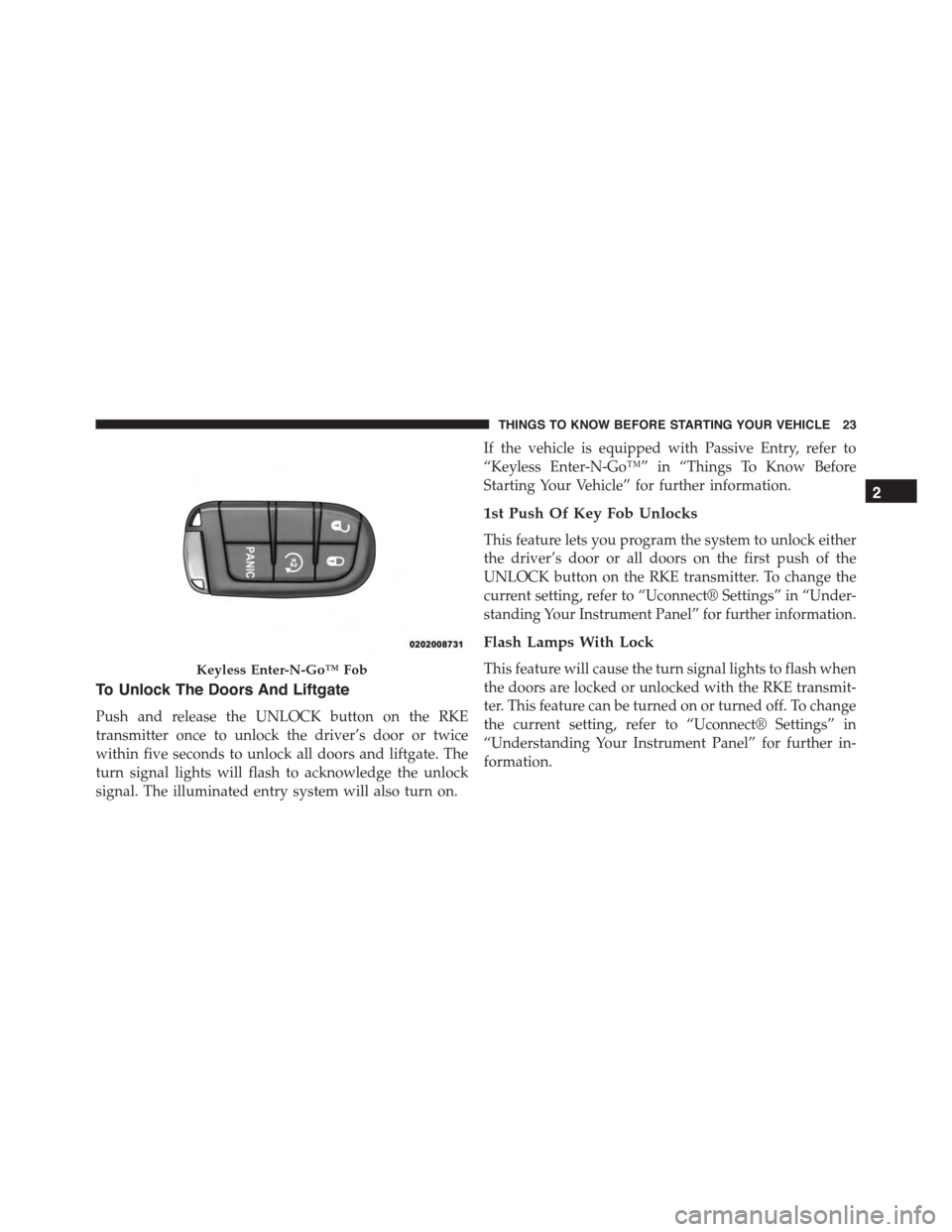
To Unlock The Doors And Liftgate
Push and release the UNLOCK button on the RKE
transmitter once to unlock the driver’s door or twice
within five seconds to unlock all doors and liftgate. The
turn signal lights will flash to acknowledge the unlock
signal. The illuminated entry system will also turn on.
If the vehicle is equipped with Passive Entry, refer to
“Keyless Enter-N-Go™” in “Things To Know Before
Starting Your Vehicle” for further information.
1st Push Of Key Fob Unlocks
This feature lets you program the system to unlock either
the driver’s door or all doors on the first push of the
UNLOCK button on the RKE transmitter. To change the
current setting, refer to “Uconnect® Settings” in “Under-
standing Your Instrument Panel” for further information.
Flash Lamps With Lock
This feature will cause the turn signal lights to flash when
the doors are locked or unlocked with the RKE transmit-
ter. This feature can be turned on or turned off. To change
the current setting, refer to “Uconnect® Settings” in
“Understanding Your Instrument Panel” for further in-
formation.
Keyless Enter-N-Go™ Fob
2
THINGS TO KNOW BEFORE STARTING YOUR VEHICLE 23
Page 26 of 689
Headlight Illumination On Approach
This feature activates the headlights for up to 90 seconds
when the doors are unlocked with the RKE transmitter.
The time for this feature is programmable on vehicles
equipped through Uconnect®. To change the current
setting, refer to “Uconnect® Settings” in “Understanding
Your Instrument Panel” for further information.
To Lock The Doors And Liftgate
Push and release the LOCK button on the RKE transmit-
ter to lock all doors and liftgate. The turn signal lights
will flash, and the horn will chirp to acknowledge the
signal.
If the vehicle is equipped with Passive Entry, refer to
“Keyless Enter-N-Go™” in “Things To Know Before
Starting Your Vehicle” for further information.
Sound Horn With Lock
This feature will cause the horn to chirp when the doors
are locked with the RKE transmitter. This feature can be
turned on or turned off. To change the current setting,
refer to “Uconnect® Settings” in “Understanding Your
Instrument Panel” for further information.
Using The Panic Alarm
To turn the Panic Alarm feature on or off, push and hold
the PANIC button on the RKE transmitter for at least one
second and release. When the Panic Alarm is activated,
the turn signals will flash, the horn will pulse on and off,
and the interior lights will turn on.
The Panic Alarm will stay on for three minutes unless
you turn it off by either pushing the PANIC button a
second time or drive the vehicle at a speed of 15 MPH
(24 km/h) or greater.
24 THINGS TO KNOW BEFORE STARTING YOUR VEHICLE
Page 27 of 689
NOTE:
•The interior lights will turn off if you place the ignition
in the ACC or ON/RUN position while the Panic
Alarm is activated. However, the exterior lights and
horn will remain on.
•You may need to be less than 35 ft (11 m) from the
vehicle when using the RKE transmitter to turn off the
Panic Alarm due to the radio frequency noises emitted
by the system.
Programming Additional Transmitters
Programming Key Fobs or RKE transmitters may be
performed at an authorized dealer.
Transmitter Battery Replacement
The recommended replacement battery is one CR2032
battery.
NOTE:
•Perchlorate Material — special handling may apply.
Batteries could contain dangerous materials. Please
dispose of them according to respect for environment
and local laws.
•Used batteries are harmful to the environment. You
can dispose of them either in the correct containers as
specified by law or by taking them to a Dealership,
which will deal with their disposal.
•Do not touch the battery terminals that are on the back
housing or the printed circuit board.
1. Remove the emergency key by sliding the mechanical
latch on the back of the RKE transmitter sideways
with your thumb and then pull the key out with your
other hand.
2
THINGS TO KNOW BEFORE STARTING YOUR VEHICLE 25
Page 28 of 689
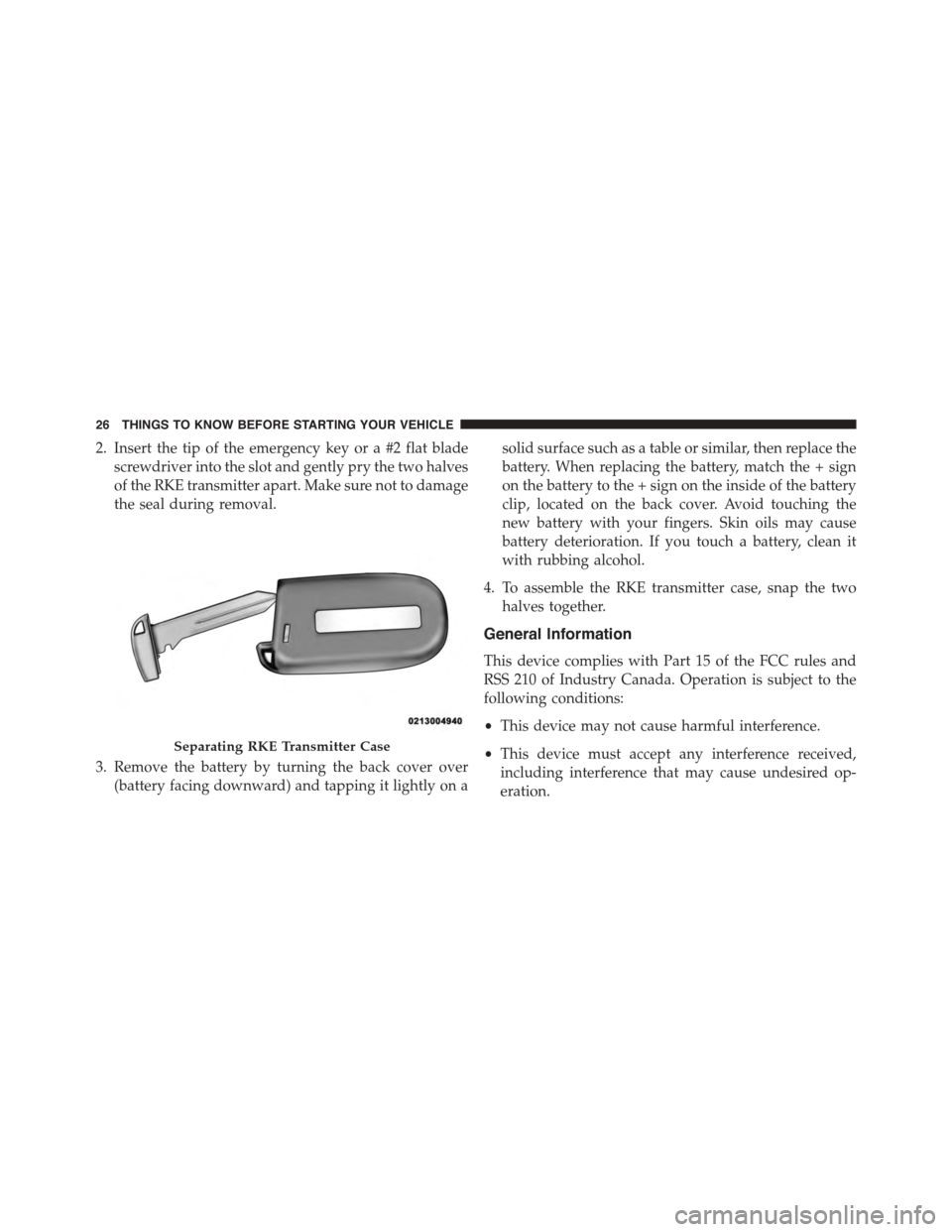
2. Insert the tip of the emergency key or a #2 flat blade
screwdriver into the slot and gently pry the two halves
of the RKE transmitter apart. Make sure not to damage
the seal during removal.
3. Remove the battery by turning the back cover over
(battery facing downward) and tapping it lightly on a
solid surface such as a table or similar, then replace the
battery. When replacing the battery, match the + sign
on the battery to the + sign on the inside of the battery
clip, located on the back cover. Avoid touching the
new battery with your fingers. Skin oils may cause
battery deterioration. If you touch a battery, clean it
with rubbing alcohol.
4. To assemble the RKE transmitter case, snap the two
halves together.
General Information
This device complies with Part 15 of the FCC rules and
RSS 210 of Industry Canada. Operation is subject to the
following conditions:
•This device may not cause harmful interference.
•This device must accept any interference received,
including interference that may cause undesired op-
eration.
Separating RKE Transmitter Case
26 THINGS TO KNOW BEFORE STARTING YOUR VEHICLE
Page 31 of 689
The DID message stays active until the ignition is turned
to the ON/RUN position.
To Enter Remote Start Mode
Push and release the REMOTE START button
on the RKE transmitter twice within five sec-
onds. The vehicle doors will lock, the parking
lights will flash, and the horn will chirp twice
(if programmed). Then, the engine will start, and the
vehicle will remain in the Remote Start mode for a
15-minute cycle.
NOTE:
•If an engine fault is present or fuel level is low, the
vehicle will start and then shut down in 10 seconds.
•The park lamps will turn on and remain on during
Remote Start mode.
•For security, power window and power sunroof op-
eration (if equipped) are disabled when the vehicle is
in the Remote Start mode.
•The engine can be started two consecutive times with
the RKE transmitter. However, the ignition must be
cycled by pushing the START/STOP button twice (or
the ignition switch must be cycled to the ON/RUN
position) before you can repeat the start sequence for a
third cycle.
To Exit Remote Start Mode Without Driving The
Vehicle
Push and release the REMOTE START button one time or
allow the engine to run for the entire 15-minute cycle.
NOTE:To avoid unintentional shutdowns, the system
will disable the one time push of the REMOTE START
button for two seconds after receiving a valid Remote
Start request.
2
THINGS TO KNOW BEFORE STARTING YOUR VEHICLE 29
Page 45 of 689
NOTE:If the window runs into any obstacle during
Auto Up, it will reverse direction and then go back down.
Remove the obstacle and use the window switch again to
close the window. Any impact due to rough road condi-
tions may trigger the auto reverse function unexpectedly
during Auto Up. If this happens, pull the switch lightly to
the first detent and hold it to close the window manually.
WARNING!
There is no anti-pinch protection when the window
is almost closed. Be sure to clear all objects from the
window before closing.
Resetting The Auto Up Feature
Should the Auto Up feature stop working, the window
probably needs to be reset. To reset Auto Up:
1. Pull the window switch up to close the window
completely and continue to hold the switch up for an
additional two seconds after the window is closed.
2. Push the window switch down firmly to the second
detent to open the window completely and continue
to hold the switch down for an additional two seconds
after the window is fully open.
2
THINGS TO KNOW BEFORE STARTING YOUR VEHICLE 43