instrument cluster DODGE DURANGO 2017 3.G Workshop Manual
[x] Cancel search | Manufacturer: DODGE, Model Year: 2017, Model line: DURANGO, Model: DODGE DURANGO 2017 3.GPages: 584, PDF Size: 5.14 MB
Page 270 of 584
Stored Messages
Push and release theUPorDOWNar-
row button until the Messages Menu item is
highlighted. This feature shows the number of
stored warning messages. Pushing the RIGHT
arrow button will allow you to see what the stored
messages are.
When no messages are present, main menu icon will be a
closed envelope.
Screen Setup
Push and release the UPorDOWNar-
row button until the Screen Setup Menu icon/
title is highlighted in the Instrument Cluster
Display. Push and release the OKbutton to
enter the submenus and follow the prompts on the
screen as needed. The Screen Setup feature allows you
to change what information is displayed in the instru-
ment cluster as well as the location that information is
displayed. Screen Setup Driver Selectable Items
Current Gear
•
On
• Off (default setting)
Favorite Menus
• Speedometer
• Vehicle Info
• Driver Assist (Show/Hide)
• Fuel Economy (Show/Hide)
• Trip (Show/Hide)
• Stop/Start
• Audio (Show/Hide)
• Stored Messages
• Screen Setup
NOTE: Menus with (show/hide) can push the OKbutton
to choose whether to show or hide this menu on the
Instrument Cluster Display.
268 UNDERSTANDING YOUR INSTRUMENT PANEL
Page 272 of 584
When load reduction is activated, the message “Battery
Saver On” or “Battery Saver Mode” will appear in the
Instrument Cluster Display.
These messages indicate the vehicle battery has a low state
of charge and continues to lose electrical charge at a rate
that the charging system cannot sustain.
NOTE:
•The charging system is independent from load reduc-
tion. The charging system performs a diagnostic on the
charging system continuously.
• If the Battery Charge Warning Light is on it may indicate
a problem with the charging system. Refer to “Battery
Charge Warning Light” in “Understanding Your Instru-
ment Panel” for further information.
The electrical loads that may be switched off (if equipped),
and vehicle functions which can be effected by load reduction:
• Heated Seat/Vented Seats/Heated Wheel
• Heated/Cooled Cup Holders — If Equipped
• Rear Defroster And Heated Mirrors
• HVAC System •
115V AC Power Inverter System
• Audio and Telematics System
Loss of the battery charge may indicate one or more of the
following conditions:
• The charging system cannot deliver enough electrical
power to the vehicle system because the electrical loads
are larger than the capability of charging system. The
charging system is still functioning properly.
• Turning on all possible vehicle electrical loads (e.g.
HVAC to max settings, exterior and interior lights,
overloaded power outlets +12V, 115V AC, USB ports)
during certain driving conditions (city driving, towing,
frequent stopping).
•
Installing options like additional lights, upfitter electrical
accessories, audio systems, alarms and similar devices.
• Unusual driving cycles (short trips separated by long
parking periods).
• The vehicle was parked for an extended period of time
(weeks, months).
• The battery was recently replaced and was not charged
completely.
270 UNDERSTANDING YOUR INSTRUMENT PANEL
Page 278 of 584
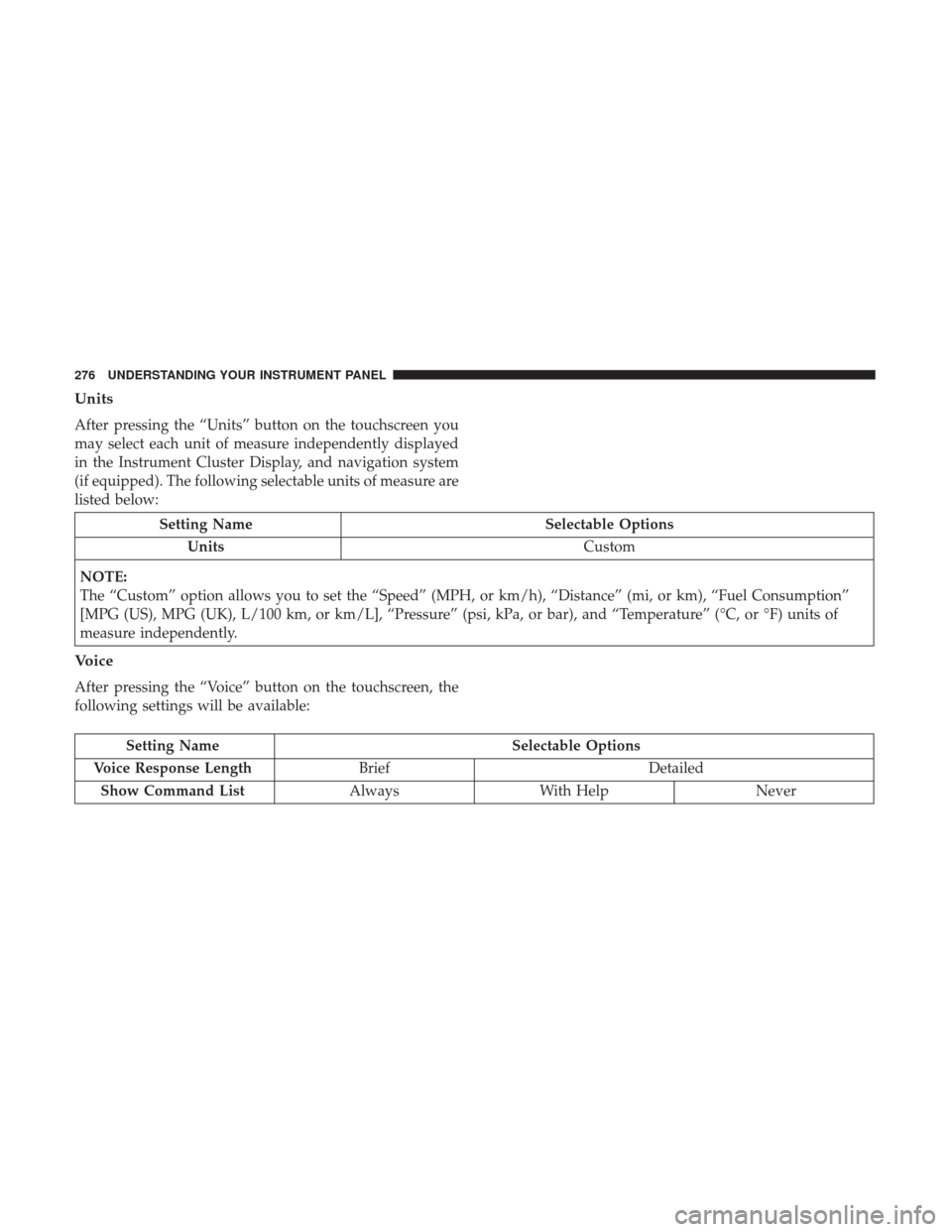
Units
After pressing the “Units” button on the touchscreen you
may select each unit of measure independently displayed
in the Instrument Cluster Display, and navigation system
(if equipped). The following selectable units of measure are
listed below:
Setting NameSelectable Options
Units Custom
NOTE:
The “Custom” option allows you to set the “Speed” (MPH, or km/h), “Distance” (mi, or km), “Fuel Consumption”
[MPG (US), MPG (UK), L/100 km, or km/L], “Pressure” (psi, kPa, or bar), and “Temperature” (°C, or °F) units of
measure independently.
Voice
After pressing the “Voice” button on the touchscreen, the
following settings will be available:
Setting Name Selectable Options
Voice Response Length Brief Detailed
Show Command List AlwaysWith Help Never
276 UNDERSTANDING YOUR INSTRUMENT PANEL
Page 297 of 584
Setting NameSelectable Options
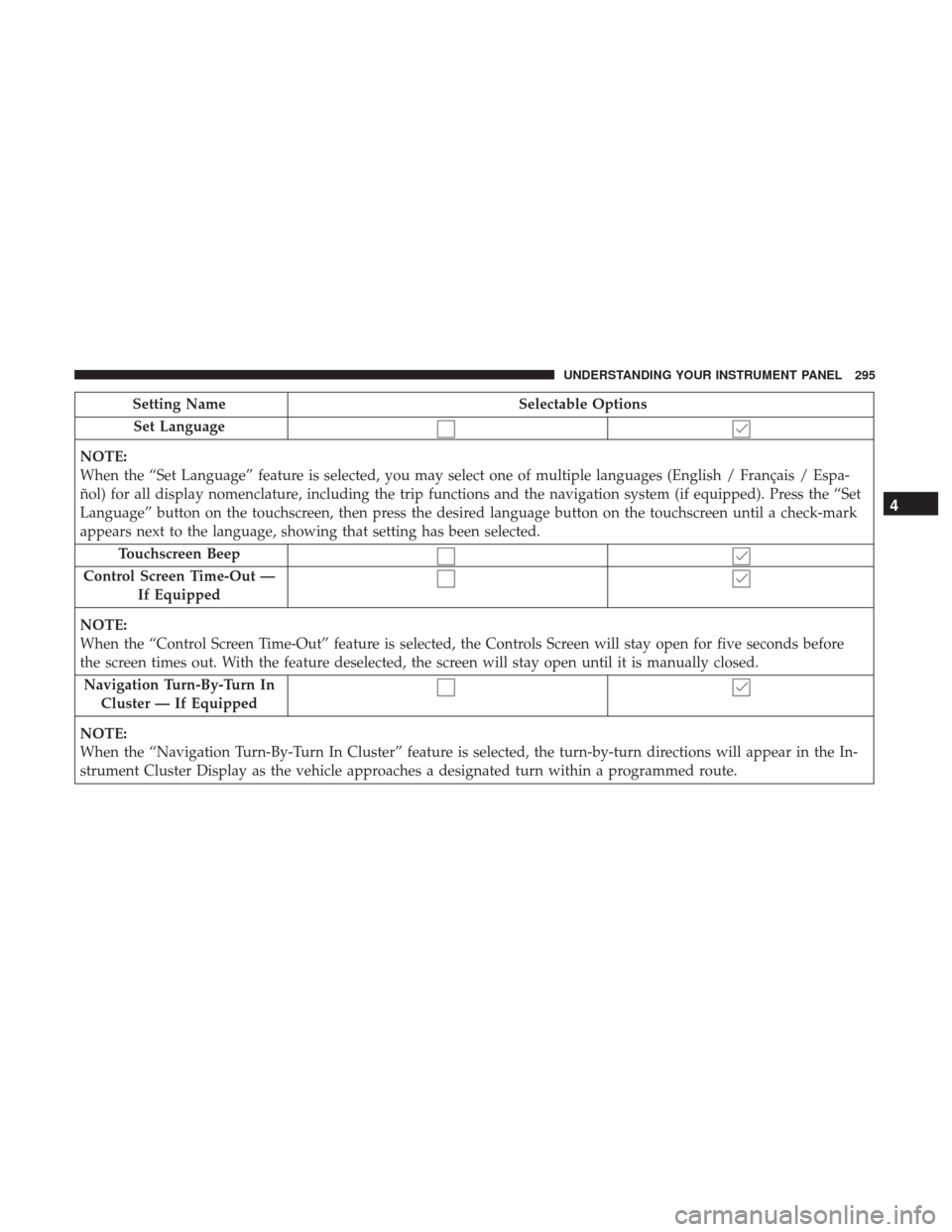
Set Language
NOTE:
When the “Set Language” feature is selected, you may select one of multiple languages (English / Français / Espa-
ñol) for all display nomenclature, including the trip functions and the navigation system (if equipped). Press the “Set
Language” button on the touchscreen, then press the desired language button on the touchscreen until a check-mark
appears next to the language, showing that setting has been selected. Touchscreen Beep
Control Screen Time-Out — If Equipped
NOTE:
When the “Control Screen Time-Out” feature is selected, the Controls Screen will stay open for five seconds before
the screen times out. With the feature deselected, the screen will stay open until it is manually closed. Navigation Turn-By-Turn In Cluster — If Equipped
NOTE:
When the “Navigation Turn-By-Turn In Cluster” feature is selected, the turn-by-turn directions will appear in the In-
strument Cluster Display as the vehicle approaches a designated turn within a programmed route.
4
UNDERSTANDING YOUR INSTRUMENT PANEL 295
Page 298 of 584
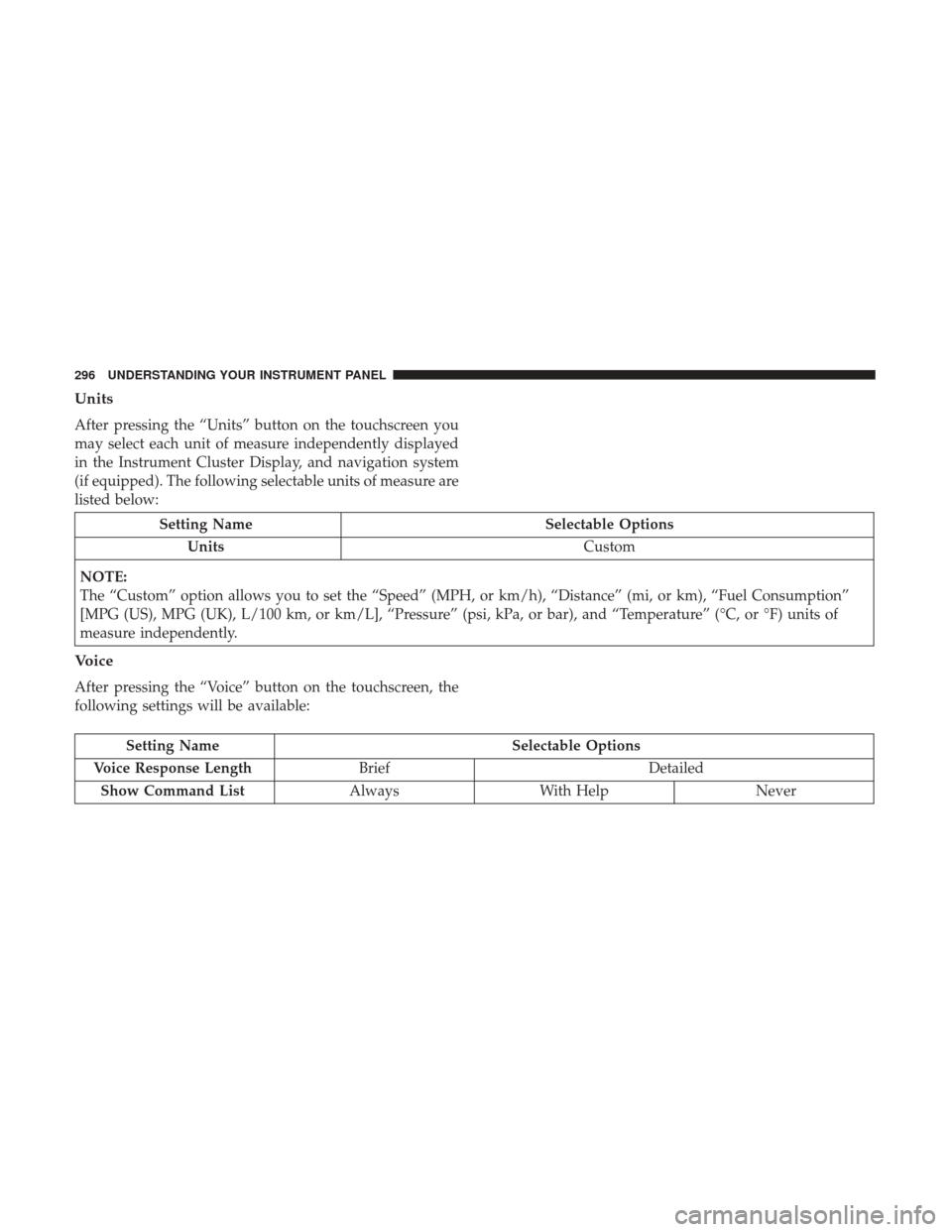
Units
After pressing the “Units” button on the touchscreen you
may select each unit of measure independently displayed
in the Instrument Cluster Display, and navigation system
(if equipped). The following selectable units of measure are
listed below:
Setting NameSelectable Options
Units Custom
NOTE:
The “Custom” option allows you to set the “Speed” (MPH, or km/h), “Distance” (mi, or km), “Fuel Consumption”
[MPG (US), MPG (UK), L/100 km, or km/L], “Pressure” (psi, kPa, or bar), and “Temperature” (°C, or °F) units of
measure independently.
Voice
After pressing the “Voice” button on the touchscreen, the
following settings will be available:
Setting Name Selectable Options
Voice Response Length Brief Detailed
Show Command List AlwaysWith Help Never
296 UNDERSTANDING YOUR INSTRUMENT PANEL
Page 383 of 584
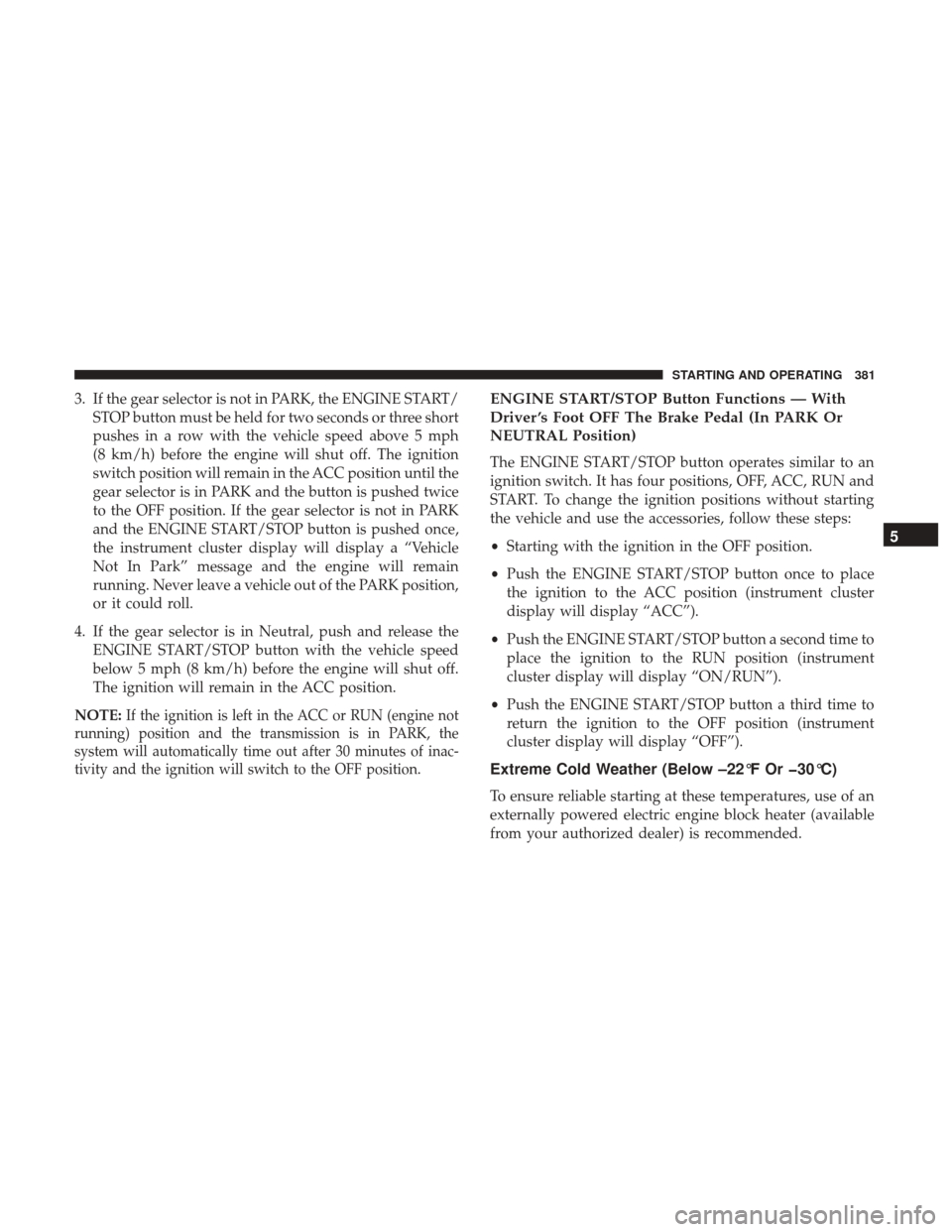
3. If the gear selector is not in PARK, the ENGINE START/STOP button must be held for two seconds or three short
pushes in a row with the vehicle speed above 5 mph
(8 km/h) before the engine will shut off. The ignition
switch position will remain in the ACC position until the
gear selector is in PARK and the button is pushed twice
to the OFF position. If the gear selector is not in PARK
and the ENGINE START/STOP button is pushed once,
the instrument cluster display will display a “Vehicle
Not In Park” message and the engine will remain
running. Never leave a vehicle out of the PARK position,
or it could roll.
4. If the gear selector is in Neutral, push and release the ENGINE START/STOP button with the vehicle speed
below 5 mph (8 km/h) before the engine will shut off.
The ignition will remain in the ACC position.
NOTE:
If the ignition is left in the ACC or RUN (engine not
running) position and the transmission is in PARK, the
system will automatically time out after 30 minutes of inac-
tivity and the ignition will switch to the OFF position.
ENGINE START/STOP Button Functions — With
Driver ’s Foot OFF The Brake Pedal (In PARK Or
NEUTRAL Position)
The ENGINE START/STOP button operates similar to an
ignition switch. It has four positions, OFF, ACC, RUN and
START. To change the ignition positions without starting
the vehicle and use the accessories, follow these steps:
• Starting with the ignition in the OFF position.
• Push the ENGINE START/STOP button once to place
the ignition to the ACC position (instrument cluster
display will display “ACC”).
• Push the ENGINE START/STOP button a second time to
place the ignition to the RUN position (instrument
cluster display will display “ON/RUN”).
• Push the ENGINE START/STOP button a third time to
return the ignition to the OFF position (instrument
cluster display will display “OFF”).
Extreme Cold Weather (Below –22°F Or 30°C)
To ensure reliable starting at these temperatures, use of an
externally powered electric engine block heater (available
from your authorized dealer) is recommended.
5
STARTING AND OPERATING 381
Page 385 of 584
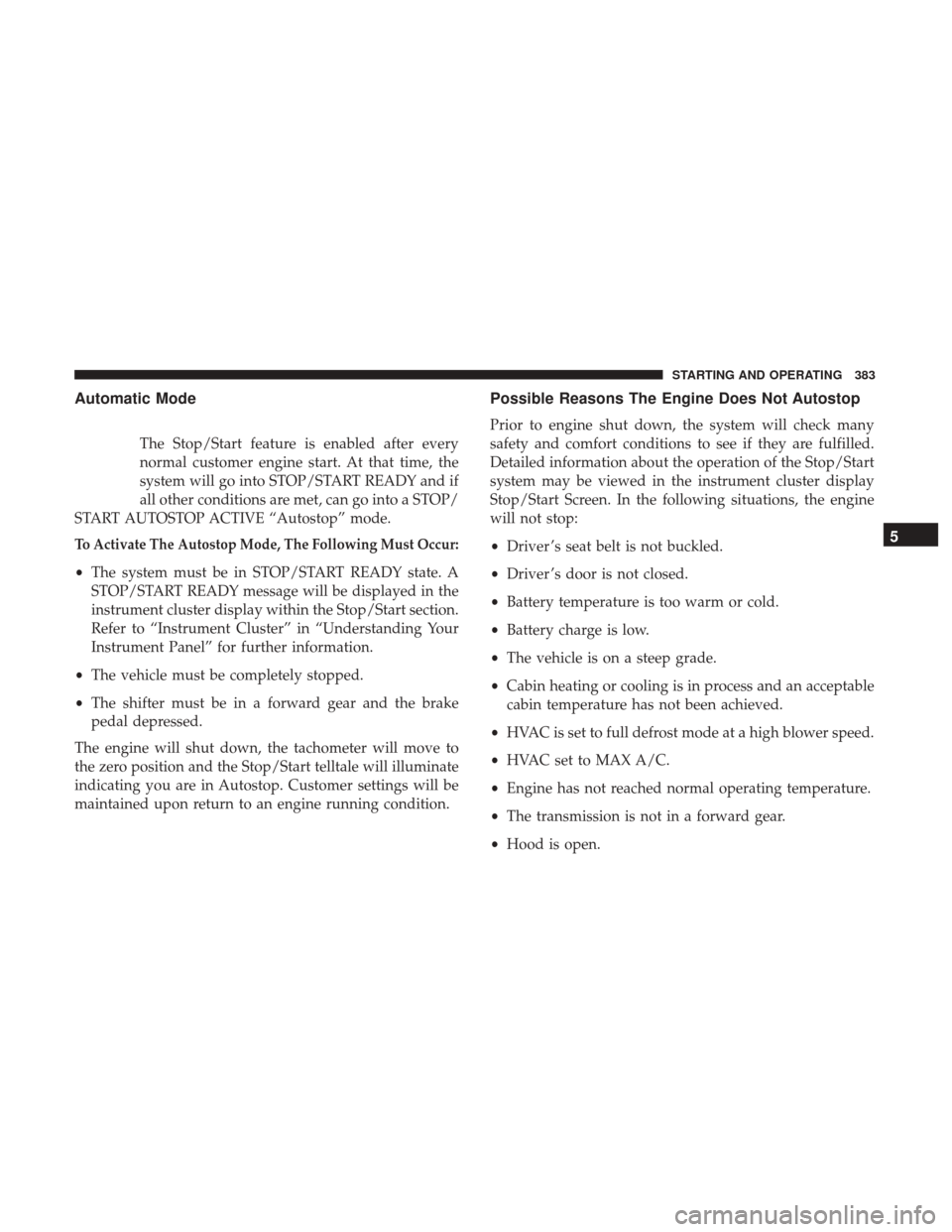
Automatic Mode
The Stop/Start feature is enabled after every
normal customer engine start. At that time, the
system will go into STOP/START READY and if
all other conditions are met, can go into a STOP/
START AUTOSTOP ACTIVE “Autostop” mode.
To Activate The Autostop Mode, The Following Must Occur:
• The system must be in STOP/START READY state. A
STOP/START READY message will be displayed in the
instrument cluster display within the Stop/Start section.
Refer to “Instrument Cluster” in “Understanding Your
Instrument Panel” for further information.
• The vehicle must be completely stopped.
• The shifter must be in a forward gear and the brake
pedal depressed.
The engine will shut down, the tachometer will move to
the zero position and the Stop/Start telltale will illuminate
indicating you are in Autostop. Customer settings will be
maintained upon return to an engine running condition.
Possible Reasons The Engine Does Not Autostop
Prior to engine shut down, the system will check many
safety and comfort conditions to see if they are fulfilled.
Detailed information about the operation of the Stop/Start
system may be viewed in the instrument cluster display
Stop/Start Screen. In the following situations, the engine
will not stop:
• Driver ’s seat belt is not buckled.
• Driver ’s door is not closed.
• Battery temperature is too warm or cold.
• Battery charge is low.
• The vehicle is on a steep grade.
• Cabin heating or cooling is in process and an acceptable
cabin temperature has not been achieved.
• HVAC is set to full defrost mode at a high blower speed.
• HVAC set to MAX A/C.
• Engine has not reached normal operating temperature.
• The transmission is not in a forward gear.
• Hood is open.
5
STARTING AND OPERATING 383
Page 387 of 584
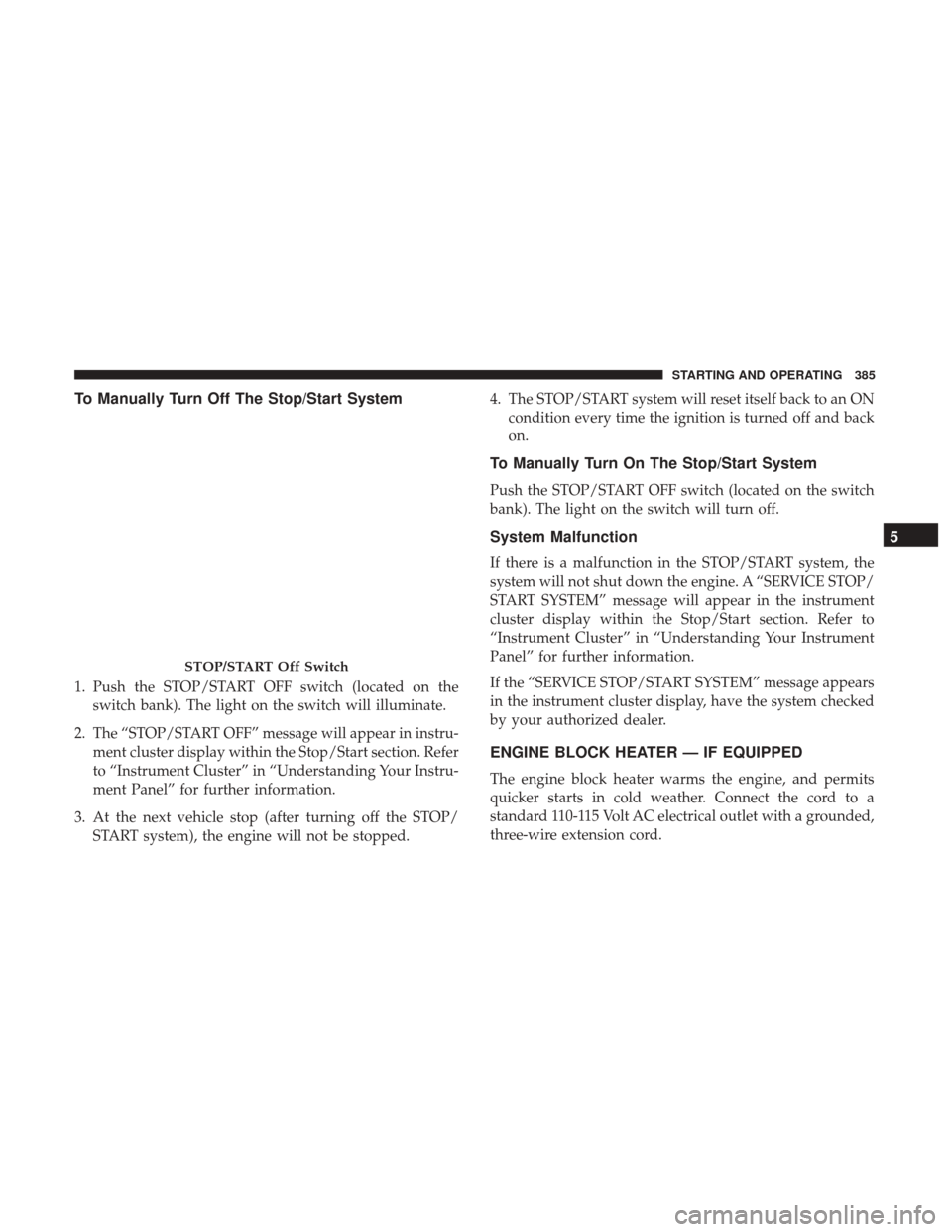
To Manually Turn Off The Stop/Start System
1. Push the STOP/START OFF switch (located on theswitch bank). The light on the switch will illuminate.
2. The “STOP/START OFF” message will appear in instru- ment cluster display within the Stop/Start section. Refer
to “Instrument Cluster” in “Understanding Your Instru-
ment Panel” for further information.
3. At the next vehicle stop (after turning off the STOP/ START system), the engine will not be stopped. 4. The STOP/START system will reset itself back to an ON
condition every time the ignition is turned off and back
on.
To Manually Turn On The Stop/Start System
Push the STOP/START OFF switch (located on the switch
bank). The light on the switch will turn off.
System Malfunction
If there is a malfunction in the STOP/START system, the
system will not shut down the engine. A “SERVICE STOP/
START SYSTEM” message will appear in the instrument
cluster display within the Stop/Start section. Refer to
“Instrument Cluster” in “Understanding Your Instrument
Panel” for further information.
If the “SERVICE STOP/START SYSTEM” message appears
in the instrument cluster display, have the system checked
by your authorized dealer.
ENGINE BLOCK HEATER — IF EQUIPPED
The engine block heater warms the engine, and permits
quicker starts in cold weather. Connect the cord to a
standard 110-115 Volt AC electrical outlet with a grounded,
three-wire extension cord.
STOP/START Off Switch
5
STARTING AND OPERATING 385
Page 390 of 584
When the Fuel Economy (ECO) Mode is engaged, the
vehicle control systems will change the following:
•The transmission will upshift sooner and downshift
later.
• The overall driving performance will be more conserva-
tive.
• Some ECO mode functions may be temporarily inhib-
ited based on temperature and other factors.
Eight-Speed Automatic Transmission
The transmission is controlled using a rotary electronic
gear selector located on the center console. The transmis-
sion gear range (PRND) is displayed both above the gear
selector and in the instrument cluster display. To select a
gear range, simply rotate the gear selector. You must also
press the brake pedal to shift the transmission out of PARK,
or to shift from NEUTRAL into DRIVE or REVERSE when
the vehicle is stopped or moving at low speeds (refer to
“Brake/Transmission Shift Interlock System” in this sec-
tion). To shift past multiple gear ranges at once (such as
PARK to DRIVE), simply rotate the gear selector to the
appropriate detent. Select the DRIVE range for normal
driving.
The electronically-controlled transmission provides a pre-
cise shift schedule. The transmission electronics are self-
calibrating; therefore, the first few shifts on a new vehicle
may be somewhat abrupt. This is a normal condition, and
precision shifts will develop within a few hundred miles
(kilometers).
Only shift from DRIVE to PARK or REVERSE when the
accelerator pedal is released and the vehicle is stopped. Be
sure to keep your foot on the brake pedal when shifting
between these gears.
Fuel Economy Mode Switch
388 STARTING AND OPERATING
Page 391 of 584
The transmission gear selector has only PARK, REVERSE,
NEUTRAL, and DRIVE shift positions. Manual shifts can
be made using the AutoStick shift control (shift paddles
mounted on the steering wheel). Pressing the shift paddles
(-/+) while in the DRIVE range will manually select the
transmission gear, and will display the current gear in the
instrument cluster. Refer to “AutoStick” in this section for
further information.Gear Ranges
DO NOT race the engine when shifting from PARK or
NEUTRAL into another gear range.
NOTE:After selecting any gear range, wait a moment to
allow the selected gear to engage before accelerating. This
is especially important when the engine is cold.
PARK (P)
This range supplements the parking brake by locking the
transmission. The engine can be started in this range.
Never attempt to use PARK while the vehicle is in motion.
Apply the parking brake when leaving the vehicle in this
range.
When parking on a level surface, you may shift the
transmission into PARK first, and then apply the parking
brake.
When parking on a hill, apply the parking brake before
shifting the transmission to PARK. As an added precau-
tion, turn the front wheels toward the curb on a downhill
grade and away from the curb on an uphill grade.
Electronic Gear Selector
5
STARTING AND OPERATING 389