start stop button DODGE DURANGO 2019 User Guide
[x] Cancel search | Manufacturer: DODGE, Model Year: 2019, Model line: DURANGO, Model: DODGE DURANGO 2019Pages: 598, PDF Size: 4.32 MB
Page 266 of 598
CAUTION!(Continued)
•Shift into PARK only after the vehicle has come to a
complete stop.
• Shift into or out of REVERSE only after the vehicle
has come to a complete stop and the engine is at idle
speed.
• Before shifting into any gear, make sure your foot is
firmly on the brake pedal.
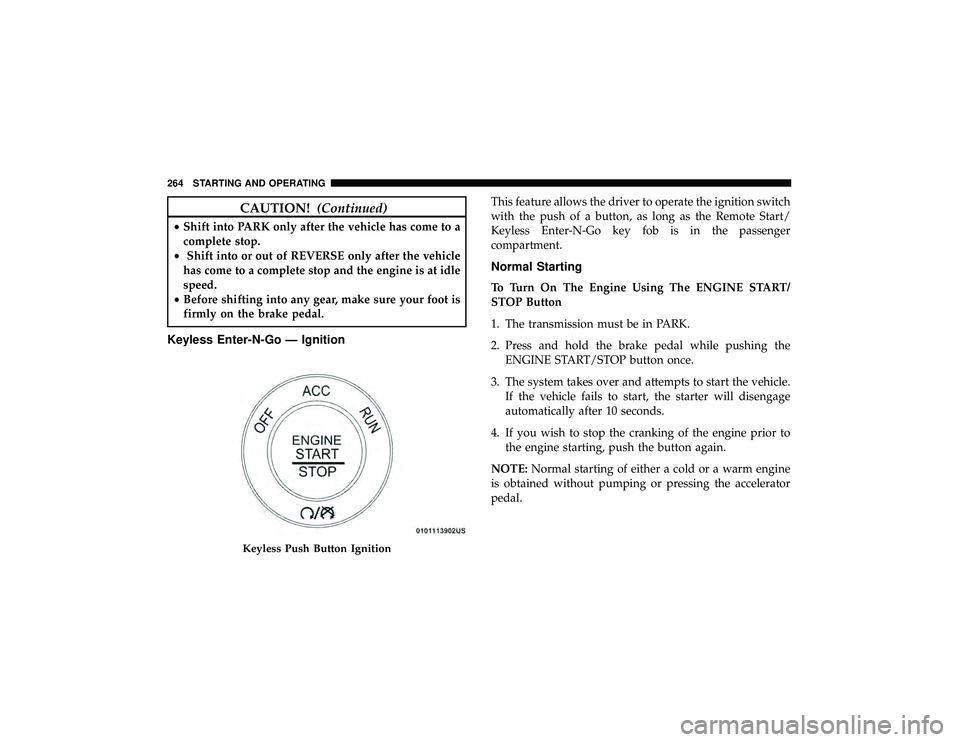
Keyless Enter-N-Go — Ignition
This feature allows the driver to operate the ignition switch
with the push of a button, as long as the Remote Start/
Keyless Enter-N-Go key fob is in the passenger
compartment.
Normal Starting
To Turn On The Engine Using The ENGINE START/
STOP Button
1. The transmission must be in PARK.
2. Press and hold the brake pedal while pushing the
ENGINE START/STOP button once.
3. The system takes over and attempts to start the vehicle. If the vehicle fails to start, the starter will disengage
automatically after 10 seconds.
4. If you wish to stop the cranking of the engine prior to the engine starting, push the button again.
NOTE: Normal starting of either a cold or a warm engine
is obtained without pumping or pressing the accelerator
pedal.
Keyless Push Button Ignition
264 STARTING AND OPERATING
Page 267 of 598
To Turn Off The Engine Using ENGINE START/STOP
Button
1. Place the gear selector in PARK, then push and releasethe ENGINE START/STOP button.
2. The ignition will return to the OFF mode.
3. If the gear selector is not in PARK, the ENGINE START/ STOP button must be held for two seconds or three short
pushes in a row with the vehicle speed above 5 MPH
(8 km/h) before the engine will shut off. The ignition
will remain in the ACC mode until the gear selector is in
PARK and the button is pushed twice to the OFF mode.
4. If the gear selector is not in PARK and the ENGINE START/STOP button is pushed once with the vehicle
speed above 5 MPH (8 km/h), the instrument cluster
will display a “ Vehicle Not In Park” message and the
engine will remain running. Never leave a vehicle out of
the PARK position, or it could roll.
NOTE: If the gear selector is not in PARK, and the ENGINE
START/STOP button is pushed once with the vehicle
speed below 5 MPH (8 km/h), the engine will shut off and
the ignition will remain in the ACC position. If vehicle
speed drops below 1.2 MPH (1.9 km/h), the vehicle will
AutoPark. See AutoPark section for further details. ENGINE START/STOP Button Functions — With Driv-
er ’s Foot OFF The Brake Pedal (In PARK Or NEUTRAL
Position)
The ENGINE START/STOP button operates similar to an
ignition switch. It has three modes: OFF, ACC, and RUN.
To change the ignition modes without starting the vehicle
and use the accessories, follow these directions:
1. Start with the ignition in the OFF mode.
2. Push the ENGINE START/STOP button once to place
the ignition to the ACC mode.
3. Push the ENGINE START/STOP button a second time to place the ignition to the RUN mode.
4. Push the ENGINE START/STOP button a third time to return the ignition to the OFF mode.
NOTE: Only press one pedal at a time while driving the
vehicle. Torque performance of the vehicle could be re-
duced if both pedals are pressed at the same time. If
pressure is detected on both pedals simultaneously, a
warning message will display in the instrument cluster. For
further information, refer to “Instrument Cluster Display”
in “Getting To Know Your Instrument Panel”.
6
STARTING AND OPERATING 265
Page 276 of 598
Fuel Economy (ECO) Mode
The Fuel Economy (ECO) mode can improve the vehicle’s
overall fuel economy during normal driving conditions.
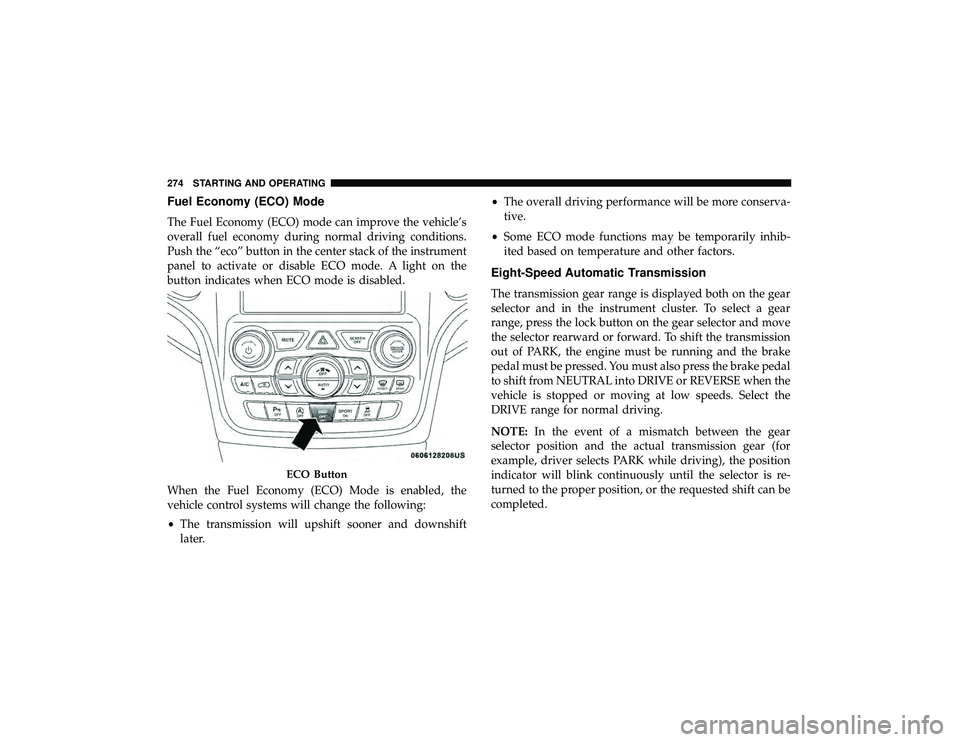
Push the “eco” button in the center stack of the instrument
panel to activate or disable ECO mode. A light on the
button indicates when ECO mode is disabled.
When the Fuel Economy (ECO) Mode is enabled, the
vehicle control systems will change the following:
•The transmission will upshift sooner and downshift
later. •
The overall driving performance will be more conserva-
tive.
• Some ECO mode functions may be temporarily inhib-
ited based on temperature and other factors.
Eight-Speed Automatic Transmission
The transmission gear range is displayed both on the gear
selector and in the instrument cluster. To select a gear
range, press the lock button on the gear selector and move
the selector rearward or forward. To shift the transmission
out of PARK, the engine must be running and the brake
pedal must be pressed. You must also press the brake pedal
to shift from NEUTRAL into DRIVE or REVERSE when the
vehicle is stopped or moving at low speeds. Select the
DRIVE range for normal driving.
NOTE: In the event of a mismatch between the gear
selector position and the actual transmission gear (for
example, driver selects PARK while driving), the position
indicator will blink continuously until the selector is re-
turned to the proper position, or the requested shift can be
completed.
ECO Button
274 STARTING AND OPERATING
Page 277 of 598
The electronically-controlled transmission adapts its shift
schedule based on driver inputs, along with environmental
and road conditions. The transmission electronics are self-
calibrating; therefore, the first few shifts on a new vehicle
may be somewhat abrupt. This is a normal condition, and
precision shifts will develop within a few hundred miles
(kilometers).
Only shift from DRIVE to PARK or REVERSE when the
accelerator pedal is released and the vehicle is stopped. Be
sure to keep your foot on the brake pedal when shifting
between these gears.
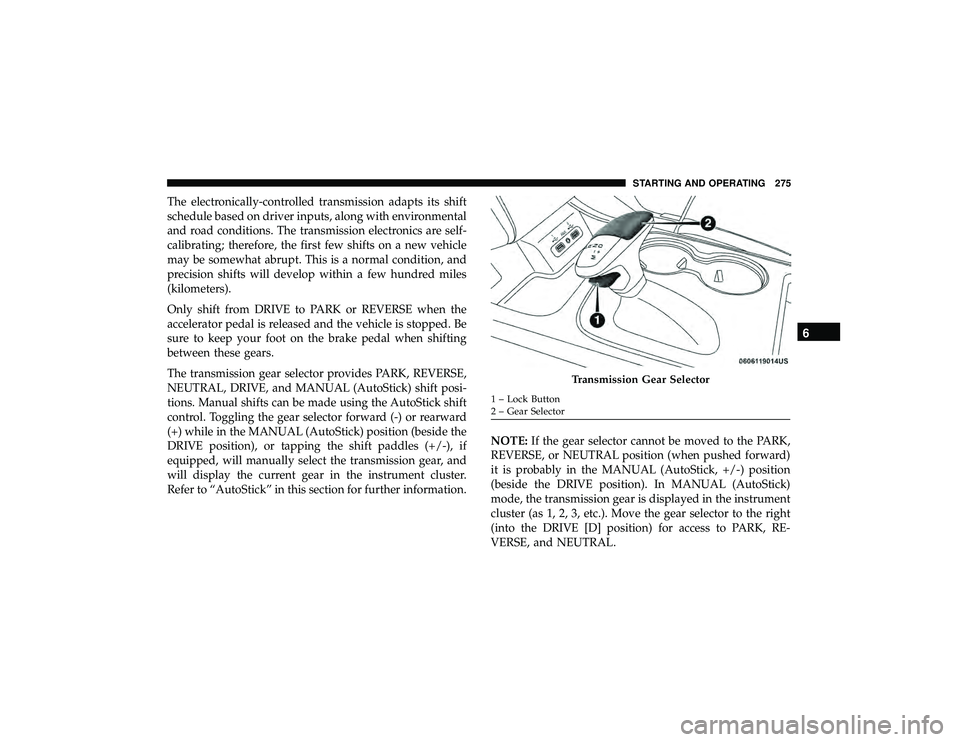
The transmission gear selector provides PARK, REVERSE,
NEUTRAL, DRIVE, and MANUAL (AutoStick) shift posi-
tions. Manual shifts can be made using the AutoStick shift
control. Toggling the gear selector forward (-) or rearward
(+) while in the MANUAL (AutoStick) position (beside the
DRIVE position), or tapping the shift paddles (+/-), if
equipped, will manually select the transmission gear, and
will display the current gear in the instrument cluster.
Refer to “AutoStick” in this section for further information.NOTE:
If the gear selector cannot be moved to the PARK,
REVERSE, or NEUTRAL position (when pushed forward)
it is probably in the MANUAL (AutoStick, +/-) position
(beside the DRIVE position). In MANUAL (AutoStick)
mode, the transmission gear is displayed in the instrument
cluster (as 1, 2, 3, etc.). Move the gear selector to the right
(into the DRIVE [D] position) for access to PARK, RE-
VERSE, and NEUTRAL.
Transmission Gear Selector
1 – Lock Button
2 – Gear Selector
6
STARTING AND OPERATING 275
Page 280 of 598
CAUTION!
•Before moving the transmission gear selector out of
PARK, you must start the engine, and also press the
brake pedal. Otherwise, damage to the gear selector
could result.
• DO NOT race the engine when shifting from PARK
or NEUTRAL into another gear range, as this can
damage the drivetrain.
The following indicators should be used to ensure that you
have properly engaged the transmission into the PARK
position:
• When shifting into PARK, push the lock button on the
gear selector and firmly move the selector all the way
forward until it stops and is fully seated.
• Look at the transmission gear position display and
verify that it indicates the PARK position (P), and is not
blinking.
• With brake pedal released, verify that the gear selector
will not move out of PARK. NOTE:
If the gear selector cannot be moved to the PARK,
REVERSE, or NEUTRAL position (when pushed forward)
it is probably in the MANUAL (AutoStick, +/-) position
(beside the DRIVE position). In MANUAL (AutoStick)
mode, the transmission gear is displayed in the instrument
cluster (as 1, 2, 3, etc.). Move the gear selector to the right
(into the DRIVE [D] position) for access to PARK, RE-
VERSE, and NEUTRAL.
REVERSE (R)
This range is for moving the vehicle backward. Shift into
REVERSE only after the vehicle has come to a complete
stop.
NEUTRAL (N)
Use this range when the vehicle is standing for prolonged
periods with the engine running. Apply the parking brake
and shift the transmission into PARK if you must exit the
vehicle.
278 STARTING AND OPERATING
Page 293 of 598
3. At the next vehicle stop (after turning off the STOP/START system), the engine will not be stopped.
4. The STOP/START system will reset itself back to an ON condition every time the ignition is turned off and back
on.
To Manually Turn On The Stop/Start System
Push the STOP/START OFF switch (located on the switch
bank). The light on the switch will turn off.
System Malfunction
If there is a malfunction in the STOP/START system, the
system will not shut down the engine. A “SERVICE STOP/
START SYSTEM” message will appear in the instrument
cluster display. Refer to “Instrument Cluster Display“ in
“Getting to Know Your Instrument Panel” for further
information.
If the “SERVICE STOP/START SYSTEM” message appears
in the instrument cluster display, have the system checked
by an authorized dealer.
SPEED CONTROL — IF EQUIPPED
When engaged, the Speed Control takes over accelerator
operations at speeds greater than 20 mph (32 km/h).
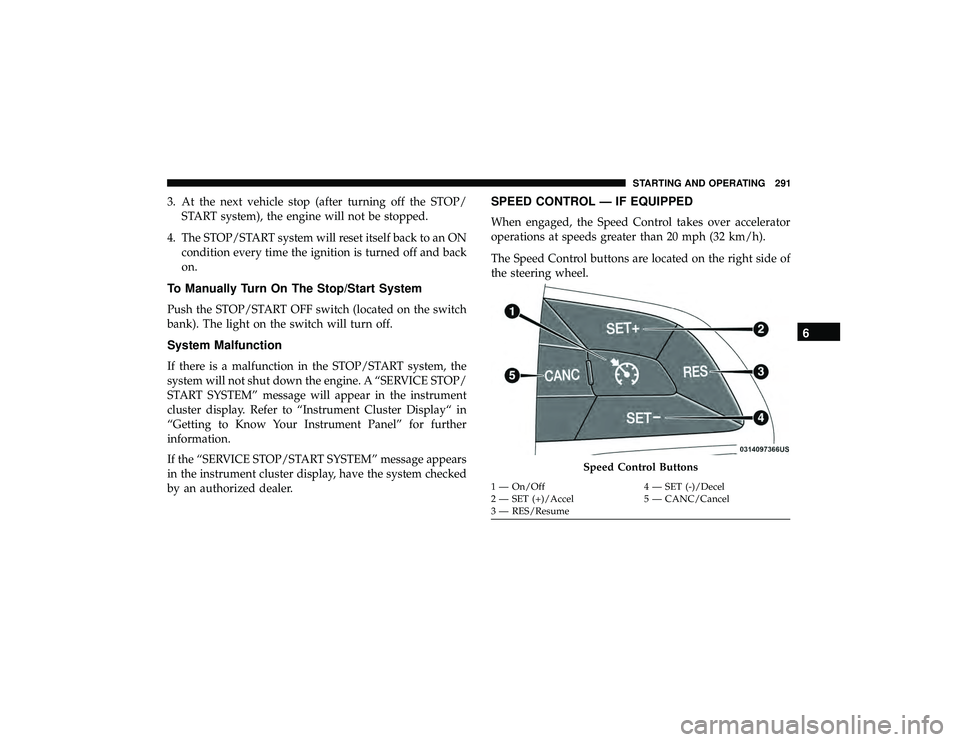
The Speed Control buttons are located on the right side of
the steering wheel.
Speed Control Buttons
1 — On/Off 4 — SET (-)/Decel
2 — SET (+)/Accel 5 — CANC/Cancel
3 — RES/Resume
6
STARTING AND OPERATING 291
Page 297 of 598
NOTE:
•If the sensor does not detect a vehicle ahead of you, ACC
will maintain a fixed set speed.
• If the ACC sensor detects a vehicle ahead, ACC will
apply limited braking or accelerate (not to exceed the
original set speed) automatically to maintain a preset
following distance, while matching the speed of the
vehicle ahead.
The Cruise Control system has two control modes:
• Adaptive Cruise Control mode for maintaining an ap-
propriate distance between vehicles.
• Normal (Fixed Speed) Cruise Control mode for cruising
at a constant preset speed. For additional information,
refer to “Normal (Fixed Speed) Cruise Control Mode” in
this section.
NOTE: Normal (Fixed Speed) Cruise Control will not react
to preceding vehicles. Always be aware of the mode
selected.
You can change the mode by using the Cruise Control
buttons. The two control modes function differently. Al-
ways confirm which mode is selected.WARNING!
• Adaptive Cruise Control (ACC) is a convenience
system. It is not a substitute for active driving
involvement. It is always the driver ’s responsibility
to be attentive of road, traffic, and weather condi-
tions, vehicle speed, distance to the vehicle ahead;
and, most importantly, brake operation to ensure safe
operation of the vehicle under all road conditions.
Your complete attention is always required while
driving to maintain safe control of your vehicle.
Failure to follow these warnings can result in a
collision and death or serious personal injury.
• The ACC system:
• Does not react to pedestrians, oncoming vehicles,
and stationary objects (e.g., a stopped vehicle in a
traffic jam or a disabled vehicle).
• Cannot take street, traffic, and weather conditions
into account, and may be limited upon adverse
sight distance conditions.
• Does not always fully recognize complex driving
conditions, which can result in wrong or missing
distance warnings.
(Continued)
6
STARTING AND OPERATING 295
Page 298 of 598
WARNING!(Continued)
•Will bring the vehicle to a complete stop while
following a target vehicle and hold the vehicle for
2 seconds in the stop position. If the target vehicle
does not start moving within two seconds the ACC
system will display a message that the system will
release the brakes and that the brakes must be
applied manually. An audible chime will sound
when the brakes are released.
You should switch off the ACC system:
• When driving in fog, heavy rain, heavy snow, sleet,
heavy traffic, and complex driving situations (i.e., in
highway construction zones).
• When entering a turn lane or highway off ramp;
when driving on roads that are winding, icy, snow-
covered, slippery, or have steep uphill or downhill
slopes.
• When towing a trailer up or down steep slopes.
• When circumstances do not allow safe driving at a
constant speed.
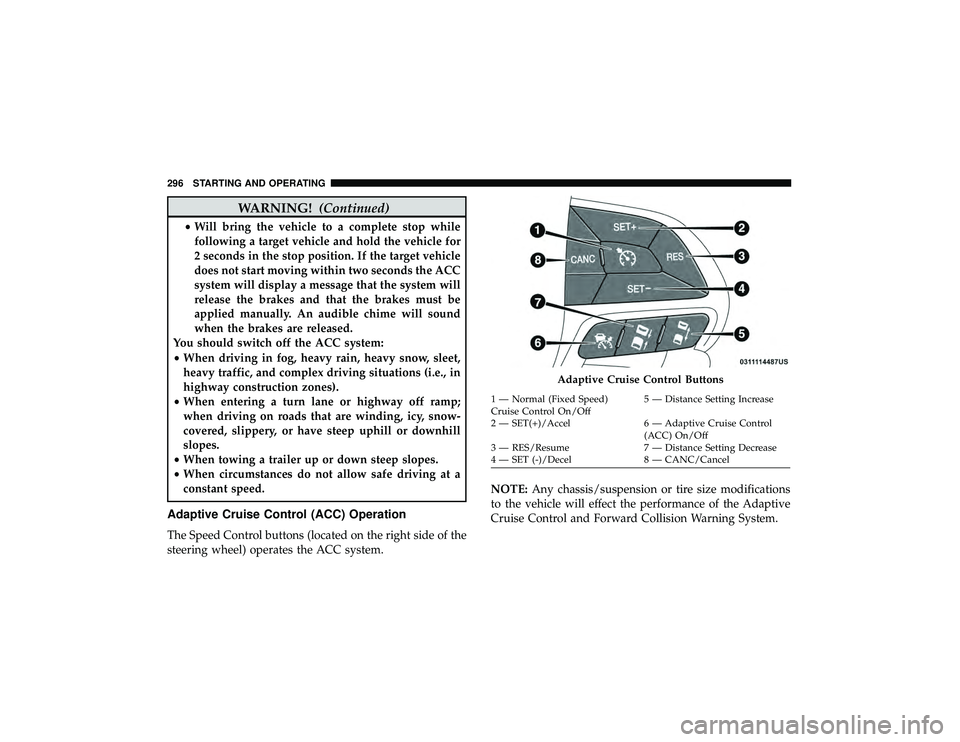
Adaptive Cruise Control (ACC) Operation
The Speed Control buttons (located on the right side of the
steering wheel) operates the ACC system. NOTE:
Any chassis/suspension or tire size modifications
to the vehicle will effect the performance of the Adaptive
Cruise Control and Forward Collision Warning System.
Adaptive Cruise Control Buttons
1 — Normal (Fixed Speed)
Cruise Control On/Off 5 — Distance Setting Increase
2 — SET(+)/Accel 6 — Adaptive Cruise Control (ACC) On/Off
3 — RES/Resume 7 — Distance Setting Decrease
4 — SET (-)/Decel 8 — CANC/Cancel
296 STARTING AND OPERATING
Page 303 of 598
•If the button is continually pushed, the set speed will
continue to decrease in 10 km/h decrements until the
button is released. The decrease in set speed is reflected
in the instrument cluster display.
NOTE:
• When you override and push the SET (+)button or SET
(-) buttons, the new set speed will be the current speed
of the vehicle.
• When you use the SET (-)button to decelerate, if the
engine’s braking power does not slow the vehicle suffi-
ciently to reach the set speed, the brake system will
automatically slow the vehicle.
• The ACC system applies the brake down to a full stop
when following a target vehicle. If an ACC host vehicle
follows a target vehicle to a standstill, the host vehicle
will release the vehicle brakes two seconds after coming
to a full stop.
• The ACC system maintains set speed when driving up
hill and down hill. However, a slight speed change on
moderate hills is normal. In addition, downshifting may
occur while climbing uphill or descending downhill.
This is normal operation and necessary to maintain set speed. When driving up hill and down hill, the ACC
system will cancel if the braking temperature exceeds
normal range (overheated).
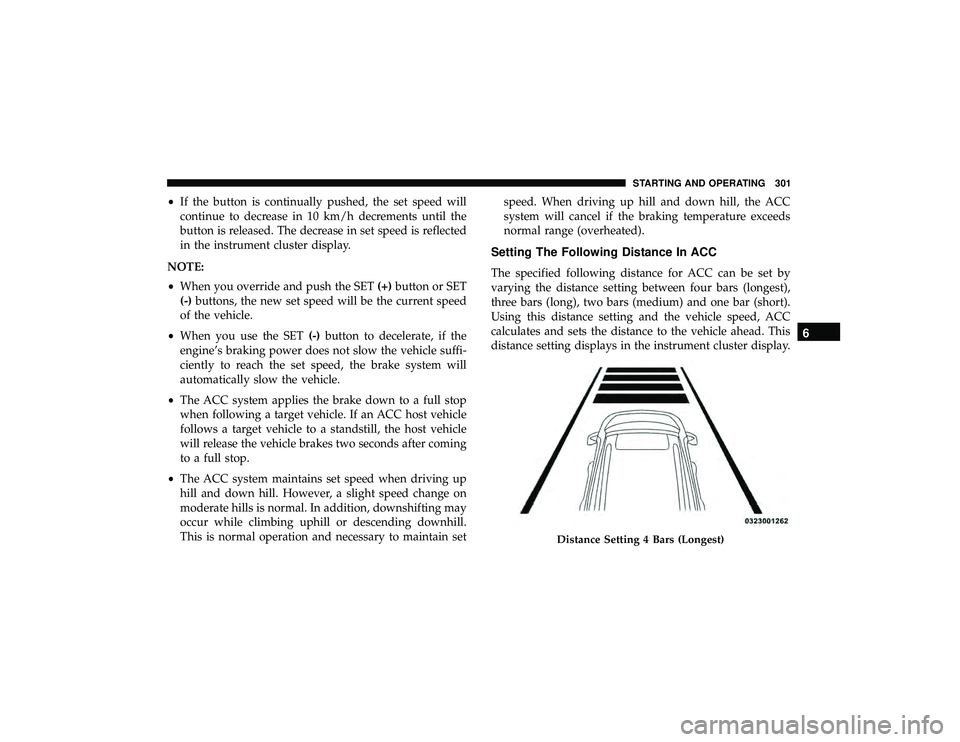
Setting The Following Distance In ACC
The specified following distance for ACC can be set by
varying the distance setting between four bars (longest),
three bars (long), two bars (medium) and one bar (short).
Using this distance setting and the vehicle speed, ACC
calculates and sets the distance to the vehicle ahead. This
distance setting displays in the instrument cluster display.
Distance Setting 4 Bars (Longest)
6
STARTING AND OPERATING 301
Page 307 of 598
While ACC with Stop is holding your vehicle at a stand-
still, if the driver seatbelt is unbuckled or the driver door is
opened, the ACC with Stop system will cancel and the
brakes will release. A cancel message will display on the
instrument cluster display and produce a warning chime.
Driver intervention will be required at this moment.
WARNING!
When the ACC system is resumed, the driver must
ensure that there are no pedestrians, vehicles or objects
in the path of the vehicle. Failure to follow these
warnings can result in a collision and death or serious
personal injury.
Adaptive Cruise Control (ACC) Menu
The instrument cluster display will show the current ACC
system settings. The instrument cluster display is located
in the center of the instrument cluster. The information it
displays depends on ACC system status.
Push the Adaptive Cruise Control (ACC) on/off button
(located on the steering wheel) until one of the following
appears in the instrument cluster display:Adaptive Cruise Control Off
When ACC is deactivated, the display will read “Adaptive
Cruise Control Off.”
Adaptive Cruise Control Ready
When ACC is activated, but the vehicle speed setting has
not been selected, the display will read “Adaptive Cruise
Control Ready.”
Adaptive Cruise Control Set
When the SET (+) or the SET (-) button (located on the
steering wheel) is pushed, the display will read “ACC
SET.”
When ACC is set, the set speed will show in the instrument
cluster display.
The ACC screen may display once again if any ACC
activity occurs, which may include any of the following:
•
System Cancel
• Driver Override
• System Off
• ACC Proximity Warning
• ACC Unavailable Warning
6
STARTING AND OPERATING 305