torque DODGE DURANGO 2020 User Guide
[x] Cancel search | Manufacturer: DODGE, Model Year: 2020, Model line: DURANGO, Model: DODGE DURANGO 2020Pages: 464, PDF Size: 22.14 MB
Page 239 of 464

STARTING AND OPERATING237
CHANGING LANESENSE STATUS
The LaneSense system has settings to adjust
the intensity of the torque warning and the
warning zone sensitivity (early/late) that you
can configure through the Uconnect system
screen. Refer to “Uconnect Settings” in
“Multimedia” for further information.
NOTE:
When enabled the system operates above
37 mph (60 km/h) and below 112 mph
(180 km/h).
Use of the turn signal suppresses the
warnings.
The system will not apply torque to the
steering wheel whenever a safety system
engages (Anti-Lock Brakes, Traction Control
System, Electronic Stability Control, Forward
Collision Warning, etc.).
PARKVIEW REAR BACK UP CAMERA
Your vehicle is equipped with the ParkView Rear
Back Up Camera that allows you to see an
on-screen image of the rear surroundings of
your vehicle whenever the gear selector is put
into REVERSE. The image will be displayed on
the Navigation/Multimedia radio display screen
along with a caution note to “check entire
surroundings” across the top of the screen.
After five seconds this note will disappear. The
ParkView camera is located on the rear of the
vehicle above the rear license plate.
When the vehicle is shifted out of REVERSE
(with camera delay turned off), the rear camera
mode is exited and the navigation or audio
screen appears again.
Manual Activation Of The Backup Camera
1. Press the “Controls” button located on the
bottom of the Uconnect display.
2. Press the “Backup Camera” button to turn the Rear View Camera system on. NOTE:
The ParkView Rear Back Up Camera has
programmable modes of operation that may be
selected through the Uconnect System.
Refer to “Uconnect Settings” in “Multimedia”
for further information.
When the vehicle is shifted out of REVERSE
(with camera delay turned off), the rear camera
mode is exited and the previous screen appears
again. When the vehicle is shifted out of
REVERSE (with camera delay turned on), the
camera image will continue to be displayed for
up to ten seconds, unless the vehicle speed
exceeds 8 mph (13 km/h), the vehicle is shifted
into PARK, the vehicle’s ignition is placed in the
OFF position, or the user presses image defeat
“X” to exit out of the camera video display.
When enabled, active guidelines are overlaid on
the image to illustrate the width of the vehicle
and its projected backup path based on the
steering wheel position. A dashed center line
overlay indicates the center of the vehicle to
assist with parking or aligning to a hitch/
receiver. Different colored zones indicate the
distance to the rear of the vehicle.
5
20_WD_OM_EN_USC_t.book Page 237
Page 262 of 464
260STARTING AND OPERATING
After Driving Off-Road
Off-road operation puts more stress on your
vehicle than does most on-road driving. After
going off-road, it is always a good idea to check
for damage. That way you can get any problems
taken care of right away and have your vehicle
ready when you need it.
Completely inspect the underbody of your
vehicle. Check tires, body structure, steering,
suspension, and exhaust system for damage.
Inspect the radiator for mud and debris and
clean as required.
Check threaded fasteners for looseness,
particularly on the chassis, drivetrain compo -
nents, steering, and suspension. Retighten
them, if required, and torque to the values
specified in the Service Manual.
Check for accumulations of plants or brush.
These things could be a fire hazard. They
might hide damage to fuel lines, brake hoses,
axle pinion seals, and propeller shafts.
After extended operation in mud, sand,
water, or similar dirty conditions, have the
radiator, fan, brake rotors, wheels, brake
linings, and axle yokes inspected and
cleaned as soon as possible.
If you experience unusual vibration after
driving in mud, slush or similar conditions,
check the wheels for impacted material.
Impacted material can cause a wheel imbal-
ance and freeing the wheels of it will correct
the situation.
WARNING!
Abrasive material in any part of the brakes
may cause excessive wear or unpredictable
braking. You might not have full braking
power when you need it to prevent a collision.
If you have been operating your vehicle in
dirty conditions, get your brakes checked and
cleaned as necessary.
20_WD_OM_EN_USC_t.book Page 260
Page 284 of 464
282IN CASE OF EMERGENCY
9. Finish tightening the lug nuts. Push down on
the wrench while at the end of the handle
for increased leverage. Tighten the lug nuts
in a star pattern until each nut has been
tightened twice. Refer to “Wheel and Tire
Torque Specifications” in “Technical
Specifications” for proper lug nut torque. If
in doubt about the correct tightness, have
them checked with a torque wrench by an
authorized dealer or at a service station.
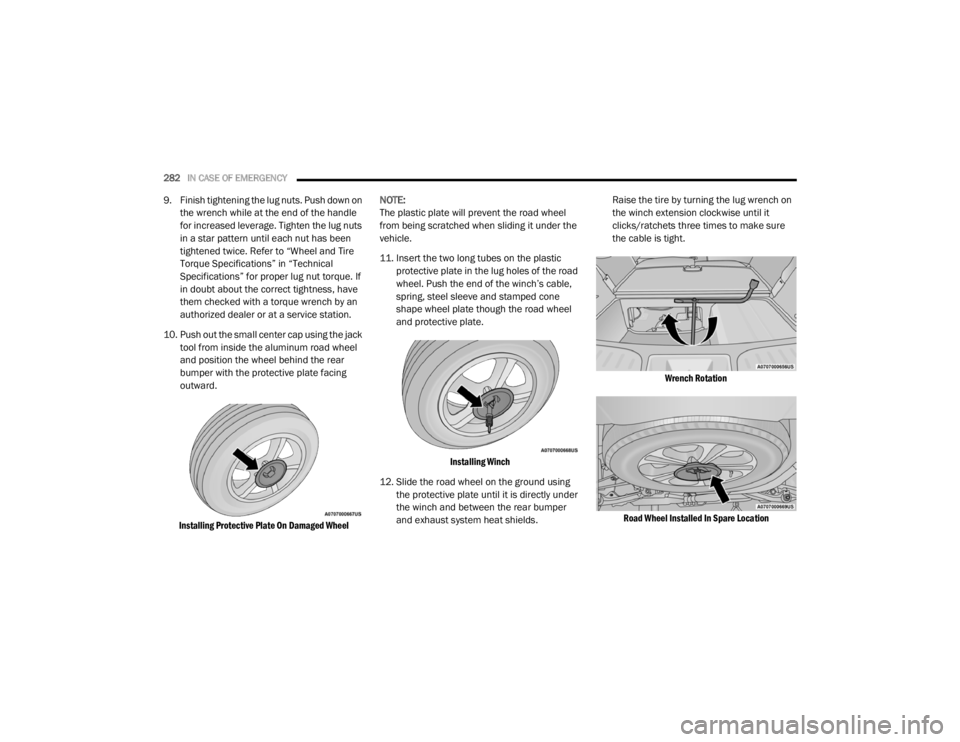
10. Push out the small center cap using the jack tool from inside the aluminum road wheel
and position the wheel behind the rear
bumper with the protective plate facing
outward.
Installing Protective Plate On Damaged Wheel
NOTE:
The plastic plate will prevent the road wheel
from being scratched when sliding it under the
vehicle.
11. Insert the two long tubes on the plastic
protective plate in the lug holes of the road
wheel. Push the end of the winch’s cable,
spring, steel sleeve and stamped cone
shape wheel plate though the road wheel
and protective plate.
Installing Winch
12. Slide the road wheel on the ground using the protective plate until it is directly under
the winch and between the rear bumper
and exhaust system heat shields. Raise the tire by turning the lug wrench on
the winch extension clockwise until it
clicks/ratchets three times to make sure
the cable is tight.
Wrench Rotation
Road Wheel Installed In Spare Location
20_WD_OM_EN_USC_t.book Page 282
Page 285 of 464
IN CASE OF EMERGENCY283
NOTE:
Double check to ensure the tire is snug against
the underbody of the vehicle. Damage to the
winch cable may result if the vehicle is driven
with the tire loose.
13. Lower the jack to the fully closed position.
Return the tools to the proper positions in
the tool bag. Fold the flap on the tool bag
under the tools and roll the tools in the bag
underneath the others. Use the hook and
loop fasteners to secure the tool bag to the
jack with the lug wrench on the forward side
of the jack. Expand the jack on the bracket
by turning the thumb screw clockwise until
it is tight to prevent rattles.
14. Reinstall the plastic plug into the floor of the cargo area. Roll up and store the Jack, Tool
Kit and Tire Changing Instructions. Reinstall
the cover for the jack in the rear storage bin. 15. Have the aluminum road wheel and tire
repaired as soon as possible and properly
secure the spare tire, jack and tool kit.
ROAD TIRE INSTALLATION
1. Mount the road tire on the axle.
2. Install the remaining lug nuts with the cone shaped end of the nut toward the wheel.
Lightly tighten the lug nuts. 3. Lower the vehicle to the ground by turning
the jack handle counterclockwise.
4. Refer to “Wheel and Tire Torque Specifi -
cations” in “Technical Specifications” for
proper lug nut torque.
5. After 25 miles (40 km), check the lug nut torque with a torque wrench to ensure that
all lug nuts are properly seated against the
wheel.
JUMP STARTING
If your vehicle has a discharged battery, it can
be jump started using a set of jumper cables
and a battery in another vehicle, or by using a
portable battery booster pack. Jump starting
can be dangerous if done improperly, so please
follow the procedures in this section carefully.
CAUTION!
The winch mechanism is designed for use
with the jack wrench extension tool only. Use
of air wrench or power tool may damage the
winch.
WARNING!
A loose tire or jack thrown forward in a
collision or hard stop, could endanger the
occupants of the vehicle. Always stow the jack
parts and the spare tire in the places
provided.
WARNING!
To avoid the risk of forcing the vehicle off the
jack, do not tighten the wheel nuts fully until
the vehicle has been lowered. Failure to
follow this warning may result in serious
injury.
WARNING!
Do not attempt jump starting if the battery is
frozen. It could rupture or explode and cause
personal injury.
6
20_WD_OM_EN_USC_t.book Page 283
Page 328 of 464

326SERVICING AND MAINTENANCE
AUTOMATIC TRANSMISSION
Selection Of Lubricant
It is important to use the proper transmission
fluid to ensure optimum transmission
performance and life. Use only the
manufacturer's specified transmission fluid.
Refer to “Fluids And Lubricants” in “Technical
Specifications” for fluid specifications. It is
important to maintain the transmission fluid at
the correct level using the recommended fluid.
NOTE:
No chemical flushes should be used in any
transmission; only the approved lubricant
should be used.
Special Additives
The manufacturer strongly recommends
against using any special additives in the
transmission. Automatic Transmission Fluid
(ATF) is an engineered product and its
performance may be impaired by supplemental
additives. Therefore, do not add any fluid
additives to the transmission. Avoid using
transmission sealers as they may adversely
affect seals.
Fluid Level Check
The fluid level is preset at the factory and does
not require adjustment under normal operating
conditions. Routine fluid level checks are not
required; therefore the transmission has no
dipstick. An authorized dealer can check your
transmission fluid level using special service
tools. If you notice fluid leakage or transmission
malfunction, visit an authorized dealer
immediately to have the transmission fluid level
checked. Operating the vehicle with an
improper fluid level can cause severe
transmission damage.
Fluid And Filter Changes
Under normal operating conditions, the fluid
installed at the factory will provide satisfactory
lubrication for the life of the vehicle.
Routine fluid and filter changes are not
required. However, change the fluid and filter if
the fluid becomes contaminated (with water,
etc.), or if the transmission is disassembled for
any reason.
CAUTION!
Using a transmission fluid other than the
manufacturer’s recommended fluid may
cause deterioration in transmission shift
quality and/or torque converter shudder.
Refer to “Fluids And Lubricants” in “Technical
Specifications” for fluid specifications.
CAUTION!
Do not use chemical flushes in your
transmission as the chemicals can damage
your transmission components. Such damage
is not covered by the New Vehicle Limited
Warranty.
CAUTION!
If a transmission fluid leak occurs, visit an
authorized dealer immediately. Severe
transmission damage may occur. An
authorized dealer has the proper tools to
adjust the fluid level accurately.
20_WD_OM_EN_USC_t.book Page 326
Page 329 of 464

SERVICING AND MAINTENANCE327
FRONT/REAR AXLE FLUID
For normal service, periodic fluid level checks
are not required. When the vehicle is serviced
for other reasons the exterior surfaces of the
axle assembly should be inspected. If gear oil
leakage is suspected inspect the fluid level.
Refer to “Fluids And Lubricants” in “Technical
Specifications” for further information.
Front Axle Fluid Level Check
The front axle oil level needs to be no lower than
1/8 inch (3 mm) below the bottom of the fill
hole.
The front axle fill and drain plugs should be
tightened to 22 to 29 ft lbs (30 to 40 N·m).
Rear Axle Fluid Level Check
The rear axle oil level needs to be no lower than
1/8 inch (3 mm) below the bottom of the fill
hole. The rear axle fill and drain plugs should be
tightened to 22 to 29 ft lbs (30 to 40 N·m).
Selection Of Lubricant
Use only the manufacturer's recommended
fluid. Refer to “Fluids And Lubricants” in
“Technical Specifications” for further
information.
TRANSFER CASE
Fluid Level Check
For normal service, periodic fluid level checks
are not required. When the vehicle is serviced
for other reasons the exterior surfaces of the
transfer case assembly should be inspected. If
oil leakage is suspected inspect the fluid level.
Refer to “Fluids And Lubricants” in “Technical
Specifications” for further information.
Adding Fluid
Add fluid at the filler hole, until it runs out of the
hole, when the vehicle is in a level position.
Drain
First remove fill plug, then remove drain plug.
Recommended tightening torque for drain and
fill plugs is 15 to 25 ft lbs (20 to 34 N·m).
Selection Of Lubricant
Use only the manufacturer's recommended
fluid. Refer to “Fluids And Lubricants” in
“Technical Specifications” for further
information.
RAISING THE VEHICLE
In the case where it is necessary to raise the
vehicle, go to an authorized dealer or service
station.
TIRES
TIRE SAFETY INFORMATION
Tire safety information will cover aspects of the
following information: Tire Markings, Tire
Identification Numbers, Tire Terminology and
Definitions, Tire Pressures, and Tire Loading.
CAUTION!
Do not overtighten the plugs as it could
damage them and cause them to leak.
CAUTION!
Do not overtighten the plugs as it could
damage them and cause them to leak.CAUTION!
When installing plugs, do not overtighten. You
could damage them and cause them to leak.
7
20_WD_OM_EN_USC_t.book Page 327
Page 352 of 464
350
TECHNICAL SPECIFICATIONS
IDENTIFICATION DATA
VEHICLE IDENTIFICATION NUMBER
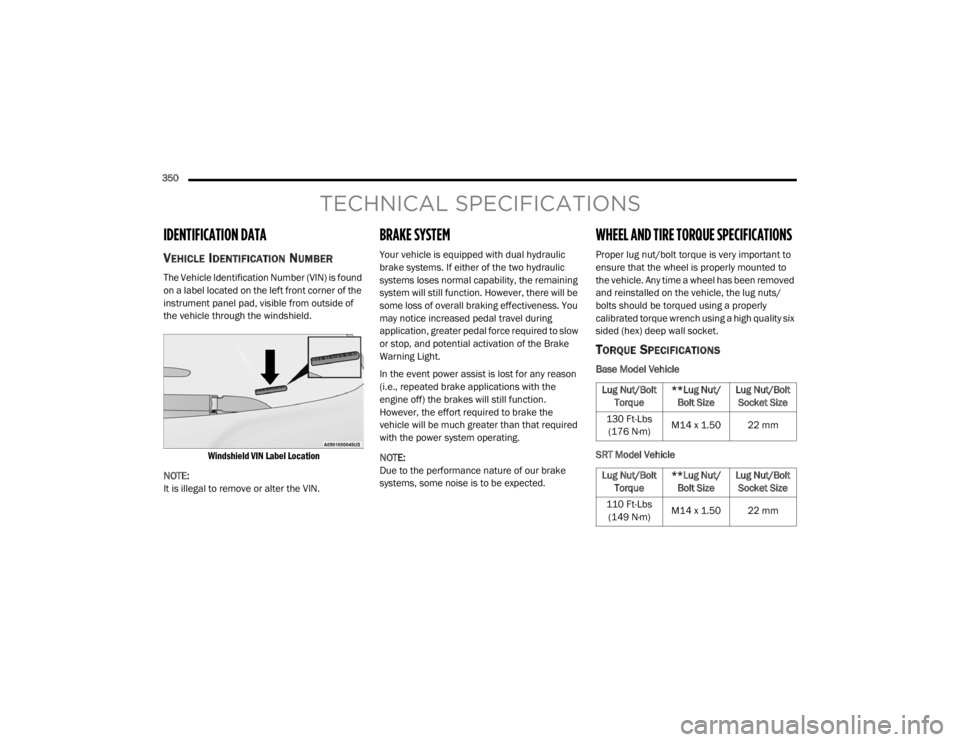
The Vehicle Identification Number (VIN) is found
on a label located on the left front corner of the
instrument panel pad, visible from outside of
the vehicle through the windshield.
Windshield VIN Label Location
NOTE:
It is illegal to remove or alter the VIN.
BRAKE SYSTEM
Your vehicle is equipped with dual hydraulic
brake systems. If either of the two hydraulic
systems loses normal capability, the remaining
system will still function. However, there will be
some loss of overall braking effectiveness. You
may notice increased pedal travel during
application, greater pedal force required to slow
or stop, and potential activation of the Brake
Warning Light.
In the event power assist is lost for any reason
(i.e., repeated brake applications with the
engine off) the brakes will still function.
However, the effort required to brake the
vehicle will be much greater than that required
with the power system operating.
NOTE:
Due to the performance nature of our brake
systems, some noise is to be expected.
WHEEL AND TIRE TORQUE SPECIFICATIONS
Proper lug nut/bolt torque is very important to
ensure that the wheel is properly mounted to
the vehicle. Any time a wheel has been removed
and reinstalled on the vehicle, the lug nuts/
bolts should be torqued using a properly
calibrated torque wrench using a high quality six
sided (hex) deep wall socket.
TORQUE SPECIFICATIONS
Base Model Vehicle
SRT Model Vehicle
Lug Nut/Bolt Torque **Lug Nut/
Bolt Size Lug Nut/Bolt
Socket Size
130 Ft-Lbs (176 N·m) M14 x 1.50 22 mm
Lug Nut/Bolt Torque **Lug Nut/
Bolt Size Lug Nut/Bolt
Socket Size
110 Ft-Lbs (149 N·m) M14 x 1.50 22 mm
20_WD_OM_EN_USC_t.book Page 350
Page 353 of 464
TECHNICAL SPECIFICATIONS351
**Use only authorized dealer recommended
lug nuts/bolts and clean or remove any dirt or
oil before tightening.
Inspect the wheel mounting surface prior to
mounting the tire and remove any corrosion or
loose particles.
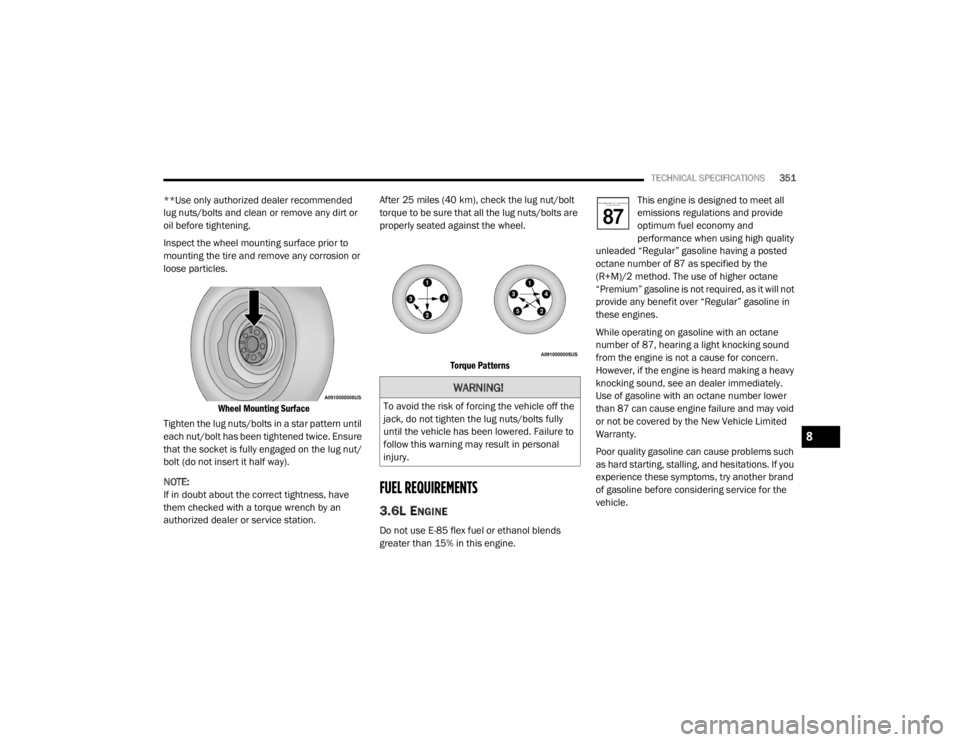
Wheel Mounting Surface
Tighten the lug nuts/bolts in a star pattern until
each nut/bolt has been tightened twice. Ensure
that the socket is fully engaged on the lug nut/
bolt (do not insert it half way).
NOTE:
If in doubt about the correct tightness, have
them checked with a torque wrench by an
authorized dealer or service station. After 25 miles (40 km), check the lug nut/bolt
torque to be sure that all the lug nuts/bolts are
properly seated against the wheel.
Torque Patterns
FUEL REQUIREMENTS
3.6L ENGINE
Do not use E-85 flex fuel or ethanol blends
greater than 15% in this engine. This engine is designed to meet all
emissions regulations and provide
optimum fuel economy and
performance when using high quality
unleaded “Regular” gasoline having a posted
octane number of 87 as specified by the
(R+M)/2 method. The use of higher octane
“Premium” gasoline is not required, as it will not
provide any benefit over “Regular” gasoline in
these engines.
While operating on gasoline with an octane
number of 87, hearing a light knocking sound
from the engine is not a cause for concern.
However, if the engine is heard making a heavy
knocking sound, see an dealer immediately.
Use of gasoline with an octane number lower
than 87 can cause engine failure and may void
or not be covered by the New Vehicle Limited
Warranty.
Poor quality gasoline can cause problems such
as hard starting, stalling, and hesitations. If you
experience these symptoms, try another brand
of gasoline before considering service for the
vehicle.
WARNING!
To avoid the risk of forcing the vehicle off the
jack, do not tighten the lug nuts/bolts fully
until the vehicle has been lowered. Failure to
follow this warning may result in personal
injury.
8
20_WD_OM_EN_USC_t.book Page 351
Page 458 of 464

456
T
Telescoping Steering Column
.......................... 46Temperature Control, Automatic (ATC)............ 69Tie Down Hooks, Cargo.................................... 78Tilt Steering Column........................................ 46Tire And Loading Information Placard........... 332Tire Markings................................................. 328Tire Safety Information.................................. 327Tires................................... 183, 335, 340, 344Aging (Life Of Tires)................................... 338Air Pressure............................................... 335Chains............................................. 343, 344Changing................................ 275, 283, 327Compact Spare......................................... 341Flat Changing............................................ 283General Information........................ 335, 340High Speed................................................ 336Inflation Pressure...................................... 336Jacking...................................................... 327Life Of Tires............................................... 338Load Capacity............................................ 332Pressure Monitoring System (TPMS)........................................ 114, 138Quality Grading.......................................... 344Radial........................................................ 337Replacement................................... 283, 338Rotation.................................................... 344Safety.............................................. 327, 335Sizes.......................................................... 329Snow Tires................................................. 340
Spare Tires............................. 277, 340, 342Spinning................................................... 337Trailer Towing........................................... 248Tread Wear Indicators.............................. 338Wheel Mounting....................................... 283Wheel Nut Torque..................................... 350To Open Hood.................................................. 75Tongue Weight/Trailer Weight...................... 246Towing................................................. 241, 290Disabled Vehicle....................................... 290Guide............................................... 244, 245Recreational............................................. 253Weight............................................. 244, 245Towing Behind A Motorhome........................ 253Traction Control............................................ 130Trailer Sway Control (TSC)............................. 130Trailer Towing............................................... 241Cooling System Tips................................. 252Hitches..................................................... 243Minimum Requirements........................... 247Tips........................................................... 251Trailer And Tongue Weight........................ 246Wiring....................................................... 251Trailer Towing Guide............................ 244, 245Trailer Weight....................................... 244, 245Transfer Case............................................... 327Electronically Shifted................................ 199Fluid......................................................... 358Maintenance............................................ 327
Transmission................................................. 193Automatic........................................ 193, 326Fluid.......................................................... 358Maintenance............................................ 326Shifting..................................................... 191Transmitter, Garage Door Opener
(Homelink).......................................................78Transporting Pets.......................................... 180Tread Wear Indicators................................... 338Turn Signals......................................... 118, 269
U
UconnectAdvanced Phone Connectivity
................... 421Phone Call Features................................. 418Things You Should Know About Your Uconnect Phone................................................... 422Uconnect Settings.................................... 372Uconnect Phone..........................414, 416, 417Answer Or Ignore An Incoming Call — Call Currently In Progress..................... 420Answer Or Ignore An Incoming Call — No Call Currently In Progress................ 420Bluetooth Communication Link................ 423Call By Saying A Phonebook Name........... 419Call Continuation...................................... 421Call Controls............................................. 419Call Termination....................................... 421Cancel Command..................................... 414
20_WD_OM_EN_USC_t.book Page 456