fuel DODGE DURANGO 2020 Owner's Manual
[x] Cancel search | Manufacturer: DODGE, Model Year: 2020, Model line: DURANGO, Model: DODGE DURANGO 2020Pages: 464, PDF Size: 22.14 MB
Page 122 of 464

120GETTING TO KNOW YOUR INSTRUMENT PANEL
ONBOARD DIAGNOSTIC SYSTEM — OBD II
Your vehicle is equipped with a sophisticated
Onboard Diagnostic system called OBD II. This
system monitors the performance of the
emissions, engine, and transmission control
systems. When these systems are operating
properly, your vehicle will provide excellent
performance and fuel economy, as well as
engine emissions well within current
government regulations.
If any of these systems require service, the
OBD II system will turn on the Malfunction
Indicator Light (MIL). It will also store diagnostic
codes and other information to assist your
service technician in making repairs. Although
your vehicle will usually be driveable and not
need towing, see an authorized dealer for
service as soon as possible.
ONBOARD DIAGNOSTIC SYSTEM
(OBD II) C
YBERSECURITY
Your vehicle is required to have an Onboard
Diagnostic system (OBD II) and a connection
port to allow access to information related to
the performance of your emissions controls.
Authorized service technicians may need to
access this information to assist with the
diagnosis and service of your vehicle and
emissions system. For further information, refer to “Cybersecurity”
in “Multimedia”.
CAUTION!
Prolonged driving with the MIL on could
cause further damage to the emission
control system. It could also affect fuel
economy and driveability. The vehicle must
be serviced before any emissions tests can
be performed.
If the MIL is flashing while the vehicle is
running, severe catalytic converter damage
and power loss will soon occur. Immediate
service is required.
WARNING!
ONLY an authorized service technician
should connect equipment to the OBD II
connection port in order to read the VIN,
diagnose, or service your vehicle.
If unauthorized equipment is connected to
the OBD II connection port, such as a
driver-behavior tracking device, it may:
Be possible that vehicle systems,
including safety related systems, could
be impaired or a loss of vehicle control
could occur that may result in an acci
-
dent involving serious injury or death.
Access, or allow others to access, infor -
mation stored in your vehicle systems,
including personal information.
20_WD_OM_EN_USC_t.book Page 120
Page 142 of 464
140SAFETY
NOTE:
The TPMS is not intended to replace normal
tire care and maintenance, or to provide
warning of a tire failure or condition.
The TPMS should not be used as a tire pres -
sure gauge while adjusting your tire pressure.
Driving on a significantly under-inflated tire
causes the tire to overheat and can lead to
tire failure. Under-inflation also reduces fuel
efficiency and tire tread life, and may affect
the vehicle’s handling and stopping ability.
The TPMS is not a substitute for proper tire
maintenance, and it is the driver’s responsi -
bility to maintain correct tire pressure using
an accurate tire gauge, even if under-infla -
tion has not reached the level to trigger illu -
mination of the TPMS Warning Light.
Seasonal temperature changes will affect
tire pressure, and the TPMS will monitor the
actual tire pressure in the tire.
The Tire Pressure Monitoring System (TPMS)
uses wireless technology with wheel
rim-mounted electronic sensors to monitor tire
pressure levels. Sensors, mounted to each
wheel as part of the valve stem, transmit tire
pressure readings to the Receiver Module.
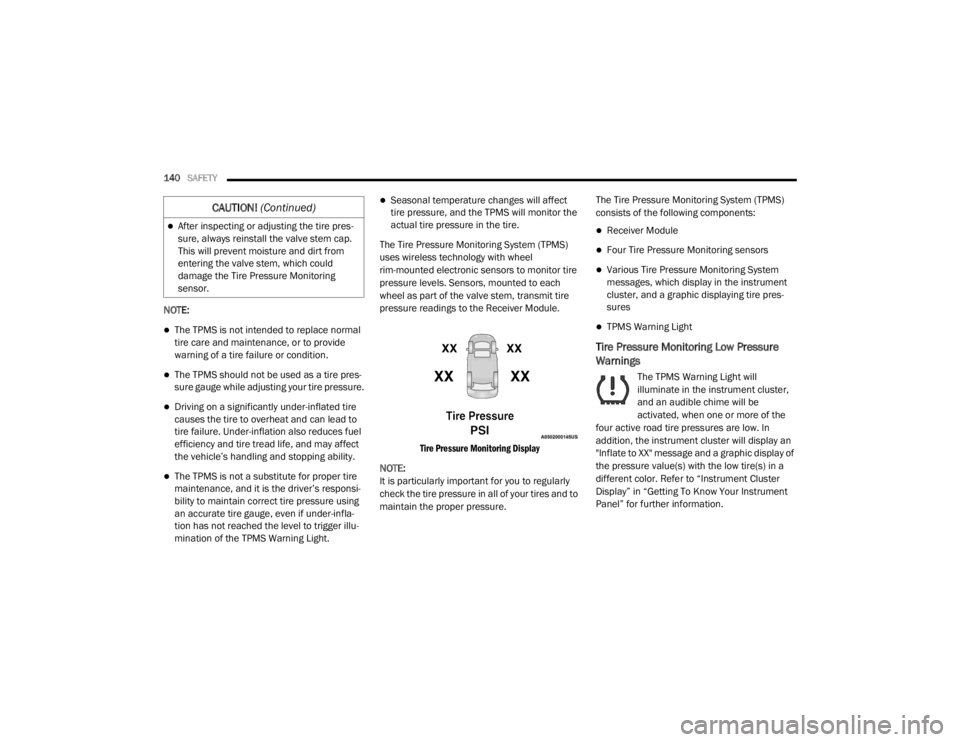
Tire Pressure Monitoring Display
NOTE:
It is particularly important for you to regularly
check the tire pressure in all of your tires and to
maintain the proper pressure. The Tire Pressure Monitoring System (TPMS)
consists of the following components:
Receiver Module
Four Tire Pressure Monitoring sensors
Various Tire Pressure Monitoring System
messages, which display in the instrument
cluster, and a graphic displaying tire pres
-
sures
TPMS Warning Light
Tire Pressure Monitoring Low Pressure
Warnings
The TPMS Warning Light will
illuminate in the instrument cluster,
and an audible chime will be
activated, when one or more of the
four active road tire pressures are low. In
addition, the instrument cluster will display an
"Inflate to XX" message and a graphic display of
the pressure value(s) with the low tire(s) in a
different color. Refer to “Instrument Cluster
Display” in “Getting To Know Your Instrument
Panel” for further information.
After inspecting or adjusting the tire pres -
sure, always reinstall the valve stem cap.
This will prevent moisture and dirt from
entering the valve stem, which could
damage the Tire Pressure Monitoring
sensor.
CAUTION! (Continued)
20_WD_OM_EN_USC_t.book Page 140
Page 163 of 464

SAFETY161
(Continued)
Enhanced Accident Response System
In the event of an impact, if the communication
network remains intact, and the power remains
intact, depending on the nature of the event,
the Occupant Restraint Controller (ORC) will
determine whether to have the Enhanced
Accident Response System perform the
following functions:
Cut off fuel to the engine (if equipped)
Cut off battery power to the electric motor (if
equipped)
Flash hazard lights as long as the battery has
power
Turn on the interior lights, which remain on
as long as the battery has power or for
15 minutes from the intervention of the
Enhanced Accident Response System
Unlock the power door locks
Your vehicle may also be designed to perform
any of these other functions in response to the
Enhanced Accident Response System:
Turn off the Fuel Filter Heater, Turn off the
HVAC Blower Motor, Close the HVAC Circula -
tion Door
Cut off battery power to the:
Engine
Electric Motor (if equipped)
Electric power steering
Brake booster
Electric park brake
Automatic transmission gear selector
Horn
Front wiper
Headlamp washer pump
NOTE:
After an accident, remember to cycle the igni -
tion to the STOP (OFF/LOCK) position and
remove the key from the ignition switch to avoid
draining the battery. Carefully check the vehicle
for fuel leaks in the engine compartment and on
the ground near the engine compartment and
fuel tank before resetting the system and
starting the engine. If there are no fuel leaks or
damage to the vehicle electrical devices (e.g.
headlights) after an accident, reset the system
by following the procedure described below. If you have any doubt, contact an authorized
dealer.
Enhanced Accident Response System
Reset Procedure
In order to reset the Enhanced Accident
Response System functions after an event, the
ignition switch must be changed from ignition
START or ON/RUN to ignition OFF. Carefully
check the vehicle for fuel leaks in the engine
compartment and on the ground near the
engine compartment and fuel tank before
resetting the system and starting the engine.
Maintaining Your Air Bag System
WARNING!
Modifications to any part of the air bag
system could cause it to fail when you need
it. You could be injured if the air bag system
is not there to protect you. Do not modify
the components or wiring, including adding
any kind of badges or stickers to the
steering wheel hub trim cover or the upper
passenger side of the instrument panel. Do
not modify the front bumper, vehicle body
structure, or add aftermarket side steps or
running boards.
4
20_WD_OM_EN_USC_t.book Page 161
Page 185 of 464

SAFETY183
PERIODIC SAFETY CHECKS YOU SHOULD
M
AKE OUTSIDE THE VEHICLE
Tires
Examine tires for excessive tread wear and
uneven wear patterns. Check for stones, nails,
glass, or other objects lodged in the tread or
sidewall. Inspect the tread for cuts and cracks.
Inspect sidewalls for cuts, cracks, and bulges.
Check the wheel nuts for tightness. Check the
tires (including spare) for proper cold inflation
pressure.
Lights
Have someone observe the operation of brake
lights and exterior lights while you work the
controls. Check turn signal and high beam
indicator lights on the instrument panel.
Door Latches
Check for proper closing, latching, and locking.
Fluid Leaks
Check area under the vehicle after overnight
parking for fuel, coolant, oil, or other fluid leaks.
Also, if gasoline fumes are detected or if fuel, or
brake fluid leaks are suspected, the cause
should be located and corrected immediately.
WARNING!
To prevent SERIOUS INJURY or DEATH when
using “Track-Use” parts and equipment:
NEVER use any “Track-Use” equipment on
public roads. FCA US LLC does not autho -
rize the use of “Track-Use” equipment on
public roads.
The intended use of “Track-Use” parts is for
race vehicles on race tracks. To help
ensure the safety of the race driver, engi -
neers should supervise the installation of
“Track-Use” parts.
FCA US LLC does not authorize the installa -
tion or use of any part noted as “Track-Use”
on any new vehicle prior to its first retail
sale.
WARNING!
To prevent SERIOUS INJURY or DEATH:
ALWAYS remove any “Track-Use” equip -
ment before driving on public roads.
ALWAYS properly use your three-point seat
belts when driving on public roads.
In a collision, you and your passengers can
suffer much greater injuries if you are not
properly buckled up. You can strike the inte -
rior of your vehicle or other passengers, or
you can be thrown out of the vehicle.
4
20_WD_OM_EN_USC_t.book Page 183
Page 189 of 464
STARTING AND OPERATING187
NOTE:
In some cases the ParkSense graphic will be
displayed in the instrument cluster. In these
cases, the gear selector must be returned to “P”
to select desired gear.
If the driver shifts into PARK while moving, the
vehicle may AutoPark.
AutoPark will engage ONLY when vehicle speed
is 1.2 mph (1.9 km/h) or less.
The MESSAGE “ Vehicle Speed is Too High to
Shift to P ” will be displayed in the instrument
cluster if vehicle speed is above 1.2 mph
(1.9 km/h). 4WD LOW — If Equipped
AutoPark will be disabled when operating the
vehicle in 4WD LOW.
The MESSAGE “
AutoPark Disabled ” will be
displayed in the instrument cluster.
Additional customer warnings will be given
when both of these conditions are met:
Vehicle is not in PARK
Driver’s door is ajar
The MESSAGE “ AutoPark Not Engaged ” will be
displayed in the instrument cluster. A warning
chime will continue until you shift the vehicle
into PARK or the driver’s door is closed.
ALWAYS DO A VISUAL CHECK
that your vehicle
is in PARK by looking for the "P" in the
instrument cluster display and on the gear
selector. As an added precaution, always apply
the parking brake when exiting the vehicle.
IF ENGINE FAILS TO START
If the engine fails to start after you have
followed the "Normal Starting" or "Extreme Cold
Weather" procedure it may be flooded. Push the
accelerator pedal all the way to the floor and
hold it there. Crank the engine for no more than 15 seconds.
This should clear any excess fuel in case the
engine is flooded. Leave the ignition key in the
RUN position, release the accelerator pedal and
repeat the “Normal Starting” procedure.
WARNING!
If vehicle speed is above 1.2 mph (1.9 km/h),
the transmission will default to NEUTRAL until
the vehicle speed drops below 1.2 mph
(1.9 km/h). A vehicle left in the NEUTRAL
position can roll. As an added precaution,
always apply the parking brake when exiting
the vehicle.
WARNING!
Never pour fuel or other flammable liquid
into the throttle body air inlet opening in an
attempt to start the vehicle. This could
result in flash fire causing serious personal
injury.
Do not attempt to push or tow your vehicle
to get it started. Vehicles equipped with an
automatic transmission cannot be started
this way. Unburned fuel could enter the
catalytic converter and once the engine has
started, ignite and damage the converter
and vehicle.
If the vehicle has a discharged battery,
booster cables may be used to obtain a
start from a booster battery or the battery in
another vehicle. This type of start can be
dangerous if done improperly. Refer to
“Jump Starting Procedure” in “In Case Of
Emergency” for further information.
5
20_WD_OM_EN_USC_t.book Page 187
Page 191 of 464

STARTING AND OPERATING189
ENGINE BREAK-IN RECOMMENDATIONS –
SRT
The following tips will be helpful in obtaining
optimum performance and maximum durability
for your new SRT Vehicle.
Despite modern technology and World Class
manufacturing methods, the moving parts of
the vehicle still require wear in with one
another. This wearing in occurs mainly during
the first 500 miles (805 km) and continues
through the first oil change interval.
It is recommended that the operator observe
the following driving behaviors during the new
vehicle break-in period:
0 to 100 miles (0 to 161 km):
Do not allow the engine to operate at idle for
an extended period of time.
Depress the accelerator pedal slowly and
not more than halfway to avoid rapid
acceleration.
Avoid aggressive braking.
Drive with the engine speed less than
3,500 RPM.
Maintain vehicle speed below 55 mph
(88 km/h) and observe local speed limits.
100 to 300 miles (161 to 483 km):
Depress the accelerator pedal slowly and not
more than halfway to avoid rapid accelera -
tion in lower gears (FIRST to THIRD gears).
Avoid aggressive braking.
Drive with the engine speed less than
5,000 RPM.
Maintain vehicle speed below 70 mph
(112 km/h) and observe local speed limits. 300 to 500 miles (483 to 805 km):
Exercise the full engine RPM range, shifting
manually (paddles or gear shift) at higher
RPM when possible.
Do not perform sustained operation with the
accelerator pedal at wide open throttle.
Maintain vehicle speed below 85 mph
(136 km/h) and observe local speed limits.
For the first 1,500 miles (2,414 km):
Do not participate in track events, sport
driving schools, or similar activities during
the first 1,500 miles (2,414 km).
NOTE:
Check engine oil with every refueling and add if
necessary. Oil and fuel consumption may be
higher through the first oil change interval.
Running the engine with an oil level below the
add mark can cause severe engine damage.5
20_WD_OM_EN_USC_t.book Page 189
Page 194 of 464
192STARTING AND OPERATING
NOTE:
You must press and hold the brake pedal while
shifting out of PARK.
IGNITION PARK INTERLOCK
This vehicle is equipped with an Ignition Park
Interlock which requires the transmission to be
in PARK (P) before the ignition can be turned to
the OFF mode. This helps the driver avoid
inadvertently leaving the vehicle without placing
the transmission in PARK. This system also
locks the transmission in PARK whenever the
ignition is in the OFF mode.
NOTE:
The transmission is NOT locked in PARK when
the ignition is in the ACC mode (even though the
engine will be off). Ensure that the transmission
is in PARK, and the ignition is OFF (not in ACC
mode) before exiting the vehicle.
BRAKE/TRANSMISSION SHIFT
I
NTERLOCK SYSTEM
This vehicle is equipped with a Brake
Transmission Shift Interlock system (BTSI) that
holds the transmission gear selector in PARK
unless the brakes are applied. To shift the
transmission out of PARK, the engine must be
running and the brake pedal must be pressed.
The brake pedal must also be pressed to shift
from NEUTRAL into DRIVE or REVERSE when the
vehicle is stopped or moving at low speeds.
FUEL ECONOMY (ECO) MODE
The Fuel Economy (ECO) mode can improve the
vehicle's overall fuel economy during normal
driving conditions. Push the “eco” button in the
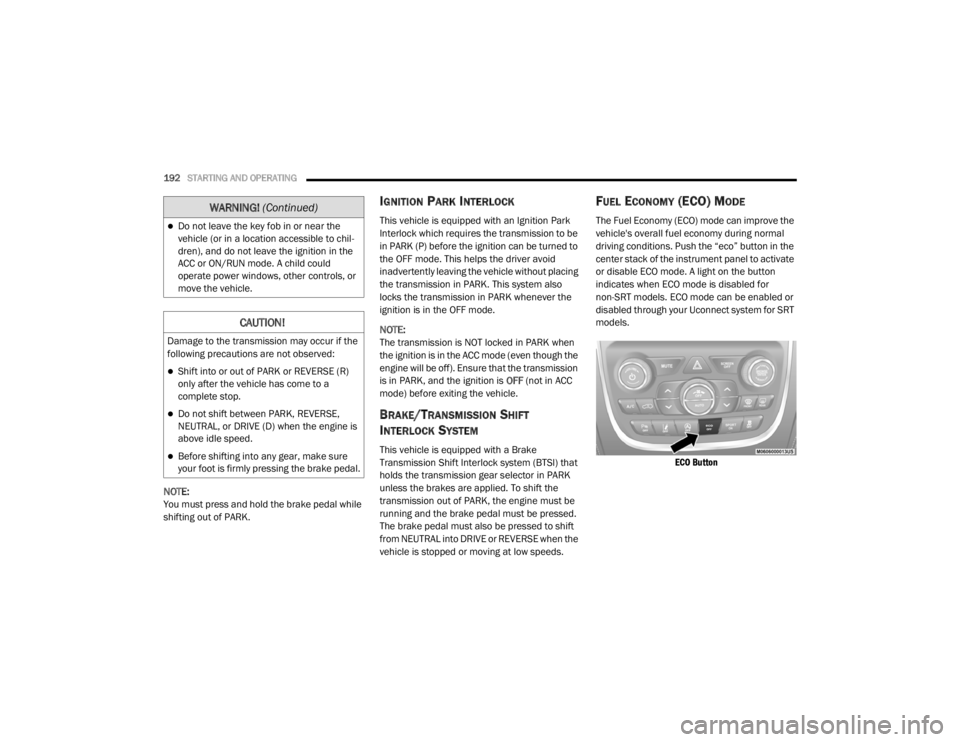
center stack of the instrument panel to activate
or disable ECO mode. A light on the button
indicates when ECO mode is disabled for
non-SRT models. ECO mode can be enabled or
disabled through your Uconnect system for SRT
models.
ECO Button
Do not leave the key fob in or near the
vehicle (or in a location accessible to chil -
dren), and do not leave the ignition in the
ACC or ON/RUN mode. A child could
operate power windows, other controls, or
move the vehicle.
CAUTION!
Damage to the transmission may occur if the
following precautions are not observed:
Shift into or out of PARK or REVERSE (R)
only after the vehicle has come to a
complete stop.
Do not shift between PARK, REVERSE,
NEUTRAL, or DRIVE (D) when the engine is
above idle speed.
Before shifting into any gear, make sure
your foot is firmly pressing the brake pedal.
WARNING! (Continued)
20_WD_OM_EN_USC_t.book Page 192
Page 195 of 464
STARTING AND OPERATING193
When the Fuel Economy (ECO) Mode is enabled,
the vehicle control systems will change the
following:
The transmission will upshift sooner and
downshift later.
In SRT models, the transmission will launch
(from a stop) in SECOND gear.
The overall driving performance will be more
conservative.
Some ECO mode functions may be tempo -
rarily inhibited based on temperature and
other factors.
EIGHT-SPEED AUTOMATIC
T
RANSMISSION
The transmission gear range is displayed both
on the gear selector and in the instrument
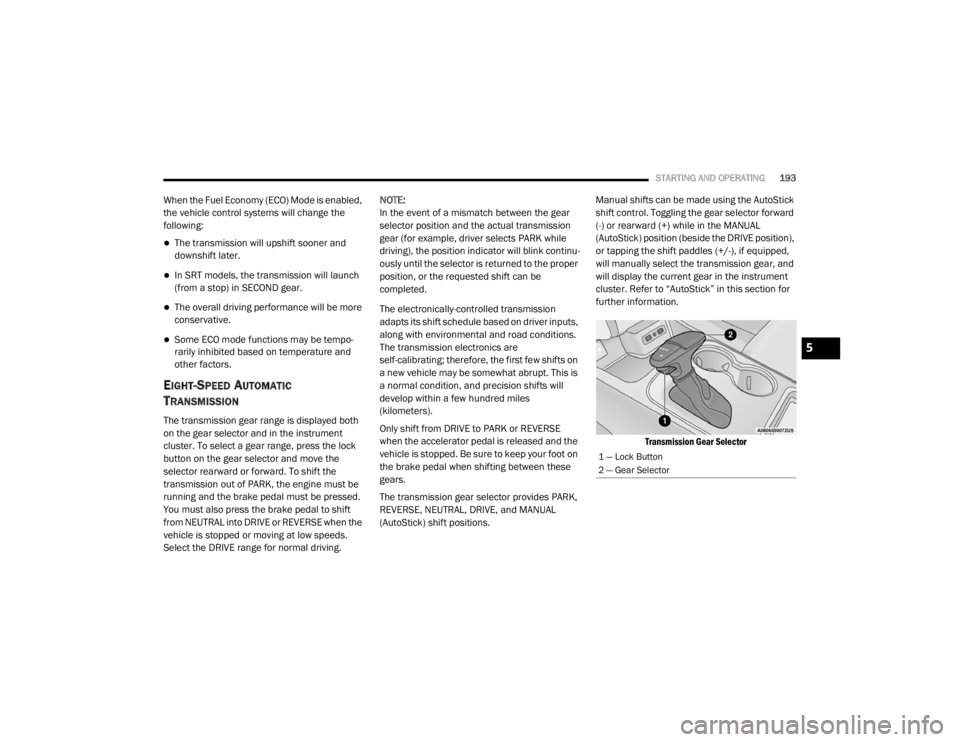
cluster. To select a gear range, press the lock
button on the gear selector and move the
selector rearward or forward. To shift the
transmission out of PARK, the engine must be
running and the brake pedal must be pressed.
You must also press the brake pedal to shift
from NEUTRAL into DRIVE or REVERSE when the
vehicle is stopped or moving at low speeds.
Select the DRIVE range for normal driving. NOTE:
In the event of a mismatch between the gear
selector position and the actual transmission
gear (for example, driver selects PARK while
driving), the position indicator will blink continu
-
ously until the selector is returned to the proper
position, or the requested shift can be
completed.
The electronically-controlled transmission
adapts its shift schedule based on driver inputs,
along with environmental and road conditions.
The transmission electronics are
self-calibrating; therefore, the first few shifts on
a new vehicle may be somewhat abrupt. This is
a normal condition, and precision shifts will
develop within a few hundred miles
(kilometers).
Only shift from DRIVE to PARK or REVERSE
when the accelerator pedal is released and the
vehicle is stopped. Be sure to keep your foot on
the brake pedal when shifting between these
gears.
The transmission gear selector provides PARK,
REVERSE, NEUTRAL, DRIVE, and MANUAL
(AutoStick) shift positions. Manual shifts can be made using the AutoStick
shift control. Toggling the gear selector forward
(-) or rearward (+) while in the MANUAL
(AutoStick) position (beside the DRIVE position),
or tapping the shift paddles (+/-), if equipped,
will manually select the transmission gear, and
will display the current gear in the instrument
cluster. Refer to “AutoStick” in this section for
further information.
Transmission Gear Selector
1 — Lock Button
2 — Gear Selector
5
20_WD_OM_EN_USC_t.book Page 193
Page 198 of 464
196STARTING AND OPERATING
NOTE:
If the gear selector cannot be moved to the
PARK, REVERSE, or NEUTRAL position (when
pushed forward) it is probably in the MANUAL
(AutoStick, +/-) position (beside the DRIVE posi -
tion). In MANUAL (AutoStick) mode, the trans -
mission gear is displayed in the instrument
cluster (as 1, 2, 3, etc.). Move the gear selector
to the right (into the DRIVE position) for access
to PARK, REVERSE, and NEUTRAL.
REVERSE (R)
This range is for moving the vehicle backward.
Shift into REVERSE only after the vehicle has
come to a complete stop.
NEUTRAL (N)
Use this range when the vehicle is standing for
prolonged periods with the engine running.
Apply the parking brake and shift the
transmission into PARK (P) if you must exit the
vehicle. DRIVE (D)
This range should be used for most city and
highway driving. It provides the smoothest
upshifts and downshifts, and the best fuel
economy. The transmission automatically
upshifts through all forward gears. The DRIVE position provides optimum driving
characteristics under all normal operating
conditions.
When frequent transmission shifting occurs
(such as when operating the vehicle under
heavy loading conditions, in hilly terrain,
traveling into strong head winds, or while towing
a heavy trailer), use the AutoStick shift control
(refer to AutoStick in this section for further
information) to select a lower gear. Under these
conditions, using a lower gear will improve
performance and extend transmission life by
reducing excessive shifting and heat buildup.
During cold temperatures, transmission
operation may be modified depending on
engine and transmission temperature as well
as vehicle speed. This feature improves warm
up time of the engine and transmission to
achieve maximum efficiency. Engagement of
the torque converter clutch is inhibited until the
transmission fluid is warm. Normal operation
will resume once the transmission temperature
has risen to a suitable level.WARNING!
Do not coast in NEUTRAL and never turn off
the ignition to coast down a hill. These are
unsafe practices that limit your response to
changing traffic or road conditions. You might
lose control of the vehicle and have a
collision.
CAUTION!
Towing the vehicle, coasting, or driving for any
other reason with the transmission in
NEUTRAL can cause severe transmission
damage.
Refer to “Recreational Towing” in “Starting
And Operating” and “Towing A Disabled
Vehicle” in “In Case Of Emergency” for further
information.
20_WD_OM_EN_USC_t.book Page 196
Page 204 of 464

202STARTING AND OPERATING
Preferred Procedure
1. With the engine running, slow the vehicle
to 2 to 3 mph (3 to 5 km/h).
2. Shift the transmission into NEUTRAL.
3. While still rolling, rotate the AWD control switch to the desired position.
4. After the desired position indicator light is on (not flashing), shift the transmission
back into gear.
Alternate Procedure
1. Bring the vehicle to complete stop.
2. With the ignition in ON/RUN position and engine running, shift the transmission to
NEUTRAL.
3. Rotate the AWD control switch to the desired position.
4. After the desired position indicator light is on (not flashing), shift the transmission
back into gear. NOTE:
If steps 1 or 2 of either the Preferred or Alter
-
nate Procedure are not satisfied prior to
attempting the shift or if they no longer are
being met while the shift attempt is in
process, the desired position indicator light
will flash continuously while the original posi -
tion indicator light is on, until all require -
ments have been met.
The ignition switch must be in the ON/RUN
position for a shift to take place and for the
position indicator lights to be operable. If the
ignition switch is not in the ON/RUN position,
then the shift will not take place and no posi -
tion indicator lights will be on or flashing.
NEUTRAL Shift Procedure
For information regarding the transfer case
NEUTRAL (N) shift procedure, refer to “Shifting
Into NEUTRAL (N)” in “Recreational Towing” in
this chapter.
FUEL SAVER TECHNOLOGY 5.7L/6.4L ONLY
— IF EQUIPPED
This feature offers improved fuel economy by
shutting off four of the engine's eight cylinders
during light load and cruise conditions. The
system is automatic with no driver inputs or
additional driving skills required.
NOTE:
This system may take some time to return to full
functionality after a battery disconnect.
POWER STEERING
The electric power steering system will give you
good vehicle response and increased ease of
maneuverability in tight spaces. The system will
vary its assist to provide light efforts while
parking and good feel while driving. If the
electric steering system experiences a fault that
prevents it from providing assist, you will still
have the ability to steer the vehicle manually.
20_WD_OM_EN_USC_t.book Page 202