instrument panel DODGE DURANGO 2020 Workshop Manual
[x] Cancel search | Manufacturer: DODGE, Model Year: 2020, Model line: DURANGO, Model: DODGE DURANGO 2020Pages: 464, PDF Size: 22.14 MB
Page 163 of 464

SAFETY161
(Continued)
Enhanced Accident Response System
In the event of an impact, if the communication
network remains intact, and the power remains
intact, depending on the nature of the event,
the Occupant Restraint Controller (ORC) will
determine whether to have the Enhanced
Accident Response System perform the
following functions:
Cut off fuel to the engine (if equipped)
Cut off battery power to the electric motor (if
equipped)
Flash hazard lights as long as the battery has
power
Turn on the interior lights, which remain on
as long as the battery has power or for
15 minutes from the intervention of the
Enhanced Accident Response System
Unlock the power door locks
Your vehicle may also be designed to perform
any of these other functions in response to the
Enhanced Accident Response System:
Turn off the Fuel Filter Heater, Turn off the
HVAC Blower Motor, Close the HVAC Circula -
tion Door
Cut off battery power to the:
Engine
Electric Motor (if equipped)
Electric power steering
Brake booster
Electric park brake
Automatic transmission gear selector
Horn
Front wiper
Headlamp washer pump
NOTE:
After an accident, remember to cycle the igni -
tion to the STOP (OFF/LOCK) position and
remove the key from the ignition switch to avoid
draining the battery. Carefully check the vehicle
for fuel leaks in the engine compartment and on
the ground near the engine compartment and
fuel tank before resetting the system and
starting the engine. If there are no fuel leaks or
damage to the vehicle electrical devices (e.g.
headlights) after an accident, reset the system
by following the procedure described below. If you have any doubt, contact an authorized
dealer.
Enhanced Accident Response System
Reset Procedure
In order to reset the Enhanced Accident
Response System functions after an event, the
ignition switch must be changed from ignition
START or ON/RUN to ignition OFF. Carefully
check the vehicle for fuel leaks in the engine
compartment and on the ground near the
engine compartment and fuel tank before
resetting the system and starting the engine.
Maintaining Your Air Bag System
WARNING!
Modifications to any part of the air bag
system could cause it to fail when you need
it. You could be injured if the air bag system
is not there to protect you. Do not modify
the components or wiring, including adding
any kind of badges or stickers to the
steering wheel hub trim cover or the upper
passenger side of the instrument panel. Do
not modify the front bumper, vehicle body
structure, or add aftermarket side steps or
running boards.
4
20_WD_OM_EN_USC_t.book Page 161
Page 185 of 464

SAFETY183
PERIODIC SAFETY CHECKS YOU SHOULD
M
AKE OUTSIDE THE VEHICLE
Tires
Examine tires for excessive tread wear and
uneven wear patterns. Check for stones, nails,
glass, or other objects lodged in the tread or
sidewall. Inspect the tread for cuts and cracks.
Inspect sidewalls for cuts, cracks, and bulges.
Check the wheel nuts for tightness. Check the
tires (including spare) for proper cold inflation
pressure.
Lights
Have someone observe the operation of brake
lights and exterior lights while you work the
controls. Check turn signal and high beam
indicator lights on the instrument panel.
Door Latches
Check for proper closing, latching, and locking.
Fluid Leaks
Check area under the vehicle after overnight
parking for fuel, coolant, oil, or other fluid leaks.
Also, if gasoline fumes are detected or if fuel, or
brake fluid leaks are suspected, the cause
should be located and corrected immediately.
WARNING!
To prevent SERIOUS INJURY or DEATH when
using “Track-Use” parts and equipment:
NEVER use any “Track-Use” equipment on
public roads. FCA US LLC does not autho -
rize the use of “Track-Use” equipment on
public roads.
The intended use of “Track-Use” parts is for
race vehicles on race tracks. To help
ensure the safety of the race driver, engi -
neers should supervise the installation of
“Track-Use” parts.
FCA US LLC does not authorize the installa -
tion or use of any part noted as “Track-Use”
on any new vehicle prior to its first retail
sale.
WARNING!
To prevent SERIOUS INJURY or DEATH:
ALWAYS remove any “Track-Use” equip -
ment before driving on public roads.
ALWAYS properly use your three-point seat
belts when driving on public roads.
In a collision, you and your passengers can
suffer much greater injuries if you are not
properly buckled up. You can strike the inte -
rior of your vehicle or other passengers, or
you can be thrown out of the vehicle.
4
20_WD_OM_EN_USC_t.book Page 183
Page 188 of 464

186STARTING AND OPERATING
4. Push the ENGINE START/STOP button a
third time to return the ignition to the OFF
mode.
NOTE:
Only press one pedal at a time while driving the
vehicle. Torque performance of the vehicle
could be reduced if both pedals are pressed at
the same time. If pressure is detected on both
pedals simultaneously, a warning message will
display in the instrument cluster. For further
information, refer to “Instrument Cluster
Display” in “Getting To Know Your Instrument
Panel”.
AutoPark
AutoPark is a supplemental feature to assist in
placing the vehicle in PARK (P) should the
situations on the following pages occur. It is a
backup system and should not be relied upon
as the primary method by which the driver shifts
the vehicle into PARK.
The conditions under which AutoPark will
engage are outlined on the following pages. If the vehicle is not in PARK and the driver turns
off the engine, the vehicle may AutoPark.
AutoPark will engage when all of these
conditions are met:
Vehicle is equipped with an eight-speed
transmission
Vehicle is not in PARK
Vehicle speed is 1.2 mph (1.9 km/h) or less
Ignition switched from RUN to ACC
NOTE:
For Keyless Enter-N-Go equipped vehicles, the
engine will turn off and the ignition switch will
change to ACC mode.
If the vehicle is not in PARK and the driver exits
the vehicle with the engine running, the vehicle
may AutoPark.
AutoPark will engage when all of these
conditions are met:
Vehicle is equipped with an eight-speed
transmission
Vehicle is not in PARK
Vehicle speed is 1.2 mph (1.9 km/h) or less
Driver’s seat belt is unbuckled
Driver’s door is ajar
Brake pedal is not depressed
The MESSAGE “ AutoPark Engaged Shift to P
then Shift to Gear ” will display in the instrument
cluster.
WARNING!
Driver inattention could lead to failure to
place the vehicle in PARK. ALWAYS DO A
VISUAL CHECK that your vehicle is in PARK
by verifying that a solid (not blinking) “P” is
indicated in the instrument cluster display
and on the gear selector. If the "P" indicator
is blinking, your vehicle is not in PARK. As
an added precaution, always apply the
parking brake when exiting the vehicle.
AutoPark is a supplemental feature. It is not
designed to replace the need to shift your
vehicle into PARK. It is a backup system
and should not be relied upon as the
primary method by which the driver shifts
the vehicle into PARK.
20_WD_OM_EN_USC_t.book Page 186
Page 192 of 464
190STARTING AND OPERATING
(Continued)
(Continued)
PARKING BRAKE
Before leaving the vehicle, make sure that the
parking brake is fully applied and place the gear
selector in the PARK (P) position.
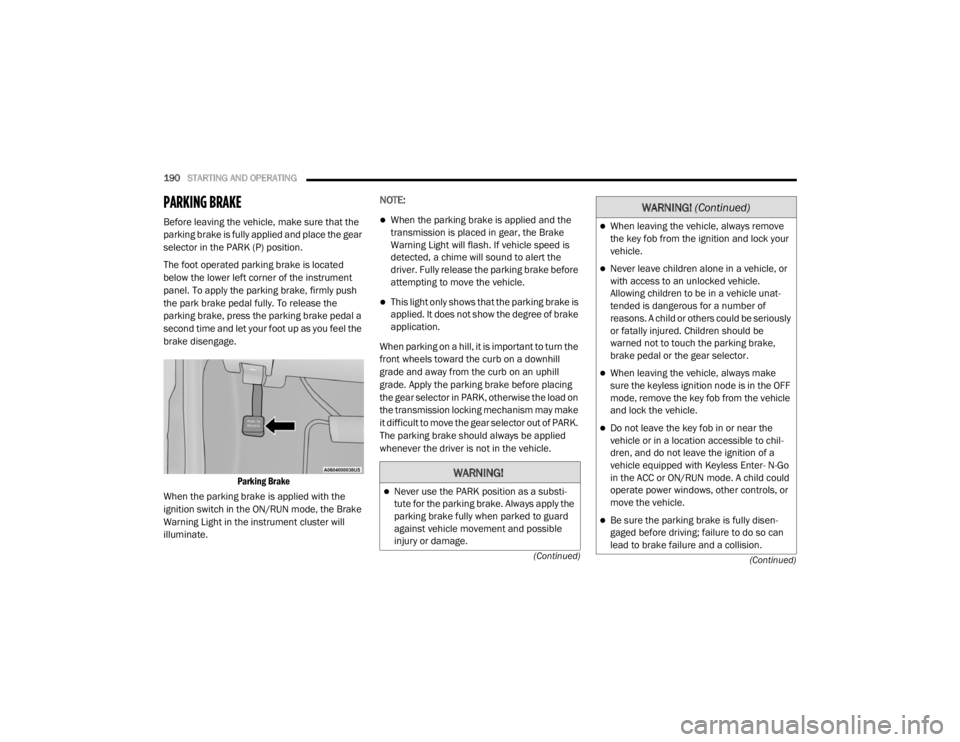
The foot operated parking brake is located
below the lower left corner of the instrument
panel. To apply the parking brake, firmly push
the park brake pedal fully. To release the
parking brake, press the parking brake pedal a
second time and let your foot up as you feel the
brake disengage.
Parking Brake
When the parking brake is applied with the
ignition switch in the ON/RUN mode, the Brake
Warning Light in the instrument cluster will
illuminate. NOTE:When the parking brake is applied and the
transmission is placed in gear, the Brake
Warning Light will flash. If vehicle speed is
detected, a chime will sound to alert the
driver. Fully release the parking brake before
attempting to move the vehicle.
This light only shows that the parking brake is
applied. It does not show the degree of brake
application.
When parking on a hill, it is important to turn the
front wheels toward the curb on a downhill
grade and away from the curb on an uphill
grade. Apply the parking brake before placing
the gear selector in PARK, otherwise the load on
the transmission locking mechanism may make
it difficult to move the gear selector out of PARK.
The parking brake should always be applied
whenever the driver is not in the vehicle.
WARNING!
Never use the PARK position as a substi -
tute for the parking brake. Always apply the
parking brake fully when parked to guard
against vehicle movement and possible
injury or damage.
When leaving the vehicle, always remove
the key fob from the ignition and lock your
vehicle.
Never leave children alone in a vehicle, or
with access to an unlocked vehicle.
Allowing children to be in a vehicle unat -
tended is dangerous for a number of
reasons. A child or others could be seriously
or fatally injured. Children should be
warned not to touch the parking brake,
brake pedal or the gear selector.
When leaving the vehicle, always make
sure the keyless ignition node is in the OFF
mode, remove the key fob from the vehicle
and lock the vehicle.
Do not leave the key fob in or near the
vehicle or in a location accessible to chil -
dren, and do not leave the ignition of a
vehicle equipped with Keyless Enter- N-Go
in the ACC or ON/RUN mode. A child could
operate power windows, other controls, or
move the vehicle.
Be sure the parking brake is fully disen -
gaged before driving; failure to do so can
lead to brake failure and a collision.
WARNING! (Continued)
20_WD_OM_EN_USC_t.book Page 190
Page 194 of 464
192STARTING AND OPERATING
NOTE:
You must press and hold the brake pedal while
shifting out of PARK.
IGNITION PARK INTERLOCK
This vehicle is equipped with an Ignition Park
Interlock which requires the transmission to be
in PARK (P) before the ignition can be turned to
the OFF mode. This helps the driver avoid
inadvertently leaving the vehicle without placing
the transmission in PARK. This system also
locks the transmission in PARK whenever the
ignition is in the OFF mode.
NOTE:
The transmission is NOT locked in PARK when
the ignition is in the ACC mode (even though the
engine will be off). Ensure that the transmission
is in PARK, and the ignition is OFF (not in ACC
mode) before exiting the vehicle.
BRAKE/TRANSMISSION SHIFT
I
NTERLOCK SYSTEM
This vehicle is equipped with a Brake
Transmission Shift Interlock system (BTSI) that
holds the transmission gear selector in PARK
unless the brakes are applied. To shift the
transmission out of PARK, the engine must be
running and the brake pedal must be pressed.
The brake pedal must also be pressed to shift
from NEUTRAL into DRIVE or REVERSE when the
vehicle is stopped or moving at low speeds.
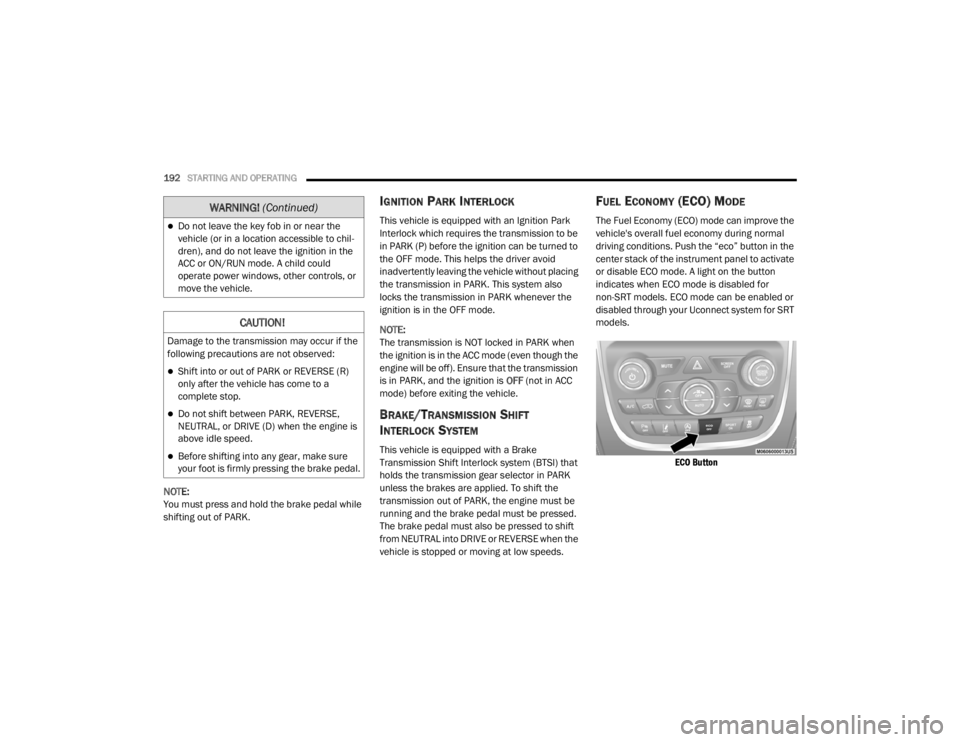
FUEL ECONOMY (ECO) MODE
The Fuel Economy (ECO) mode can improve the
vehicle's overall fuel economy during normal
driving conditions. Push the “eco” button in the
center stack of the instrument panel to activate
or disable ECO mode. A light on the button
indicates when ECO mode is disabled for
non-SRT models. ECO mode can be enabled or
disabled through your Uconnect system for SRT
models.
ECO Button
Do not leave the key fob in or near the
vehicle (or in a location accessible to chil -
dren), and do not leave the ignition in the
ACC or ON/RUN mode. A child could
operate power windows, other controls, or
move the vehicle.
CAUTION!
Damage to the transmission may occur if the
following precautions are not observed:
Shift into or out of PARK or REVERSE (R)
only after the vehicle has come to a
complete stop.
Do not shift between PARK, REVERSE,
NEUTRAL, or DRIVE (D) when the engine is
above idle speed.
Before shifting into any gear, make sure
your foot is firmly pressing the brake pedal.
WARNING! (Continued)
20_WD_OM_EN_USC_t.book Page 192
Page 201 of 464
STARTING AND OPERATING199
SPORT MODE — IF EQUIPPED
Your vehicle is equipped with a Sport Mode
feature. This mode is a configuration set up for
typical enthusiast driving. The engine,
transmission, and steering systems are all set
to their SPORT settings. Sport Mode will provide
improved throttle response and modified
transmission shift points for an enhanced
driving experience, as well as greater amount of
steering feel. This mode may be activated and
deactivated by pushing the Sport button on the
instrument panel switch bank.
ALL-WHEEL DRIVE OPERATION
SINGLE-SPEED OPERATING
I
NSTRUCTIONS/PRECAUTIONS— IF
E
QUIPPED
This system contains a single-speed (HI range
only) transfer case, which provides convenient
full-time All-Wheel Drive (AWD). No driver
interaction is required. The Brake Traction
Control (BTC) System, which combines standard
ABS and Traction Control, provides resistance
to any wheel that is slipping to allow additional
torque transfer to wheels with traction. NOTE:
This system is not appropriate for conditions
where LOW range is recommended. Refer to
“Driving Tips” in this chapter for further informa-
tion.
ELECTRONICALLY SHIFTED TRANSFER
C
ASE (THREE-POSITION SWITCH) — IF
E
QUIPPED
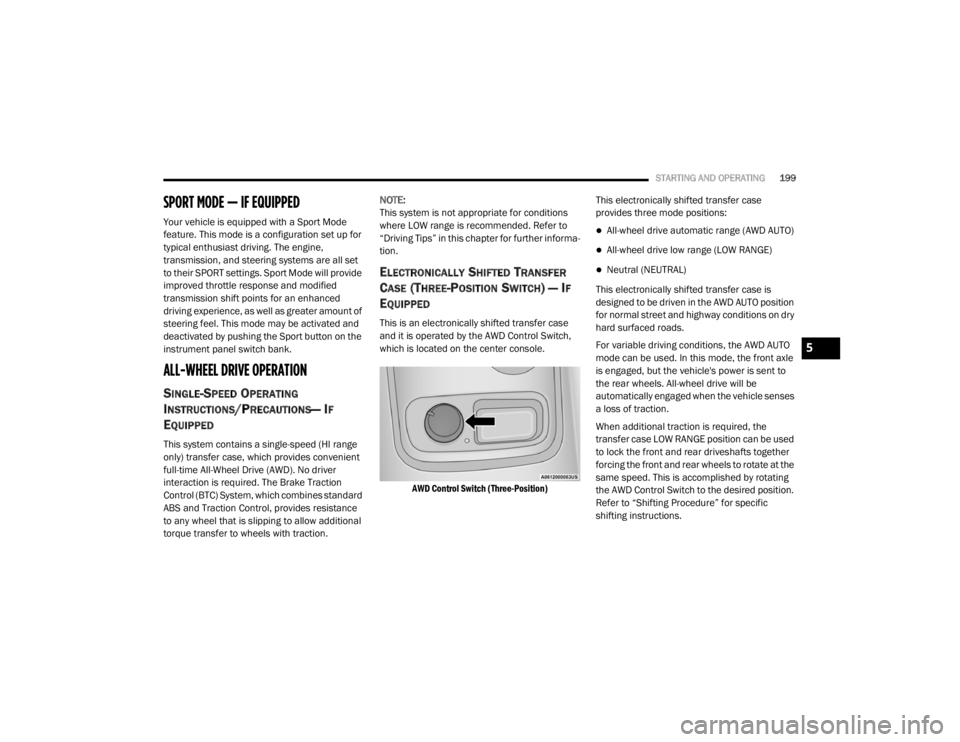
This is an electronically shifted transfer case
and it is operated by the AWD Control Switch,
which is located on the center console.
AWD Control Switch (Three-Position)
This electronically shifted transfer case
provides three mode positions:
All-wheel drive automatic range (AWD AUTO)
All-wheel drive low range (LOW RANGE)
Neutral (NEUTRAL)
This electronically shifted transfer case is
designed to be driven in the AWD AUTO position
for normal street and highway conditions on dry
hard surfaced roads.
For variable driving conditions, the AWD AUTO
mode can be used. In this mode, the front axle
is engaged, but the vehicle's power is sent to
the rear wheels. All-wheel drive will be
automatically engaged when the vehicle senses
a loss of traction.
When additional traction is required, the
transfer case LOW RANGE position can be used
to lock the front and rear driveshafts together
forcing the front and rear wheels to rotate at the
same speed. This is accomplished by rotating
the AWD Control Switch to the desired position.
Refer to “Shifting Procedure” for specific
shifting instructions.
5
20_WD_OM_EN_USC_t.book Page 199
Page 202 of 464

200STARTING AND OPERATING
The LOW RANGE position is designed for loose,
slippery road surfaces only. Driving in the LOW
RANGE position on dry hard surfaced roads may
cause increased tire wear and damage to the
driveline components.
Transfer Case Position Indicator Messages
The Transfer Case Position Indicator messages
(AWD AUTO and LOW RANGE) are located in the
instrument cluster and indicate the current and
desired transfer case selection. Refer to
“Instrument Cluster Display” in “Getting To
Know Your Instrument Panel” for further
information. When you select a different
transfer case position, the position indicator
lights will do the following:
If All Shift Conditions Are Met:
1. The current position indicator light will turn
off.
2. The selected position indicator light will flash until the transfer case completes the
shift.
3. When the shift is complete, the indicator light for the selected position will stop
flashing and remain on. If shift conditions are not met, one or more of
the following events may occur:
1. The indicator light for the current position
will remain on.
2. The newly selected position indicator light will continue to flash.
3. The transfer case will not shift.
NOTE:
Before retrying a selection, make certain that all
the necessary requirements for selecting a new
transfer case position have been met. To retry
the selection, turn the control knob back to the
current position, wait five seconds, and retry
selection. To find the shift requirements, refer
to the "Shifting Procedure" for your transfer
case, located in this section.
The “SERV AWD” Warning Light monitors the
electronic shift all-wheel drive system. If this
light remains on after engine start up or
illuminates during driving, it means that the
all-wheel drive system is not functioning
properly and that service is required. NOTE:
Do not attempt to make a shift while only the
front or rear wheels are spinning. This could
cause damage to driveline components.
When operating your vehicle in LOW RANGE, the
engine speed is approximately three times that
of the AWD AUTO position at a given road speed.
Take care not to overspeed the engine and do
not exceed 25 mph (40 km/h).
Proper operation of all-wheel drive vehicles
depends on tires of equal size, type and
circumference on each wheel. Any difference in
tire size can cause damage to the transfer case.
Because all-wheel drive provides improved
traction, there is a tendency to exceed safe
turning and stopping speeds. Do not go faster
than road conditions permit.
WARNING!
Always engage the parking brake when
powering down the vehicle if the “SERV AWD
Warning Light” is illuminated. Not engaging
the parking brake may allow the vehicle to roll
which may cause personal injury.
20_WD_OM_EN_USC_t.book Page 200
Page 205 of 464
STARTING AND OPERATING203
Alternate electric power steering efforts can be
selected through the Uconnect System. Refer to
”Customer Programmable Features” within
“Uconnect Settings” in “Multimedia” for further
information.
If the Electric Power Steering warning
icon is displayed and the “SERVICE
POWER STEERING” or the “POWER
STEERING ASSIST OFF – SERVICE
SYSTEM” message is displayed within the
instrument cluster display, this indicates the
vehicle needs to be taken to the dealer for
service. Refer to “Warning Lights And
Messages” in “Getting To Know Your
Instrument Panel” for further information. NOTE:
Even if the power steering assistance is no
longer operational, it is still possible to steer
the vehicle. Under these conditions there will
be a substantial increase in steering effort,
especially at low speeds and during parking
maneuvers.
If the condition persists, see an authorized
dealer for service.
If the Steering icon is displayed and the
“POWER STEERING SYSTEM OVER TEMP”
message is displayed on the instrument cluster
screen, they indicate that extreme steering
maneuvers may have occurred which caused
an over temperature condition in the power
steering system. Once driving conditions are
safe, pull over and let the vehicle idle for a few
moments until the icon and message turn off.
STOP/START SYSTEM — IF EQUIPPED
The Stop/Start function is developed to reduce
fuel consumption. The system will stop the
engine automatically during a vehicle stop if the
required conditions are met. Releasing the
brake pedal or pressing the accelerator pedal
will automatically re-start the engine. This vehicle has been upgraded with a heavy
duty starter, enhanced battery, and other
upgraded engine parts, to handle the additional
engine starts.
AUTOMATIC MODE
The Stop/Start feature is enabled
after every normal customer engine
start. At that time, the system will go
into STOP/START READY and if all
other conditions are met, can go into a STOP/
START AUTOSTOP ACTIVE “Autostop” mode.
To Activate The Autostop Mode, The Following
Must Occur:
The system must be in STOP/START READY
state. A STOP/START READY message will be
displayed in the instrument cluster display
within the Stop/Start section. Refer to
“Instrument Cluster” in “Getting To Know
Your Instrument Panel” for further informa -
tion.
The vehicle must be completely stopped.
The gear selector must be in a forward gear
and the brake pedal depressed.
WARNING!
Continued operation with reduced assist
could pose a safety risk to yourself and
others. Service should be obtained as soon
as possible.
5
20_WD_OM_EN_USC_t.book Page 203
Page 207 of 464
STARTING AND OPERATING205
Low brake vacuum (e.g. after several brake
pedal applications).
Stop/Start OFF switch is pushed.
A Stop/Start system error occurs.
TO MANUALLY TURN OFF THE STOP/
S
TART SYSTEM
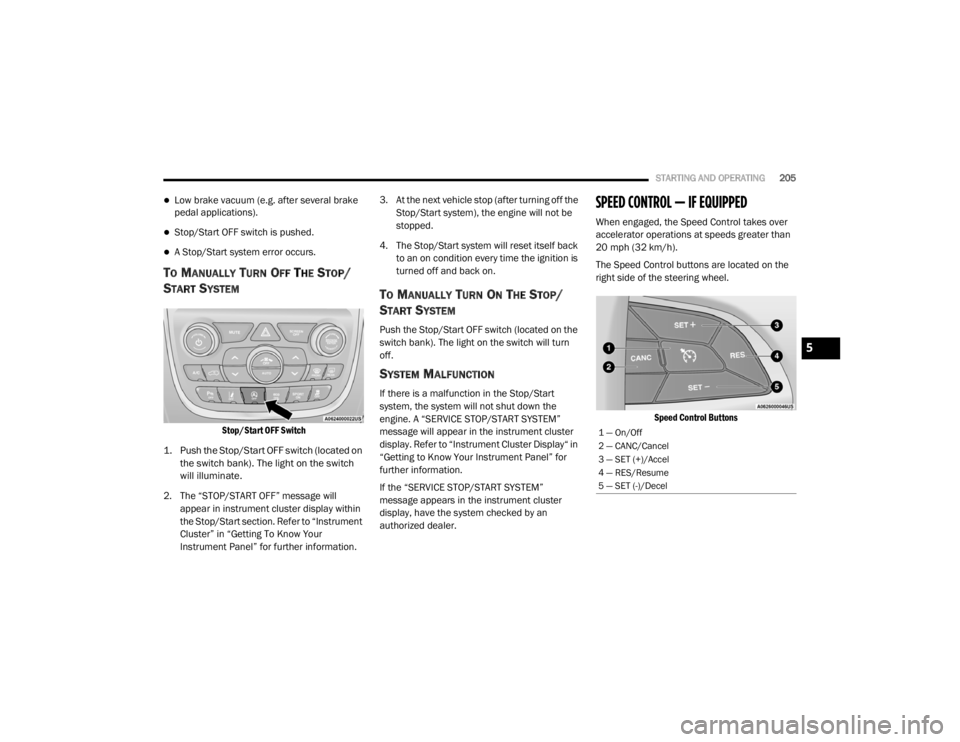
Stop/Start OFF Switch
1. Push the Stop/Start OFF switch (located on the switch bank). The light on the switch
will illuminate.
2. The “STOP/START OFF” message will appear in instrument cluster display within
the Stop/Start section. Refer to “Instrument
Cluster” in “Getting To Know Your
Instrument Panel” for further information. 3. At the next vehicle stop (after turning off the
Stop/Start system), the engine will not be
stopped.
4. The Stop/Start system will reset itself back to an on condition every time the ignition is
turned off and back on.
TO MANUALLY TURN ON THE STOP/
S
TART SYSTEM
Push the Stop/Start OFF switch (located on the
switch bank). The light on the switch will turn
off.
SYSTEM MALFUNCTION
If there is a malfunction in the Stop/Start
system, the system will not shut down the
engine. A “SERVICE STOP/START SYSTEM”
message will appear in the instrument cluster
display. Refer to “Instrument Cluster Display“ in
“Getting to Know Your Instrument Panel” for
further information.
If the “SERVICE STOP/START SYSTEM”
message appears in the instrument cluster
display, have the system checked by an
authorized dealer.
SPEED CONTROL — IF EQUIPPED
When engaged, the Speed Control takes over
accelerator operations at speeds greater than
20 mph (32 km/h).
The Speed Control buttons are located on the
right side of the steering wheel.
Speed Control Buttons
1 — On/Off
2 — CANC/Cancel
3 — SET (+)/Accel
4 — RES/Resume
5 — SET (-)/Decel
5
20_WD_OM_EN_USC_t.book Page 205
Page 208 of 464

206STARTING AND OPERATING
NOTE:
In order to ensure proper operation, the Speed
Control system has been designed to shut down
if multiple Speed Control functions are operated
at the same time. If this occurs, the Speed
Control system can be reactivated by pushing
the Speed Control on/off button and resetting
the desired vehicle set speed.
TO ACTIVATE
Push the on/off button to activate the Speed
Control. “CRUISE CONTROL READY” will appear
in the instrument cluster display to indicate the
Speed Control is on. To turn the system off,
push the on/off button a second time. “CRUISE CONTROL OFF” will appear in the
instrument cluster display to indicate the Speed
Control is off. The system should be turned off
when not in use.
TO SET A DESIRED SPEED
Turn the Speed Control on. When the vehicle
has reached the desired speed, push the SET
(+) or SET (-) button and release. Release the
accelerator and the vehicle will operate at the
selected speed. Once a speed has been set, a
message “CRUISE CONTROL SET TO MPH
(km/h)” will appear indicating what speed was
set. A cruise indicator lamp, along with set
speed will also appear and stay on in the
instrument cluster when the speed is set.
TO VARY THE SPEED SETTING
To Increase Speed
When the Speed Control is set, you can increase
speed by pushing the SET
(+) button.
The driver's preferred units can be selected
through the instrument cluster display. Refer to
“Getting To Know Your Instrument Panel” for
more information. The speed increment shown
is dependent on the chosen speed unit of U.S.
(mph) or Metric (km/h):
U.S. Speed (mph)
Pushing the SET (+) button once will result in
a 1 mph increase in set speed. Each subse -
quent tap of the button results in an increase
of 1 mph.
If the button is continually pushed, the set
speed will continue to increase until the
button is released, then the new set speed
will be established.
WARNING!
Speed Control can be dangerous where the
system cannot maintain a constant speed.
Your vehicle could go too fast for the
conditions, and you could lose control and
have an accident. Do not use Speed Control
in heavy traffic or on roads that are winding,
icy, snow-covered or slippery.
WARNING!
Leaving the Speed Control system on when
not in use is dangerous. You could
accidentally set the system or cause it to go
faster than you want. You could lose control
and have an accident. Always leave the
system OFF when you are not using it.
20_WD_OM_EN_USC_t.book Page 206