pairing phone DODGE DURANGO 2020 Owners Manual
[x] Cancel search | Manufacturer: DODGE, Model Year: 2020, Model line: DURANGO, Model: DODGE DURANGO 2020Pages: 464, PDF Size: 22.14 MB
Page 408 of 464
406MULTIMEDIA
NOTE:
The radio unit is acting as the amplifier for audio
output from the Auxiliary device. Therefore, if
the volume control on the Auxiliary device is set
too low, there will be insufficient audio signal for
the radio unit to play the music on the device.
Media Mode
Press the Media button on the touchscreen to
select the desired audio source: AUX.
Audio
Refer to “Radio Mode” for adjusting the audio
settings.
BLUETOOTH® MODE
Overview
Bluetooth® Streaming Audio (BTSA) or
Bluetooth® Mode is entered by pairing a
Bluetooth® device, containing music, to the
Uconnect System.
Before proceeding, the Bluetooth® device must
be paired to the Uconnect Phone to
communicate with the Uconnect System.
NOTE:
See the pairing procedure in the Uconnect
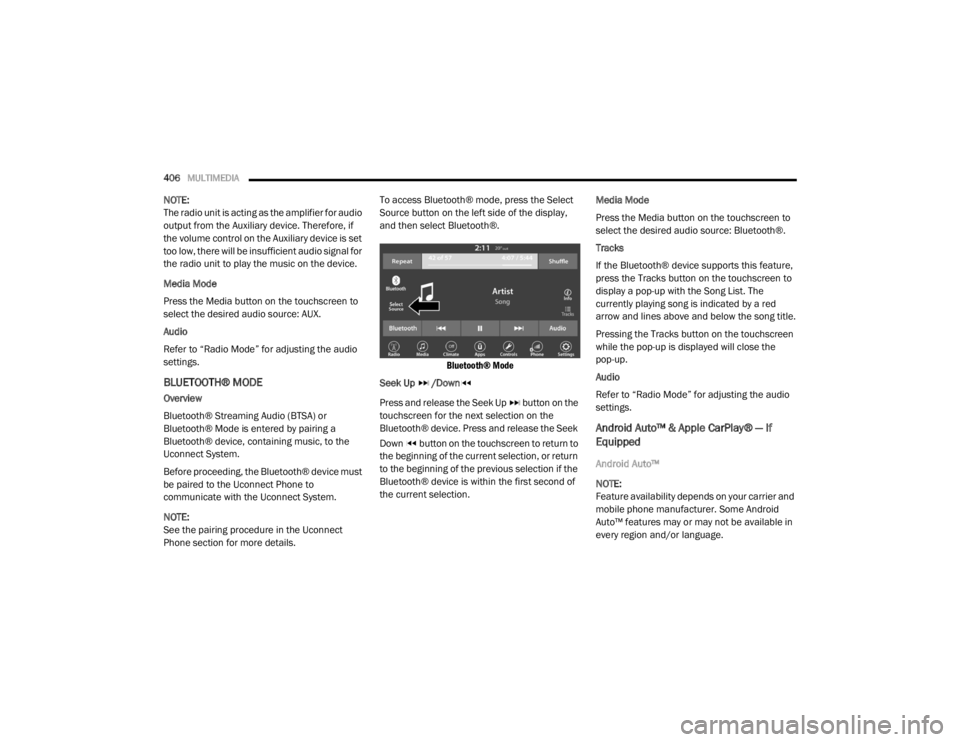
Phone section for more details. To access Bluetooth® mode, press the Select
Source button on the left side of the display,
and then select Bluetooth®.
Bluetooth® Mode
Seek Up /Down
Press and release the Seek Up button on the
touchscreen for the next selection on the
Bluetooth® device. Press and release the Seek
Down button on the touchscreen to return to
the beginning of the current selection, or return
to the beginning of the previous selection if the
Bluetooth® device is within the first second of
the current selection. Media Mode
Press the Media button on the touchscreen to
select the desired audio source: Bluetooth®.
Tracks
If the Bluetooth® device supports this feature,
press the Tracks button on the touchscreen to
display a pop-up with the Song List. The
currently playing song is indicated by a red
arrow and lines above and below the song title.
Pressing the Tracks button on the touchscreen
while the pop-up is displayed will close the
pop-up.
Audio
Refer to “Radio Mode” for adjusting the audio
settings.
Android Auto™ & Apple CarPlay® — If
Equipped
Android Auto™
NOTE:
Feature availability depends on your carrier and
mobile phone manufacturer. Some Android
Auto™ features may or may not be available in
every region and/or language.
20_WD_OM_EN_USC_t.book Page 406
Page 413 of 464
MULTIMEDIA411
Android Auto™ Automatic Bluetooth® Pairing
After connecting to Android Auto™ for the first
time and undergoing the setup procedure, the
smartphone will automatically pair to the
Uconnect system via Bluetooth® without any
setup required every time it is within range, if
Bluetooth® is turned on.
NOTE:
Android Auto™ features cannot be used with
Bluetooth®, a USB connection is required for its
use. Android Auto™ uses both Bluetooth® and
USB connections to function, and the
connected device will be unavailable to other
devices when connected using Android Auto™.
Multiple Devices Connecting To The Uconnect
System
It is possible to have multiple devices
connected to the Uconnect system. For
example, if using Android Auto™/Apple
CarPlay®, the connected device will be the one
that will be used to place hands-free phone calls
or send hands-free text messages. However,
another device can also be paired to the
Uconnect system, via Bluetooth®, as an audio
source, so the passenger can stream music. NOTE:
If using a Samsung device, every time it is
connected to a media USB, and there is
another device plugged in, you will need to
manually change the configuration of the
USB connection in order for the Samsung
device to send data.
The Uconnect 4 built-in media functions will
be unavailable when Android Auto™/Apple
CarPlay® are in use.
PHONE MODE
Overview
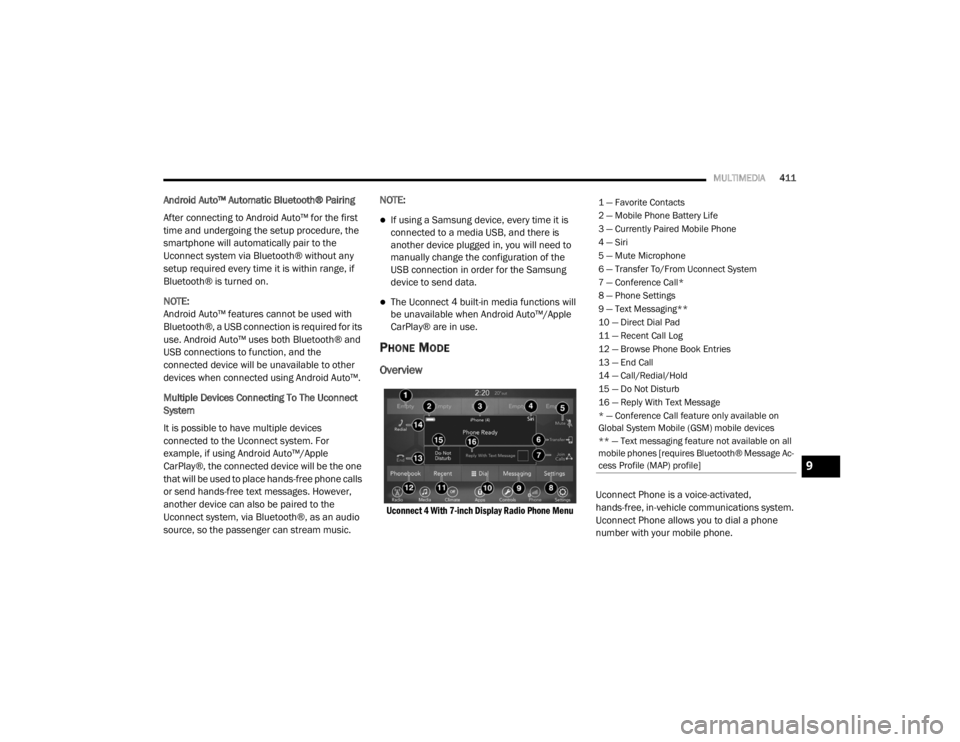
Uconnect 4 With 7-inch Display Radio Phone Menu
Uconnect Phone is a voice-activated,
hands-free, in-vehicle communications system.
Uconnect Phone allows you to dial a phone
number with your mobile phone.
1 — Favorite Contacts
2 — Mobile Phone Battery Life
3 — Currently Paired Mobile Phone
4 — Siri
5 — Mute Microphone
6 — Transfer To/From Uconnect System
7 — Conference Call*
8 — Phone Settings
9 — Text Messaging**
10 — Direct Dial Pad
11 — Recent Call Log
12 — Browse Phone Book Entries
13 — End Call
14 — Call/Redial/Hold
15 — Do Not Disturb
16 — Reply With Text Message
* — Conference Call feature only available on
Global System Mobile (GSM) mobile devices
** — Text messaging feature not available on all
mobile phones [requires Bluetooth® Message Ac
-
cess Profile (MAP) profile]
9
20_WD_OM_EN_USC_t.book Page 411
Page 414 of 464
412MULTIMEDIA
Uconnect Phone supports the following
features:
Voice Activated Features
Hands-Free dialing via Voice (“Call John
Smith Mobile” or, “Dial 248-555-1212”).
Hands-Free text-to-speech listening of your
incoming SMS messages.
Hands-Free text message replying (Forward
one of 18 pre-defined SMS messages to
incoming calls/text messages).
Redialing last dialed numbers (“Redial”).
Calling back the last incoming call number
(“Call Back”).
Viewing call logs on screen (“Show incoming
calls,” “Show outgoing calls,” “Show missed
calls,” “Show recent calls”).
Searching contacts phone number (“Search
for John Smith Mobile”).
NOTE:
Examples of Voice Commands are provided
throughout this manual. For quick use, go to the
Voice Command Quick Reference Section. Screen Activated Features
Dialing via keypad using touchscreen.
Viewing and calling contacts from phone -
books displayed on the touchscreen.
Setting favorite contact phone numbers so
they are easily accessible on the main phone
screen.
Viewing and calling contacts from recent call
logs.
Reviewing your recent incoming SMS.
Listening to music on your Bluetooth® device
via the touchscreen.
Pairing up to 10 phones/audio devices for
easy access to connect to them quickly.
NOTE:
Your phone must be capable of SMS messaging
via Bluetooth® for messaging features to work
properly.
Your mobile phone’s audio is transmitted
through your vehicle’s audio system; the system
automatically mutes your radio when using the
Uconnect Phone. For Uconnect customer support:
US residents - visit UconnectPhone.com or
call:
877-855-8400
Canadian residents - (English) call:
800-465-2001
or (French) call:
800-387-9983
Visit UconnectPhone.com
Uconnect Phone allows you to transfer calls
between the system and your mobile phone as
you enter or exit your vehicle and enables you to
mute the system's microphone for private
conversation.
WARNING!
ALWAYS drive safely with your hands on the
steering wheel. You have full responsibility
and assume all risks related to the use of the
Uconnect features and applications in this
vehicle. Only use Uconnect when it is safe to
do so. Failure to do so may result in an
accident involving serious injury or death.
20_WD_OM_EN_USC_t.book Page 412
Page 416 of 464

414MULTIMEDIA
Natural Speech
Your Uconnect Phone Voice system uses a
Natural Language Voice Recognition (VR)
engine.
Natural speech allows the user to speak
commands in phrases or complete sentences.
The system filters out certain non-word
utterances and sounds such as “ah” and “eh.”
The system handles fill-in words such as “I
would like to.”
The system handles multiple inputs in the same
phrase or sentence such as “make a phone
call” and “to Kelly Smith”. For multiple inputs in
the same phrase or sentence, the system
identifies the topic or context and provides the
associated follow-up prompt such as “Who do
you want to call?” in the case where a phone
call was requested but the specific name was
not recognized.
The system utilizes continuous dialog; when the
system requires more information from the user
it will ask a question to which the user can
respond without pushing the Voice Command
button on your steering wheel. Help Command
If you need assistance at any prompt, or if you
want to know your options at any prompt, say
“Help” following the beep.
To activate the Uconnect Phone from idle,
simply push the Phone button (if active) on your
steering wheel and say a command or say
“Help.” All Uconnect Phone sessions begin with
a push of the VR button or the Phone button (if
active) on the radio control head.
Cancel Command
At any prompt, after the beep, you can say
“Cancel” and you will be returned to the main
menu.
You can also push the VR button or Phone
button (if active) on your steering wheel when
the system is listening for a command and be
returned to the main or previous menu.
Pair (Link) Uconnect Phone To A Mobile Phone
To begin using your Uconnect Phone, you must
pair your compatible Bluetooth®-enabled
mobile phone. Mobile phone pairing is the
process of establishing a wireless connection
between a cellular phone and the Uconnect
system.To complete the pairing process, you need to
reference your mobile phone Owner's Manual.
Please visit UconnectPhone.com for complete
mobile phone compatibility information.
NOTE:
You must have Bluetooth® enabled on your
phone to complete this procedure.
The vehicle must be in PARK.
1. Place the ignition in the ACC or ON/RUN position.
2. Press the Phone button in the Menu Bar on the touchscreen.
NOTE:
If there are no phones currently connected with
the system, a pop-up will appear asking if you
would like to pair a mobile phone.
3. Select “Yes” to begin the pairing process.
20_WD_OM_EN_USC_t.book Page 414
Page 417 of 464
MULTIMEDIA415
4. Search for available devices on your
Bluetooth®-enabled mobile phone.
Press the Settings button on your mobile
phone.
Select Bluetooth® and ensure it is
enabled. Once enabled, the mobile
phone will begin to search for Bluetooth®
connections.
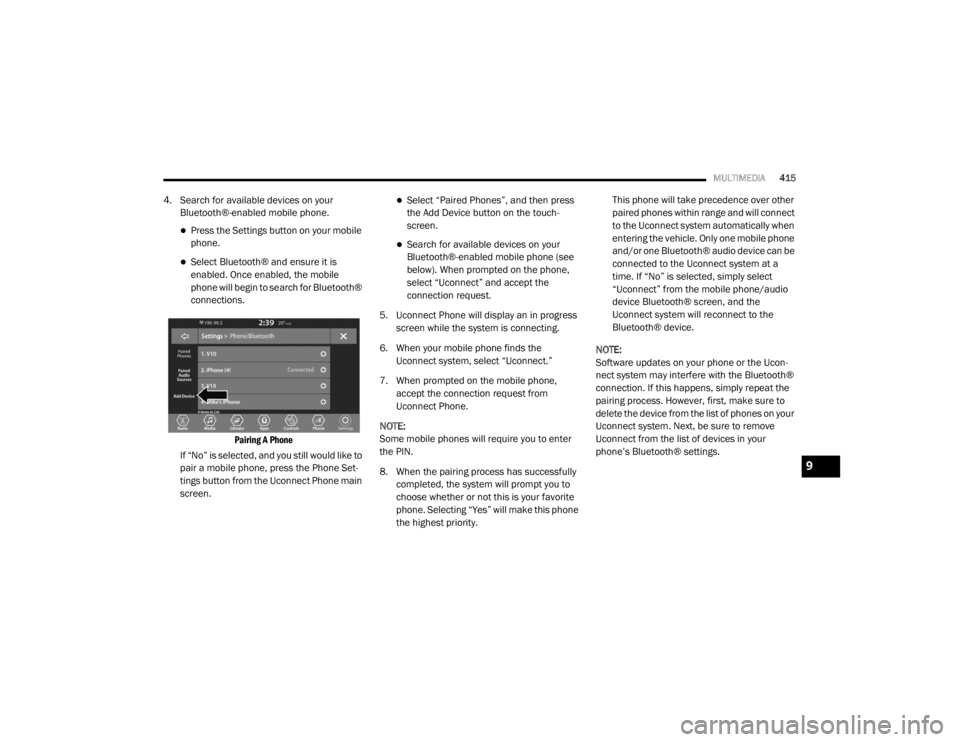
Pairing A Phone
If “No” is selected, and you still would like to
pair a mobile phone, press the Phone Set-
tings button from the Uconnect Phone main
screen.
Select “Paired Phones”, and then press
the Add Device button on the touch -
screen.
Search for available devices on your
Bluetooth®-enabled mobile phone (see
below). When prompted on the phone,
select “Uconnect” and accept the
connection request.
5. Uconnect Phone will display an in progress screen while the system is connecting.
6. When your mobile phone finds the Uconnect system, select “Uconnect.”
7. When prompted on the mobile phone, accept the connection request from
Uconnect Phone.
NOTE:
Some mobile phones will require you to enter
the PIN.
8. When the pairing process has successfully completed, the system will prompt you to
choose whether or not this is your favorite
phone. Selecting “Yes” will make this phone
the highest priority. This phone will take precedence over other
paired phones within range and will connect
to the Uconnect system automatically when
entering the vehicle. Only one mobile phone
and/or one Bluetooth® audio device can be
connected to the Uconnect system at a
time. If “No” is selected, simply select
“Uconnect” from the mobile phone/audio
device Bluetooth® screen, and the
Uconnect system will reconnect to the
Bluetooth® device.
NOTE:
Software updates on your phone or the Ucon -
nect system may interfere with the Bluetooth®
connection. If this happens, simply repeat the
pairing process. However, first, make sure to
delete the device from the list of phones on your
Uconnect system. Next, be sure to remove
Uconnect from the list of devices in your
phone’s Bluetooth® settings.
9
20_WD_OM_EN_USC_t.book Page 415
Page 418 of 464

416MULTIMEDIA
Pair Additional Mobile Phones
1. Press the Phone Settings button on the
touchscreen from the Phone main screen.
2. Press the Add Device button on the touchscreen.
3. Search for available devices on your Bluetooth®-enabled mobile phone. When
prompted on the phone, enter the name
and PIN shown on the Uconnect screen.
4. Uconnect Phone will display an in process screen while the system is connecting.
5. When the pairing process has successfully completed, the system will prompt you to
choose whether or not this is your favorite
phone. Selecting “Yes” will make this phone
the highest priority. This phone will take
precedence over other paired phones within
range.
NOTE:
For phones which are not made a favorite, the
phone priority is determined by the order in
which it was paired. The latest phone paired will
have the higher priority. You can also use the following VR commands to
bring up the Paired Phone screen from any
screen on the radio:
“Show Paired Phones” or
“Connect My Phone”
Pair A Bluetooth® Streaming Audio Device
1. Press the Media button on the touchscreen to begin.
2. Change the Source to Bluetooth®.
3. Press the Bluetooth® button on the touchscreen to display the Paired Audio
Devices screen.
4. Press the Add Device button on the touchscreen.
NOTE:
If there is no device currently connected with
the system, a pop-up will appear.
5. Search for available devices on your Bluetooth®-enabled audio device. When
prompted on the device, enter the PIN
shown on the Uconnect screen. 6. Uconnect Phone will display an in process
screen while the system is connecting.
7. When the pairing process has successfully completed, the system will prompt you to
choose whether or not this is your favorite
device. Selecting “Yes” will make this device
the highest priority. This device will take
precedence over other paired devices
within range.
NOTE:
For devices which are not made a favorite, the
device priority is determined by the order in
which it was paired. The latest device paired will
have the higher priority.
You can also use a following VR command to
bring up a list of paired audio devices:
“Show Paired Phones” or
“Connect My Phone”
20_WD_OM_EN_USC_t.book Page 416
Page 419 of 464
MULTIMEDIA417
Connecting To A Particular Mobile Phone Or
Audio Device After Pairing
Uconnect Phone will automatically connect to
the highest priority paired phone and/or Audio
Device within range. If you need to choose a
particular phone or Audio Device follow these
steps:
1. Press the Phone Settings button on the
touchscreen.
2. Press the Paired Phones or Paired Audio Sources button on the touchscreen.
3. Press to select the particular Phone or the particular Audio Device. A pop-up menu will
appear, press “Connect Phone”.
4. Press the X button to exit out of the Settings screen.
Disconnecting A Phone Or Audio Device
1. Press the Phone Settings button on the touchscreen.
2. Press the Paired Phones or Paired Audio Devices button on the touchscreen.
3. Press the Settings button located to the right of the device name. 4. The option’s pop-up will be displayed.
5. Press the Disconnect Device button on the
touchscreen.
6. Press the X button to exit out of the Settings screen.
Deleting A Phone Or Audio Device
1. Press the Phone Settings button on the touchscreen.
2. Press the Pair Phones or Paired Audio Devices button on the touchscreen.
3. Press the Settings button located to the right of the device name for a different
Phone or Audio Device than the currently
connected device.
4. The option’s pop-up will be displayed.
5. Press the Delete Device button on the touchscreen.
6. Press the X button to exit out of the Settings screen. Making A Phone Or Audio Device A Favorite
1. Press the Phone Settings button on the
touchscreen.
2. Press the Paired Phones or Paired Audio Devices button on the touchscreen.
3. Press the Settings button located to the right of the device name.
4. The option’s pop-up will be displayed.
5. Press the Make Favorite button on the touchscreen; you will see the chosen device
move to the top of the list.
6. Press the X to exit out of the Settings screen.
Phonebook Download (Automatic Phonebook
Transfer From Mobile Phone) — If Equipped
If equipped and specifically supported by your
phone, Uconnect Phone automatically
downloads names (text names) and number
entries from the mobile phone’s phonebook.
Specific Bluetooth® Phones with Phonebook
Access Profile may support this feature.
9
20_WD_OM_EN_USC_t.book Page 417
Page 440 of 464
438MULTIMEDIA
UCONNECT VOICE RECOGNITION QUICK TIPS
INTRODUCING UCONNECT
Start using Uconnect Voice Recognition (VR)
with these helpful quick tips. It provides the key
Voice Commands and tips you need to know to
control your Uconnect system.
NOTE:
If you see the NAV icon on the bottom bar, or in
the Apps menus, of your touchscreen, you have
the Uconnect 4C NAV system. If not, you have a
Uconnect 4C system.
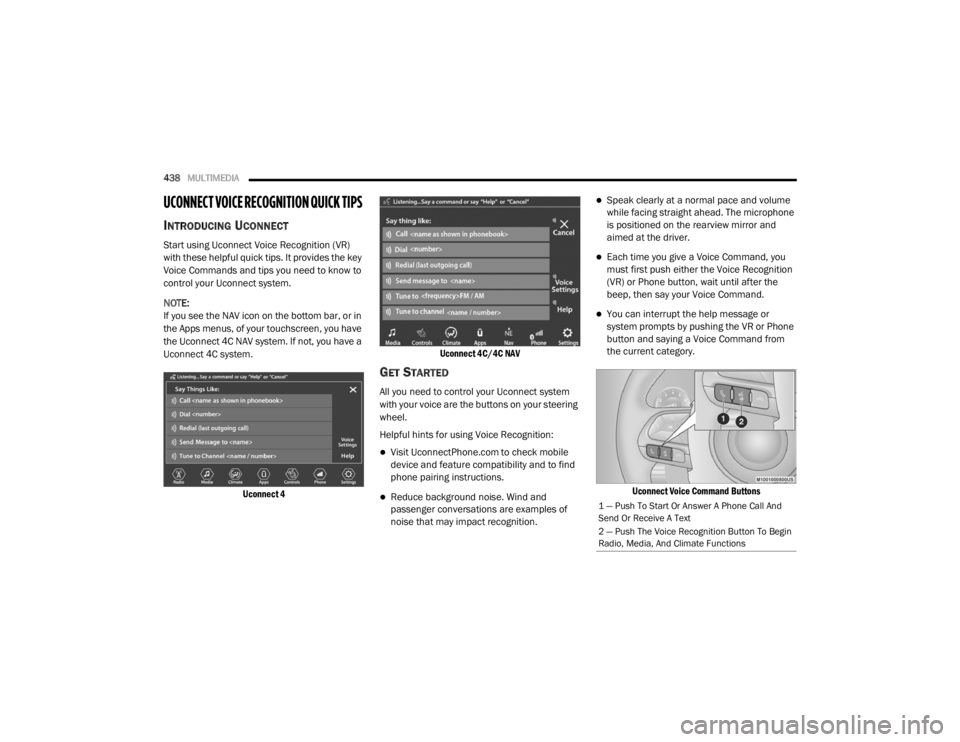
Uconnect 4 Uconnect 4C/4C NAV
GET STARTED
All you need to control your Uconnect system
with your voice are the buttons on your steering
wheel.
Helpful hints for using Voice Recognition:
Visit UconnectPhone.com to check mobile
device and feature compatibility and to find
phone pairing instructions.
Reduce background noise. Wind and
passenger conversations are examples of
noise that may impact recognition.
Speak clearly at a normal pace and volume
while facing straight ahead. The microphone
is positioned on the rearview mirror and
aimed at the driver.
Each time you give a Voice Command, you
must first push either the Voice Recognition
(VR) or Phone button, wait until after the
beep, then say your Voice Command.
You can interrupt the help message or
system prompts by pushing the VR or Phone
button and saying a Voice Command from
the current category.
Uconnect Voice Command Buttons
1 — Push To Start Or Answer A Phone Call And
Send Or Receive A Text
2 — Push The Voice Recognition Button To Begin
Radio, Media, And Climate Functions
20_WD_OM_EN_USC_t.book Page 438
Page 441 of 464

MULTIMEDIA439
BASIC VOICE COMMANDS
The basic Voice Commands below can be given
at any point while using your Uconnect system.
Push the VR button . After the beep, say:
“Cancel ” to stop a current voice session
“Help ” to hear a list of suggested Voice
Commands
“ Repeat ” to listen to the system prompts
again
Notice the visual cues that inform you of your
voice recognition system’s status. Cues appear
on the touchscreen.
RADIO
Use your voice to quickly get to the AM, FM, or
SiriusXM® Satellite Radio stations you would
like to hear. (Subscription or included
SiriusXM® Satellite Radio trial required.)
Push the VR button . After the beep, say:
“ Tune to ninety-five-point-five FM”
“Tune to Satellite Channel Hits 1”TIP:
At any time, if you are not sure of what to say or
want to learn a Voice Command, push the VR
button and say, “
Help”. The system provides
you with a list of commands.
MEDIA
Uconnect offers connections via USB,
Bluetooth®, and auxiliary ports (if equipped).
Voice operation is only available for connected
USB and AUX devices.
Push the VR button . After the beep, say one
of the following commands and follow the
prompts to switch your media source or choose
an artist.
“ Change source to Bluetooth®”
“Change source to AUX”
“Change source to USB”
“Play artist Beethoven”; “ Play album
Greatest Hits”; “ Play song Moonlight
Sonata”; “ Play genre Classical” TIP:
Press the Browse button on the touchscreen to
see all of the music on your USB device. Your
Voice Command must match exactly how the
artist, album, song, and genre information is
displayed.
PHONE
Making and answering hands-free phone calls
is easy with Uconnect. When the Phonebook
button is illuminated on your touchscreen, your
system is ready. Check UconnectPhone.com for
mobile phone compatibility and pairing
instructions.
Push the Phone button . After the beep, say
one of the following commands:
“ Call John Smith”
“Dial 123-456-7890 and follow the system
prompts”
“ Redial (call previous outgoing phone
number)”
“ Call back (call previous incoming phone
number)”
9
20_WD_OM_EN_USC_t.book Page 439
Page 451 of 464

449
B
Battery
................................................. 111, 307Charging System Light............................... 111Keyless Key Fob Replacement.................... 15Battery Saver Feature...................................... 53Belts, Seat..................................................... 181Blind Spot Monitoring.................................... 131Bluetooth Connect Or Disconnect Link Betweenthe Uconnect Phone And Mobile
Phone
................................................... 422Connecting To A Particular Mobile Phone Or Audio Device After Pairing..... 417Bluetooth Mode............................................. 406Body Mechanism Lubrication........................ 316B-Pillar Location............................................. 332Brake Assist System...................................... 123Brake Control System, Electronic.................. 123Brake Fluid................................. 325, 358, 360Brake System...................................... 325, 350Anti-Lock (ABS).......................................... 350Fluid Check..................................... 325, 360Master Cylinder......................................... 325Parking...................................................... 190Warning Light............................................ 110Brake/Transmission Interlock....................... 192Bulb Replacement............................... 266, 268Bulbs, Light.................................................... 183
C
Camera, Rear................................................ 237Capacities, Fluid.................................. 355, 356Caps, FillerOil (Engine)............................. 304, 309, 310Radiator (Coolant Pressure)..................... 323Car Washes................................................... 347Carbon Monoxide Warning................... 180, 354Cargo Area Cover............................................. 77Cargo Compartment........................................ 77Light............................................................ 77Luggage Carrier........................................... 90Cargo Light....................................................... 77Cargo Tie-Downs.............................................. 78Cellular Phone.............................................. 436Center High Mounted Stop Light................... 269Chains, Tire.......................................... 343, 344Changing A Flat Tire...................................... 327Chart, Tire Sizing........................................... 329Check Engine Light
(Malfunction Indicator Light)......................... 121Checking Your Vehicle For Safety................. 180Checks, Safety.............................................. 180Child Restraint.............................................. 163Child RestraintsBooster Seats........................................... 166Child Seat Installation.............................. 177
How To Stow An unused ALR Seat Belt..... 174Infant And Child Restraints....................... 164Locating The LATCH Anchorages.............. 171Lower Anchors And Tethers For Children................................................ 167Older Children And Child Restraints.......... 165Seating Positions...................................... 166Child Safety Locks............................................29Clean Air Gasoline......................................... 352CleaningWheels...................................................... 342Climate Control................................................58Automatic....................................................58Cold Weather Operation................................ 188Compact Spare Tire...................................... 341Contract, Service........................................... 445Cooling Pressure Cap (Radiator Cap)............ 323Cooling System............................................. 321Adding Coolant (Antifreeze)...................... 322Coolant Level................................... 323, 324Cooling Capacity.............................. 355, 356Disposal Of Used Coolant......................... 323Drain, Flush, And Refill............................. 321Inspection............................... 321, 323, 324Points To Remember................................ 324Pressure Cap............................................ 323
11
20_WD_OM_EN_USC_t.book Page 449