USB port DODGE DURANGO 2020 Owners Manual
[x] Cancel search | Manufacturer: DODGE, Model Year: 2020, Model line: DURANGO, Model: DODGE DURANGO 2020Pages: 464, PDF Size: 22.14 MB
Page 9 of 464

7
RAISING THE VEHICLE ..................................... 327
TIRES ................................................................... 327 Tire Safety Information .............................327Tires — General Information .....................335Tire Types ...................................................339
Spare Tires — If Equipped ........................ 340Wheel And Wheel Trim Care ...................342Tire Chains and Traction Devices —
Non-SRT .....................................................343 Tire Chains and Traction Devices —
SRT .............................................................344 Tire Rotation Recommendations .............344
DEPARTMENT OF TRANSPORTATION
UNIFORM TIRE QUALITY GRADES ................... 344
Treadwear .................................................. 345Traction Grades .........................................345
Temperature Grades .................................345
STORING THE VEHICLE ..................................... 346
BODYWORK ........................................................ 346
Protection From Atmospheric Agents ......346Body And Underbody Maintenance ..........346
Preserving The Bodywork ..........................347
INTERIORS ......................................................... 348
Seats And Fabric Parts .............................. 348
Plastic And Coated Parts ...........................348
Leather Parts .............................................349Glass Surfaces ..........................................349
TECHNICAL SPECIFICATIONS
IDENTIFICATION DATA .......................................350
Vehicle Identification Number .................. 350
BRAKE SYSTEM .................................................. 350
WHEEL AND TIRE TORQUE
SPECIFICATIONS ............................................... 350
Torque Specifications ................................ 350
FUEL REQUIREMENTS ......................................351
3.6L Engine ................................................ 351
5.7L Engine ................................................ 351
6.4L Engine ................................................ 352
Reformulated Gasoline .......................... 352Materials Added To Fuel .......................... 352Gasoline/Oxygenate Blends .................... 353
Do Not Use E-85 In Non-Flex Fuel
Vehicles ...................................................... 353 CNG And LP Fuel System Modifications... 353
MMT In Gasoline ........................................ 353
Fuel System Cautions................................ 354
Carbon Monoxide Warnings ..................... 354
FLUID CAPACITIES — NON-SRT ........................355
FLUID CAPACITIES — SRT ................................. 356
FLUIDS AND LUBRICANTS — NON-SRT ........... 357
Engine ........................................................ 357
Chassis ....................................................... 358
FLUIDS AND LUBRICANTS — SRT .................... 359
Engine ........................................................ 359
Chassis ...................................................... 360
MULTIMEDIA
UCONNECT SYSTEMS ........................................ 361
CYBERSECURITY ................................................ 361
UCONNECT SETTINGS ....................................... 362Customer Programmable Features —
Uconnect 4 Settings .................................. 363 Customer Programmable Features —
Uconnect 4C/4C NAV Settings ................. 377
SAFETY AND GENERAL INFORMATION .......... 394
Safety Guidelines....................................... 394
UCONNECT 4 WITH 7-INCH DISPLAY .............. 395
Introduction................................................ 395
Radio Mode ................................................ 396
Media Mode ............................................... 404
Phone Mode............................................... 411
STEERING WHEEL AUDIO CONTROLS ............ 423
Radio Operation......................................... 423Media Mode ............................................... 423
IPOD®/USB/MP3 CONTROL —
IF EQUIPPED ....................................................... 424
Connecting The AUX Audio Input Or
External USB Device .................................. 424 Using This Feature..................................... 424
Second Row USB Charging Port ............... 425
20_WD_OM_EN_USC_t.book Page 7
Page 110 of 464

108GETTING TO KNOW YOUR INSTRUMENT PANEL
SRT Speed Warning — If Equipped
Push and release the up or down arrow button
until the Speed Warning Menu icon/title is
highlighted in the instrument cluster display.
Push and release the OK button to enter speed
warning. Use the up or down arrow button to
select a desired speed, then push and release
the OK button to set the speed. When the set
speed is exceeded, the indication will light up
yellow and flash along with a pop-up message of
“Speed Warning Exceeded” with a continuous
chime (until the speed is no longer exceeded).
BATTERY SAVER ON/BATTERY SAVER
M
ODE MESSAGE — ELECTRICAL LOAD
R
EDUCTION ACTIONS — IF EQUIPPED
This vehicle is equipped with an Intelligent
Battery Sensor (IBS) to perform additional
monitoring of the electrical system and status
of the vehicle battery.
In cases when the IBS detects charging system
failure, or the vehicle battery conditions are
deteriorating, electrical load reduction actions
will take place to extend the driving time and
distance of the vehicle. This is done by reducing
power to or turning off non-essential electrical
loads. Load reduction is only active when the engine is
running. It will display a message if there is a
risk of battery depletion to the point where the
vehicle may stall due to lack of electrical supply,
or will not restart after the current drive cycle.
When load reduction is activated, the message
“Battery Saver On” or “Battery Saver Mode” will
appear in the instrument cluster.
These messages indicate the vehicle battery
has a low state of charge and continues to lose
electrical charge at a rate that the charging
system cannot sustain.
NOTE:
The charging system is independent from
load reduction. The charging system
performs a diagnostic on the charging
system continuously.
If the Battery Charge Warning Light is on it
may indicate a problem with the charging
system. Refer to “Battery Charge Warning
Light” in this chapter for further information.
The electrical loads that may be switched off
(if equipped), and vehicle functions which can
be affected by load reduction:
Heated Seat/Vented Seats/Heated Wheel
Rear Defroster And Heated Mirrors
HVAC System
115 Volt AC Power Inverter System
Audio and Telematics System
Loss of the battery charge may indicate one or
more of the following conditions:
The charging system cannot deliver enough
electrical power to the vehicle system
because the electrical loads are larger than
the capability of the charging system. The
charging system is still functioning properly.
Turning on all possible vehicle electrical
loads (e.g. HVAC to max settings, exterior and
interior lights, overloaded power outlets
+12 Volt, 115 Volt AC, USB ports) during
certain driving conditions (city driving,
towing, frequent stopping, etc.).
20_WD_OM_EN_USC_t.book Page 108
Page 111 of 464

GETTING TO KNOW YOUR INSTRUMENT PANEL109
Installing options like additional lights,
upfitter electrical accessories, audio
systems, alarms and similar devices.
Unusual driving cycles (short trips separated
by long parking periods).
The vehicle was parked for an extended
period of time (weeks, months).
The battery was recently replaced and was
not charged completely.
The battery was discharged by an electrical
load left on when the vehicle was parked.
The battery was used for an extended period
with the engine not running to supply radio,
lights, chargers, +12 Volt portable appli-
ances like vacuum cleaners, game consoles
and similar devices. What to do when an electrical load reduction
action message is present (“Battery Saver On”
or “Battery Saver Mode”)
During a trip:
Reduce power to unnecessary loads if
possible:
Turn off redundant lights (interior or exte
-
rior)
Check what may be plugged in to power
outlets +12 Volt, 115 Volt AC, USB ports
Check HVAC settings (blower, tempera -
ture)
Check the audio settings (volume)
After a trip:
Check if any aftermarket equipment was
installed (additional lights, upfitter electrical
accessories, audio systems, alarms) and
review specifications if any (load and Ignition
Off Draw currents).
Evaluate the latest driving cycles (distance,
driving time and parking time).
The vehicle should have service performed if
the message is still present during consecu -
tive trips, and if the evaluation and driving
pattern of the vehicle did not help to identify
the cause.
WARNING LIGHTS AND MESSAGES
The warning/indicator lights will illuminate in
the instrument panel together with a dedicated
message and/or acoustic signal when
applicable. These indications are indicative and
precautionary and as such must not be
considered as exhaustive and/or alternative to
the information contained in the Owner’s
Manual, which you are advised to read carefully
in all cases. Always refer to the information in
this chapter in the event of a failure indication.
All active telltales will display first if applicable.
The system check menu may appear different
based upon equipment options and current
vehicle status. Some telltales are optional and
may not appear.3
20_WD_OM_EN_USC_t.book Page 109
Page 275 of 464

IN CASE OF EMERGENCY273
F57 –20 Amp Yellow NOX Sensor/PM Sensor/Fuel Htr
F58 –15 Amp Blue HID Headlamps LH — If Equipped
F59 –10 Amp Red SCR Pumps Relay
F60 –15 Amp Blue Transmission Control Module
F61 –10 Amp RedTransmission Control Module/PM Sensor
(Diesel Engine Only)
F62 –10 Amp Red Air Conditioning Clutch
F63 –20 Amp Yellow Ignition Coils / Ignition Coil Capacitors / Short Runner
Valve Actuator — If Equipped (Gas) Urea Heater (Diesel)
F64 –25 Amp Clear Fuel Injectors/Powertrain
F66 –10 Amp RedSunroof/Rain Sensor/Inside Rear View Mirror / USB Port /
DSCR / DTV — If Equipped
F67 –15 Amp Blue CDM/UCI Port/USB Port
F68 –20 Amp Yellow Rear Wiper Motor
F69 –15 Amp Blue Spotlight Feed — If Equipped
F70 –20 Amp Yellow Fuel Pump Motor
F71 –30 Amp Green Amplifier/ANCM — If Equipped
F72 –10 Amp Red ECM/PCM
F73 –15 Amp Blue HID Headlamp RH — If Equipped
F75 –10 Amp Red Dual Battery Control — If Equipped
F76 –10 Amp Red Anti-lock Brakes/Electronic Stability Control
CavityCartridge Fuse Micro Fuse Description
6
20_WD_OM_EN_USC_t.book Page 273
Page 406 of 464
404MULTIMEDIA
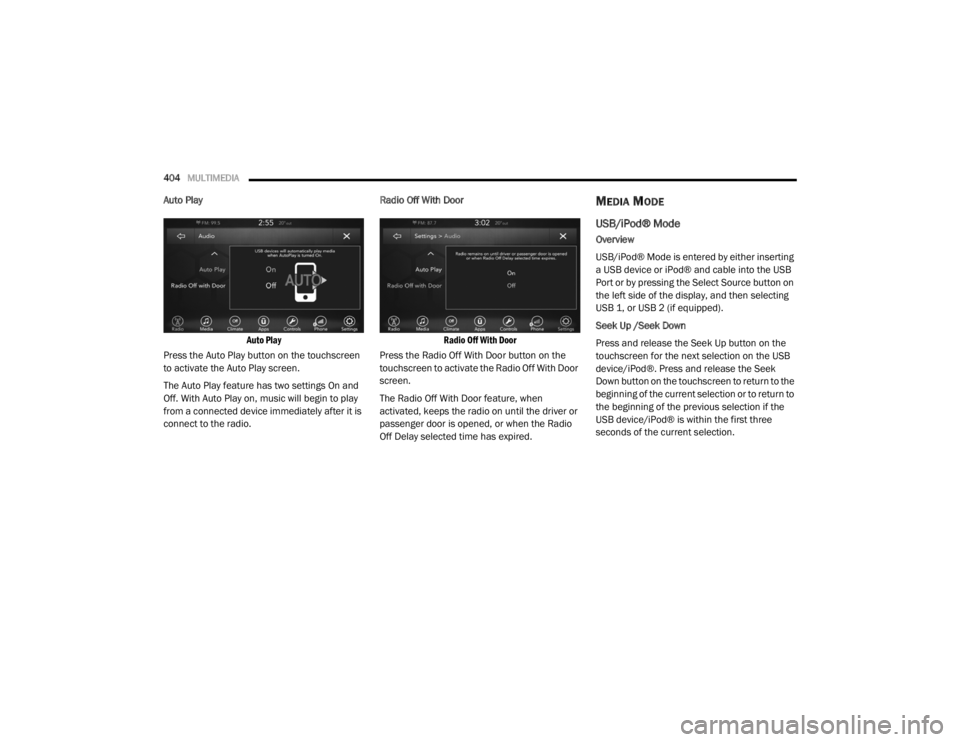
Auto Play
Auto Play
Press the Auto Play button on the touchscreen
to activate the Auto Play screen.
The Auto Play feature has two settings On and
Off. With Auto Play on, music will begin to play
from a connected device immediately after it is
connect to the radio. Radio Off With Door
Radio Off With Door
Press the Radio Off With Door button on the
touchscreen to activate the Radio Off With Door
screen.
The Radio Off With Door feature, when
activated, keeps the radio on until the driver or
passenger door is opened, or when the Radio
Off Delay selected time has expired.MEDIA MODE
USB/iPod® Mode
Overview
USB/iPod® Mode is entered by either inserting
a USB device or iPod® and cable into the USB
Port or by pressing the Select Source button on
the left side of the display, and then selecting
USB 1, or USB 2 (if equipped).
Seek Up /Seek Down
Press and release the Seek Up button on the
touchscreen for the next selection on the USB
device/iPod®. Press and release the Seek
Down button on the touchscreen to return to the
beginning of the current selection or to return to
the beginning of the previous selection if the
USB device/iPod® is within the first three
seconds of the current selection.
20_WD_OM_EN_USC_t.book Page 404
Page 407 of 464

MULTIMEDIA405
Browse
Press the Browse button on the touchscreen to
display the browse window. The left side of the
browse window displays a list of ways you can
browse through the contents of the USB device/
iPod®. If supported by the device, you can
browse by Folders, Artists, Playlists, Albums,
Songs, etc. Press the desired button on the left
side of the screen. The center of the browse
window shows items and its sub-functions,
which can be scrolled by pressing the Up and
Down buttons to the right. The Tune/Scroll knob
can also be used to scroll.
Media Mode
Press the Media button on the touchscreen to
select the desired audio source: USB.
Repeat
Press the Repeat button on the touchscreen to
toggle the repeat functionality. The Repeat
button on the touchscreen is highlighted when
active. The Radio will continue to play the
current track, repeatedly, as long as the repeat
is active. Press the Repeat button on the
touchscreen a second time to turn this feature
off. Shuffle
Press the Shuffle button on the touchscreen to
play the selections on the USB/iPod® device in
random order to provide an interesting change
of pace. Press the Shuffle button on the
touchscreen a second time to turn this feature
off.
Info
Press the Info button on the touchscreen to
display the current track information. Press the
Info button on the touchscreen a second time to
cancel this feature.
Tracks
Press the Tracks button on the touchscreen to
display a pop-up with the Song List. The
currently playing song is indicated by an arrow
and lines above and below the song title. When
in the Tracks List screen, you can rotate the
Tune/Scroll knob to highlight a track (indicated
by the line above and below the track name)
and then push the Enter/Browse knob to start
playing that track.
Pressing the Tracks button on the touchscreen
while the pop-up is displayed will close the
pop-up.Audio
Refer to “Radio Mode” for adjusting the audio
settings.
AUX Mode
Overview
AUX (Auxiliary Mode) is entered by inserting an
AUX device using a cable with a 3.5 mm audio
jack into the AUX port or by pressing the AUX
button on the left side of the display.
Inserting Auxiliary Device
Gently insert the Auxiliary device cable into the
AUX Port. If you insert an Auxiliary device with
the ignition and the radio on, the unit will switch
to AUX mode and begin to play when you insert
the device cable.
Controlling The Auxiliary Device
The control of the auxiliary device (e.g.,
selecting playlists, play, fast forward, etc.)
cannot be provided by the radio; use the device
controls instead. Adjust the volume with the
Volume/Mute rotary knob, or with the volume of
the attached device.
9
20_WD_OM_EN_USC_t.book Page 405
Page 409 of 464
MULTIMEDIA407
Android Auto™ is a feature of your Uconnect
system, and your Android™ 5.0 or higher
powered smartphone with a data plan, that
allows you to project your smartphone and a
number of its apps onto the touchscreen radio
display. Android Auto™ automatically brings you
useful information, and organizes it into simple
cards that appear just when they are needed.
Android Auto™ can be used with Google's
best-in-class speech technology, the steering
wheel controls, the knobs and buttons on your
radio faceplate, and the radio display’s
touchscreen to control many of your apps. To
use Android Auto™, follow the following
procedure:
1. Download the Android Auto™ app from the
Google Play store on your
Android™-powered smartphone.
2. Connect your Android™-powered smartphone to one of the media USB ports
in your vehicle. If the Android Auto™ app
was not downloaded, the first time you plug
your device in, the app will begin to
download. NOTE:
Be sure to use the factory-provided USB cable
that came with your phone, as aftermarket
cables may not work.
3. Once the device is connected and recognized, the “Phone” icon on the drag &
drop menu bar changes to the Android
Auto™ Icon.
Once Android Auto™ is up and running on your
Uconnect system, the following features can be
utilized using your smartphone’s data plan:
Google Maps™ for navigation
Google Play Music, Spotify, iHeart Radio, etc.
for music
Hands-free Calling and Texting for communi
-
cation
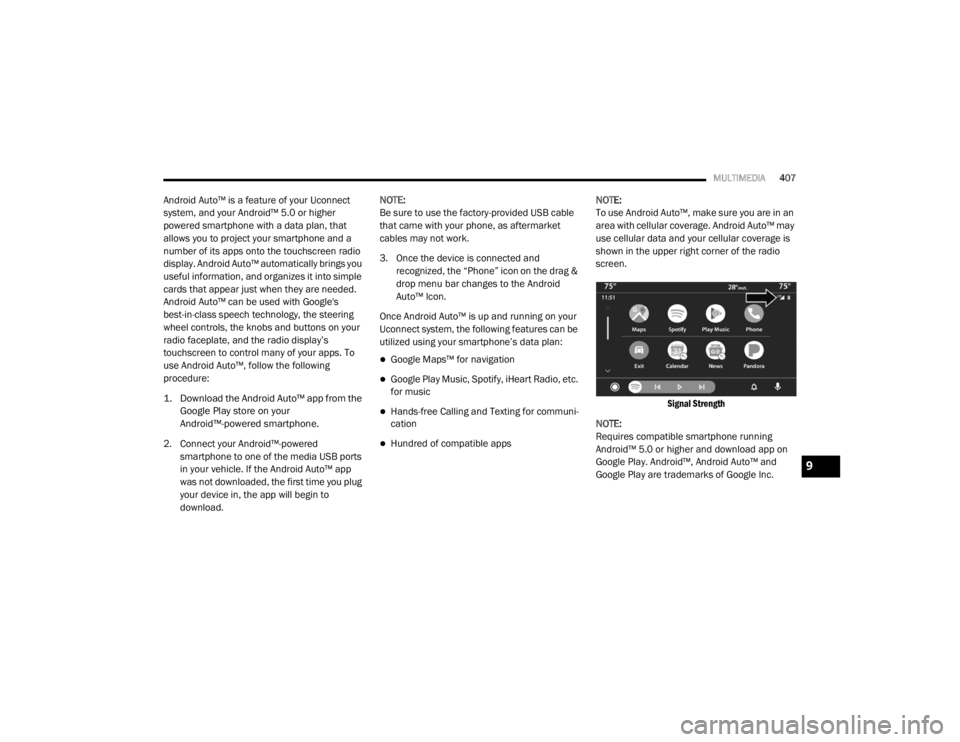
Hundred of compatible apps NOTE:
To use Android Auto™, make sure you are in an
area with cellular coverage. Android Auto™ may
use cellular data and your cellular coverage is
shown in the upper right corner of the radio
screen.
Signal Strength
NOTE:
Requires compatible smartphone running
Android™ 5.0 or higher and download app on
Google Play. Android™, Android Auto™ and
Google Play are trademarks of Google Inc.
9
20_WD_OM_EN_USC_t.book Page 407
Page 411 of 464
MULTIMEDIA409
Uconnect works seamlessly with Apple
CarPlay®, the smarter, more secure way to use
your iPhone® in the car, and stay focused on
the road. Use your Uconnect Touchscreen
display, the vehicle's knobs and controls, and
your voice with Siri to get access to Apple
Music®, Maps, Messages, and more.
To use Apple CarPlay®, make sure you are
using iPhone® 5 or later, have Siri enabled in
Settings, ensure your iPhone® is unlocked for
the very first connection only, and then use the
following procedure:
1. Connect your iPhone® to one of the media
USB ports in your vehicle.
NOTE:
Be sure to use the factory-provided Lightning
cable that came with your phone, as after -
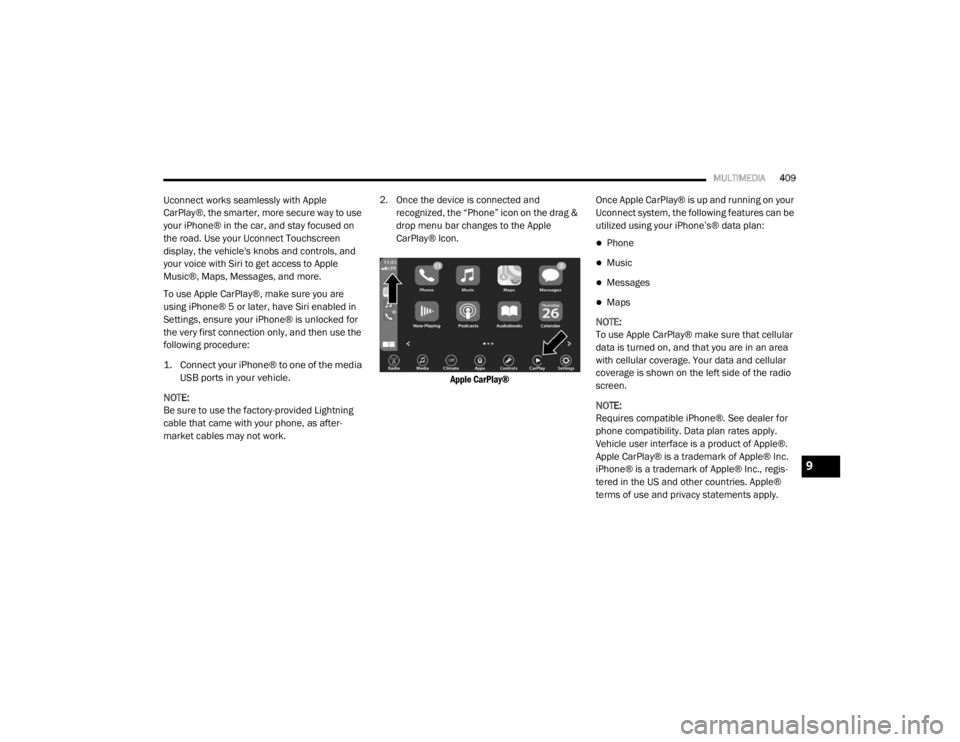
market cables may not work. 2. Once the device is connected and recognized, the “Phone” icon on the drag &
drop menu bar changes to the Apple
CarPlay® Icon.
Apple CarPlay®
Once Apple CarPlay® is up and running on your
Uconnect system, the following features can be
utilized using your iPhone’s® data plan:
Phone
Music
Messages
Maps
NOTE:
To use Apple CarPlay® make sure that cellular
data is turned on, and that you are in an area
with cellular coverage. Your data and cellular
coverage is shown on the left side of the radio
screen.
NOTE:
Requires compatible iPhone®. See dealer for
phone compatibility. Data plan rates apply.
Vehicle user interface is a product of Apple®.
Apple CarPlay® is a trademark of Apple® Inc.
iPhone® is a trademark of Apple® Inc., regis -
tered in the US and other countries. Apple®
terms of use and privacy statements apply.
9
20_WD_OM_EN_USC_t.book Page 409
Page 426 of 464
424MULTIMEDIA
IPOD®/USB/MP3 CONTROL — IF EQUIPPED
This feature allows an iPod® or external USB
device to be plugged into the USB port, located
inside the storage area on the center stack of
the instrument panel.
Plugging in a smartphone device to a USB Port
may activate Android Auto™ or Apple CarPlay®
features, if equipped. For further information,
refer to “Android Auto™” or “Apple CarPlay®” in
the Owner’s Manual Supplement.
iPod® control supports Mini, 4G, Photo, iPod
nano®, 5G iPod® and iPhone® devices. Some
iPod® software versions may not fully support
the iPod® control features. Please visit
Apple’s® website for software updates.
For further information, refer to the Uconnect
Owner’s Manual Supplement.
CONNECTING THE AU X AUDIO INPUT OR
E
XTERNAL USB DEVICE
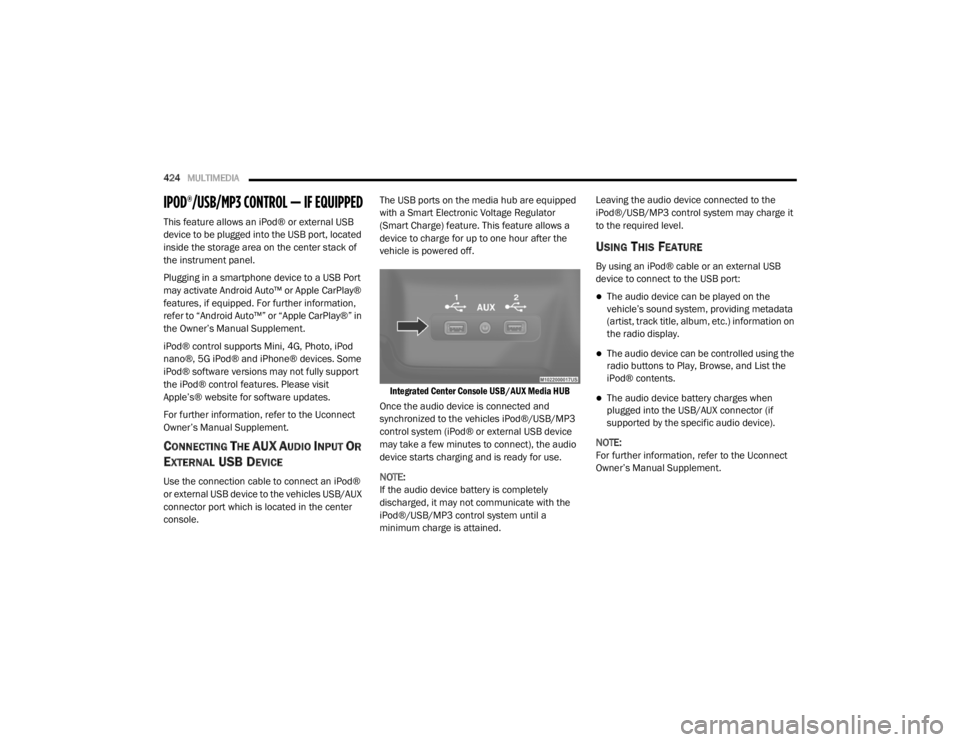
Use the connection cable to connect an iPod®
or external USB device to the vehicles USB/AUX
connector port which is located in the center
console. The USB ports on the media hub are equipped
with a Smart Electronic Voltage Regulator
(Smart Charge) feature. This feature allows a
device to charge for up to one hour after the
vehicle is powered off.
Integrated Center Console USB/AUX Media HUB
Once the audio device is connected and
synchronized to the vehicles iPod®/USB/MP3
control system (iPod® or external USB device
may take a few minutes to connect), the audio
device starts charging and is ready for use.
NOTE:
If the audio device battery is completely
discharged, it may not communicate with the
iPod®/USB/MP3 control system until a
minimum charge is attained. Leaving the audio device connected to the
iPod®/USB/MP3 control system may charge it
to the required level.
USING THIS FEATURE
By using an iPod® cable or an external USB
device to connect to the USB port:
The audio device can be played on the
vehicle’s sound system, providing metadata
(artist, track title, album, etc.) information on
the radio display.
The audio device can be controlled using the
radio buttons to Play, Browse, and List the
iPod® contents.
The audio device battery charges when
plugged into the USB/AUX connector (if
supported by the specific audio device).
NOTE:
For further information, refer to the Uconnect
Owner’s Manual Supplement.
20_WD_OM_EN_USC_t.book Page 424
Page 427 of 464
MULTIMEDIA425
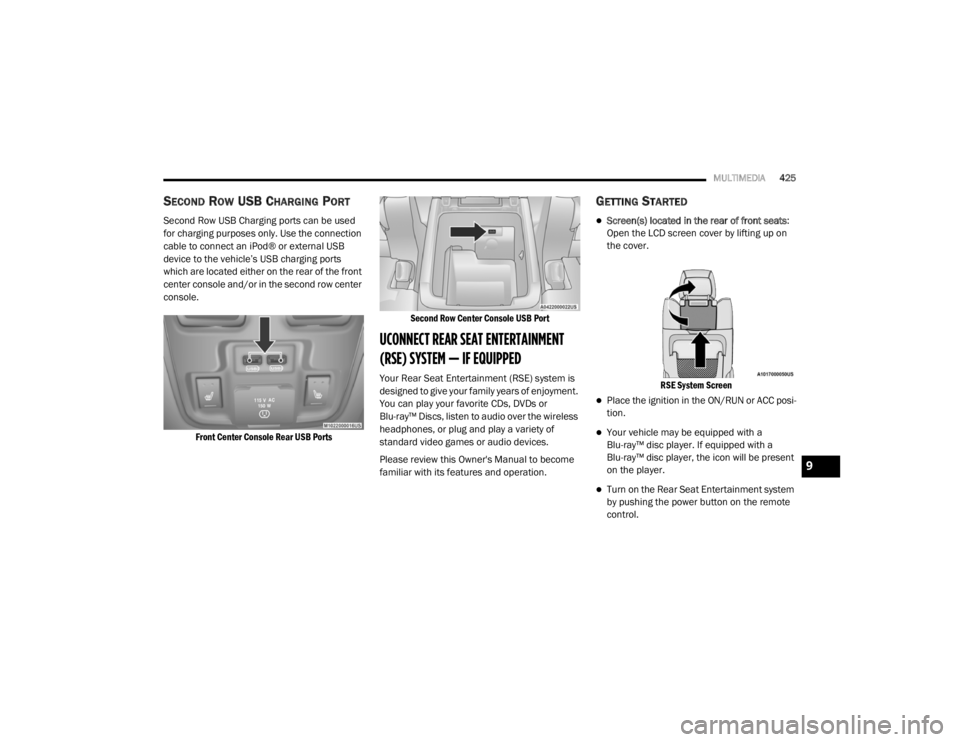
SECOND ROW USB CHARGING PORT
Second Row USB Charging ports can be used
for charging purposes only. Use the connection
cable to connect an iPod® or external USB
device to the vehicle’s USB charging ports
which are located either on the rear of the front
center console and/or in the second row center
console.
Front Center Console Rear USB Ports Second Row Center Console USB Port
UCONNECT REAR SEAT ENTERTAINMENT
(RSE) SYSTEM — IF EQUIPPED
Your Rear Seat Entertainment (RSE) system is
designed to give your family years of enjoyment.
You can play your favorite CDs, DVDs or
Blu-ray™ Discs, listen to audio over the wireless
headphones, or plug and play a variety of
standard video games or audio devices.
Please review this Owner's Manual to become
familiar with its features and operation.
GETTING STARTED
Screen(s) located in the rear of front seats
:
Open the LCD screen cover by lifting up on
the cover.
RSE System Screen
Place the ignition in the ON/RUN or ACC posi -
tion.
Your vehicle may be equipped with a
Blu-ray™ disc player. If equipped with a
Blu-ray™ disc player, the icon will be present
on the player.
Turn on the Rear Seat Entertainment system
by pushing the power button on the remote
control.
9
20_WD_OM_EN_USC_t.book Page 425