power steering DODGE DURANGO 2020 Owners Manual
[x] Cancel search | Manufacturer: DODGE, Model Year: 2020, Model line: DURANGO, Model: DODGE DURANGO 2020Pages: 464, PDF Size: 22.14 MB
Page 4 of 464

2
INTRODUCTION
HOW TO USE THIS MANUAL ...............................10
Essential Information .................................. 10
Symbols ........................................................ 10
ROLLOVER WARNING ..........................................10
WARNINGS AND CAUTIONS ...............................11
VEHICLE MODIFICATIONS/ALTERATIONS .........11
GETTING TO KNOW YOUR VEHICLE
VEHICLE USER GUIDE — IF EQUIPPED ...............12
KEYS ......................................................................13
Key Fob......................................................... 13
IGNITION SWITCH ................................................17
Keyless Push Button Ignition ...................... 17
Ignition Or Accessory On Message ............. 18
Depleted Key Fob Battery ........................... 18
REMOTE START — IF EQUIPPED .........................19
How To Use Remote Start .......................... 19
Remote Start Abort Message —
If Equipped ................................................... 20 To Enter Remote Start Mode ...................... 20
To Exit Remote Start Mode Without
Driving The Vehicle ..................................... 20 To Exit Remote Start Mode And Drive
The Vehicle ................................................... 20 Remote Start Comfort Systems —
If Equipped ................................................... 21 General Information .................................... 21 SENTRY KEY ......................................................... 21
Key Programming ....................................... 22
Replacement Keys ...................................... 22
General Information .................................... 22
VEHICLE SECURITY ALARM — IF EQUIPPED ..... 23
To Arm The System ...................................... 23
To Disarm The System ................................ 24
Rearming Of The System............................. 24
Tamper Alert................................................. 24
DOORS .................................................................. 24
Manual Door Locks...................................... 24
Power Door Locks ........................................ 25
Keyless Enter-N-Go — Passive Entry .......... 26
Automatic Unlock On Exit Feature — If
Equipped ...................................................... 29 Automatic Door Locks — If Equipped ......... 29
Child-Protection Door Lock System —
Rear Doors .................................................. 29
DRIVER MEMORY SETTINGS —
IF EQUIPPED ........................................................ 30
Programming The Memory Feature............ 31
Linking And Unlinking The Remote
Keyless Entry Key Fob To Memory ............. 31 Memory Position Recall............................... 31
SEATS ................................................................... 32
Manual Adjustment (Front Seats) — If
Equipped ...................................................... 32 Manual Adjustment (Rear Seats) ............... 34
Power Adjustment (Front Seats) —
If Equipped .................................................. 37 Power Passenger Seat Adjustment — If
Equipped ...................................................... 39 Heated Seats — If Equipped ...................... 40
Front Ventilated Seats — If Equipped ........ 42
HEAD RESTRAINTS ..............................................42
Supplemental Active Head Restraints —
Front Seats................................................... 42 Head Restraints — Rear Seats.................... 44
Head Restraint Removal — Rear Seats...... 44
Power Folding Third Row Head
Restraints ..................................................... 45
STEERING WHEEL.................................................46
Manual Tilt/Telescoping Steering
Column — If Equipped ................................ 46 Power Tilt/Telescoping Steering
Column — If Equipped ............................... 46 Heated Steering Wheel — If Equipped ...... 47
MIRRORS ..............................................................47
Inside Day/Night Mirror — If Equipped ...... 47
Automatic Dimming Mirror —
If Equipped .................................................. 48 Outside Mirrors ........................................... 48
Outside Automatic Dimming Mirrors —
If Equipped ................................................... 49 Power Mirrors .............................................. 49
Heated Mirrors — If Equipped .................... 49
Tilt Side Mirrors In Reverse (Available
With Memory Settings Only) —
If Equipped ................................................... 49 Illuminated Vanity Mirrors .......................... 50
20_WD_OM_EN_USC_t.book Page 2
Page 6 of 464

4
ONBOARD DIAGNOSTIC SYSTEM — OBD II .... 120 Onboard Diagnostic System
(OBD II) Cybersecurity ................................120
EMISSIONS INSPECTION AND
MAINTENANCE PROGRAMS ............................ 121
SAFETY
SAFETY FEATURES ............................................ 122
Anti-Lock Brake System (ABS) ................. 122
Electronic Brake Control (EBC) System ....123
AUXILIARY DRIVING SYSTEMS ........................ 131
Blind Spot Monitoring (BSM) —
If Equipped .................................................131 Forward Collision Warning (FCW) With
Mitigation ...................................................136 Tire Pressure Monitoring System
(TPMS) ........................................................ 138
OCCUPANT RESTRAINT SYSTEMS .................. 143
Occupant Restraint Systems Features.....143
Important Safety Precautions ...................143Seat Belt Systems ..................................... 144Supplemental Restraint Systems (SRS) ...153Child Restraints .........................................163
Transporting Pets ......................................180 SAFETY TIPS ....................................................... 180
Transporting Passengers .......................... 180Exhaust Gas .............................................. 180
Safety Checks You Should Make
Inside The Vehicle ..................................... 181 Periodic Safety Checks You Should Make
Outside The Vehicle ................................... 183STARTING AND OPERATING
STARTING THE ENGINE .....................................184
Automatic Transmission............................ 184
Keyless Enter-N-Go — Ignition ................... 184
Normal Starting ......................................... 185
If Engine Fails To Start ............................. 187Cold Weather Operation (Below –22°F
Or −30°C) ................................................. 188 After Starting .............................................. 188
ENGINE BLOCK HEATER — IF EQUIPPED ........188
ENGINE BREAK-IN RECOMMENDATIONS –
NON-SRT .............................................................. 188
ENGINE BREAK-IN RECOMMENDATIONS –
SRT ....................................................................... 189
PARKING BRAKE ............................................... 190 AUTOMATIC TRANSMISSION ........................... 191
Ignition Park Interlock ............................... 192Brake/Transmission Shift Interlock
System ....................................................... 192 Fuel Economy (ECO) Mode........................ 192
Eight-Speed Automatic Transmission ...... 193
SPORT MODE — IF EQUIPPED.......................... 199
ALL-WHEEL DRIVE OPERATION ....................... 199
Single-Speed Operating Instructions/
Precautions— If Equipped ........................ 199 Electronically Shifted Transfer Case
(Three-Position Switch) — If Equipped...... 199 Shifting Procedure ..................................... 201
FUEL SAVER TECHNOLOGY 5.7L/6.4L
ONLY — IF EQUIPPED ........................................ 202
POWER STEERING............................................. 202
STOP/START SYSTEM — IF EQUIPPED ........... 203 Automatic Mode ........................................ 203
Possible Reasons The Engine Does Not
Autostop ..................................................... 204 To Start The Engine While In Autostop
Mode .......................................................... 204 To Manually Turn Off The Stop/Start
System........................................................ 205 To Manually Turn On The Stop/Start
System........................................................ 205 System Malfunction................................... 205
20_WD_OM_EN_USC_t.book Page 4
Page 32 of 464
30GETTING TO KNOW YOUR VEHICLE
3. Repeat steps 1 and 2 for the opposite rear
door.
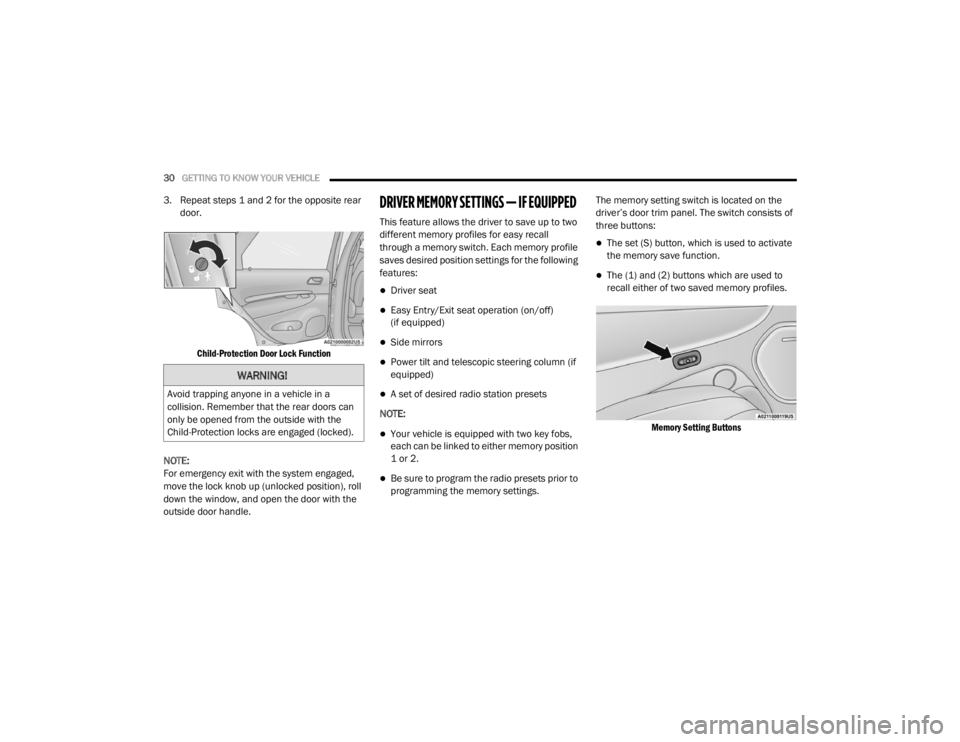
Child-Protection Door Lock Function
NOTE:
For emergency exit with the system engaged,
move the lock knob up (unlocked position), roll
down the window, and open the door with the
outside door handle.DRIVER MEMORY SETTINGS — IF EQUIPPED
This feature allows the driver to save up to two
different memory profiles for easy recall
through a memory switch. Each memory profile
saves desired position settings for the following
features:
Driver seat
Easy Entry/Exit seat operation (on/off)
(if equipped)
Side mirrors
Power tilt and telescopic steering column (if
equipped)
A set of desired radio station presets
NOTE:
Your vehicle is equipped with two key fobs,
each can be linked to either memory position
1 or 2.
Be sure to program the radio presets prior to
programming the memory settings. The memory setting switch is located on the
driver’s door trim panel. The switch consists of
three buttons:
The set (S) button, which is used to activate
the memory save function.
The (1) and (2) buttons which are used to
recall either of two saved memory profiles.
Memory Setting Buttons
WARNING!
Avoid trapping anyone in a vehicle in a
collision. Remember that the rear doors can
only be opened from the outside with the
Child-Protection locks are engaged (locked).
20_WD_OM_EN_USC_t.book Page 30
Page 33 of 464

GETTING TO KNOW YOUR VEHICLE31
PROGRAMMING THE MEMORY FEATURE
To create a new memory profile, perform the
following:
1. Place the vehicle’s ignition in the ON/RUN
position (do not start the engine).
2. Adjust all memory profile settings to desired preferences (i.e., seat, side mirror, power tilt
and telescopic steering column [if
equipped], and radio station presets).
3. Push the set (S) button on the memory switch, and then push the desired memory
button (1 or 2) within five seconds. The
instrument cluster display will display which
memory position has been set.
NOTE:
Memory profiles can be set without the vehicle
in PARK, but the vehicle must be in PARK to
recall a memory profile.
LINKING AND UNLINKING THE REMOTE
K
EYLESS ENTRY KEY FOB TO MEMORY
Your key fobs can be programmed to recall one
of two saved memory profiles by pushing the
unlock button on the key fob.
NOTE:
Before programming your key fobs you must
select the “Memory Linked To Fob” feature
through the Uconnect system settings. Refer to
“Uconnect Settings” in “Multimedia” for further
information.
To program your key fobs, perform the following:
1. Place the vehicle’s ignition in the OFF
position.
2. Select a desired memory profile, 1 or 2.
3. Once the profile has been recalled, push and release the set (S) button on the
memory switch. Then, within five seconds,
push and release button (1) or (2)
accordingly. “Memory Profile Set” (1 or 2)
will display in the instrument cluster display.
4. Push and release the lock button on the key fob within 10 seconds. NOTE:
Your key fobs can be unlinked from your
memory settings by pushing the set (S) button,
and within 10 seconds, followed by pushing the
unlock button on the key fob.
MEMORY POSITION RECALL
NOTE:
If a recall is attempted when the vehicle is not in
PARK, a message will be displayed in the instru
-
ment cluster display.
To recall the memory settings for driver one or
two, push the desired memory button (1 or 2) or
the unlock button on the key fob linked to the
desired memory position.
A recall can be canceled by pushing any of the
memory buttons during a recall (S, 1, or 2), or by
pushing any of the seat adjustment switches.
When a recall is canceled, the driver's seat and
telescopic steering column (if equipped) will
stop moving. A delay of one second will occur
before another recall can be selected.
2
20_WD_OM_EN_USC_t.book Page 31
Page 48 of 464
46GETTING TO KNOW YOUR VEHICLE
STEERING WHEEL
MANUAL TILT/TELESCOPING STEERING
C
OLUMN — IF EQUIPPED
This feature allows you to tilt the steering
column upward or downward. It also allows you
to lengthen or shorten the steering column. The
tilt/telescoping lever is located below the
steering wheel at the end of the steering
column.
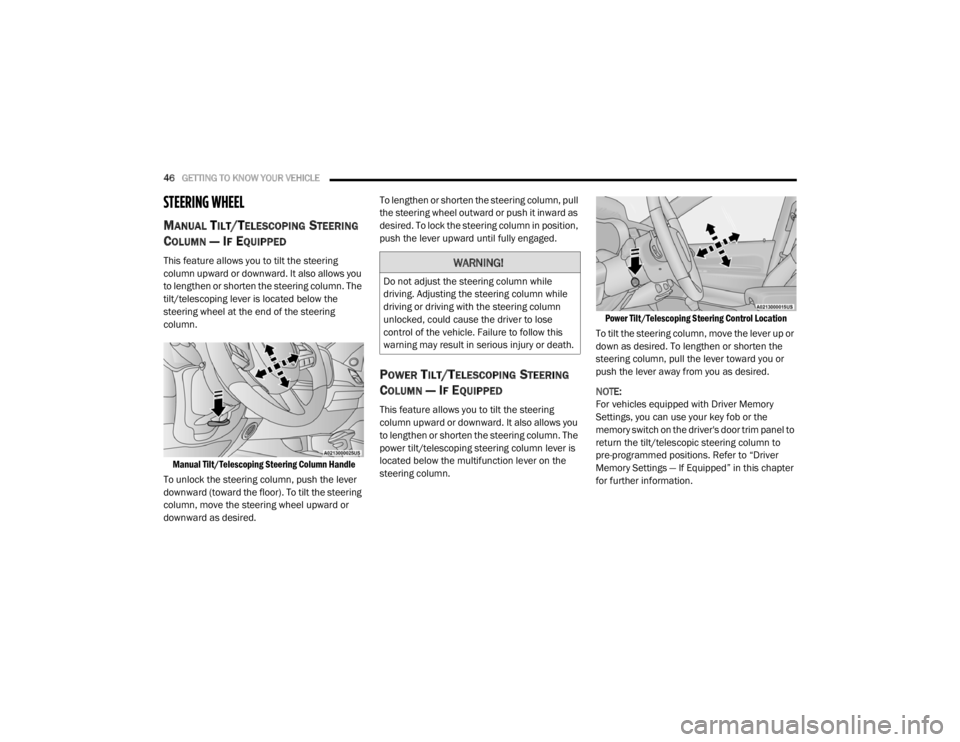
Manual Tilt/Telescoping Steering Column Handle
To unlock the steering column, push the lever
downward (toward the floor). To tilt the steering
column, move the steering wheel upward or
downward as desired. To lengthen or shorten the steering column, pull
the steering wheel outward or push it inward as
desired. To lock the steering column in position,
push the lever upward until fully engaged.
POWER TILT/TELESCOPING STEERING
C
OLUMN — IF EQUIPPED
This feature allows you to tilt the steering
column upward or downward. It also allows you
to lengthen or shorten the steering column. The
power tilt/telescoping steering column lever is
located below the multifunction lever on the
steering column.
Power Tilt/Telescoping Steering Control Location
To tilt the steering column, move the lever up or
down as desired. To lengthen or shorten the
steering column, pull the lever toward you or
push the lever away from you as desired.
NOTE:
For vehicles equipped with Driver Memory
Settings, you can use your key fob or the
memory switch on the driver's door trim panel to
return the tilt/telescopic steering column to
pre-programmed positions. Refer to “Driver
Memory Settings — If Equipped” in this chapter
for further information.
WARNING!
Do not adjust the steering column while
driving. Adjusting the steering column while
driving or driving with the steering column
unlocked, could cause the driver to lose
control of the vehicle. Failure to follow this
warning may result in serious injury or death.
20_WD_OM_EN_USC_t.book Page 46
Page 104 of 464

102GETTING TO KNOW YOUR INSTRUMENT PANEL
5. Push and release the up or down arrow
button to exit the submenu screen.
NOTE:
If the indicator message illuminates when you
start the vehicle, the oil change indicator
system did not reset. If necessary, repeat this
procedure.
Secondary Method Of Resetting Engine Oil Life
1. Without pressing the brake pedal, push the ENGINE START/STOP button and place the
ignition to the ON/RUN position (do not
start the engine).
2. Fully press the accelerator pedal, slowly, three times within 10 seconds.
3. Without pushing the brake pedal, push the ENGINE START/STOP button once to return
the ignition to the OFF/LOCK position.
NOTE:
If the indicator message illuminates when you
start the vehicle, the oil change indicator
system did not reset. If necessary, repeat this
procedure.DISPLAY AND MESSAGES
Includes the following, but not limited to:
Front Seat Belts Unbuckled
Driver Seat Belt Unbuckled
Passenger Seat Belt Unbuckled
Traction Control Off
Washer Fluid Low
Oil Pressure Low
Oil Change Due
Fuel Low
Service Anti-lock Brake System
Service Electronic Throttle Control
Service Power Steering
Cruise Off
Cruise Ready
ACC Override
Cruise Set To XXX mph or km/h
Tire Pressure Screen With Low Tire(s)
Service Tire Pressure System
Park Brake Engaged
Brake Fluid Low
Engine Temperature Hot
Lights On
Right Front Turn Signal Light Out
Right Rear Turn Signal Light Out
Left Front Turn Signal Light Out
Left Rear Turn Signal Light Out
Ignition or Accessory On
Vehicle Not In Park
Remote Start Active Push Start Button
Remote Start Canceled Fuel Low
Remote Start Canceled Door Open
Remote Start Canceled Hood Open
Remote Start Canceled Liftgate Open
Remote Start Canceled Time Expired
Remote Start Disabled Start To Reset
20_WD_OM_EN_USC_t.book Page 102
Page 113 of 464
GETTING TO KNOW YOUR INSTRUMENT PANEL111
Vehicles equipped with the Anti-Lock Brake
System (ABS) are also equipped with Electronic
Brake Force Distribution (EBD). In the event of
an EBD failure, the Brake Warning Light will turn
on along with the ABS Light. Immediate repair to
the ABS system is required.
Operation of the Brake Warning Light can be
checked by turning the ignition switch from the
OFF position to the ON/RUN position. The light
should illuminate for approximately two
seconds. The light should then turn off unless
the parking brake is applied or a brake fault is
detected. If the light does not illuminate, have
the light inspected by an authorized dealer.
The light also will turn on when the parking
brake is applied with the ignition switch in the
ON/RUN position.
NOTE:
This light shows only that the parking brake is
applied. It does not show the degree of brake
application.Battery Charge Warning Light
This warning light will illuminate when
the battery is not charging properly. If
it stays on while the engine is running,
there may be a malfunction with the
charging system. Contact an authorized dealer
as soon as possible.
This indicates a possible problem with the
electrical system or a related component.
Door Open Warning Light — If Equipped
This indicator will illuminate when a
door is ajar/open and not fully closed.
NOTE:
If the vehicle is moving, there will also be a
single chime.
Electric Power Steering Fault Warning
Light
This warning light will turn on when
there's a fault with the Electric Power
Steering (EPS) system. Refer to
“Power Steering” in “Starting And
Operating” for further information.
Electronic Throttle Control (ETC) Warning
Light
This warning light will illuminate to
indicate a problem with the Electronic
Throttle Control (ETC) system. If a
problem is detected while the vehicle
is running, the light will either stay on or flash
depending on the nature of the problem. Cycle
the ignition when the vehicle is safely and
completely stopped and the transmission is
placed in the PARK (P) position. The light should
turn off. If the light remains on with the vehicle
running, your vehicle will usually be drivable;
however, see an authorized dealer for service
as soon as possible.
NOTE:
This light may turn on if the accelerator and
brake pedals are pressed at the same time.
WARNING!
Continued operation with reduced assist
could pose a safety risk to yourself and
others. Service should be obtained as soon
as possible.
3
20_WD_OM_EN_USC_t.book Page 111
Page 126 of 464

124SAFETY
Brake System Warning Light
The red “Brake System Warning Light” will turn
on when the ignition is placed in the ON/RUN
mode and may stay on for as long as four
seconds.
If the “Brake System Warning Light” remains on
or comes on while driving, it indicates that the
brake system is not functioning properly and
that immediate service is required. If the “Brake
System Warning Light” does not come on when
the ignition is placed in the ON/RUN mode,
have the light repaired as soon as possible.
Dynamic Steering Torque (DST)
Dynamic Steering Torque (DST) is a feature of
the ESC and Electric Power Steering (EPS)
modules that provides torque at the steering
wheel for certain driving conditions in which the
ESC module is detecting vehicle instability. The
torque that the steering wheel receives is only
meant to help the driver realize optimal steering
behavior in order to reach/maintain vehicle
stability. The only notification the driver receives
that the feature is active is the torque applied to
the steering wheel. NOTE:
The DST feature is only meant to help the driver
realize the correct course of action through
small torques on the steering wheel, which
means the effectiveness of the DST feature is
highly dependent on the driver’s sensitivity and
overall reaction to the applied torque. It is very
important to realize that this feature will not
steer the vehicle, meaning the driver is still
responsible for steering the vehicle.
Electronic Brake Force Distribution (EBD)
The Electronic Brake Force Distribution (EBD)
function manages the distribution of the
braking torque between the front and rear axles
by limiting braking pressure to the rear axle.
This is done to prevent overslip of the rear
wheels to avoid vehicle instability, and to
prevent the rear axle from entering ABS before
the front axle.
Electronic Roll Mitigation (ERM)
This system anticipates the potential for wheel
lift by monitoring the driver’s steering wheel
input and the speed of the vehicle. When
Electronic Roll Mitigation (ERM) determines
that the rate of change of the steering wheel
angle and vehicle’s speed are sufficient to
potentially cause wheel lift, it then applies the
appropriate brake and may also reduce engine
power to lessen the chance that wheel lift will
occur. ERM can only reduce the chance of
wheel lift occurring during severe or evasive
driving maneuvers; it cannot prevent wheel lift
due to other factors, such as road conditions,
leaving the roadway, or striking objects or other
vehicles.
20_WD_OM_EN_USC_t.book Page 124
Page 127 of 464

SAFETY125
(Continued)
Electronic Stability Control (ESC)
This system enhances directional control and
stability of the vehicle under various driving
conditions. Electronic Stability Control (ESC)
corrects for oversteering or understeering of the
vehicle by applying the brake of the appropriate
wheel(s) to assist in counteracting the oversteer
or understeer condition. Engine power may also
be reduced to help the vehicle maintain the
desired path. ESC uses sensors in the vehicle to determine
the vehicle path intended by the driver and
compares it to the actual path of the vehicle.
When the actual path does not match the
intended path, ESC applies the brake of the
appropriate wheel to assist in counteracting the
oversteer or understeer condition.
Oversteer — when the vehicle is turning more
than appropriate for the steering wheel posi
-
tion.
Understeer — when the vehicle is turning less
than appropriate for the steering wheel posi -
tion.
The “ESC Activation/Malfunction Indicator
Light” located in the instrument cluster will start
to flash as soon as the ESC system becomes
active. The “ESC Activation/Malfunction
Indicator Light” also flashes when the Traction
Control System (TCS) is active. If the “ESC
Activation/Malfunction Indicator Light” begins
to flash during acceleration, ease up on the
accelerator and apply as little throttle as
possible. Be sure to adapt your speed and
driving to the prevailing road conditions.
WARNING!
Many factors, such as vehicle loading, road
conditions and driving conditions, influence
the chance that wheel lift or rollover may
occur. ERM cannot prevent all wheel lift or roll
overs, especially those that involve leaving
the roadway or striking objects or other
vehicles. The capabilities of an
ERM-equipped vehicle must never be
exploited in a reckless or dangerous manner
which could jeopardize the user's safety or
the safety of others.
WARNING!
Electronic Stability Control (ESC) cannot
prevent the natural laws of physics from
acting on the vehicle, nor can it increase
the traction afforded by prevailing road
conditions. ESC cannot prevent accidents,
including those resulting from excessive
speed in turns, driving on very slippery
surfaces, or hydroplaning. ESC also cannot
prevent accidents resulting from loss of
vehicle control due to inappropriate driver
input for the conditions. Only a safe, atten -
tive, and skillful driver can prevent acci -
dents. The capabilities of an ESC equipped
vehicle must never be exploited in a reck -
less or dangerous manner which could
jeopardize the user’s safety or the safety of
others.
4
20_WD_OM_EN_USC_t.book Page 125
Page 128 of 464

126SAFETY
ESC Operating Modes
NOTE:
Depending upon model and mode of operation,
the ESC system may have multiple operating
modes.
ESC On
This is the normal operating mode for the ESC.
Whenever the vehicle is started, the ESC system
will be in this mode. This mode should be used
for most driving conditions. Alternate ESC
modes should only be used for specific reasons
as noted in the following paragraphs.
Partial Off
The “Partial Off” mode is intended for times
when a more spirited driving experience is
desired. This mode may modify TCS and ESC
thresholds for activation, which allows for more
wheel spin than normally allowed. This mode
may be useful if the vehicle becomes stuck.
To enter the “Partial Off” mode, momentarily
push the “ESC OFF” switch and the “ESC OFF
Indicator Light” will illuminate. To turn the ESC
on again, momentarily push the “ESC OFF”
switch and the “ESC OFF Indicator Light” will
turn off. NOTE:
For vehicles with multiple partial ESC modes a
momentary button push will toggle the ESC
mode. Multiple momentary button pushes may
be required to return to “ESC On” mode.Vehicle modifications, or failure to properly
maintain your vehicle, may change the
handling characteristics of your vehicle,
and may negatively affect the performance
of the ESC system. Changes to the steering
system, suspension, braking system, tire
type and size or wheel size may adversely
affect ESC performance. Improperly
inflated and unevenly worn tires may also
degrade ESC performance. Any vehicle
modification or poor vehicle maintenance
that reduces the effectiveness of the ESC
system can increase the risk of loss of
vehicle control, vehicle rollover, personal
injury and death.
WARNING!
(Continued)
WARNING!
When in “Partial Off” mode, the TCS func -
tionality of ESC, except for the limited slip
feature described in the TCS section, has
been disabled and the “ESC OFF Indicator
Light” will be illuminated. When in “Partial
Off” mode, the engine power reduction
feature of TCS is disabled, and the
enhanced vehicle stability offered by the
ESC system is reduced.
Trailer Sway Control (TSC) is disabled when
the ESC system is in the “Partial Off” mode.
20_WD_OM_EN_USC_t.book Page 126