key battery DODGE DURANGO 2020 Owners Manual
[x] Cancel search | Manufacturer: DODGE, Model Year: 2020, Model line: DURANGO, Model: DODGE DURANGO 2020Pages: 464, PDF Size: 22.14 MB
Page 4 of 464

2
INTRODUCTION
HOW TO USE THIS MANUAL ...............................10
Essential Information .................................. 10
Symbols ........................................................ 10
ROLLOVER WARNING ..........................................10
WARNINGS AND CAUTIONS ...............................11
VEHICLE MODIFICATIONS/ALTERATIONS .........11
GETTING TO KNOW YOUR VEHICLE
VEHICLE USER GUIDE — IF EQUIPPED ...............12
KEYS ......................................................................13
Key Fob......................................................... 13
IGNITION SWITCH ................................................17
Keyless Push Button Ignition ...................... 17
Ignition Or Accessory On Message ............. 18
Depleted Key Fob Battery ........................... 18
REMOTE START — IF EQUIPPED .........................19
How To Use Remote Start .......................... 19
Remote Start Abort Message —
If Equipped ................................................... 20 To Enter Remote Start Mode ...................... 20
To Exit Remote Start Mode Without
Driving The Vehicle ..................................... 20 To Exit Remote Start Mode And Drive
The Vehicle ................................................... 20 Remote Start Comfort Systems —
If Equipped ................................................... 21 General Information .................................... 21 SENTRY KEY ......................................................... 21
Key Programming ....................................... 22
Replacement Keys ...................................... 22
General Information .................................... 22
VEHICLE SECURITY ALARM — IF EQUIPPED ..... 23
To Arm The System ...................................... 23
To Disarm The System ................................ 24
Rearming Of The System............................. 24
Tamper Alert................................................. 24
DOORS .................................................................. 24
Manual Door Locks...................................... 24
Power Door Locks ........................................ 25
Keyless Enter-N-Go — Passive Entry .......... 26
Automatic Unlock On Exit Feature — If
Equipped ...................................................... 29 Automatic Door Locks — If Equipped ......... 29
Child-Protection Door Lock System —
Rear Doors .................................................. 29
DRIVER MEMORY SETTINGS —
IF EQUIPPED ........................................................ 30
Programming The Memory Feature............ 31
Linking And Unlinking The Remote
Keyless Entry Key Fob To Memory ............. 31 Memory Position Recall............................... 31
SEATS ................................................................... 32
Manual Adjustment (Front Seats) — If
Equipped ...................................................... 32 Manual Adjustment (Rear Seats) ............... 34
Power Adjustment (Front Seats) —
If Equipped .................................................. 37 Power Passenger Seat Adjustment — If
Equipped ...................................................... 39 Heated Seats — If Equipped ...................... 40
Front Ventilated Seats — If Equipped ........ 42
HEAD RESTRAINTS ..............................................42
Supplemental Active Head Restraints —
Front Seats................................................... 42 Head Restraints — Rear Seats.................... 44
Head Restraint Removal — Rear Seats...... 44
Power Folding Third Row Head
Restraints ..................................................... 45
STEERING WHEEL.................................................46
Manual Tilt/Telescoping Steering
Column — If Equipped ................................ 46 Power Tilt/Telescoping Steering
Column — If Equipped ............................... 46 Heated Steering Wheel — If Equipped ...... 47
MIRRORS ..............................................................47
Inside Day/Night Mirror — If Equipped ...... 47
Automatic Dimming Mirror —
If Equipped .................................................. 48 Outside Mirrors ........................................... 48
Outside Automatic Dimming Mirrors —
If Equipped ................................................... 49 Power Mirrors .............................................. 49
Heated Mirrors — If Equipped .................... 49
Tilt Side Mirrors In Reverse (Available
With Memory Settings Only) —
If Equipped ................................................... 49 Illuminated Vanity Mirrors .......................... 50
20_WD_OM_EN_USC_t.book Page 2
Page 15 of 464

GETTING TO KNOW YOUR VEHICLE13
Features/Benefits
Pre-installed on your Uconnect touchscreen
radio
Enhanced search and browsing capability
Robust NAV application (if equipped)
Add selected topics to a fast-access Favor -
ites category
Icon and symbol glossary
Warranty information
Crucial driver information and assistance:
Operating Instructions
Warranty Information
Fluid Level Standards
Maintenance Schedules
Emergency Procedures
911 Contact and More TIP:
When viewing a topic, tap the star icon to add it
to your Favorites, for easy access in the future.
KEYS
KEY FOB
Your vehicle uses a keyless ignition system. The
ignition system consists of a key fob with
Remote Keyless Entry (RKE) and a START/STOP
push button ignition system. The RKE system
consists of a key fob and Keyless Enter-N-Go
feature (if equipped).
NOTE:
The key fob may not be found if it is located next
to a mobile phone, laptop or other electronic
device; these devices may block the key fob’s
wireless signal.
The key fob also includes an emergency key,
which stores in the rear of the key fob.
The emergency key allows for entry into the
vehicle should the battery in the vehicle or the
key fob become depleted. The emergency key is
also for locking the glove compartment. You can
keep the emergency key with you when valet
parking.
To remove the emergency key, slide the
mechanical latch at the top of the key fob
sideways with your thumb and then pull the key
out with your other hand.
2
20_WD_OM_EN_USC_t.book Page 13
Page 16 of 464
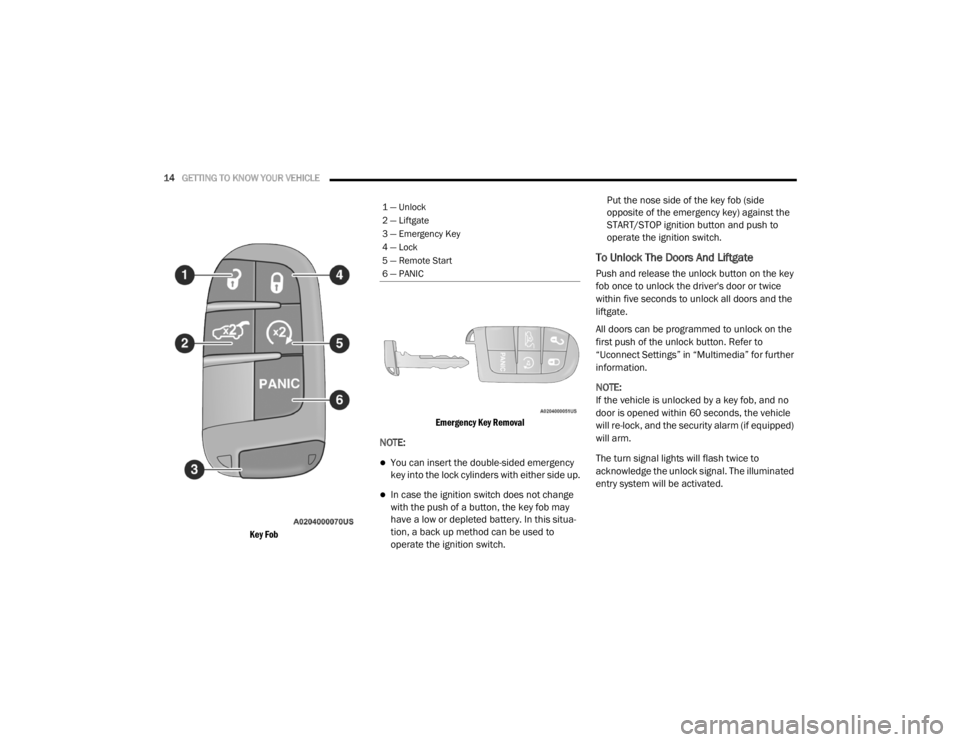
14GETTING TO KNOW YOUR VEHICLE
Key Fob Emergency Key Removal
NOTE:
You can insert the double-sided emergency
key into the lock cylinders with either side up.
In case the ignition switch does not change
with the push of a button, the key fob may
have a low or depleted battery. In this situa -
tion, a back up method can be used to
operate the ignition switch. Put the nose side of the key fob (side
opposite of the emergency key) against the
START/STOP ignition button and push to
operate the ignition switch.
To Unlock The Doors And Liftgate
Push and release the unlock button on the key
fob once to unlock the driver's door or twice
within five seconds to unlock all doors and the
liftgate.
All doors can be programmed to unlock on the
first push of the unlock button. Refer to
“Uconnect Settings” in “Multimedia” for further
information.
NOTE:
If the vehicle is unlocked by a key fob, and no
door is opened within 60 seconds, the vehicle
will re-lock, and the security alarm (if equipped)
will arm.
The turn signal lights will flash twice to
acknowledge the unlock signal. The illuminated
entry system will be activated.
1 — Unlock
2 — Liftgate
3 — Emergency Key
4 — Lock
5 — Remote Start
6 — PANIC
20_WD_OM_EN_USC_t.book Page 14
Page 17 of 464
GETTING TO KNOW YOUR VEHICLE15
1st Push Of Key Fob Unlock Button
This feature lets you program the system to
unlock either the driver's door or all doors on
the first push of the unlock button on the key
fob. To change the current setting, refer to
“Uconnect Settings” in “Multimedia” for further
information.
NOTE:
If the vehicle is equipped with Passive Entry,
refer to “Keyless Enter-N-Go — Passive Entry” in
“Doors” in this chapter for further information.
To Lock The Doors And Liftgate
Push and release the lock button on the key fob
to lock all doors and liftgate.
The turn signal lights will flash and the horn will
chirp to acknowledge the signal. Refer to
“Uconnect Settings” in “Multimedia” for further
programmable information.
If the vehicle is equipped with Passive Entry,
refer to “Keyless Enter-N-Go — Passive Entry” in
“Doors” in this chapter for further information. Vehicles Equipped With Keyless Enter-N-Go —
Passive Entry
If one or more doors are open, or the liftgate is
open, the doors will lock. The doors will unlock
again automatically if the key is left inside the
passenger compartment, otherwise the doors
will stay locked.
Replacing The Battery In The Key With
Remote Control
The recommended replacement battery is one
CR2032 battery.
NOTE:
Perchlorate Material — special handling may
apply. See www.dtsc.ca.gov/hazard
-
ouswaste/perchlorate for further informa -
tion.
Do not touch the battery terminals that are
on the back housing or the printed circuit
board.
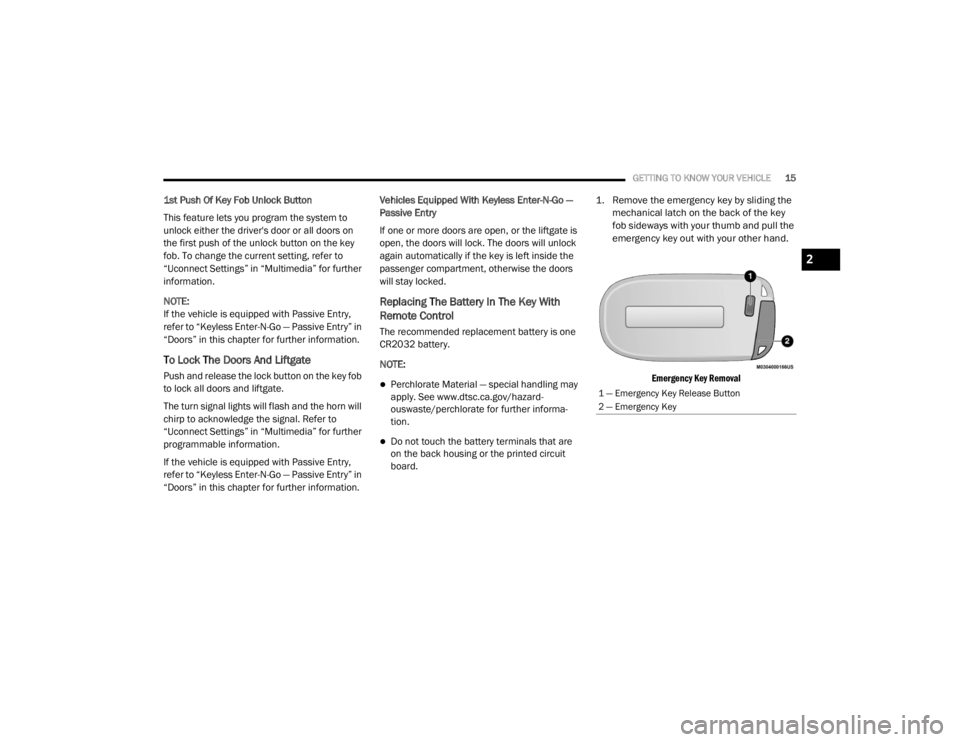
1. Remove the emergency key by sliding the
mechanical latch on the back of the key
fob sideways with your thumb and pull the
emergency key out with your other hand.
Emergency Key Removal
1 — Emergency Key Release Button
2 — Emergency Key
2
20_WD_OM_EN_USC_t.book Page 15
Page 18 of 464
16GETTING TO KNOW YOUR VEHICLE
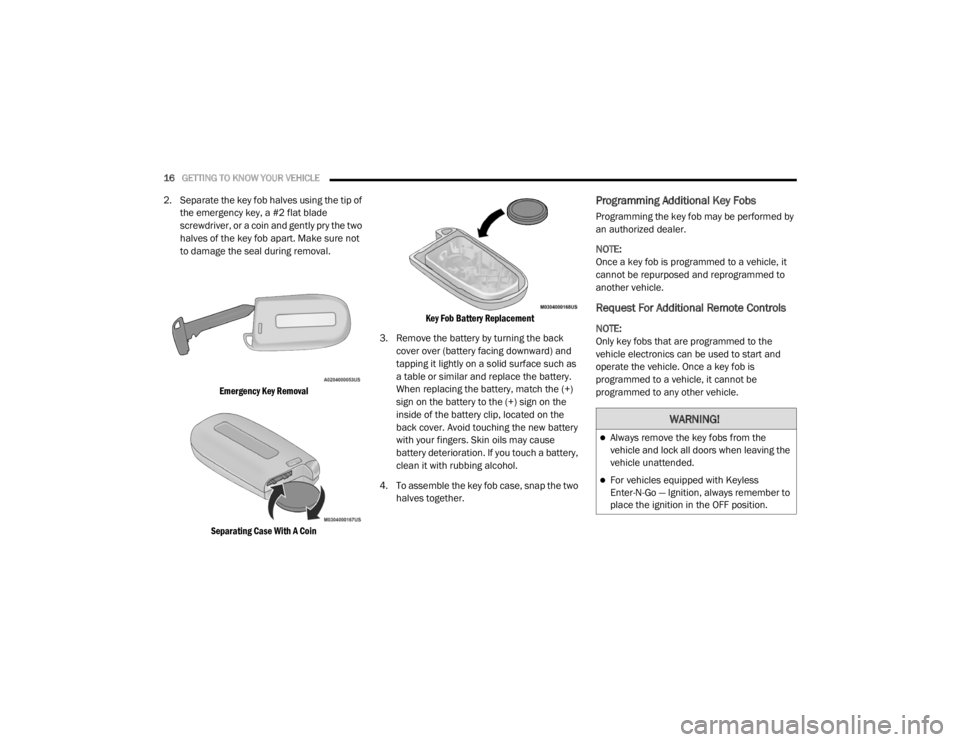
2. Separate the key fob halves using the tip of
the emergency key, a #2 flat blade
screwdriver, or a coin and gently pry the two
halves of the key fob apart. Make sure not
to damage the seal during removal.
Emergency Key Removal
Separating Case With A Coin Key Fob Battery Replacement
3. Remove the battery by turning the back cover over (battery facing downward) and
tapping it lightly on a solid surface such as
a table or similar and replace the battery.
When replacing the battery, match the (+)
sign on the battery to the (+) sign on the
inside of the battery clip, located on the
back cover. Avoid touching the new battery
with your fingers. Skin oils may cause
battery deterioration. If you touch a battery,
clean it with rubbing alcohol.
4. To assemble the key fob case, snap the two halves together.Programming Additional Key Fobs
Programming the key fob may be performed by
an authorized dealer.
NOTE:
Once a key fob is programmed to a vehicle, it
cannot be repurposed and reprogrammed to
another vehicle.
Request For Additional Remote Controls
NOTE:
Only key fobs that are programmed to the
vehicle electronics can be used to start and
operate the vehicle. Once a key fob is
programmed to a vehicle, it cannot be
programmed to any other vehicle.
WARNING!
Always remove the key fobs from the
vehicle and lock all doors when leaving the
vehicle unattended.
For vehicles equipped with Keyless
Enter-N-Go — Ignition, always remember to
place the ignition in the OFF position.
20_WD_OM_EN_USC_t.book Page 16
Page 20 of 464

18GETTING TO KNOW YOUR VEHICLE
(Continued)
NOTE:
In case the ignition switch does not change with
the push of a button, the key fob may have a low
or depleted battery. In this situation, a back up
method can be used to operate the ignition
switch. Put the nose side of the key fob (side
opposite of the emergency key) against the
START/STOP ignition button and push to
operate the ignition switch.
IGNITION OR ACCESSORY ON MESSAGE
Upon opening the driver's door when the
ignition is in ACC or ON (engine not running), a
chime will sound to remind you to place the
ignition in the OFF position. In addition to the
chime, the ignition or accessory on message will
display in the cluster.
NOTE:
With the Uconnect system, the power window
switches, radio, power sunroof (if equipped),
and power outlets will remain active for up to
10 minutes after the ignition is placed in the
OFF position. Opening either front door will
cancel this feature. The timing for this feature is programmable.
Refer to “Uconnect Settings” in “Multimedia”
for further information.
DEPLETED KEY FOB BATTERY
Key Not Detected Feature
If the ignition position does not change with a
push of the ignition button, and the instrument
cluster display message “Key Fob Not
Detected” is being displayed, the key fob may
have a low or depleted battery. In this situation,
a back up method can be used to operate the
keyless push button ignition.
WARNING!
Before exiting a vehicle, always shift the
automatic transmission into PARK and
apply the parking brake. Always make sure
the keyless ignition node is in the “OFF”
mode, remove the key fob from the vehicle
and lock the vehicle.
Never leave children alone in a vehicle, or
with access to an unlocked vehicle.
Allowing children to be in a vehicle unat
-
tended is dangerous for a number of
reasons. A child or others could be seriously
or fatally injured. Children should be
warned not to touch the parking brake,
brake pedal or the gear selector.
Do not leave the key fob in or near the
vehicle, or in a location accessible to chil-
dren, and do not leave the ignition of a
vehicle equipped with Keyless Enter-N-Go
in the ACC or ON/RUN mode. A child could
operate power windows, other controls, or
move the vehicle.
Do not leave children or animals inside
parked vehicles in hot weather. Interior
heat build-up may cause serious injury or
death.
CAUTION!
An unlocked vehicle is an invitation. Always
remove the key fobs from vehicle, place the
ignition in the OFF position and lock all doors
when leaving the vehicle unattended.
WARNING! (Continued)
20_WD_OM_EN_USC_t.book Page 18
Page 21 of 464
GETTING TO KNOW YOUR VEHICLE19
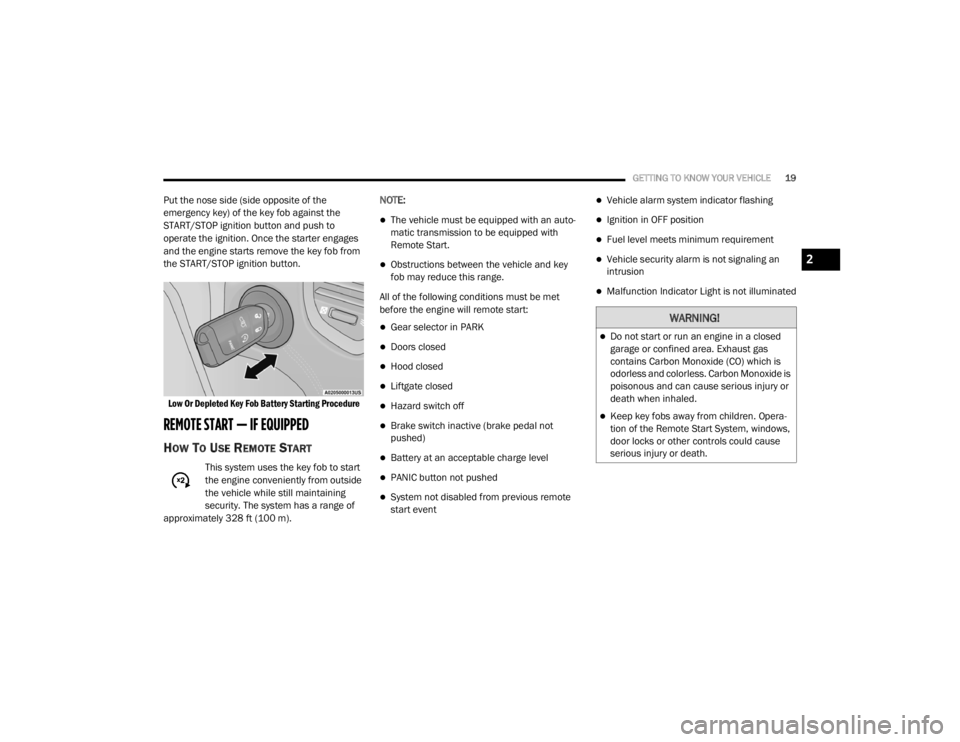
Put the nose side (side opposite of the
emergency key) of the key fob against the
START/STOP ignition button and push to
operate the ignition. Once the starter engages
and the engine starts remove the key fob from
the START/STOP ignition button.
Low Or Depleted Key Fob Battery Starting Procedure
REMOTE START — IF EQUIPPED
HOW TO USE REMOTE START
This system uses the key fob to start
the engine conveniently from outside
the vehicle while still maintaining
security. The system has a range of
approximately 328 ft (100 m). NOTE:
The vehicle must be equipped with an auto
-
matic transmission to be equipped with
Remote Start.
Obstructions between the vehicle and key
fob may reduce this range.
All of the following conditions must be met
before the engine will remote start:
Gear selector in PARK
Doors closed
Hood closed
Liftgate closed
Hazard switch off
Brake switch inactive (brake pedal not
pushed)
Battery at an acceptable charge level
PANIC button not pushed
System not disabled from previous remote
start event
Vehicle alarm system indicator flashing
Ignition in OFF position
Fuel level meets minimum requirement
Vehicle security alarm is not signaling an
intrusion
Malfunction Indicator Light is not illuminated
WARNING!
Do not start or run an engine in a closed
garage or confined area. Exhaust gas
contains Carbon Monoxide (CO) which is
odorless and colorless. Carbon Monoxide is
poisonous and can cause serious injury or
death when inhaled.
Keep key fobs away from children. Opera -
tion of the Remote Start System, windows,
door locks or other controls could cause
serious injury or death.
2
20_WD_OM_EN_USC_t.book Page 19
Page 26 of 464

24GETTING TO KNOW YOUR VEHICLE
TO DISARM THE SYSTEM
The vehicle security alarm can be disarmed
using any of the following methods:
Push the unlock button on the key fob.
Grasp the Passive Entry unlock door handle
(if equipped). Refer to "Keyless Enter-N-Go —
Passive Entry" in “Doors” in this chapter for
further information.
Cycle the vehicle ignition system out of the
OFF position.
NOTE:
The driver's door key cylinder cannot arm or
disarm the vehicle security alarm. Use of the
door key cylinder when the alarm is armed
will sound the alarm when the door is
opened.
The vehicle security alarm remains armed
when the power liftgate is opened using the
liftgate button on the key fob. If someone
enters the vehicle through the liftgate and
opens any door from the inside, the alarm will
sound.
If Passive Entry (if equipped) is used to
unlock the liftgate, the vehicle security alarm
is disarmed and the rest of the vehicle doors
will remain locked unless “Unlock All Doors
1st Press” is selected in the Passive Entry
settings.
When the vehicle security alarm is armed,
the interior power door lock switches will not
unlock the doors.
The vehicle security alarm is designed to protect
your vehicle. However, you can create
conditions where the system will give you a false
alarm. If one of the previously described arming
sequences has occurred, the vehicle security
alarm will arm regardless of whether you are in
the vehicle or not. If you remain in the vehicle
and open a door, the alarm will sound. If this
occurs, disarm the vehicle security alarm.
If the vehicle security alarm is armed and the
battery becomes disconnected, the vehicle
security alarm will remain armed when the
battery is reconnected; the exterior lights will
flash, and the horn will sound. If this occurs,
disarm the vehicle security alarm.
REARMING OF THE SYSTEM
If something triggers the alarm, and no action is
taken to disarm it, the vehicle security alarm will
turn the horn off after 29 seconds, five seconds
between cycles, up to eight cycles if the trigger
remains active and the vehicle security alarm
will rearm itself.
TAMPER ALERT
If something has triggered the vehicle security
alarm in your absence, the horn will sound three
times and the exterior lights will blink three
times when you disarm the vehicle security
alarm. Check the vehicle for tampering.
DOORS
MANUAL DOOR LOCKS
The power door locks can be manually locked
from inside the vehicle by using the door lock
knob. To lock each door, push the door lock
knob on each door trim panel downward. To
unlock the front doors, pull the inside door
handle to the first detent.
20_WD_OM_EN_USC_t.book Page 24
Page 30 of 464
28GETTING TO KNOW YOUR VEHICLE
NOTE:
If “Unlock All Doors 1st Press” is programmed in
Uconnect Settings, all doors will unlock when
you push the button on the liftgate. If "Unlock
Driver Door 1st Press" is programmed in Ucon -
nect Settings, the liftgate will unlock when you
push the button on the liftgate. For further infor -
mation, refer to “Uconnect Settings” in “Multi -
media”.
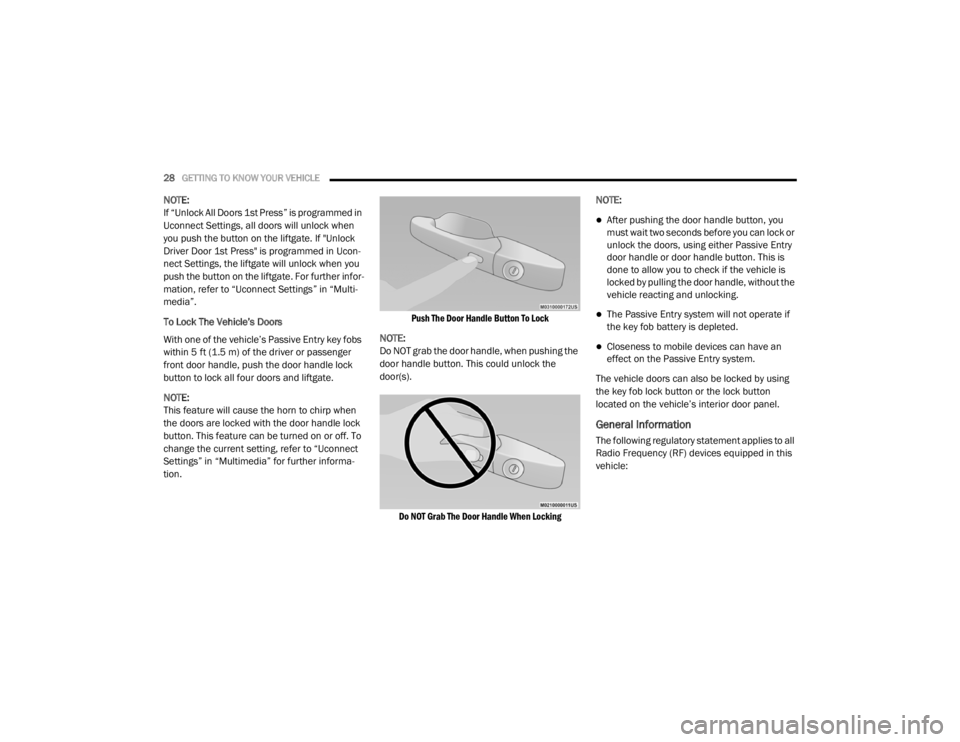
To Lock The Vehicle’s Doors
With one of the vehicle’s Passive Entry key fobs
within 5 ft (1.5 m) of the driver or passenger
front door handle, push the door handle lock
button to lock all four doors and liftgate.
NOTE:
This feature will cause the horn to chirp when
the doors are locked with the door handle lock
button. This feature can be turned on or off. To
change the current setting, refer to “Uconnect
Settings” in “Multimedia” for further informa -
tion.
Push The Door Handle Button To Lock
NOTE:
Do NOT grab the door handle, when pushing the
door handle button. This could unlock the
door(s).
Do NOT Grab The Door Handle When Locking
NOTE:
After pushing the door handle button, you
must wait two seconds before you can lock or
unlock the doors, using either Passive Entry
door handle or door handle button. This is
done to allow you to check if the vehicle is
locked by pulling the door handle, without the
vehicle reacting and unlocking.
The Passive Entry system will not operate if
the key fob battery is depleted.
Closeness to mobile devices can have an
effect on the Passive Entry system.
The vehicle doors can also be locked by using
the key fob lock button or the lock button
located on the vehicle’s interior door panel.
General Information
The following regulatory statement applies to all
Radio Frequency (RF) devices equipped in this
vehicle:
20_WD_OM_EN_USC_t.book Page 28
Page 89 of 464
GETTING TO KNOW YOUR VEHICLE87
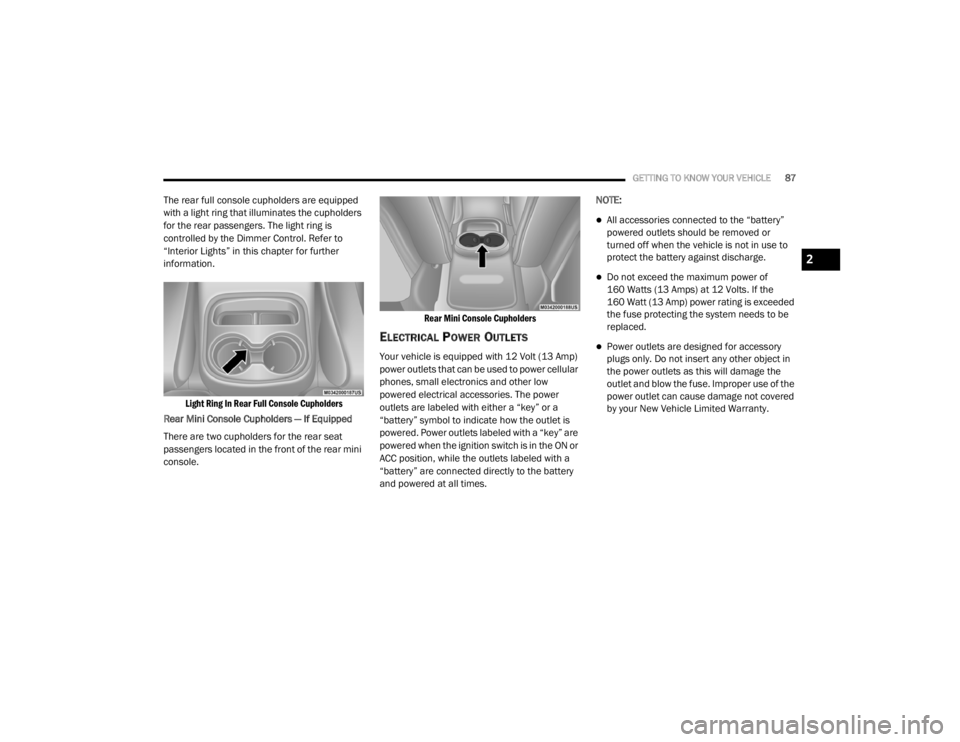
The rear full console cupholders are equipped
with a light ring that illuminates the cupholders
for the rear passengers. The light ring is
controlled by the Dimmer Control. Refer to
“Interior Lights” in this chapter for further
information.
Light Ring In Rear Full Console Cupholders
Rear Mini Console Cupholders — If Equipped
There are two cupholders for the rear seat
passengers located in the front of the rear mini
console.
Rear Mini Console Cupholders
ELECTRICAL POWER OUTLETS
Your vehicle is equipped with 12 Volt (13 Amp)
power outlets that can be used to power cellular
phones, small electronics and other low
powered electrical accessories. The power
outlets are labeled with either a “key” or a
“battery” symbol to indicate how the outlet is
powered. Power outlets labeled with a “key” are
powered when the ignition switch is in the ON or
ACC position, while the outlets labeled with a
“battery” are connected directly to the battery
and powered at all times.NOTE:
All accessories connected to the “battery”
powered outlets should be removed or
turned off when the vehicle is not in use to
protect the battery against discharge.
Do not exceed the maximum power of
160 Watts (13 Amps) at 12 Volts. If the
160 Watt (13 Amp) power rating is exceeded
the fuse protecting the system needs to be
replaced.
Power outlets are designed for accessory
plugs only. Do not insert any other object in
the power outlets as this will damage the
outlet and blow the fuse. Improper use of the
power outlet can cause damage not covered
by your New Vehicle Limited Warranty.
2
20_WD_OM_EN_USC_t.book Page 87