lane assist DODGE DURANGO 2020 Owners Manual
[x] Cancel search | Manufacturer: DODGE, Model Year: 2020, Model line: DURANGO, Model: DODGE DURANGO 2020Pages: 464, PDF Size: 22.14 MB
Page 5 of 464

3
EXTERIOR LIGHTS ................................................50 Multifunction Lever ...................................... 50
Headlight Switch ......................................... 50
Daytime Running Lights (DRLs) —
If Equipped .................................................. 51 High/Low Beam Switch ............................... 51
Automatic High Beam — If Equipped .......... 51
Flash-To-Pass .............................................. 52
Automatic Headlights ................................. 52
Parking Lights And Panel Lights ................. 52
Headlights On Automatically With
Wipers........................................................... 52 Headlight Delay ............................................ 52
Lights-On Reminder ..................................... 52
Fog Lights — If Equipped ............................. 53
Turn Signals ................................................. 53
Lane Change Assist — If Equipped ............. 53
Battery Saver................................................ 53
INTERIOR LIGHTS ................................................54
Courtesy Lights ............................................ 54
WINDSHIELD WIPERS AND WASHERS .............55
Windshield Wiper Operation ....................... 55
Rain Sensing Wipers — If Equipped ........... 57
Rear Window Wiper/Washer ...................... 58
CLIMATE CONTROLS ............................................58
Automatic Climate Control Overview .......... 58
Climate Control Functions ........................... 68
Automatic Temperature Control (ATC) ....... 69
Operating Tips ............................................. 69 WINDOWS ............................................................ 71
Power Windows............................................ 71
Wind Buffeting ............................................ 72
POWER SUNROOF — IF EQUIPPED .................... 73
Opening Sunroof .......................................... 73
Closing Sunroof............................................ 74
Wind Buffeting ............................................ 74
Sunshade Operation.................................... 74
Pinch Protect Feature.................................. 74
Sunroof Maintenance.................................. 74
Ignition Off Operation .................................. 74
HOOD ..................................................................... 75
Opening The Hood ....................................... 75
Closing The Hood ......................................... 75
LIFTGATE ............................................................... 75
Power Liftgate — If Equipped ...................... 75
Cargo Area Features ................................... 77
GARAGE DOOR OPENER — IF EQUIPPED ......... 78
Before You Begin Programming
HomeLink® .................................................. 79 Canadian/Gate Operator Programming ..... 81
Using HomeLink®........................................ 82
Security......................................................... 82
Troubleshooting Tips ................................... 82
General Information .................................... 83
INTERNAL EQUIPMENT ........................................ 83
Storage ......................................................... 83
Cupholders ................................................... 86
Electrical Power Outlets ............................. 87
Power Inverter — If Equipped ...................... 90
Sunglasses Bin Door ................................... 90 ROOF LUGGAGE RACK — IF EQUIPPED ............90
Deploying The Crossbars ............................ 91
Stowing The Crossbars................................ 93
GETTING TO KNOW YOUR
INSTRUMENT PANEL
INSTRUMENT CLUSTER .......................................95Instrument Cluster Descriptions................. 96
SRT INSTRUMENT CLUSTER ...............................97
SRT Instrument Cluster Descriptions ......... 98
INSTRUMENT CLUSTER DISPLAY .......................99
Location And Controls ................................. 99
Engine Oil Life Reset ................................ 101
Display And Messages .............................. 102
Instrument Cluster Display Menu
Items .......................................................... 103 Battery Saver On/Battery Saver Mode
Message — Electrical Load Reduction
Actions — If Equipped ............................... 108
WARNING LIGHTS AND MESSAGES ............... 109
Red Warning Lights ................................... 110
Yellow Warning Lights ............................... 113Yellow Indicator Lights .............................. 117
Green Indicator Lights ............................... 117White Indicator Lights ............................... 119Blue Indicator Lights ................................. 119
20_WD_OM_EN_USC_t.book Page 3
Page 7 of 464

5
SPEED CONTROL — IF EQUIPPED ................... 205 To Activate .................................................206
To Set A Desired Speed ............................206
To Vary The Speed Setting .......................206
To Accelerate For Passing ........................ 207To Resume Speed ..................................... 207To Deactivate ............................................207
ADAPTIVE CRUISE CONTROL (ACC) —
IF EQUIPPED ..................................................... 208
Adaptive Cruise Control (ACC)
Operation ....................................................209 Activating Adaptive Cruise Control
(ACC) ...........................................................210 To Activate/Deactivate .............................. 210
To Set A Desired ACC Speed .....................210To Cancel ....................................................211
To Turn Off .................................................. 211To Resume .................................................211
To Vary The Speed Setting .......................212
Setting The Following Distance In ACC.....213
Overtake Aid ...............................................214ACC Operation At Stop ...............................214
Adaptive Cruise Control (ACC) Menu ........214Display Warnings And Maintenance.........215
Precautions While Driving With ACC .........217
General Information ..................................219Normal (Fixed Speed) Cruise Control
Mode...........................................................219 PARKSENSE REAR PARK ASSIST —
IF EQUIPPED ...................................................... 221
ParkSense Sensors ................................... 222
ParkSense Display ..................................... 222
ParkSense Warning Display ...................... 224
Enabling And Disabling ParkSense .......... 225Operation With A Trailer ............................ 225
Service The ParkSense Rear Park Assist
System ........................................................ 225 Cleaning The ParkSense System.............. 226
ParkSense System Usage Precautions .... 226
PARKSENSE FRONT AND REAR PARK
ASSIST — IF EQUIPPED .....................................227
ParkSense Sensors ................................... 228
ParkSense Display ..................................... 228
ParkSense Warning Display ...................... 231
Enabling And Disabling ParkSense .......... 231Operation With A Trailer ............................ 231
Service The ParkSense Park Assist
System ........................................................ 232 Cleaning The ParkSense System.............. 232
ParkSense System Usage Precautions .... 233
LANESENSE — IF EQUIPPED ............................ 234
LaneSense Operation................................ 234
Turning LaneSense On Or Off ................... 234
LaneSense Warning Message .................. 235Changing LaneSense Status..................... 237 PARKVIEW REAR BACK UP CAMERA ............ 237
REFUELING THE VEHICLE ................................. 238
Emergency Fuel Filler Door Release ........ 240
VEHICLE LOADING ............................................. 240
Gross Vehicle Weight Rating (GVWR) ...... 240
Payload....................................................... 240
Gross Axle Weight Rating (GAWR) ............ 240
Tire Size ...................................................... 240Rim Size ..................................................... 241
Inflation Pressure ...................................... 241
Curb Weight ............................................... 241
Loading....................................................... 241
TRAILER TOWING ............................................. 241
Common Towing Definitions ..................... 241
Trailer Hitch Classification ........................ 243
Trailer Towing Weights (Maximum
Trailer Weight Ratings) — Non SRT .......... 244 Trailer Towing Weights (Maximum
Trailer Weight Ratings) — SRT .................. 245 Trailer Hitch Receiver Cover Removal —
If Equipped ................................................. 246 Trailer And Tongue Weight ....................... 246Towing Requirements .............................. 247
Towing Tips ............................................... 251
SNOW PLOW ...................................................... 252
20_WD_OM_EN_USC_t.book Page 5
Page 55 of 464
GETTING TO KNOW YOUR VEHICLE53
FOG LIGHTS — IF EQUIPPED
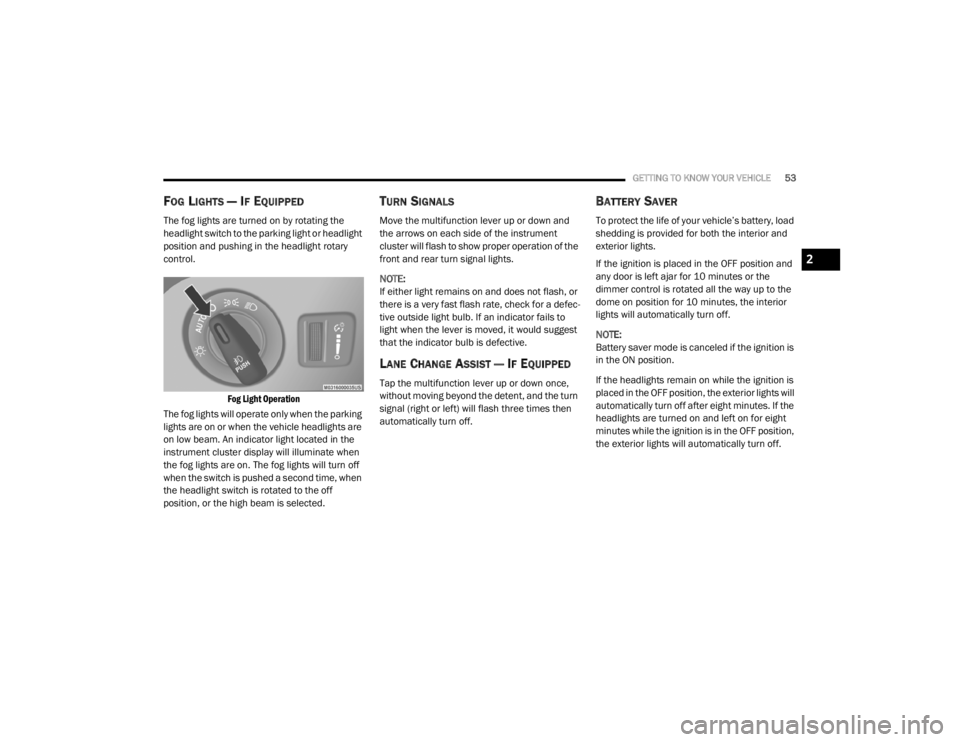
The fog lights are turned on by rotating the
headlight switch to the parking light or headlight
position and pushing in the headlight rotary
control.
Fog Light Operation
The fog lights will operate only when the parking
lights are on or when the vehicle headlights are
on low beam. An indicator light located in the
instrument cluster display will illuminate when
the fog lights are on. The fog lights will turn off
when the switch is pushed a second time, when
the headlight switch is rotated to the off
position, or the high beam is selected.
TURN SIGNALS
Move the multifunction lever up or down and
the arrows on each side of the instrument
cluster will flash to show proper operation of the
front and rear turn signal lights.
NOTE:
If either light remains on and does not flash, or
there is a very fast flash rate, check for a defec -
tive outside light bulb. If an indicator fails to
light when the lever is moved, it would suggest
that the indicator bulb is defective.
LANE CHANGE ASSIST — IF EQUIPPED
Tap the multifunction lever up or down once,
without moving beyond the detent, and the turn
signal (right or left) will flash three times then
automatically turn off.
BATTERY SAVER
To protect the life of your vehicle’s battery, load
shedding is provided for both the interior and
exterior lights.
If the ignition is placed in the OFF position and
any door is left ajar for 10 minutes or the
dimmer control is rotated all the way up to the
dome on position for 10 minutes, the interior
lights will automatically turn off.
NOTE:
Battery saver mode is canceled if the ignition is
in the ON position.
If the headlights remain on while the ignition is
placed in the OFF position, the exterior lights will
automatically turn off after eight minutes. If the
headlights are turned on and left on for eight
minutes while the ignition is in the OFF position,
the exterior lights will automatically turn off.
2
20_WD_OM_EN_USC_t.book Page 53
Page 239 of 464

STARTING AND OPERATING237
CHANGING LANESENSE STATUS
The LaneSense system has settings to adjust
the intensity of the torque warning and the
warning zone sensitivity (early/late) that you
can configure through the Uconnect system
screen. Refer to “Uconnect Settings” in
“Multimedia” for further information.
NOTE:
When enabled the system operates above
37 mph (60 km/h) and below 112 mph
(180 km/h).
Use of the turn signal suppresses the
warnings.
The system will not apply torque to the
steering wheel whenever a safety system
engages (Anti-Lock Brakes, Traction Control
System, Electronic Stability Control, Forward
Collision Warning, etc.).
PARKVIEW REAR BACK UP CAMERA
Your vehicle is equipped with the ParkView Rear
Back Up Camera that allows you to see an
on-screen image of the rear surroundings of
your vehicle whenever the gear selector is put
into REVERSE. The image will be displayed on
the Navigation/Multimedia radio display screen
along with a caution note to “check entire
surroundings” across the top of the screen.
After five seconds this note will disappear. The
ParkView camera is located on the rear of the
vehicle above the rear license plate.
When the vehicle is shifted out of REVERSE
(with camera delay turned off), the rear camera
mode is exited and the navigation or audio
screen appears again.
Manual Activation Of The Backup Camera
1. Press the “Controls” button located on the
bottom of the Uconnect display.
2. Press the “Backup Camera” button to turn the Rear View Camera system on. NOTE:
The ParkView Rear Back Up Camera has
programmable modes of operation that may be
selected through the Uconnect System.
Refer to “Uconnect Settings” in “Multimedia”
for further information.
When the vehicle is shifted out of REVERSE
(with camera delay turned off), the rear camera
mode is exited and the previous screen appears
again. When the vehicle is shifted out of
REVERSE (with camera delay turned on), the
camera image will continue to be displayed for
up to ten seconds, unless the vehicle speed
exceeds 8 mph (13 km/h), the vehicle is shifted
into PARK, the vehicle’s ignition is placed in the
OFF position, or the user presses image defeat
“X” to exit out of the camera video display.
When enabled, active guidelines are overlaid on
the image to illustrate the width of the vehicle
and its projected backup path based on the
steering wheel position. A dashed center line
overlay indicates the center of the vehicle to
assist with parking or aligning to a hitch/
receiver. Different colored zones indicate the
distance to the rear of the vehicle.
5
20_WD_OM_EN_USC_t.book Page 237
Page 370 of 464

368MULTIMEDIA
Rear ParkSense Braking Assist — If
Equipped On
Off
NOTE:
When the “Rear ParkSense Braking Assist” feature is selected, the Park Assist system detects objects located behind the vehicle and utilizes auton -
omous braking to stop the vehicle.
LaneSense Warning — If Equipped EarlyMedium Late
NOTE:
The “LaneSense Warning” setting determines at what distance the LaneSense system warns you, through steering wheel feedback, of a possible lane
departure. LaneSense Strength — If Equipped LowMedium High
Blind Spot Alert — If Equipped OffLightsLights & Chime
NOTE:
When the “Blind Spot Alert” feature is selected, the Blind Spot Monitor (BSM) system is activated and shows a visual alert in the outside mirrors, or
it shows a visual alert in the outside mirrors as well as plays an audible alert when the turn signal is on. When “Off” is selected, the BSM system is
deactivated.
If your vehicle has experienced any damage in the area where the sensor is located, even if the fascia is not damaged, the sensor may have become
misaligned. Take your vehicle to an authorized dealer to verify sensor alignment. A sensor that is misaligned results in the BSM not operating to spec -
ification.
Rain Sensing Auto Wipers — If Equipped On
Off
Hill Start Assist — If Equipped On Off
Tilt Side Mirrors in Reverse On Off
Paddle Shifters Enable Disable
Setting Name Selectable Options
20_WD_OM_EN_USC_t.book Page 368
Page 454 of 464

452
Intermittent Wipers (Delay Wipers)
.................. 56Introduction....................................................... 9Inverter Power.......................................................... 90iPod/USB/MP3 Control....................... 404, 424
J
Jack Location................................................. 276Jack Operation..................................... 279, 327Jacking And Tire Changing Instructions......... 279Jacking Instructions....................................... 279Jump Starting................................................ 283
K
Key Fob........................................................... 13Arm The System.......................................... 23Disarm The System..................................... 24Programming Additional Key Fobs....... 16, 22Key Fob Battery Service (Remote
Keyless Entry).................................................. 15Key Fob Programming (Remote
Keyless Entry).................................................. 16Key-In Reminder.............................................. 18Keyless Enter-N-Go........................................ 184Passive Entry............................................... 26Passive Entry Programming................ 26, 370Keys................................................................. 13Replacement........................................ 16, 22Sentry (Immobilizer).................................... 21
L
Lane Change Assist......................................... 53LaneSense.................................................... 234Lap/Shoulder Belts....................................... 145Latches......................................................... 183Hood............................................................ 75Lead Free Gasoline....................................... 351Leaks, Fluid.................................................. 183Life Of Tires................................................... 338Liftgate............................................................ 75Liftgate Window Wiper/Washer....................... 58Light Bulbs.................................................... 183Lights............................................................ 183Air Bag.................................... 110, 153, 181Automatic Headlights.................................. 52Brake Assist Warning............................... 127Brake Warning.......................................... 110Bulb Replacement........................... 266, 268Cargo........................................................... 77Center Mounted Stop............................... 269Cruise.............................................. 117, 119Daytime Running......................................... 51Dimmer Switch, Headlight........................... 50Electronic Stability Program(ESP) Indicator............................................... 112Exterior...............................................50, 183Fog........................................................... 269Hazard Warning Flasher........................... 261
Headlights................................................ 268Headlights On With Wipers..........................52High Beam/Low Beam Select......................51Interior.........................................................54Lights On Reminder.....................................52Malfunction Indicator (Check Engine)....... 113Park................................................... 52, 118Passing........................................................52Reading.......................................................54Rear Servicing.......................................... 269Rear Tail Lamps........................................ 269Seat Belt Reminder.................................. 110Security Alarm.......................................... 113Service............................................. 266, 268Side Marker.............................................. 269Traction Control........................................ 127Turn Signals..................... 50, 118, 183, 269Vanity Mirror................................................50Warning Instrument ClusterDescriptions................................ 112, 118Load Shed Battery Saver Mode..................... 108Load Shed Battery Saver On......................... 108Load Shed Electrical Load Reduction........... 108Load Shed Intelligent Battery Sensor............ 108Loading Vehicle............................................. 240Tires.......................................................... 332
20_WD_OM_EN_USC_t.book Page 452