maintenance schedule DODGE DURANGO 2020 Owners Manual
[x] Cancel search | Manufacturer: DODGE, Model Year: 2020, Model line: DURANGO, Model: DODGE DURANGO 2020Pages: 464, PDF Size: 22.14 MB
Page 8 of 464
6
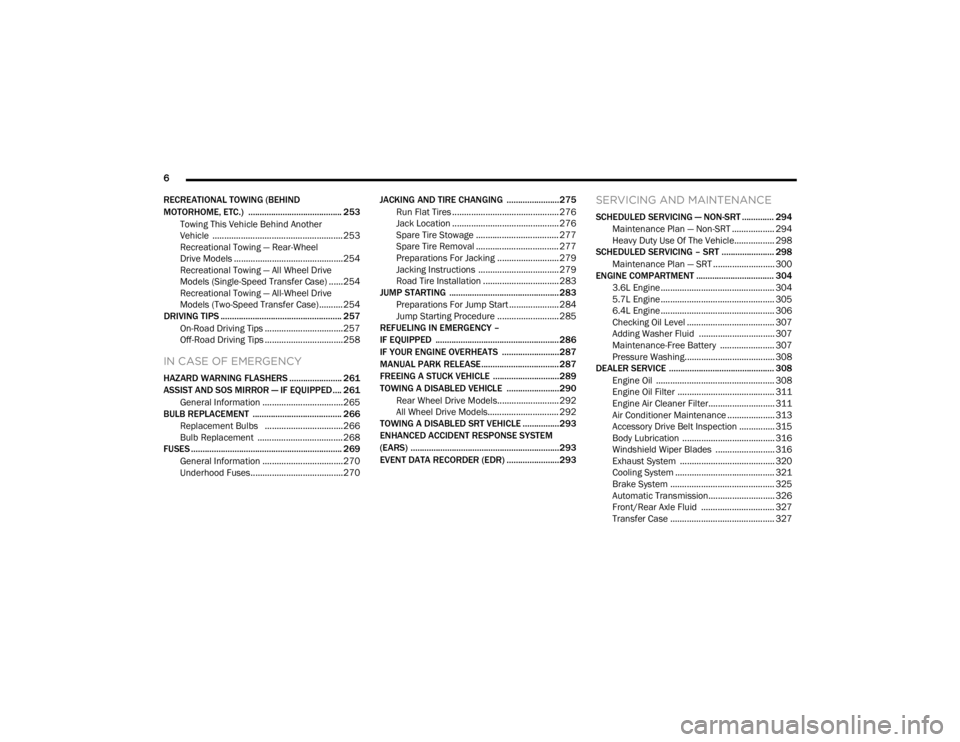
RECREATIONAL TOWING (BEHIND
MOTORHOME, ETC.) ......................................... 253 Towing This Vehicle Behind Another
Vehicle .......................................................253 Recreational Towing — Rear-Wheel
Drive Models ..............................................254 Recreational Towing — All Wheel Drive
Models (Single-Speed Transfer Case) ......254 Recreational Towing — All-Wheel Drive
Models (Two-Speed Transfer Case) ..........254
DRIVING TIPS ..................................................... 257
On-Road Driving Tips .................................257
Off-Road Driving Tips .................................258
IN CASE OF EMERGENCY
HAZARD WARNING FLASHERS ....................... 261
ASSIST AND SOS MIRROR — IF EQUIPPED.... 261General Information ..................................265
BULB REPLACEMENT ....................................... 266
Replacement Bulbs .................................266
Bulb Replacement ....................................268
FUSES .................................................................. 269
General Information ..................................270Underhood Fuses.......................................270 JACKING AND TIRE CHANGING .......................275
Run Flat Tires ............................................. 276
Jack Location ............................................. 276
Spare Tire Stowage ................................... 277
Spare Tire Removal ................................... 277
Preparations For Jacking .......................... 279Jacking Instructions .................................. 279Road Tire Installation ................................ 283
JUMP STARTING ................................................ 283
Preparations For Jump Start ..................... 284Jump Starting Procedure .......................... 285
REFUELING IN EMERGENCY –
IF EQUIPPED ...................................................... 286
IF YOUR ENGINE OVERHEATS .........................287
MANUAL PARK RELEASE .................................. 287
FREEING A STUCK VEHICLE .............................289
TOWING A DISABLED VEHICLE .......................290 Rear Wheel Drive Models.......................... 292All Wheel Drive Models.............................. 292
TOWING A DISABLED SRT VEHICLE ................293
ENHANCED ACCIDENT RESPONSE SYSTEM
(EARS) .................................................................293
EVENT DATA RECORDER (EDR) .......................293
SERVICING AND MAINTENANCE
SCHEDULED SERVICING — NON-SRT .............. 294
Maintenance Plan — Non-SRT .................. 294Heavy Duty Use Of The Vehicle................. 298
SCHEDULED SERVICING – SRT ....................... 298
Maintenance Plan — SRT .......................... 300
ENGINE COMPARTMENT .................................. 304
3.6L Engine ................................................ 304
5.7L Engine ................................................ 305
6.4L Engine ................................................ 306
Checking Oil Level ..................................... 307
Adding Washer Fluid ................................ 307
Maintenance-Free Battery ....................... 307Pressure Washing...................................... 308
DEALER SERVICE .............................................. 308
Engine Oil .................................................. 308
Engine Oil Filter ......................................... 311Engine Air Cleaner Filter............................ 311Air Conditioner Maintenance .................... 313Accessory Drive Belt Inspection ............... 315Body Lubrication ....................................... 316
Windshield Wiper Blades ......................... 316
Exhaust System ........................................ 320
Cooling System .......................................... 321
Brake System ............................................ 325Automatic Transmission............................ 326Front/Rear Axle Fluid ............................... 327Transfer Case ............................................ 327
20_WD_OM_EN_USC_t.book Page 6
Page 14 of 464
12
GETTING TO KNOW YOUR VEHICLE
VEHICLE USER GUIDE — IF EQUIPPED
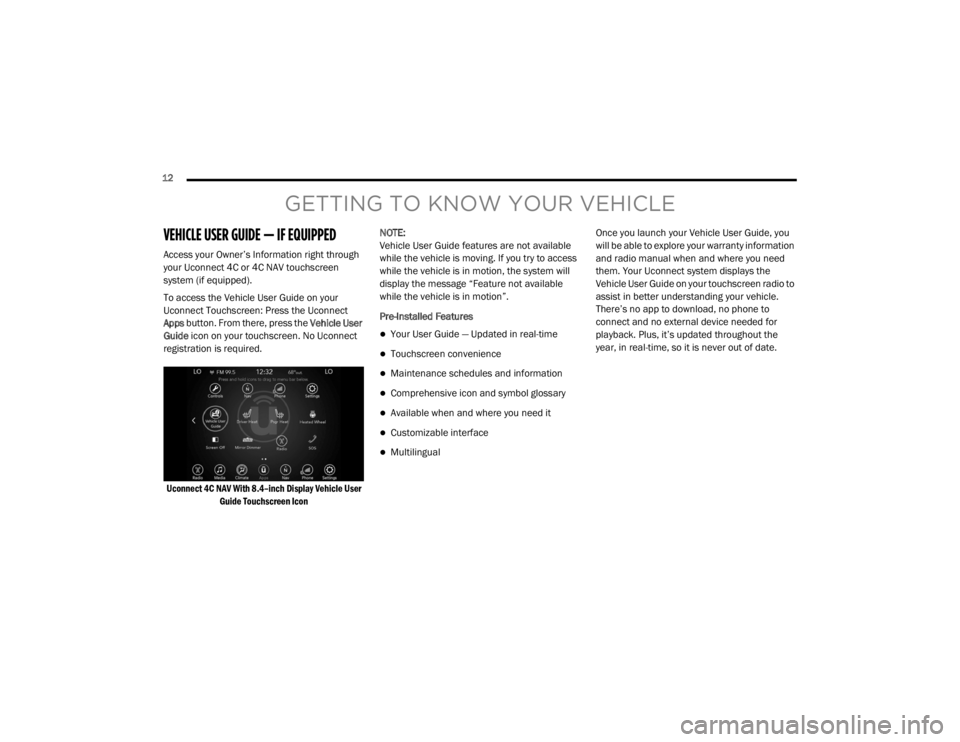
Access your Owner’s Information right through
your Uconnect 4C or 4C NAV touchscreen
system (if equipped).
To access the Vehicle User Guide on your
Uconnect Touchscreen: Press the Uconnect
Apps button. From there, press the Vehicle User
Guide icon on your touchscreen. No Uconnect
registration is required.
Uconnect 4C NAV With 8.4–inch Display Vehicle User Guide Touchscreen Icon
NOTE:
Vehicle User Guide features are not available
while the vehicle is moving. If you try to access
while the vehicle is in motion, the system will
display the message “Feature not available
while the vehicle is in motion”.
Pre-Installed Features
Your User Guide — Updated in real-time
Touchscreen convenience
Maintenance schedules and information
Comprehensive icon and symbol glossary
Available when and where you need it
Customizable interface
Multilingual Once you launch your Vehicle User Guide, you
will be able to explore your warranty information
and radio manual when and where you need
them. Your Uconnect system displays the
Vehicle User Guide on your touchscreen radio to
assist in better understanding your vehicle.
There’s no app to download, no phone to
connect and no external device needed for
playback. Plus, it’s updated throughout the
year, in real-time, so it is never out of date.
20_WD_OM_EN_USC_t.book Page 12
Page 15 of 464

GETTING TO KNOW YOUR VEHICLE13
Features/Benefits
Pre-installed on your Uconnect touchscreen
radio
Enhanced search and browsing capability
Robust NAV application (if equipped)
Add selected topics to a fast-access Favor -
ites category
Icon and symbol glossary
Warranty information
Crucial driver information and assistance:
Operating Instructions
Warranty Information
Fluid Level Standards
Maintenance Schedules
Emergency Procedures
911 Contact and More TIP:
When viewing a topic, tap the star icon to add it
to your Favorites, for easy access in the future.
KEYS
KEY FOB
Your vehicle uses a keyless ignition system. The
ignition system consists of a key fob with
Remote Keyless Entry (RKE) and a START/STOP
push button ignition system. The RKE system
consists of a key fob and Keyless Enter-N-Go
feature (if equipped).
NOTE:
The key fob may not be found if it is located next
to a mobile phone, laptop or other electronic
device; these devices may block the key fob’s
wireless signal.
The key fob also includes an emergency key,
which stores in the rear of the key fob.
The emergency key allows for entry into the
vehicle should the battery in the vehicle or the
key fob become depleted. The emergency key is
also for locking the glove compartment. You can
keep the emergency key with you when valet
parking.
To remove the emergency key, slide the
mechanical latch at the top of the key fob
sideways with your thumb and then pull the key
out with your other hand.
2
20_WD_OM_EN_USC_t.book Page 13
Page 103 of 464

GETTING TO KNOW YOUR INSTRUMENT PANEL101
Five Second Stored Messages
When the appropriate conditions occur, this
type of message takes control of the main
display area for five seconds and then
returns to the previous screen. Most of the
messages of this type are then stored (as
long as the condition that activated it
remains active) and can be reviewed from
the “Messages” main menu item. Examples
of this message type are “Right Front Turn
Signal Lamp Out” and “Low Tire Pressure.”
Unstored Messages
This message type is displayed indefinitely or
until the condition that activated the
message is cleared. Examples of this
message type are “Turn Signal On” (if a turn
signal is left on) and “Lights On” (if driver
leaves the vehicle with the lights on).
Unstored Messages Until RUN
These messages deal primarily with the
Remote Start feature. This message type is
displayed until the ignition is in the RUN
state. Examples of this message type are
“Remote Start Canceled - Door Ajar” and
“Press Brake Pedal and Push Button to
Start.”
Five Second Unstored Messages
When the appropriate conditions occur, this
type of message takes control of the main
display area for five seconds and then
returns to the previous screen. An example of
this message type is “Automatic High Beams
On.”
ENGINE OIL LIFE RESET
Oil Change Required
Your vehicle is equipped with an engine oil
change indicator system. The “Oil Change
Required” message will display in the
instrument cluster display for five seconds after
a single chime has sounded, to indicate the next
scheduled oil change interval. The engine oil
change indicator system is duty cycle based,
which means the engine oil change interval may
fluctuate, dependent upon your personal
driving style.
Unless reset, this message will continue to
display each time the ignition is placed in the
ON/RUN position. To turn off the message
temporarily, push and release the OK or arrow
buttons. To reset the oil change indicator system (after
performing the scheduled maintenance), refer
to the following procedure.
Vehicles Equipped With Keyless Enter-N-Go —
Ignition
Use the steering wheel instrument cluster
display controls for the following procedure(s):
1. Without pressing the brake pedal, push the
ENGINE START/STOP button and place the
ignition in the ON/RUN position (do not
start the engine).
2. Push and release the down arrow button to
scroll downward through the main menu to
“Vehicle Info.”
3. Push and release the right arrow button to
access the ”Oil Life” screen.
4. Push and hold the OK button to reset oil life.
If conditions are met, the gauge and
numeric display will update to show 100%.
If conditions are not met a pop-up message
of “To reset oil life engine must be off with
ignition in run” will be displayed (for five
seconds), and the user will remain at the Oil
Life screen.
3
20_WD_OM_EN_USC_t.book Page 101
Page 249 of 464

STARTING AND OPERATING247
(Continued)
Consider the following items when computing
the weight on the rear axle of the vehicle:
The tongue weight of the trailer.
The weight of any other type of cargo or
equipment put in or on your vehicle.
The weight of the driver and all passengers.
NOTE:
Remember that everything put into or on the
trailer adds to the load on your vehicle. Also,
additional factory-installed options or
dealer-installed options must be considered as
part of the total load on your vehicle. Refer to the “Tire And Loading Information”
placard for the maximum combined weight of
occupants and cargo for your vehicle.
TOWING REQUIREMENTS
To promote proper break-in of the new vehicle
drivetrain components, the following guidelines
are recommended.
Perform the maintenance listed in the
“Scheduled Servicing”. Refer to “Scheduled
Servicing” in “Servicing And Maintenance” for
the proper maintenance intervals. When towing
a trailer, never exceed the GAWR or GCWR
ratings.
CAUTION!
Always load a trailer with 60% of the weight in
the front of the trailer. This places 10% of the
GTW on the tow hitch of your vehicle. Loads
balanced over the wheels or heavier in the
rear can cause the trailer to sway severely
side to side which will cause loss of control of
the vehicle and trailer. Failure to load trailers
heavier in front is the cause of many trailer
collisions.
CAUTION!
Do not tow a trailer at all during the first
500 miles (805 km) the new vehicle is
driven. The engine, axle or other parts could
be damaged.
Then, during the first 500 miles (805 km) that a trailer is towed, do not drive over
50 mph (80 km/h) and do not make starts
at full throttle. This helps the engine and
other parts of the vehicle wear in at the
heavier loads.
WARNING!
Make certain that the load is secured in the
trailer and will not shift during travel. When
trailering cargo that is not fully secured,
dynamic load shifts can occur that may be
difficult for the driver to control. You could
lose control of your vehicle and have a colli -
sion.
When hauling cargo or towing a trailer, do
not overload your vehicle or trailer. Over -
loading can cause a loss of control, poor
performance or damage to brakes, axle,
engine, transmission, steering, suspension,
chassis structure or tires.
Safety chains must always be used
between your vehicle and trailer. Always
connect the chains to the hook retainers of
the vehicle hitch. Cross the chains under
the trailer tongue and allow enough slack
for turning corners.
5
20_WD_OM_EN_USC_t.book Page 247
Page 296 of 464
294
SERVICING AND MAINTENANCE
SCHEDULED SERVICING — NON-SRT
Your vehicle is equipped with an automatic oil
change indicator system. The oil change
indicator system will remind you that it is time to
take your vehicle in for scheduled maintenance.
Based on engine operation conditions, the oil
change indicator message will illuminate. This
means that service is required for your vehicle.
Operating conditions such as frequent
short-trips, trailer tow, extremely hot or cold
ambient temperatures, and E85 fuel usage will
influence when the “Oil Change Required”
message is displayed. Severe Operating
Conditions can cause the change oil message
to illuminate as early as 3,500 miles
(5,600 km) since last reset. Have your vehicle
serviced as soon as possible, within the next
500 miles (805 km).An authorized dealer will reset the oil change
indicator message after completing the
scheduled oil change.
NOTE:
Under no circumstances should oil change
intervals exceed 10,000 miles (16,000 km),
12 months or 350 hours of engine run time,
whichever comes first. The 350 hours of engine
run or idle time is generally only a concern for
fleet customers.
Severe Duty All Models
Change Engine Oil at 4,000 miles (6,500 km) or
350 hours of engine run time if the vehicle is
operated in a dusty and off road environment or
is operated predominately at idle or only very
low engine RPM. This type of vehicle use is
considered Severe Duty.
Once A Month Or Before A Long Trip:Check engine oil level
Check windshield washer fluid level
Check the tire inflation pressures and look
for unusual wear or damage
Check the fluid levels of the coolant reservoir,
brake master cylinder and fill as needed.
Check function of all interior and exterior
lights
MAINTENANCE PLAN — NON-SRT
Required Maintenance
Refer to the Maintenance Plans on the following
pages for required maintenance.
20_WD_OM_EN_USC_t.book Page 294
Page 300 of 464
298SERVICING AND MAINTENANCE
HEAVY DUTY USE OF THE VEHICLE
Change engine oil at 4,000 miles (6,500 km) or
350 hours of engine run time if the vehicle is
operated in a dusty and off road environment or
is operated predominately at idle or only very
low engine RPM. This type of vehicle use is
considered Severe Duty.
SCHEDULED SERVICING – SRT
The Scheduled Maintenance services listed in
this manual must be done at the times or
mileages specified to protect your vehicle
warranty and ensure the best vehicle
performance and reliability. More frequent
maintenance may be needed for vehicles in
severe operating conditions, such as dusty
areas and very short trip driving. Inspection and
service should also be done anytime a
malfunction is suspected. The oil change indicator system will remind you
that it is time to take your vehicle in for
scheduled maintenance.
The instrument cluster display will display an
“Oil Change Required” message and a single
chime will sound, indicating that an oil change
is necessary.
Based on engine operation conditions, the oil
change indicator message will illuminate. This
means that service is required for your vehicle.
Have your vehicle serviced as soon as possible,
within the next 500 miles (805 km).
NOTE:
The oil change indicator message will not
monitor the time since the last oil change.
Change your vehicle's oil if it has been six
months since your last oil change, even if the
oil change indicator message is NOT illumi-
nated.
Change your engine oil more often if you drive
your vehicle off-road for an extended period
of time.
Under no circumstances should oil change
intervals exceed 6,000 miles (10,000 km) or
6 months, whichever comes first.
An authorized dealer will reset the oil change
indicator message after completing the
scheduled oil change. If a scheduled oil change
is performed by someone other than an
authorized dealer, the message can be reset by
referring to the steps described under
“Instrument Cluster Display” in “Getting To
Know Your Instrument Panel” for further
information.
20_WD_OM_EN_USC_t.book Page 298
Page 302 of 464
300SERVICING AND MAINTENANCE
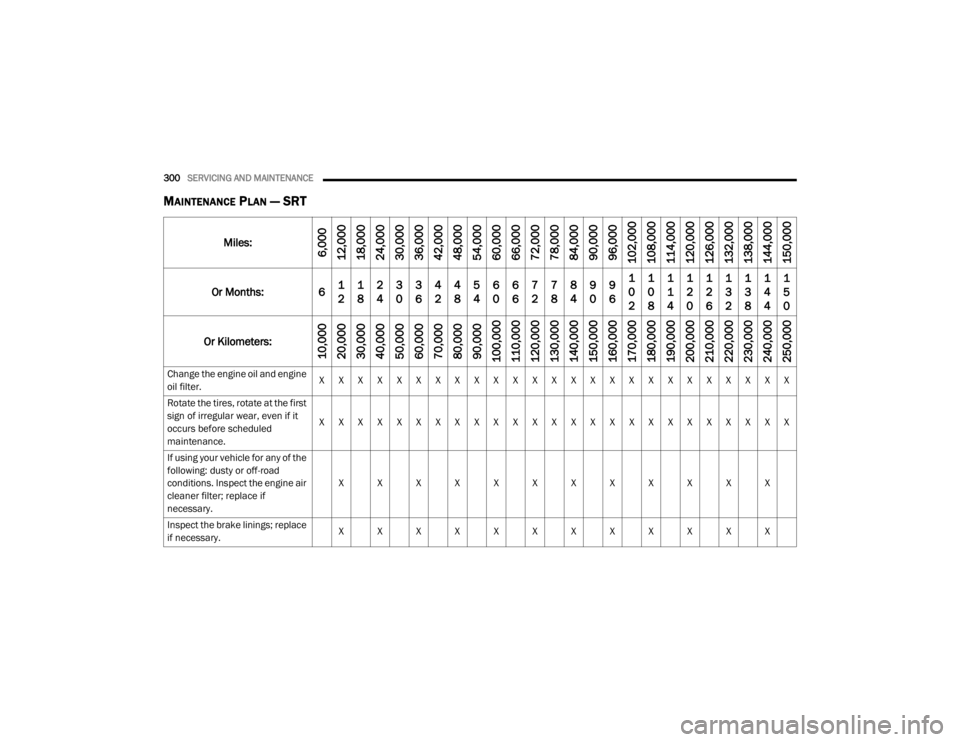
MAINTENANCE PLAN — SRT
Miles:6,000
12,000
18,000
24,000
30,000
36,000
42,000
48,000
54,000
60,000
66,000
72,000
78,000
84,000
90,000
96,000
102,000
108,000
114,000
120,000
126,000
132,000
138,000
144,000
150,000
Or Months: 6 1
21
82
43
03
64
24
85
46
06
67
27
88
49
09
61
0
21
0
81
1
41
2
01
2
61
3
21
3
81
4
41
5
0
Or Kilometers:
10,000
20,000
30,000
40,000
50,000
60,000
70,000
80,000
90,000
100,000
110,000
120,000
130,000
140,000
150,000
160,000
170,000
180,000
190,000
200,000
210,000
220,000
230,000
240,000
250 ,000
Change the engine oil and engine
oil filter. X X X X X X X X X X X X X X X X X X X X X X X X X
Rotate the tires, rotate at the first
sign of irregular wear, even if it
occurs before scheduled
maintenance. X X X X X X X X X X X X X X X X X X X X X X X X X
If using your vehicle for any of the
following: dusty or off-road
conditions. Inspect the engine air
cleaner filter; replace if
necessary. X X X X X X X X X X X X
Inspect the brake linings; replace
if necessary. X X X X X X X X X X X X
20_WD_OM_EN_USC_t.book Page 300
Page 310 of 464
308SERVICING AND MAINTENANCE
PRESSURE WASHING
Cleaning the engine compartment with a high
pressure washer is not recommended.
DEALER SERVICE
An authorized dealer has the qualified service
personnel, special tools, and equipment to
perform all service operations in an expert
manner. Service Manuals are available which
include detailed service information for your
vehicle. Refer to these Service Manuals before
attempting any procedure yourself.
NOTE:
Intentional tampering with emissions control
systems may void your warranty and could
result in civil penalties being assessed against
you.
ENGINE OIL
Change Engine Oil — Non-SRT (If Equipped)
The oil change indicator system will remind you
that it is time to take your vehicle in for
scheduled maintenance. Refer to the
“Maintenance Plan” for further information.
NOTE:
Under no circumstances should oil change
intervals exceed 10,000 miles (16,000 km),
12 months or 350 hours of engine run time,
whichever comes first. The 350 hours of engine
run or idle time is generally only a concern for
fleet customers.
Battery gas is flammable and explosive.
Keep flame or sparks away from the
battery. Do not use a booster battery or any
other booster source with an output greater
than 12 Volts. Do not allow cable clamps to
touch each other.
Battery posts, terminals, and related acces -
sories contain lead and lead compounds.
Wash hands after handling.
CAUTION!
It is essential when replacing the cables on
the battery that the positive cable is
attached to the positive post and the nega -
tive cable is attached to the negative post.
Battery posts are marked positive (+) and
negative (-) and are identified on the battery
case. Cable clamps should be tight on the
terminal posts and free of corrosion.
If a “fast charger” is used while the battery
is in the vehicle, disconnect both vehicle
battery cables before connecting the
charger to the battery. Do not use a “fast
charger” to provide starting voltage.
WARNING! (Continued)
CAUTION!
Precautions have been taken to safeguard all
parts and connections however, the
pressures generated by these machines is
such that complete protection against water
ingress cannot be guaranteed.
WARNING!
You can be badly injured working on or
around a motor vehicle. Only do service work
for which you have the knowledge and the
proper equipment. If you have any doubt
about your ability to perform a service job,
take your vehicle to a competent mechanic.
20_WD_OM_EN_USC_t.book Page 308
Page 311 of 464

SERVICING AND MAINTENANCE309
Change Engine Oil — SRT (If Equipped)
The oil change indicator system will remind you
that it is time to take your vehicle in for
scheduled maintenance. Refer to “Scheduled
Servicing” for further information.
NOTE:
Under no circumstances should oil change
intervals exceed 6,000 miles (10,000 km) or
6 months, whichever occurs first.
Engine Oil Selection — Non-SRT (If
Equipped)
For best performance and maximum protection
under all types of operating conditions, the
manufacturer only recommends engine oils
that are API Certified and meet the
requirements of FCA Material Standard
MS-6395.
NOTE:
Hemi engines (5.7L) at times can tick right after
startup and then quiet down after approxi -
mately 30 seconds. This is normal and will not
harm the engine. This characteristic can be
caused by short drive cycles. For example, if the
vehicle is started then shut off after driving a
short distance. Upon restarting, you may experience a ticking
sound. Other causes could be if the vehicle is
unused for an extended period of time, incor
-
rect oil, extended oil changes or extended
idling. If the engine continues to tick or if the
Malfunction Indicator Light (MIL) comes on, see
the nearest authorized dealer.
Engine Oil Selection — SRT (If Equipped)
For best performance and maximum protection
under all types of operating conditions, the
manufacturer only recommends full synthetic
engine oils that meet the American Petroleum
Institute (API) categories of SN.
The manufacturer recommends the use of
Pennzoil Ultra 0W-40 engine or equivalent
Mopar oil meeting the FCA Material Standard
MS-12633 for use in all operating
temperatures.
The engine oil filler cap also shows the
recommended engine oil viscosity for your
engine. For information on engine oil filler cap
location, refer to “Engine Compartment” in this
section for further information. NOTE:
Hemi engines at times can tick right after
startup and then quiet down after approxi
-
mately 30 seconds. This is normal and will not
harm the engine. This characteristic can be
caused by short drive cycles. For example, if the
vehicle is started then shut off after driving a
short distance. Upon restarting, you may experi -
ence a ticking sound. Other causes could be if
the vehicle is unused for an extended period of
time, incorrect oil, extended oil changes or
extended idling. If the engine continues to tick
or if the Malfunction Indicator Light (MIL) comes
on, see the nearest authorized dealer.
CAUTION!
Do not use chemical flushes in your engine oil
as the chemicals can damage your engine.
Such damage is not covered by the New
Vehicle Limited Warranty.7
20_WD_OM_EN_USC_t.book Page 309