seat adjustment DODGE DURANGO 2020 Owners Manual
[x] Cancel search | Manufacturer: DODGE, Model Year: 2020, Model line: DURANGO, Model: DODGE DURANGO 2020Pages: 464, PDF Size: 22.14 MB
Page 4 of 464
2
INTRODUCTION
HOW TO USE THIS MANUAL ...............................10
Essential Information .................................. 10
Symbols ........................................................ 10
ROLLOVER WARNING ..........................................10
WARNINGS AND CAUTIONS ...............................11
VEHICLE MODIFICATIONS/ALTERATIONS .........11
GETTING TO KNOW YOUR VEHICLE
VEHICLE USER GUIDE — IF EQUIPPED ...............12
KEYS ......................................................................13
Key Fob......................................................... 13
IGNITION SWITCH ................................................17
Keyless Push Button Ignition ...................... 17
Ignition Or Accessory On Message ............. 18
Depleted Key Fob Battery ........................... 18
REMOTE START — IF EQUIPPED .........................19
How To Use Remote Start .......................... 19
Remote Start Abort Message —
If Equipped ................................................... 20 To Enter Remote Start Mode ...................... 20
To Exit Remote Start Mode Without
Driving The Vehicle ..................................... 20 To Exit Remote Start Mode And Drive
The Vehicle ................................................... 20 Remote Start Comfort Systems —
If Equipped ................................................... 21 General Information .................................... 21 SENTRY KEY ......................................................... 21
Key Programming ....................................... 22
Replacement Keys ...................................... 22
General Information .................................... 22
VEHICLE SECURITY ALARM — IF EQUIPPED ..... 23
To Arm The System ...................................... 23
To Disarm The System ................................ 24
Rearming Of The System............................. 24
Tamper Alert................................................. 24
DOORS .................................................................. 24
Manual Door Locks...................................... 24
Power Door Locks ........................................ 25
Keyless Enter-N-Go — Passive Entry .......... 26
Automatic Unlock On Exit Feature — If
Equipped ...................................................... 29 Automatic Door Locks — If Equipped ......... 29
Child-Protection Door Lock System —
Rear Doors .................................................. 29
DRIVER MEMORY SETTINGS —
IF EQUIPPED ........................................................ 30
Programming The Memory Feature............ 31
Linking And Unlinking The Remote
Keyless Entry Key Fob To Memory ............. 31 Memory Position Recall............................... 31
SEATS ................................................................... 32
Manual Adjustment (Front Seats) — If
Equipped ...................................................... 32 Manual Adjustment (Rear Seats) ............... 34
Power Adjustment (Front Seats) —
If Equipped .................................................. 37 Power Passenger Seat Adjustment — If
Equipped ...................................................... 39 Heated Seats — If Equipped ...................... 40
Front Ventilated Seats — If Equipped ........ 42
HEAD RESTRAINTS ..............................................42
Supplemental Active Head Restraints —
Front Seats................................................... 42 Head Restraints — Rear Seats.................... 44
Head Restraint Removal — Rear Seats...... 44
Power Folding Third Row Head
Restraints ..................................................... 45
STEERING WHEEL.................................................46
Manual Tilt/Telescoping Steering
Column — If Equipped ................................ 46 Power Tilt/Telescoping Steering
Column — If Equipped ............................... 46 Heated Steering Wheel — If Equipped ...... 47
MIRRORS ..............................................................47
Inside Day/Night Mirror — If Equipped ...... 47
Automatic Dimming Mirror —
If Equipped .................................................. 48 Outside Mirrors ........................................... 48
Outside Automatic Dimming Mirrors —
If Equipped ................................................... 49 Power Mirrors .............................................. 49
Heated Mirrors — If Equipped .................... 49
Tilt Side Mirrors In Reverse (Available
With Memory Settings Only) —
If Equipped ................................................... 49 Illuminated Vanity Mirrors .......................... 50
20_WD_OM_EN_USC_t.book Page 2
Page 33 of 464
GETTING TO KNOW YOUR VEHICLE31
PROGRAMMING THE MEMORY FEATURE
To create a new memory profile, perform the
following:
1. Place the vehicle’s ignition in the ON/RUN
position (do not start the engine).
2. Adjust all memory profile settings to desired preferences (i.e., seat, side mirror, power tilt
and telescopic steering column [if
equipped], and radio station presets).
3. Push the set (S) button on the memory switch, and then push the desired memory
button (1 or 2) within five seconds. The
instrument cluster display will display which
memory position has been set.
NOTE:
Memory profiles can be set without the vehicle
in PARK, but the vehicle must be in PARK to
recall a memory profile.
LINKING AND UNLINKING THE REMOTE
K
EYLESS ENTRY KEY FOB TO MEMORY
Your key fobs can be programmed to recall one
of two saved memory profiles by pushing the
unlock button on the key fob.
NOTE:
Before programming your key fobs you must
select the “Memory Linked To Fob” feature
through the Uconnect system settings. Refer to
“Uconnect Settings” in “Multimedia” for further
information.
To program your key fobs, perform the following:
1. Place the vehicle’s ignition in the OFF
position.
2. Select a desired memory profile, 1 or 2.
3. Once the profile has been recalled, push and release the set (S) button on the
memory switch. Then, within five seconds,
push and release button (1) or (2)
accordingly. “Memory Profile Set” (1 or 2)
will display in the instrument cluster display.
4. Push and release the lock button on the key fob within 10 seconds. NOTE:
Your key fobs can be unlinked from your
memory settings by pushing the set (S) button,
and within 10 seconds, followed by pushing the
unlock button on the key fob.
MEMORY POSITION RECALL
NOTE:
If a recall is attempted when the vehicle is not in
PARK, a message will be displayed in the instru
-
ment cluster display.
To recall the memory settings for driver one or
two, push the desired memory button (1 or 2) or
the unlock button on the key fob linked to the
desired memory position.
A recall can be canceled by pushing any of the
memory buttons during a recall (S, 1, or 2), or by
pushing any of the seat adjustment switches.
When a recall is canceled, the driver's seat and
telescopic steering column (if equipped) will
stop moving. A delay of one second will occur
before another recall can be selected.
2
20_WD_OM_EN_USC_t.book Page 31
Page 34 of 464
32GETTING TO KNOW YOUR VEHICLE
(Continued)
SEATS
Seats are a part of the Occupant Restraint
System of the vehicle.
MANUAL ADJUSTMENT (FRONT SEATS)
— I
F EQUIPPED
Manual Front Passenger Seat Forward/
Rearward Adjustment
Some models may be equipped with a manual
front passenger seat. The passenger seat can
be adjusted forward or rearward by using a bar
located by the front of the seat cushion, near
the floor.
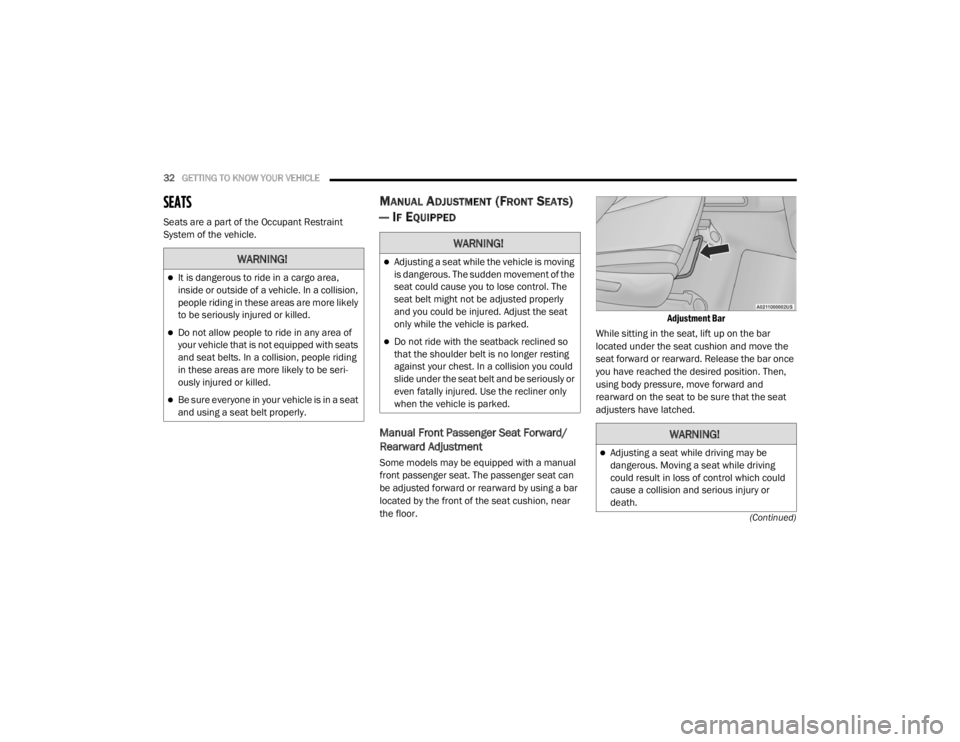
Adjustment Bar
While sitting in the seat, lift up on the bar
located under the seat cushion and move the
seat forward or rearward. Release the bar once
you have reached the desired position. Then,
using body pressure, move forward and
rearward on the seat to be sure that the seat
adjusters have latched.
WARNING!
It is dangerous to ride in a cargo area,
inside or outside of a vehicle. In a collision,
people riding in these areas are more likely
to be seriously injured or killed.
Do not allow people to ride in any area of
your vehicle that is not equipped with seats
and seat belts. In a collision, people riding
in these areas are more likely to be seri -
ously injured or killed.
Be sure everyone in your vehicle is in a seat
and using a seat belt properly.
WARNING!
Adjusting a seat while the vehicle is moving
is dangerous. The sudden movement of the
seat could cause you to lose control. The
seat belt might not be adjusted properly
and you could be injured. Adjust the seat
only while the vehicle is parked.
Do not ride with the seatback reclined so
that the shoulder belt is no longer resting
against your chest. In a collision you could
slide under the seat belt and be seriously or
even fatally injured. Use the recliner only
when the vehicle is parked.
WARNING!
Adjusting a seat while driving may be
dangerous. Moving a seat while driving
could result in loss of control which could
cause a collision and serious injury or
death.
20_WD_OM_EN_USC_t.book Page 32
Page 35 of 464
GETTING TO KNOW YOUR VEHICLE33
Manual Front Passenger Seatback
Adjustment — Recline
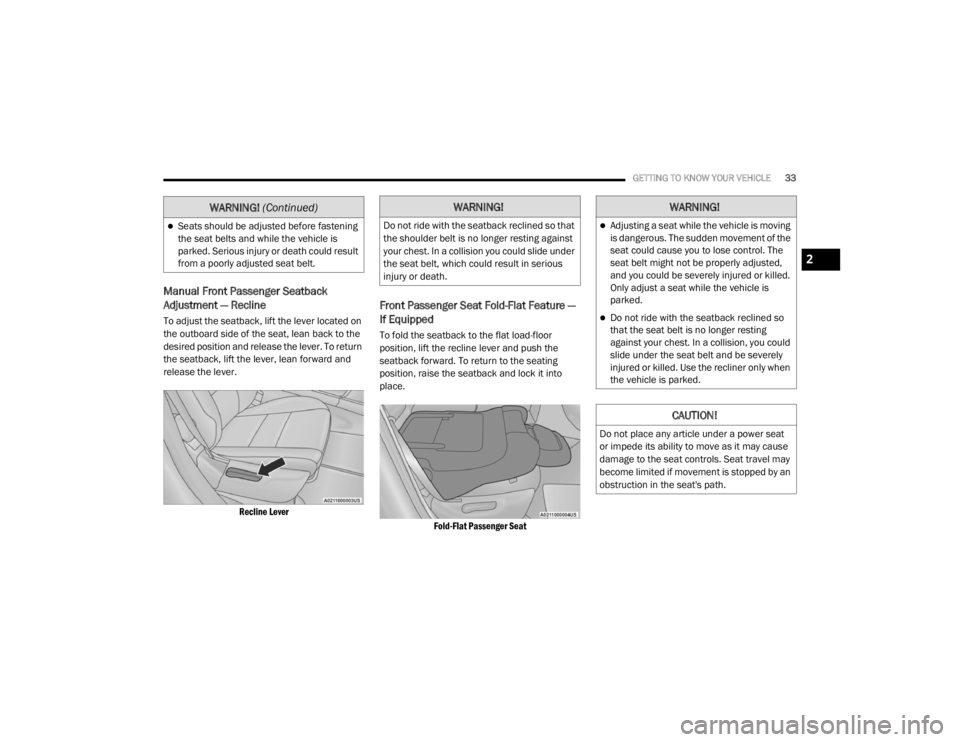
To adjust the seatback, lift the lever located on
the outboard side of the seat, lean back to the
desired position and release the lever. To return
the seatback, lift the lever, lean forward and
release the lever.
Recline Lever
Front Passenger Seat Fold-Flat Feature —
If Equipped
To fold the seatback to the flat load-floor
position, lift the recline lever and push the
seatback forward. To return to the seating
position, raise the seatback and lock it into
place.
Fold-Flat Passenger Seat
Seats should be adjusted before fastening
the seat belts and while the vehicle is
parked. Serious injury or death could result
from a poorly adjusted seat belt.
WARNING! (Continued)WARNING!
Do not ride with the seatback reclined so that
the shoulder belt is no longer resting against
your chest. In a collision you could slide under
the seat belt, which could result in serious
injury or death.
WARNING!
Adjusting a seat while the vehicle is moving
is dangerous. The sudden movement of the
seat could cause you to lose control. The
seat belt might not be properly adjusted,
and you could be severely injured or killed.
Only adjust a seat while the vehicle is
parked.
Do not ride with the seatback reclined so
that the seat belt is no longer resting
against your chest. In a collision, you could
slide under the seat belt and be severely
injured or killed. Use the recliner only when
the vehicle is parked.
CAUTION!
Do not place any article under a power seat
or impede its ability to move as it may cause
damage to the seat controls. Seat travel may
become limited if movement is stopped by an
obstruction in the seat's path.
2
20_WD_OM_EN_USC_t.book Page 33
Page 36 of 464
34GETTING TO KNOW YOUR VEHICLE
MANUAL ADJUSTMENT (REAR SEATS)
60/40 Split Rear Seat
Second Row Fold Flat Seat
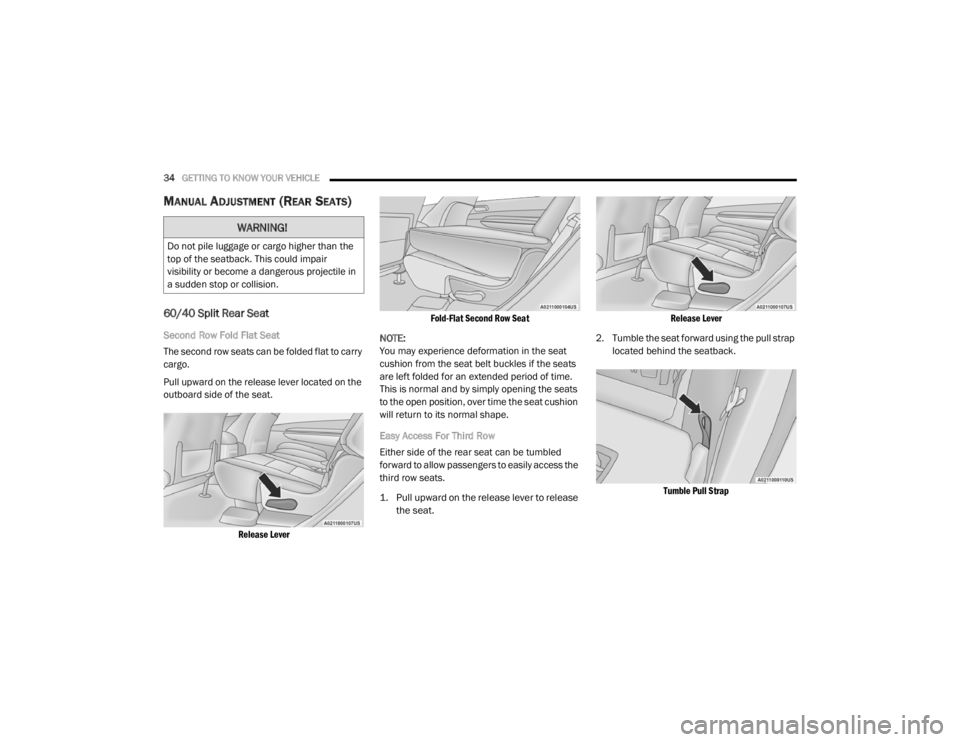
The second row seats can be folded flat to carry
cargo.
Pull upward on the release lever located on the
outboard side of the seat.
Release Lever Fold-Flat Second Row Seat
NOTE:
You may experience deformation in the seat
cushion from the seat belt buckles if the seats
are left folded for an extended period of time.
This is normal and by simply opening the seats
to the open position, over time the seat cushion
will return to its normal shape.
Easy Access For Third Row
Either side of the rear seat can be tumbled
forward to allow passengers to easily access the
third row seats.
1. Pull upward on the release lever to release the seat.
Release Lever
2. Tumble the seat forward using the pull strap located behind the seatback.
Tumble Pull Strap
WARNING!
Do not pile luggage or cargo higher than the
top of the seatback. This could impair
visibility or become a dangerous projectile in
a sudden stop or collision.
20_WD_OM_EN_USC_t.book Page 34
Page 39 of 464
GETTING TO KNOW YOUR VEHICLE37
Folding Third Row
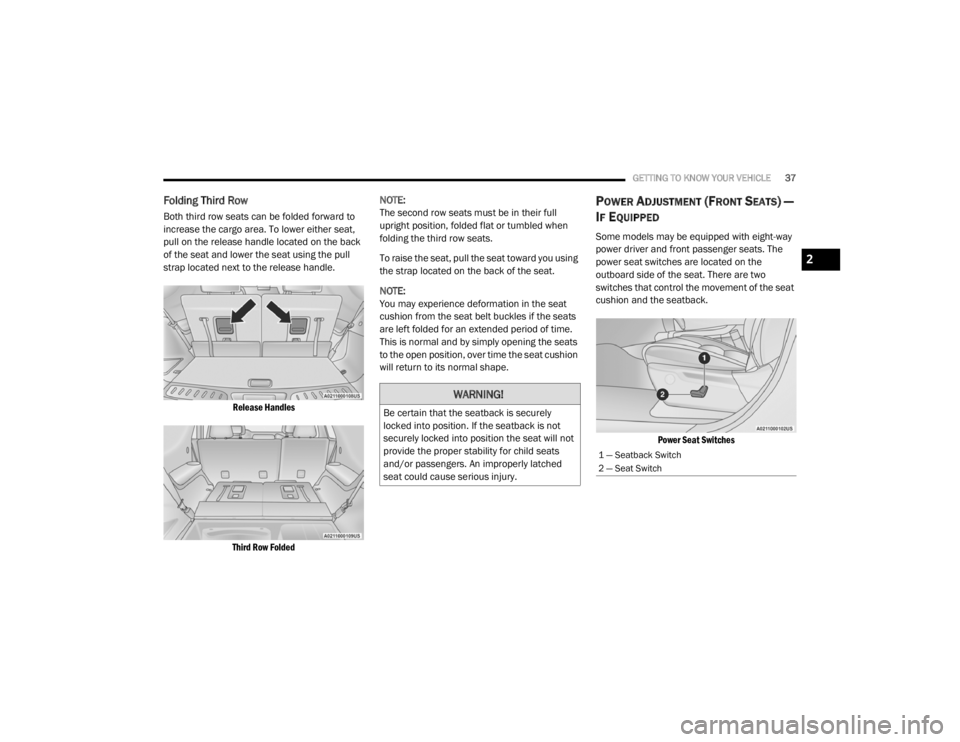
Both third row seats can be folded forward to
increase the cargo area. To lower either seat,
pull on the release handle located on the back
of the seat and lower the seat using the pull
strap located next to the release handle.
Release Handles
Third Row Folded
NOTE:
The second row seats must be in their full
upright position, folded flat or tumbled when
folding the third row seats.
To raise the seat, pull the seat toward you using
the strap located on the back of the seat.
NOTE:
You may experience deformation in the seat
cushion from the seat belt buckles if the seats
are left folded for an extended period of time.
This is normal and by simply opening the seats
to the open position, over time the seat cushion
will return to its normal shape.
POWER ADJUSTMENT (FRONT SEATS) —
I
F EQUIPPED
Some models may be equipped with eight-way
power driver and front passenger seats. The
power seat switches are located on the
outboard side of the seat. There are two
switches that control the movement of the seat
cushion and the seatback.
Power Seat Switches
WARNING!
Be certain that the seatback is securely
locked into position. If the seatback is not
securely locked into position the seat will not
provide the proper stability for child seats
and/or passengers. An improperly latched
seat could cause serious injury.
1 — Seatback Switch
2 — Seat Switch
2
20_WD_OM_EN_USC_t.book Page 37
Page 41 of 464
GETTING TO KNOW YOUR VEHICLE39
(Continued)
POWER PASSENGER SEAT ADJUSTMENT
— I
F EQUIPPED
Some models are equipped with a six-way
power passenger seat. The power seat switch is
located on the outboard side of the seat. The
switch is used to control the movement of the
seat and seat cushion.
Adjusting The Seat Forward Or Rearward
The seat can be adjusted both forward and
rearward. Push the seat switch forward or
rearward. The seat will move in the direction of
the switch. Release the switch when the desired
position has been reached.
Adjusting The Seat Up Or Down
The height of the seats can be adjusted up or
down. Pull upward or push downward on the
rear of seat switch, the seat will move in the
direction of the switch. Release the switch when
the desired position has been reached.
Tilting The Seat Up Or Down
The angle of the seat cushion can be adjusted
in two directions. Pull upward or push
downward on the front of the seat switch, the
front of the seat cushion will move in the
direction of the switch. Release the switch when
the desired position has been reached.
Reclining The Seatback
The angle of the seatback can be adjusted
forward or rearward. Push the seatback switch
forward or rearward, the seat will move in the
direction of the switch. Release the switch when
the desired position is reached.
Easy Entry/Exit Seat — If Equipped
This feature provides automatic driver seat
positioning to enhance driver mobility when
entering and exiting the vehicle.
The distance the driver seat moves depends on
where you have the driver seat positioned when
you place the vehicle’s ignition in the OFF
position.
WARNING!
Adjusting a seat while driving may be
dangerous. Moving a seat while driving
could result in loss of control which could
cause a collision and serious injury or
death.
Seats should be adjusted before fastening
the seat belts and while the vehicle is
parked. Serious injury or death could result
from a poorly adjusted seat belt.
Do not ride with the seatback reclined so
that the shoulder belt is no longer resting
against your chest. In a collision you could
slide under the seat belt, which could result
in serious injury or death.
CAUTION!
Do not place any article under a power seat
or impede its ability to move as it may cause
damage to the seat controls. Seat travel may
become limited if movement is stopped by an
obstruction in the seat's path.
WARNING! (Continued)
2
20_WD_OM_EN_USC_t.book Page 39
Page 46 of 464
44GETTING TO KNOW YOUR VEHICLE
HEAD RESTRAINTS — REAR SEATS
The head restraints on the outboard seats are
not adjustable. They automatically fold forward
when the rear seat is folded to a load floor
position, but do not return to their normal
position when the rear seat is raised. After
returning either seat to its upright position,
raise the head restraint until it locks in place.
The outboard head restraints are not
removable.
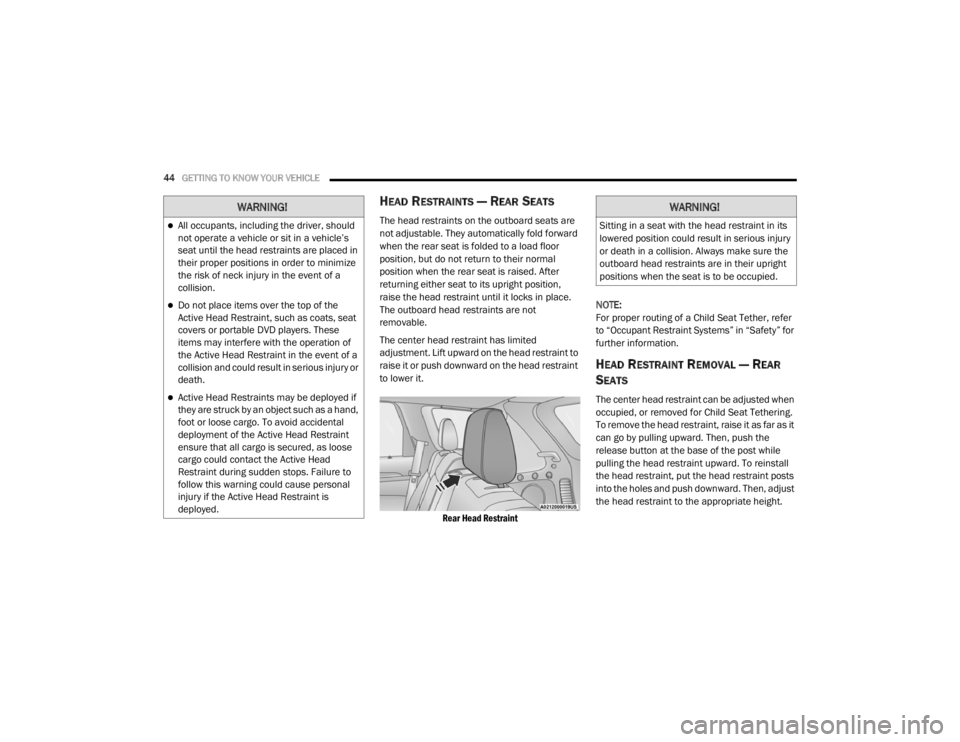
The center head restraint has limited
adjustment. Lift upward on the head restraint to
raise it or push downward on the head restraint
to lower it.
Rear Head Restraint
NOTE:
For proper routing of a Child Seat Tether, refer
to “Occupant Restraint Systems” in “Safety” for
further information.
HEAD RESTRAINT REMOVAL — REAR
S
EATS
The center head restraint can be adjusted when
occupied, or removed for Child Seat Tethering.
To remove the head restraint, raise it as far as it
can go by pulling upward. Then, push the
release button at the base of the post while
pulling the head restraint upward. To reinstall
the head restraint, put the head restraint posts
into the holes and push downward. Then, adjust
the head restraint to the appropriate height.
WARNING!
All occupants, including the driver, should
not operate a vehicle or sit in a vehicle’s
seat until the head restraints are placed in
their proper positions in order to minimize
the risk of neck injury in the event of a
collision.
Do not place items over the top of the
Active Head Restraint, such as coats, seat
covers or portable DVD players. These
items may interfere with the operation of
the Active Head Restraint in the event of a
collision and could result in serious injury or
death.
Active Head Restraints may be deployed if
they are struck by an object such as a hand,
foot or loose cargo. To avoid accidental
deployment of the Active Head Restraint
ensure that all cargo is secured, as loose
cargo could contact the Active Head
Restraint during sudden stops. Failure to
follow this warning could cause personal
injury if the Active Head Restraint is
deployed.
WARNING!
Sitting in a seat with the head restraint in its
lowered position could result in serious injury
or death in a collision. Always make sure the
outboard head restraints are in their upright
positions when the seat is to be occupied.
20_WD_OM_EN_USC_t.book Page 44
Page 150 of 464
148SAFETY
Lap/Shoulder Belt Untwisting Procedure
Use the following procedure to untwist a twisted
lap/shoulder belt.
1. Position the latch plate as close as
possible to the anchor point.
2. At about 6 to 12 inches (15 to 30 cm) above the latch plate, grasp and twist the seat belt
webbing 180 degrees to create a fold that
begins immediately above the latch plate.
3. Slide the latch plate upward over the folded webbing. The folded webbing must enter
the slot at the top of the latch plate.
4. Continue to slide the latch plate up until it clears the folded webbing and the seat belt
is no longer twisted.
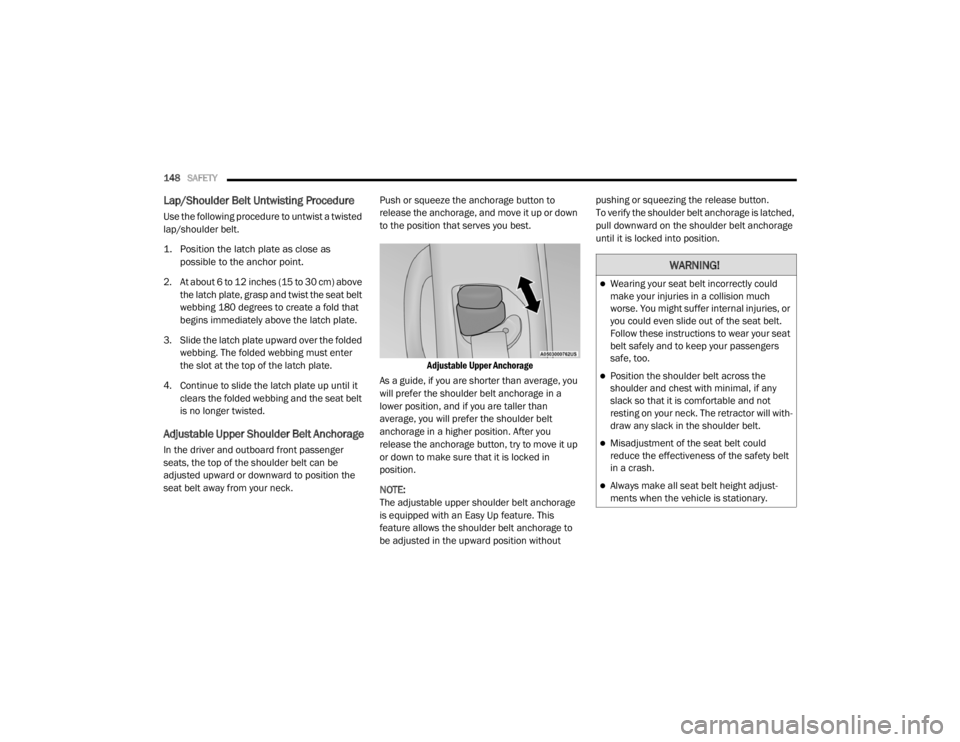
Adjustable Upper Shoulder Belt Anchorage
In the driver and outboard front passenger
seats, the top of the shoulder belt can be
adjusted upward or downward to position the
seat belt away from your neck. Push or squeeze the anchorage button to
release the anchorage, and move it up or down
to the position that serves you best.
Adjustable Upper Anchorage
As a guide, if you are shorter than average, you
will prefer the shoulder belt anchorage in a
lower position, and if you are taller than
average, you will prefer the shoulder belt
anchorage in a higher position. After you
release the anchorage button, try to move it up
or down to make sure that it is locked in
position.
NOTE:
The adjustable upper shoulder belt anchorage
is equipped with an Easy Up feature. This
feature allows the shoulder belt anchorage to
be adjusted in the upward position without pushing or squeezing the release button.
To verify the shoulder belt anchorage is latched,
pull downward on the shoulder belt anchorage
until it is locked into position.
WARNING!
Wearing your seat belt incorrectly could
make your injuries in a collision much
worse. You might suffer internal injuries, or
you could even slide out of the seat belt.
Follow these instructions to wear your seat
belt safely and to keep your passengers
safe, too.
Position the shoulder belt across the
shoulder and chest with minimal, if any
slack so that it is comfortable and not
resting on your neck. The retractor will with
-
draw any slack in the shoulder belt.
Misadjustment of the seat belt could
reduce the effectiveness of the safety belt
in a crash.
Always make all seat belt height adjust -
ments when the vehicle is stationary.
20_WD_OM_EN_USC_t.book Page 148
Page 374 of 464
372MULTIMEDIA
Auto-On Comfort Systems — If Equipped
After pressing the Auto-On Comfort Systems button on the touchscreen, the following setting will be available:
Engine Off Options
After pressing the Engine Off Options button on the touchscreen, the following settings will be available:
Setting Name Selectable Options
Auto-On Driver Heated/Ventilated
Seat & Steering Wheel With Vehicle Start — If Equipped Off
Remote Start All Starts
NOTE:
When this feature is selected, the driver’s heated seat and heated steering wheel will automatically turn on when temperatures are below 40°F
(4.4°C). When temperatures are above 80°F (26.7°C) the driver vented seat will turn on.
Setting Name Selectable Options
Engine Off Power Delay — If Equipped 0 sec
45 sec
5 min 10 min
NOTE:
When the “Engine Off Power Delay” feature is selected, the power window switches, radio, Uconnect phone system (if equipped), DVD video system
(if equipped), power sunroof (if equipped), and power outlets will remain active for up to 10 minutes after the ignition is cycled to OFF. Opening either
front door will cancel this feature.
Headlight Off Delay 0 sec
30 sec
60 sec 90 sec
NOTE:
When the “Headlight Off Delay” feature is selected, it allows the adjustment of the amount of time the headlights remain on after the engine is shut off.
20_WD_OM_EN_USC_t.book Page 372