climate control DODGE DURANGO 2021 User Guide
[x] Cancel search | Manufacturer: DODGE, Model Year: 2021, Model line: DURANGO, Model: DODGE DURANGO 2021Pages: 340, PDF Size: 20.38 MB
Page 64 of 340
62GETTING TO KNOW YOUR VEHICLE
AUTOMATIC TEMPERATURE CONTROL
(ATC)
Automatic Operation
1. Push the AUTO button on the front Automatic
Temperature Control (ATC) Panel and the
word “AUTO” will illuminate in the front ATC
display, along with two temperatures for the
driver and front passenger. The system will
then automatically regulate the amount of
airflow.
2. Adjust the temperature you would like the system to maintain, by adjusting the driver,
passenger, and rear temperatures. Once the
desired temperature is displayed, the system
will achieve and automatically maintain that
comfort level.
3. When the system is set up for your comfort level, it is not necessary to change the
settings. You will experience the greatest
efficiency by simply allowing the system to
function automatically.
NOTE:It is not necessary to move the temperature
settings. The system automatically adjusts the
temperature, mode and fan speed to provide
comfort as quickly as possible. To provide you with maximum comfort in the
automatic mode, during cold start-ups, the blower
fan will remain on low until the engine warms up.
The fan will engage immediately if the Defrost
mode is selected, or by changing the front blower
knob setting.
Manual Operation Override
This system offers a full complement of manual
override features. The AUTO symbol in the front
ATC display will be turned off when the system is
being used in the manual mode.
NOTE:The system will not automatically sense the
presence of fog, mist or ice on the windshield.
Defrost mode must be manually selected to clear
the windshield and side glass.
CLIMATE VOICE RECOGNITION
Adjust vehicle temperatures hands-free and keep
everyone comfortable while you keep moving
ahead.
Push the VR button on the steering wheel. After the
beep, say one of the following commands:
“Set driver temperature to 70 degrees”
“Set passenger temperature to 70 degrees”
Did you know: Voice Command for Climate may
only be used to adjust the interior temperature of
your vehicle. Voice Command will not work to
adjust the heated seats or steering wheel if
equipped.
OPERATING TIPS
NOTE:Refer to the chart at the end of this section for
suggested control settings for various weather
conditions.
CAUTION!
Interior air enters the Rear Automatic
Temperature Control system through an intake
grille, located in the right side trim panel behind
the third row seats. The heater outlets are
located in the right side trim panel, just behind
the passenger second row door. Do not block or
place objects directly in front of the inlet grille or
heater outlets. The electrical system could
overload causing damage to the blower motor.
21_WD_OM_EN_USC_t.book Page 62
Page 65 of 340
GETTING TO KNOW YOUR VEHICLE63
Summer Operation
The engine cooling system must be protected with
a high-quality antifreeze coolant to provide proper
corrosion protection and to protect against engine
overheating. A solution of 50% OAT (Organic
Additive Technology) coolant that meets the
requirements of FCA Material Standard MS.90032
and 50% water is recommended Úpage 322.
Winter Operation
To ensure the best possible heater and defroster
performance, make sure the engine cooling
system is functioning properly and the proper
amount, type, and concentration of coolant is
used. Use of the Air Recirculation mode during
Winter months is not recommended, because it
may cause window fogging.
Vacation/Storage
For information on maintaining the Climate Control
system when the vehicle is being stored for an
extended period of time, see Úpage 313.
Window Fogging
Interior fogging on the windshield can be quickly
removed by turning the mode selector to Defrost.
The Defrost/Floor mode can be used to maintain a
clear windshield and provide sufficient heating. If
side window fogging becomes objectionable, increase blower speed to improve airflow and
clearing of the side windows. Vehicle windows tend
to fog on the inside in mild but rainy or humid
weather.
NOTE:
Recirculate without A/C should not be used for
long periods, as fogging may occur.
Automatic Temperature Controls (ATC) will auto
-
matically adjust the climate control settings to
reduce or eliminate window fogging on the front
windshield. When this occurs, recirculation will
be unavailable.
Outside Air Intake
Make sure the air intake, located directly in front of
the windshield, is free of obstructions, such as
leaves. Leaves collected in the air intake may
reduce airflow, and if they enter the air distribution
box, they could plug the water drains. In Winter
months, make sure the air intake is clear of ice,
slush, and snow.
Cabin Air Filter
The Climate Control system filters out dust and
pollen from the air. Contact an authorized dealer to
service your cabin air filter, and to have it replaced
when needed Ú page 271.
Stop/Start System — If Equipped
While in an Autostop, the Climate Control system
may automatically adjust airflow to maintain cabin
comfort. Customer settings will be maintained
upon return to an engine running condition.
Windshield Wiper De-Icer — If Equipped
The Windshield Wiper De-Icer is a heating element
located at the base of the windshield.
It operates automatically once the following
conditions are met:
Activation By Front Defrost
The Windshield Wiper De-Icer activates auto -
matically during a cold weather manual start
with full defrost, and when the ambient
temperature is below 33°F (0.6°C) .
Activation By Rear Defrost
The Windshield Wiper De-Icer activates auto -
matically when the Rear Defrost is operating
and the ambient temperature is below 33°F
(0.6°C) .
Activation By Remote Start Operation
When the Remote Start is activated and the
outside ambient temperature is less than 33°F
(0.6°C) the Windshield Wiper De-Icer is acti-
vated. Exiting Remote Start will resume its
previous operation. If the Windshield Wiper
De-Icer was active, the timer and operation will
continue.
2
21_WD_OM_EN_USC_t.book Page 63
Page 70 of 340
68GETTING TO KNOW YOUR VEHICLE
The audio device battery charges when plugged
into the USB/AUX connector (if supported by the
specific audio device).
NOTE:For further information, refer to the Uconnect
Owner’s Manual Supplement.
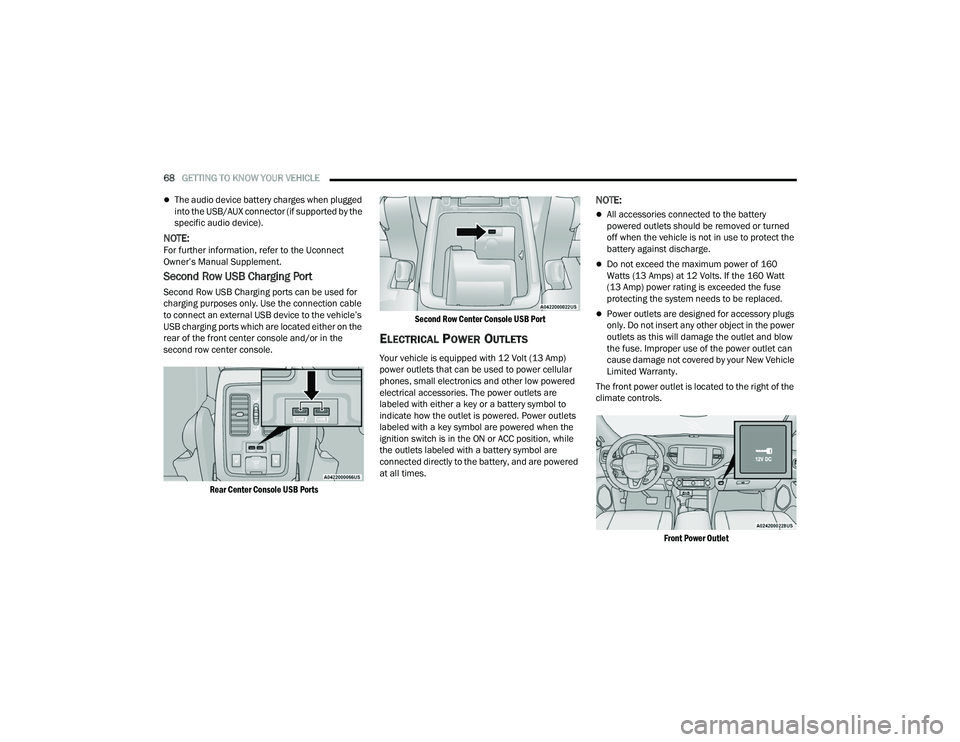
Second Row USB Charging Port
Second Row USB Charging ports can be used for
charging purposes only. Use the connection cable
to connect an external USB device to the vehicle’s
USB charging ports which are located either on the
rear of the front center console and/or in the
second row center console.
Rear Center Console USB Ports Second Row Center Console USB Port
ELECTRICAL POWER OUTLETS
Your vehicle is equipped with 12 Volt (13 Amp)
power outlets that can be used to power cellular
phones, small electronics and other low powered
electrical accessories. The power outlets are
labeled with either a key or a battery symbol to
indicate how the outlet is powered. Power outlets
labeled with a key symbol are powered when the
ignition switch is in the ON or ACC position, while
the outlets labeled with a battery symbol are
connected directly to the battery, and are powered
at all times.
NOTE:
All accessories connected to the battery
powered outlets should be removed or turned
off when the vehicle is not in use to protect the
battery against discharge.
Do not exceed the maximum power of 160
Watts (13 Amps) at 12 Volts. If the 160 Watt
(13 Amp) power rating is exceeded the fuse
protecting the system needs to be replaced.
Power outlets are designed for accessory plugs
only. Do not insert any other object in the power
outlets as this will damage the outlet and blow
the fuse. Improper use of the power outlet can
cause damage not covered by your New Vehicle
Limited Warranty.
The front power outlet is located to the right of the
climate controls.
Front Power Outlet
21_WD_OM_EN_USC_t.book Page 68
Page 78 of 340
76GETTING TO KNOW YOUR VEHICLE
If anything obstructs the power liftgate while it is
closing or opening, the liftgate will automatically
reverse to the closed or open position. After
multiple obstructions in the same cycle, the lift -
gate will automatically stop and must be opened
or closed manually.
There are also pinch sensors attached to the
side of the liftgate. Light pressure anywhere
along these strips will cause the liftgate to
return to the open position.
If the liftgate is only partially open, push the lift -
gate button on the key fob twice to operate the
liftgate.
If the liftgate release handle is pushed while the
power liftgate is opening, the liftgate motor will
disengage to allow manual operation.
CARGO AREA FEATURES
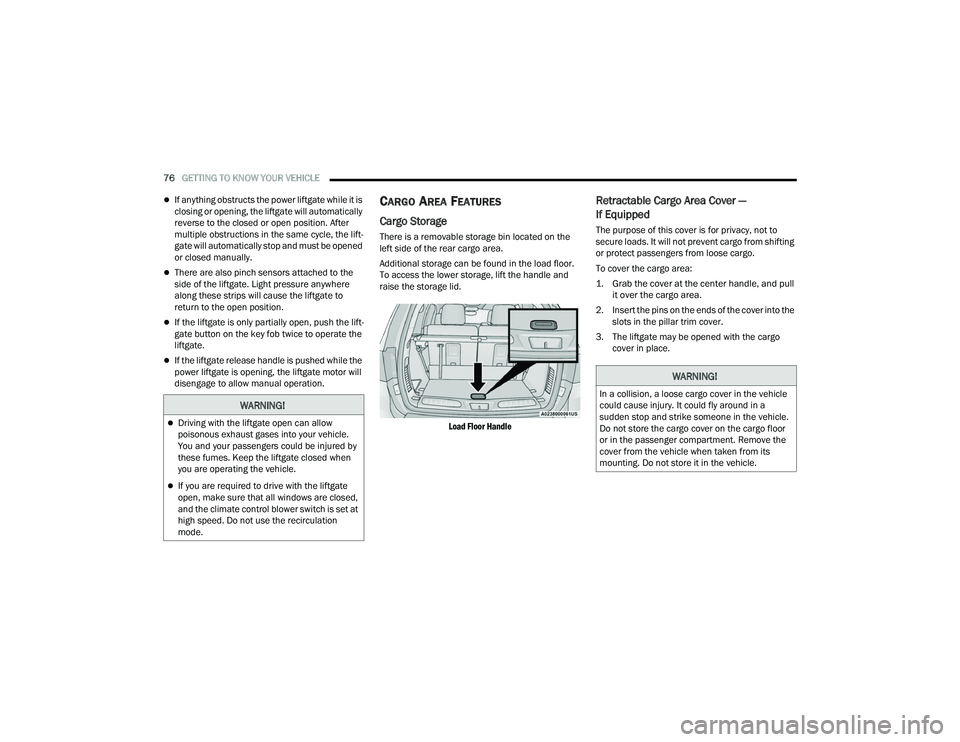
Cargo Storage
There is a removable storage bin located on the
left side of the rear cargo area.
Additional storage can be found in the load floor.
To access the lower storage, lift the handle and
raise the storage lid.
Load Floor Handle
Retractable Cargo Area Cover —
If Equipped
The purpose of this cover is for privacy, not to
secure loads. It will not prevent cargo from shifting
or protect passengers from loose cargo.
To cover the cargo area:
1. Grab the cover at the center handle, and pull it over the cargo area.
2. Insert the pins on the ends of the cover into the slots in the pillar trim cover.
3. The liftgate may be opened with the cargo cover in place.
WARNING!
Driving with the liftgate open can allow
poisonous exhaust gases into your vehicle.
You and your passengers could be injured by
these fumes. Keep the liftgate closed when
you are operating the vehicle.
If you are required to drive with the liftgate
open, make sure that all windows are closed,
and the climate control blower switch is set at
high speed. Do not use the recirculation
mode.
WARNING!
In a collision, a loose cargo cover in the vehicle
could cause injury. It could fly around in a
sudden stop and strike someone in the vehicle.
Do not store the cargo cover on the cargo floor
or in the passenger compartment. Remove the
cover from the vehicle when taken from its
mounting. Do not store it in the vehicle.
21_WD_OM_EN_USC_t.book Page 76
Page 243 of 340
SAFETY241
PERIODIC SAFETY CHECKS YOU SHOULD
M
AKE OUTSIDE THE VEHICLE
Tires
Examine tires for excessive tread wear and uneven
wear patterns. Check for stones, nails, glass, or
other objects lodged in the tread or sidewall.
Inspect the tread for cuts and cracks. Inspect
sidewalls for cuts, cracks, and bulges. Check the
lug nut/bolt torque for tightness. Check the tires
(including spare) for proper cold inflation pressure.
Lights
Have someone observe the operation of brake
lights and exterior lights while you work the
controls. Check turn signal and high beam
indicator lights on the instrument panel.
Door Latches
Check for proper closing, latching, and locking.
Fluid Leaks
Check area under the vehicle after overnight
parking for fuel, coolant, oil, or other fluid leaks.
Also, if gasoline fumes are detected or if fuel or
brake fluid leaks are suspected, the cause should
be located and corrected immediately.
EXHAUST GAS
NEVER place any objects under the floor mat
(e.g., towels, keys, etc.). These objects could
change the position of the floor mat and may
cause interference with the accelerator,
brake, or clutch pedals.
If the vehicle carpet has been removed and
re-installed, always properly attach carpet to
the floor and check the floor mat fasteners are
secure to the vehicle carpet. Fully depress
each pedal to check for interference with the
accelerator, brake, or clutch pedals then
re-install the floor mats.
It is recommended to only use mild soap and
water to clean your floor mats. After cleaning,
always check your floor mat has been properly
installed and is secured to your vehicle using
the floor mat fasteners by lightly pulling mat.
WARNING!
WARNING!
Exhaust gases can injure or kill. They contain
carbon monoxide (CO), which is colorless and
odorless. Breathing it can make you
unconscious and can eventually poison you. To
avoid breathing (CO), follow these safety tips:
Do not run the engine in a closed garage or in
confined areas any longer than needed to
move your vehicle in or out of the area.
If you are required to drive with the trunk/lift -
gate/rear doors open, make sure that all
windows are closed and the climate control
BLOWER switch is set at high speed. DO NOT
use the recirculation mode.
If it is necessary to sit in a parked vehicle with
the engine running, adjust your heating or
cooling controls to force outside air into the
vehicle. Set the blower at high speed.
6
21_WD_OM_EN_USC_t.book Page 241
Page 245 of 340
243
IN CASE OF EMERGENCY
HAZARD WARNING FLASHERS
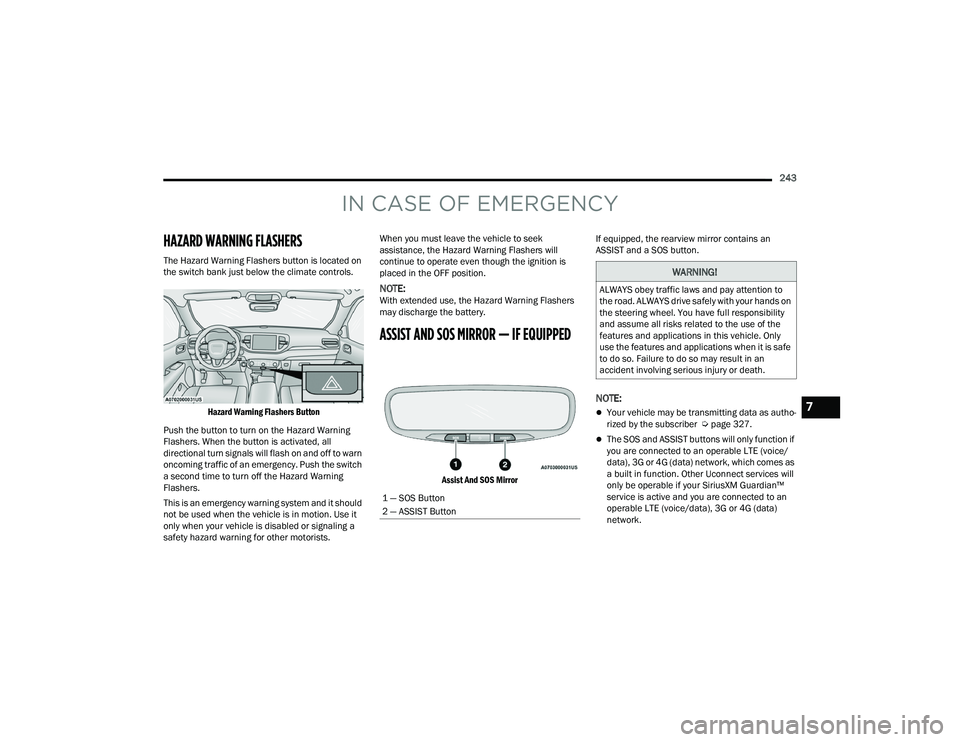
The Hazard Warning Flashers button is located on
the switch bank just below the climate controls.
Hazard Warning Flashers Button
Push the button to turn on the Hazard Warning
Flashers. When the button is activated, all
directional turn signals will flash on and off to warn
oncoming traffic of an emergency. Push the switch
a second time to turn off the Hazard Warning
Flashers.
This is an emergency warning system and it should
not be used when the vehicle is in motion. Use it
only when your vehicle is disabled or signaling a
safety hazard warning for other motorists. When you must leave the vehicle to seek
assistance, the Hazard Warning Flashers will
continue to operate even though the ignition is
placed in the OFF position.
NOTE:With extended use, the Hazard Warning Flashers
may discharge the battery.
ASSIST AND SOS MIRROR — IF EQUIPPED
Assist And SOS Mirror
If equipped, the rearview mirror contains an
ASSIST and a SOS button.
NOTE:
Your vehicle may be transmitting data as autho
-
rized by the subscriber Ú page 327.
The SOS and ASSIST buttons will only function if
you are connected to an operable LTE (voice/
data), 3G or 4G (data) network, which comes as
a built in function. Other Uconnect services will
only be operable if your SiriusXM Guardian™
service is active and you are connected to an
operable LTE (voice/data), 3G or 4G (data)
network.
1 — SOS Button
2 — ASSIST Button
WARNING!
ALWAYS obey traffic laws and pay attention to
the road. ALWAYS drive safely with your hands on
the steering wheel. You have full responsibility
and assume all risks related to the use of the
features and applications in this vehicle. Only
use the features and applications when it is safe
to do so. Failure to do so may result in an
accident involving serious injury or death.
7
21_WD_OM_EN_USC_t.book Page 243
Page 291 of 340
SERVICING AND MAINTENANCE289
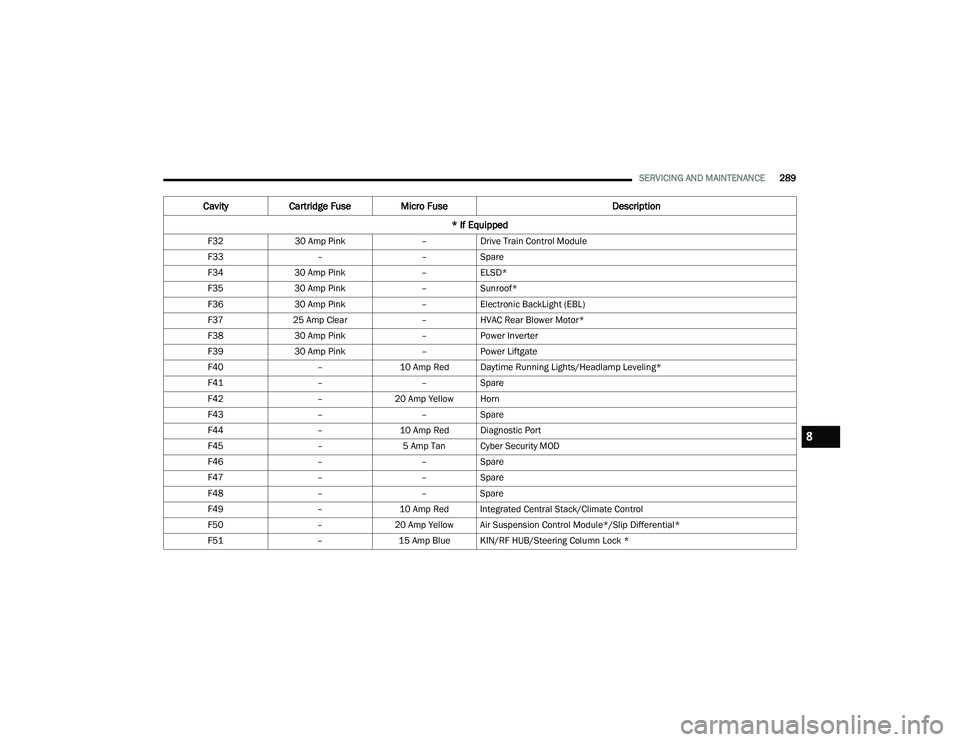
F32 30 Amp Pink –Drive Train Control Module
F33 ––Spare
F34 30 Amp Pink –ELSD*
F35 30 Amp Pink –Sunroof*
F36 30 Amp Pink –Electronic BackLight (EBL)
F37 25 Amp Clear –HVAC Rear Blower Motor*
F38 30 Amp Pink –Power Inverter
F39 30 Amp Pink –Power Liftgate
F40 –10 Amp Red Daytime Running Lights/Headlamp Leveling*
F41 ––Spare
F42 –20 Amp Yellow Horn
F43 ––Spare
F44 –10 Amp Red Diagnostic Port
F45 –5 Amp Tan Cyber Security MOD
F46 ––Spare
F47 ––Spare
F48 ––Spare
F49 –10 Amp Red Integrated Central Stack/Climate Control
F50 –20 Amp Yellow Air Suspension Control Module*/Slip Differential*
F51 –15 Amp Blue KIN/RF HUB/Steering Column Lock *
CavityCartridge Fuse Micro Fuse Description
* If Equipped
8
21_WD_OM_EN_USC_t.book Page 289
Page 294 of 340
292SERVICING AND MAINTENANCE
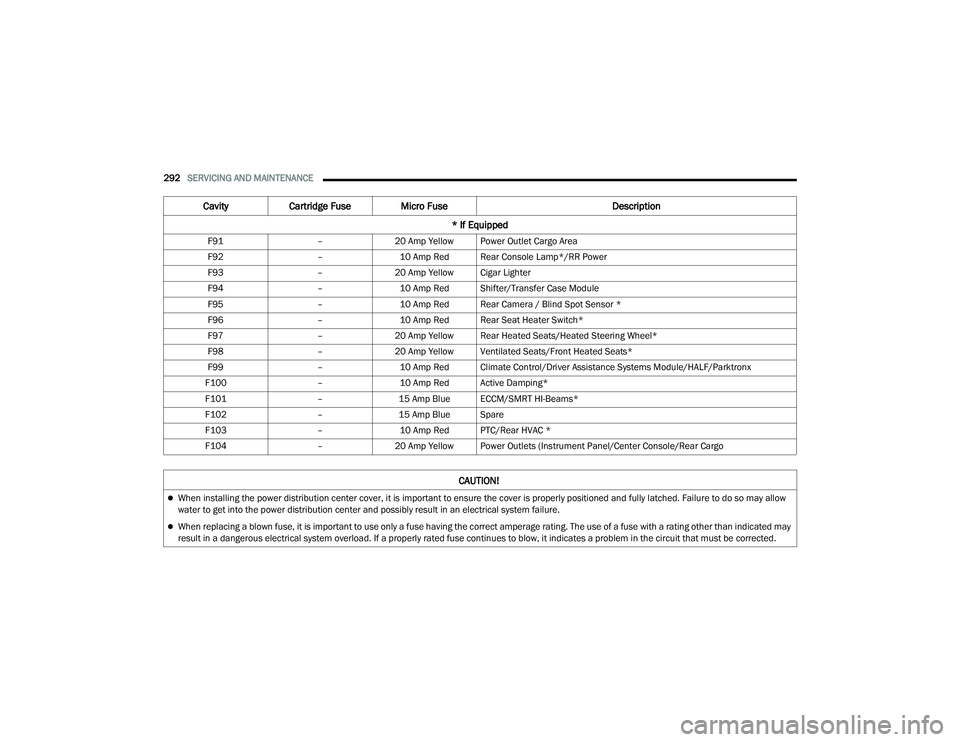
F91 –20 Amp Yellow Power Outlet Cargo Area
F92 –10 Amp Red Rear Console Lamp*/RR Power
F93 –20 Amp Yellow Cigar Lighter
F94 –10 Amp Red Shifter/Transfer Case Module
F95 –10 Amp Red Rear Camera / Blind Spot Sensor *
F96 –10 Amp Red Rear Seat Heater Switch*
F97 –20 Amp Yellow Rear Heated Seats/Heated Steering Wheel*
F98 –20 Amp Yellow Ventilated Seats/Front Heated Seats*
F99 –10 Amp Red Climate Control/Driver Assistance Systems Module/HALF/Parktronx
F100 –10 Amp Red Active Damping*
F101 –15 Amp Blue ECCM/SMRT HI-Beams*
F102 –15 Amp Blue Spare
F103 –10 Amp Red PTC/Rear HVAC *
F104 –20 Amp Yellow Power Outlets (Instrument Panel/Center Console/Rear Cargo
Cavity Cartridge Fuse Micro Fuse Description
* If Equipped
CAUTION!
When installing the power distribution center cover, it is important to ensure the cover is properly positioned and fully latched. Failure to do so may allow
water to get into the power distribution center and possibly result in an electrical system failure.
When replacing a blown fuse, it is important to use only a fuse having the correct amperage rating. The use of a fuse with a rating other than indicated may
result in a dangerous electrical system overload. If a properly rated fuse continues to blow, it indicates a problem in the circuit that must be corrected.
21_WD_OM_EN_USC_t.book Page 292
Page 314 of 340
312SERVICING AND MAINTENANCE
TIRE ROTATION RECOMMENDATIONS
The tires on the front and rear of your vehicle
operate at different loads and perform different
steering, handling, and braking functions. For
these reasons, they wear at unequal rates.
These effects can be reduced by timely rotation of
tires. The benefits of rotation are especially
worthwhile with aggressive tread designs such as
those on On/Off-Road type tires. Rotation will
increase tread life, help to maintain mud, snow,
and wet traction levels, and contribute to a
smooth, quiet ride.
For the proper maintenance intervals Úpage 265.
The reasons for any rapid or unusual wear should
be corrected prior to rotation being performed.
NOTE:The Tire Pressure Monitoring System will automat -
ically locate the pressure values displayed in the
correct vehicle position following a tire rotation.
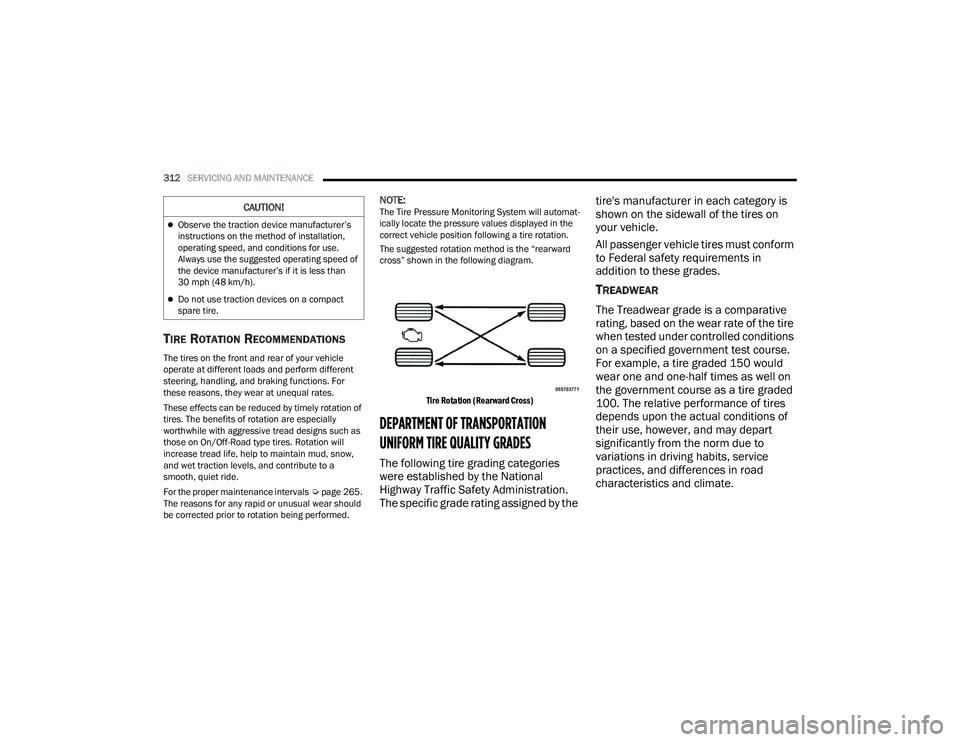
The suggested rotation method is the “rearward
cross” shown in the following diagram.
Tire Rotation (Rearward Cross)
DEPARTMENT OF TRANSPORTATION
UNIFORM TIRE QUALITY GRADES
The following tire grading categories
were established by the National
Highway Traffic Safety Administration.
The specific grade rating assigned by the tire's manufacturer in each category is
shown on the sidewall of the tires on
your vehicle.
All passenger vehicle tires must conform
to Federal safety requirements in
addition to these grades.
TREADWEAR
The Treadwear grade is a comparative
rating, based on the wear rate of the tire
when tested under controlled conditions
on a specified government test course.
For example, a tire graded 150 would
wear one and one-half times as well on
the government course as a tire graded
100. The relative performance of tires
depends upon the actual conditions of
their use, however, and may depart
significantly from the norm due to
variations in driving habits, service
practices, and differences in road
characteristics and climate.
Observe the traction device manufacturer’s
instructions on the method of installation,
operating speed, and conditions for use.
Always use the suggested operating speed of
the device manufacturer’s if it is less than
30 mph (48 km/h).
Do not use traction devices on a compact
spare tire.
CAUTION!
21_WD_OM_EN_USC_t.book Page 312
Page 331 of 340
329
B
Battery
.................................................... 92, 270Charging System Light................................. 92Keyless Key Fob Replacement.................... 15Battery Saver Feature...................................... 52Belts, Seat..................................................... 239Blind Spot Monitoring.................................... 195Body Mechanism Lubrication........................ 276B-Pillar Location............................................. 300Brake Assist System...................................... 190Brake Control System, Electronic.................. 190Brake Fluid.......................................... 283, 323Brake System...................................... 283, 317Anti-Lock (ABS).......................................... 317Fluid Check............................................... 283Master Cylinder......................................... 283Parking...................................................... 105Warning Light.............................................. 91Brake/Transmission Interlock....................... 107Bulb Replacement............................... 293, 294Bulbs, Light.................................................... 241
C
Camera, Rear................................................ 139Capacities, Fluid............................................ 321Caps, Filler Oil (Engine)................................................ 268Radiator (Coolant Pressure)...................... 282Car Washes................................................... 314
Carbon Monoxide Warning................... 241, 242Cargo Area Cover............................................. 76Cargo Compartment........................................ 76Light............................................................ 76Luggage Carrier........................................... 77Cargo Light....................................................... 76Cargo Tie-Downs.............................................. 77Cellular Phone.............................................. 188Center High Mounted Stop Light................... 295Certification Label......................................... 141Chains, Tire................................................... 310Chart, Tire Sizing........................................... 296Check Engine Light
(Malfunction Indicator Light)......................... 100Checking Your Vehicle For Safety................. 239Checks, Safety.............................................. 239Child Restraint.............................................. 223Child RestraintsBooster Seats........................................... 225Child Seat Installation.............................. 236How To Stow An unused ALR Seat Belt.............................................. 233Infant And Child Restraints....................... 224Locating The LATCH Anchorages.............. 229Lower Anchors And Tethers For Children................................................ 226Older Children And Child Restraints......... 225Seating Positions...................................... 226
Child Safety Locks............................................26Clean Air Gasoline......................................... 319CleaningWheels...................................................... 309Climate Control................................................55Automatic....................................................55Cold Weather Operation................................ 104Compact Spare Tire...................................... 307Contract, Service........................................... 325Cooling Pressure Cap (Radiator Cap)............ 282Cooling System............................................. 280Adding Coolant (Antifreeze)...................... 281Cooling Capacity....................................... 321Disposal Of Used Coolant......................... 282Drain, Flush, And Refill............................. 281Inspection................................................. 281Points To Remember................................ 283Pressure Cap............................................ 282Radiator Cap............................................. 282Selection Of Coolant (Antifreeze)......................... 281, 321, 322Corrosion Protection..................................... 313Cruise Control (Speed Control)............. 119, 121Cruise Light............................................... 97, 98Customer Assistance.................................... 324Cybersecurity................................................ 158
11
21_WD_OM_EN_USC_t.book Page 329