reset DODGE DURANGO 2021 Owner's Manual
[x] Cancel search | Manufacturer: DODGE, Model Year: 2021, Model line: DURANGO, Model: DODGE DURANGO 2021Pages: 340, PDF Size: 20.38 MB
Page 180 of 340
178MULTIMEDIA
STEERING WHEEL AUDIO CONTROLS
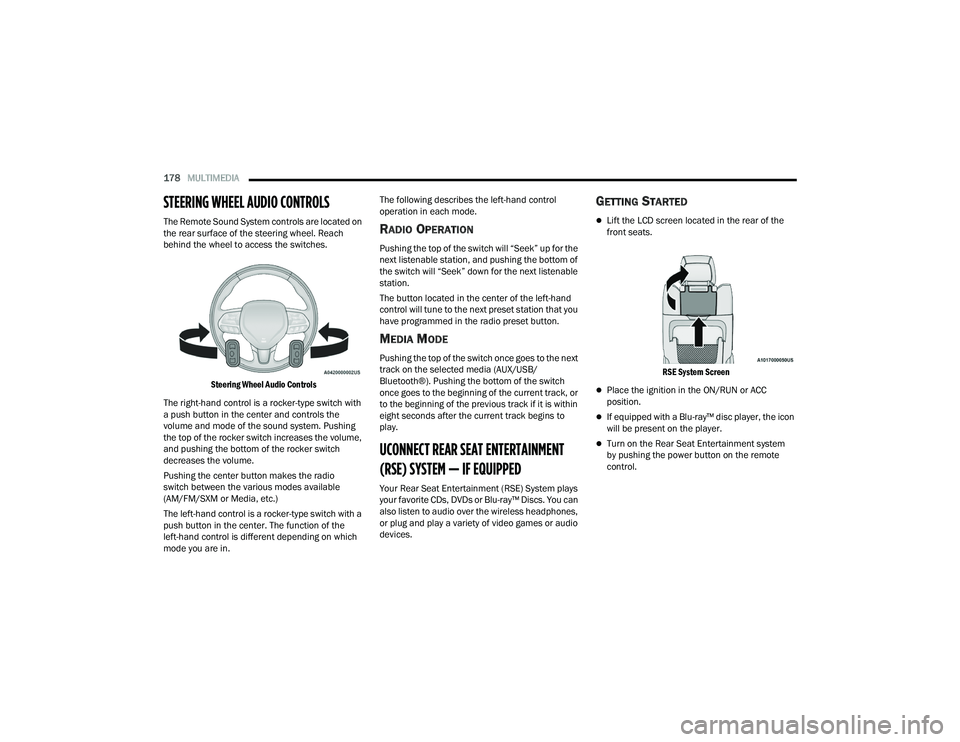
The Remote Sound System controls are located on
the rear surface of the steering wheel. Reach
behind the wheel to access the switches.
Steering Wheel Audio Controls
The right-hand control is a rocker-type switch with
a push button in the center and controls the
volume and mode of the sound system. Pushing
the top of the rocker switch increases the volume,
and pushing the bottom of the rocker switch
decreases the volume.
Pushing the center button makes the radio
switch between the various modes available
(AM/FM/SXM or Media, etc.)
The left-hand control is a rocker-type switch with a
push button in the center. The function of the
left-hand control is different depending on which
mode you are in. The following describes the left-hand control
operation in each mode.RADIO OPERATION
Pushing the top of the switch will “Seek” up for the
next listenable station, and pushing the bottom of
the switch will “Seek” down for the next listenable
station.
The button located in the center of the left-hand
control will tune to the next preset station that you
have programmed in the radio preset button.
MEDIA MODE
Pushing the top of the switch once goes to the next
track on the selected media (AUX/USB/
Bluetooth®). Pushing the bottom of the switch
once goes to the beginning of the current track, or
to the beginning of the previous track if it is within
eight seconds after the current track begins to
play.
UCONNECT REAR SEAT ENTERTAINMENT
(RSE) SYSTEM — IF EQUIPPED
Your Rear Seat Entertainment (RSE) System plays
your favorite CDs, DVDs or Blu-ray™ Discs. You can
also listen to audio over the wireless headphones,
or plug and play a variety of video games or audio
devices.
GETTING STARTED
Lift the LCD screen located in the rear of the
front seats.
RSE System Screen
Place the ignition in the ON/RUN or ACC
position.
If equipped with a Blu-ray™ disc player, the icon
will be present on the player.
Turn on the Rear Seat Entertainment system
by pushing the power button on the remote
control.
21_WD_OM_EN_USC_t.book Page 178
Page 187 of 340
MULTIMEDIA185
STEREO HEADPHONE LIFETIME LIMITED
W
ARRANTY
Who Does This Warranty Cover? This warranty
covers the initial user or purchaser ("you" or "your")
of this particular Aptiv PLC (“Aptiv”) wireless
headphone ("Product"). The warranty is not
transferable.
How Long Does the Coverage Last? This warranty
lasts as long as you own the Product.
What Does This Warranty Cover? Except as
specified below, this warranty covers any Product
that in normal use is defective in workmanship or
materials.
What Does This Warranty Not Cover? This warranty
does not cover any damage or defect that results
from misuse, abuse, or modification of the Product
other than by Aptiv. Foam earpieces, which will
wear over time through normal use, are specifically
not covered (replacement foam is available for a
nominal charge). APTIV IS NOT LIABLE FOR ANY
INJURIES OR DAMAGES TO PERSONS OR
PROPERTY RESULTING FROM THE USE OF, OR ANY
FAILURE OR DEFECT IN, THE PRODUCT, NOR IS
APTIV LIABLE FOR ANY GENERAL, SPECIAL,
DIRECT, INDIRECT, INCIDENTAL, CONSEQUENTIAL,
EXEMPLARY, PUNITIVE OR OTHER DAMAGES OF
ANY KIND OR NATURE WHATSOEVER. Some states
and jurisdictions may not allow the exclusion or
limitation of incidental or consequential damages, so the above limitation may not apply to you. This
warranty gives you specific legal rights. You may
also have other rights, which vary from jurisdiction
to jurisdiction.
What Will Aptiv Do?
Aptiv, at its option, will repair or
replace any defective Product. Aptiv reserves the
right to replace any discontinued Product with a
comparable model. THIS WARRANTY IS THE SOLE
WARRANTY FOR THIS PRODUCT, SETS FORTH
YOUR EXCLUSIVE REMEDY REGARDING
DEFECTIVE PRODUCTS, AND IS IN LIEU OF ALL
OTHER WARRANTIES (EXPRESS OR IMPLIED),
INCLUDING ANY WARRANTY FOR
MERCHANTABILITY OR FITNESS FOR A
PARTICULAR PURPOSE.
If you have any questions or comments regarding
your Aptiv wireless headphones, please email
[email protected] or phone: 888-293-3332
System Information
Disc Menu
When listening to a CD Audio or CD Data disc,
pushing the remote control’s POPUP/MENU button
displays a list of all commands which control
playback of the disc.
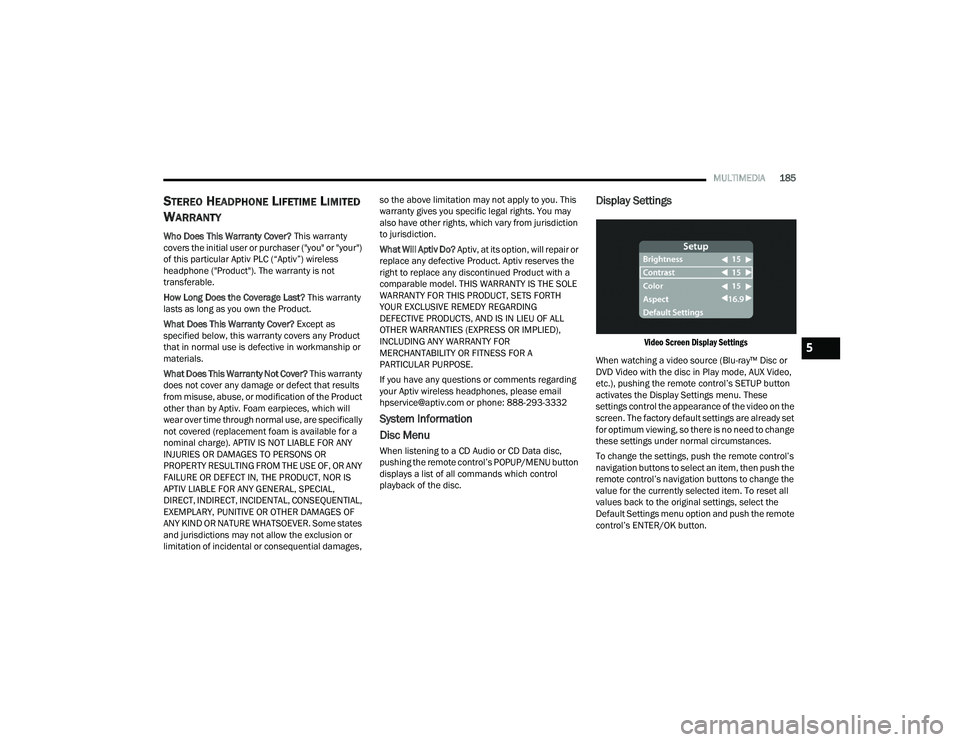
Display Settings
Video Screen Display Settings
When watching a video source (Blu-ray™ Disc or
DVD Video with the disc in Play mode, AUX Video,
etc.), pushing the remote control’s SETUP button
activates the Display Settings menu. These
settings control the appearance of the video on the
screen. The factory default settings are already set
for optimum viewing, so there is no need to change
these settings under normal circumstances.
To change the settings, push the remote control’s
navigation buttons to select an item, then push the
remote control’s navigation buttons to change the
value for the currently selected item. To reset all
values back to the original settings, select the
Default Settings menu option and push the remote
control’s ENTER/OK button.5
21_WD_OM_EN_USC_t.book Page 185
Page 224 of 340
222SAFETY
(Continued)
Cut off battery power to the:
Engine
Electric Motor (if equipped)
Electric power steering
Brake booster
Electric park brake
Automatic transmission gear selector
Horn
Front wiper
Headlamp washer pump
NOTE:After an accident, remember to cycle the ignition to
the STOP (OFF/LOCK) position and remove the key
from the ignition switch to avoid draining the
battery. Carefully check the vehicle for fuel leaks in
the engine compartment and on the ground near
the engine compartment and fuel tank before
resetting the system and starting the engine. If
there are no fuel leaks or damage to the vehicle
electrical devices (e.g. headlights) after an
accident, reset the system by following the
procedure described below. If you have any doubt,
contact an authorized dealer.
Enhanced Accident Response System
Reset Procedure
In order to reset the Enhanced Accident Response
System functions after an event, the ignition switch
must be changed from ignition START or ON/RUN
to ignition OFF. Carefully check the vehicle for fuel
leaks in the engine compartment and on the
ground near the engine compartment and fuel
tank before resetting the system and starting the
engine.
After an accident, if the vehicle will not start after
performing the reset procedure, the vehicle must
be towed to an authorized dealer to be inspected
and to have the Enhanced Accident Response
System reset.
Maintaining Your Air Bag System Event Data Recorder (EDR)
This vehicle is equipped with an event data
recorder (EDR). The main purpose of an EDR is to
record, in certain crash or near crash-like
situations, such as an air bag deployment or hitting
a road obstacle, data that will assist in
understanding how a vehicle’s systems performed.
The EDR is designed to record data related to
WARNING!
Modifications to any part of the air bag system
could cause it to fail when you need it. You
could be injured if the air bag system is not
there to protect you. Do not modify the compo-
nents or wiring, including adding any kind of
badges or stickers to the steering wheel hub
trim cover or the upper passenger side of the
instrument panel. Do not modify the front
fascia/bumper, vehicle body structure, or add
aftermarket side steps or running boards.
It is dangerous to try to repair any part of the
air bag system yourself. Be sure to tell anyone
who works on your vehicle that it has an air
bag system.
Do not attempt to modify any part of your air
bag system. The air bag may inflate acciden -
tally or may not function properly if modifica -
tions are made. Take your vehicle to an
authorized dealer for any air bag system
service. If your seat, including your trim cover
and cushion, needs to be serviced in any way
(including removal or loosening/tightening of
seat attachment bolts), take the vehicle to an
authorized dealer. Only manufacturer
approved seat accessories may be used. If it is
necessary to modify the air bag system for
persons with disabilities, contact an autho -
rized dealer.
WARNING!
21_WD_OM_EN_USC_t.book Page 222
Page 266 of 340
264
SERVICING AND MAINTENANCE
SCHEDULED SERVICING
Your vehicle is equipped with an automatic oil
change indicator system. The oil change indicator
system will remind you that it is time to take your
vehicle in for scheduled maintenance.
Based on engine operation conditions, the oil
change indicator message will illuminate. This
means that service is required for your vehicle.
Operating conditions such as frequent short-trips,
trailer tow, extremely hot or cold ambient
temperatures, and E85 fuel usage will influence
when the “Oil Change Required” message is
displayed. Have your vehicle serviced as soon as
possible, within the next 500 miles (805 km).An authorized dealer will reset the oil change
indicator message after completing the scheduled
oil change.
NOTE:Under no circumstances should oil change
intervals exceed 10,000 miles (16,000 km),
12 months or 350 hours of engine run time,
whichever comes first. The 350 hours of engine
run or idle time is generally only a concern for
fleet customers.
Once A Month Or Before A Long Trip:
Check engine oil level
Check windshield washer fluid level
Check the tire pressure and look for unusual
wear or damage
Check the fluid levels of the coolant reservoir,
brake master cylinder and fill as needed
Check function of all interior and exterior lights
21_WD_OM_EN_USC_t.book Page 264
Page 286 of 340
284SERVICING AND MAINTENANCE
AUTOMATIC TRANSMISSION
Special Additives
The manufacturer strongly recommends against
using any special additives in the transmission.
Automatic Transmission Fluid (ATF) is an
engineered product and its performance may be
impaired by supplemental additives. Therefore, do
not add any fluid additives to the transmission.
Avoid using transmission sealers as they may
adversely affect seals.
Fluid Level Check
The fluid level is preset at the factory and does not
require adjustment under normal operating
conditions. Routine fluid level checks are not
required; therefore the transmission has no
dipstick. An authorized dealer can check your
transmission fluid level using special service tools. If you notice fluid leakage or transmission
malfunction, visit an authorized dealer
immediately to have the transmission fluid level
checked. Operating the vehicle with an improper
fluid level can cause severe transmission damage.
Fluid And Filter Changes
Under normal operating conditions, the fluid
installed at the factory will provide satisfactory
lubrication for the life of the vehicle.
Routine fluid and filter changes are not required.
However, change the fluid and filter if the fluid
becomes contaminated (with water, etc.), or if the
transmission is disassembled for any reason.
To avoid contamination from foreign matter or
moisture, use only new brake fluid or fluid that
has been in a tightly closed container. Keep
the master cylinder reservoir cap secured at
all times. Brake fluid in a open container
absorbs moisture from the air resulting in a
lower boiling point. This may cause it to boil
unexpectedly during hard or prolonged
braking, resulting in sudden brake failure. This
could result in a collision.
Overfilling the brake fluid reservoir can result
in spilling brake fluid on hot engine parts,
causing the brake fluid to catch fire. Brake
fluid can also damage painted and vinyl
surfaces, care should be taken to avoid its
contact with these surfaces.
Do not allow petroleum based fluid to contam
-
inate the brake fluid. Brake seal components
could be damaged, causing partial or
complete brake failure. This could result in a
collision.
WARNING!
CAUTION!
Do not use chemical flushes in your
transmission as the chemicals can damage your
transmission components. Such damage is not
covered by the New Vehicle Limited Warranty.
CAUTION!
If a transmission fluid leak occurs, visit an
authorized dealer immediately. Severe
transmission damage may occur. An authorized
dealer has the proper tools to adjust the fluid
level accurately.
21_WD_OM_EN_USC_t.book Page 284
Page 335 of 340
333
Warning Instrument Cluster Descriptions
.... 93Load Shed Battery Saver Mode....................... 89Load Shed Battery Saver On............................ 89Load Shed Electrical Load Reduction.............. 89Load Shed Intelligent Battery Sensor.............. 89Loading Vehicle............................................. 141Tires.......................................................... 300Locks Child Protection........................................... 26Manual........................................................ 22Power Door.................................................. 23Lubrication, Body........................................... 276Lug Nuts/Bolts.............................................. 317Luggage Carrier............................................... 77
M
Maintenance................................................... 74Maintenance Free Battery............................. 270Maintenance Schedule.................................. 264Malfunction Indicator Light
(Check Engine)....................................... 94, 100ManualService...................................................... 327Memory Feature (Memory Seats).................... 28Memory Seat................................................... 28Memory Seats And Radio................................ 28Methanol....................................................... 319Mirrors............................................................. 42Electric Remote........................................... 44Exterior Folding........................................... 44
Heated......................................................... 44Outside........................................................ 43Rearview......................................42, 43, 243Vanity.......................................................... 43Modifications/AlterationsVehicle......................................................... 10Monitor, Tire Pressure System...................... 201Mopar Parts.................................................. 326Multi-Function Control Lever............................ 48
N
New Vehicle Break-In Period......................... 104
O
Occupant Restraints..................................... 204Octane Rating, Gasoline (Fuel)..................... 318Oil Change Indicator........................................ 85Reset........................................................... 85Oil Filter, Change.......................................... 272Oil Filter, Selection........................................ 272Oil Pressure Light............................................. 93Oil, Engine..................................................... 271Capacity.................................................... 321Checking................................................... 270Dipstick.................................................... 270Disposal................................................... 272Filter......................................................... 272Filter Disposal........................................... 272Identification Logo.................................... 272Materials Added To.................................. 272
Pressure Warning Light................................93Recommendation............................ 271, 321Synthetic................................................... 272Viscosity.................................................... 321Onboard Diagnostic System.............................99Operating Precautions.....................................99Operator ManualOwner's Manual........................................ 327Outside Rearview Mirrors.................................43Overheating, Engine...................................... 258
P
Paint Care..................................................... 313Parking Brake............................................... 105ParkSense System, Rear............................... 130Passive Entry....................................................23Pets............................................................... 239Pinch Protection...............................................74Placard, Tire And Loading Information.......... 300PowerBrakes...................................................... 317Distribution Center (Fuses)....................... 287Door Locks...................................................23Inverter........................................................70Liftgate........................................................75Mirrors.........................................................44Outlet (Auxiliary Electrical Outlet).................68Seats...........................................................35Steering........................................... 117, 323Sunroof........................................................73
11
21_WD_OM_EN_USC_t.book Page 333
Page 338 of 340
336 Rotation
.................................................... 312Safety.............................................. 295, 303Sizes.......................................................... 296Snow Tires................................................. 307Spare Tires............................. 249, 307, 308Spinning.................................................... 305Trailer Towing............................................ 148Tread Wear Indicators............................... 305Wheel Nut Torque..................................... 317To Open Hood.................................................. 74Tongue Weight/Trailer Weight....................... 147Tow N Go....................................................... 115Towing................................................. 142, 261Disabled Vehicle........................................ 261Guide......................................................... 145Recreational.............................................. 153Weight....................................................... 145Towing Behind A Motorhome......................... 153Traction Control............................................. 194Trailer Sway Control (TSC)............................. 195Trailer Towing................................................ 142Hitches...................................................... 145Minimum Requirements............................ 147Tips........................................................... 152Trailer And Tongue Weight........................ 147Wiring........................................................ 151Trailer Towing Guide...................................... 145Trailer Weight................................................ 145Transfer Case................................................ 285Electronically Shifted................................. 112
Fluid......................................................... 323Maintenance............................................ 285Transmission................................................ 108Automatic........................................ 108, 284Fluid......................................................... 323Maintenance............................................ 284Shifting..................................................... 106Transporting Pets.......................................... 239Tread Wear Indicators.................................. 305Turn Signals............................................98, 294
U
Uconnect SettingsCustomer Programmable Features
...... 23, 26Passive Entry Programming.................. 23, 26Uniform Tire Quality Grades.......................... 312Unleaded Gasoline....................................... 318Untwisting Procedure, Seat Belt................... 208
V
Vanity Mirrors.................................................. 43Vehicle Identification Number (VIN).............. 317Vehicle Loading................................... 141, 301Vehicle Maintenance.................................... 271Vehicle Modifications/Alterations.................... 10Vehicle Security System................................... 21Vehicle Storage.......................................63, 313Voice Command............................................... 41Voice Recognition System (VR)........................ 41
W
Warning Flashers, Hazard............................. 243Warning lightRed..............................................................91Yellow..........................................................94Warning Lights
(Instrument Cluster Descriptions)....................95Warning Lights and Messages.........................91Warnings, Roll Over............................................ 9Warranty Information.................................... 326Washers, Windshield............................. 53, 270Washing Vehicle............................................ 314Wheel And Wheel Tire Care........................... 309Wheel And Wheel Tire Trim........................... 309Wind Buffeting.................................................73Window Fogging...............................................63Windows..........................................................71Power...........................................................71Reset Auto-Up..............................................72Windshield Defroster.................................... 240Windshield Washers.............................. 53, 270Fluid.......................................................... 270Windshield Wiper Blades.............................. 276Windshield Wipers...........................................53Wipers Blade Replacement........................... 276Wipers, Intermittent.........................................53Wipers, Rain Sensitive.....................................54Wireless Charging Pad.....................................71
21_WD_OM_EN_USC_t.book Page 336