child seat DODGE DURANGO 2021 Owners Manual
[x] Cancel search | Manufacturer: DODGE, Model Year: 2021, Model line: DURANGO, Model: DODGE DURANGO 2021Pages: 340, PDF Size: 20.38 MB
Page 4 of 340
2
INTRODUCTION
SYMBOLS KEY ...........................................................9
ROLLOVER WARNING ............................................. 9
VEHICLE MODIFICATIONS/ALTERATIONS .......... 10
SYMBOL GLOSSARY.............................................. 10
GETTING TO KNOW YOUR VEHICLE
KEYS ........................................................................ 14 Key Fob .............................................................14
SENTRY KEY .......................................................... 16
IGNITION SWITCH .................................................. 17
Keyless Enter ‘n Go™ Ignition .........................17
REMOTE START — IF EQUIPPED .......................... 18
How To Use Remote Start ................................19
To Exit Remote Start Mode ..............................19
Remote Start Front Defrost Activation —
If Equipped........................................................20
Remote Start Comfort Systems —
If Equipped........................................................20
Remote Start Windshield Wiper De–Icer
Activation — If Equipped ..................................21
Remote Start Cancel Message —
If Equipped........................................................21
VEHICLE SECURITY SYSTEM — IF EQUIPPED ..... 21
To Arm The System ..........................................21
To Disarm The System .....................................21
Rearming Of The System .................................22
Security System Manual Override ...................22
Tamper Alert .....................................................22 DOORS ....................................................................22
Manual Door Locks ..........................................22
Power Door Locks ............................................23
Keyless Enter ‘n Go™ — Passive Entry ...........23
Automatic Unlock On Exit Feature —
If Equipped........................................................26
Automatic Door Locks — If Equipped ..............26
Child-Protection Door Lock System —
Rear Doors .......................................................26
STEERING WHEEL ..................................................27
Manual Tilt/Telescoping Steering
Column — If Equipped .....................................27
Power Tilt/Telescoping Steering
Column — If Equipped ......................................27
Heated Steering Wheel — If Equipped ...........27
DRIVER MEMORY SETTINGS — IF EQUIPPED .....28
Programming The Memory Feature ................28
Linking And Unlinking The Remote
Keyless Entry Key Fob To Memory ..................29
Memory Position Recall ...................................29
SEATS ..................................................................29
Manual Adjustment (Front Seats) —
If Equipped........................................................30
Manual Adjustment (Rear Seats) ....................31
Power Adjustment (Front Seats) —
If Equipped .......................................................35
Power Passenger Seat Adjustment —
If Equipped........................................................36
Heated Seats — If Equipped ...........................37
Front Ventilated Seats — If Equipped .............38
Head Restraints .............................................39 UCONNECT VOICE RECOGNITION ....................... 41
Introducing Voice Recognition ........................ 41
Basic Voice Commands ................................... 41
Get Started .......................................................41
Additional Information ..................................... 42
MIRRORS ............................................................... 42
Inside Rearview Mirror..................................... 42
Illuminated Vanity Mirrors .............................. 43
Outside Mirrors ................................................ 43
Outside Automatic Dimming Mirrors —
If Equipped .......................................................44
Power Mirrors .................................................. 44
Heated Mirrors — If Equipped ......................... 44
Tilt Side Mirrors In Reverse — If Equipped ..... 44
UNIVERSAL GARAGE DOOR OPENER
(HOMELINK®) ....................................................... 45
Before You Begin Programming
HomeLink® ...................................................... 45
Erasing All The HomeLink® Channels ............ 45
Identifying Whether You Have A Rolling
Code Or Non-Rolling Code Device ................... 45
Programming HomeLink® To A Garage
Door Opener ..................................................... 46
Programming HomeLink® To A
Miscellaneous Device ...................................... 47
Reprogramming A Single HomeLink®
Button ............................................................... 47
Canadian/Gate Operator Programming ......... 47
21_WD_OM_EN_USC_t.book Page 2
Page 7 of 340
5
TRAILER TOWING ................................................ 142 Common Towing Definitions ......................... 142Trailer Hitch Classification ............................ 145
Trailer Towing Weights
(Maximum Trailer Weight Ratings) ............ 145Trailer Hitch Receiver Cover Removal —
If Equipped..................................................... 146
Trailer And Tongue Weight ........................... 147
Towing Requirements .................................. 147
Towing Tips ................................................... 152
RECREATIONAL TOWING
(BEHIND MOTORHOME) ...................................... 153
Towing This Vehicle Behind Another
Vehicle............................................................ 153
Recreational Towing — Rear-Wheel
Drive Models.................................................. 153
Recreational Towing — All-Wheel Drive
Models (Single-Speed Transfer Case).......... 154
Recreational Towing — All-Wheel Drive
Models (Two-Speed Transfer Case) ............. 154
DRIVING TIPS ....................................................... 156
On-Road Driving Tips..................................... 156
Off-Road Driving Tips..................................... 157
MULTIMEDIA
UCONNECT SYSTEMS ........................................ 158
CYBERSECURITY ................................................ 158
UCONNECT SETTINGS ......................................... 159Customer Programmable Features.............. 159
STEERING WHEEL AUDIO CONTROLS .............. 178
Radio Operation ............................................ 178
Media Mode................................................... 178
UCONNECT REAR SEAT ENTERTAINMENT
(RSE) SYSTEM — IF EQUIPPED .......................... 178
Getting Started .............................................. 178
Dual Video Screen......................................... 179
Play A Blu-ray™ Disc...................................... 180
Play Video Games ......................................... 182
Important Notes For Dual Video Screen
System ........................................................... 182
Blu-ray™ Disc Player Remote Control .......... 183
Headphones Operation................................. 184
Controls.......................................................... 184Replacing The Headphone Batteries ........... 184Accessibility — If Equipped ........................... 184Stereo Headphone Lifetime Limited
Warranty ........................................................ 185
RADIO OPERATION AND MOBILE PHONES ..... 188
Regulatory And Safety Information .............. 188
SAFETY
SAFETY FEATURES .............................................. 189 Anti-Lock Brake System (ABS) ..................... 189Electronic Brake Control (EBC) System ...... 190
AUXILIARY DRIVING SYSTEMS .......................... 195
Blind Spot Monitoring (BSM) —
If Equipped .................................................... 195
Forward Collision Warning (FCW) With
Mitigation ....................................................... 199Tire Pressure Monitoring System
(TPMS) ........................................................... 201
OCCUPANT RESTRAINT SYSTEMS ................... 204
Occupant Restraint Systems Features ........ 204Important Safety Precautions ...................... 204
Seat Belt Systems ........................................ 205
Supplemental Restraint Systems (SRS) ...... 211Child Restraints ........................................... 223
SAFETY TIPS ...................................................... 239
Transporting Passengers.............................. 239
Transporting Pets ....................................... 239
Safety Checks You Should Make
Inside The Vehicle ........................................ 239
Periodic Safety Checks You Should
Make Outside The Vehicle ............................ 241
Exhaust Gas................................................... 241
Carbon Monoxide Warnings ....................... 242
21_WD_OM_EN_USC_t.book Page 5
Page 28 of 340
26GETTING TO KNOW YOUR VEHICLE
NOTE:
After pushing the door handle button, you must
wait two seconds before you can lock or unlock
the doors, using either Passive Entry door
handle or door handle button. This is done to
allow you to check if the vehicle is locked by
pulling the door handle without the vehicle
unlocking.
The Passive Entry system will not operate if the
key fob battery is depleted.
Close proximity to mobile devices can affect the
Passive Entry system.
The vehicle doors can also be locked by using the
key fob lock button or the lock button located on
the vehicle’s interior door panel Ú page 327.
AUTOMATIC UNLOCK ON EXIT
F
EATURE — IF EQUIPPED
If Auto Unlock is enabled within Uconnect Settings
Ú page 159, this feature will unlock all the doors
when any door is opened if the vehicle is in PARK.
AUTOMATIC DOOR LOCKS —
I
F EQUIPPED
When enabled, the door locks will lock
automatically when the vehicle’s speed exceeds
15 mph (24 km/h). Auto door lock feature is
enabled/disabled within Uconnect Settings
Ú page 159.
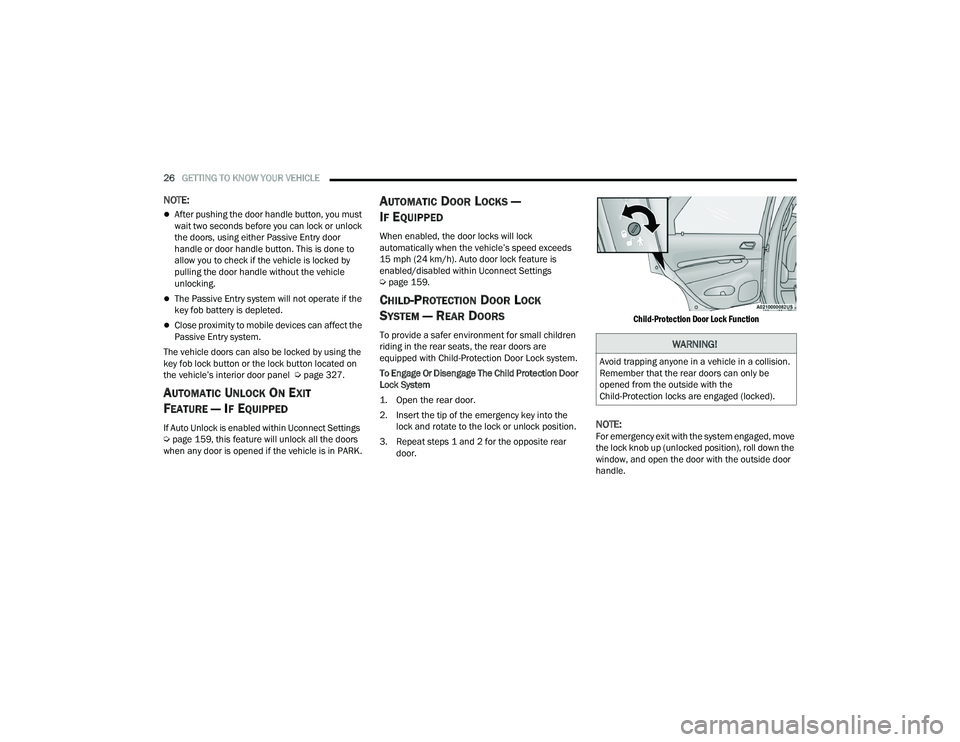
CHILD-PROTECTION DOOR LOCK
S
YSTEM — REAR DOORS
To provide a safer environment for small children
riding in the rear seats, the rear doors are
equipped with Child-Protection Door Lock system.
To Engage Or Disengage The Child Protection Door
Lock System
1. Open the rear door.
2. Insert the tip of the emergency key into the
lock and rotate to the lock or unlock position.
3. Repeat steps 1 and 2 for the opposite rear door.
Child-Protection Door Lock Function
NOTE:For emergency exit with the system engaged, move
the lock knob up (unlocked position), roll down the
window, and open the door with the outside door
handle.
WARNING!
Avoid trapping anyone in a vehicle in a collision.
Remember that the rear doors can only be
opened from the outside with the
Child-Protection locks are engaged (locked).
21_WD_OM_EN_USC_t.book Page 26
Page 35 of 340
GETTING TO KNOW YOUR VEHICLE33
TO RAISE REAR SEAT
Fold the seat rearward to its original position, and
lock it into place. Then lift the head restraint until it
locks into place.
Rear Captain’s Chairs — If Equipped
SECOND ROW CAPTAIN’S CHAIRS FOLD FLAT
SEATS
The second row seats can be folded flat to carry
cargo.
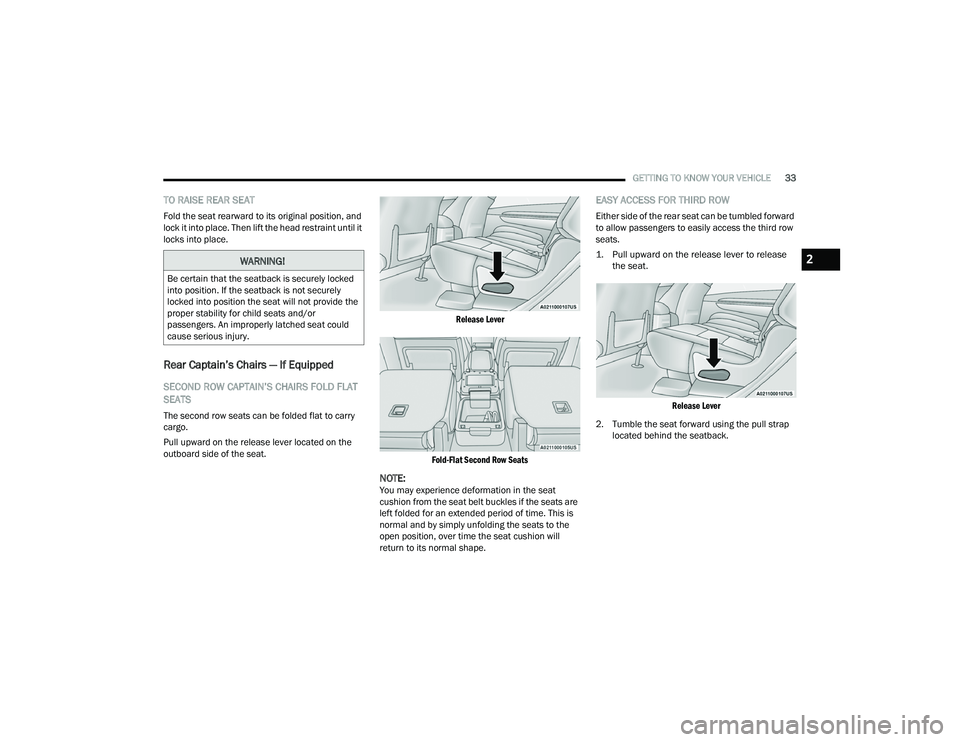
Pull upward on the release lever located on the
outboard side of the seat.
Release Lever
Fold-Flat Second Row Seats
NOTE:You may experience deformation in the seat
cushion from the seat belt buckles if the seats are
left folded for an extended period of time. This is
normal and by simply unfolding the seats to the
open position, over time the seat cushion will
return to its normal shape.
EASY ACCESS FOR THIRD ROW
Either side of the rear seat can be tumbled forward
to allow passengers to easily access the third row
seats.
1. Pull upward on the release lever to release the seat.
Release Lever
2. Tumble the seat forward using the pull strap located behind the seatback.
WARNING!
Be certain that the seatback is securely locked
into position. If the seatback is not securely
locked into position the seat will not provide the
proper stability for child seats and/or
passengers. An improperly latched seat could
cause serious injury.
2
21_WD_OM_EN_USC_t.book Page 33
Page 36 of 340
34GETTING TO KNOW YOUR VEHICLE
Tumble Strap
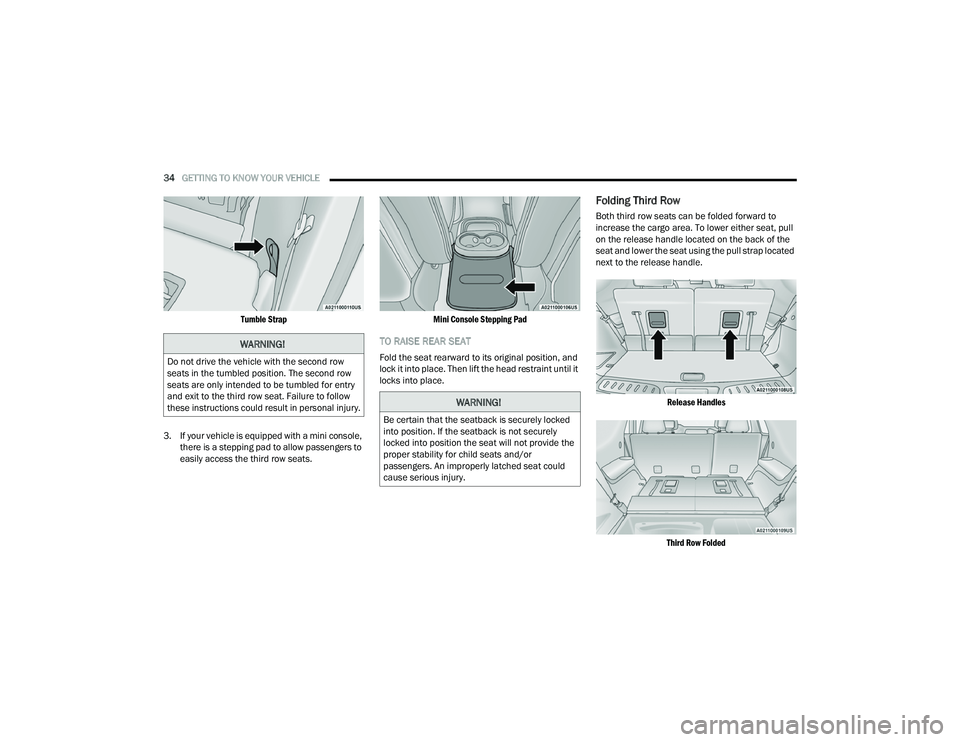
3. If your vehicle is equipped with a mini console, there is a stepping pad to allow passengers to
easily access the third row seats.
Mini Console Stepping Pad
TO RAISE REAR SEAT
Fold the seat rearward to its original position, and
lock it into place. Then lift the head restraint until it
locks into place.
Folding Third Row
Both third row seats can be folded forward to
increase the cargo area. To lower either seat, pull
on the release handle located on the back of the
seat and lower the seat using the pull strap located
next to the release handle.
Release Handles
Third Row Folded
WARNING!
Do not drive the vehicle with the second row
seats in the tumbled position. The second row
seats are only intended to be tumbled for entry
and exit to the third row seat. Failure to follow
these instructions could result in personal injury.
WARNING!
Be certain that the seatback is securely locked
into position. If the seatback is not securely
locked into position the seat will not provide the
proper stability for child seats and/or
passengers. An improperly latched seat could
cause serious injury.
21_WD_OM_EN_USC_t.book Page 34
Page 37 of 340
GETTING TO KNOW YOUR VEHICLE35
NOTE:The second row seats must be in their full upright
position, folded flat or tumbled when folding the
third row seats.
To raise the seat, pull the seat toward you using
the strap located on the back of the seat. Then lift
the head restraint until it locks into place.
NOTE:You may experience deformation in the seat
cushion from the seat belt buckles if the seats are
left folded for an extended period of time. This is
normal and by simply unfolding the seats to the
open position, over time the seat cushion will
return to its normal shape.
POWER ADJUSTMENT (FRONT SEATS) —
I
F EQUIPPED
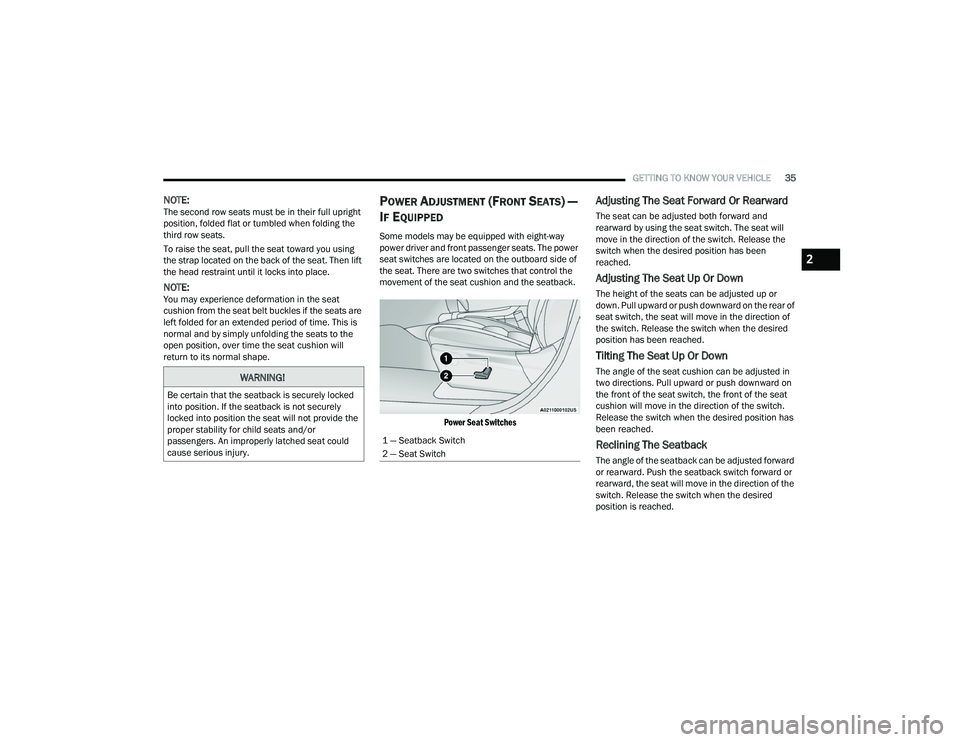
Some models may be equipped with eight-way
power driver and front passenger seats. The power
seat switches are located on the outboard side of
the seat. There are two switches that control the
movement of the seat cushion and the seatback.
Power Seat Switches
Adjusting The Seat Forward Or Rearward
The seat can be adjusted both forward and
rearward by using the seat switch. The seat will
move in the direction of the switch. Release the
switch when the desired position has been
reached.
Adjusting The Seat Up Or Down
The height of the seats can be adjusted up or
down. Pull upward or push downward on the rear of
seat switch, the seat will move in the direction of
the switch. Release the switch when the desired
position has been reached.
Tilting The Seat Up Or Down
The angle of the seat cushion can be adjusted in
two directions. Pull upward or push downward on
the front of the seat switch, the front of the seat
cushion will move in the direction of the switch.
Release the switch when the desired position has
been reached.
Reclining The Seatback
The angle of the seatback can be adjusted forward
or rearward. Push the seatback switch forward or
rearward, the seat will move in the direction of the
switch. Release the switch when the desired
position is reached.
WARNING!
Be certain that the seatback is securely locked
into position. If the seatback is not securely
locked into position the seat will not provide the
proper stability for child seats and/or
passengers. An improperly latched seat could
cause serious injury.
1 — Seatback Switch
2 — Seat Switch
2
21_WD_OM_EN_USC_t.book Page 35
Page 42 of 340
40GETTING TO KNOW YOUR VEHICLE
Head Restraints — Rear Seats
The head restraints on the outboard seats are not
adjustable. They automatically fold forward when
the rear seat is folded to a load floor position, but
do not return to their normal position when the rear
seat is raised. After returning either seat to its
upright position, raise the head restraint until it
locks in place. The outboard head restraints are
not removable.
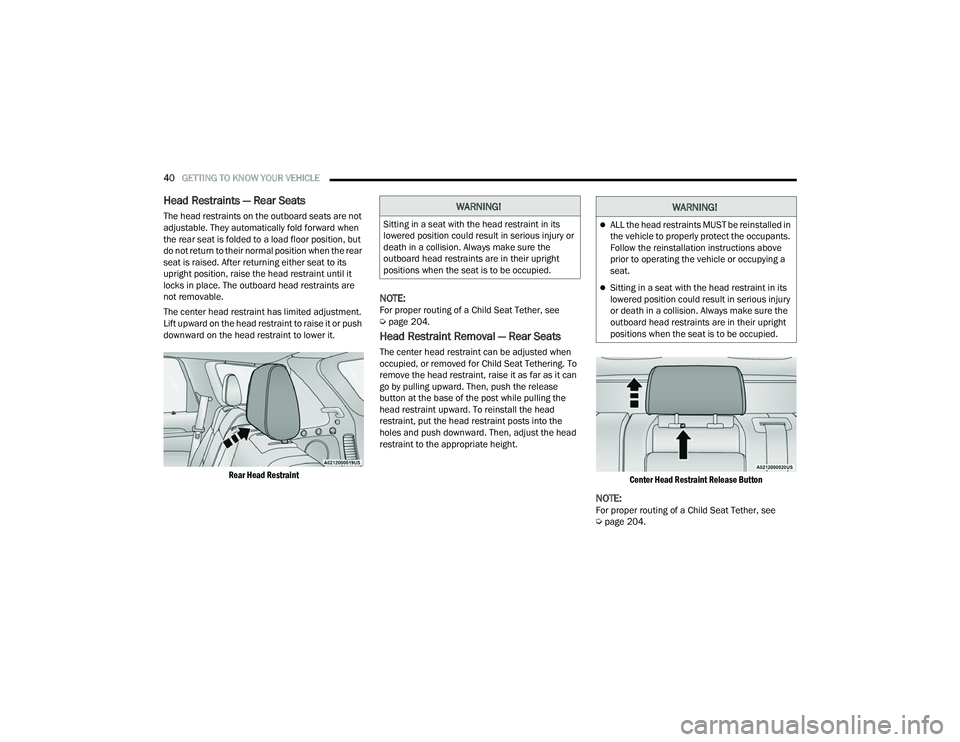
The center head restraint has limited adjustment.
Lift upward on the head restraint to raise it or push
downward on the head restraint to lower it.
Rear Head Restraint
NOTE:For proper routing of a Child Seat Tether, see
Úpage 204.
Head Restraint Removal — Rear Seats
The center head restraint can be adjusted when
occupied, or removed for Child Seat Tethering. To
remove the head restraint, raise it as far as it can
go by pulling upward. Then, push the release
button at the base of the post while pulling the
head restraint upward. To reinstall the head
restraint, put the head restraint posts into the
holes and push downward. Then, adjust the head
restraint to the appropriate height.
Center Head Restraint Release Button
NOTE:For proper routing of a Child Seat Tether, see
Úpage 204.
WARNING!
Sitting in a seat with the head restraint in its
lowered position could result in serious injury or
death in a collision. Always make sure the
outboard head restraints are in their upright
positions when the seat is to be occupied.
WARNING!
ALL the head restraints MUST be reinstalled in
the vehicle to properly protect the occupants.
Follow the reinstallation instructions above
prior to operating the vehicle or occupying a
seat.
Sitting in a seat with the head restraint in its
lowered position could result in serious injury
or death in a collision. Always make sure the
outboard head restraints are in their upright
positions when the seat is to be occupied.
21_WD_OM_EN_USC_t.book Page 40
Page 75 of 340
GETTING TO KNOW YOUR VEHICLE73
WIND BUFFETING
Wind buffeting can be described as the perception
of pressure on the ears or a helicopter-type sound
in the ears. Your vehicle may exhibit wind buffeting
with the windows down, or the sunroof (if
equipped) in certain open or partially open
positions. This is a normal occurrence and can be
minimized. If the buffeting occurs with the rear
windows open, open the front and rear windows
together to minimize the buffeting. If the buffeting
occurs with the sunroof open, adjust the sunroof
opening to minimize the buffeting or open any
window.
POWER SUNROOF — IF EQUIPPED
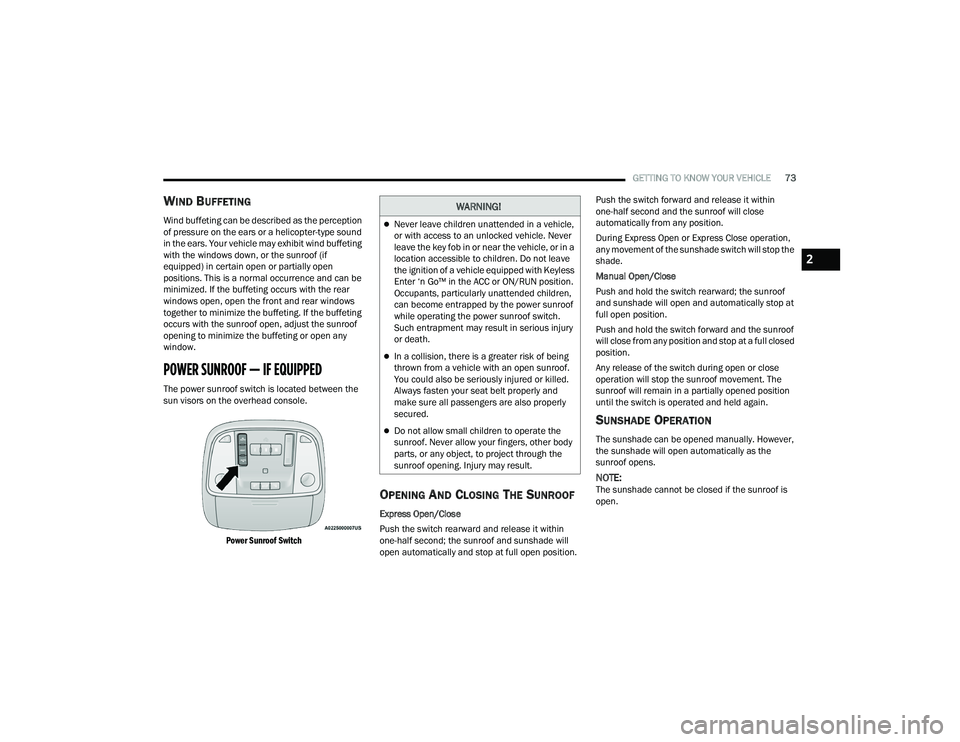
The power sunroof switch is located between the
sun visors on the overhead console.
Power Sunroof Switch
OPENING AND CLOSING THE SUNROOF
Express Open/Close
Push the switch rearward and release it within
one-half second; the sunroof and sunshade will
open automatically and stop at full open position. Push the switch forward and release it within
one-half second and the sunroof will close
automatically from any position.
During Express Open or Express Close operation,
any movement of the sunshade switch will stop the
shade.
Manual Open/Close
Push and hold the switch rearward; the sunroof
and sunshade will open and automatically stop at
full open position.
Push and hold the switch forward and the sunroof
will close from any position and stop at a full closed
position.
Any release of the switch during open or close
operation will stop the sunroof movement. The
sunroof will remain in a partially opened position
until the switch is operated and held again.
SUNSHADE OPERATION
The sunshade can be opened manually. However,
the sunshade will open automatically as the
sunroof opens.
NOTE:The sunshade cannot be closed if the sunroof is
open.
WARNING!
Never leave children unattended in a vehicle,
or with access to an unlocked vehicle. Never
leave the key fob in or near the vehicle, or in a
location accessible to children. Do not leave
the ignition of a vehicle equipped with Keyless
Enter ‘n Go™ in the ACC or ON/RUN position.
Occupants, particularly unattended children,
can become entrapped by the power sunroof
while operating the power sunroof switch.
Such entrapment may result in serious injury
or death.
In a collision, there is a greater risk of being
thrown from a vehicle with an open sunroof.
You could also be seriously injured or killed.
Always fasten your seat belt properly and
make sure all passengers are also properly
secured.
Do not allow small children to operate the
sunroof. Never allow your fingers, other body
parts, or any object, to project through the
sunroof opening. Injury may result.
2
21_WD_OM_EN_USC_t.book Page 73
Page 79 of 340
GETTING TO KNOW YOUR VEHICLE77
(Continued)
(Continued)
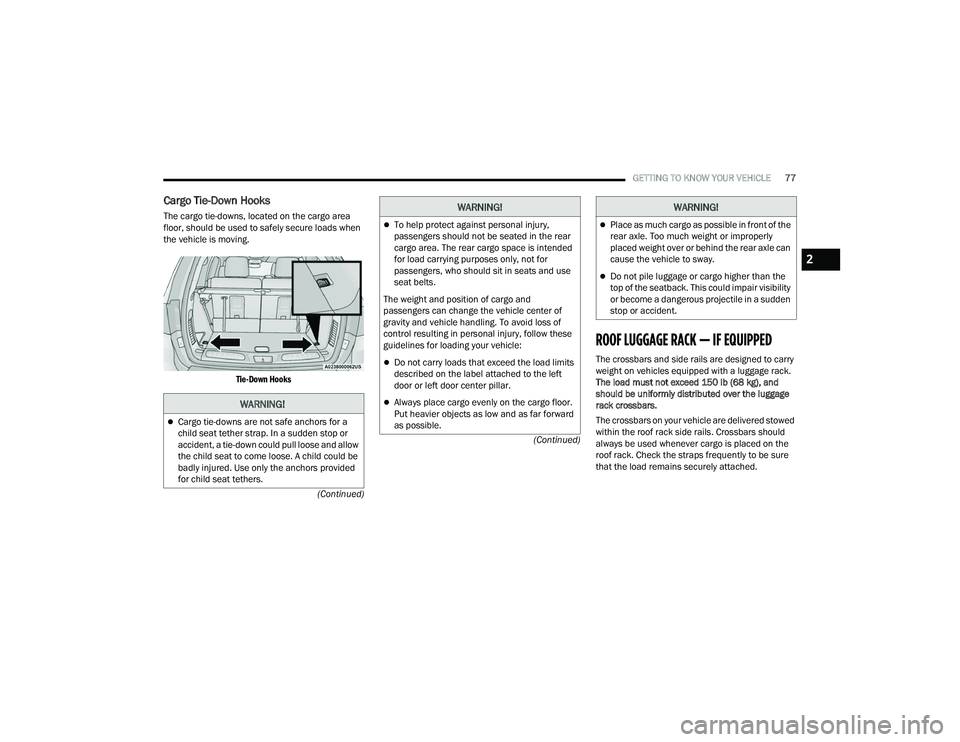
Cargo Tie-Down Hooks
The cargo tie-downs, located on the cargo area
floor, should be used to safely secure loads when
the vehicle is moving.
Tie-Down Hooks
ROOF LUGGAGE RACK — IF EQUIPPED
The crossbars and side rails are designed to carry
weight on vehicles equipped with a luggage rack.
The load must not exceed 150 lb (68 kg), and
should be uniformly distributed over the luggage
rack crossbars.
The crossbars on your vehicle are delivered stowed
within the roof rack side rails. Crossbars should
always be used whenever cargo is placed on the
roof rack. Check the straps frequently to be sure
that the load remains securely attached.
WARNING!
Cargo tie-downs are not safe anchors for a
child seat tether strap. In a sudden stop or
accident, a tie-down could pull loose and allow
the child seat to come loose. A child could be
badly injured. Use only the anchors provided
for child seat tethers.
To help protect against personal injury,
passengers should not be seated in the rear
cargo area. The rear cargo space is intended
for load carrying purposes only, not for
passengers, who should sit in seats and use
seat belts.
The weight and position of cargo and
passengers can change the vehicle center of
gravity and vehicle handling. To avoid loss of
control resulting in personal injury, follow these
guidelines for loading your vehicle:
Do not carry loads that exceed the load limits
described on the label attached to the left
door or left door center pillar.
Always place cargo evenly on the cargo floor.
Put heavier objects as low and as far forward
as possible.
WARNING!
Place as much cargo as possible in front of the
rear axle. Too much weight or improperly
placed weight over or behind the rear axle can
cause the vehicle to sway.
Do not pile luggage or cargo higher than the
top of the seatback. This could impair visibility
or become a dangerous projectile in a sudden
stop or accident.
WARNING!
2
21_WD_OM_EN_USC_t.book Page 77
Page 103 of 340
101
(Continued)
(Continued)
STARTING AND OPERATING
STARTING THE ENGINE
Before starting your vehicle, adjust your seat,
adjust the inside and outside mirrors, fasten your
seat belt, and if present, instruct all other
occupants to buckle their seat belts.
AUTOMATIC TRANSMISSION
The gear selector must be in the NEUTRAL (N) or
PARK (P) position before you can start the engine.
Apply the brakes before shifting into any driving
gear.
NORMAL STARTING
To Turn On The Engine Using The ENGINE START/
STOP Button
1. The transmission must be in PARK (P).
2. Press and hold the brake pedal while pushing
the ENGINE START/STOP button once.
3. The system starts the vehicle. If the vehicle fails to start, the starter will disengage
automatically after 10 seconds.
4. If you wish to stop the cranking of the engine prior to the engine starting, push the ENGINE
START/STOP button again.
WARNING!
Before exiting a vehicle, always come to a
complete stop, then shift the automatic trans -
mission into PARK and apply the parking
brake.
Always make sure the keyless ignition node is
in the OFF mode, key fob is removed from the
vehicle and vehicle is locked.
Never leave children alone in a vehicle, or with
access to an unlocked vehicle. Leaving chil -
dren in a vehicle unattended is dangerous for
a number of reasons. A child or others could
be seriously or fatally injured. Children should
be warned not to touch the parking brake,
brake pedal or the gear selector.
Do not leave the key fob in or near the vehicle,
or in a location accessible to children, and do
not leave the ignition of a vehicle equipped
with Keyless Enter ‘n Go™ in the ACC or
ON/RUN mode. A child could operate power
windows, other controls, or move the vehicle.
Do not leave children or animals inside parked
vehicles in hot weather. Interior heat build-up
may cause serious injury or death.
CAUTION!
Damage to the transmission may occur if the
following precautions are not observed:
Do not shift from REVERSE (R), PARK, or
NEUTRAL into any forward gear when the
engine is above idle speed.
WARNING!
Shift into or out of PARK or REVERSE only after
the vehicle has come to a complete stop and
the engine is at idle speed.
Before shifting into any gear, make sure your
foot is firmly on the brake pedal.
CAUTION!
4
21_WD_OM_EN_USC_t.book Page 101