cruise control DODGE DURANGO 2022 Owners Manual
[x] Cancel search | Manufacturer: DODGE, Model Year: 2022, Model line: DURANGO, Model: DODGE DURANGO 2022Pages: 332, PDF Size: 19.82 MB
Page 7 of 332
5
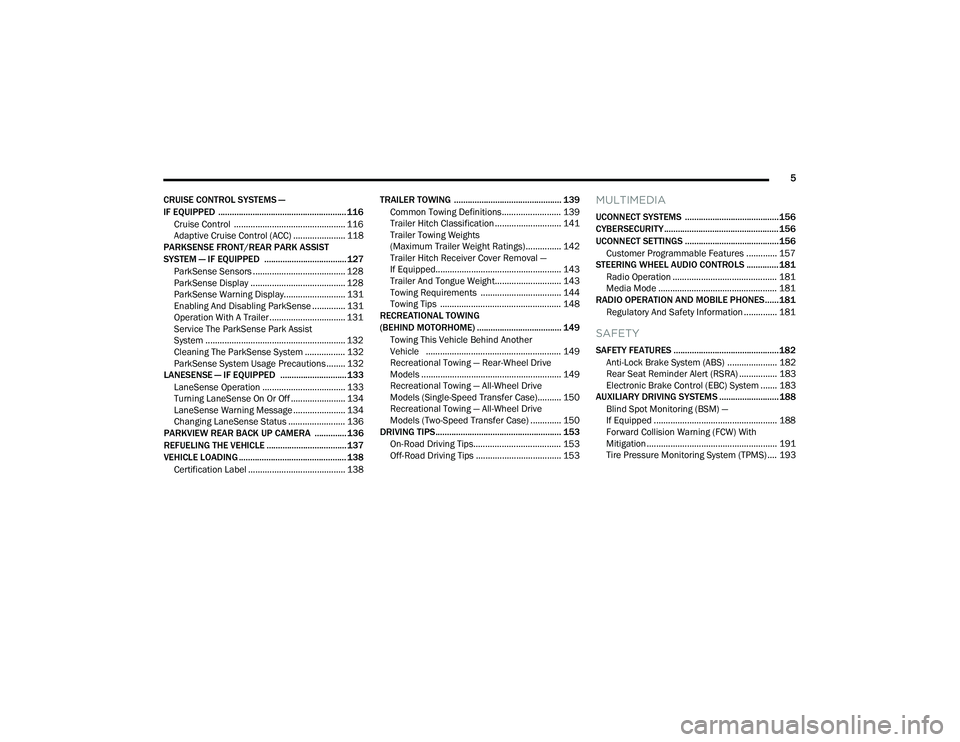
CRUISE CONTROL SYSTEMS —
IF EQUIPPED ........................................................ 116 Cruise Control ............................................... 116
Adaptive Cruise Control (ACC) ...................... 118
PARKSENSE FRONT/REAR PARK ASSIST
SYSTEM — IF EQUIPPED .................................... 127
ParkSense Sensors ....................................... 128
ParkSense Display ........................................ 128
ParkSense Warning Display.......................... 131
Enabling And Disabling ParkSense .............. 131
Operation With A Trailer ................................ 131
Service The ParkSense Park Assist
System ........................................................... 132Cleaning The ParkSense System ................. 132ParkSense System Usage Precautions ........ 132
LANESENSE — IF EQUIPPED ............................. 133
LaneSense Operation ................................... 133Turning LaneSense On Or Off ....................... 134
LaneSense Warning Message ...................... 134Changing LaneSense Status ........................ 136
PARKVIEW REAR BACK UP CAMERA .............. 136
REFUELING THE VEHICLE ................................... 137
VEHICLE LOADING ............................................... 138
Certification Label ......................................... 138 TRAILER TOWING ............................................... 139
Common Towing Definitions......................... 139
Trailer Hitch Classification ............................ 141
Trailer Towing Weights
(Maximum Trailer Weight Ratings)............... 142
Trailer Hitch Receiver Cover Removal —
If Equipped..................................................... 143Trailer And Tongue Weight............................ 143
Towing Requirements .................................. 144
Towing Tips ................................................... 148
RECREATIONAL TOWING
(BEHIND MOTORHOME) ..................................... 149
Towing This Vehicle Behind Another
Vehicle ......................................................... 149
Recreational Towing — Rear-Wheel Drive
Models ........................................................... 149
Recreational Towing — All-Wheel Drive
Models (Single-Speed Transfer Case).......... 150
Recreational Towing — All-Wheel Drive
Models (Two-Speed Transfer Case) ............. 150
DRIVING TIPS ....................................................... 153
On-Road Driving Tips..................................... 153
Off-Road Driving Tips .................................... 153
MULTIMEDIA
UCONNECT SYSTEMS ......................................... 156
CYBERSECURITY .................................................. 156
UCONNECT SETTINGS ......................................... 156 Customer Programmable Features ............. 157
STEERING WHEEL AUDIO CONTROLS .............. 181
Radio Operation ............................................ 181
Media Mode .................................................. 181
RADIO OPERATION AND MOBILE PHONES...... 181
Regulatory And Safety Information .............. 181
SAFETY
SAFETY FEATURES .............................................. 182Anti-Lock Brake System (ABS) ..................... 182Rear Seat Reminder Alert (RSRA) ................ 183Electronic Brake Control (EBC) System ....... 183
AUXILIARY DRIVING SYSTEMS .......................... 188
Blind Spot Monitoring (BSM) —
If Equipped .................................................... 188
Forward Collision Warning (FCW) With
Mitigation ....................................................... 191Tire Pressure Monitoring System (TPMS) .... 193
22_WD_OM_EN_USC_t.book Page 5
Page 13 of 332
11
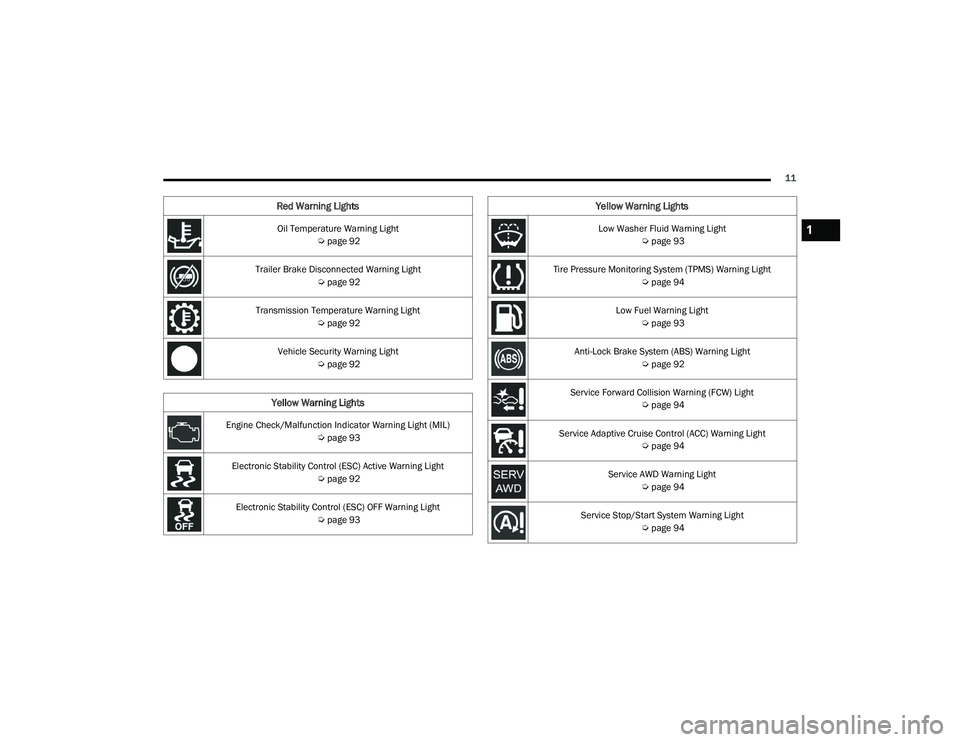
Oil Temperature Warning Light Úpage 92
Trailer Brake Disconnected Warning Light Úpage 92
Transmission Temperature Warning Light Úpage 92
Vehicle Security Warning Light Úpage 92
Yellow Warning Lights
Engine Check/Malfunction Indicator Warning Light (MIL)
Úpage 93
Electronic Stability Control (ESC) Active Warning Light Úpage 92
Electronic Stability Control (ESC) OFF Warning Light Úpage 93
Red Warning Lights
Low Washer Fluid Warning Light
Úpage 93
Tire Pressure Monitoring System (TPMS) Warning Light Úpage 94
Low Fuel Warning Light Úpage 93
Anti-Lock Brake System (ABS) Warning Light Úpage 92
Service Forward Collision Warning (FCW) Light Úpage 94
Service Adaptive Cruise Control (ACC) Warning Light Úpage 94
Service AWD Warning Light Úpage 94
Service Stop/Start System Warning Light Úpage 94
Yellow Warning Lights
1
22_WD_OM_EN_USC_t.book Page 11
Page 14 of 332
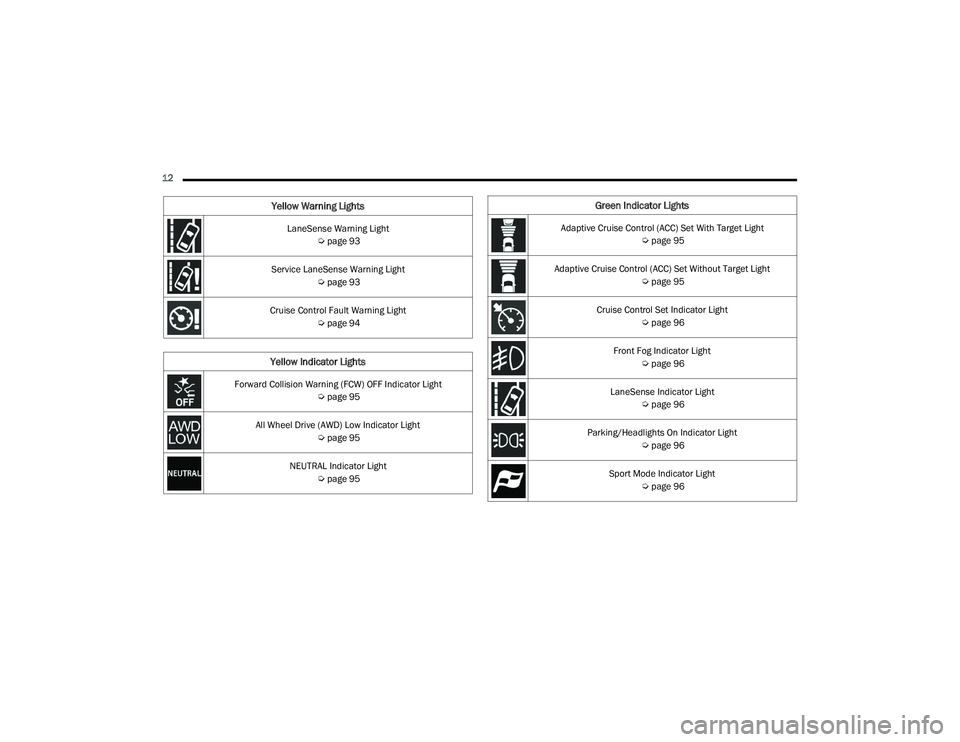
12 LaneSense Warning Light Úpage 93
Service LaneSense Warning Light Úpage 93
Cruise Control Fault Warning Light Úpage 94
Yellow Indicator Lights
Forward Collision Warning (FCW) OFF Indicator Light
Úpage 95
All Wheel Drive (AWD) Low Indicator Light Úpage 95
NEUTRAL Indicator Light Úpage 95
Yellow Warning LightsGreen Indicator Lights
Adaptive Cruise Control (ACC) Set With Target Light
Úpage 95
Adaptive Cruise Control (ACC) Set Without Target Light Úpage 95
Cruise Control Set Indicator Light Úpage 96
Front Fog Indicator Light Úpage 96
LaneSense Indicator Light Úpage 96
Parking/Headlights On Indicator Light Úpage 96
Sport Mode Indicator Light Úpage 96
22_WD_OM_EN_USC_t.book Page 12
Page 15 of 332
13
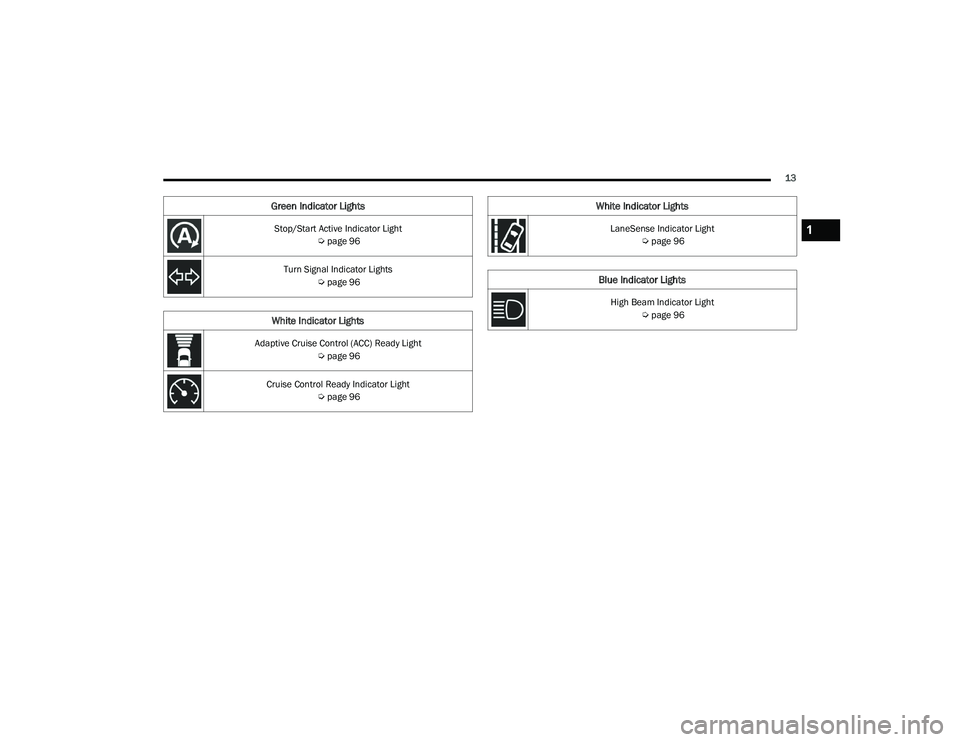
Stop/Start Active Indicator Light Úpage 96
Turn Signal Indicator Lights Úpage 96
White Indicator Lights
Adaptive Cruise Control (ACC) Ready Light
Úpage 96
Cruise Control Ready Indicator Light Úpage 96
Green Indicator Lights
LaneSense Indicator Light
Úpage 96
Blue Indicator Lights
High Beam Indicator Light
Úpage 96
White Indicator Lights
1
22_WD_OM_EN_USC_t.book Page 13
Page 87 of 332
GETTING TO KNOW YOUR INSTRUMENT PANEL85
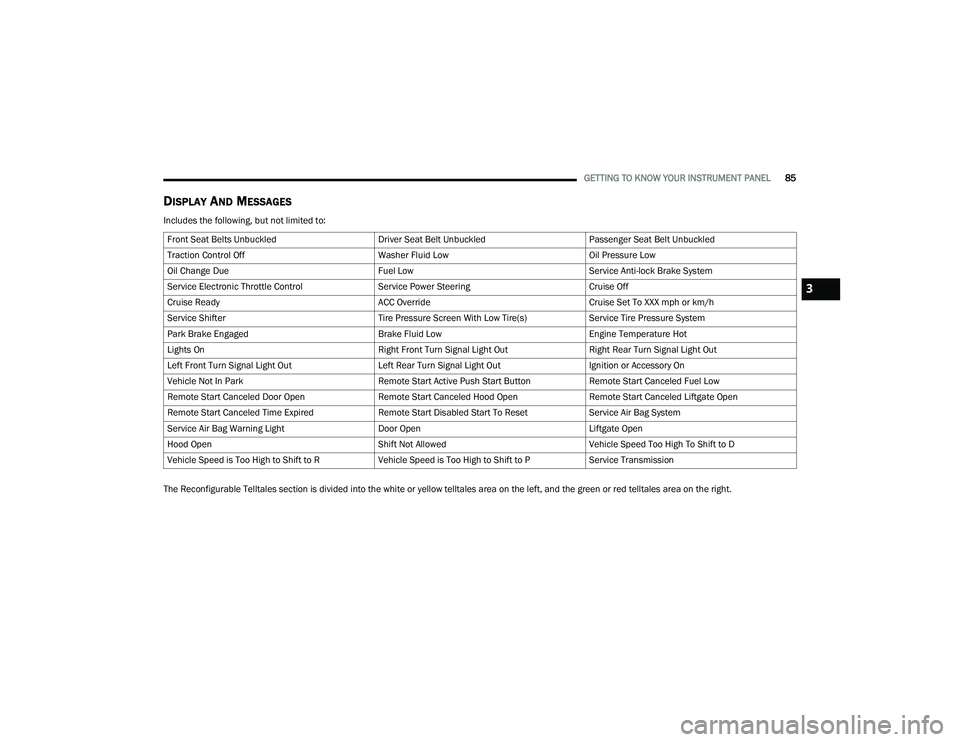
DISPLAY AND MESSAGES
Includes the following, but not limited to:
The Reconfigurable Telltales section is divided into the white or yellow telltales area on the left, and the green or red telltales area on the right.Front Seat Belts Unbuckled
Driver Seat Belt UnbuckledPassenger Seat Belt Unbuckled
Traction Control Off Washer Fluid LowOil Pressure Low
Oil Change Due Fuel LowService Anti-lock Brake System
Service Electronic Throttle Control Service Power SteeringCruise Off
Cruise Ready ACC OverrideCruise Set To XXX mph or km/h
Service Shifter Tire Pressure Screen With Low Tire(s)Service Tire Pressure System
Park Brake Engaged Brake Fluid LowEngine Temperature Hot
Lights On Right Front Turn Signal Light OutRight Rear Turn Signal Light Out
Left Front Turn Signal Light Out Left Rear Turn Signal Light OutIgnition or Accessory On
Vehicle Not In Park Remote Start Active Push Start ButtonRemote Start Canceled Fuel Low
Remote Start Canceled Door Open Remote Start Canceled Hood OpenRemote Start Canceled Liftgate Open
Remote Start Canceled Time Expired Remote Start Disabled Start To ResetService Air Bag System
Service Air Bag Warning Light Door OpenLiftgate Open
Hood Open Shift Not AllowedVehicle Speed Too High To Shift to D
Vehicle Speed is Too High to Shift to R Vehicle Speed is Too High to Shift to PService Transmission
3
22_WD_OM_EN_USC_t.book Page 85
Page 96 of 332
94GETTING TO KNOW YOUR INSTRUMENT PANEL
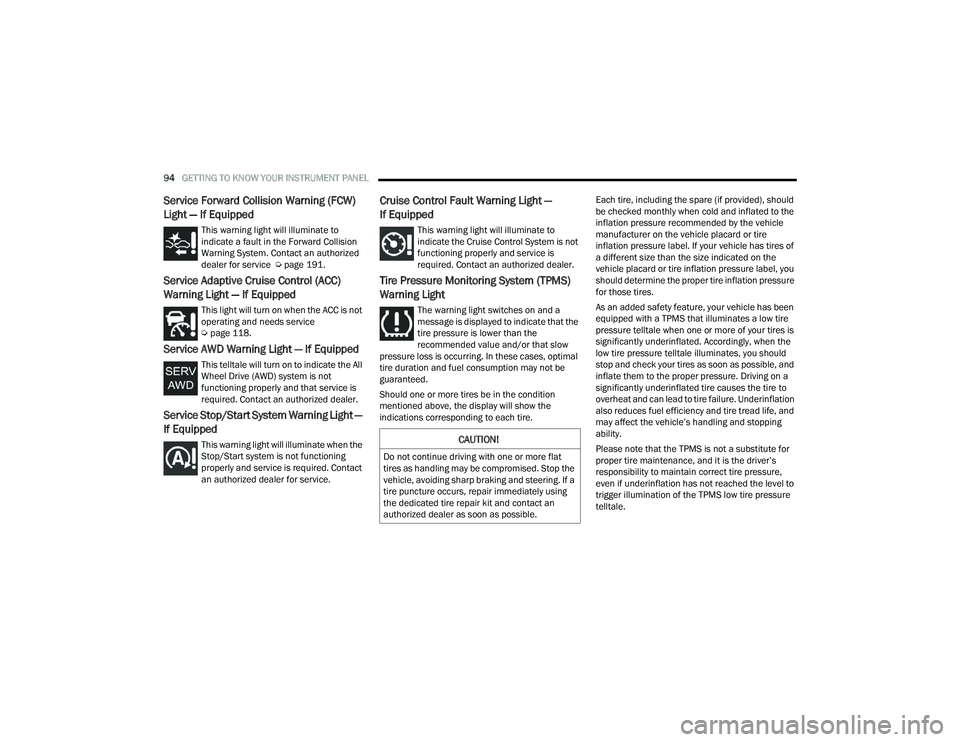
Service Forward Collision Warning (FCW)
Light — If Equipped
This warning light will illuminate to
indicate a fault in the Forward Collision
Warning System. Contact an authorized
dealer for service Úpage 191.
Service Adaptive Cruise Control (ACC)
Warning Light — If Equipped
This light will turn on when the ACC is not
operating and needs service
Úpage 118.
Service AWD Warning Light — If Equipped
This telltale will turn on to indicate the All
Wheel Drive (AWD) system is not
functioning properly and that service is
required. Contact an authorized dealer.
Service Stop/Start System Warning Light —
If Equipped
This warning light will illuminate when the
Stop/Start system is not functioning
properly and service is required. Contact
an authorized dealer for service.
Cruise Control Fault Warning Light —
If Equipped
This warning light will illuminate to
indicate the Cruise Control System is not
functioning properly and service is
required. Contact an authorized dealer.
Tire Pressure Monitoring System (TPMS)
Warning Light
The warning light switches on and a
message is displayed to indicate that the
tire pressure is lower than the
recommended value and/or that slow
pressure loss is occurring. In these cases, optimal
tire duration and fuel consumption may not be
guaranteed.
Should one or more tires be in the condition
mentioned above, the display will show the
indications corresponding to each tire. Each tire, including the spare (if provided), should
be checked monthly when cold and inflated to the
inflation pressure recommended by the vehicle
manufacturer on the vehicle placard or tire
inflation pressure label. If your vehicle has tires of
a different size than the size indicated on the
vehicle placard or tire inflation pressure label, you
should determine the proper tire inflation pressure
for those tires.
As an added safety feature, your vehicle has been
equipped with a TPMS that illuminates a low tire
pressure telltale when one or more of your tires is
significantly underinflated. Accordingly, when the
low tire pressure telltale illuminates, you should
stop and check your tires as soon as possible, and
inflate them to the proper pressure. Driving on a
significantly underinflated tire causes the tire to
overheat and can lead to tire failure. Underinflation
also reduces fuel efficiency and tire tread life, and
may affect the vehicle’s handling and stopping
ability.
Please note that the TPMS is not a substitute for
proper tire maintenance, and it is the driver’s
responsibility to maintain correct tire pressure,
even if underinflation has not reached the level to
trigger illumination of the TPMS low tire pressure
telltale.
CAUTION!
Do not continue driving with one or more flat
tires as handling may be compromised. Stop the
vehicle, avoiding sharp braking and steering. If a
tire puncture occurs, repair immediately using
the dedicated tire repair kit and contact an
authorized dealer as soon as possible.
22_WD_OM_EN_USC_t.book Page 94
Page 97 of 332
GETTING TO KNOW YOUR INSTRUMENT PANEL95
Your vehicle has also been equipped with a TPMS
malfunction indicator to indicate when the system
is not operating properly. The TPMS malfunction
indicator is combined with the low tire pressure
telltale. When the system detects a malfunction,
the telltale will flash for approximately one minute
and then remain continuously illuminated. This
sequence will continue upon subsequent vehicle
start-ups as long as the malfunction exists. When
the malfunction indicator is illuminated, the
system may not be able to detect or signal low tire
pressure as intended. TPMS malfunctions may
occur for a variety of reasons, including the
installation of replacement or alternate tires or
wheels on the vehicle that prevent the TPMS from
functioning properly. Always check the TPMS
malfunction telltale after replacing one or more
tires or wheels on your vehicle to ensure that the
replacement or alternate tires and wheels allow
the TPMS to continue to function properly.
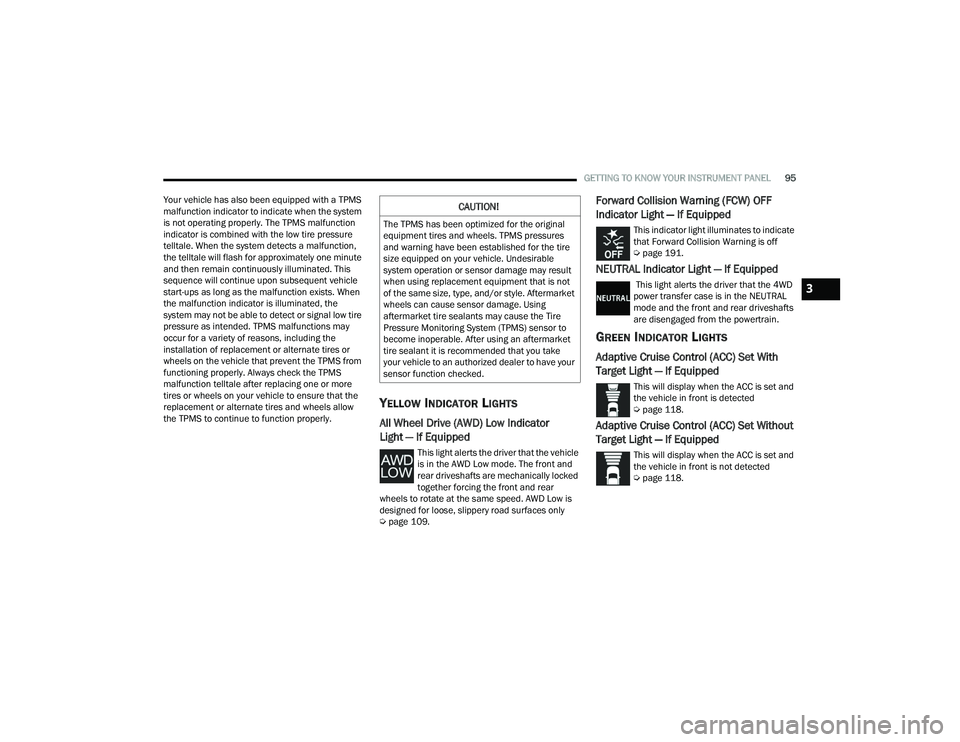
YELLOW INDICATOR LIGHTS
All Wheel Drive (AWD) Low Indicator
Light — If Equipped
This light alerts the driver that the vehicle
is in the AWD Low mode. The front and
rear driveshafts are mechanically locked
together forcing the front and rear
wheels to rotate at the same speed. AWD Low is
designed for loose, slippery road surfaces only
Ú page 109.
Forward Collision Warning (FCW) OFF
Indicator Light — If Equipped
This indicator light illuminates to indicate
that Forward Collision Warning is off
Úpage 191.
NEUTRAL Indicator Light — If Equipped
This light alerts the driver that the 4WD
power transfer case is in the NEUTRAL
mode and the front and rear driveshafts
are disengaged from the powertrain.
GREEN INDICATOR LIGHTS
Adaptive Cruise Control (ACC) Set With
Target Light — If Equipped
This will display when the ACC is set and
the vehicle in front is detected
Úpage 118.
Adaptive Cruise Control (ACC) Set Without
Target Light — If Equipped
This will display when the ACC is set and
the vehicle in front is not detected
Úpage 118.
CAUTION!
The TPMS has been optimized for the original
equipment tires and wheels. TPMS pressures
and warning have been established for the tire
size equipped on your vehicle. Undesirable
system operation or sensor damage may result
when using replacement equipment that is not
of the same size, type, and/or style. Aftermarket
wheels can cause sensor damage. Using
aftermarket tire sealants may cause the Tire
Pressure Monitoring System (TPMS) sensor to
become inoperable. After using an aftermarket
tire sealant it is recommended that you take
your vehicle to an authorized dealer to have your
sensor function checked.
3
22_WD_OM_EN_USC_t.book Page 95
Page 98 of 332
96GETTING TO KNOW YOUR INSTRUMENT PANEL
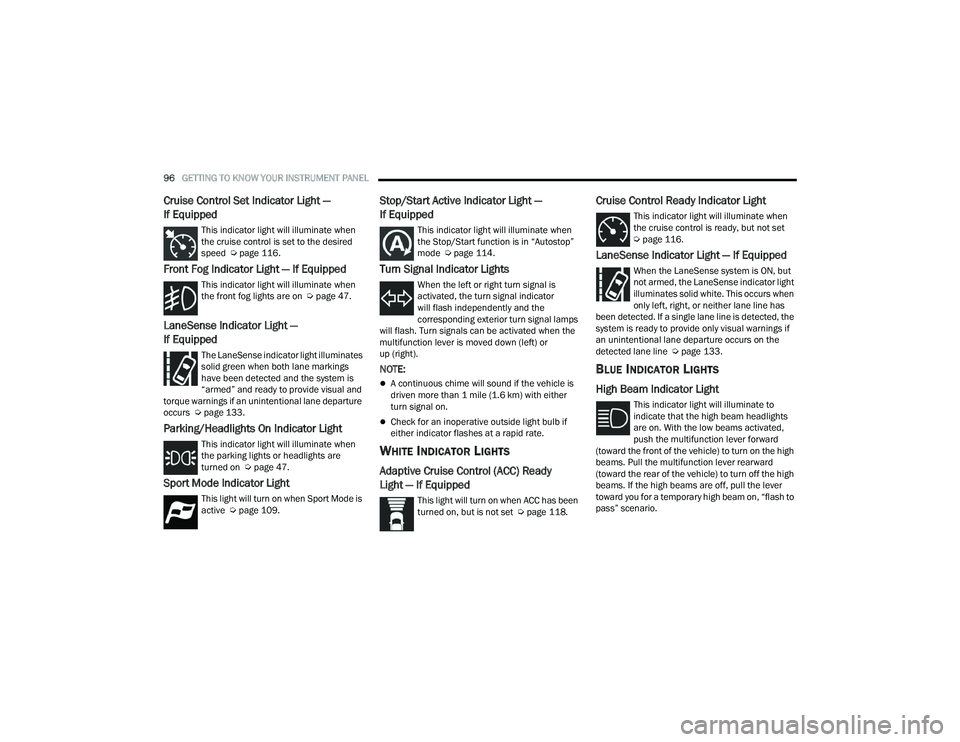
Cruise Control Set Indicator Light —
If Equipped
This indicator light will illuminate when
the cruise control is set to the desired
speed Úpage 116.
Front Fog Indicator Light — If Equipped
This indicator light will illuminate when
the front fog lights are on Ú page 47.
LaneSense Indicator Light —
If Equipped
The LaneSense indicator light illuminates
solid green when both lane markings
have been detected and the system is
“armed” and ready to provide visual and
torque warnings if an unintentional lane departure
occurs Ú page 133.
Parking/Headlights On Indicator Light
This indicator light will illuminate when
the parking lights or headlights are
turned on Ú page 47.
Sport Mode Indicator Light
This light will turn on when Sport Mode is
active Úpage 109.
Stop/Start Active Indicator Light —
If Equipped
This indicator light will illuminate when
the Stop/Start function is in “Autostop”
mode Úpage 114.
Turn Signal Indicator Lights
When the left or right turn signal is
activated, the turn signal indicator
will flash independently and the
corresponding exterior turn signal lamps
will flash. Turn signals can be activated when the
multifunction lever is moved down (left) or
up (right).
NOTE:
A continuous chime will sound if the vehicle is
driven more than 1 mile (1.6 km) with either
turn signal on.
Check for an inoperative outside light bulb if
either indicator flashes at a rapid rate.
WHITE INDICATOR LIGHTS
Adaptive Cruise Control (ACC) Ready
Light — If Equipped
This light will turn on when ACC has been
turned on, but is not set Ú page 118.
Cruise Control Ready Indicator Light
This indicator light will illuminate when
the cruise control is ready, but not set
Úpage 116.
LaneSense Indicator Light — If Equipped
When the LaneSense system is ON, but
not armed, the LaneSense indicator light
illuminates solid white. This occurs when
only left, right, or neither lane line has
been detected. If a single lane line is detected, the
system is ready to provide only visual warnings if
an unintentional lane departure occurs on the
detected lane line Ú page 133.
BLUE INDICATOR LIGHTS
High Beam Indicator Light
This indicator light will illuminate to
indicate that the high beam headlights
are on. With the low beams activated,
push the multifunction lever forward
(toward the front of the vehicle) to turn on the high
beams. Pull the multifunction lever rearward
(toward the rear of the vehicle) to turn off the high
beams. If the high beams are off, pull the lever
toward you for a temporary high beam on, “flash to
pass” scenario.
22_WD_OM_EN_USC_t.book Page 96
Page 118 of 332
116STARTING AND OPERATING
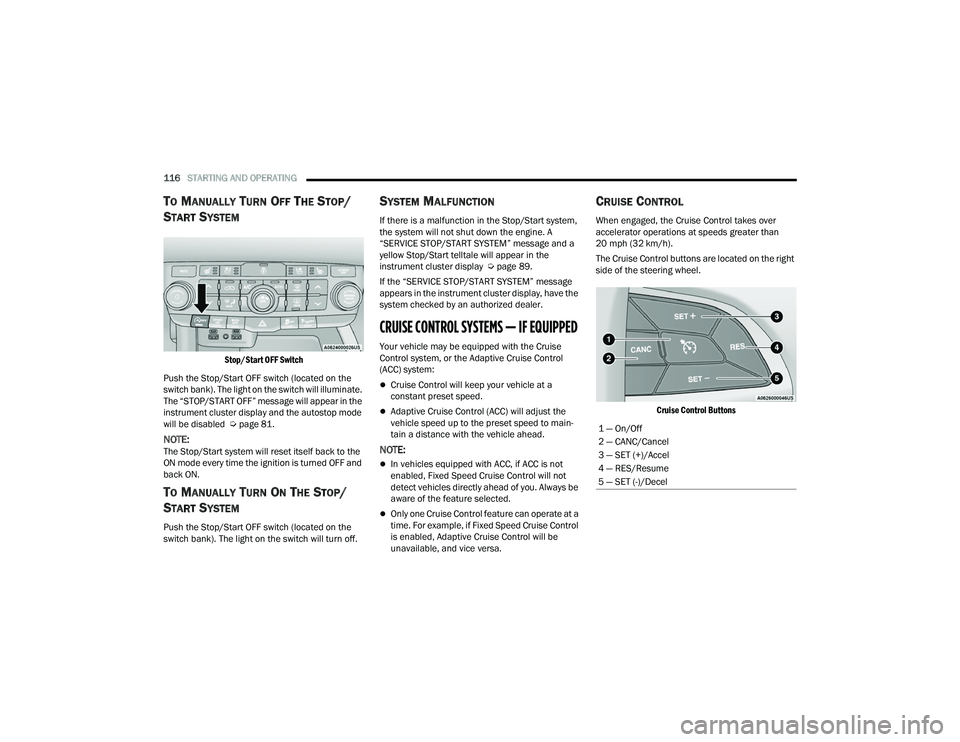
TO MANUALLY TURN OFF THE STOP/
S
TART SYSTEM
Stop/Start OFF Switch
Push the Stop/Start OFF switch (located on the
switch bank). The light on the switch will illuminate.
The “STOP/START OFF” message will appear in the
instrument cluster display and the autostop mode
will be disabled Ú page 81.
NOTE:The Stop/Start system will reset itself back to the
ON mode every time the ignition is turned OFF and
back ON.
TO MANUALLY TURN ON THE STOP/
S
TART SYSTEM
Push the Stop/Start OFF switch (located on the
switch bank). The light on the switch will turn off.
SYSTEM MALFUNCTION
If there is a malfunction in the Stop/Start system,
the system will not shut down the engine. A
“SERVICE STOP/START SYSTEM” message and a
yellow Stop/Start telltale will appear in the
instrument cluster display Ú page 89.
If the “SERVICE STOP/START SYSTEM” message
appears in the instrument cluster display, have the
system checked by an authorized dealer.
CRUISE CONTROL SYSTEMS — IF EQUIPPED
Your vehicle may be equipped with the Cruise
Control system, or the Adaptive Cruise Control
(ACC) system:
Cruise Control will keep your vehicle at a
constant preset speed.
Adaptive Cruise Control (ACC) will adjust the
vehicle speed up to the preset speed to main -
tain a distance with the vehicle ahead.
NOTE:
In vehicles equipped with ACC, if ACC is not
enabled, Fixed Speed Cruise Control will not
detect vehicles directly ahead of you. Always be
aware of the feature selected.
Only one Cruise Control feature can operate at a
time. For example, if Fixed Speed Cruise Control
is enabled, Adaptive Cruise Control will be
unavailable, and vice versa.
CRUISE CONTROL
When engaged, the Cruise Control takes over
accelerator operations at speeds greater than
20 mph (32 km/h).
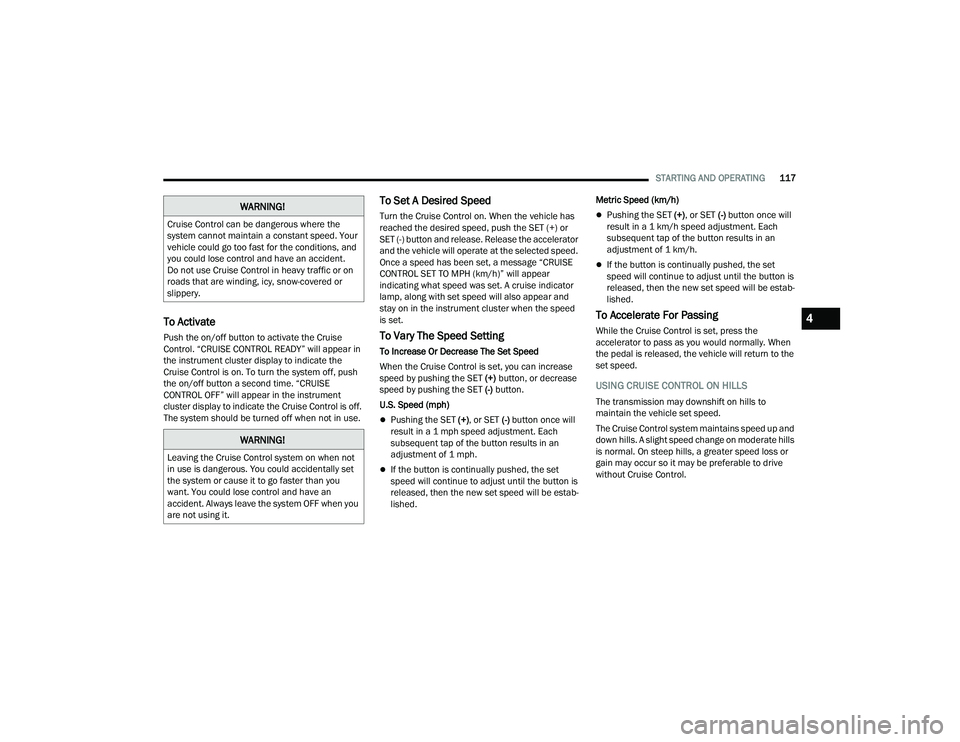
The Cruise Control buttons are located on the right
side of the steering wheel.
Cruise Control Buttons
1 — On/Off
2 — CANC/Cancel
3 — SET (+)/Accel
4 — RES/Resume
5 — SET (-)/Decel
22_WD_OM_EN_USC_t.book Page 116
Page 119 of 332
STARTING AND OPERATING117
To Activate
Push the on/off button to activate the Cruise
Control. “CRUISE CONTROL READY” will appear in
the instrument cluster display to indicate the
Cruise Control is on. To turn the system off, push
the on/off button a second time. “CRUISE
CONTROL OFF” will appear in the instrument
cluster display to indicate the Cruise Control is off.
The system should be turned off when not in use.
To Set A Desired Speed
Turn the Cruise Control on. When the vehicle has
reached the desired speed, push the SET (+) or
SET (-) button and release. Release the accelerator
and the vehicle will operate at the selected speed.
Once a speed has been set, a message “CRUISE
CONTROL SET TO MPH (km/h)” will appear
indicating what speed was set. A cruise indicator
lamp, along with set speed will also appear and
stay on in the instrument cluster when the speed
is set.
To Vary The Speed Setting
To Increase Or Decrease The Set Speed
When the Cruise Control is set, you can increase
speed by pushing the SET (+) button, or decrease
speed by pushing the SET (-) button.
U.S. Speed (mph)
Pushing the SET (+) , or SET (-) button once will
result in a 1 mph speed adjustment. Each
subsequent tap of the button results in an
adjustment of 1 mph.
If the button is continually pushed, the set
speed will continue to adjust until the button is
released, then the new set speed will be estab -
lished. Metric Speed (km/h)
Pushing the SET (+)
, or SET (-) button once will
result in a 1 km/h speed adjustment. Each
subsequent tap of the button results in an
adjustment of 1 km/h.
If the button is continually pushed, the set
speed will continue to adjust until the button is
released, then the new set speed will be estab -
lished.
To Accelerate For Passing
While the Cruise Control is set, press the
accelerator to pass as you would normally. When
the pedal is released, the vehicle will return to the
set speed.
USING CRUISE CONTROL ON HILLS
The transmission may downshift on hills to
maintain the vehicle set speed.
The Cruise Control system maintains speed up and
down hills. A slight speed change on moderate hills
is normal. On steep hills, a greater speed loss or
gain may occur so it may be preferable to drive
without Cruise Control.
WARNING!
Cruise Control can be dangerous where the
system cannot maintain a constant speed. Your
vehicle could go too fast for the conditions, and
you could lose control and have an accident.
Do not use Cruise Control in heavy traffic or on
roads that are winding, icy, snow-covered or
slippery.
WARNING!
Leaving the Cruise Control system on when not
in use is dangerous. You could accidentally set
the system or cause it to go faster than you
want. You could lose control and have an
accident. Always leave the system OFF when you
are not using it.
4
22_WD_OM_EN_USC_t.book Page 117