lock DODGE DURANGO 2023 Owners Manual
[x] Cancel search | Manufacturer: DODGE, Model Year: 2023, Model line: DURANGO, Model: DODGE DURANGO 2023Pages: 328, PDF Size: 13.82 MB
Page 2 of 328

DRIVING AND ALCOHOL
Drunk driving is one of the most frequent causes of accidents. Your driving ability can be seriously impaired with blood alcohol levels \
far
below the legal minimum. If you are drinking, don’t drive. Ride with a designated non-drinking driver, call a cab, a rideshare, a friend, or use public
transportation.
The driver’s primary responsibility is the safe operation of the vehicle. Driving w\
hile distracted can result in loss of vehicle control, resulting in an accident and personal injury.
FCA US LLC strongly recommends that the driver use extreme caution when \
using any device or feature that may take their attention off the road. Use of any electrical devices,
such as cellular telephones, computers, portable radios, vehicle navigat\
ion or other devices, by the driver while the vehicle is moving is dangerous and could lead to a serious
accident. Texting while driving is also dangerous and should never be done while th\
e vehicle is moving. If you find yourself unable to devote your full attention to vehicle operation,
pull off the road to a safe location and stop your vehicle. Some states \
or provinces prohibit the use of cellular telephones or texting while driving. It is always the driver’s
responsibility to comply with all local laws.
This Owner’s Manual has been prepared to help you get acquainted with your new Dodg\
e brand vehicle and to provide a convenient reference source for common questions.
Not all features shown in this manual may apply to your vehicle. For add\
itional information, visit mopar.com/om (U.S.), owners.mopar.ca (Canada) or your local Dodge brand dealer.
WARNING
Driving after drinking can lead to an accident. Your perceptions are less sharp, your reflexes are slower and your judg\
ment is impaired when you have been
drinking. Never drink and then drive.
WARNING: Operating, servicing and maintaining a passenger vehicle or off-highway \
motor vehicle can expose you to
chemicals including engine exhaust, carbon monoxide, phthalates, and lea\
d, which are known to the State of California to cause
cancer and birth defects or other reproductive harm. To minimize exposure, avoid breathing exhaust, do not idle the engine exc\
ept
as necessary, service your vehicle in a well-ventilated area and wear gloves or wash\
your hands frequently when servicing your
vehicle. For more information go to www.P65Warnings.ca.gov/passenger-vehicle.
This Owner’s Manual illustrates and describes the operation of features and equipme\
nt that are either standard or optional on this vehicle. This manual may\
also include a description of features and equipment that are no longer available or were not ordered on this vehic\
le. Please disregard any features and equipment described in this manual\
that are not on this vehicle. FCA US LLC reserves the right to make changes in design and specifications, and/or make ad\
ditions to or improvements to its products without imposing any obligati\
on upon itself to install them on products previously manufactured.
With respect to any vehicles sold in Canada, the name FCA US LLC shall b\
e deemed to be deleted and the name FCA Canada Inc. used in substitution\
therefore.
This Owner’s Manual is intended to familiarize you with the important features of y\
our vehicle. Your most up-to-date Owner’s Manual, Navigation/Uconnect manuals and Warranty Booklet can be found by visiting the website on the back cover.
U.S. Residents: If you are the first registered retail owner of your v\
ehicle, you may obtain a complimentary printed copy of the Warranty Booklet by calling 1-800-423-6343 or by contacting your dealer. Replacement kits can be purchased by visiting www.techauthority.com.
Canadian Residents: If you are the first registered retail owner of yo\
ur vehicle, you may obtain a complimentary printed copy of the W arranty Booklet or purchase a replacement kit by calling 1-800-387-1143 or by contacting your dealer.
ROADSIDE ASSISTANCE
24 HOURS, 7 DAYS A WEEK AT YOUR SERVICE. CALL 1-800-521-2779 OR VISIT CHRYSLER.RSAHELP.COM (USA) CALL 1-800-363-4869 OR VISIT FCA.ROADSIDEAID.COM (CANADA) SERVICES: Flat Tire Service, Out Of Gas/Fuel Delivery, Battery Jump Assistance, Lockout Service and Towing Service
Please see the Customer Assistance chapter in this Owner’s Manual for further information.FCA US LLC reserves the right to modify the terms or discontinue the Roa\
dside Assistance Program at any time. The Roadside Assistance Program i\
s subject to restrictions and conditions of use, that are determined solely by FCA US LLC.
Page 4 of 328

2
INTRODUCTION
SYMBOLS KEY ...........................................................8
ROLLOVER WARNING ............................................. 8
VEHICLE MODIFICATIONS/ALTERATIONS .............9
SYMBOL GLOSSARY.................................................9
GETTING TO KNOW YOUR VEHICLE
KEYS ....................................................................... 13 Key Fob .............................................................13
SENTRY KEY .......................................................... 16
IGNITION SWITCH .................................................. 16
Keyless Enter ‘n Go™ Ignition .........................16
REMOTE START — IF EQUIPPED .......................... 17
How To Use Remote Start ................................18
To Exit Remote Start Mode ..............................19
Remote Start Front Defrost Activation —
If Equipped........................................................19
Remote Start Comfort Systems —
If Equipped........................................................19
Remote Start Windshield Wiper De-Icer
Activation — If Equipped ..................................20
Remote Start Cancel Message — If Equipped .. 20
VEHICLE SECURITY SYSTEM — IF EQUIPPED ..... 20
To Arm The System ..........................................20
To Disarm The System .....................................20
Rearming Of The System .................................21
Security System Manual Override ...................21
Tamper Alert .....................................................21 DOORS ....................................................................21
Manual Door Locks ..........................................21
Power Door Locks ............................................22
Keyless Enter ‘n Go™ — Passive Entry ...........22
Automatic Unlock On Exit Feature —
If Equipped........................................................25
Child-Protection Door Lock System —
Rear Doors .......................................................25
STEERING WHEEL ..................................................25
Manual Tilt/Telescoping Steering Column —
If Equipped .......................................................25
Power Tilt/Telescoping Steering Column —
If Equipped........................................................26
Heated Steering Wheel —
If Equipped .......................................................26
DRIVER MEMORY SETTINGS — IF EQUIPPED .....27
Programming The Memory Feature ................27
Linking And Unlinking The Remote Keyless
Entry Key Fob To Memory ................................27
Memory Position Recall ...................................28
SEATS ......................................................................28
Manual Adjustment (Front Seats) —
If Equipped........................................................28
Manual Adjustment (Rear Seats) ....................30
Power Adjustment (Front Seats) —
If Equipped .......................................................33
Heated Seats — If Equipped ...........................35
Front Ventilated Seats — If Equipped .............36
Head Restraints ...............................................36 UCONNECT VOICE RECOGNITION —
IF EQUIPPED .......................................................... 38
Introducing Voice Recognition ........................ 38
Basic Voice Commands ................................... 38
Get Started .......................................................39
Additional Information ..................................... 39
MIRRORS ............................................................... 40
Inside Rearview Mirror..................................... 40
Illuminated Vanity Mirrors .............................. 40
Outside Mirrors ................................................ 40
Outside Mirrors With Turn Signal —
If Equipped .......................................................41
Outside Automatic Dimming Mirror —
If Equipped .......................................................41
Power Mirrors .................................................. 41
Heated Mirrors — If Equipped ......................... 41
UNIVERSAL GARAGE DOOR OPENER
(HOMELINK®) — IF EQUIPPED ............................ 41
Before You Begin Programming HomeLink® ... 42
Erasing All The HomeLink® Channels ............ 42
Identifying Whether You Have A Rolling Code
Or Non-Rolling Code Device ............................ 42
Programming HomeLink® To A Garage Door
Opener ..............................................................42
Programming HomeLink® To A Miscellaneous
Device ............................................................... 43
Reprogramming A Single HomeLink® Button .. 44
Canadian/Gate Operator Programming ......... 44
Security ............................................................. 45
Troubleshooting Tips........................................ 45
23_WD_OM_EN_USC_t.book Page 2
Page 6 of 328

4
STARTING AND OPERATING
STARTING THE ENGINE ......................................... 98
Automatic Transmission ..................................98
Normal Starting ...............................................98
AutoPark ...........................................................99
Extended Park Starting ................................. 100If Engine Fails To Start .................................. 101
Cold Weather Operation
(Below –22°F Or −30°C) ............................ 101
After Starting.................................................. 101
ENGINE BREAK-IN RECOMMENDATIONS ........ 101
PARKING BRAKE ................................................ 102
AUTOMATIC TRANSMISSION.............................. 103 Ignition Park Interlock ................................... 104Brake Transmission Shift Interlock (BTSI)
System ........................................................... 104Fuel Economy (ECO) Mode ........................... 104
8-Speed Automatic Transmission ................ 104
SPORT MODE — IF EQUIPPED ............................ 108
ALL-WHEEL DRIVE OPERATION .........................108
Single-Speed Operating Instructions/
Precautions — If Equipped ............................ 108
Electronically Shifted Transfer Case —
If Equipped..................................................... 109
Shifting Procedure......................................... 110
TOW N GO — IF EQUIPPED ................................. 111
Guidelines For Track Use .............................. 112
FUEL SAVER TECHNOLOGY 5.7L ONLY —
IF EQUIPPED ......................................................... 113
POWER STEERING ............................................... 113 STOP/START SYSTEM — IF EQUIPPED ............. 114
Autostop Mode .............................................. 114
Possible Reasons The Engine Does Not
Autostop......................................................... 114
To Start The Engine While In Autostop
Mode .............................................................. 114
To Manually Turn Off The
Stop/Start System......................................... 115
To Manually Turn On The
Stop/Start System......................................... 115
System Malfunction ...................................... 115
CRUISE CONTROL SYSTEMS — IF EQUIPPED .... 115
Cruise Control ............................................... 115
Adaptive Cruise Control (ACC) ...................... 117
PARKSENSE FRONT/REAR PARK ASSIST
SYSTEM — IF EQUIPPED .................................... 125
ParkSense Sensors ....................................... 126
ParkSense Display ........................................ 126ParkSense Warning Display ......................... 129
Enabling And Disabling ParkSense .............. 129Operation With A Trailer................................ 129
Service The ParkSense Park Assist System ...130
Cleaning The ParkSense System ................. 130
ParkSense System Usage Precautions........ 130
LANESENSE — IF EQUIPPED ............................. 131
LaneSense Operation ................................... 131Turning LaneSense On Or Off ....................... 132
LaneSense Warning Message ...................... 132Changing LaneSense Status ........................ 134 PARKVIEW REAR BACK UP CAMERA .............. 134
REFUELING THE VEHICLE ................................... 135
VEHICLE LOADING .............................................. 136
Certification Label ......................................... 136
TRAILER TOWING ................................................ 137
Common Towing Definitions......................... 137
Trailer Hitch Classification............................ 139
Trailer Towing Weights (Maximum Trailer
Weight Ratings) ............................................ 139
Trailer Hitch Receiver Cover Removal —
If Equipped .................................................... 140
Trailer And Tongue Weight .......................... 140
Towing Requirements .................................. 141Towing Tips ................................................... 145
RECREATIONAL TOWING
(BEHIND MOTORHOME) ..................................... 146
Towing This Vehicle Behind Another Vehicle ..146
Recreational Towing — Rear-Wheel
Drive Models ................................................. 147
Recreational Towing — All-Wheel Drive
Models (Single-Speed Transfer Case) ......... 147
Recreational Towing — All-Wheel Drive
Models (Two-Speed Transfer Case) ............. 147
DRIVING TIPS ....................................................... 150
On-Road Driving Tips..................................... 150Off-Road Driving Tips .................................... 150
23_WD_OM_EN_USC_t.book Page 4
Page 7 of 328

5
MULTIMEDIA
UCONNECT SYSTEMS ......................................... 153
CYBERSECURITY ................................................. 153
UCONNECT SETTINGS ......................................... 153Customer Programmable Features .............. 154
STEERING WHEEL AUDIO CONTROLS .............. 176
Radio Operation ............................................ 176
Media Mode................................................... 176
RADIO OPERATION AND MOBILE PHONES...... 176
Regulatory And Safety Information .............. 176
SAFETY
SAFETY FEATURES .............................................. 177 Anti-Lock Brake System (ABS) ..................... 177
Rear Seat Reminder Alert (RSRA) ................ 178
Electronic Brake Control (EBC) System ...... 178
AUXILIARY DRIVING SYSTEMS .......................... 183
Blind Spot Monitoring (BSM) —
If Equipped..................................................... 183
Forward Collision Warning (FCW) With
Mitigation ....................................................... 186
Tire Pressure Monitoring System (TPMS) .... 188
OCCUPANT RESTRAINT SYSTEMS .................... 191
Occupant Restraint Systems Features ........ 191
Important Safety Precautions....................... 191
Seat Belt Systems ........................................ 192
Supplemental Restraint Systems (SRS) ...... 198
Child Restraints ............................................. 210 SAFETY TIPS ....................................................... 225
Transporting Passengers .............................. 225Transporting Pets ......................................... 225
Connected Vehicles ...................................... 225
Safety Checks You Should Make Inside
The Vehicle ................................................... 226
Periodic Safety Checks You Should Make
Outside The Vehicle ...................................... 227
Exhaust Gas................................................... 228
Carbon Monoxide Warnings ......................... 228
IN CASE OF EMERGENCY
HAZARD WARNING FLASHERS ........................ 229
SOS AND ASSIST MIRROR — IF EQUIPPED ..... 229
JACKING AND TIRE CHANGING ........................ 232 Preparations For Jacking .............................. 232Jack Location ................................................. 233
Spare Tire Stowage ....................................... 234
Spare Tire Removal ....................................... 234
Jacking Instructions ..................................... 236
JUMP STARTING ................................................. 239
Preparations For Jump Start ........................ 240
Jump Starting Procedure .............................. 240
REFUELING IN EMERGENCY – IF EQUIPPED .. 242
IF YOUR ENGINE OVERHEATS ........................... 243
MANUAL PARK RELEASE ................................... 243
FREEING A STUCK VEHICLE .............................. 245
TOWING A DISABLED VEHICLE ........................ 246
Rear-Wheel Drive Models ............................. 247
All-Wheel Drive Models ................................. 247 ENHANCED ACCIDENT RESPONSE SYSTEM
(EARS) .................................................................. 248
EVENT DATA RECORDER (EDR) ......................... 248
SERVICING AND MAINTENANCE
SCHEDULED SERVICING .................................... 249
Maintenance Plan ......................................... 250
ENGINE COMPARTMENT .................................... 253
3.6L Engine ................................................... 253
5.7L Engine ................................................... 254
Checking Oil Level ......................................... 255
Adding Washer Fluid .................................... 255
Maintenance-Free Battery ........................... 255
Pressure Washing ......................................... 256
VEHICLE MAINTENANCE ..................................... 256
Engine Oil ...................................................... 256
Engine Oil Filter ............................................. 257Engine Air Cleaner Filter .............................. 257
Air Conditioner Maintenance ....................... 258
Accessory Drive Belt Inspection ................... 260Body Lubrication ........................................... 261
Windshield Wiper Blades.............................. 261
Exhaust System ............................................ 264
Cooling System.............................................. 265
Brake System ............................................... 268Automatic Transmission ............................... 269
Front/Rear Axle Fluid ................................... 269
Transfer Case ............................................... 270Fuses.............................................................. 270
Bulb Replacement ........................................ 278
23_WD_OM_EN_USC_t.book Page 5
Page 12 of 328
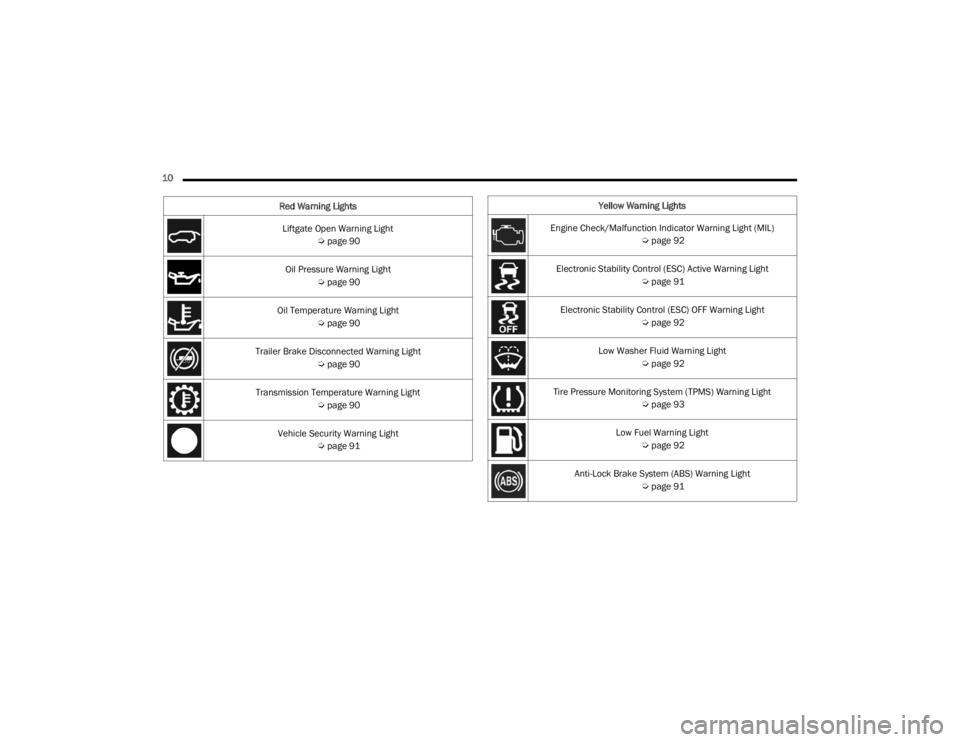
10 Liftgate Open Warning Light Úpage 90
Oil Pressure Warning Light Úpage 90
Oil Temperature Warning Light Úpage 90
Trailer Brake Disconnected Warning Light Úpage 90
Transmission Temperature Warning Light Úpage 90
Vehicle Security Warning Light Úpage 91
Red Warning Lights
Yellow Warning Lights
Engine Check/Malfunction Indicator Warning Light (MIL) Úpage 92
Electronic Stability Control (ESC) Active Warning Light Úpage 91
Electronic Stability Control (ESC) OFF Warning Light Úpage 92
Low Washer Fluid Warning Light Úpage 92
Tire Pressure Monitoring System (TPMS) Warning Light Úpage 93
Low Fuel Warning Light Úpage 92
Anti-Lock Brake System (ABS) Warning Light Úpage 91
23_WD_OM_EN_USC_t.book Page 10
Page 15 of 328
13
GETTING TO KNOW YOUR VEHICLE
KEYS
KEY FOB
Your vehicle is equipped with a key fob which
supports Passive Entry, Remote Keyless Entry
(RKE), Keyless Enter ‘n Go™ (if equipped), Remote
Start (if equipped), and remote power liftgate
operation. The key fob allows you to lock or unlock
the doors and liftgate from distances up to
approximately 66 ft (20 m). The key fob does not need to be pointed at the vehicle to activate the
system. The key fob also contains an emergency
key, which is stored in the rear of the key fob.
NOTE:
The key fob’s wireless signal may be blocked if
the key fob is located next to a mobile phone,
laptop, or other electronic device. This may
result in poor performance.
With ignition in the ON position and the vehicle
moving at 2 mph (4 km/h), all RKE commands are disabled.
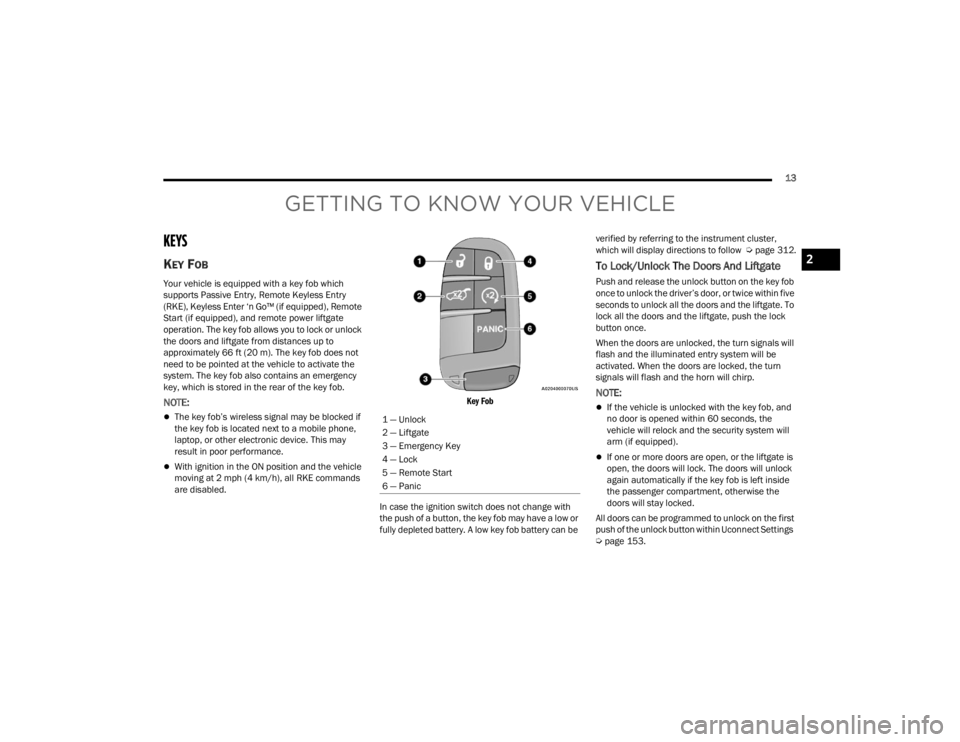
Key Fob
In case the ignition switch does not change with
the push of a button, the key fob may have a low or
fully depleted battery. A low key fob battery can be verified by referring to the instrument cluster,
which will display directions to follow
Úpage 312.
To Lock/Unlock The Doors And Liftgate
Push and release the unlock button on the key fob
once to unlock the driver’s door, or twice within five
seconds to unlock all the doors and the liftgate. To
lock all the doors and the liftgate, push the lock
button once.
When the doors are unlocked, the turn signals will
flash and the illuminated entry system will be
activated. When the doors are locked, the turn
signals will flash and the horn will chirp.
NOTE:
If the vehicle is unlocked with the key fob, and
no door is opened within 60 seconds, the
vehicle will relock and the security system will
arm (if equipped).
If one or more doors are open, or the liftgate is
open, the doors will lock. The doors will unlock
again automatically if the key fob is left inside
the passenger compartment, otherwise the
doors will stay locked.
All doors can be programmed to unlock on the first
push of the unlock button within Uconnect Settings
Ú page 153.
1 — Unlock
2 — Liftgate
3 — Emergency Key
4 — Lock
5 — Remote Start
6 — Panic
2
23_WD_OM_EN_USC_t.book Page 13
Page 17 of 328
GETTING TO KNOW YOUR VEHICLE15
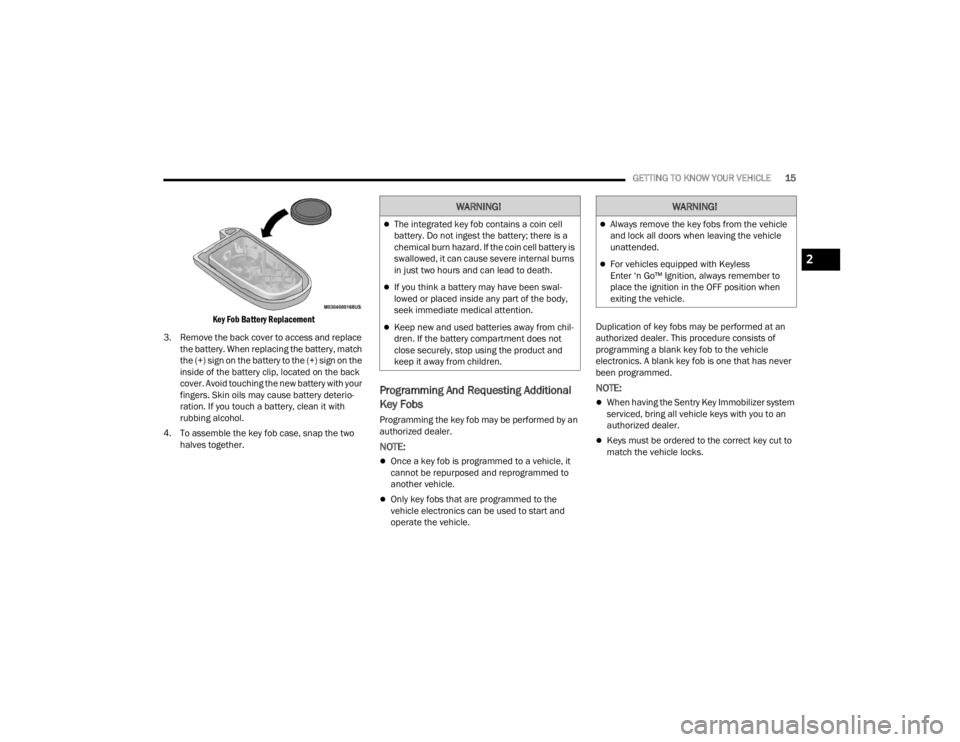
Key Fob Battery Replacement
3. Remove the back cover to access and replace the battery. When replacing the battery, match
the (+) sign on the battery to the (+) sign on the
inside of the battery clip, located on the back
cover. Avoid touching the new battery with your
fingers. Skin oils may cause battery deterio -
ration. If you touch a battery, clean it with
rubbing alcohol.
4. To assemble the key fob case, snap the two halves together.
Programming And Requesting Additional
Key Fobs
Programming the key fob may be performed by an
authorized dealer.
NOTE:
Once a key fob is programmed to a vehicle, it
cannot be repurposed and reprogrammed to
another vehicle.
Only key fobs that are programmed to the
vehicle electronics can be used to start and
operate the vehicle. Duplication of key fobs may be performed at an
authorized dealer. This procedure consists of
programming a blank key fob to the vehicle
electronics. A blank key fob is one that has never
been programmed.
NOTE:
When having the Sentry Key Immobilizer system
serviced, bring all vehicle keys with you to an
authorized dealer.
Keys must be ordered to the correct key cut to
match the vehicle locks.
WARNING!
The integrated key fob contains a coin cell
battery. Do not ingest the battery; there is a
chemical burn hazard. If the coin cell battery is
swallowed, it can cause severe internal burns
in just two hours and can lead to death.
If you think a battery may have been swal-
lowed or placed inside any part of the body,
seek immediate medical attention.
Keep new and used batteries away from chil
-
dren. If the battery compartment does not
close securely, stop using the product and
keep it away from children.
WARNING!
Always remove the key fobs from the vehicle
and lock all doors when leaving the vehicle
unattended.
For vehicles equipped with Keyless
Enter ‘n Go™ Ignition, always remember to
place the ignition in the OFF position when
exiting the vehicle.2
23_WD_OM_EN_USC_t.book Page 15
Page 18 of 328
16GETTING TO KNOW YOUR VEHICLE
SENTRY KEY
The Sentry Key Immobilizer system prevents
unauthorized vehicle operation by disabling the
engine. The system does not need to be armed or
activated. Operation is automatic, regardless of
whether the vehicle is locked or unlocked.
The system uses a key fob, keyless push button
ignition and a Radio Frequency (RF) receiver to
prevent unauthorized vehicle operation. Therefore,
only key fobs that are programmed to the vehicle
can be used to start and operate the vehicle. The
system will shut the engine off in two seconds if an
invalid key fob is used to start the engine.
After placing the ignition switch in the ON/RUN
position, the Vehicle Security Light will turn on for
three seconds for a bulb check. If the light remains
on after the bulb check, it indicates that there is a
problem with the electronics. In addition, if the light
begins to flash after the bulb check, it indicates
that someone used an invalid key fob to start the
engine. Either of these conditions will result in the
engine being shut off after two seconds.
If the Vehicle Security Light turns on during normal
vehicle operation (vehicle running for longer than
10 seconds), it indicates that there is a fault in the
electronics. Should this occur, have the vehicle
serviced as soon as possible by an authorized
dealer. All of the key fobs provided with your new vehicle
have been programmed to the vehicle electronics
Ú
page 312.
NOTE:A key fob that has not been programmed is also
considered an invalid key.
IGNITION SWITCH
KEYLESS ENTER ‘N GO™ IGNITION
This feature allows the driver to operate the
ignition switch with the push of a button as long as
the key fob is in the passenger compartment.
The START/STOP ignition button has several
operating modes that are labeled and will
illuminate when in position. These modes are OFF,
ACC, ON/RUN, and START.
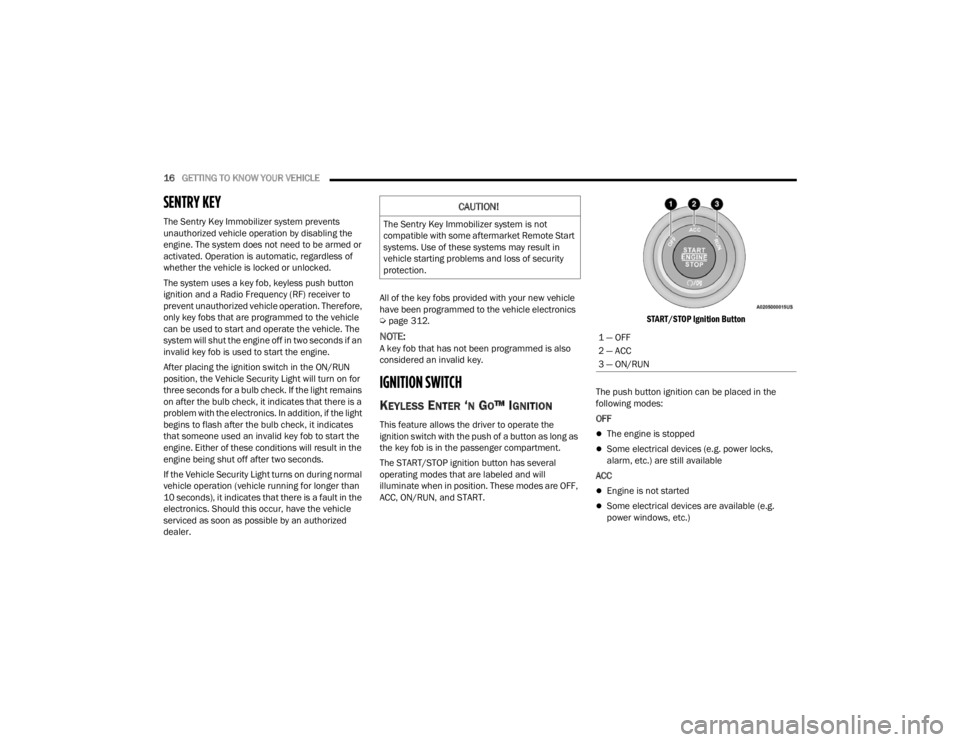
START/STOP Ignition Button
The push button ignition can be placed in the
following modes:
OFFThe engine is stopped
Some electrical devices (e.g. power locks,
alarm, etc.) are still available
ACC
Engine is not started
Some electrical devices are available (e.g.
power windows, etc.)
CAUTION!
The Sentry Key Immobilizer system is not
compatible with some aftermarket Remote Start
systems. Use of these systems may result in
vehicle starting problems and loss of security
protection.
1 — OFF
2 — ACC
3 — ON/RUN
23_WD_OM_EN_USC_t.book Page 16
Page 19 of 328
GETTING TO KNOW YOUR VEHICLE17
ON/RUN
Driving position
All electrical devices are available (e.g. climate
controls, etc.)
START
The engine will start (when foot is on the brake
pedal)
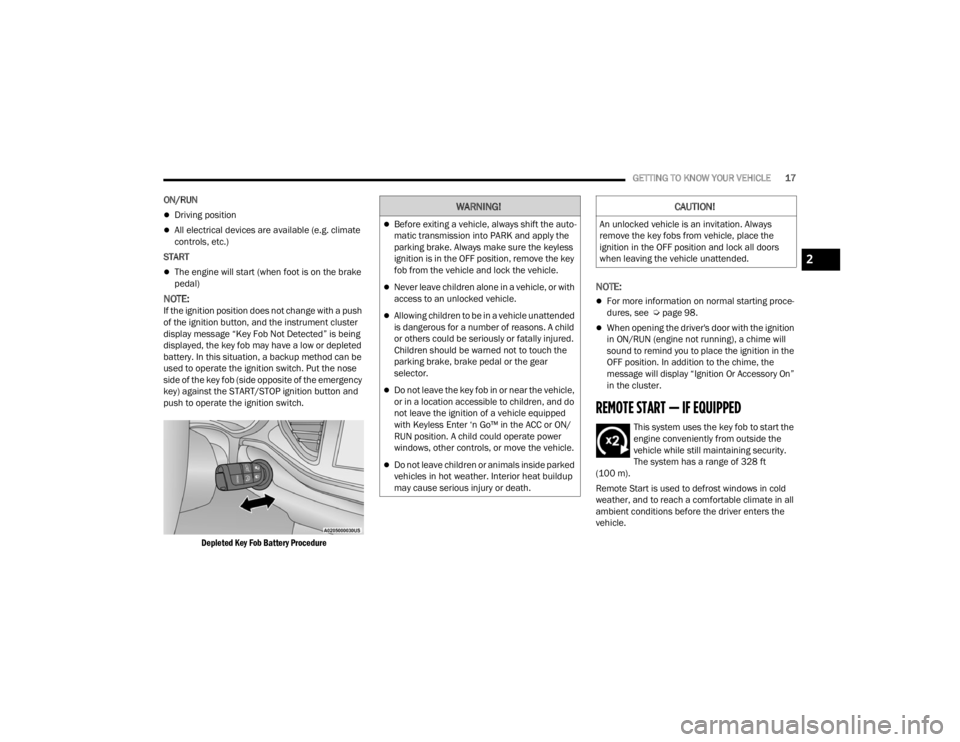
NOTE:If the ignition position does not change with a push
of the ignition button, and the instrument cluster
display message “Key Fob Not Detected” is being
displayed, the key fob may have a low or depleted
battery. In this situation, a backup method can be
used to operate the ignition switch. Put the nose
side of the key fob (side opposite of the emergency
key) against the START/STOP ignition button and
push to operate the ignition switch.
Depleted Key Fob Battery Procedure
NOTE:
For more information on normal starting proce -
dures, see Ú page 98.
When opening the driver's door with the ignition
in ON/RUN (engine not running), a chime will
sound to remind you to place the ignition in the
OFF position. In addition to the chime, the
message will display “Ignition Or Accessory On”
in the cluster.
REMOTE START — IF EQUIPPED
This system uses the key fob to start the
engine conveniently from outside the
vehicle while still maintaining security.
The system has a range of 328 ft
(100 m).
Remote Start is used to defrost windows in cold
weather, and to reach a comfortable climate in all
ambient conditions before the driver enters the
vehicle.
WARNING!
Before exiting a vehicle, always shift the auto -
matic transmission into PARK and apply the
parking brake. Always make sure the keyless
ignition is in the OFF position, remove the key
fob from the vehicle and lock the vehicle.
Never leave children alone in a vehicle, or with
access to an unlocked vehicle.
Allowing children to be in a vehicle unattended
is dangerous for a number of reasons. A child
or others could be seriously or fatally injured.
Children should be warned not to touch the
parking brake, brake pedal or the gear
selector.
Do not leave the key fob in or near the vehicle,
or in a location accessible to children, and do
not leave the ignition of a vehicle equipped
with Keyless Enter ‘n Go™ in the ACC or ON/
RUN position. A child could operate power
windows, other controls, or move the vehicle.
Do not leave children or animals inside parked
vehicles in hot weather. Interior heat buildup
may cause serious injury or death.
CAUTION!
An unlocked vehicle is an invitation. Always
remove the key fobs from vehicle, place the
ignition in the OFF position and lock all doors
when leaving the vehicle unattended.
2
23_WD_OM_EN_USC_t.book Page 17
Page 20 of 328

18GETTING TO KNOW YOUR VEHICLE
NOTE:Obstructions between the vehicle and key fob may
reduce this range Úpage 312.
HOW TO USE REMOTE START
Push and release the Remote Start button on the
key fob twice within five seconds. The vehicle
doors will lock, the parking lights will flash, and the
horn will chirp twice (if programmed). Then, the
engine will start, and the vehicle will remain in the
Remote Start mode for a 15 minute cycle. Pushing
the Remote Start button a third time shuts the
engine off. To drive the vehicle, push the unlock button, and
with a valid Keyless Enter ‘n Go™ key fob in the
vehicle, place the ignition in the ON/RUN position.
NOTE:
With Remote Start, the engine will only run for
15 minutes.
Remote Start can only be used twice.
If an engine fault is present or fuel level is low,
the vehicle will start and then shut down in 10
seconds.
The parking lights will turn on and remain on
during Remote Start mode.
For security, power window and sunroof (if
equipped) operation is disabled when the
vehicle is in the Remote Start mode.
The ignition must be placed in the ON/RUN posi
-
tion before the Remote Start sequence can be
repeated for a third cycle.
All of the following conditions must be met before
the engine will remote start:
Gear selector in PARK
Doors closed
Hood closed
Liftgate closed
Hazard switch off
Brake pedal not pressed
Battery at an acceptable charge level
Panic button not pressed
System not disabled from previous Remote
Start event
Vehicle Security system indicator flashing
Ignition in OFF position
Fuel level meets minimum requirement
Vehicle Security system is not signaling an intru -
sion
Malfunction Indicator Light (MIL) is not illumi -
nated
WARNING!
Do not start or run an engine in a closed
garage or confined area. Exhaust gas contains
carbon monoxide (CO) which is odorless and
colorless. Carbon monoxide is poisonous and
can cause serious injury or death when
inhaled.
Keep key fobs away from children. Operation
of the Remote Start system, windows, door
locks or other controls could cause serious
injury or death.
WARNING!
Do not start or run an engine in a closed
garage or confined area. Exhaust gas contains
carbon monoxide (CO) which is odorless and
colorless. Carbon monoxide is poisonous and
can cause serious injury or death when
inhaled.
Keep key fobs away from children. Operation
of the Remote Start system, windows, door
locks or other controls could cause serious
injury or death.
23_WD_OM_EN_USC_t.book Page 18