change time DODGE DURANGO SRT 2019 Owner's Manual
[x] Cancel search | Manufacturer: DODGE, Model Year: 2019, Model line: DURANGO SRT, Model: DODGE DURANGO SRT 2019Pages: 572, PDF Size: 6.59 MB
Page 262 of 572
To Turn Off The Engine Using ENGINE START/STOP
Button
1. Place the gear selector in PARK, then push and releasethe ENGINE START/STOP button.
2. The ignition will return to the OFF mode.
3. If the gear selector is not in PARK, the ENGINE START/ STOP button must be held for two seconds or three short
pushes in a row with the vehicle speed above 5 MPH
(8 km/h) before the engine will shut off. The ignition
will remain in the ACC mode until the gear selector is in
PARK and the button is pushed twice to the OFF mode.
4. If the gear selector is not in PARK and the ENGINE START/STOP button is pushed once with the vehicle
speed above 5 MPH (8 km/h), the instrument cluster
will display a “ Vehicle Not In Park” message and the
engine will remain running. Never leave a vehicle out of
the PARK position, or it could roll.
NOTE: If the gear selector is not in PARK, and the ENGINE
START/STOP button is pushed once with the vehicle
speed below 5 MPH (8 km/h), the engine will shut off and
the ignition will remain in the ACC position. If vehicle
speed drops below 1.2 MPH (1.9 km/h), the vehicle will
AutoPark. See AutoPark section for further details. ENGINE START/STOP Button Functions — With Driv-
er ’s Foot OFF The Brake Pedal (In PARK Or NEUTRAL
Position)
The ENGINE START/STOP button operates similar to an
ignition switch. It has three modes: OFF, ACC, and RUN.
To change the ignition modes without starting the vehicle
and use the accessories, follow these directions:
1. Start with the ignition in the OFF mode.
2. Push the ENGINE START/STOP button once to place
the ignition to the ACC mode.
3. Push the ENGINE START/STOP button a second time to place the ignition to the RUN mode.
4. Push the ENGINE START/STOP button a third time to return the ignition to the OFF mode.
NOTE: Only press one pedal at a time while driving the
vehicle. Torque performance of the vehicle could be re-
duced if both pedals are pressed at the same time. If
pressure is detected on both pedals simultaneously, a
warning message will display in the instrument cluster. For
further information, refer to “Instrument Cluster Display”
in “Getting To Know Your Instrument Panel”.
260 STARTING AND OPERATING
Page 265 of 572
WARNING!
•Never pour fuel or other flammable liquid into the
throttle body air inlet opening in an attempt to start
the vehicle. This could result in flash fire causing
serious personal injury.
• Do not attempt to push or tow your vehicle to get it
started. Vehicles equipped with an automatic trans-
mission cannot be started this way. Unburned fuel
could enter the catalytic converter and once the
engine has started, ignite and damage the converter
and vehicle.
• If the vehicle has a discharged battery, booster cables
may be used to obtain a start from a booster battery
or the battery in another vehicle. This type of start
can be dangerous if done improperly. Refer to “Jump
Starting Procedure” in “In Case Of Emergency” for
further information.
CAUTION!
To prevent damage to the starter, do not continuously
crank the engine for more than 25 seconds at a time.
Wait 60 seconds before trying again.
Cold Weather Operation (Below –22°F Or 30°C)
To ensure reliable starting at these temperatures, use of an
externally powered electric engine block heater (available
from your authorized dealer) is recommended.
After Starting
The idle speed is controlled automatically, and it will
decrease as the engine warms up.
ENGINE BREAK-IN RECOMMENDATIONS
The following tips will be helpful in obtaining optimum
performance and maximum durability for your new SRT
Vehicle.
Despite modern technology and World Class manufactur-
ing methods, the moving parts of the vehicle must still
wear in with each other. This wearing in occurs mainly
during the first 500 miles (805 km) and continues through
the first oil change interval.
6
STARTING AND OPERATING 263
Page 266 of 572
It is recommended for the operator to observe the follow-
ing driving behaviors during the new vehicle break-in
period:
0 to 100 miles (0 to 161 km):
•Do not allow the engine to operate at idle for an
extended period of time.
• Depress the accelerator pedal slowly and not more than
halfway to avoid rapid acceleration.
• Avoid aggressive braking.
• Drive with the engine speed less than 3,500 RPM.
• Maintain vehicle speed below 55 mph (88 km/h) and
observe local speed limits.
100 to 300 miles (161 to 483 km):
• Depress the accelerator pedal slowly and not more than
halfway to avoid rapid acceleration in lower gears (1st to
3rd gears).
• Avoid aggressive braking.
• Drive with the engine speed less than 5,000 RPM. •
Maintain vehicle speed below 70 mph (112 km/h) and
observe local speed limits.
300 to 500 miles (483 to 805 km):
• Exercise the full engine rpm range, shifting manually
(paddles or gear shift) at higher rpms when possible.
• Do not perform sustained operation with the accelerator
pedal at wide open throttle.
• Maintain vehicle speed below 85 mph (136 km/h) and
observe local speed limits.
For the first 1500 miles (2414 km):
• Do not participate in track events, sport driving schools,
or similar activities during the first 1500 miles (2414 km).
NOTE: Check engine oil with every refueling and add if
necessary. Oil and fuel consumption may be higher
through the first oil change interval. Running the engine
with an oil level below the add mark can cause severe
engine damage.
264 STARTING AND OPERATING
Page 282 of 572
•Track usage results in increased operating temperatures
of the engine, transmission, clutch – if equipped, drive-
line and brake system. This may affect noise (NVH)
countermeasures designed into your vehicle. New com-
ponents may need to be installed to return the system to
the original NVH performance.
• For race track usage it is recommended that the axle
fluid be changed every 4 hours of on track time.
• Tire pressure:
• 40psi (276kpa) hot, recommended 32psi (221kpa) front,
30psi (207 kpa) rear cold
NOTE: It is recommended that you target 40psi (276kpa)
Hot Tire Pressure at the conclusion of each track session.
Starting at 32psi (221kpa) Front and 30psi (207 kpa) Rear
Cold and adjusting based on ambient & track conditions is
recommended. Tire pressure can be monitored via the
instrument cluster display and can assist with adjustments.
Track burnishing your brakes:
To avoid “green lining fade” during track use, the brake
pads and rotors must have a thermal burnish for factory
installed components or when new brake friction compo-
nents are installed: 1. Use one track session to burnish brakes by driving at
75% speed. Brake at approximately 0.60-0.80g max with-
out ABS intervention.
2. Lap the track in this manner until you start smelling the brakes. Continue for another half lap at speed, then do
a two lap cool down with minimal brake applies. Make
sure the brakes are not smoking. If they are, do another
cool down lap.
3. Do not continue for more than one full burnishing lap after you start smelling the brakes. Do not get them
smoking heavily. This will get them too hot and affect
their life negatively in future track use.
4. Allow vehicle to sit and cool in the paddock for at least 30 min. If an infrared thermal gun is available, allow
rotors to cool to 200°F (93.3°C) before going back out.
5. There should be a thin ash layer when inspecting the pads installed in the caliper. Having the ash layer go
more than half the thickness of the pad material indi-
cates too aggressive of a burnish.
6. Sometimes, a second burnish session is required. If the pads start smelling in the next track session, reduce
speed and braking decel to burnish targets and follow
steps two through four.
280 STARTING AND OPERATING
Page 297 of 572
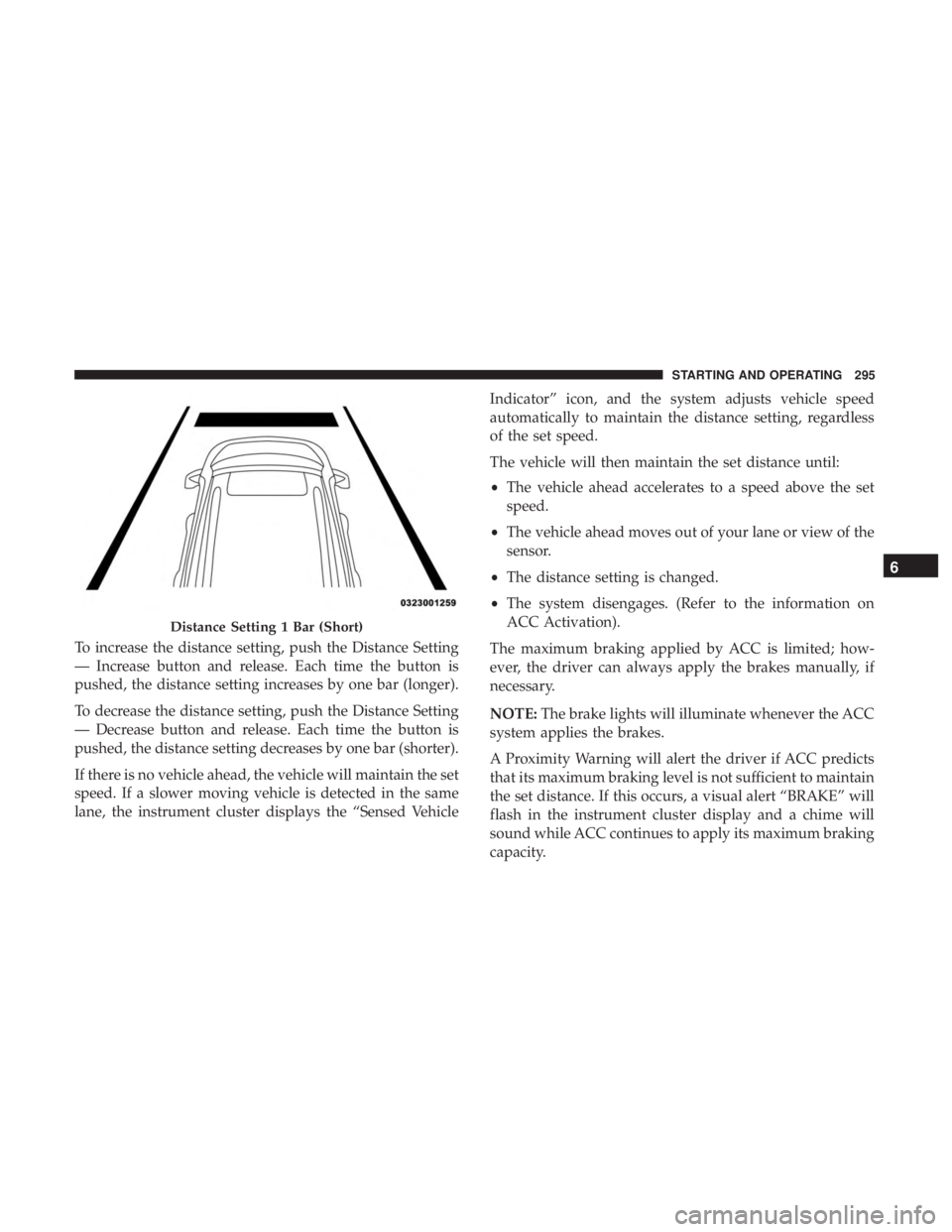
To increase the distance setting, push the Distance Setting
— Increase button and release. Each time the button is
pushed, the distance setting increases by one bar (longer).
To decrease the distance setting, push the Distance Setting
— Decrease button and release. Each time the button is
pushed, the distance setting decreases by one bar (shorter).
If there is no vehicle ahead, the vehicle will maintain the set
speed. If a slower moving vehicle is detected in the same
lane, the instrument cluster displays the “Sensed VehicleIndicator” icon, and the system adjusts vehicle speed
automatically to maintain the distance setting, regardless
of the set speed.
The vehicle will then maintain the set distance until:
•
The vehicle ahead accelerates to a speed above the set
speed.
• The vehicle ahead moves out of your lane or view of the
sensor.
• The distance setting is changed.
• The system disengages. (Refer to the information on
ACC Activation).
The maximum braking applied by ACC is limited; how-
ever, the driver can always apply the brakes manually, if
necessary.
NOTE: The brake lights will illuminate whenever the ACC
system applies the brakes.
A Proximity Warning will alert the driver if ACC predicts
that its maximum braking level is not sufficient to maintain
the set distance. If this occurs, a visual alert “BRAKE” will
flash in the instrument cluster display and a chime will
sound while ACC continues to apply its maximum braking
capacity.
Distance Setting 1 Bar (Short)
6
STARTING AND OPERATING 295
Page 329 of 572
NOTE:The LaneSense system operates with the similar
behavior for a right lane departure when only the right
lane marking has been detected.
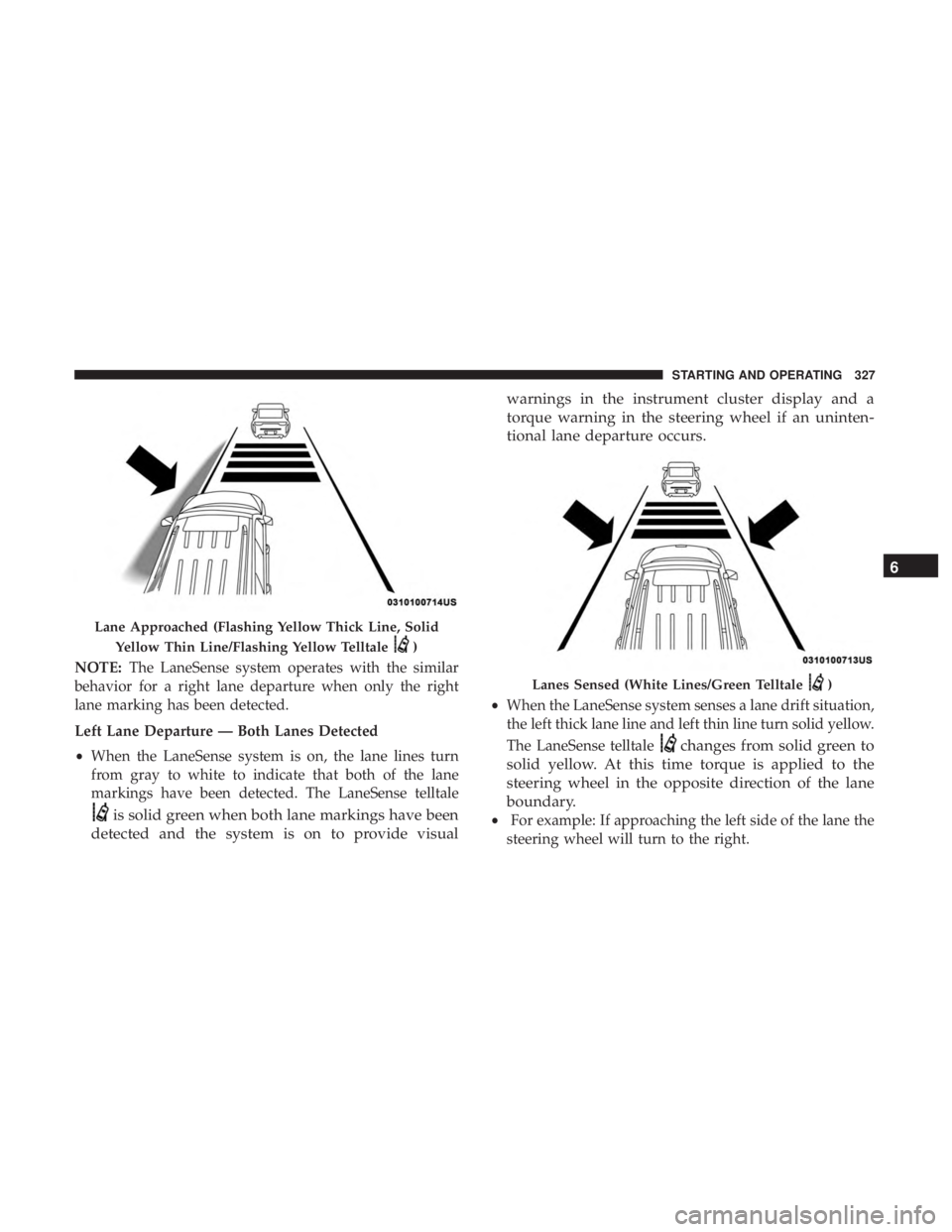
Left Lane Departure — Both Lanes Detected
• When the LaneSense system is on, the lane lines turn
from gray to white to indicate that both of the lane
markings have been detected. The LaneSense telltale
is solid green when both lane markings have been
detected and the system is on to provide visual warnings in the instrument cluster display and a
torque warning in the steering wheel if an uninten-
tional lane departure occurs.
•
When the LaneSense system senses a lane drift situation,
the left thick lane line and left thin line turn solid yellow.
The LaneSense telltale
changes from solid green to
solid yellow. At this time torque is applied to the
steering wheel in the opposite direction of the lane
boundary.
• For example: If approaching the left side of the lane the
steering wheel will turn to the right.
Lane Approached (Flashing Yellow Thick Line, Solid
Yellow Thin Line/Flashing Yellow Telltale
)
Lanes Sensed (White Lines/Green Telltale)
6
STARTING AND OPERATING 327
Page 330 of 572
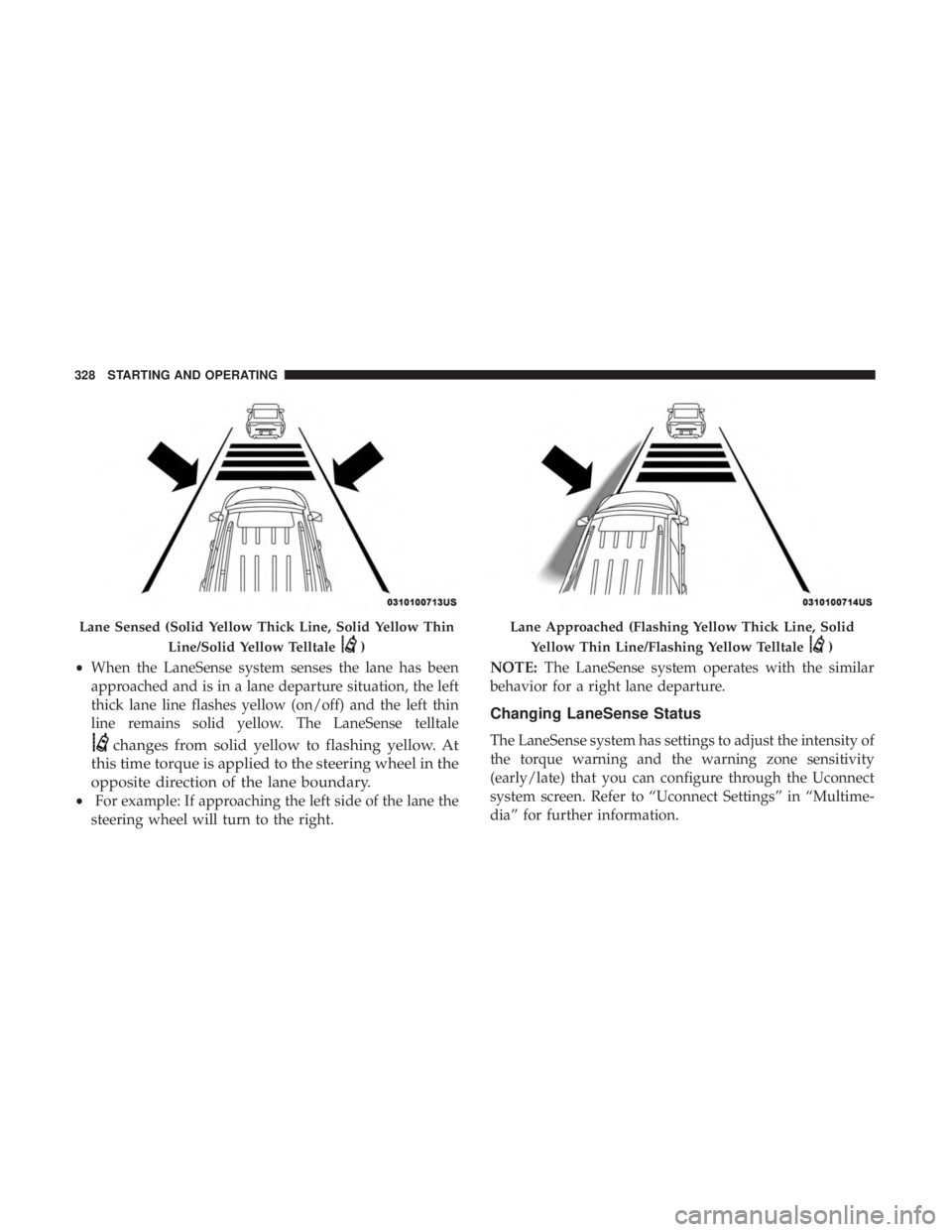
•When the LaneSense system senses the lane has been
approached and is in a lane departure situation, the left
thick lane line flashes yellow (on/off) and the left thin
line remains solid yellow. The LaneSense telltale
changes from solid yellow to flashing yellow. At
this time torque is applied to the steering wheel in the
opposite direction of the lane boundary.
• For example: If approaching the left side of the lane the
steering wheel will turn to the right. NOTE:
The LaneSense system operates with the similar
behavior for a right lane departure.
Changing LaneSense Status
The LaneSense system has settings to adjust the intensity of
the torque warning and the warning zone sensitivity
(early/late) that you can configure through the Uconnect
system screen. Refer to “Uconnect Settings” in “Multime-
dia” for further information.
Lane Sensed (Solid Yellow Thick Line, Solid Yellow Thin
Line/Solid Yellow Telltale
)
Lane Approached (Flashing Yellow Thick Line, SolidYellow Thin Line/Flashing Yellow Telltale
)
328 STARTING AND OPERATING
Page 363 of 572
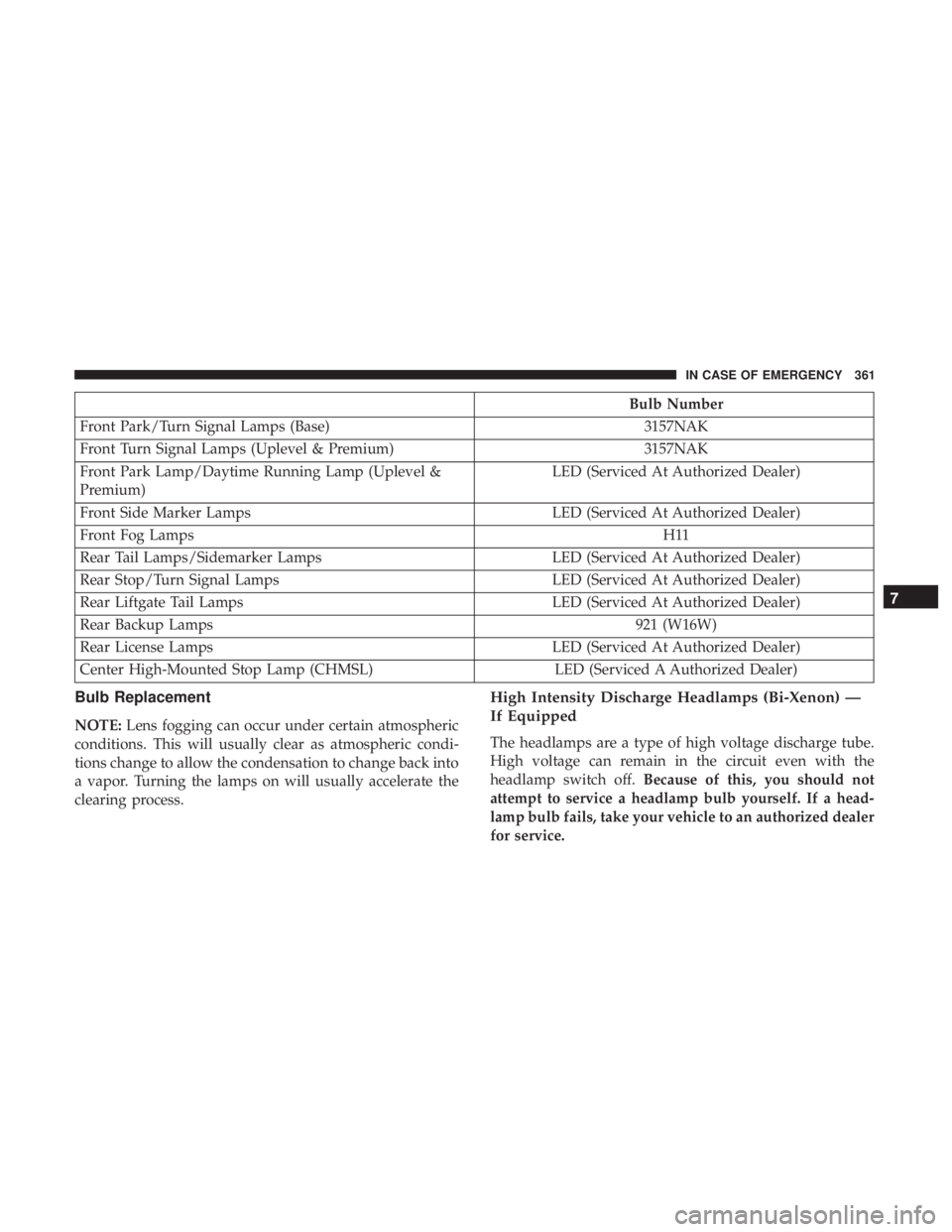
Bulb Number
Front Park/Turn Signal Lamps (Base) 3157NAK
Front Turn Signal Lamps (Uplevel & Premium) 3157NAK
Front Park Lamp/Daytime Running Lamp (Uplevel &
Premium) LED (Serviced At Authorized Dealer)
Front Side Marker Lamps LED (Serviced At Authorized Dealer)
Front Fog Lamps H11
Rear Tail Lamps/Sidemarker Lamps LED (Serviced At Authorized Dealer)
Rear Stop/Turn Signal Lamps LED (Serviced At Authorized Dealer)
Rear Liftgate Tail Lamps LED (Serviced At Authorized Dealer)
Rear Backup Lamps 921 (W16W)
Rear License Lamps LED (Serviced At Authorized Dealer)
Center High-Mounted Stop Lamp (CHMSL) LED (Serviced A Authorized Dealer)
Bulb Replacement
NOTE:Lens fogging can occur under certain atmospheric
conditions. This will usually clear as atmospheric condi-
tions change to allow the condensation to change back into
a vapor. Turning the lamps on will usually accelerate the
clearing process.
High Intensity Discharge Headlamps (Bi-Xenon) —
If Equipped
The headlamps are a type of high voltage discharge tube.
High voltage can remain in the circuit even with the
headlamp switch off. Because of this, you should not
attempt to service a headlamp bulb yourself. If a head-
lamp bulb fails, take your vehicle to an authorized dealer
for service.
7
IN CASE OF EMERGENCY 361
Page 395 of 572
SCHEDULED SERVICING
The Scheduled Maintenance services listed in this manual
must be done at the times or mileages specified to protect
your vehicle warranty and ensure the best vehicle perfor-
mance and reliability. More frequent maintenance may be
needed for vehicles in severe operating conditions, such as
dusty areas and very short trip driving. Inspection and
service should also be done anytime a malfunction is
suspected.
The oil change indicator system will remind you that it is
time to take your vehicle in for scheduled maintenance.
The instrument cluster display will display an “Oil Change
Required” message and a single chime will sound, indicat-
ing that an oil change is necessary.
Based on engine operation conditions, the oil change
indicator message will illuminate. This means that service
is required for your vehicle. Have your vehicle serviced as
soon as possible, within the next 500 miles (800 km).NOTE:
•
The oil change indicator message will not monitor the
time since the last oil change. Change your vehicle’s oil
if it has been six months since your last oil change, even
if the oil change indicator message is NOT illuminated.
• Change your engine oil more often if you drive your
vehicle off-road for an extended period of time.
• Under no circumstances should oil change intervals
exceed 6,000 miles (10,000 km) or six months, whichever
comes first.
Your authorized dealer will reset the oil change indicator
message after completing the scheduled oil change. If a
scheduled oil change is performed by someone other than
your authorized dealer, the message can be reset by
referring to the steps described under “Instrument Cluster
Display” in “Getting To Know Your Instrument Panel” for
further information.
8
SERVICING AND MAINTENANCE 393
Page 403 of 572
WARNING!
You can be badly injured working on or around a
motor vehicle. Only do service work for which you
have the knowledge and the proper equipment. If you
have any doubt about your ability to perform a service
job, take your vehicle to a competent mechanic.
Engine Oil
Change Engine Oil
The oil change indicator system will remind you that it is
time to take your vehicle in for scheduled maintenance.
Refer to “Scheduled Servicing” for further information.
NOTE:Under no circumstances should oil change inter-
vals exceed 6,000 miles (10,000 km) or six months, which-
ever occurs first.
Engine Oil Selection
For best performance and maximum protection under all
types of operating conditions, the manufacturer only rec-
ommends full synthetic engine oils that meet the American
Petroleum Institute (API) categories of SN.
The manufacturer recommends the use of Pennzoil Ultra
0W-40 engine or equivalent Mopar oil meeting the FCA
Material Standard MS-12633 for use in all operating tem-
peratures.
The engine oil filler cap also shows the recommended
engine oil viscosity for your engine. For information on
engine oil filler cap location, refer to “Engine Compart-
ment” in this section for further information.
CAUTION!
Do not use chemical flushes in your engine oil as the
chemicals can damage your engine. Such damage is not
covered by the New Vehicle Limited Warranty.
8
SERVICING AND MAINTENANCE 401