transmission DODGE DURANGO SRT 2019 Workshop Manual
[x] Cancel search | Manufacturer: DODGE, Model Year: 2019, Model line: DURANGO SRT, Model: DODGE DURANGO SRT 2019Pages: 572, PDF Size: 6.59 MB
Page 417 of 572
In unusual situations involving grossly malfunctioning
engine operation, a scorching odor may suggest severe and
abnormal catalyst overheating. If this occurs, stop the
vehicle, turn off the engine and allow it to cool. Service,
including a tune-up to manufacturer’s specifications,
should be obtained immediately.
To minimize the possibility of catalytic converter damage:
•Do not interrupt the ignition when the transmission is in
gear and the vehicle is in motion.
• Do not try to start the vehicle by pushing or towing the
vehicle.
• Do not idle the engine with any ignition components
disconnected or removed, such as when diagnostic
testing, or for prolonged periods during very rough idle
or malfunctioning operating conditions.
Cooling System
WARNING!
• You or others can be badly burned by hot engine
coolant (antifreeze) or steam from your radiator. If
you see or hear steam coming from under the hood,
(Continued)
WARNING! (Continued)
do not open the hood until the radiator has had time
to cool. Never open a cooling system pressure cap
when the radiator or coolant bottle is hot.
• Keep hands, tools, clothing, and jewelry away from
the radiator cooling fan when the hood is raised. The
fan starts automatically and may start at any time,
whether the engine is running or not.
• When working near the radiator cooling fan, discon-
nect the fan motor lead or turn the ignition to the
OFF mode. The fan is temperature controlled and can
start at any time the ignition is in the ON mode.
Engine Coolant Checks
Check the engine coolant (antifreeze) protection every 12
months (before the onset of freezing weather, where appli-
cable). If the engine coolant (antifreeze) is dirty, the system
should be drained, flushed, and refilled with fresh OAT
coolant (conforming to MS.90032) by an authorized dealer.
Check the front of the A/C condenser for any accumula-
tion of bugs, leaves, etc. If dirty, clean by gently spraying
water from a garden hose vertically down the face of the
condenser.
8
SERVICING AND MAINTENANCE 415
Page 423 of 572
WARNING!(Continued)
brake fluid to catch fire. Brake fluid can also damage
painted and vinyl surfaces, care should be taken to
avoid its contact with these surfaces.
• Do not allow petroleum based fluid to contaminate
the brake fluid. Brake seal components could be
damaged, causing partial or complete brake failure.
This could result in a collision.
Automatic Transmission
Selection Of Lubricant
It is important to use the proper transmission fluid to
ensure optimum transmission performance and life. Use
only the manufacturer’s specified transmission fluid. Refer
to “Fluids And Lubricants” in “Technical Specifications”
for fluid specifications. It is important to maintain the
transmission fluid at the correct level using the recom-
mended fluid.
NOTE: No chemical flushes should be used in any trans-
mission; only the approved lubricant should be used.
CAUTION!
Using a transmission fluid other than the manufactur-
er ’s recommended fluid may cause deterioration in
transmission shift quality and/or torque converter
shudder. Refer to “Fluids And Lubricants” in “Techni-
cal Specifications” for fluid specifications.
Special Additives
The manufacturer strongly recommends against using any
special additives in the transmission. Automatic Transmis-
sion Fluid (ATF) is an engineered product and its perfor-
mance may be impaired by supplemental additives. There-
fore, do not add any fluid additives to the transmission.
Avoid using transmission sealers as they may adversely
affect seals.
CAUTION!
Do not use chemical flushes in your transmission as
the chemicals can damage your transmission compo-
nents. Such damage is not covered by the New Vehicle
Limited Warranty.
8
SERVICING AND MAINTENANCE 421
Page 424 of 572
Fluid Level Check
The fluid level is preset at the factory and does not require
adjustment under normal operating conditions. Routine
fluid level checks are not required; therefore the transmis-
sion has no dipstick. An authorized dealer can check your
transmission fluid level using special service tools. If you
notice fluid leakage or transmission malfunction, visit an
authorized dealer immediately to have the transmission
fluid level checked. Operating the vehicle with an im-
proper fluid level can cause severe transmission damage.
CAUTION!
If a transmission fluid leak occurs, visit an authorized
dealer immediately. Severe transmission damage may
occur. An authorized dealer has the proper tools to
adjust the fluid level accurately.
Fluid And Filter Changes
Under normal operating conditions, the fluid installed at
the factory will provide satisfactory lubrication for the life
of the vehicle.Routine fluid and filter changes are not required. However,
change the fluid and filter if the fluid becomes contami-
nated (with water, etc.), or if the transmission is disas-
sembled for any reason.
Front/Rear Axle Fluid
For normal service, periodic fluid level checks are not
required. When the vehicle is serviced for other reasons the
exterior surfaces of the axle assembly should be inspected.
If gear oil leakage is suspected inspect the fluid level. Refer
to “Fluids And Lubricants” in “Technical Specifications”
for further information.
Front Axle Fluid Level Check
The front axle oil level needs to be no lower than 1/8 inch
(3 mm) below the bottom of the fill hole.
The front axle fill and drain plugs should be tightened to 22
to 29 ft lbs (30 to 40 N·m).
CAUTION!
Do not overtighten the plugs as it could damage them
and cause them to leak.
422 SERVICING AND MAINTENANCE
Page 464 of 572
Chassis
ComponentFluid, Lubricant, or Genuine Part
Automatic Transmission Use only Mopar ZF 8&9 Speed ATF Automatic Transmis-
sion Fluid or equivalent. Failure to use the correct fluid
may affect the function or performance of your transmis-
sion.
Transfer Case – Single-Speed We recommend you use Mopar ATF+4 Automatic Trans-
mission Fluid.
Axle Differential (Front) We recommend you use Mopar GL-5 Synthetic Axle Lubri-
cant SAE 75W-85.
Axle Differential (Rear) – With Electronic Limited-Slip
Differential (ELSD) We recommend you use Mopar GL-5 Synthetic Axle Lubri-
cant SAE 75W-85 with integrated friction modifier.
Brake Master Cylinder We recommend you use Mopar DOT 3 Brake Fluid, SAE
J1703 should be used. If DOT 3, SAE J1703 brake fluid is not
available, then DOT 4 is acceptable.
462 TECHNICAL SPECIFICATIONS
Page 476 of 572
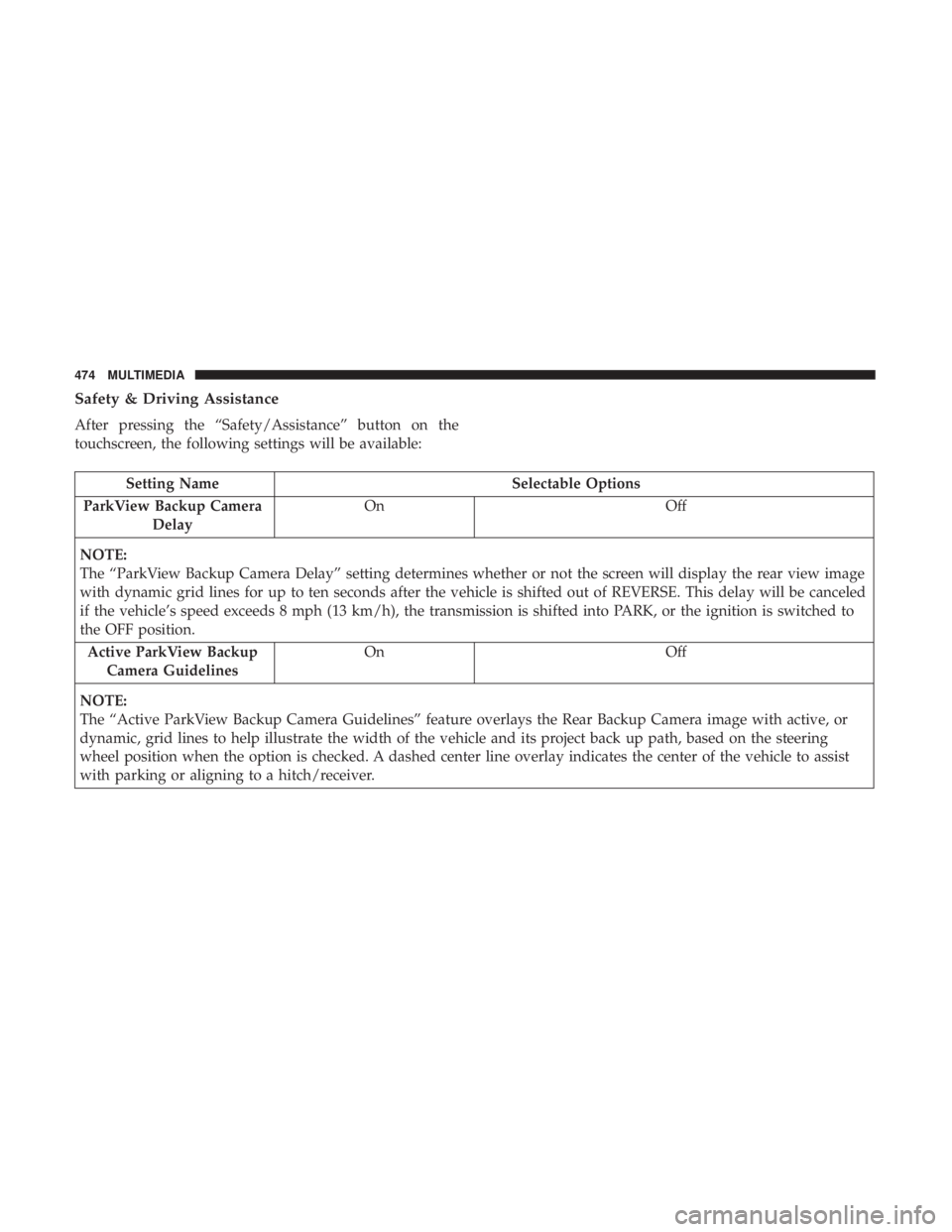
Safety & Driving Assistance
After pressing the “Safety/Assistance” button on the
touchscreen, the following settings will be available:
Setting NameSelectable Options
ParkView Backup Camera Delay On
Off
NOTE:
The “ParkView Backup Camera Delay” setting determines whether or not the screen will display the rear view image
with dynamic grid lines for up to ten seconds after the vehicle is shifted out of REVERSE. This delay will be canceled
if the vehicle’s speed exceeds 8 mph (13 km/h), the transmission is shifted into PARK, or the ignition is switched to
the OFF position. Active ParkView Backup Camera Guidelines On
Off
NOTE:
The “Active ParkView Backup Camera Guidelines” feature overlays the Rear Backup Camera image with active, or
dynamic, grid lines to help illustrate the width of the vehicle and its project back up path, based on the steering
wheel position when the option is checked. A dashed center line overlay indicates the center of the vehicle to assist
with parking or aligning to a hitch/receiver.
474 MULTIMEDIA
Page 478 of 572
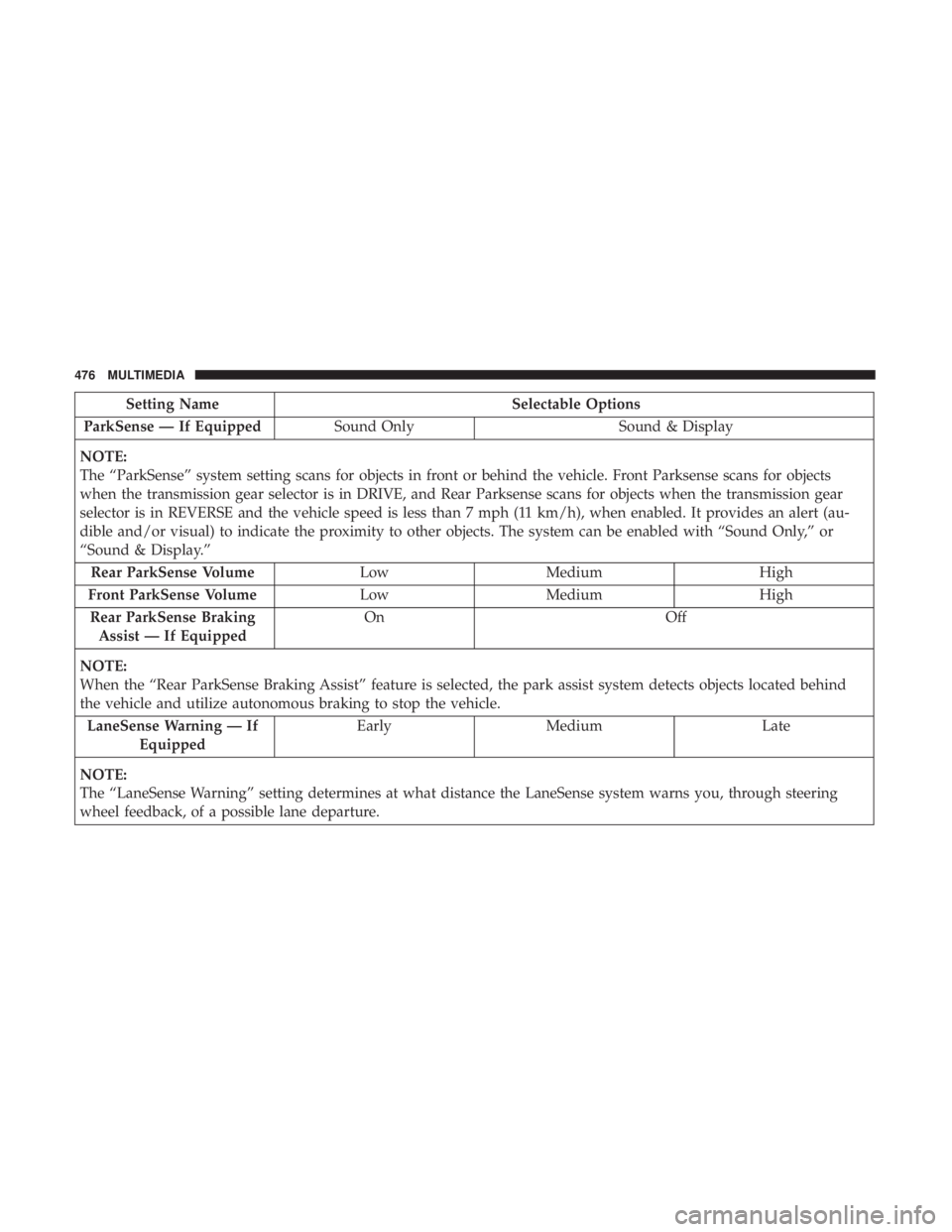
Setting NameSelectable Options
ParkSense — If Equipped Sound Only Sound & Display
NOTE:
The “ParkSense” system setting scans for objects in front or behind the vehicle. Front Parksense scans for objects
when the transmission gear selector is in DRIVE, and Rear Parksense scans for objects when the transmission gear
selector is in REVERSE and the vehicle speed is less than 7 mph (11 km/h), when enabled. It provides an alert (au-
dible and/or visual) to indicate the proximity to other objects. The system can be enabled with “Sound Only,” or
“Sound & Display.” Rear ParkSense Volume LowMedium High
Front ParkSense Volume LowMedium High
Rear ParkSense Braking Assist — If Equipped On
Off
NOTE:
When the “Rear ParkSense Braking Assist” feature is selected, the park assist system detects objects located behind
the vehicle and utilize autonomous braking to stop the vehicle. LaneSense Warning — If Equipped Early
Medium Late
NOTE:
The “LaneSense Warning” setting determines at what distance the LaneSense system warns you, through steering
wheel feedback, of a possible lane departure.
476 MULTIMEDIA
Page 482 of 572
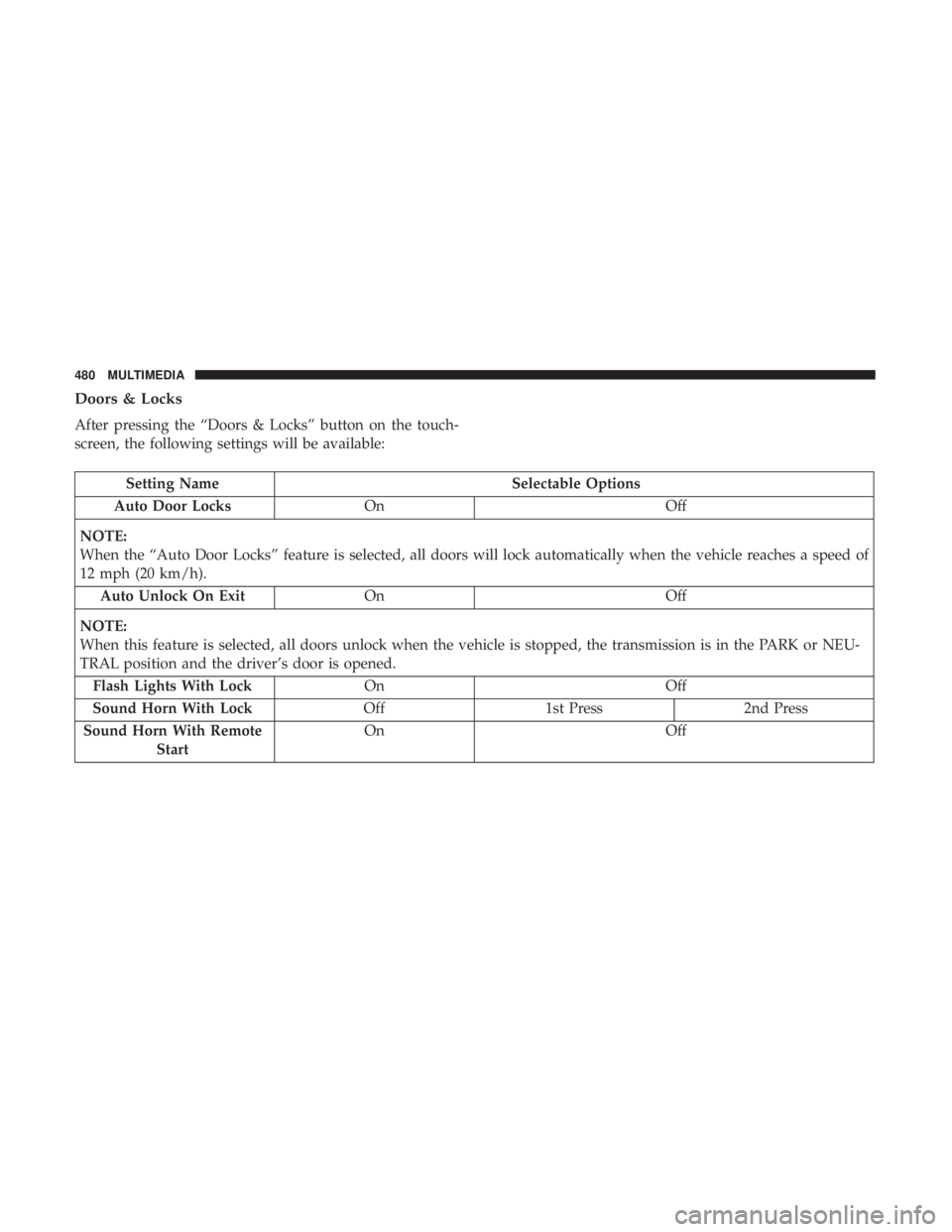
Doors & Locks
After pressing the “Doors & Locks” button on the touch-
screen, the following settings will be available:
Setting NameSelectable Options
Auto Door Locks On Off
NOTE:
When the “Auto Door Locks” feature is selected, all doors will lock automatically when the vehicle reaches a speed of
12 mph (20 km/h). Auto Unlock On Exit On Off
NOTE:
When this feature is selected, all doors unlock when the vehicle is stopped, the transmission is in the PARK or NEU-
TRAL position and the driver’s door is opened. Flash Lights With Lock On Off
Sound Horn With Lock Off1st Press 2nd Press
Sound Horn With Remote Start On
Off
480 MULTIMEDIA
Page 497 of 572
•Oil Pressure
Shows the actual oil pressure.
• Coolant Temperature
Shows the actual coolant temperature.
• Battery Voltage
Shows the actual battery voltage.
• Trans Oil Temp
Shows the current transmission oil temperature.
• Intake Air Temperature
Shows the actual air intake temperature.
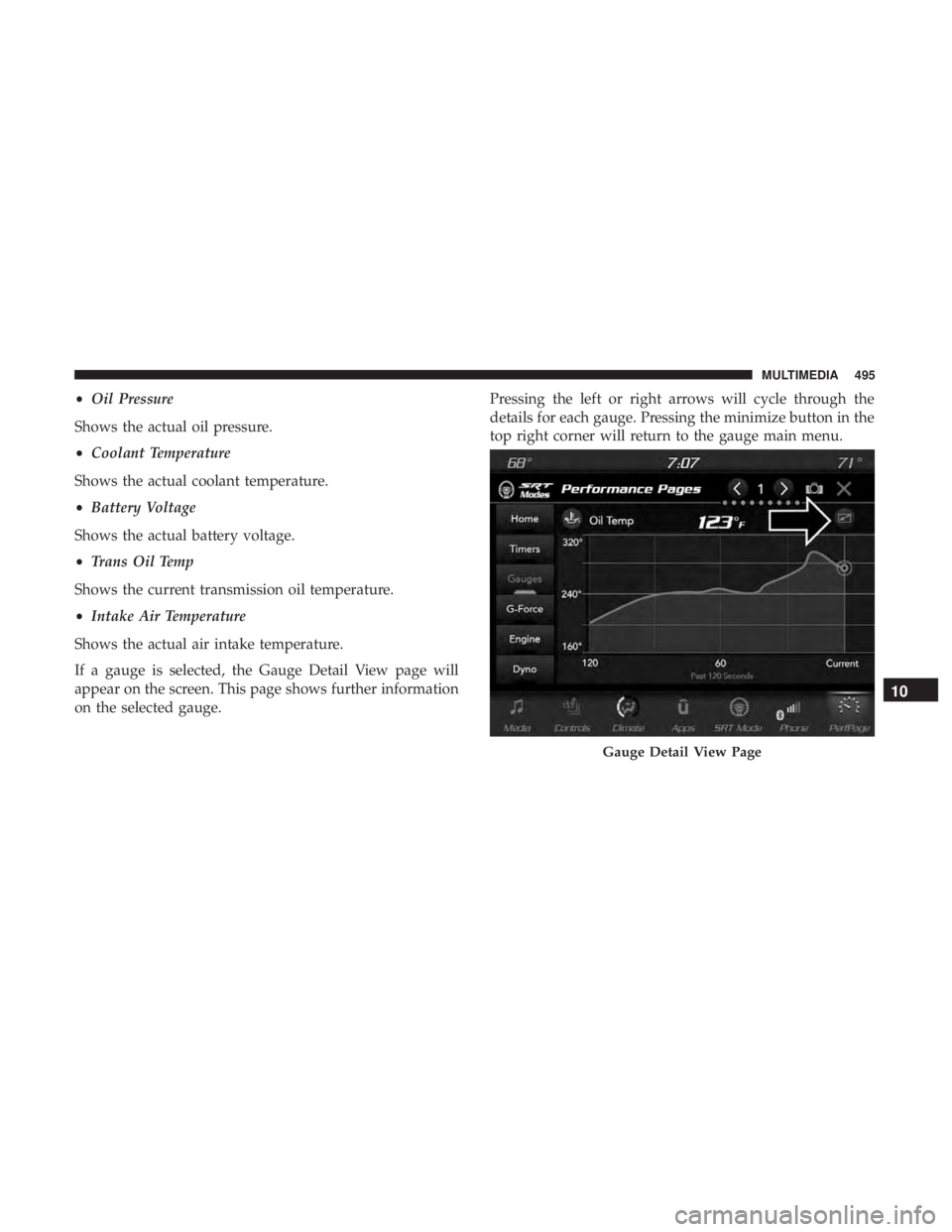
If a gauge is selected, the Gauge Detail View page will
appear on the screen. This page shows further information
on the selected gauge. Pressing the left or right arrows will cycle through the
details for each gauge. Pressing the minimize button in the
top right corner will return to the gauge main menu.
Gauge Detail View Page
10
MULTIMEDIA 495
Page 502 of 572
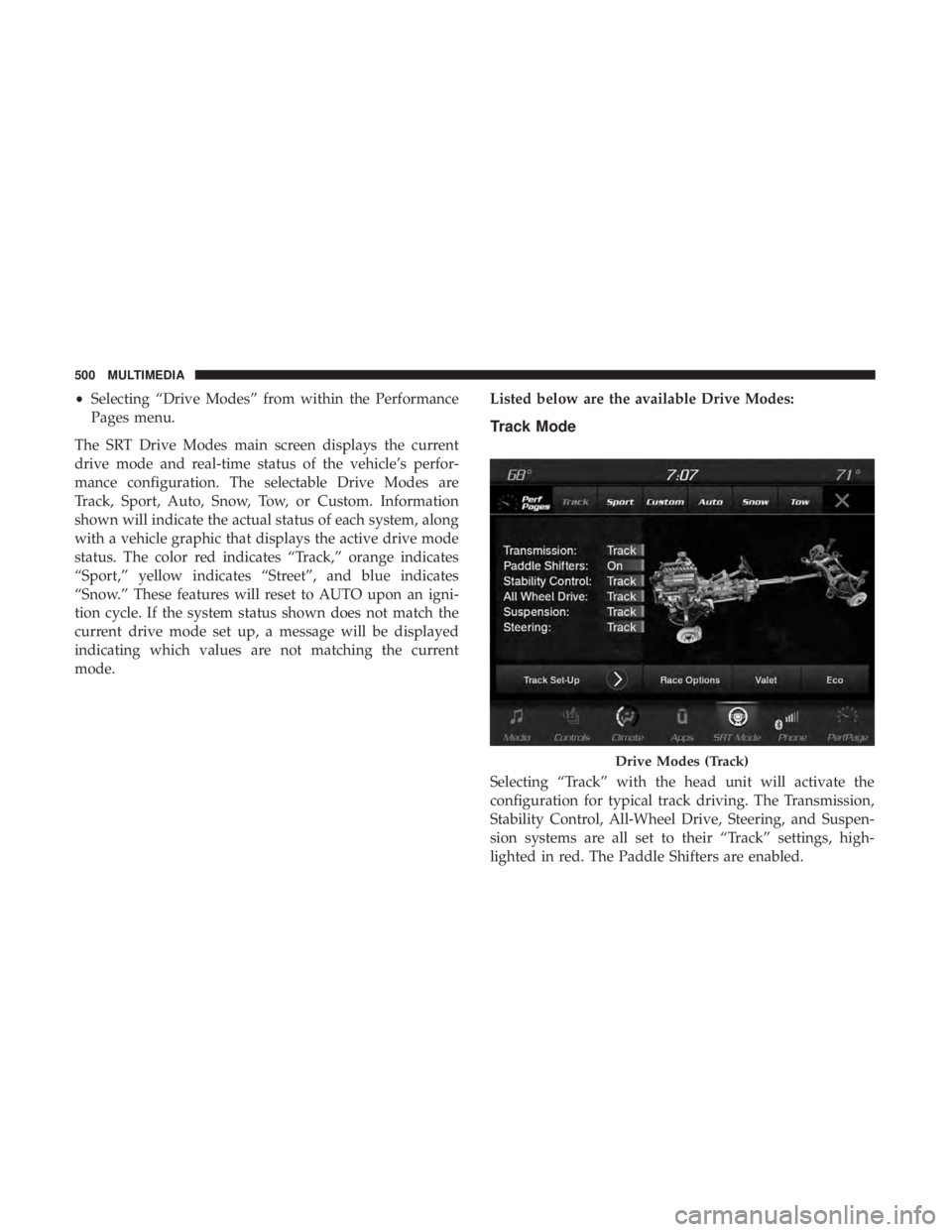
•Selecting “Drive Modes” from within the Performance
Pages menu.
The SRT Drive Modes main screen displays the current
drive mode and real-time status of the vehicle’s perfor-
mance configuration. The selectable Drive Modes are
Track, Sport, Auto, Snow, Tow, or Custom. Information
shown will indicate the actual status of each system, along
with a vehicle graphic that displays the active drive mode
status. The color red indicates “Track,” orange indicates
“Sport,” yellow indicates “Street”, and blue indicates
“Snow.” These features will reset to AUTO upon an igni-
tion cycle. If the system status shown does not match the
current drive mode set up, a message will be displayed
indicating which values are not matching the current
mode. Listed below are the available Drive Modes:
Track Mode
Selecting “Track” with the head unit will activate the
configuration for typical track driving. The Transmission,
Stability Control, All-Wheel Drive, Steering, and Suspen-
sion systems are all set to their “Track” settings, high-
lighted in red. The Paddle Shifters are enabled.
Drive Modes (Track)
500 MULTIMEDIA
Page 503 of 572
NOTE:Electronic Stability Control (ESC) Full-Off can be
activated by pushing and holding the ESC Off button on
the instrument panel switch bank for five seconds.
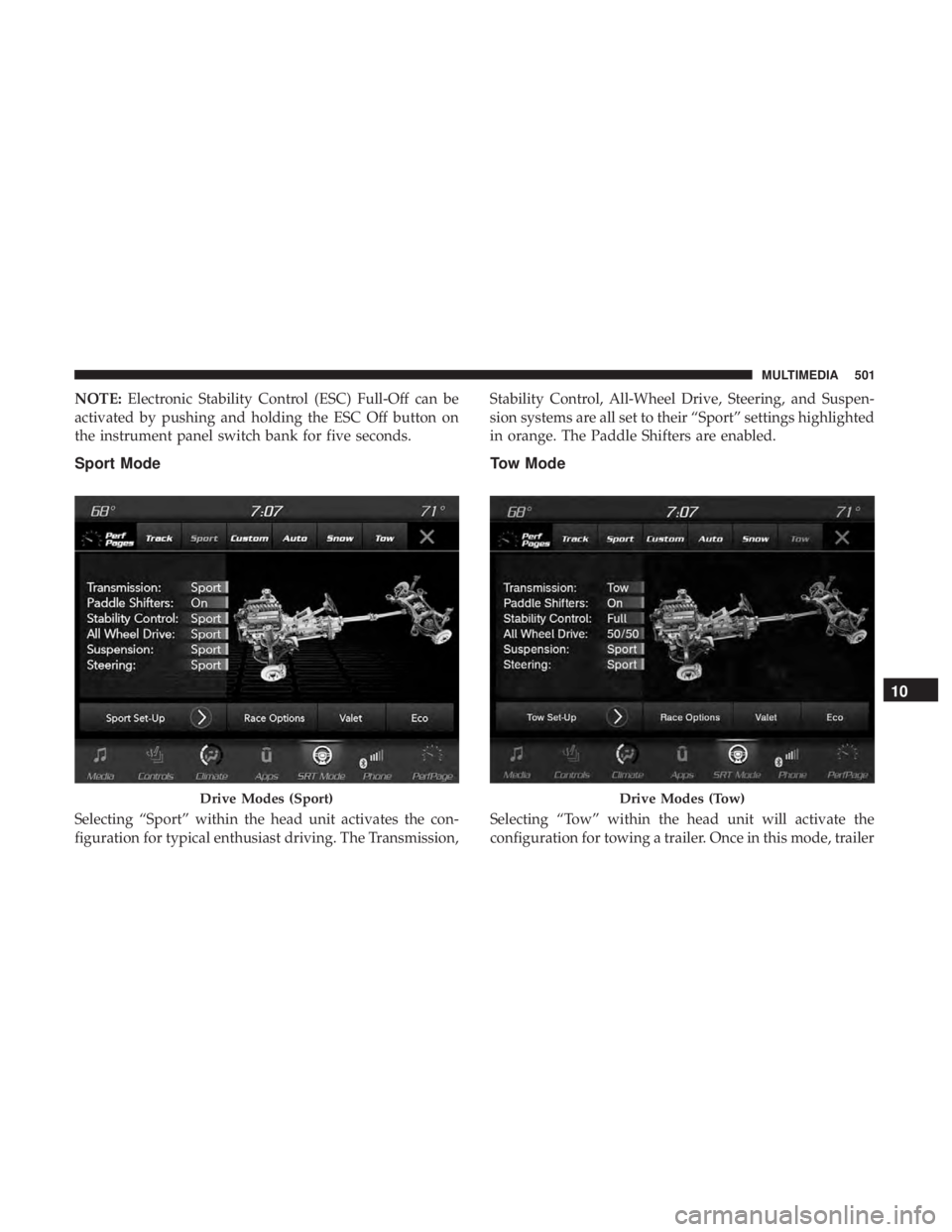
Sport Mode
Selecting “Sport” within the head unit activates the con-
figuration for typical enthusiast driving. The Transmission, Stability Control, All-Wheel Drive, Steering, and Suspen-
sion systems are all set to their “Sport” settings highlighted
in orange. The Paddle Shifters are enabled.
Tow Mode
Selecting “Tow” within the head unit will activate the
configuration for towing a trailer. Once in this mode, trailer
Drive Modes (Sport)Drive Modes (Tow)
10
MULTIMEDIA 501