transmission DODGE DURANGO SRT 2019 Owner's Guide
[x] Cancel search | Manufacturer: DODGE, Model Year: 2019, Model line: DURANGO SRT, Model: DODGE DURANGO SRT 2019Pages: 572, PDF Size: 6.59 MB
Page 277 of 572
1. Stop the vehicle.
2. Shift the transmission into PARK, if possible. If not, shiftthe transmission to NEUTRAL.
3. Push and hold the ignition switch until the engine turns OFF.
4. Wait approximately 30 seconds.
5. Restart the engine.
6. Shift into the desired gear range. If the problem is no longer detected, the transmission will return to normal
operation.
NOTE: Even if the transmission can be reset, we recom-
mend that you visit an authorized dealer at your earliest
possible convenience. An authorized dealer has diagnostic
equipment to assess the condition of your transmission.
If the transmission cannot be reset, authorized dealer
service is required.
When To Use TOW Mode
When driving in hilly areas, towing a trailer, carrying a
heavy load, etc., and frequent transmission shifting occurs,
select TOW mode, using the rotary switch on the center
console. Selecting TOW mode will improve performance and reduce the potential for transmission overheating or
failure due to excessive shifting. Refer to “All-Wheel Drive
Operation” in “Starting And Operating” for further infor-
mation.
AutoStick
AutoStick is a driver-interactive transmission feature pro-
viding manual shift control, giving you more control of the
vehicle. AutoStick allows you to maximize engine braking,
eliminate undesirable upshifts and downshifts, and im-
prove overall vehicle performance. This system can also
provide you with more control during passing, city driv-
ing, cold slippery conditions, mountain driving, trailer
towing, and many other situations.
Operation
To activate AutoStick mode, move the gear selector into the
SPORT (S) position (beside the DRIVE position), or tap one
of the shift paddles on the steering wheel. Tapping the (-)
shift paddle to enter AutoStick mode will downshift the
transmission to the next lower gear, while tapping (+) to
enter AutoStick mode will retain the current gear. The
current transmission gear will be displayed in the instru-
ment cluster. In AutoStick mode, you can use the gear
selector (in the SPORT position), or the shift paddles, to
manually shift the transmission. Tapping the gear selector
6
STARTING AND OPERATING 275
Page 278 of 572
forward (-) while in the SPORT (S) position, or tapping the
(-) shift paddle on the steering wheel, will downshift the
transmission to the next lower gear. Tapping the selector
rearward (+) (or tapping the (+) shift paddle) will com-
mand an upshift.
NOTE:The shift paddles may be disabled (or re-enabled,
as desired) using the SRT Drive Modes.
In AutoStick mode, the transmission will shift up or down
when (+/-) is manually selected by the driver (using the
gear selector or the shift paddles), unless an engine lugging
or overspeed condition would result. It will remain in the
selected gear until another upshift or downshift is chosen,
except as described below.
• The transmission will automatically downshift as the
vehicle slows (to prevent engine lugging) and will
display the current gear.
• The transmission will automatically downshift to first
gear when coming to a stop. After a stop, the driver
should manually upshift (+) the transmission as the
vehicle is accelerated.
• You can start out, from a stop, in first or second gear (or
third gear, in SNOW mode). Tapping (+) (at a stop) will allow starting in second gear. Starting out in second or
third gear can be helpful in snowy or icy conditions.
• If a requested downshift would cause the engine to
over-speed, that shift will not occur.
• The system will ignore attempts to upshift at too low of
a vehicle speed.
• Holding the (-) paddle depressed, or holding the gear
selector in the (-) position, will downshift the transmis-
sion to the lowest gear possible at the current speed.
• Transmission shifting will be more noticeable when
AutoStick is enabled.
• The system may revert to automatic shift mode if a fault
or overheat condition is detected.
To disengage AutoStick, return the gear selector to the
DRIVE position, or press and hold the (+) shift paddle (if
the gear selector is already in DRIVE) until “D” is once
again indicated in the instrument cluster. You can shift in or
out of AutoStick mode at any time without taking your foot
off the accelerator pedal.
276 STARTING AND OPERATING
Page 279 of 572
WARNING!
Do not downshift for additional engine braking on a
slippery surface. The drive wheels could lose their grip
and the vehicle could skid, causing a collision or
personal injury.
DRIVE MODES
Your vehicle is equipped with a SRT Drive Mode feature.
This feature gives the driver control over the systems in the
vehicle which affect its performance, enabling the driver to
tune it for desired driving scenarios.
NOTE:Refer to “SRT Drive Modes” in “Multimedia” for
further descriptions of these modes.
Launch Control — If Equipped
This vehicle is equipped with a Launch Mode system that
is designed to allow the driver to consistently achieve
maximum acceleration in a straight line. Launch Mode is a
form of traction control that manages tire slip while
aggressively launching the vehicle. Launch mode is in-
tended for use during race events on a closed course where
consistent acceleration is desired. The system is not in-
tended to compensate for lack of driver experience or familiarity with the race track. The use of this feature in
low traction (cold, wet, gravel, etc) conditions may result in
excessive wheel slip outside of the system’s control, result-
ing in an aborted launch. Launch Mode is calibrated to
provide the most benefit on an unprepared surface and will
degrade performance on prepared surfaces (such as a drag
strip).
NOTE:
Launch control is not available within the first 500
miles (804 km) of engine break-in.
Preconditions:
• Launch control should not be used on public roads.
Always check track conditions and the surrounding
area.
• Launch Control should only be used when the engine
and transmission are at operating temperature.
• Launch Control is intended to be used on dry, paved
road surfaces only. Use on slippery or loose surfaces
may cause damage to vehicle components and is not
recommended.
6
STARTING AND OPERATING 277
Page 281 of 572
•The “ESC OFF” button is pushed to change the system
to another mode.
NOTE: After launch control has been aborted, ESC will
return to its current ESC mode.
CAUTION!
Do not attempt to shift when the drive wheels are
spinning and do not have traction. Damage to the
transmission may occur.
Guidelines For Track Use
NOTE: Because of the extreme conditions encountered
during track use, any damage or wear associated with
track use may not be covered by warranty.
• If your SRT vehicle is equipped with Drive Modes, they
will alter the vehicle’s performance in various driving
situations. It is recommended that your vehicle operates
in SPORT or TRACK modes during the track event.
• Prior to each track event/day, verify all fluids are at the
correct levels. Refer to “Fluid Capacities” in “Technical
Specifications” for further information. •
Prior to each track event, verify the front and rear brake
pads have more than ½ pad thickness remaining. If the
brake pads require changing, please burnish prior to
track outing at full pace.
NOTE: Use of DOT 4 brake fluid is suggested for extended
track usage due to increased thermal capacity.
• At the conclusion of each track event, it is recommended
that a brake bleed procedure is performed to maintain
the pedal feel and stopping capability of your Brembo
High Performance brake system.
• It is recommended that each track outing should end
with a minimum of one cool down lap using minimal
braking.
• If equipped with a removable lower front fascia grille, it
is recommended to remove it for track use during
warm/hot weather to improve cooling airflow to critical
powertrain and cooling system components.
• All SRT vehicles are track tested for 24 hours of endur-
ance. However, it is recommended that suspension
system, brake system, prop shaft, and ½ shaft boots
should be checked for wear or damage after every track
event.
6
STARTING AND OPERATING 279
Page 282 of 572
•Track usage results in increased operating temperatures
of the engine, transmission, clutch – if equipped, drive-
line and brake system. This may affect noise (NVH)
countermeasures designed into your vehicle. New com-
ponents may need to be installed to return the system to
the original NVH performance.
• For race track usage it is recommended that the axle
fluid be changed every 4 hours of on track time.
• Tire pressure:
• 40psi (276kpa) hot, recommended 32psi (221kpa) front,
30psi (207 kpa) rear cold
NOTE: It is recommended that you target 40psi (276kpa)
Hot Tire Pressure at the conclusion of each track session.
Starting at 32psi (221kpa) Front and 30psi (207 kpa) Rear
Cold and adjusting based on ambient & track conditions is
recommended. Tire pressure can be monitored via the
instrument cluster display and can assist with adjustments.
Track burnishing your brakes:
To avoid “green lining fade” during track use, the brake
pads and rotors must have a thermal burnish for factory
installed components or when new brake friction compo-
nents are installed: 1. Use one track session to burnish brakes by driving at
75% speed. Brake at approximately 0.60-0.80g max with-
out ABS intervention.
2. Lap the track in this manner until you start smelling the brakes. Continue for another half lap at speed, then do
a two lap cool down with minimal brake applies. Make
sure the brakes are not smoking. If they are, do another
cool down lap.
3. Do not continue for more than one full burnishing lap after you start smelling the brakes. Do not get them
smoking heavily. This will get them too hot and affect
their life negatively in future track use.
4. Allow vehicle to sit and cool in the paddock for at least 30 min. If an infrared thermal gun is available, allow
rotors to cool to 200°F (93.3°C) before going back out.
5. There should be a thin ash layer when inspecting the pads installed in the caliper. Having the ash layer go
more than half the thickness of the pad material indi-
cates too aggressive of a burnish.
6. Sometimes, a second burnish session is required. If the pads start smelling in the next track session, reduce
speed and braking decel to burnish targets and follow
steps two through four.
280 STARTING AND OPERATING
Page 287 of 572
•If the button is continually pushed, the set speed will
continue to decrease until the button is released, then the
new set speed will be established.
Metric Speed (km/h)
• Pushing the SET (-)button once will result in a 1 km/h
decrease in set speed. Each subsequent tap of the button
results in a decrease of 1 km/h.
• If the button is continually pushed, the set speed will
continue to decrease until the button is released, then the
new set speed will be established.
To Accelerate For Passing
Press the accelerator as you would normally. When the
pedal is released, the vehicle will return to the set speed.
Using Speed Control On Hills
The transmission may downshift on hills to maintain the
vehicle set speed.
NOTE: The Speed Control system maintains speed up and
down hills. A slight speed change on moderate hills is
normal.
On steep hills, a greater speed loss or gain may occur so it
may be preferable to drive without Speed Control.
WARNING!
Speed Control can be dangerous where the system
cannot maintain a constant speed. Your vehicle could
go too fast for the conditions, and you could lose
control and have an accident. Do not use Speed Control
in heavy traffic or on roads that are winding, icy,
snow-covered or slippery.
To Resume Speed
To resume a previously set speed, push the RES button and
release. Resume can be used at any speed above 20 mph
(32 km/h).
To Deactivate
A soft tap on the brake pedal, pushing the CANC button,
or normal brake pressure while slowing the vehicle will
deactivate the Speed Control without erasing the set speed
from memory.
Pushing the on/off button or turning the ignition switch
OFF erases the set speed from memory.
6
STARTING AND OPERATING 285
Page 290 of 572
Adaptive Cruise Control (ACC) Operation
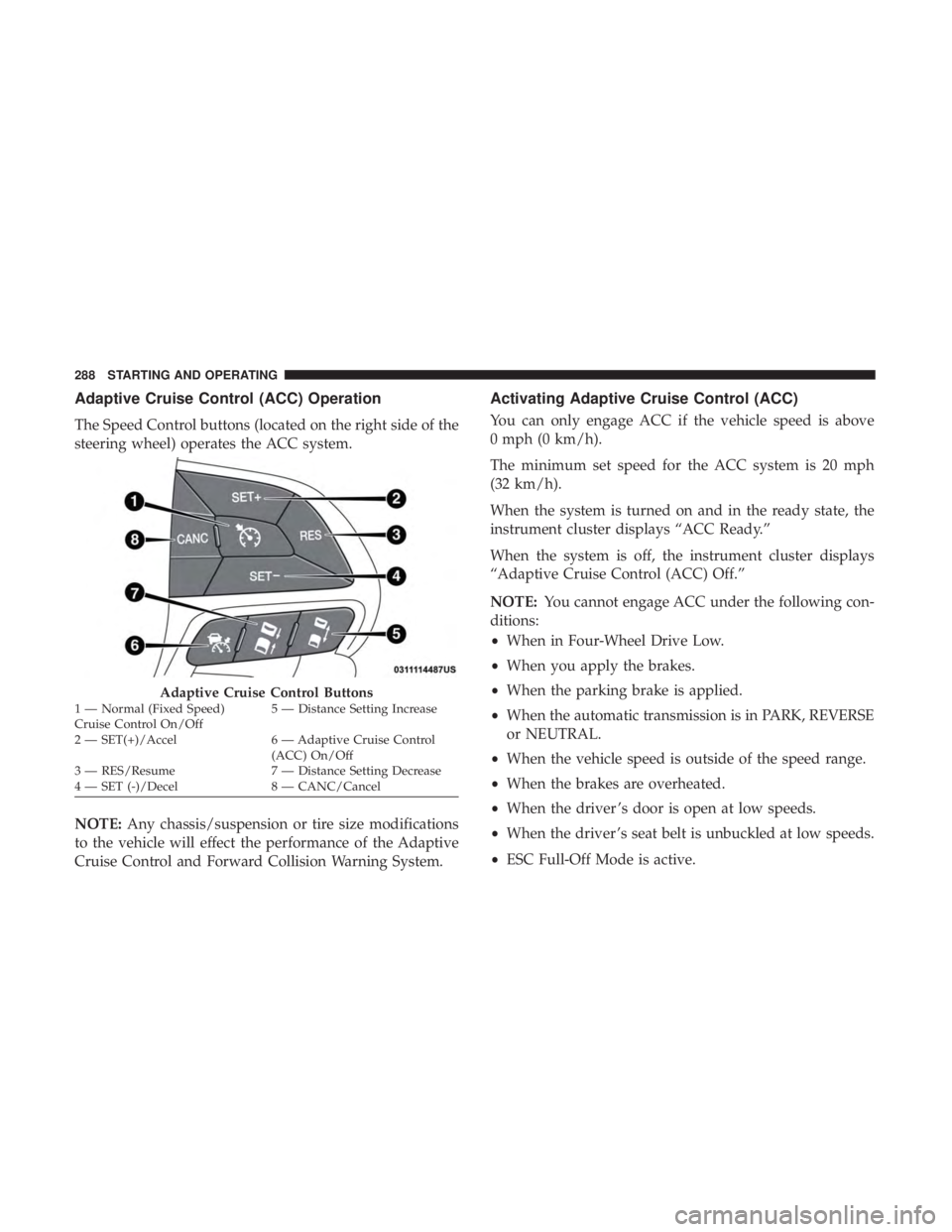
The Speed Control buttons (located on the right side of the
steering wheel) operates the ACC system.
NOTE:Any chassis/suspension or tire size modifications
to the vehicle will effect the performance of the Adaptive
Cruise Control and Forward Collision Warning System.
Activating Adaptive Cruise Control (ACC)
You can only engage ACC if the vehicle speed is above
0 mph (0 km/h).
The minimum set speed for the ACC system is 20 mph
(32 km/h).
When the system is turned on and in the ready state, the
instrument cluster displays “ACC Ready.”
When the system is off, the instrument cluster displays
“Adaptive Cruise Control (ACC) Off.”
NOTE: You cannot engage ACC under the following con-
ditions:
• When in Four-Wheel Drive Low.
• When you apply the brakes.
• When the parking brake is applied.
• When the automatic transmission is in PARK, REVERSE
or NEUTRAL.
• When the vehicle speed is outside of the speed range.
• When the brakes are overheated.
• When the driver ’s door is open at low speeds.
• When the driver ’s seat belt is unbuckled at low speeds.
• ESC Full-Off Mode is active.
Adaptive Cruise Control Buttons1 — Normal (Fixed Speed)
Cruise Control On/Off 5 — Distance Setting Increase
2 — SET(+)/Accel 6 — Adaptive Cruise Control (ACC) On/Off
3 — RES/Resume 7 — Distance Setting Decrease
4 — SET (-)/Decel 8 — CANC/Cancel 288 STARTING AND OPERATING
Page 308 of 572
•The braking temperature exceeds normal range (over-
heated).
• The gear selector is removed from the DRIVE position.
• The driver switches ESC to full-off mode.
To Resume Speed
To resume a previously set speed, push the RES button and
release. Resume can be used at any speed above 20 mph
(32 km/h).
To Turn Off
The system will turn off and erase the set speed in memory
if:
•The Normal (Fixed Speed) Cruise Control on/off button
is pushed.
• The ignition is turned OFF.
• The Adaptive Cruise Control (ACC) on/off button is
pushed.
PARKSENSE REAR PARK ASSIST — IF EQUIPPED
The ParkSense Rear Park Assist system provides visual and
audible indications of the distance between the rear fascia
and a detected obstacle when backing up, e.g. during a parking maneuver. If your vehicle is equipped with an
automatic transmission, the vehicle brakes may be auto-
matically applied and released when performing a reverse
parking maneuver if the system detects a possible collision
with an obstacle.
NOTE:
•
The driver can override the automatic braking function
by pressing the gas pedal, turning ParkSense off via
ParkSense switch, or changing the gear while the auto-
matic brakes are being applied.
• Automatic brakes are not available if the vehicle is in
4LO.
• Automatic brakes will not be available if there is a
faulted condition detected with the ParkSense Park
Assist system or the Braking System Module.
• The automatic braking function may only be applied if
the vehicle deceleration is not enough to avoid colliding
with a detected obstacle.
• The automatic braking function may not be applied fast
enough for obstacles that move toward the rear of the
vehicle from the left and/or right sides.
306 STARTING AND OPERATING
Page 317 of 572
PARKSENSE FRONT AND REAR PARK ASSIST —
IF EQUIPPED
The ParkSense Park Assist system provides visual and
audible indications of the distance between the rear and/or
front fascia and a detected obstacle when backing up or
moving forward, e.g. during a parking maneuver. If your
vehicle is equipped with an automatic transmission, the
vehicle brakes may be automatically applied and released
when performing a reverse parking maneuver if the sys-
tem detects a possible collision with an obstacle.
NOTE:
•The driver can override the automatic braking function
by pressing the gas pedal, turning ParkSense off via
ParkSense switch, or changing the gear while the auto-
matic brakes are being applied.
• Automatic brakes are not available if the vehicle is in
4LO.
• Automatic brakes will not be available if there is a
faulted condition detected with the ParkSense Park
Assist system or the Braking System Module.
• The automatic braking function may only be applied if
the vehicle deceleration is not enough to avoid colliding
with a detected obstacle. •
The automatic braking function may not be applied fast
enough for obstacles that move toward the rear of the
vehicle from the left and/or right sides.
• The automatic braking function can be enabled/
disabled from the Customer Programmable Features
section of the Uconnect System.
• ParkSense will retain its last known configuration state
for the automatic braking function through ignition
cycles.
The automatic braking function is intended to assist the
driver in avoiding possible collisions with detected ob-
stacles when backing up in REVERSE gear.
NOTE:
• The driver is always responsible for controlling the
vehicle.
• The system is provided to assist the driver and not to
substitute the driver.
• The driver must stay in full control of the vehicle’s
acceleration and braking and is responsible for the
vehicle’s movements.
Refer to “ParkSense System Usage Precautions” for limita-
tions of this system and recommendations.
6
STARTING AND OPERATING 315
Page 340 of 572
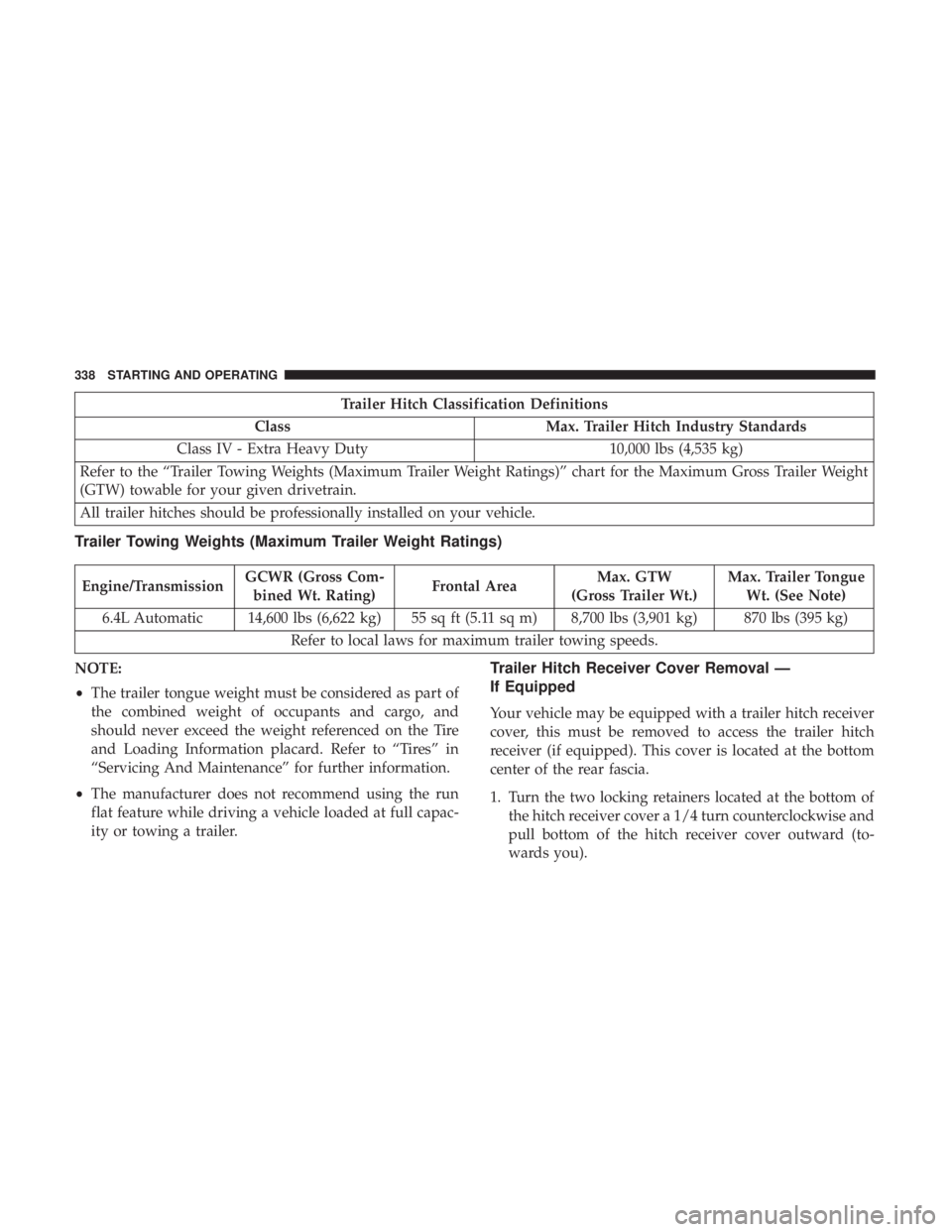
Trailer Hitch Classification Definitions
Class Max. Trailer Hitch Industry Standards
Class IV - Extra Heavy Duty 10,000 lbs (4,535 kg)
Refer to the “Trailer Towing Weights (Maximum Trailer Weight Ratings)” chart for the Maximum Gross Trailer Weight
(GTW) towable for your given drivetrain.
All trailer hitches should be professionally installed on your vehicle.
Trailer Towing Weights (Maximum Trailer Weight Ratings)
Engine/Transmission GCWR (Gross Com-
bined Wt. Rating) Frontal AreaMax. GTW
(Gross Trailer Wt.) Max. Trailer Tongue
Wt. (See Note)
6.4L Automatic 14,600 lbs (6,622 kg) 55 sq ft (5.11 sq m) 8,700 lbs (3,901 kg) 870 lbs (395 kg) Refer to local laws for maximum trailer towing speeds.
NOTE:
• The trailer tongue weight must be considered as part of
the combined weight of occupants and cargo, and
should never exceed the weight referenced on the Tire
and Loading Information placard. Refer to “Tires” in
“Servicing And Maintenance” for further information.
• The manufacturer does not recommend using the run
flat feature while driving a vehicle loaded at full capac-
ity or towing a trailer.
Trailer Hitch Receiver Cover Removal —
If Equipped
Your vehicle may be equipped with a trailer hitch receiver
cover, this must be removed to access the trailer hitch
receiver (if equipped). This cover is located at the bottom
center of the rear fascia.
1. Turn the two locking retainers located at the bottom of the hitch receiver cover a 1/4 turn counterclockwise and
pull bottom of the hitch receiver cover outward (to-
wards you).
338 STARTING AND OPERATING