ignition DODGE GRAND CARAVAN 2008 5.G Repair Manual
[x] Cancel search | Manufacturer: DODGE, Model Year: 2008, Model line: GRAND CARAVAN, Model: DODGE GRAND CARAVAN 2008 5.GPages: 531, PDF Size: 7.72 MB
Page 241 of 531
To reset the display shown, turn the ignition switch to the
ON position, then press and hold the reset button for
approximately two seconds.
When the appropriate conditions exist, the following
odometer messages will display:
NE.......Eight-point compass headings are displayed
(N, S, E, W, NE, NW, SE, SW)
14ÉF............ Temperature (Fahrenheit or Celsius)
AV G......... AverageFuel Economy (U.S. or Metric)
DTE.......................Distance to Empty
ET............................Elapsed Time
P.......................... ParkAssist On/Off
Should this wrench symbol display with the
letterPnext to it, your Park Assist System
needs servicing. Contact your authorized
dealer.NOTE:Temperature and Average Fuel Economy can be
changed from U.S. or Metric by pressing and holding the
left CMTC Reset Button located on the instrument cluster
near the temperature gauge.
Compass Mini-Trip Computer (CMTC) Trip
Odometer (ODO)
This display shows the distance traveled since the last
reset. Press and release the right button located on the
instrument cluster to switch from odometer, to trip A or
trip B. Press and hold the right button while the
odometer/trip odometer is displayed to reset.
Trip A
Shows the total distance traveled for Trip A since the last
reset.
Trip B
Shows the total distance traveled for Trip B since the last
reset.
UNDERSTANDING YOUR INSTRUMENT PANEL 239
4
Page 246 of 531
Unless reset, this message will continue to display each
time you turn the ignition switch to the ON/RUN
position. To turn off the message temporarily, press and
release the Menu button. To reset the oil change indicator
system (after performing the scheduled maintenance)
refer to the following procedure.
1. Turn the ignition switch to the ON position (Do not
start the engine).
2. Fully depress the accelerator pedal slowly three times
within 10 seconds.
3. Turn the ignition switch to the OFF/LOCK position.
NOTE:If the indicator message illuminates when you
start the vehicle, the oil change indicator system did not
reset. If necessary repeat this procedure.TRIP FUNCTIONS
Press and release the MENU button until one of the
following Trip Functions displays in the EVIC:
Press the STEP button to scroll through all the Trip
Computer functions.
The Trip Functions mode displays the following informa-
tion:
Average Fuel Economy
Shows the average fuel economy since the last reset.
When the fuel economy is reset, the display will read
ªRESETº or show dashes for two seconds. Then, the
history information will be erased, and the averaging will
continue from the last fuel average reading before the
reset.
244 UNDERSTANDING YOUR INSTRUMENT PANEL
Page 247 of 531
Distance To Empty (DTE)
Shows the estimated distance that can be traveled with
the fuel remaining in the tank. This estimated distance is
determined by a weighted average of the instantaneous
and average fuel economy, according to the current fuel
tank level.
NOTE:Significant changes in driving style or vehicle
loading will greatly affect the actual drivable distance of
the vehicle, regardless of the DTE displayed value.
When the DTE value is less than 30 miles (48 km)
estimated driving distance, the DTE display will change
to a text display of9LOW FUEL.9This display will
continue until the vehicle runs out of fuel. Adding a
significant amount of fuel to the vehicle will turn off the
9LOW FUEL9text and a new DTE value will display.
Elapsed Time
Shows the total elapsed time of travel since the last reset
when the ignition switch is in the ACC position. Elapsed
time will increment when the ignition switch is in the ON
or START position.
Display Units of Measure in:
To make your selection, press and release the STEP
button until ªUSº or ªMETRICº appears.
To Reset The Display
Reset will only occur while a resettable function is being
displayed. Press and release the RESET button once to
clear the resettable function being displayed. To reset all
resettable functions, press and release the RESET button
a second time within three seconds of resetting the
currently displayed function (Reset ALL will display
during this three-second window).
UNDERSTANDING YOUR INSTRUMENT PANEL 245
4
Page 248 of 531
COMPASS DISPLAY
The compass readings indicate the direction
the vehicle is facing. Press and release the
compass button to display one of eight com-
pass readings and the outside temperature.
Automatic Compass Calibration
This compass is self-calibrating, which eliminates the
need to manually reset the compass. When the vehicle is
new, the compass may appear erratic and the EVIC will
display CAL until the compass is calibrated. You may
also calibrate the compass by completing one or more
360É turns (in an area free from large metal or metallic
objects) until the CAL indicator displayed in the EVIC
turns off. The compass will now function normally.
Manual Compass Calibration
If the compass appears erratic and the CAL indicator
does not appear in the EVIC display, you must put the
compass into the Calibration Mode manually as follows:
1. Turn on the ignition switch.
2. Press the MENU button until Personal Settings (Cus-
tomer Programmable Features) menu is reached.
3. Press the STEP button until ªCalibrate Compassº is
displayed in the EVIC.
4. Press and release the RESET button to start the cali-
bration. The ªCALº indicator will be displayed in the
EVIC.
5. Complete one or more 360É turns (in an area free from
large metal or metallic objects) until the CAL indicator
turns off. The compass will now function normally.
246 UNDERSTANDING YOUR INSTRUMENT PANEL
Page 250 of 531
1. Turn the ignition switch ON.
2. Press and hold the compass button for approximately
two seconds.
3. Press the STEP button until ªCompass Varianceº mes-
sage and the last variance zone number displays in the
EVIC.
4. Press and release STEP button until the proper vari-
ance zone is selected according to the map.
5. Press and release the compass button to exit.
PERSONAL SETTINGS (CUSTOMER
PROGRAMMABLE FEATURES)
Personal Settings allows the driver to set and recall
features when the transmission is in PARK. If the trans-
mission is out of PARK or the vehicle begins moving, a
warning messagePERSONAL SETTING NOT AVAIL-
ABLEfollowed in three seconds byVEHICLE NOT IN
PARK.Press and release the MENU button until Personal Set-
tings displays in the EVIC.
Use the Step button to display one of the following
choices:
Language
When in this display you may select one of five lan-
guages for all display nomenclature, including the trip
functions and the navigation system (if equipped). Press
the reset button while in this display to select English,
Spanish (EspaÞol), French (FranÕais), Italian (Italiano),
German (Deutsch), and Dutch (Nederlands). Then, as
you continue, the information will display in the selected
language.
Lock Doors Automatically at 15 mph (24 km/h)
When ON is selected, all doors will lock automatically
when the vehicle reaches a speed of 15 mph (24 km/h).
To make your selection, press and release the RESET
button until ON or OFF appears.
248 UNDERSTANDING YOUR INSTRUMENT PANEL
Page 252 of 531
SELECT button until YES (Y) or NO (N) appears. Refer to
ªLights/SmartBeams Ð If Equippedº in Section 3 of this
manual for more information.
Headlights On with Wipers (Available with Auto
Headlights Only)
When YES (Y) is selected, and the headlight switch is in
the AUTO position, the headlights will turn on approxi-
mately 10 seconds after the wipers are turned on. The
headlights will also turn off when the wipers are turned
off if they were turned on by this feature. To make your
selection, press and release the FUNCTION SELECT
button until YES (Y) or NO (N) appears.
NOTE:Turning the headlights on during the daytime
causes the instrument panel lights to dim. To increase the
brightness, refer to ªLightsº in Section 3 of this manual.
Delay Turning Headlights Off
When this feature is selected, the driver can choose to
have the headlights remain on for 0, 30, 60, or 90 secondswhen exiting the vehicle. To make your selection, press
and release the RESET button until 0, 30, 60, or 90
appears.
Turn Headlights On with Remote Key Unlock
When this feature is selected, the headlights will activate
and remain on for up to 90 seconds when the doors are
unlocked with the remote keyless entry transmitter. To
make your selection, press and release the RESET button
until OFF, 30 sec., 60 sec., or 90 sec. appears.
Delay Power Off to Accessories Until Exit
When this feature is selected, the power window
switches, radio, hands±free system (if equipped), DVD
video system (if equipped), power sunroof (if equipped),
and power outlets will remain active for up to 10 minutes
after the ignition switch is turned off. Opening a vehicle
door will cancel this feature. To make your selection,
press and release the RESET button until Off, 45 sec., 5
min., or 10 min. appears.
250 UNDERSTANDING YOUR INSTRUMENT PANEL
Page 254 of 531
FM Reception
Because FM transmission is based on frequency varia-
tions, interference that consists of amplitude variations
can be filtered out, leaving the reception relatively clear,
which is the major feature of FM radio.
NOTE:The radio, steering wheel radio controls (if
equipped), and six-disc CD/DVD changer (if equipped)
will remain active for up to 90 seconds after the ignition
switch has been turned OFF, depending upon the EVIC,
Accessory Delay setting. Opening a vehicle front door
will cancel this feature.
Electrical Disturbances
Radio waves may pick up electrical disturbances during
transmission. They mainly affect the wave amplitude,
and thus remain a part of the AM reception. They
interfere very little with the frequency variations that
carry the FM signal.
SALES CODE REQ Ð AM/FM STEREO RADIO
AND 6±DISC CD/DVD CHANGER (MP3/WMA AUX
JACK)
NOTE:The radio sales code is located on the lower right
side of your radio faceplate.
Operating Instructions - Radio Mode
NOTE:The ignition switch must be in the ON or ACC
position to operate the radio.
Power Switch/Volume Control (Rotary)
Push the On/Volume control knob to turn on the radio.
Press the control knob a second time to turn off the radio.
Electronic Volume Control
The electronic volume control turns continuously (360
degrees) in either direction without stopping. Turning the
On/Volume control knob to the right increases the vol-
ume and to the left decreases it.
252 UNDERSTANDING YOUR INSTRUMENT PANEL
Page 263 of 531
CAUTION!
The radio may shut down during extremely hot
conditions. When this occurs, the radio will indicate
ªDisc Hotº and shut off until a safe temperature is
reached. This shutdown is necessary to protect the
optics of the DVD player and other radio internal
components.
NOTE:The ignition switch must be in the ON or ACC
position to operate the radio.
LOAD Button Ð Loading Compact Disc(s)
Press the LOAD button and the pushbutton with the
corresponding number (1-6) where the CD is being
loaded. The radio will display PLEASE WAIT and
prompt when to INSERT DISC. After the radio displays
9INSERT DISC,9insert the CD into the player.Radio display will show9LOADING DISC9when the disc
is loading and ªREADING DISCº when the radio is
reading the disc.
CAUTION!
This CD player will accept 4±3/4 in (12 cm) discs only.
The use of other sized discs may damage the CD
player mechanism.
Eject Button Ð Ejecting Compact Disc(s)
Press the EJECT button and the pushbutton
with the corresponding number (1-6) where the
CD was loaded and the disc will unload and
move to the entrance for easy removal. Radio
display will show9EJECTING DISC9when the disc is
being ejected and prompt the user to remove the disc.
UNDERSTANDING YOUR INSTRUMENT PANEL 261
4
Page 264 of 531
Press and hold the EJECT button for five seconds and all
CDs will be ejected from the radio.
The disc can be ejected with the radio and ignition OFF.
SEEK Button (CD MODE)
Press the right SEEK button for the next selection on the
CD. Press the left SEEK button to return to the beginning
of the current selection, or return to the beginning of the
previous selection if the CD is within the first second of
the current selection. Pressing and holding the SEEK
button will allow you to scroll through the tracks faster in
CD, MP3/MWA modes.
SCAN Button (CD MODE)
Press the SCAN button to scan through each track on the
CD currently playing.
TIME Button (CD MODE)
Press this button to change the display from a large CD
playing time display to a small CD playing time display.
RW/FF (CD MODE)
Press and hold FF (Fast Forward) and the CD player will
begin to fast forward until FF is released, or RW or
another CD button is pressed. The RW (Rewind) button
works in a similar manner.
AM or FM Button (CD MODE)
Switches the radio to the Radio mode.
Notes On Playing MP3/WMA Files
The radio can play MP3/WMA files; however, acceptable
MP3/WMA file recording media and formats are limited.
When writing MP3/WMA files, pay attention to the
following restrictions.
Supported Media (Disc Types)
The MP3/WMA file recording media supported by the
radio are CDDA, CD-R, CD-RW, MP3,WMA, DVD Video,
DVD-R, DVD-RW, DVD+R, DVD+RW, and CDDA+MP3.
262 UNDERSTANDING YOUR INSTRUMENT PANEL
Page 270 of 531
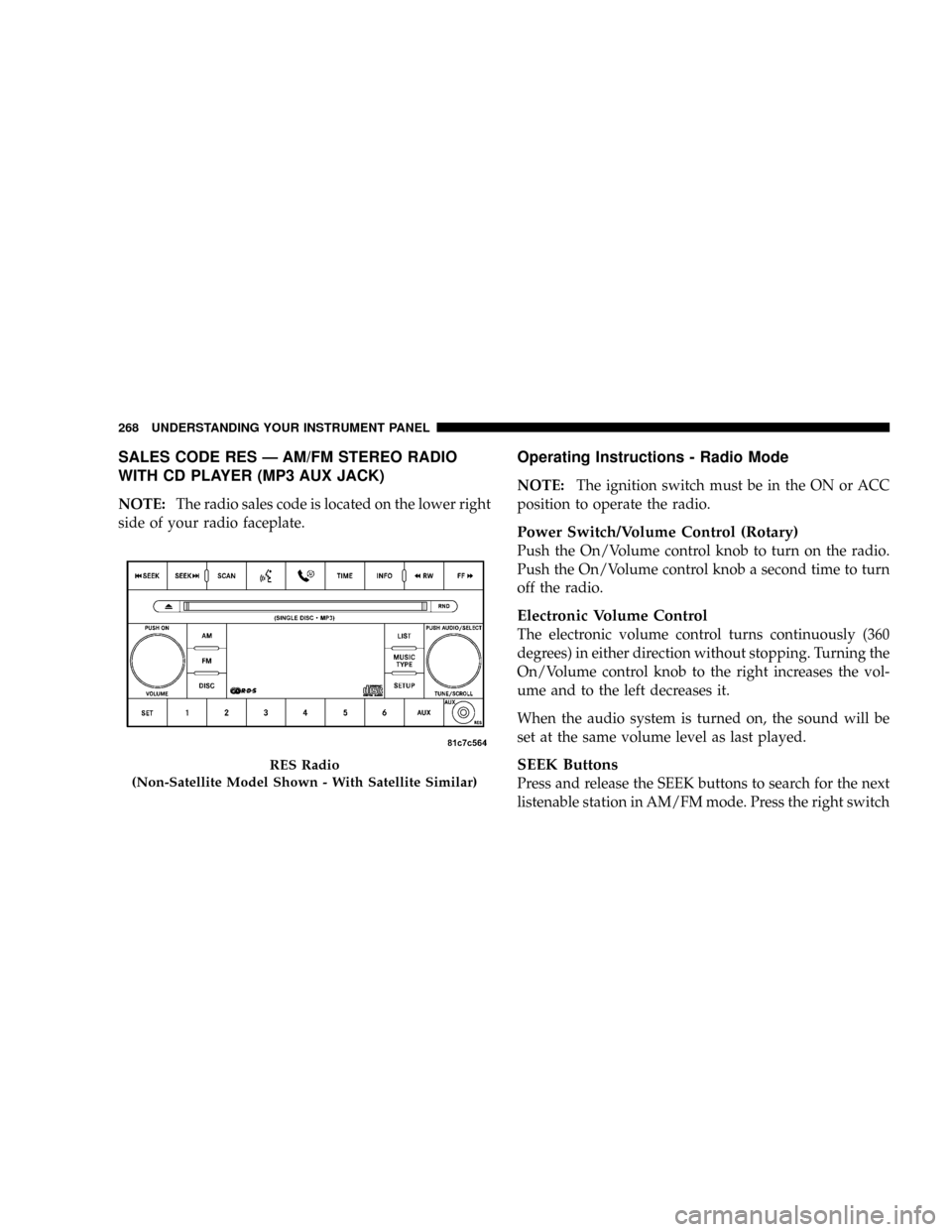
SALES CODE RES Ð AM/FM STEREO RADIO
WITH CD PLAYER (MP3 AUX JACK)
NOTE:The radio sales code is located on the lower right
side of your radio faceplate.
Operating Instructions - Radio Mode
NOTE:The ignition switch must be in the ON or ACC
position to operate the radio.
Power Switch/Volume Control (Rotary)
Push the On/Volume control knob to turn on the radio.
Push the On/Volume control knob a second time to turn
off the radio.
Electronic Volume Control
The electronic volume control turns continuously (360
degrees) in either direction without stopping. Turning the
On/Volume control knob to the right increases the vol-
ume and to the left decreases it.
When the audio system is turned on, the sound will be
set at the same volume level as last played.
SEEK Buttons
Press and release the SEEK buttons to search for the next
listenable station in AM/FM mode. Press the right switch
RES Radio
(Non-Satellite Model Shown - With Satellite Similar)
268 UNDERSTANDING YOUR INSTRUMENT PANEL