clock DODGE GRAND CARAVAN 2009 5.G User Guide
[x] Cancel search | Manufacturer: DODGE, Model Year: 2009, Model line: GRAND CARAVAN, Model: DODGE GRAND CARAVAN 2009 5.GPages: 535, PDF Size: 18.61 MB
Page 283 of 535

5. To exit, press any button/knob or wait five seconds.
The clock can also be set by pressing the SETUP button.
For vehicles equipped with satellite radio, press the
SETUP button, use the TUNE/SCROLL control to select
SET CLOCK, and then follow the above procedure,
starting at Step 2. For vehicles not equipped with satellite
radio, press the SETUP button and then follow the above
procedure, starting at Step 2.
INFO Button
Press the INFO button for an RDS station (one with call
letters displayed). The radio will return a Radio Text
message broadcast from an FM station (FM mode only).
RW/FF
Pressing the RW (Rewind) or FF (Fast Forward) buttons
causes the tuner to search for the next frequency in the
direction of the arrows. This feature operates in either
AM or FM frequencies.
TUNE Control
Turn the rotary TUNE/SCROLL control knob clockwise
to increase or counterclockwise to decrease the frequency.
Setting the Tone, Balance, and Fade
Push the rotary TUNE/SCROLL control knob and BASS
will display. Turn the TUNE/SCROLL control knob to
the right or left to increase or decrease the bass tones.
Push the rotary TUNE/SCROLL control knob a second
time and MID will display. Turn the TUNE/SCROLL
control knob to the right or left to increase or decrease the
mid-range tones.
Push the rotary TUNE/SCROLL control knob a third
time and TREBLE will display. Turn the TUNE/SCROLL
control knob to the right or left to increase or decrease the
treble tones.
UNDERSTANDING YOUR INSTRUMENT PANEL 2814
Page 285 of 535
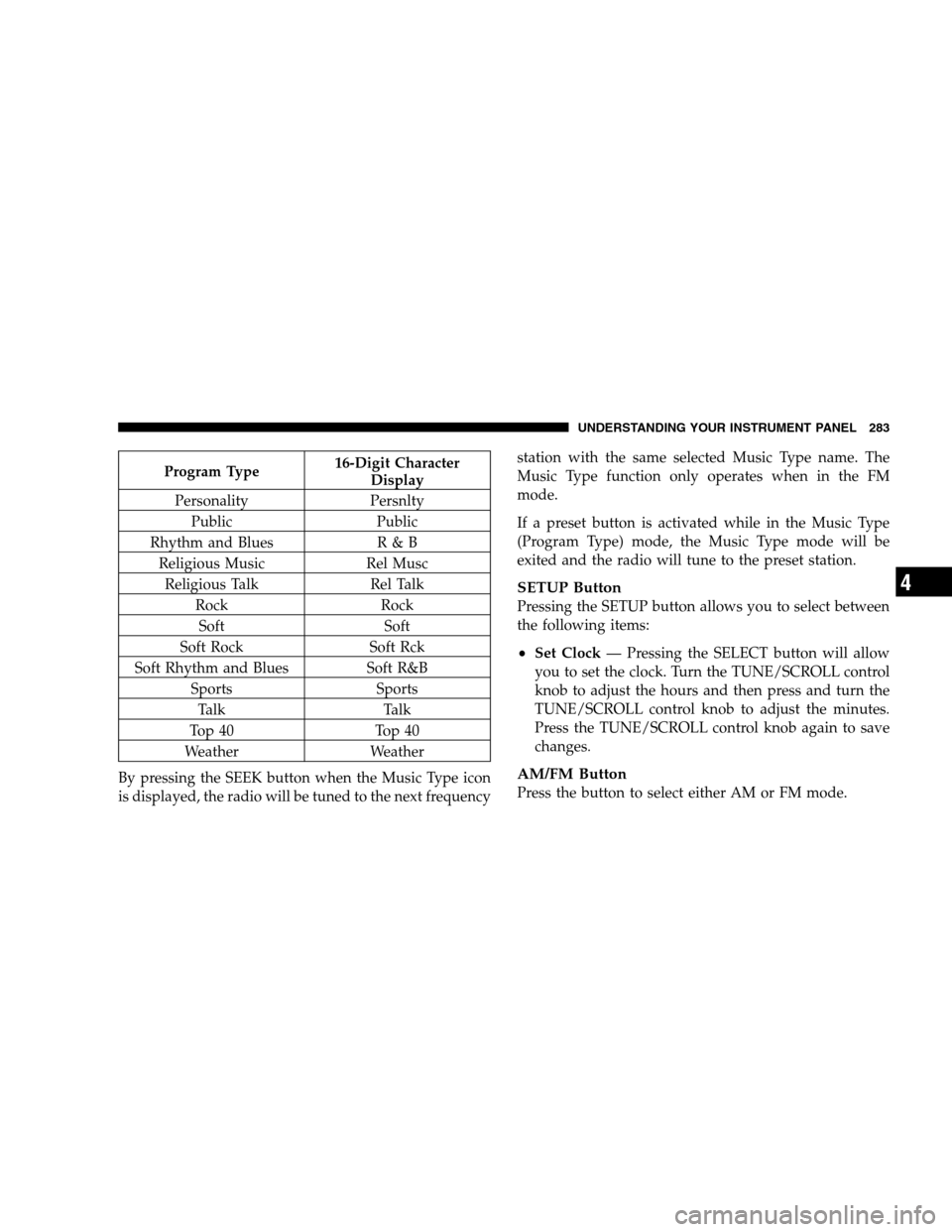
Program Type16-Digit Character
Display
Personality Persnlty Public Public
Rhythm and Blues R & B
Religious Music Rel Musc
Religious Talk Rel Talk
Rock Rock
Soft Soft
Soft Rock Soft Rck
Soft Rhythm and Blues Soft R&B
Sports Sports
Talk Talk
Top 40 Top 40
Weather Weather
By pressing the SEEK button when the Music Type icon
is displayed, the radio will be tuned to the next frequency station with the same selected Music Type name. The
Music Type function only operates when in the FM
mode.
If a preset button is activated while in the Music Type
(Program Type) mode, the Music Type mode will be
exited and the radio will tune to the preset station.
SETUP Button
Pressing the SETUP button allows you to select between
the following items:
Set Clock
— Pressing the SELECT button will allow
you to set the clock. Turn the TUNE/SCROLL control
knob to adjust the hours and then press and turn the
TUNE/SCROLL control knob to adjust the minutes.
Press the TUNE/SCROLL control knob again to save
changes.
AM/FM Button
Press the button to select either AM or FM mode.
UNDERSTANDING YOUR INSTRUMENT PANEL 283 4
Page 294 of 535
If the iPodt
battery is completely discharged, it may
not communicate with the UCI system until a mini-
mum charge is attained. Leaving the iPodt connected
to the UCI system may charge it to the required level.
Using This Feature
By using the optional connection cable to connect an
iPodt to the vehicle’s UCI 16–pin connector port:
The iPodt audio can be played on the vehicle’s sound
system, providing metadata (artist, track title, album,
etc.) information on the radio display.
The iPodt can be controlled using the radio buttons to
Play, Browse, and List the iPodt contents.
The iPodtbattery charges when plugged into the UCI
connector (if supported by the specific iPodt device)
Controlling The iPodTUsing Radio Buttons
To get into the UCI (iPodt) mode and access a connected
iPodt, press the “AUX” button on the radio faceplate. Once in the UCI (iPodt) mode, iPodt
audio tracks (if
available from iPodt) start playing over the vehicle’s
audio system.
Play Mode
When switched to UCI mode, the iPodt automatically
starts Play mode. In Play mode, you may use the
following buttons on the radio faceplate to control the
iPodt and display data:
Use the TUNE control knob to select the next or
previous track.
Turning it clockwise (forward) by one click, while
playing a track, skips to the next track.
Turning it counterclockwise (backward) by one
click, during the first two seconds of the track, will
jump to the previous track in the list. Turning this
button at any other time in the track, will jump to
the beginning of the current track.
292 UNDERSTANDING YOUR INSTRUMENT PANEL
Page 296 of 535
Shuffle OFF modes for the iPodt. If theRNDicon is
showing on the radio display, then the shuffle mode is
ON.
List Or Browse Mode
During Play mode, pressing any of the buttons described
below, takes you to List mode. List mode enables you to
scroll through the list of menus and tracks on the iPodt.
TUNE control knob: The TUNEcontrol knob functions
in a similar manner as the scroll wheel on the iPodt.
Turning it clockwise (forward) and counterclock-
wise (backward) scrolls through the lists, displaying
the track detail on the radio display. Once you have
the track to be played highlighted on the radio
display, press the TUNEcontrol knob to select and
start playing the track. Turning the TUNEcontrol
knob fast will scroll through the list faster. During
fast scroll, you may notice a slight delay in updating
the information on the radio display.
During all List modes, the iPodt displays all lists in
“wrap-around” mode. So if the track is at the
bottom of the list, just turn the wheel backwards
(counter-clockwise) to get to the track faster.
In List mode, the radio PRESETButtons are used as
shortcuts to the following lists on the iPodt.
Preset 1 – Playlists
Preset 2 – Artists
Preset 3 – Albums
Preset 4 – Genres
Preset 5 - Audiobooks
Preset 6 – Podcasts
Pressing a PRESET button will display the current
list on the top line and the first item in that list on
the second line.
294 UNDERSTANDING YOUR INSTRUMENT PANEL
Page 301 of 535
RW/FFPressing the RW (Rewind) or FF (Fast Forward) buttons
causes the tuner to search for the next channel in the
direction of the arrows.
TUNE Control (Rotary)
Turn the rotary TUNE/SCROLL control knob clockwise
to increase or counterclockwise to decrease the channel.
MUSIC TYPE Button — Except REU Radio
Pressing this button once will turn on the Music Type
mode for five seconds. Pressing the MUSIC TYPE button
or turning the TUNE/SCROLL control knob within five
seconds will allow the program format type to be se-
lected.
Toggle the MUSIC TYPE button again to select the music
type.
By pressing the SEEK button when the Music Type
function is active, the radio will be tuned to the next
channel with the same selected Music Type name.
If a preset button is activated while in the Music Type
(Program Type) mode, the Music Type mode will be
exited and the radio will tune to the preset channel.
MUSIC TYPE Button — REU Radio
Pressing this button provides a Music Type list from
which you can make a selection. Once a selection is
made, you can seek up or down or scan the channels and
the radio will tune to the next station matching the
selected format. There is no time-out for this screen.
Pressing the MUSIC TYPE button again will close the
Music Type screen. Once closed, seek up, seek down, and
scan will no longer be based on your selection.
UNDERSTANDING YOUR INSTRUMENT PANEL 299 4
Page 305 of 535
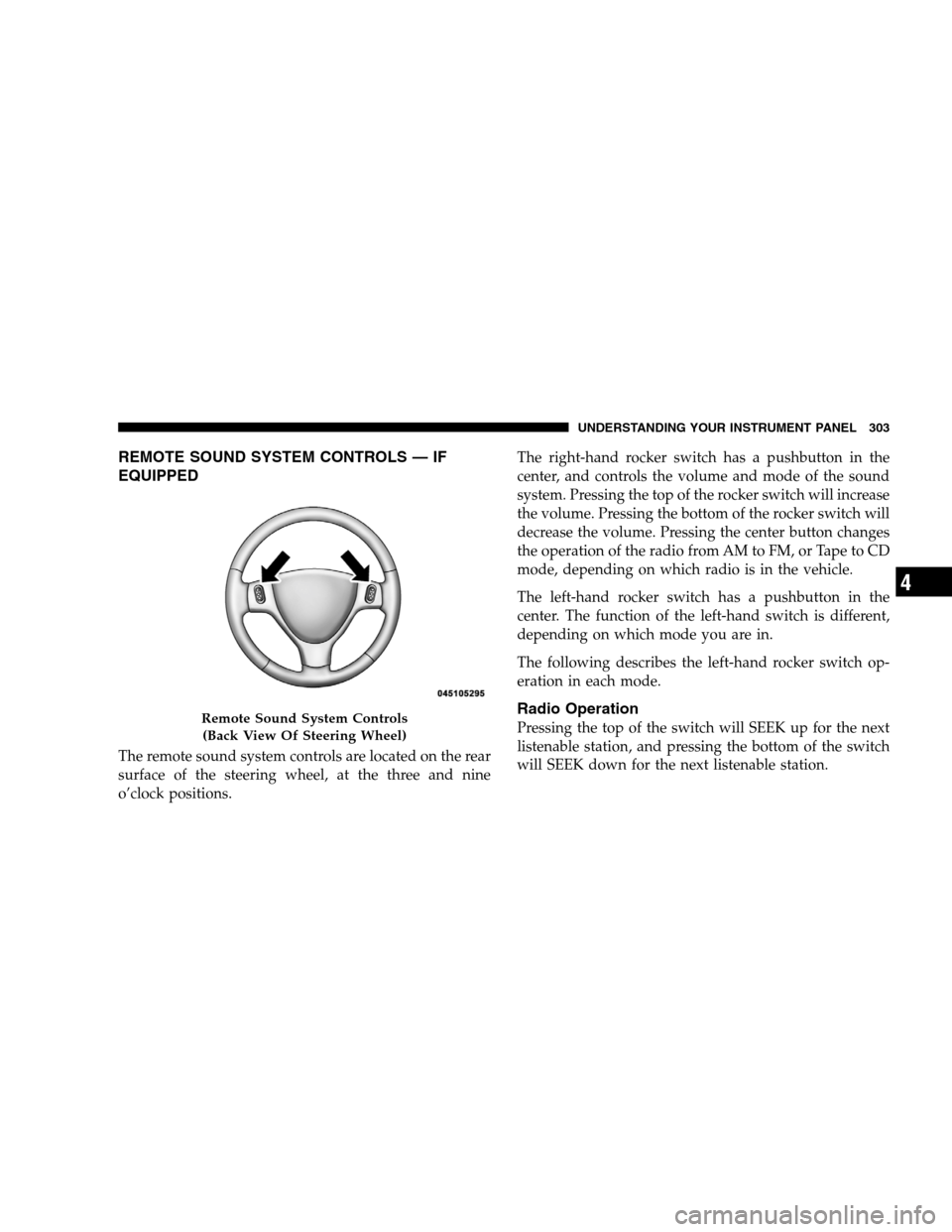
REMOTE SOUND SYSTEM CONTROLS — IF
EQUIPPEDThe remote sound system controls are located on the rear
surface of the steering wheel, at the three and nine
o’clock positions.
The right-hand rocker switch has a pushbutton in the
center, and controls the volume and mode of the sound
system. Pressing the top of the rocker switch will increase
the volume. Pressing the bottom of the rocker switch will
decrease the volume. Pressing the center button changes
the operation of the radio from AM to FM, or Tape to CD
mode, depending on which radio is in the vehicle.
The left-hand rocker switch has a pushbutton in the
center. The function of the left-hand switch is different,
depending on which mode you are in.
The following describes the left-hand rocker switch op-
eration in each mode.
Radio Operation
Pressing the top of the switch will SEEK up for the next
listenable station, and pressing the bottom of the switch
will SEEK down for the next listenable station.Remote Sound System Controls
(Back V iew Of Steering Wheel) UNDERSTANDING YOUR INSTRUMENT PANEL 303 4
Page 308 of 535
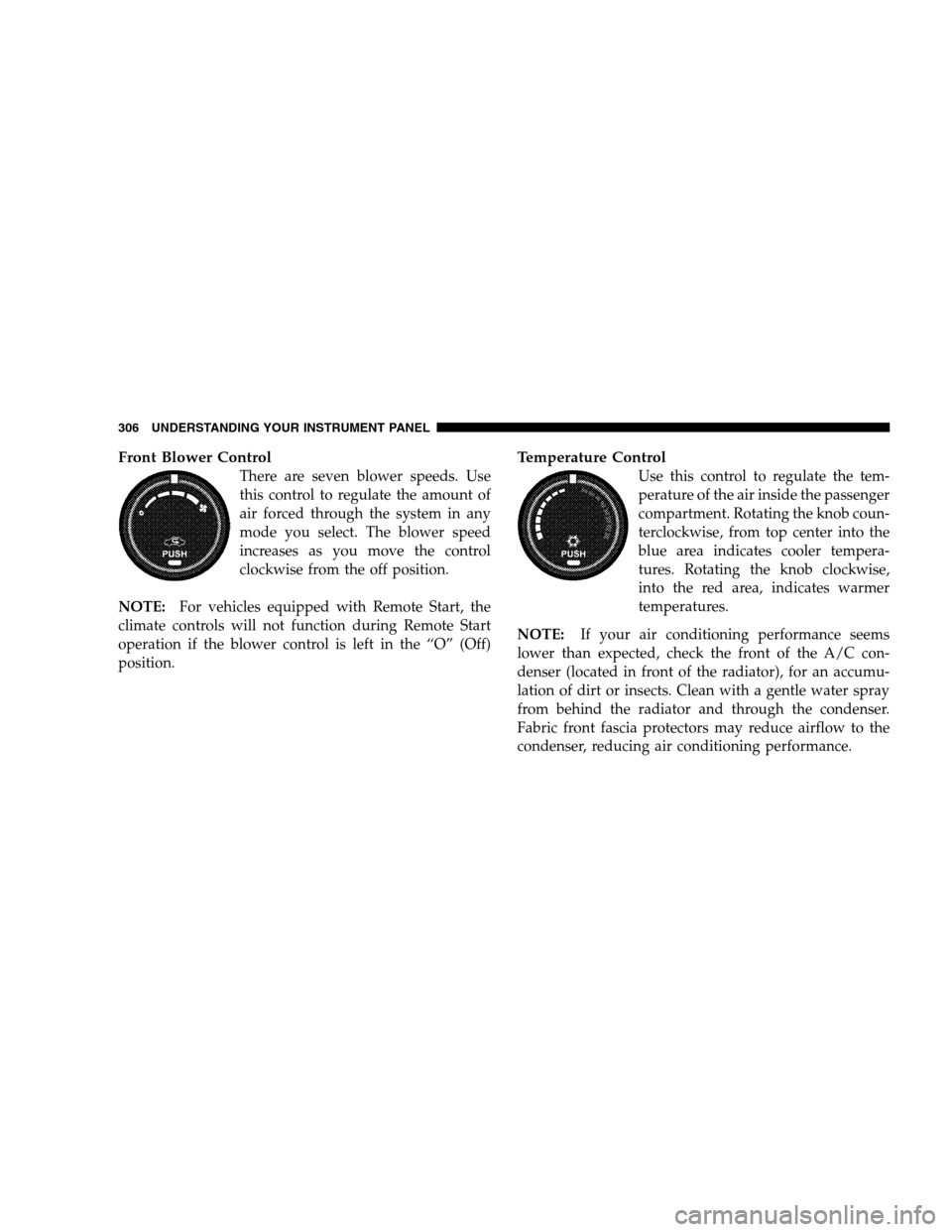
Front Blower ControlThere are seven blower speeds. Use
this control to regulate the amount of
air forced through the system in any
mode you select. The blower speed
increases as you move the control
clockwise from the off position.
NOTE: For vehicles equipped with Remote Start, the
climate controls will not function during Remote Start
operation if the blower control is left in the “O” (Off)
position.
Temperature Control
Use this control to regulate the tem-
perature of the air inside the passenger
compartment. Rotating the knob coun-
terclockwise, from top center into the
blue area indicates cooler tempera-
tures. Rotating the knob clockwise,
into the red area, indicates warmer
temperatures.
NOTE: If your air conditioning performance seems
lower than expected, check the front of the A/C con-
denser (located in front of the radiator), for an accumu-
lation of dirt or insects. Clean with a gentle water spray
from behind the radiator and through the condenser.
Fabric front fascia protectors may reduce airflow to the
condenser, reducing air conditioning performance. 306 UNDERSTANDING YOUR INSTRUMENT PANEL
Page 315 of 535
CAUTION!Interior air enters the Rear Manual Climate Control
system through an intake grille, located in the pas-
senger side trim panel behind the third row seats.
The heater outlets are located in the passenger side
trim panel, just behind the sliding door. Do not block
or place objects directly in front of the inlet grille or
heater outlets. The electrical system could overload,
causing damage to the blower motor.
Rear Temperature Control
When the blower knob on the front climate control unit is
set to any position other than the rear temperature
settings will be controlled by the rear temperature control
knob on the front climate control unit. The rear mode
selection
RR,allows the settings to be controlled by the
rear mode control knob. To change the temperature in the rear of the vehicle,
rotate the temperature control knob counterclockwise for
cold air, and clockwise for heated air.
When rear controls are locked by the front system, the
lock symbol on the temperature knob is illuminated, and
the rear overhead adjustments are inoperable.
The rear airflow modes will mirror the front unit opera-
tion. Rear PANEL mode is automatically selected when
the front control is in the PANEL mode. When the front
unit is in BI-LEVEL mode, airflow will be emitted from
both the upper and lower rear outlets. When the front
control is in FLOOR, DEFROST, or MIX modes, airflow
will be directed out of the rear floor outlets.
UNDERSTANDING YOUR INSTRUMENT PANEL 313 4
Page 322 of 535
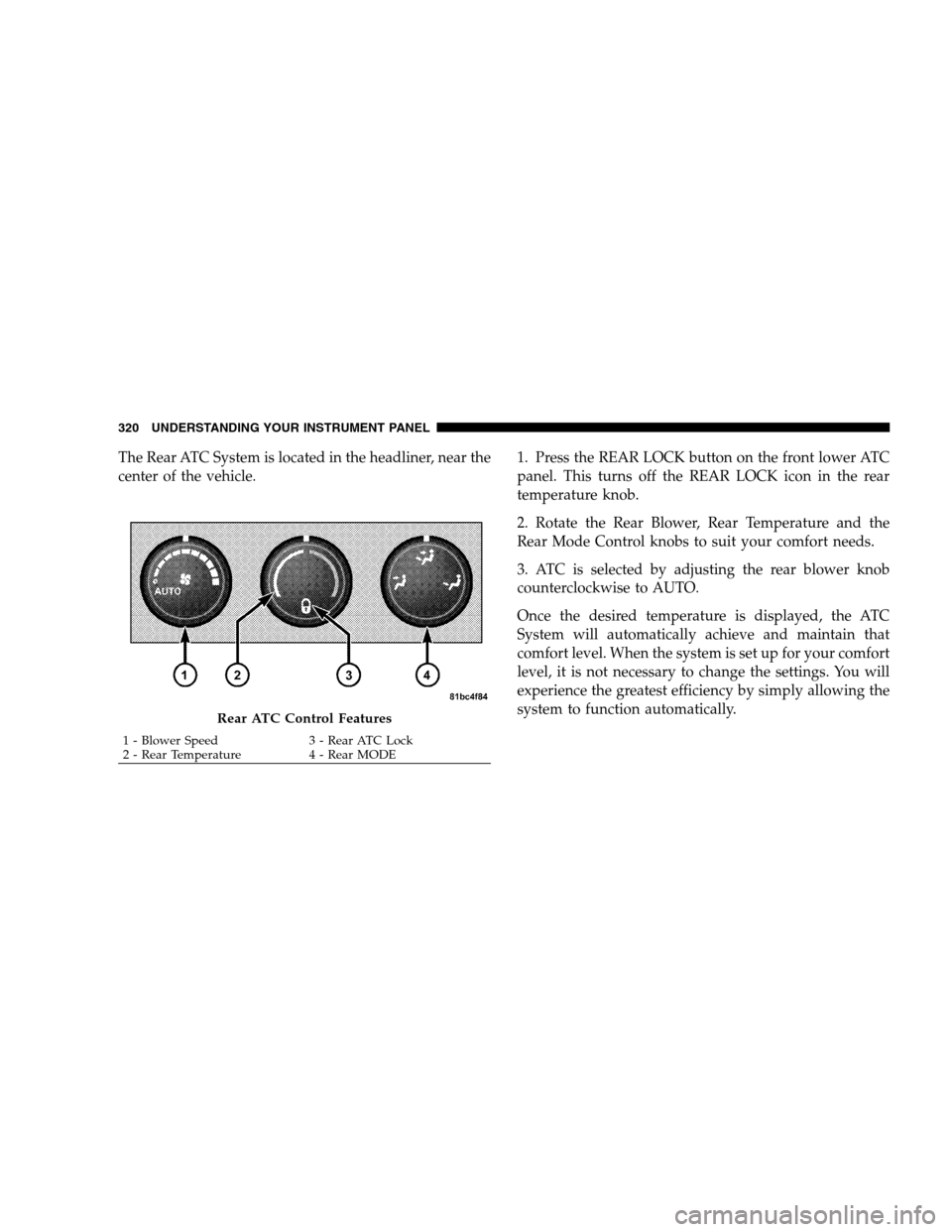
The Rear ATC System is located in the headliner, near the
center of the vehicle.1. Press the REAR LOCK button on the front lower ATC
panel. This turns off the REAR LOCK icon in the rear
temperature knob.
2. Rotate the Rear Blower, Rear Temperature and the
Rear Mode Control knobs to suit your comfort needs.
3. ATC is selected by adjusting the rear blower knob
counterclockwise to AUTO.
Once the desired temperature is displayed, the ATC
System will automatically achieve and maintain that
comfort level. When the system is set up for your comfort
level, it is not necessary to change the settings. You will
experience the greatest efficiency by simply allowing the
system to function automatically.Rear ATC Control Features
1 - Blower Speed
3 - Rear ATC Lock
2 -
Rear Temperature 4 - Rear MODE
320 UNDERSTANDING YOUR INSTRUMENT PANEL
Page 323 of 535
NOTE:
It is not necessary to move the temperature settings for
cold or hot vehicles. The system automatically adjusts
the temperature, mode and fan speed to provide
comfort as quickly as possible.
The temperature can be displayed in English or Metric
units by selecting the “Display Units of Measure in”
customer-programmable feature. Refer to the “Elec-
tronic Vehicle Information Center (EVIC) — Customer-
Programmable Features” in this Section.
Rear Blower Control
The rear blower control knob can be manually set to off,
or any fixed blower speed, by rotating the knob from low
to high. This allows the rear seat occupants to control the
volume of air circulated in the rear of the vehicle.CAUTION!
Interior air enters the Rear Automatic Temperature
Control System through an intake grille, located in
the passenger side trim panel behind the third row
seats. The heater outlets are located in the passenger
side trim panel, just behind the sliding door. Do not
block or place objects directly in front of the inlet
grille or heater outlets. The electrical system could
overload causing damage to the blower motor.
Rear Temperature Control
To change the temperature in the rear of the vehicle,
rotate the temperature knob counterclockwise to lower
the temperature, and clockwise to increase the tempera-
ture. The REAR temperature settings are displayed in the
front upper ATC panel.
UNDERSTANDING YOUR INSTRUMENT PANEL 321
4