brake DODGE GRAND CARAVAN 2009 5.G Owners Manual
[x] Cancel search | Manufacturer: DODGE, Model Year: 2009, Model line: GRAND CARAVAN, Model: DODGE GRAND CARAVAN 2009 5.GPages: 535, PDF Size: 18.61 MB
Page 29 of 535
REMOTE STARTING SYSTEM — IF EQUIPPEDThis system uses the Remote Keyless Entry
(RKE) transmitter to start the engine conve-
niently from outside the vehicle while still
maintaining security. The system has a range of
328 ft (100 m).
NOTE: The vehicle must be equipped with an auto-
matic transmission to be equipped with Remote Start.
How to Use Remote Start
All of the following conditions must be met before the
engine will Remote Start:
Shift lever in PARK
Doors closed
Hood closed
Trunk closed
Hazard switch off
Brake switch inactive (brake pedal not pressed)
Ignition key removed from ignition switch
Battery at an acceptable charge level
RKE PANIC button not pressed WARNING!
Never use the Remote Start in a closed garage.
To Enter Remote Start Mode
Press and release the REMOTE START button
on the RKE transmitter twice within five sec-
onds. The parking lights will flash and the horn
will chirp twice (if programmed). Then, the
engine will start and the vehicle will remain in the
Remote Start mode for a 15-minute cycle. THINGS TO KNOW BEFORE STARTING YOUR VEHICLE 27
2
Page 44 of 535
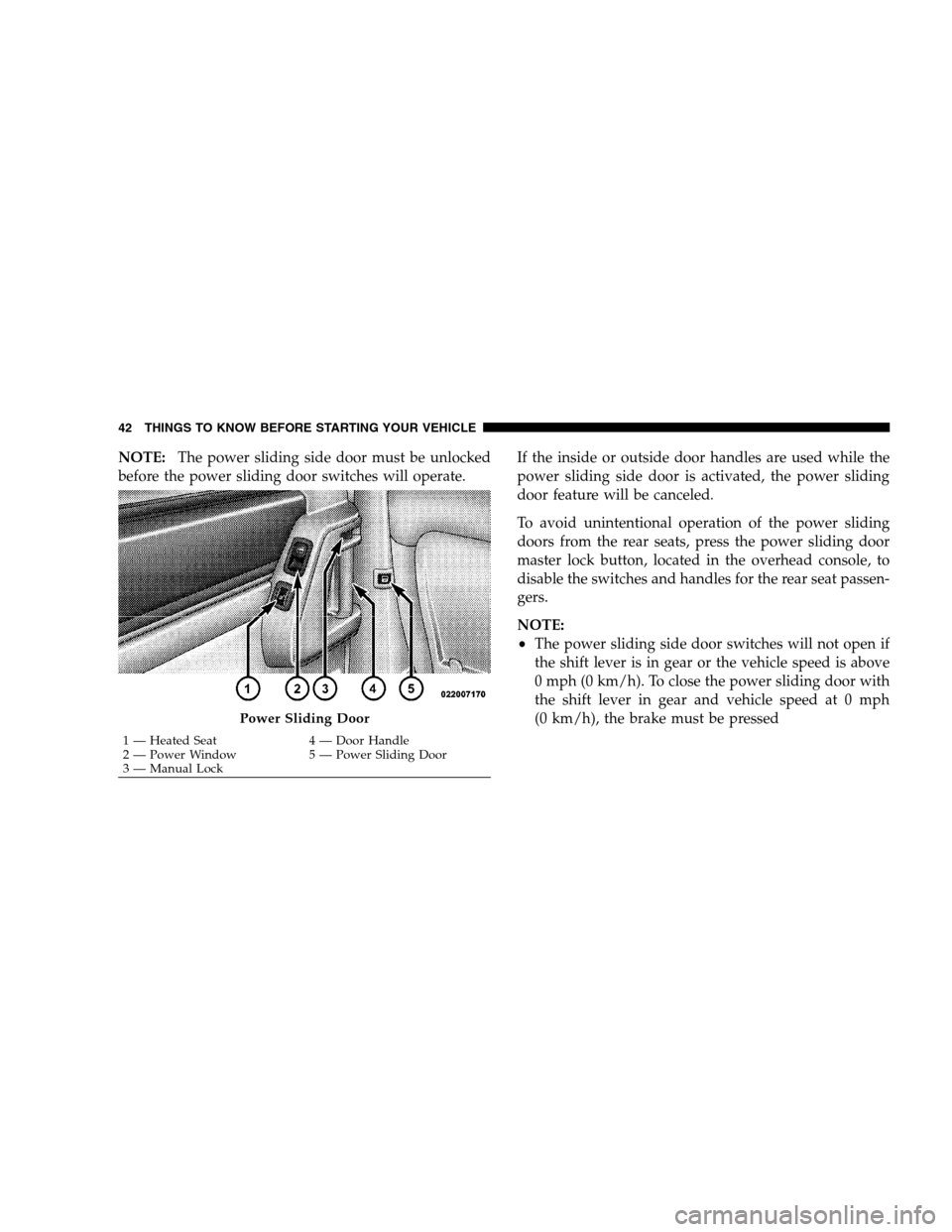
NOTE:The power sliding side door must be unlocked
before the power sliding door switches will operate. If the inside or outside door handles are used while the
power sliding side door is activated, the power sliding
door feature will be canceled.
To avoid unintentional operation of the power sliding
doors from the rear seats, press the power sliding door
master lock button, located in the overhead console, to
disable the switches and handles for the rear seat passen-
gers.
NOTE:
The power sliding side door switches will not open if
the shift lever is in gear or the vehicle speed is above
0 mph (0 km/h). To close the power sliding door with
the shift lever in gear and vehicle speed at 0 mph
(0 km/h), the brake must be pressedPower Sliding Door
1 — Heated Seat
4 — Door Handle
2 —
Power Window 5 — Power Sliding Door
3 — Manual Lock
42 THINGS TO KNOW BEFORE STARTING YOUR VEHICLE
Page 77 of 535
court with legal jurisdiction (i.e., pursuant to a warrant).
A copy of the data will be provided to the custodial entity
upon request. General data that does not identify par-
ticular vehicles or crashes may be released for incorpo-
ration in aggregate crash databases, such as those main-
tained by the U.S. government and various states. Data of
a potentially sensitive nature, such as would identify a
particular driver, vehicle, or crash, will be treated confi-
dentially. Confidential data will not be disclosed by
Chrysler LLC to any third party except when:
1. Used for research purposes, such as to match data
with a particular crash record in an aggregate database,
provided confidentiality of personal data is thereafter
preserved
2. Used in defense of litigation involving a Chrysler LLC
product
3. Requested by police under a legal warrant
4. Otherwise required by lawData Parameters that May Be Recorded:
Diagnostic trouble code(s) and warning light status for
electronically-controlled safety systems, including the
airbag system
Airbag disable light status (if equipped)
9Time9
of airbag deployment (in terms of ignition
cycles and vehicle mileage)
Airbag deployment level (if applicable)
Impact velocity and angle
Seat belt status
Brake status (service and parking brakes)
Accelerator status (including vehicle speed)
Engine control status (including engine speed)
Transmission gear selection
THINGS TO KNOW BEFORE STARTING YOUR VEHICLE 75 2
Page 96 of 535
DefrosterCheck operation by selecting the defrost mode and place
the blower control on high speed. You should be able to
feel the air directed against the windshield. See your
authorized dealer for service if your defroster is
inoperable.
Periodic Safety Checks You Should Make Outside
the Vehicle
Tires
Examine tires for excessive tread wear and uneven wear
patterns. Check for stones, nails, glass, or other objects
lodged in the tread. Inspect the tread and sidewall for
cuts and cracks. Check the wheel nuts for tightness.
Check the tires (including spare) for proper pressure.
Lights
Have someone observe the operation of exterior lights
while you work the controls. Check turn signal and high
beam indicator lights on the instrument panel.
Door Latches
Check for positive closing, latching, and locking.
Fluid Leaks
Check area under vehicle after overnight parking for fuel,
engine coolant, oil, or other fluid leaks. Also, if gasoline
fumes are detected or if fuel, power steering fluid, or
brake fluid leaks are suspected, the cause should be
located and corrected immediately.
94 THINGS TO KNOW BEFORE STARTING YOUR VEHICLE
Page 172 of 535
WARNING!To avoid serious injury or death, NEVER operate the
vehicle with occupants in the third row seat while in
the tailgate mode.
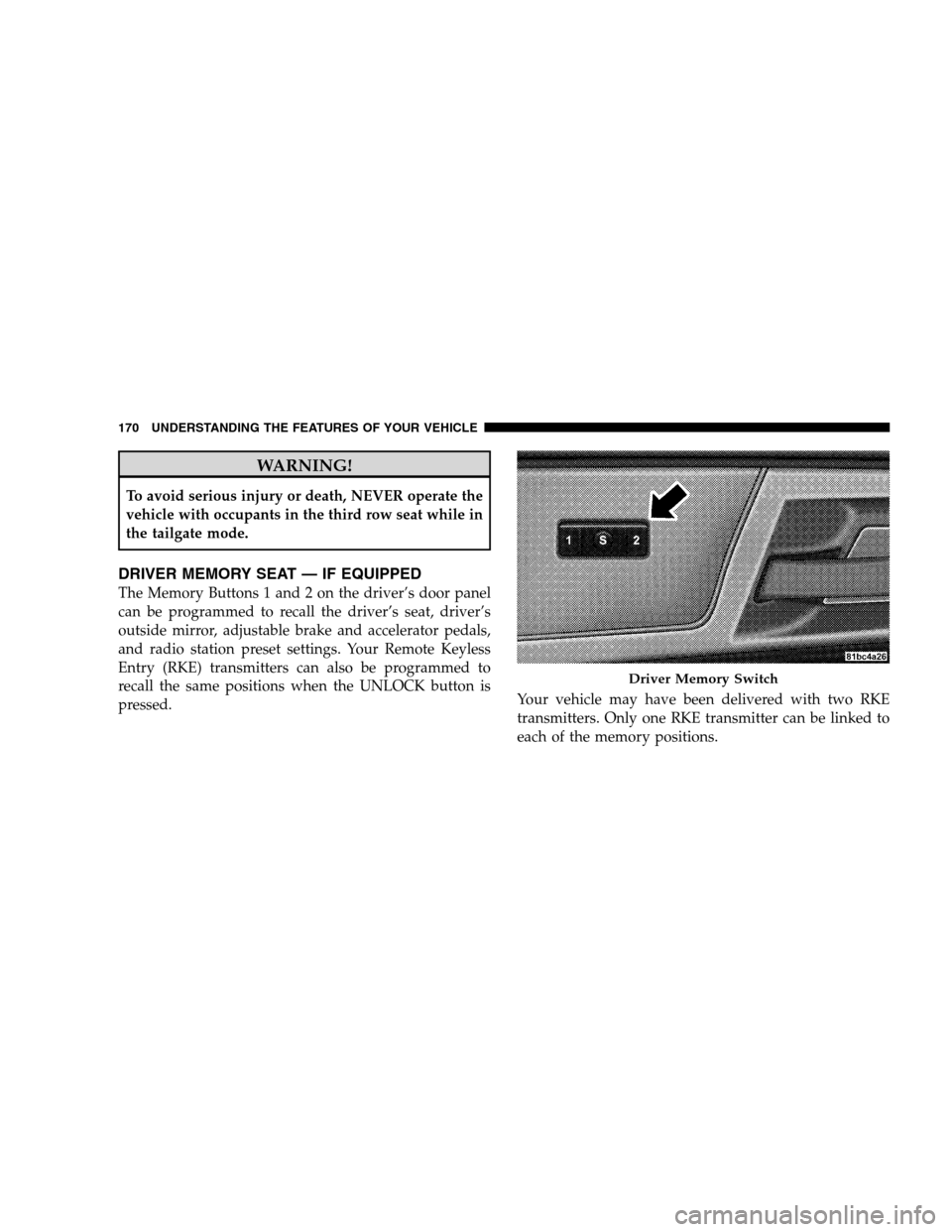
DRIVER MEMORY SEAT — IF EQUIPPED
The Memory Buttons 1 and 2 on the driver’s door panel
can be programmed to recall the driver’s seat, driver’s
outside mirror, adjustable brake and accelerator pedals,
and radio station preset settings. Your Remote Keyless
Entry (RKE) transmitters can also be programmed to
recall the same positions when the UNLOCK button is
pressed.
Your vehicle may have been delivered with two RKE
transmitters. Only one RKE transmitter can be linked to
each of the memory positions. Driver Memory Switch
170 UNDERST
ANDING THE FEATURES OF YOUR VEHICLE
Page 173 of 535
Setting Memory Positions and Linking RKE
Transmitter
to Memory
NOTE:Each time the SET (S) button and a numbered
button (1 or 2) is pressed, you erase the memory settings
for that button and store a new one.
1. Insert the ignition key and turn the ignition switch to
the ON position.
2. Press the driver door MEMORY button number 1 if
you are setting the memory for driver 1, or button
number 2 if you are setting the memory for driver 2. The
system will recall any stored settings. Wait for the system
to complete the memory recall before continuing to
Step 3.
3. Adjust the driver’s seat, recliner, and driver’s side-
view mirror to the desired positions.
4. Adjust the brake and accelerator pedals to the desired
positions. 5. Turn on the radio and set the radio station presets (up
to 10 AM and 10 FM stations can be set).
6. Turn the ignition switch to the OFF position and
remove the key.
7. Press and release the SET (S) button located on the
driver’s door.
8. Within five seconds, press and release MEMORY
button 1 or 2 on the driver’s door. The next step must be
performed within 10 seconds if you desire to also use a
RKE transmitter to recall memory positions.
9. Press and release the LOCK button on one of the RKE
transmitters.
10. Insert the ignition key and turn the ignition switch to
the ON position.
UNDERSTANDING THE FEATURES OF YOUR VEHICLE 171 3
Page 183 of 535
Daytime Running Lights (Canada/Fleet Vehicles
Only)The headlights on your vehicle will illuminate when the
engine is started and the transmission is in any gear
except PARK. This provides a constant lights on condi-
tion until the ignition is turned OFF. The lights illuminate
at less than 50% of normal intensity. If the parking brake
is applied, the Daytime Running Lights (DRL) will turn
off. Also, if a turn signal is activated, the DRL lamp on the
same side of the vehicle will turn off for the duration of
the turn signal activation. Once the turn signal is no
longer active, the DRL lamp will illuminate.
Front Fog Lights — If Equipped
To activate the front fog lights, turn on the parking
lights or the low beam headlights and push in the
headlight switch control knob. Pressing the head-
light switch control knob in a second time will turn the
front fog lights off.
Battery Protection
This feature provides battery protection to avoid wearing
down the battery if the headlights, parking lights, or
front fog lights are left on for extended periods of time
when the ignition switch is in the LOCK position. After
eight minutes of the ignition switch being in the LOCK
position and the headlight switch in any position other
than OFF or AUTO, the lights will turn off automatically
until the next cycle of the ignition switch or headlight
switch.
The battery protection feature will be disabled if the
ignition switch is turned to any other position other than
LOCK during the three minute delay. UNDERSTANDING THE FEATURES OF YOUR VEHICLE 181
3
Page 188 of 535
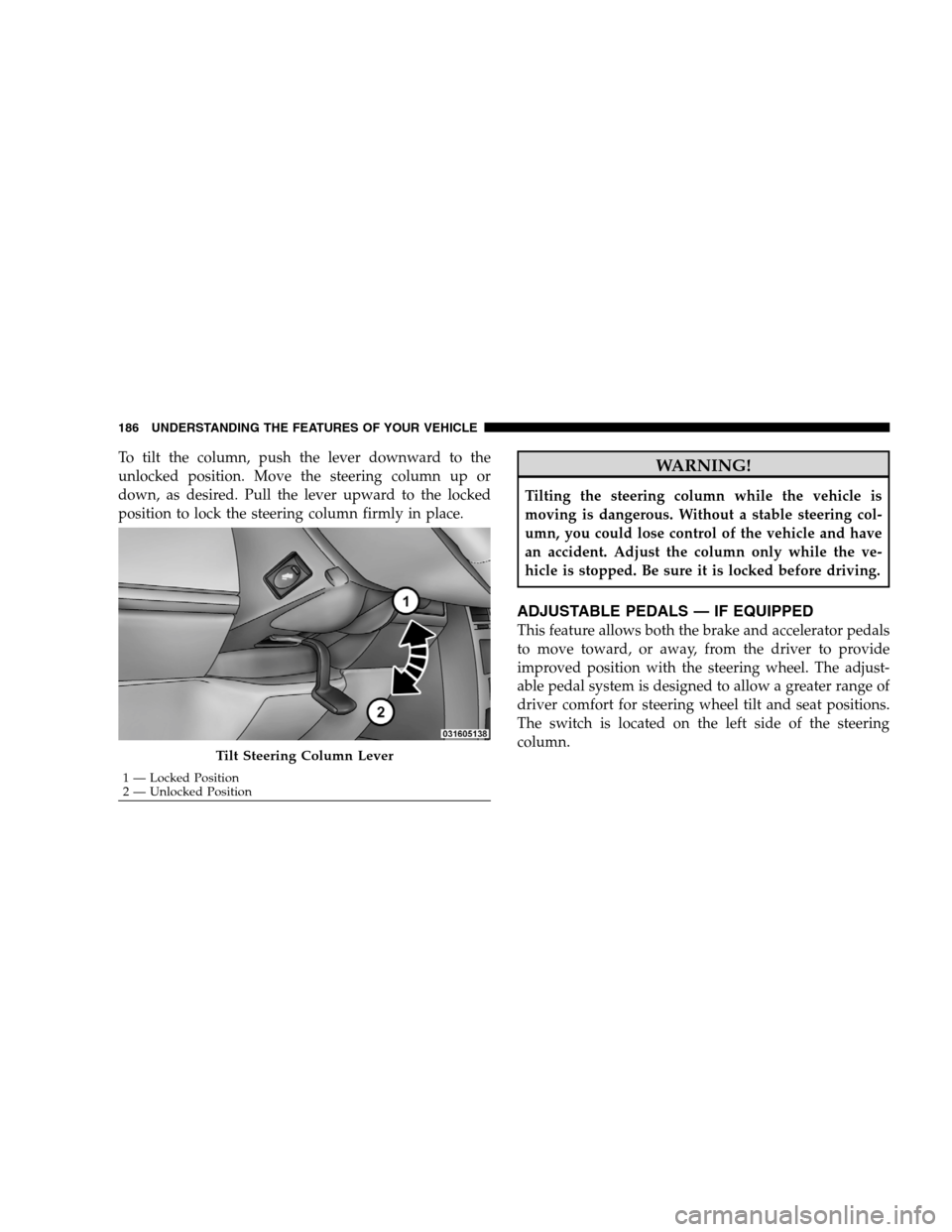
To tilt the column, push the lever downward to the
unlocked position. Move the steering column up or
down, as desired. Pull the lever upward to the locked
position to lock the steering column firmly in place.WARNING!
Tilting the steering column while the vehicle is
moving is dangerous. Without a stable steering col-
umn, you could lose control of the vehicle and have
an accident. Adjust the column only while the ve-
hicle is stopped. Be sure it is locked before driving.
ADJUSTABLE PEDALS — IF EQUIPPED
This feature allows both the brake and accelerator pedals
to move toward, or away, from the driver to provide
improved position with the steering wheel. The adjust-
able pedal system is designed to allow a greater range of
driver comfort for steering wheel tilt and seat positions.
The switch is located on the left side of the steering
column.
Tilt Steering Column Lever
1 — Locked Position
2 —
Unlocked Position
186 UNDERSTANDING THE FEATURES OF YOUR VEHICLE
Page 191 of 535
WARNING!Leaving the Electronic Speed Control system on
when not in use is dangerous. You could accidently
set the system or cause it to go faster than you want.
You could lose control and have an accident. Always
leave the Electronic Speed Control system off when
you are not using it.
To Set At A Desired Speed
When the vehicle has reached the desired speed, press
the SET lever downward and then release. Lift your foot
off the accelerator and the vehicle will operate at the
selected speed.
Deactivating Electronic Speed Control
A soft tap on the brake pedal or pulling the Electronic
Speed Control lever (CANCEL) toward you will deacti-
vate the Electronic Speed Control without erasing the set
speed memory. Pushing the ON/OFF button to the OFF
position or turning OFF the ignition erases the set speed
memory.
Resuming Speed
To resume a previously set speed, raise the Electronic
Speed Control lever (RESUME/ACCEL) upward, and
release. Resume can be used at any speed above 25 mph
(40 km/h).
Varying The Speed Setting
When the Electronic Speed Control is set, speed can be
increased by raising and holding the RESUME/ACCEL
lever upwards. When released, a new set speed will be
established.
Raising the RESUME/ACCEL lever upward, once, will
result in a 1 mph (1.6 km/h) speed increase. Each time
the lever is tapped upward speed increases, so tapping
the Electronic Speed Control lever three times will in-
crease speed by 3 mph (5 km/h), etc.
UNDERSTANDING THE FEATURES OF YOUR VEHICLE 189 3
Page 230 of 535
WARNING!Do not install the load-leveling system on vehicles
that are not equipped with Anti-Lock Brakes. Ve-
hicles without Anti-Lock Brakes (ABS) have a height-
sensing proportioning valve. Installing a leveling
system will render this system ineffective, inappro-
priately reducing rear brake pressure, resulting in
increased stopping distances. You could have a seri-
ous accident.
ROOF LUGGAGE RACK — IF EQUIPPED
The crossbars and side rails are designed to carry the
weight on vehicles equipped with a luggage rack. The
load must not exceed 150 lbs (68 kg), and should be
uniformly distributed over the luggage rack crossbars.
Distribute cargo weight evenly on the roof rack crossbars.
The roof rack does not increase the total load carrying
capacity of the vehicle. Be sure the total load of cargo
inside the vehicle plus that on the external rack does not
exceed the maximum vehicle load capacity.
To move the crossbars, loosen the thumb screws located
at the upper edge of each crossbar approximately six
turns, then move the crossbar to the desired position,
keeping the crossbars parallel to the rack frame. Once the
crossbar is in place, retighten the thumb screws to lock
the crossbar into position.
Attempt to move the crossbar again to ensure that it has
properly locked into position.
NOTE:
To help control wind noise when installing the
crossbars make sure the arrows marked on the underside
of the crossbars are facing the front of the vehicle. When
the crossbars are not in use, the front crossbar should be
fastened just forward of the middle support and the rear
crossbar should be fastened at the rearmost position of
the side rails. This will help reduce the amount of wind
noise when the crossbars are not in use.
228 UNDERSTANDING THE FEATURES OF YOUR VEHICLE