sensor DODGE GRAND CARAVAN 2009 5.G User Guide
[x] Cancel search | Manufacturer: DODGE, Model Year: 2009, Model line: GRAND CARAVAN, Model: DODGE GRAND CARAVAN 2009 5.GPages: 535, PDF Size: 18.61 MB
Page 107 of 535
When the vehicle is started, the BSM warning light will
be momentarily illuminated in both outside rear view
mirrors to let the driver know that the system is opera-
tional. The BSM system sensors operate when the vehicle
is in any forward gear or REVERSE and enters stand by
mode when the vehicle is in PARK.
The BSM detection zone covers approximately one lane
on both sides of the vehicle (11 ft or 3.35 m). The zone
starts at the outside rear view mirror and extends ap-
proximately 20 ft (6 m) to the rear of the vehicle. The BSM
system monitors the detection zones on both sides of the
vehicle when the vehicle speed has reached approxi-
mately 6 mph (10 km/h) or higher and will alert the
driver of vehicles in these areas.NOTE:
The BSM system does NOT alert the driver about
rapidly approaching vehicles that are outside the
detection zones.
The BSM system detection zone DOES NOT change if
your vehicle is towing a trailer. Therefore, visually
verify the adjacent lane is clear for both your vehicle
and trailer before making a lane change. If the trailer
or other object (i.e., bicycle, sports equipment) extends
beyond the side of your vehicle, this may result in the
BSM warning light remaining illuminated the entire
time the vehicle is in a forward gear.
UNDERSTANDING THE FEATURES OF YOUR VEHICLE 105 3
Page 108 of 535
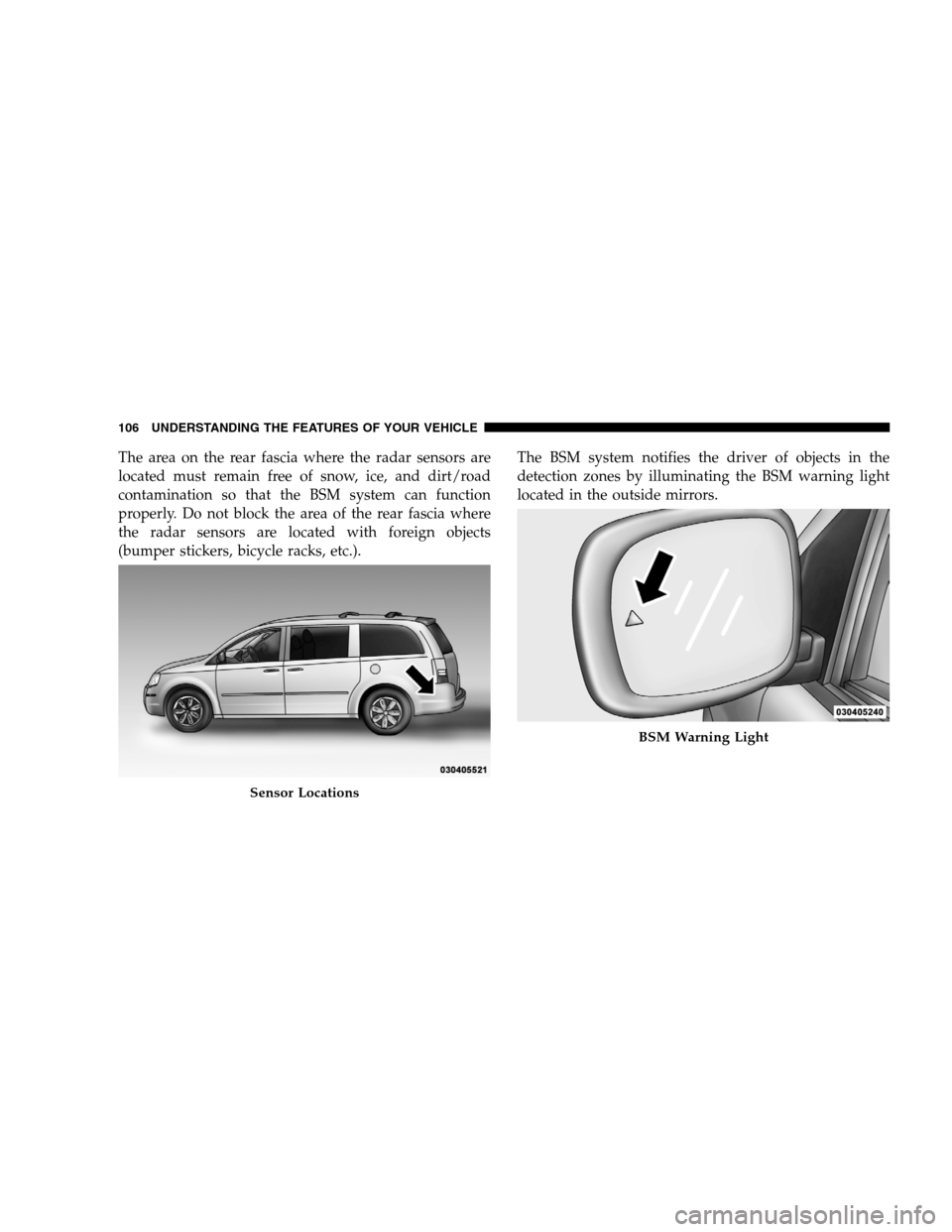
The area on the rear fascia where the radar sensors are
located must remain free of snow, ice, and dirt/road
contamination so that the BSM system can function
properly. Do not block the area of the rear fascia where
the radar sensors are located with foreign objects
(bumper stickers, bicycle racks, etc.).The BSM system notifies the driver of objects in the
detection zones by illuminating the BSM warning light
located in the outside mirrors.Sensor Locations BSM Warning Light
106 UNDERST
ANDING THE FEATURES OF YOUR VEHICLE
Page 113 of 535
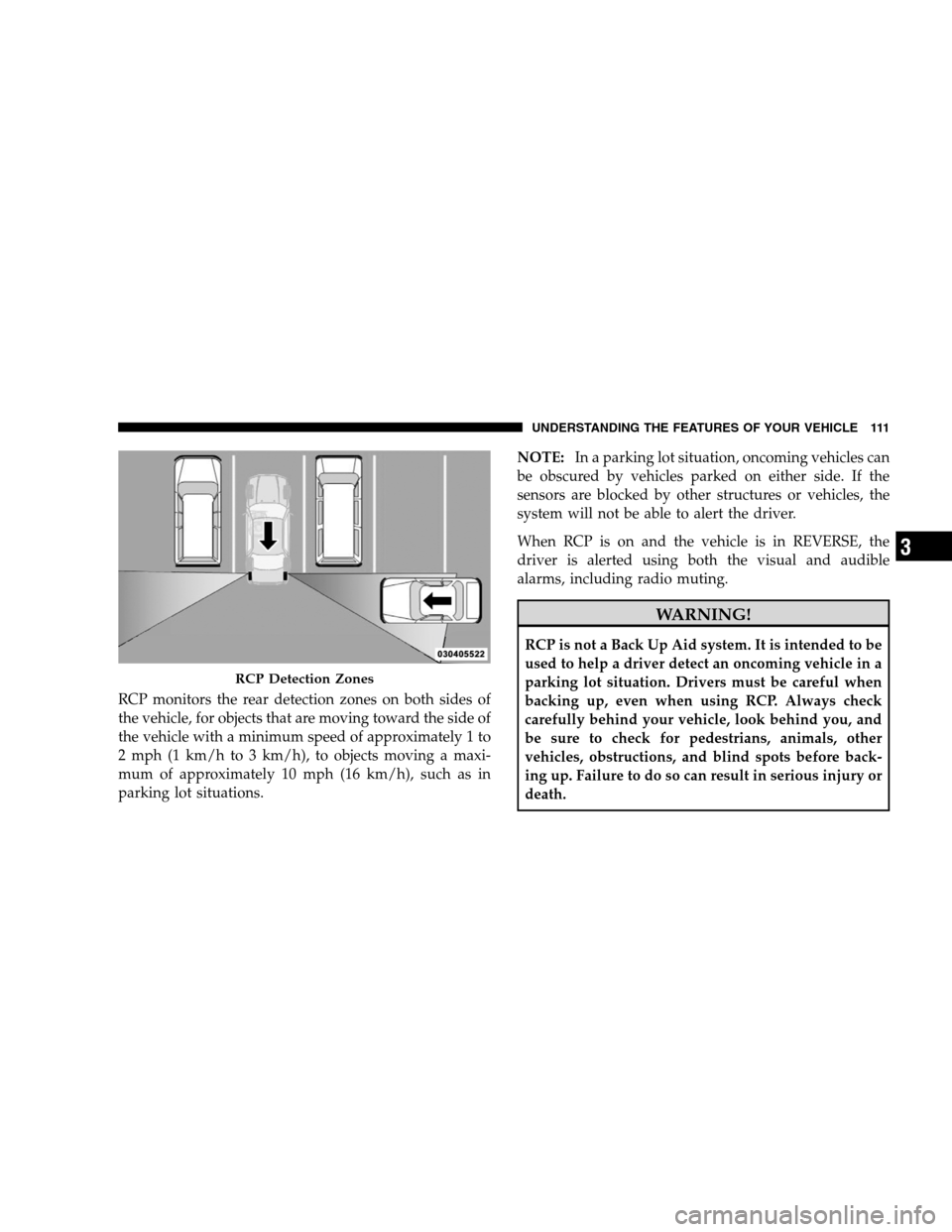
RCP monitors the rear detection zones on both sides of
the vehicle, for objects that are moving toward the side of
the vehicle with a minimum speed of approximately 1 to
2 mph (1 km/h to 3 km/h), to objects moving a maxi-
mum of approximately 10 mph (16 km/h), such as in
parking lot situations.NOTE:
In a parking lot situation, oncoming vehicles can
be obscured by vehicles parked on either side. If the
sensors are blocked by other structures or vehicles, the
system will not be able to alert the driver.
When RCP is on and the vehicle is in REVERSE, the
driver is alerted using both the visual and audible
alarms, including radio muting. WARNING!
RCP is not a Back Up Aid system. It is intended to be
used to help a driver detect an oncoming vehicle in a
parking lot situation. Drivers must be careful when
backing up, even when using RCP. Always check
carefully behind your vehicle, look behind you, and
be sure to check for pedestrians, animals, other
vehicles, obstructions, and blind spots before back-
ing up. Failure to do so can result in serious injury or
death.
RCP Detection Zones
UNDERSTANDING
THE FEATURES OF YOUR VEHICLE 111 3
Page 193 of 535
REAR PARK ASSIST — IF EQUIPPEDThe Rear Park Assist provides visible and audible indi-
cations of the distance between the rear fascia and the
detected obstacle, when backing up. When backing up,
you should also use the inside rearview and outside
mirrors.
The Rear Park Assist will remember the last system state
(enabled or disabled) from the last ignition cycle, when
the ignition is changed to the RUN/ON position.
The Rear Park Assist can be active only when the shift
lever is in REVERSE. When in REVERSE, the system
scans for objects behind the vehicle, using four sensors
located in the rear bumper.
NOTE:
The system will be active until the vehicle speed
is increased to approximately 11 mph (18 km/h) or
above. The system will be active again if the vehicle
speed is decreased to speeds less than approximately
10 mph (16 km/h).
Rear Park Assist Sensors
The four Rear Park Assist sensors, located in the rear
fascia, monitor the area behind the vehicle that is within
the sensors’ field of view. The monitored area seems oval
in shape. The sensors can detect obstacles from approxi-
mately 11.8 in (30 cm) up to 78.7 in (200 cm) from the rear
fascia in the horizontal direction, depending on the
location and orientation of the obstacle and the type of
obstacle.
UNDERSTANDING THE FEATURES OF YOUR VEHICLE 191 3
Page 196 of 535
WARNING!
Drivers must be careful when backing up, even
when using the Rear Park Assist. Always check
carefully behind your vehicle, and be sure to check
for pedestrians, animals, other vehicles, obstruc-
tions, or blind spots before backing up. You are
responsible for the safety of your surroundings
and must continue to pay attention while backing
up. Failure to do so can result in serious injury or
death.
(Continued) WARNING! (Continued)
Before using the Rear Park Assist, it is strongly
recommended that the ball mount and hitch ball
assembly be disconnected from the vehicle, when
the vehicle is not used for towing. Failure to do so
can result in injury or damage to vehicles or
obstacles, because the hitch ball will be much
closer to the obstacle than the rear fascia when the
warning display turns the red LEDs on. Also, the
sensors could detect the ball mount and hitch ball
assembly, depending on its size and shape, giving
a false indication that an obstacle is behind the
vehicle.
194 UNDERSTANDING THE FEATURES OF YOUR VEHICLE
Page 197 of 535
CAUTION!
To avoid vehicle damage, the Rear Park Assist
should only be used as a parking aid and is unable
to recognize every obstacle, including small ob-
jects. Parking curbs might be temporarily detected
or not detected at all. Obstacles located above or
below the sensors will not be detected when they
are in close proximity to the rear of the vehicle.
To avoid vehicle damage, the vehicle must be
driven slowly when using the Rear Park Assist, to
be able to stop in time when an obstacle is
detected. It is recommended that you look over
your shoulder when using the Rear Park Assist.
NOTE:
Ensure that the rear bumper is free of dirt and debris
to keep the system operating properly.
Jackhammers, large trucks, and other vibrations could
affect the performance of the system.
Enabling and Disabling The Rear Park Assist
There are times when you may want to disable the Rear
Park Assist, such as when towing a trailer.
Vehicles Equipped With the Electronic Vehicle
Information Center (EVIC)
You can turn the Rear Park Assist ON or OFF through the
EVIC. For details, refer to “Personal Settings (Customer-
Programmable Features)” under “Electronic Vehicle In-
formation Center (EVIC)” in Section 4.
Vehicles Equipped With the Compass Mini-Trip
Computer (CMTC)
You can turn the Rear Park Assist ON or OFF through the
CMTC by pressing the left reset button in the instrument
cluster. Turn the ignition switch to the ON position, then
press and hold the RESET button for approximately two
seconds.
UNDERSTANDING THE FEATURES OF YOUR VEHICLE 195 3
Page 198 of 535
Service The Rear Park AssistIf the Rear Park Assist malfunctions, the instrument
cluster will actuate a single chime, once per ignition
cycle, and it will display the
(SERVICE PARK ASSIST
SYSTEM( message. Refer to “Compass Mini Trip Com-
puter (CMTC) or “Electronic Vehicle Information Center
(EVIC) — If Equipped”, in Section 4.
If (SERVICE PARK ASSIST SYSTEM( appears in the
Electronic Vehicle Information Center (EVIC), after mak-
ing sure the rear bumper is clean, please see your
authorized dealer.
Should this wrench symbol display with the
letterPnext to it, your Park Sense system
needs servicing. Contact your authorized
dealer.
Cleaning The Rear Park Assist
Clean the Rear Park Assist sensors with water, car wash
soap and a soft cloth. Do not use rough or hard cloths. Do
not scratch or poke the sensors, otherwise, you could
damage them.
REAR BACKUP CAMERA SYSTEM — IF
EQUIPPED
Your vehicle may be equipped with a Rear Camera
System that allows you to see an on-screen image of the
rear of your vehicle whenever the shift lever is put into
REVERSE. The Rear camera image will be displayed on
the uconnect™ tunes radio display screen, located on the
center stack of the instrument panel. The camera is
located in the light bar over the rear license plate. 196 UNDERSTANDING THE FEATURES OF YOUR VEHICLE
Page 200 of 535
4. Enable or disable the rear camera feature by selecting
9enable rear camera in reverse9soft key.
5. Press the “save” soft key.
6. When the vehicle is shifted into REVERSE, an image of
the rear of the vehicle will appear with a caution note to
9check entire surroundings9 displayed across the top of
the screen. After five seconds this note will disappear.
7. When the vehicle is shifted out of REVERSE, the rear
camera mode is exited and the navigation or audio screen
appears again.
Turning the Rear Camera On or Off — Without
Navigation Radio
1. Press the 9menu9hard key.
2. Select 9system setup9 soft key.
3. Enable or disable the rear camera feature by selecting
9enable rear camera in reverse9 soft key.4. When the vehicle is shifted into REVERSE, an image of
the rear of the vehicle will appear with a caution note to
9check entire surroundings9
displayed across the top of
the screen. After five seconds this note will disappear.
5.
When the vehicle is shifted out of REVERSE, the rear
camera mode is exited and the audio screen appears again.
OVERHEAD CONSOLES
Front Overhead Console
Two versions of the overhead console are available. The
base front overhead console model featured fixed incan-
descent courtesy/reading lights, flip-down sunglass stor-
age and conversation mirror. The premium front over-
head console model features a LED focused light that
illuminates the instrument panel cupholders, Infrared
Automatic Temperature Control Sensor (ATC equipped
only), two swiveling LED lights, flip-down sunglass
storage, conversation mirror, optional power sliding door
switches and an optional power liftgate switch.
198 UNDERSTANDING THE FEATURES OF YOUR VEHICLE
Page 201 of 535
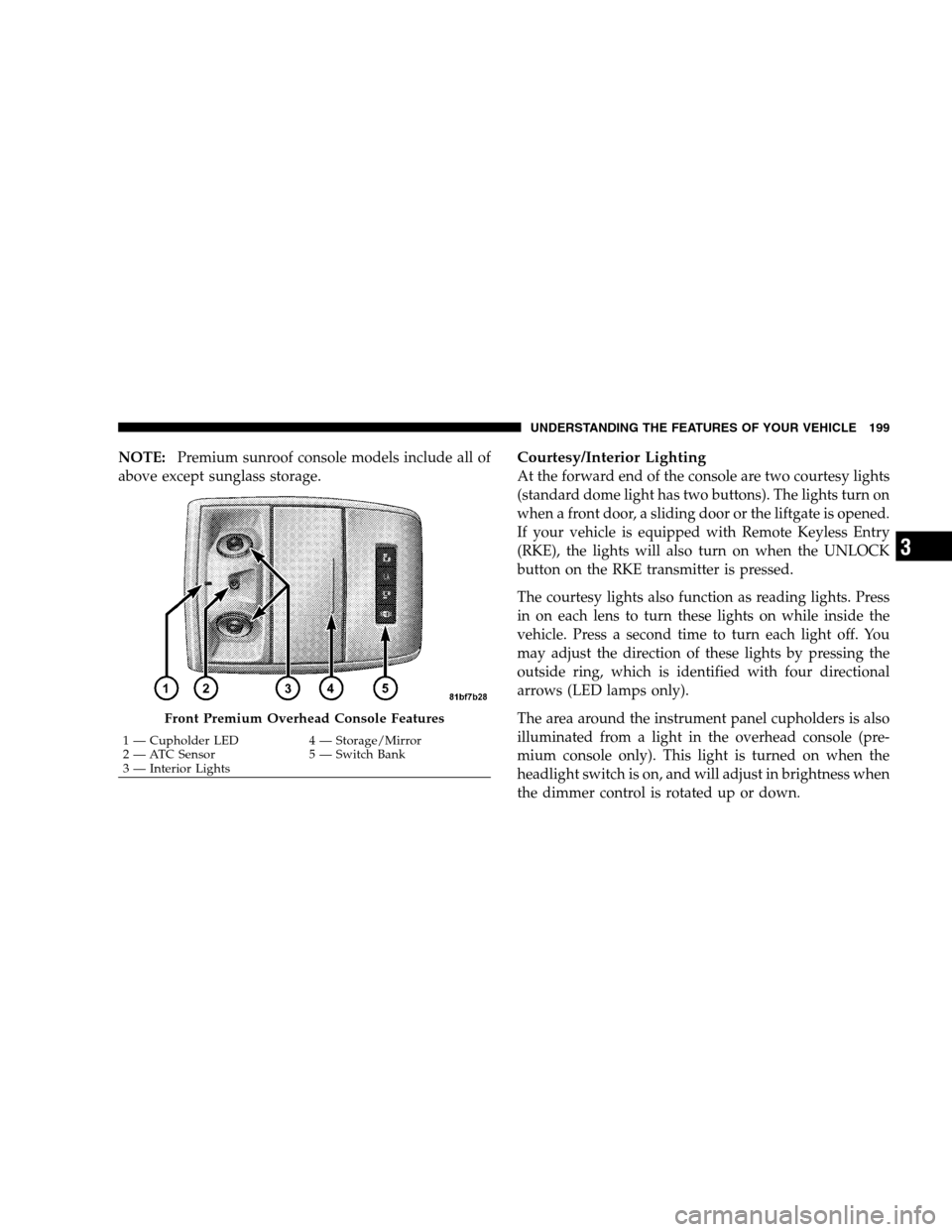
NOTE:Premium sunroof console models include all of
above except sunglass storage.Courtesy/Interior Lighting
At the forward end of the console are two courtesy lights
(standard dome light has two buttons). The lights turn on
when a front door, a sliding door or the liftgate is opened.
If your vehicle is equipped with Remote Keyless Entry
(RKE), the lights will also turn on when the UNLOCK
button on the RKE transmitter is pressed.
The courtesy lights also function as reading lights. Press
in on each lens to turn these lights on while inside the
vehicle. Press a second time to turn each light off. You
may adjust the direction of these lights by pressing the
outside ring, which is identified with four directional
arrows (LED lamps only).
The area around the instrument panel cupholders is also
illuminated from a light in the overhead console (pre-
mium console only). This light is turned on when the
headlight switch is on, and will adjust in brightness when
the dimmer control is rotated up or down. Front Premium Overhead Console Features
1 — Cupholder LED
4 — Storage/Mirror
2 —
ATC Sensor 5 — Switch Bank
3 — Interior Lights UNDERSTANDING THE FEATURES OF YOUR VEHICLE 199 3
Page 253 of 535
CAUTION!The TPMS has been optimized for the original
equipment tires and wheels. TPMS pressures and
warning have been established for the tire size
equipped on your vehicle. Undesirable system opera-
tion or sensor damage may result when using re-
placement equipment that is not of the same size,
type, and/or style. Aftermarket wheels can cause
sensor damage. Do not use tire sealant from a can, or
balance beads if your vehicle is equipped with a
TPMS, as damage to the sensors may result.
26. Electronic Stability Program (ESP) Indicator Light
/ Brake Assist System (BAS) Warning Light The malfunction light for the Electronic Stabil-
ity Program (ESP) is combined with Brake
Assist System (BAS). The yellow “ESP/BAS
Warning Light” comes on when the ignition switch is turned to the “ON” position. They should go
out with the engine running. If the “ESP/BAS Warning
Light” comes on continuously with the engine running, a
malfunction has been detected in either the ESP or the
BAS system. If this light remains on after several ignition
cycles, and the vehicle has been driven several miles/
kilometers at speeds greater than 30 mph (48 km/h), see
an authorized dealer as soon as possible.
27. Compass Mini-Trip Computer (CMTC) Reset
Button
Press the reset button to scroll through sub menus (i.e.,
Outside Temperature, Trip Functions: AVG Fuel
Economy, DTE, Elapsed Time, and Units. Press and hold
the reset button for approximately two seconds to reset
the display shown.
NOTE:
For more detailed operation, refer to “Compass
Mini-Trip Computer” later in this section. UNDERSTANDING YOUR INSTRUMENT PANEL 251
4