stop start DODGE GRAND CARAVAN 2009 5.G User Guide
[x] Cancel search | Manufacturer: DODGE, Model Year: 2009, Model line: GRAND CARAVAN, Model: DODGE GRAND CARAVAN 2009 5.GPages: 535, PDF Size: 18.61 MB
Page 250 of 535
If a problem is detected, the light will come on while the
engine is running. Cycle the ignition key when the
vehicle has completely stopped and the shift lever is
placed in the PARK position, the light should turn off.
If the light remains lit with the engine running, your
vehicle will usually be drivable; however, see an autho-
rized dealer for service as soon as possible. If the light is
flashing when the engine is running, immediate service is
required and you may experience reduced performance,
an elevated/rough idle or engine stall and your vehicle
may require towing.
18. Oil Pressure Warning LightThis light indicates low engine oil pressure. The
light should turn on momentarily when the engine
is started. If the light turns on while driving, stop the
vehicle and shut off the engine as soon as possible. A
chime will sound for four minutes when this light turns
on. Do not operate the vehicle until the cause is corrected.
This light does not indicate how much oil is in the engine.
The engine oil level must be checked under the hood.
19. Front Fog Light Indicator — If Equipped
This indicator will illuminate when the front fog
lights are on.
20. Seat Belt Reminder Light When the ignition switch is first turned ON, this
light will turn on for five to eight seconds as a bulb
check. During the bulb check, if the driver’s seat
belt is unbuckled, a chime will sound. After the bulb
check or when driving, if the driver’s seat belt remains
unbuckled, the Seat Belt Reminder Light will illuminate
and the chime will sound. Refer to the Occupant Re-
straints section for more information. 248 UNDERSTANDING YOUR INSTRUMENT PANEL
Page 252 of 535
As an added safety feature, your vehicle has been
equipped with a Tire Pressure Monitoring System
(TPMS) that illuminates a low tire pressure telltale when
one or more of your tires is significantly under-inflated.
Accordingly, when the low tire pressure telltale illumi-
nates, you should stop and check your tires as soon as
possible, and inflate them to the proper pressure. Driving
on a significantly under-inflated tire causes the tire to
overheat and can lead to tire failure. Under-inflation also
reduces fuel efficiency and tire tread life, and may affect
the vehicle’s handling and stopping ability.
Please note that the TPMS is not a substitute for proper
tire maintenance, and it is the driver ’s responsibility to
maintain correct tire pressure, even if under-inflation has
not reached the level to trigger illumination of the TPMS
low tire pressure telltale.Your vehicle has also been equipped with a TPMS
malfunction indicator to indicate when the system is not
operating properly. The TPMS malfunction indicator is
combined with the low tire pressure telltale. When the
system detects a malfunction, the telltale will flash for
approximately one minute and then remain continuously
illuminated. This sequence will continue upon subse-
quent vehicle start-ups as long as the malfunction exists.
When the malfunction indicator is illuminated, the sys-
tem may not be able to detect or signal low tire pressure
as intended. TPMS malfunctions may occur for a variety
of reasons, including the installation of replacement or
alternate tires or wheels on the vehicle that prevent the
TPMS from functioning properly. Always check the
TPMS malfunction telltale after replacing one or more
tires or wheels on your vehicle, to ensure that the
replacement or alternate tires and wheels allow the TPMS
to continue to function properly.
250 UNDERSTANDING YOUR INSTRUMENT PANEL
Page 295 of 535
Jump backward in the current track by pressing and
holding the << RWbutton. Holding the << RW
button long enough will take you to the beginning
of the current track.
Jump forward in the current track by pressing and
holding the FF>> button.
A single press backward << RWor forward FF>> will
jump backward or forward respectively, for five
seconds.
Use the << SEEKandSEEK >> buttons to jump to the
previous or next track. If the << SEEKbutton is
pressed during the first two seconds of the track, it will
jump to the previous track in the list; if you press this
button at any other time in the track, it will jump to the
beginning of the track. If you press the SEEK>>
button during play mode, it will jump to the next track
in the list.
While a track is playing, press the INFObutton to see
the associated metadata (artist, track title, album, etc.)
for that track. Pressing the INFObutton again jumps
to the next screen of data for that track. Once you have
seen all screens, the last INFObutton press will take
you back to the play mode screen on the radio.
Pressing the REPEATbutton will change the iPodt
mode to repeat the current playing track.
Press the SCANbutton to use iPodt scan mode, which
will play the first five seconds of each track in the
current list and then forward to the next song. To stop
SCAN mode and start playing the desired track, when
it is playing the track, press the SCANbutton again.
During Scan mode, you can also press the << SEEK
and SEEK >> buttons to select the previous and next
tracks.
RND button (available on sales code RES radio only):
Pressing this button toggles between Shuffle ON and
UNDERSTANDING YOUR INSTRUMENT PANEL 293 4
Page 334 of 535
AUTOMATIC TRANSAXLE
CAUTION!Damage to the transaxle may occur if the following
precautions are not observed:
Move the shift lever into PARK only after the
vehicle has come to a complete stop.
Do not move the shift lever from REVERSE,
PARK, or NEUTRAL into any forward gear when
the engine is above idle speed.
Before moving the shift lever into any gear, make
sure your foot is firmly on the brake pedal.
NOTE: You must press and hold the brake pedal down
while shifting out of PARK. WARNING!
It is dangerous to move the shift lever out of PARK or
NEUTRAL if the engine speed is higher than idle
speed. If your foot is not firmly on the brake pedal,
the vehicle could accelerate quickly forward or in
reverse. You could lose control of the vehicle and hit
someone or something. Only shift into gear when the
engine is idling normally and when your foot is
firmly on the brake pedal.
Brake/Transaxle Interlock System
This system holds the shift lever in the PARK position
when the ignition switch is in the OFF position. It also
prevents you, once the engine is started, from moving the
shift lever out of PARK and into any gear, unless the
brake pedal is pressed. This system is active only while
the ignition switch is in the ON position. Always press
the brake pedal first before moving the shift lever out of
PARK.
332 STARTING AND OPERATING
Page 335 of 535
Automatic Transaxle Ignition Interlock SystemFor electrical system malfunctions, there is an override
for the interlock system. In order to override this system,
remove the cover located to the top right of the shift lever
in the instrument panel. The override can be activated by
pressing the white-colored tab, which can be accessed
through the hole in the instrument panel. While the
override is pressed, the shift lever can be moved out of
the PARK position without pressing the brake pedal.
After operation, return the cover to its original position.
This system prevents the key from being removed unless
the shift lever is in PARK. It also prevents moving the
shift lever out of PARK, unless the key is in the ACC/ON
position, and the brake pedal is pressed.
NOTE:
If a malfunction occurs, the system will trap the
key in the ignition cylinder to warn you that this safety
feature is inoperable. The engine can be started and
stopped but the key cannot be removed until you obtain
service.
Four-Speed or Six-Speed Automatic Transaxle
NOTE: Under extreme cold temperatures (-6°F (-21°C)
and when in DRIVE, transmission operation may be
briefly limited to only second gear operation. Normal
operation will resume once the transmission temperature
has risen to a suitable level (four–speed models only).
The electronically-controlled transaxle provides a precise
shift schedule. The transaxle electronics are self-
calibrating; therefore, the first few shifts on a new vehicle
may be somewhat abrupt. This is a normal condition, and
precision shifts will develop within a few hundred miles
(kilometers).
The transaxle has only PRND shift positions. Downshifts
are carried out by an Electronic Range Select (ERS) by
moving the lever—/ + while in the DRIVE position, the
instrument cluster will display transaxle gear selection as
6, 5, 4, 3, 2, 1 for six-speed, and 4, 3, 2, 1 for four-speed
transaxles.
STARTING AND OPERATING 333 5
Page 337 of 535
The following indicators should be used to ensure that
you have placed the shift lever into the PARK position:
When moving the shift lever into PARK, press the
button on the shift lever and firmly move the lever all
the way forward until it stops.
Look at the shift indicator window on the console to
ensure the shift lever is in the PARK position.
When engaged in PARK, you will not be able to move
the shift lever rearward without pressing the shift
lever button.CAUTION!
Before moving the shift lever out of PARK, you must
turn the ignition from OFF to ACC/ON so the steer-
ing wheel and shift lever are released. Otherwise,
damage to the steering column or shift lever could
result.
REVERSE
This range is for moving the vehicle backward. Shift into
REVERSE only after the vehicle has come to a complete
stop.
NEUTRAL
This range is used when vehicle is standing for pro-
longed periods with engine running. Engine may be
started in this range. Set the parking brake if you must
leave the vehicle. WARNING!
Do not coast in NEUTRAL and never turn off the
ignition to coast down a hill. These are unsafe
practices that limit your response to changing traffic
or road conditions. You might lose control of the
vehicle and have an accident.
STARTING AND OPERATING 335 5
Page 340 of 535
Reset Mode - Electronic TransaxleThe transaxle is monitored electronically for abnormal
conditions. If a condition is detected that could cause
damage, the transaxle automatically shifts into second
gear (third gear for six-speed). The transaxle remains in
second gear (third gear for six-speed) despite the forward
gear selected. PARK, REVERSE, and NEUTRAL will
continue to operate. This Reset feature allows the vehicle
to be driven to an authorized dealer for service without
damaging the transaxle.
In the event of a momentary problem, the transaxle can
be reset to regain all forward gears by performing the
following steps:
1. Stop the vehicle.
2. Shift into PARK.
3. Turn the ignition switch to the OFF position.
4. Restart the engine.
5. Shift into the desired gear range and resume driving.
NOTE:
Even if the transaxle can be reset, it is recom-
mended that you visit an authorized dealer at your
earliest possible convenience. Your authorized dealer has
diagnostic equipment to determine if the problem could
recur.
If the transaxle cannot be reset, authorized dealer service
is required.
338 STARTING AND OPERATING
Page 341 of 535
DRIVING ON SLIPPERY SURFACES
AccelerationRapid acceleration on snow covered, wet, or other slip-
pery surfaces may cause the front wheels to pull errati-
cally to the right or left. This phenomenon occurs when
there is a difference in the surface traction under the front
(driving) wheels.
WARNING!
Rapid acceleration on slippery surfaces is dangerous.
Unequal traction can cause sudden pulling of the
front wheels. You could lose control of the vehicle
and possibly have an accident. Accelerate slowly and
carefully whenever there is likely to be poor traction
(ice, snow, wet mud, loose sand, etc.).
Traction
When driving on wet or slushy roads, it is possible for a
wedge of water to build up between the tire and road
surface. This is known as hydroplaning and may cause
partial or complete loss of vehicle control and stopping
ability. To reduce this possibility, the following precau-
tions should be observed:
1. Slow down during rainstorms or when roads are
slushy.
2. Slow down if the road has standing water or puddles.
3. Replace the tires when tread wear indicators first
become visible.
4. Keep the tires properly inflated.
5. Maintain sufficient distance between your vehicle and
the vehicle in front of you to avoid a collision in a sudden
stop.
STARTING AND OPERATING 339
5
Page 343 of 535
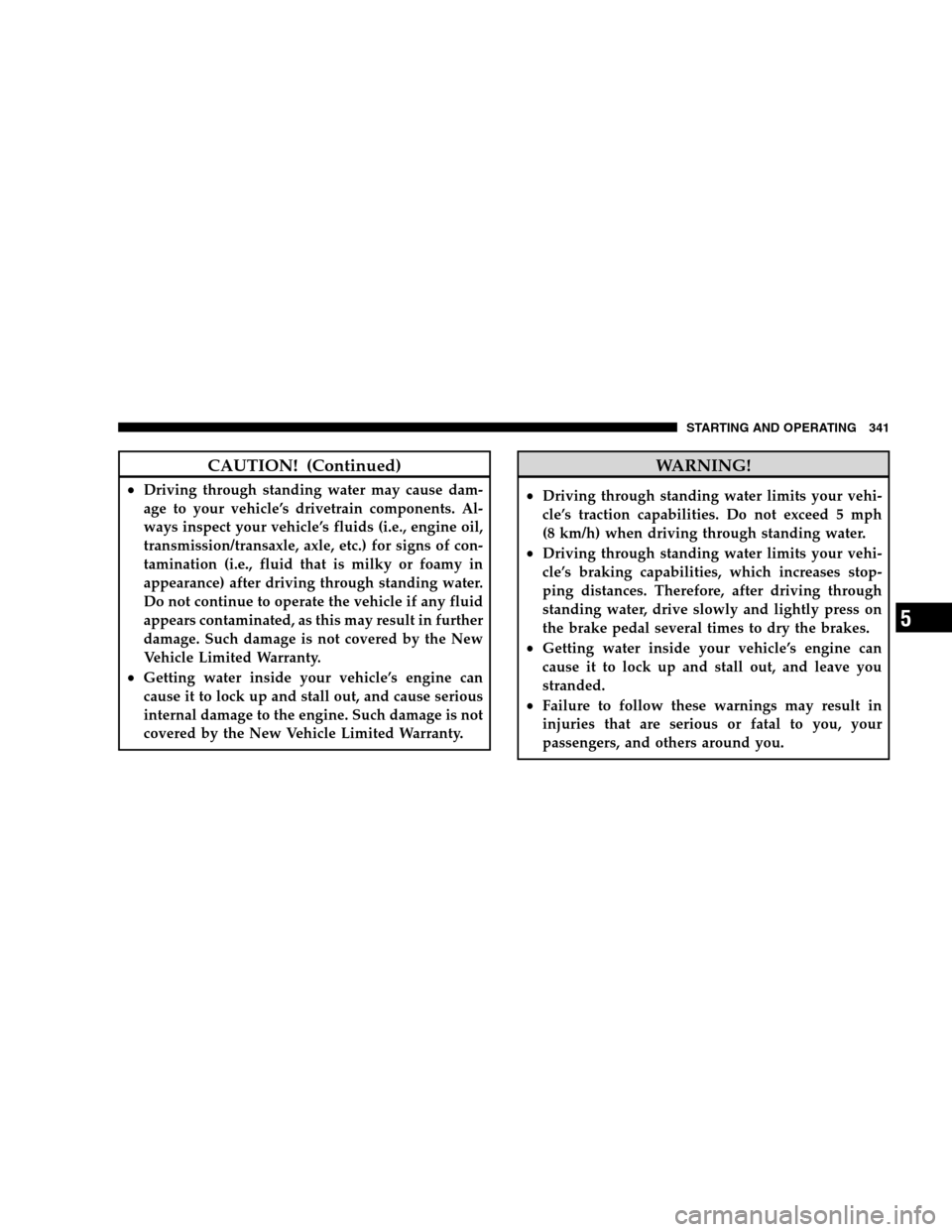
CAUTION! (Continued)
Driving through standing water may cause dam-
age to your vehicle’s drivetrain components. Al-
ways inspect your vehicle’s fluids (i.e., engine oil,
transmission/transaxle, axle, etc.) for signs of con-
tamination (i.e., fluid that is milky or foamy in
appearance) after driving through standing water.
Do not continue to operate the vehicle if any fluid
appears contaminated, as this may result in further
damage. Such damage is not covered by the New
Vehicle Limited Warranty.
Getting water inside your vehicle’s engine can
cause it to lock up and stall out, and cause serious
internal damage to the engine. Such damage is not
covered by the New Vehicle Limited Warranty. WARNING!
Driving through standing water limits your vehi-
cle’s traction capabilities. Do not exceed 5 mph
(8 km/h) when driving through standing water.
Driving through standing water limits your vehi-
cle’s braking capabilities, which increases stop-
ping distances. Therefore, after driving through
standing water, drive slowly and lightly press on
the brake pedal several times to dry the brakes.
Getting water inside your vehicle’s engine can
cause it to lock up and stall out, and leave you
stranded.
Failure to follow these warnings may result in
injuries that are serious or fatal to you, your
passengers, and others around you.
STARTING AND OPERATING 341 5
Page 347 of 535
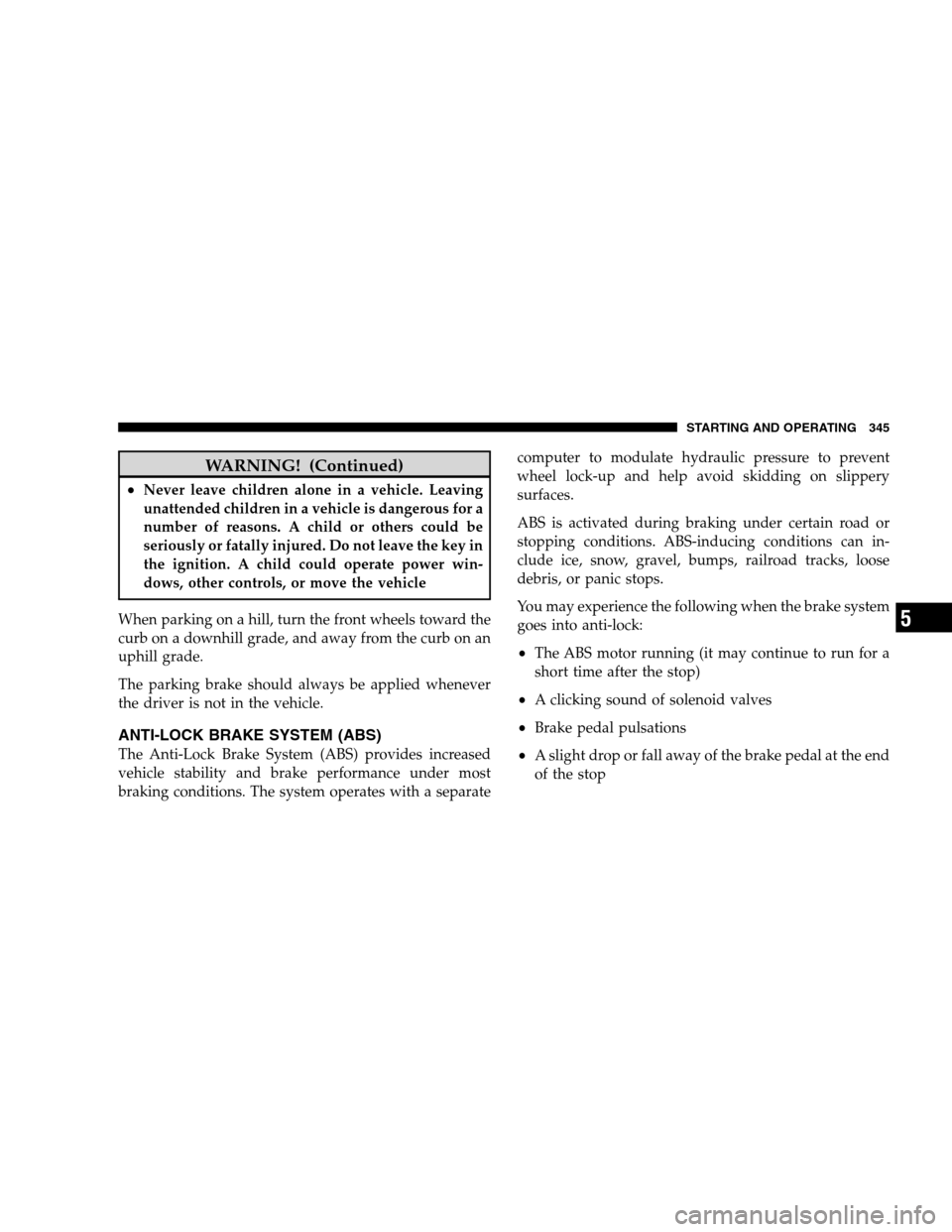
WARNING! (Continued)
Never leave children alone in a vehicle. Leaving
unattended children in a vehicle is dangerous for a
number of reasons. A child or others could be
seriously or fatally injured. Do not leave the key in
the ignition. A child could operate power win-
dows, other controls, or move the vehicle
When parking on a hill, turn the front wheels toward the
curb on a downhill grade, and away from the curb on an
uphill grade.
The parking brake should always be applied whenever
the driver is not in the vehicle.
ANTI-LOCK BRAKE SYSTEM (ABS)
The Anti-Lock Brake System (ABS) provides increased
vehicle stability and brake performance under most
braking conditions. The system operates with a separate computer to modulate hydraulic pressure to prevent
wheel lock-up and help avoid skidding on slippery
surfaces.
ABS is activated during braking under certain road or
stopping conditions. ABS-inducing conditions can in-
clude ice, snow, gravel, bumps, railroad tracks, loose
debris, or panic stops.
You may experience the following when the brake system
goes into anti-lock:
The ABS motor running (it may continue to run for a
short time after the stop)
A clicking sound of solenoid valves
Brake pedal pulsations
A slight drop or fall away of the brake pedal at the end
of the stop
STARTING AND OPERATING 345 5