mirror DODGE GRAND CARAVAN 2009 5.G Owner's Manual
[x] Cancel search | Manufacturer: DODGE, Model Year: 2009, Model line: GRAND CARAVAN, Model: DODGE GRAND CARAVAN 2009 5.GPages: 535, PDF Size: 18.61 MB
Page 228 of 535
To Remove The Premium Floor Console1. Pull up on the bottom release handle in the front of the
console.
2. Lift the rear of the console up several inches/
centimeters.
3. Pull rearward to disengage from floor and remove
console.
To reinstall the console:
1. Position the console at a slight angle (rear slightly
higher than the front).
2. Slide the console forward into the floor bracket.
3. Rotate the rear of the console down until it is resting
on the floor bracket.
4. Push down on the rear of the console until it is seated
in the rear floor bracket.
5. Pull up on the console to be sure it is firmly latched. WARNING!
In an accident, serious injury could result if the
removable floor console is not properly installed.
Always be sure the removable floor console is fully
latched.
REAR WINDOW FEATURES
Rear Window Defroster
The rear window defroster button is located on the
climate control (Mode) knob. Press this button to
turn on the rear window defroster and the heated outside
mirrors (if equipped). An indicator in the button will
illuminate when the rear window defroster is on. The
rear window defroster automatically turns off after ap-
proximately 10 minutes. For an additional five minutes of
operation, press the button a second time. 226 UNDERSTANDING THE FEATURES OF YOUR VEHICLE
Page 229 of 535
NOTE:
You can turn off the heated mirror feature at anytime
by pressing the rear window defroster switch a second
time.
To prevent excessive battery drain, use the rear win-
dow defroster only when the engine is operating.CAUTION!
Failure to follow these cautions can cause damage to
the heating elements:
Use care when washing the inside of the rear
window. Do not use abrasive window cleaners on
the interior surface of the window. Use a soft cloth
and a mild washing solution, wiping parallel to
the heating elements. Labels can be peeled off
after soaking with warm water.
(Continued) CAUTION! (Continued)
Do not use scrapers, sharp instruments, or abra-
sive window cleaners on the interior surface of the
window.
Keep all objects a safe distance from the window.
LOAD-LEVELING SYSTEM
The automatic load-leveling system will provide a level
riding vehicle under most passenger and cargo loading
conditions.
A hydraulic pump contained within the shock absorbers
raises the rear of the vehicle to the correct height. It takes
approximately 1 mile (1.6 km) of driving for the leveling
to complete depending on road surface conditions.
If the leveled vehicle is not moved for approximately
15 hours, the leveling system will bleed itself down. The
vehicle must be driven to reset the system.
UNDERSTANDING THE FEATURES OF YOUR VEHICLE 227 3
Page 261 of 535
rear view icons will be illuminated. If electronic inter-
ference is present, the BSM system will illuminate the
icon only on the side of interference as long as
interference is present.
Service Blind Spot System — This message is dis-
played to indicate the Blind Spot Monitor (BSM)
system is permanently unavailable. The driver will
receive an EVIC message and the BSM display warn-
ing in both mirrors will be permanently illuminated. If
this message is present see an authorized dealer.
Oil Change Required
Your vehicle is equipped with an engine oil change
indicator system. TheOil Change Required message will
flash in the EVIC display for approximately 10 seconds,
after a single chime has sounded, to indicate the next
scheduled oil change interval. The engine oil change indicator system is duty-cycle based, which means the
engine oil change interval may fluctuate dependent upon
your personal driving style.
Unless reset, this message will continue to display each
time you turn the ignition switch to the ON/RUN
position. To turn off the message temporarily, press and
release the Menu button. To reset the oil change indicator
system (after performing the scheduled maintenance)
perform the following steps.
1. Turn the ignition switch to the ON position (do not
start the engine).
2. Fully depress the accelerator pedal, slowly, three times
within 10 seconds.
3. Turn the ignition switch to the OFF/LOCK position.
NOTE:
If the indicator message illuminates when you
start the engine, the oil change indicator system did not
reset. If necessary, repeat these steps.
UNDERSTANDING YOUR INSTRUMENT PANEL 259 4
Page 266 of 535
Auto UNLK On ExitWhen ON is selected, all doors will unlock when the
vehicle is stopped and the transmission is in the PARK or
NEUTRAL position and the driver’s door is opened. To
make your selection, press and release the RESET button
until ON or OFF appears.
RKE Unlock
When
Driver Door 1st Press is selected, only the driver’s
door will unlock on the first press of the Remote Keyless
Entry (RKE) transmitter UNLOCK button. When Driver
Door 1st Press is selected, you must press the RKE
transmitter UNLOCK button twice, to unlock the passen-
ger’s doors. When All Doors 1st Press is selected, all of
the doors will unlock on the first press of the RKE
transmitter UNLOCK button. To make your selection,
press and release the RESET button until “Driver Door
1st Press” or “All Doors 1st Press” appears.
RKE Linked To Memory
When this feature is selected the memory seat, mirror,
and radio settings will return to the memory set position
when the RKE transmitter UNLOCK button is pressed. If
this feature is not selected then the memory seat, mirror,
and radio settings can only return to the memory set
position using the door mounted switch. Pressing the
RESET button when in this display will select 9Yes9or
9No.9
Flash Lamp Lock
When ON is selected, the front and rear turn signals will
flash when the doors are locked or unlocked with the
RKE transmitter. This feature may be selected with or
without the sound horn on lock feature selected. To make
your selection, press and release the RESET button until
ON or OFF appears.
264 UNDERSTANDING YOUR INSTRUMENT PANEL
Page 267 of 535
Headlamp Off DelayWhen this feature is selected, the driver can choose to
have the headlights remain on for 0, 30, 60, or 90 seconds
when exiting the vehicle. To make your selection, press
and release the RESET button until 0, 30, 60, or 90
appears.
Easy Exit Seat
This feature provides automatic driver seat positioning to
enhance driver mobility when entering and exiting the
vehicle. To make your selection, press and release the
RESET button until YES (Y) or NO (N) appears.
NOTE:
The seat will return to the memorized seat
location (if Recall Memory with Remote Key Unlock is set
to ON) when the RKE transmitter is used to unlock the
door. Refer to “Easy Entry/Exit Seat” under “Driver
Memory Seat” in Section 3 of this manual for more
information.
Tilt MIRR. In Reverse
When this feature is selected and the vehicle is placed in
a reverse gear, the side mirrors tilt downward to allow
the driver to see into the previous blind spot and avoid
objects in close proximity to the rear of the vehicle.
Key-Off Power Delay
When this feature is selected, the power window
switches, radio, hands-free system (if equipped), DVD
video system (if equipped), power sunroof (if equipped),
and power outlets will remain active for up to 10 minutes
after the ignition switch is turned OFF. Opening a vehicle
door will cancel this feature. To make your selection,
press and release the RESET button until Off, 45 sec.,
5 min., or 10 min. appears.
ILLUMIN. Approach
When this feature is selected, the headlights will activate
and remain on for up to 90 seconds when the doors are
UNDERSTANDING YOUR INSTRUMENT PANEL 265 4
Page 268 of 535
unlocked with the RKE transmitter. To make your selec-
tion, press and release the RESET button until “OFF,”
“30 sec.,” “60 sec.,” or “90 sec.” appears.
Blind Spot Alert
There are 3 selections when operating Blind Spot Alert.
By pressing and releasing the RESET button once, the
Blind Spot Alert feature can be activated in “Blind Spot
Alert Lights” mode. When this mode is selected the Blind
Spot Monitor (BSM) system is activated and will only
show a visual alert in the outside mirrors. By pressing
and releasing the RESET button a second time “Blind
Spot Alert Lights/CHM” mode is activated. In this mode
the Blind Spot Monitor (BSM) will show a visual alert in
the outside mirrors as well as an audible alert when the
turn signal is on. When “Blind Spot Alert Off” is selected
the Blind Spot Monitor (BSM) system is deactivated.
NOTE:If your vehicle has experienced any damage in
the area where the sensor is located, even if the fascia is not damaged, the sensor may have become misaligned.
Take your vehicle to an authorized dealer to verify sensor
alignment. Having a sensor that is misaligned will result
in the BSM not operating to specification.Park ASST. System
When enable is selected, the Rear Park Assist System is
activated. When disable is selected the system is deacti-
vated and the instrument cluster will display the
9PARK
ASSIST DISABLED9 message. To make your selection,
press and release the RESET button until ENABLE or
DISABLE appears.
Display Units of Measure In
The EVIC, odometer, and navigation system (if
equipped) can be changed between English and Metric
units of measure. To make your selection, press and
release the RESET button until ENGLISH or METRIC
appears.
266 UNDERSTANDING YOUR INSTRUMENT PANEL
Page 315 of 535
CAUTION!Interior air enters the Rear Manual Climate Control
system through an intake grille, located in the pas-
senger side trim panel behind the third row seats.
The heater outlets are located in the passenger side
trim panel, just behind the sliding door. Do not block
or place objects directly in front of the inlet grille or
heater outlets. The electrical system could overload,
causing damage to the blower motor.
Rear Temperature Control
When the blower knob on the front climate control unit is
set to any position other than the rear temperature
settings will be controlled by the rear temperature control
knob on the front climate control unit. The rear mode
selection
RR,allows the settings to be controlled by the
rear mode control knob. To change the temperature in the rear of the vehicle,
rotate the temperature control knob counterclockwise for
cold air, and clockwise for heated air.
When rear controls are locked by the front system, the
lock symbol on the temperature knob is illuminated, and
the rear overhead adjustments are inoperable.
The rear airflow modes will mirror the front unit opera-
tion. Rear PANEL mode is automatically selected when
the front control is in the PANEL mode. When the front
unit is in BI-LEVEL mode, airflow will be emitted from
both the upper and lower rear outlets. When the front
control is in FLOOR, DEFROST, or MIX modes, airflow
will be directed out of the rear floor outlets.
UNDERSTANDING YOUR INSTRUMENT PANEL 313 4
Page 331 of 535
STARTING PROCEDURESBefore starting your vehicle, adjust your seat, adjust the
inside and outside mirrors, fasten your seat belt, and if
present, instruct all other occupants to buckle their seat
belts.
WARNING!
Never leave unattended children alone in a ve-
hicle. Leaving children in a vehicle is dangerous
for a number of reasons. A child or others could be
seriously or fatally injured. Do not leave the key in
the ignition. A child could operate power win-
dows, other controls, or move the vehicle.
Do not leave animals or children inside parked
vehicles in hot weather. Interior heat build-up may
cause serious injury or death.
Automatic Transaxle
The shift lever must be in the NEUTRAL or PARK
position before you can start the engine. Press the brake
pedal before shifting into any driving gear.
Normal Starting
1. Do not press the accelerator.
2. Use the Fob with Integrated Key to briefly turn the
ignition switch to the START position and release it as
soon as the starter engages. The starter motor will
continue to run, and it will disengage automatically
when the engine is running.
3. If the engine fails to start, the starter will disengage
automatically in 10 seconds. If this occurs, turn the
ignition switch to the OFF position, wait 10 to 15 seconds,
then repeat the “Normal Starting” procedure (Steps 1–3
above).
STARTING AND OPERATING 329 5
Page 468 of 535
cleaner. Use caution when cleaning the inside rear win-
dow equipped with electric defrosters or the right rear
quarter window equipped with the radio antenna. Do
not use scrapers or other sharp instruments that may
scratch the elements.
When cleaning the rearview mirror, spray cleaner on the
towel or rag that you are using. Do not spray cleaner
directly on the mirror.
Cleaning Plastic Instrument Cluster Lenses
The lenses in front of the instruments in this vehicle are
molded in clear plastic. When cleaning the lenses, care
must be taken to avoid scratching the plastic.
1. Clean with a wet soft rag. A mild soap solution may be
used, but do not use high alcohol content or abrasive
cleaners. If soap is used, wipe clean with a clean damp
rag.
2. Dry with a soft tissue.
Seat Belt Maintenance
Do not bleach, dye or clean the seat belts with chemical
solvents or abrasive cleaners. This will weaken the fabric.
Sun damage can also weaken the fabric.
If the seat belts need cleaning, use a mild soap solution or
lukewarm water. Do not remove the belts from the car to
wash them.
Replace the seat belts if they appear frayed or worn, or if
the buckles do not work properly.
Cleaning the Instrument Panel Cupholders
Removal
Pull the flexible liner from the cupholder drawer starting
at one edge to ease removal.
Cleaning
The liner is top shelf dishwasher safe, or you may follow
the cleaning procedure below.
466 MAINTAINING YOUR VEHICLE
Page 473 of 535
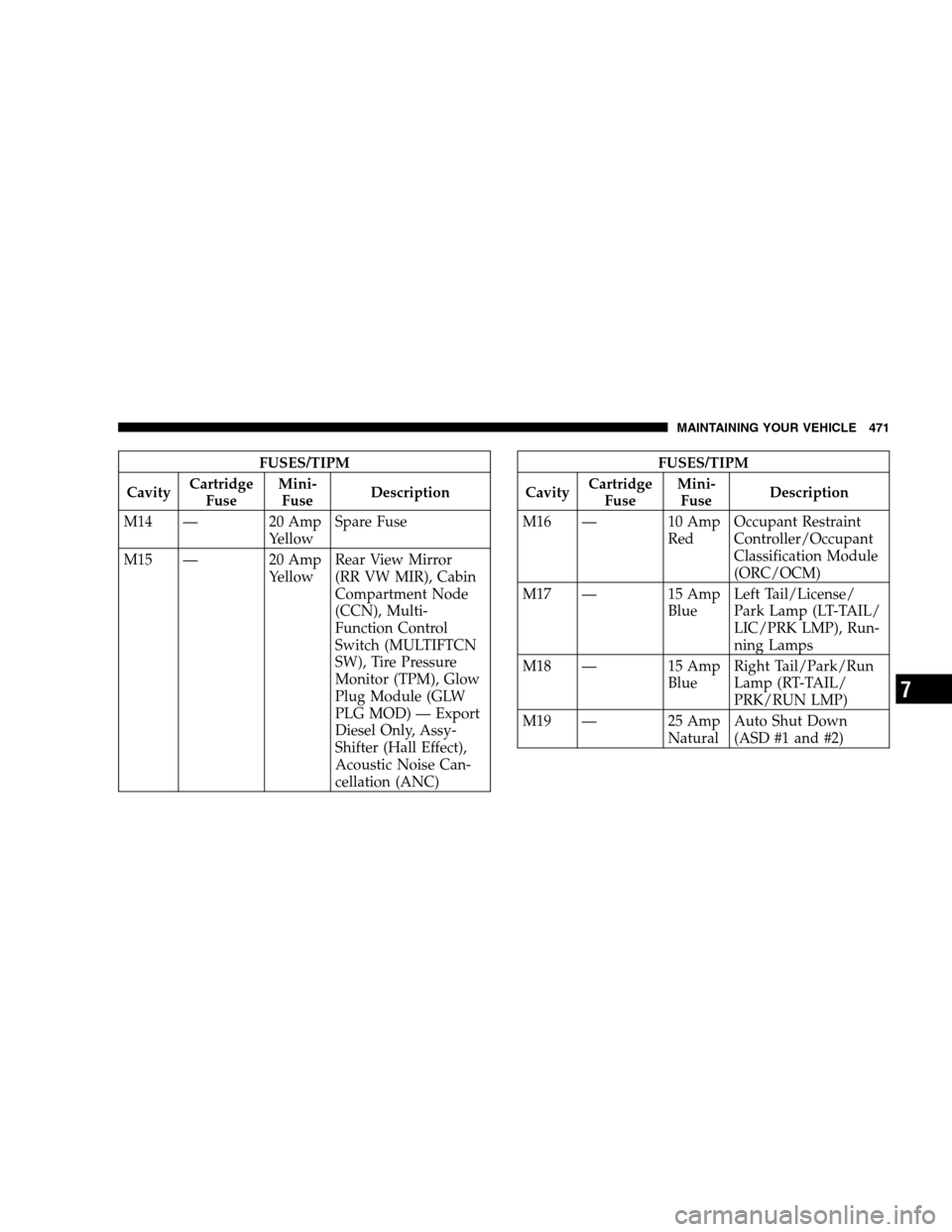
FUSES/TIPM
Cavity Cartridge
Fuse Mini-
Fuse Description
M14 — 20 Amp YellowSpare Fuse
M15 — 20 Amp YellowRear View Mirror
(RR VW MIR), Cabin
Compartment Node
(CCN), Multi-
Function Control
Switch (MULTIFTCN
SW), Tire Pressure
Monitor (TPM), Glow
Plug Module (GLW
PLG MOD) — Export
Diesel Only, Assy-
Shifter (Hall Effect),
Acoustic Noise Can-
cellation (ANC)FUSES/TIPM
Cavity Cartridge
Fuse Mini-
Fuse Description
M16 — 10 Amp RedOccupant Restraint
Controller/Occupant
Classification Module
(ORC/OCM)
M17 — 15 Amp BlueLeft Tail/License/
Park Lamp (LT-TAIL/
LIC/PRK LMP), Run-
ning Lamps
M18 — 15 Amp BlueRight Tail/Park/Run
Lamp (RT-TAIL/
PRK/RUN LMP)
M19 — 25 Amp NaturalAuto Shut Down
(ASD #1 and #2)
MAINTAINING YOUR VEHICLE 471 7