tail light DODGE GRAND CARAVAN 2009 5.G Owners Manual
[x] Cancel search | Manufacturer: DODGE, Model Year: 2009, Model line: GRAND CARAVAN, Model: DODGE GRAND CARAVAN 2009 5.GPages: 535, PDF Size: 18.61 MB
Page 51 of 535
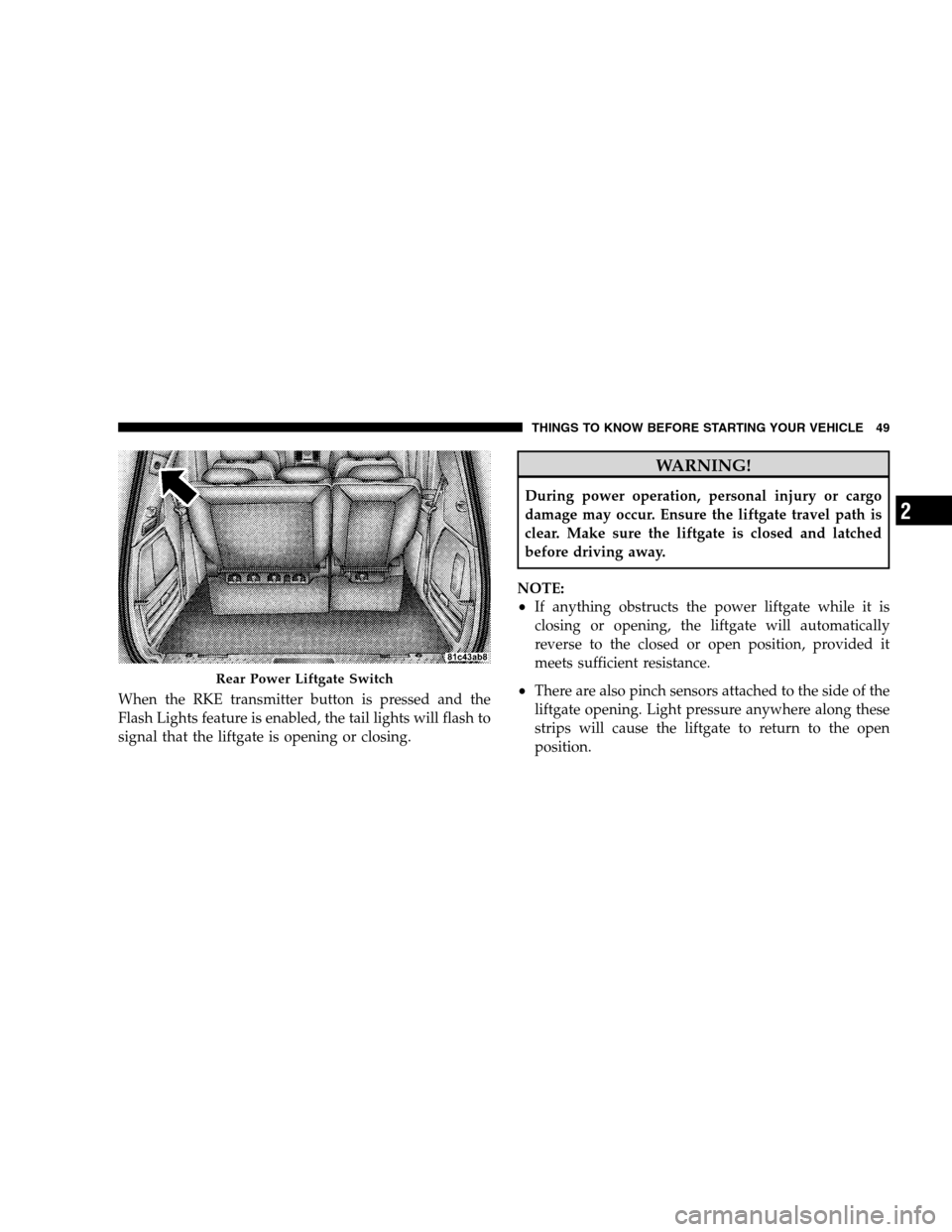
When the RKE transmitter button is pressed and the
Flash Lights feature is enabled, the tail lights will flash to
signal that the liftgate is opening or closing.WARNING!
During power operation, personal injury or cargo
damage may occur. Ensure the liftgate travel path is
clear. Make sure the liftgate is closed and latched
before driving away.
NOTE:
If anything obstructs the power liftgate while it is
closing or opening, the liftgate will automatically
reverse to the closed or open position, provided it
meets sufficient resistance.
There are also pinch sensors attached to the side of the
liftgate opening. Light pressure anywhere along these
strips will cause the liftgate to return to the open
position. Rear Power Liftgate Switch
THINGS T O KNOW BEFORE STARTING YOUR VEHICLE 49 2
Page 253 of 535
CAUTION!The TPMS has been optimized for the original
equipment tires and wheels. TPMS pressures and
warning have been established for the tire size
equipped on your vehicle. Undesirable system opera-
tion or sensor damage may result when using re-
placement equipment that is not of the same size,
type, and/or style. Aftermarket wheels can cause
sensor damage. Do not use tire sealant from a can, or
balance beads if your vehicle is equipped with a
TPMS, as damage to the sensors may result.
26. Electronic Stability Program (ESP) Indicator Light
/ Brake Assist System (BAS) Warning Light The malfunction light for the Electronic Stabil-
ity Program (ESP) is combined with Brake
Assist System (BAS). The yellow “ESP/BAS
Warning Light” comes on when the ignition switch is turned to the “ON” position. They should go
out with the engine running. If the “ESP/BAS Warning
Light” comes on continuously with the engine running, a
malfunction has been detected in either the ESP or the
BAS system. If this light remains on after several ignition
cycles, and the vehicle has been driven several miles/
kilometers at speeds greater than 30 mph (48 km/h), see
an authorized dealer as soon as possible.
27. Compass Mini-Trip Computer (CMTC) Reset
Button
Press the reset button to scroll through sub menus (i.e.,
Outside Temperature, Trip Functions: AVG Fuel
Economy, DTE, Elapsed Time, and Units. Press and hold
the reset button for approximately two seconds to reset
the display shown.
NOTE:
For more detailed operation, refer to “Compass
Mini-Trip Computer” later in this section. UNDERSTANDING YOUR INSTRUMENT PANEL 251
4
Page 270 of 535
AM/FM/CD/DVD RADIO (RER/REN) – IF
EQUIPPEDNOTE:
The sales code is located on the lower right side
of the unit’s faceplate.
The REN and RER radios contain a CD/DVD player, USB
port, and a 30-gigabyte hard drive (HDD). Sirius Satellite
Radio is optional. The 6.5 in (16.5 cm) touch screen allows
for easy menu selection.
The RER radio also contains a Global Positioning System
(GPS)-based Navigation system.
Refer to your uconnectt tunes (REN) or (RER) user’s
manual for detailed operating instructions.
Operating Instructions — Voice Recognition
System (VR) — If Equipped
For the radio, refer to “Voice Recognition System (VR)” in
Section 3.
Operating Instructions — uconnectT phone — If
Equipped
Refer to “uconnectt phone” in Section 3.
Clock Setting Procedure
uconnecttgps — RER only
The GPS receiver used in this system is synchronized to
the time data being transmitted by the GPS satellite. The
satellite clock is Greenwich Mean Time (GMT). This is the
worldwide standard for time. This makes the system’s
clock very accurate once the appropriate time zone and
daylight savings information is set.
To Manually Set the Clock — RER/REN
1. Turn on the radio.
2. Touch the screen where the time is displayed.
3. Touch the screen where “User Clock” is displayed. The
clock setting menu will appear on the screen.
268 UNDERSTANDING YOUR INSTRUMENT PANEL
Page 296 of 535
Shuffle OFF modes for the iPodt. If theRNDicon is
showing on the radio display, then the shuffle mode is
ON.
List Or Browse Mode
During Play mode, pressing any of the buttons described
below, takes you to List mode. List mode enables you to
scroll through the list of menus and tracks on the iPodt.
TUNE control knob: The TUNEcontrol knob functions
in a similar manner as the scroll wheel on the iPodt.
Turning it clockwise (forward) and counterclock-
wise (backward) scrolls through the lists, displaying
the track detail on the radio display. Once you have
the track to be played highlighted on the radio
display, press the TUNEcontrol knob to select and
start playing the track. Turning the TUNEcontrol
knob fast will scroll through the list faster. During
fast scroll, you may notice a slight delay in updating
the information on the radio display.
During all List modes, the iPodt displays all lists in
“wrap-around” mode. So if the track is at the
bottom of the list, just turn the wheel backwards
(counter-clockwise) to get to the track faster.
In List mode, the radio PRESETButtons are used as
shortcuts to the following lists on the iPodt.
Preset 1 – Playlists
Preset 2 – Artists
Preset 3 – Albums
Preset 4 – Genres
Preset 5 - Audiobooks
Preset 6 – Podcasts
Pressing a PRESET button will display the current
list on the top line and the first item in that list on
the second line.
294 UNDERSTANDING YOUR INSTRUMENT PANEL
Page 434 of 535
▫Cooling System . . . . . . . . . . . . . . . . . . . . 451
▫ Brakes . . . . . . . . . . . . . . . . . . . . . . . . . . . 456
▫ Automatic Transaxle . . . . . . . . . . . . . . . . . 458
▫ Appearance Care And Protection From
Corrosion . . . . . . . . . . . . . . . . . . . . . . . . . . 461
▫ Cleaning The Instrument Panel
Cupholders . . . . . . . . . . . . . . . . . . . . . . . . 466
m Fuses . . . . . . . . . . . . . . . . . . . . . . . . . . . . . 467
▫ Totally Integrated Power Module (TIPM) . . 467
m Vehicle Storage . . . . . . . . . . . . . . . . . . . . . . 475
m Replacement Light Bulbs . . . . . . . . . . . . . . . 475
m Bulb Replacement . . . . . . . . . . . . . . . . . . . . 476
▫ Headlamps . . . . . . . . . . . . . . . . . . . . . . . 476 ▫
Front Park/Turn Signal Lamps . . . . . . . . . 477
▫ Fog Lamps . . . . . . . . . . . . . . . . . . . . . . . . 477
▫ Rear Tail, Stop, Turn Signal, Side Marker
And Backup Lamps . . . . . . . . . . . . . . . . . . . 478
▫ Center High-Mounted Stop Lamp
(CHMSL) . . . . . . . . . . . . . . . . . . . . . . . . . . 479
▫ License Lamp . . . . . . . . . . . . . . . . . . . . . . 479
m Fluids And Capacities . . . . . . . . . . . . . . . . . 480
m Fluids, Lubricants And Genuine Parts . . . . . . 481
▫ Engine . . . . . . . . . . . . . . . . . . . . . . . . . . . 481
▫ Chassis . . . . . . . . . . . . . . . . . . . . . . . . . . 482
432 MAINTAINING YOUR VEHICLE
Page 478 of 535
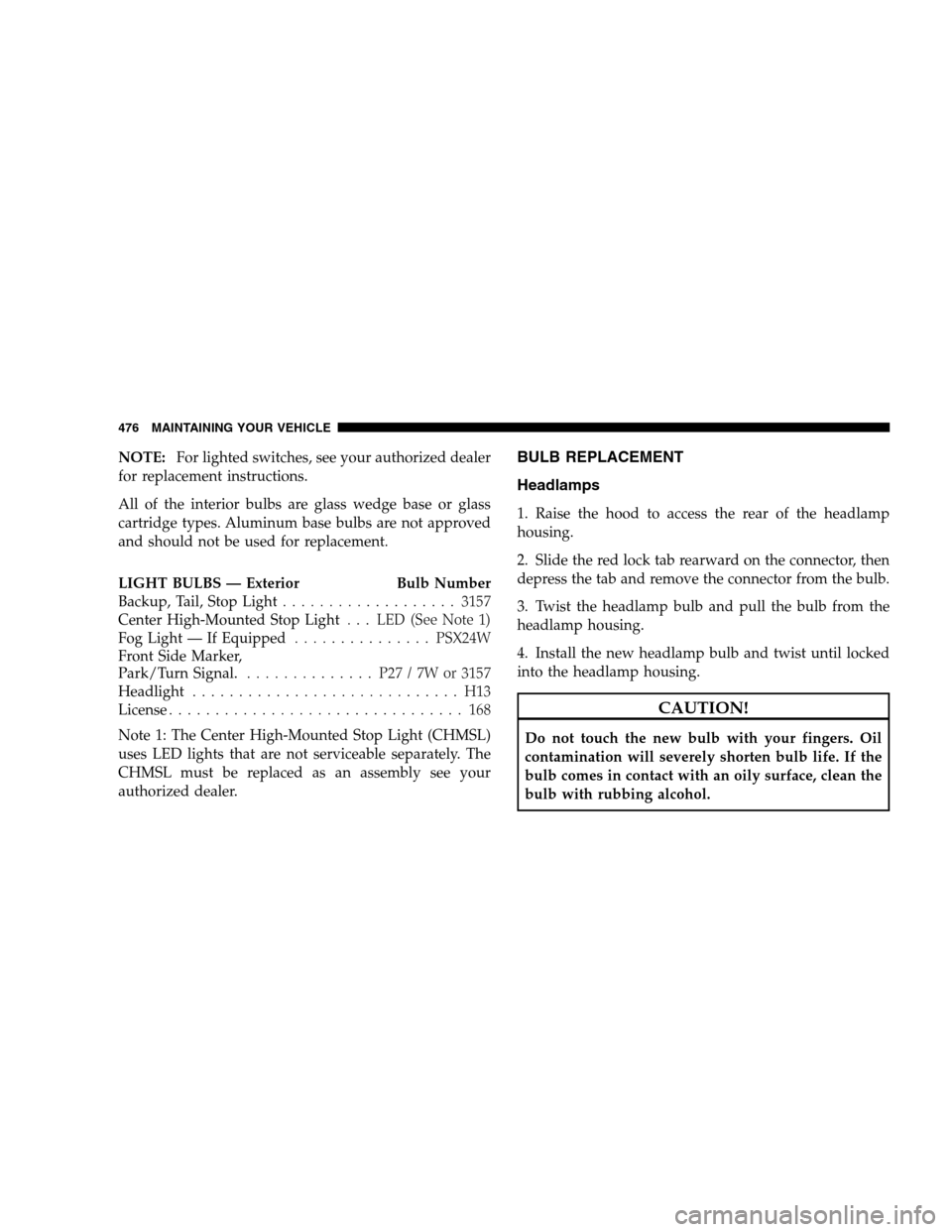
NOTE:For lighted switches, see your authorized dealer
for replacement instructions.
All of the interior bulbs are glass wedge base or glass
cartridge types. Aluminum base bulbs are not approved
and should not be used for replacement.
LIGHT BULBS — Exterior Bulb Number
Backup, Tail, Stop Light . . . . . . . . . . . . . . . . . . . 3157
Center High-Mounted Stop Light . . . LED (See Note 1)
Fog Light — If Equipped . . . . . . . . . . . . . . . PSX24W
Front Side Marker,
Park/Turn Signal. . . . . . . . . . . . . . . P27 / 7W or 3157
Headlight . . . . . . . . . . . . . . . . . . . . . . . . . . . . . H13
License . . . . . . . . . . . . . . . . . . . . . . . . . . . . . . . . 168
Note 1: The Center High-Mounted Stop Light (CHMSL)
uses LED lights that are not serviceable separately. The
CHMSL must be replaced as an assembly see your
authorized dealer.BULB REPLACEMENT
Headlamps
1. Raise the hood to access the rear of the headlamp
housing.
2. Slide the red lock tab rearward on the connector, then
depress the tab and remove the connector from the bulb.
3. Twist the headlamp bulb and pull the bulb from the
headlamp housing.
4. Install the new headlamp bulb and twist until locked
into the headlamp housing. CAUTION!
Do not touch the new bulb with your fingers. Oil
contamination will severely shorten bulb life. If the
bulb comes in contact with an oily surface, clean the
bulb with rubbing alcohol.
476 MAINTAINING YOUR VEHICLE
Page 480 of 535
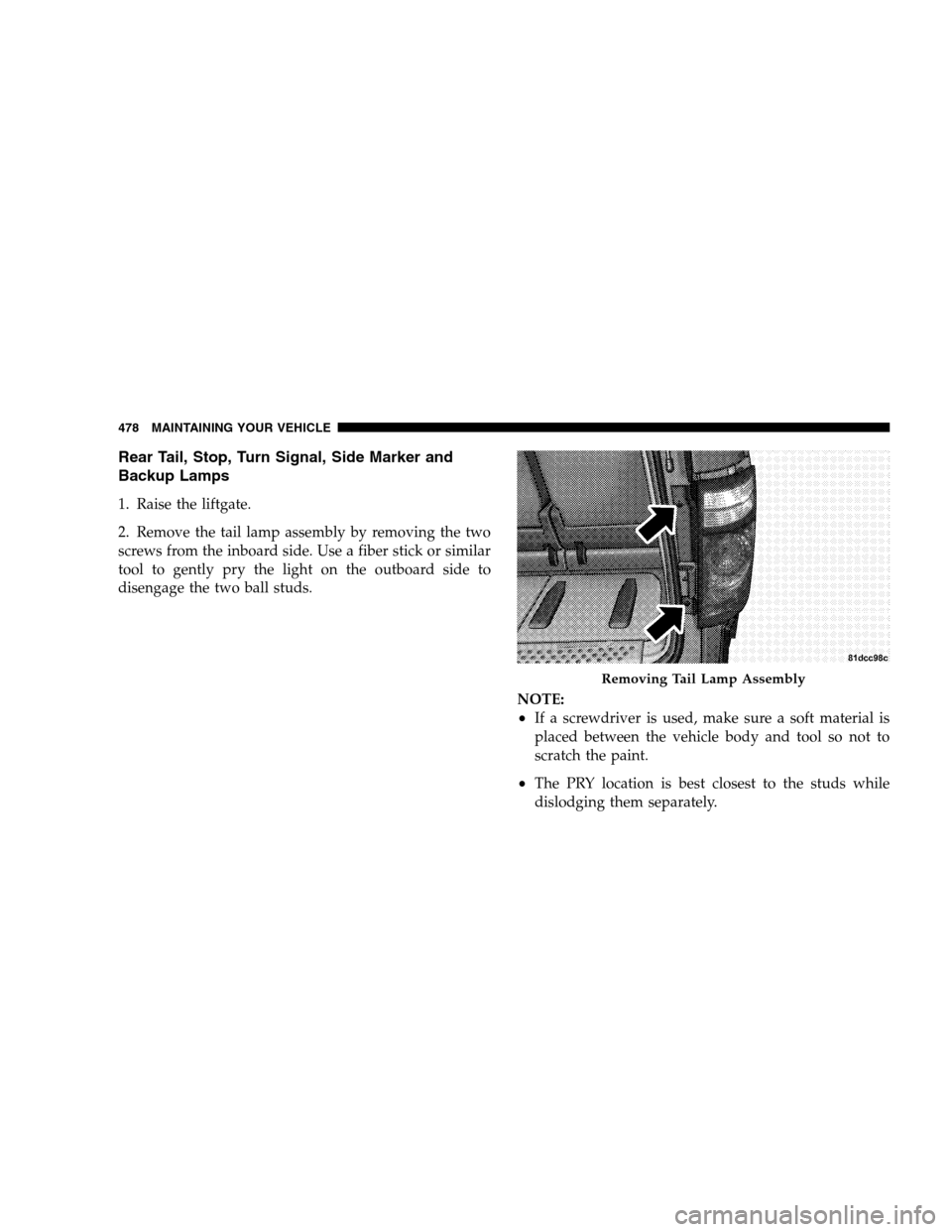
Rear Tail, Stop, Turn Signal, Side Marker and
Backup Lamps1. Raise the liftgate.
2. Remove the tail lamp assembly by removing the two
screws from the inboard side. Use a fiber stick or similar
tool to gently pry the light on the outboard side to
disengage the two ball studs.
NOTE:
If a screwdriver is used, make sure a soft material is
placed between the vehicle body and tool so not to
scratch the paint.
The PRY location is best closest to the studs while
dislodging them separately. Removing Tail Lamp Assembly
478 MAINT
AINING YOUR VEHICLE
Page 481 of 535
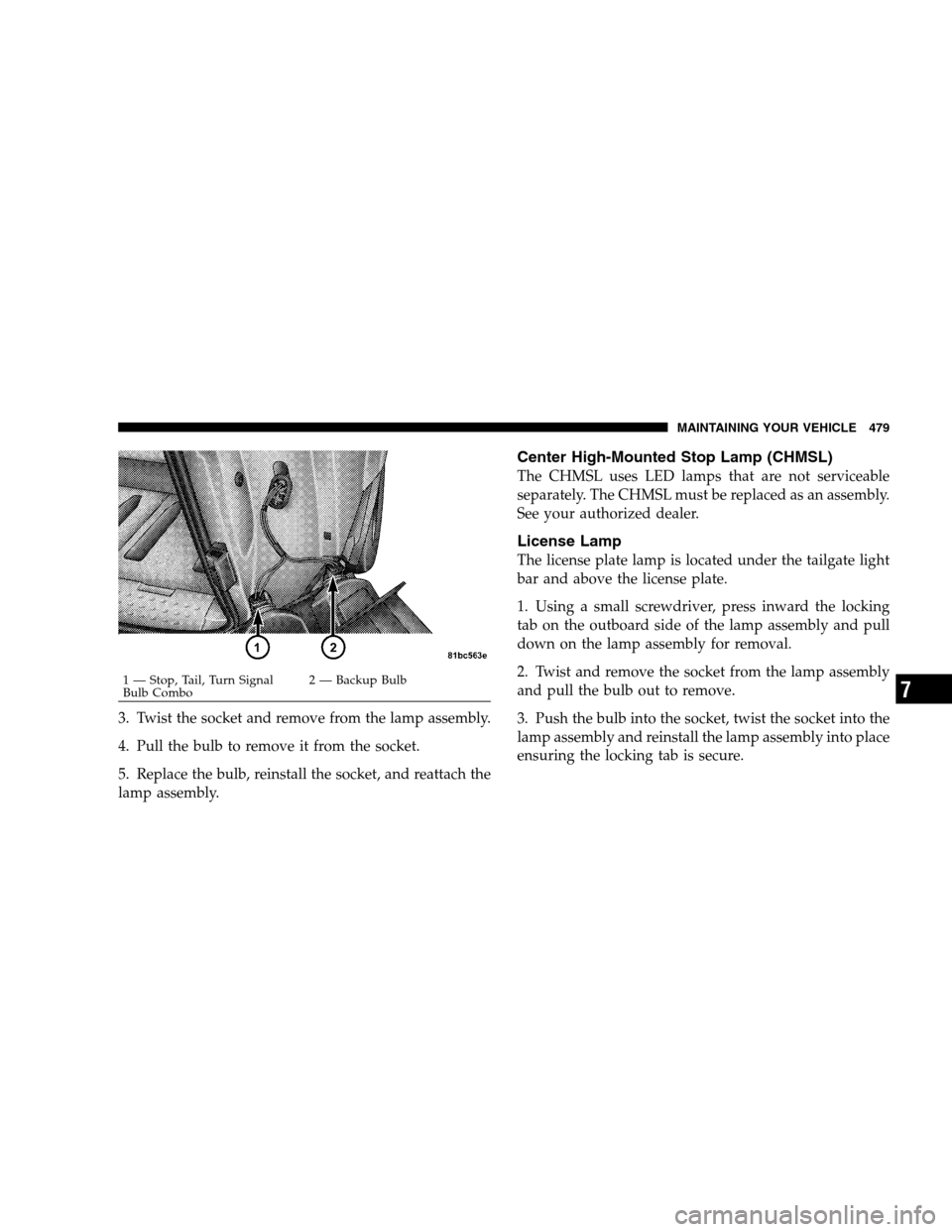
3. Twist the socket and remove from the lamp assembly.
4. Pull the bulb to remove it from the socket.
5. Replace the bulb, reinstall the socket, and reattach the
lamp assembly.
Center High-Mounted Stop Lamp (CHMSL)
The CHMSL uses LED lamps that are not serviceable
separately. The CHMSL must be replaced as an assembly.
See your authorized dealer.
License Lamp
The license plate lamp is located under the tailgate light
bar and above the license plate.
1. Using a small screwdriver, press inward the locking
tab on the outboard side of the lamp assembly and pull
down on the lamp assembly for removal.
2. Twist and remove the socket from the lamp assembly
and pull the bulb out to remove.
3. Push the bulb into the socket, twist the socket into the
lamp assembly and reinstall the lamp assembly into place
ensuring the locking tab is secure.1 — Stop, Tail, Turn Signal
Bulb Combo
2
— Backup Bulb MAINTAINING YOUR VEHICLE 479 7
Page 524 of 535
Reading . . . . . . . . . . . . . . . . . . . . . . . . . . . . . 199
Rear Servicing . . . . . . . . . . . . . . . . . . . . . . . . 478
Rear Tail . . . . . . . . . . . . . . . . . . . . . . . . . . . . 478
Seat Belt Reminder . . . . . . . . . . . . . . . . . . . . . 248
Security Alarm (Theft Alarm) . . . . . . . . . . . . . . 249
Service . . . . . . . . . . . . . . . . . . . . . . . . . . . 475,476
Service Engine Soon (Malfunction Indicator) . . . 246
Side Marker . . . . . . . . . . . . . . . . . . . . . . . . . . 478
Theft Alarm (Security Alarm) . . . . . . . . . . . . . . 249
Tire Pressure Monitoring (TPMS) . . . . . . . . . . . 249
Turn Signal . . . . . . . . . . . . . . . . . . . . . . 94,477,478
Voltage . . . . . . . . . . . . . . . . . . . . . . . . . . . . . 249
Warning (Instrument Cluster Description) . . . . . 240
Load Leveling System . . . . . . . . . . . . . . . . . . . . 227
Loading Vehicle . . . . . . . . . . . . . . . . . . . 220,389,391
Capacities . . . . . . . . . . . . . . . . . . . . . . . . . . . 391
Tires . . . . . . . . . . . . . . . . . . . . . . . . . . . . . . . 356
Locks Door . . . . . . . . . . . . . . . . . . . . . . . . . . . . . . . . 30 Lower Anchors and Tether for CHildren
(LATCH) . . . . . . . . . . . . . . . . . . . . . . . . . . . . . . 84
Lubrication, Body . . . . . . . . . . . . . . . . . . . . . . . 449
Luggage Rack (Roof Rack) . . . . . . . . . . . . . . . . . 228
Lumbar Support . . . . . . . . . . . . . . . . . . . . . . . . 152
Maintenance Free Battery . . . . . . . . . . . . . . . . . . 445
Maintenance Procedures . . . . . . . . . . . . . . . . . . . 438
Maintenance Schedule . . . . . . . . . . . . . . . . . . . . 484
Maintenance, Sunroof . . . . . . . . . . . . . . . . . . . . . 210
Malfunction Indicator Light (Check Engine) . . 246,436
Manual, Service . . . . . . . . . . . . . . . . . . . . . . . . . 507
Map/Reading Lights . . . . . . . . . . . . . . . . . . . . . 199
Memory Feature (Memory Seat) . . . . . . . . . . . . . 170
Memory Seat . . . . . . . . . . . . . . . . . . . . . . . . 103,170
Mini-Trip Computer . . . . . . . . . . . . . . . . . . . 252,260
Mirrors . . . . . . . . . . . . . . . . . . . . . . . . . . . . . . . 100
Automatic Dimming . . . . . . . . . . . . . . . . . . . . 100
Electric Remote . . . . . . . . . . . . . . . . . . . . . . . 102
522 INDEX
Page 533 of 535

INTRODUCTION INTRODUCTION HOW TO USE THIS MANUAL WARNINGS AND CAUTIONS VEHICLE IDENTIFICATION NUMBER VEHICLE MODIFICATIONS/ALTERATIONS THINGS TO KNOW BEFORE STARTING YOUR VEHICLE A WORD ABOUT YOUR KEYS
Wireless Ignition
Node (WIN)SENTRY KEY Replacement KeysVEHICLE SECURITY ALARM - IF EQUIPPED Rearming Of The SystemILLUMINATED ENTRY SYSTEM - IF EQUIPPED REMOTE KEYLESS ENTRY (RKE) - IF EQUIPPED Using the RKE TransmitterREMOTE
STARTING SYSTEM - IF EQUIPPED How to Use Remote StartDOOR LOCKS Manual Door LocksPower Door Locks - If EquippedWINDOWS Power Vent Windows - If EquippedPower WindowsSLIDING SIDE DOOR Power Sliding Side Door - If EquippedSliding Side Door
Child Protection LockLIFTGATE Power Liftgate - If EquippedSTORAGE BIN SAFETY WARNING Safety WarningOCCUPANT RESTRAINTS Lap/Shoulder BeltsAutomatic Locking Retractors (ALR) Mode - If EquippedSeat Belt PretensionersEnhanced Seat Belt Use Reminder
System (BeltAlert)Seat Belts and Pregnant WomenSeat Belt ExtenderSupplemental Restraint System (SRS) - AirbagsAirbag System ComponentsFront Seat Airbag FeaturesAirbag Deployment Sensors and ControlsEvent Data Recorder (EDR)Integrated Child Booster Seat
- If EquippedIntegrated Child Seat - If EquippedChild RestraintsREAR SEAT DELETE FEATURE (COMMERCIAL VEHICLES ONLY) - IF EQUIPPED Restraining Infants and Small Children with Seat Delete Feature (Commercial Vehicles Only)ENGINE BREAK-IN
RECOMMENDATIONS SAFETY TIPS Transporting PassengersExhaust GasSafety Checks You Should Make Inside the VehiclePeriodic Safety Checks You Should Make Outside the VehicleUNDERSTANDING THE FEATURES OF YOUR VEHICLE MIRRORS Inside
Day/Night Mirror - If EquippedAutomatic Dimming Mirror - If EquippedOutside MirrorsDrivers Outside Automatic Dimming Mirror - If EquippedOutside Mirror Folding FeaturePower Mirrors - If EquippedHeated Mirrors - If EquippedTilt Mirrors in Reverse (Available with Memory
Seat Only) - If EquippedIlluminated Vanity Mirrors - If EquippedBLIND SPOT MONITORING - IF EQUIPPED Rear Cross PathModes Of Operationuconnect phone - IF EQUIPPED OperationPhone Call Featuresuconnect phone FeaturesAdvanced Phone ConnectivityThings
You Should Know About Your uconnect phoneGeneral InformationVOICE RECOGNITION (VR) SYSTEM - IF EQUIPPED Voice Recognition (VR) System OperationCommandsVoice TrainingSEATS Manual Front And Second Row Seat AdjusterEight-Way Driver And
Passenger Power Seat - If EquippedAdjustable Head RestraintsHeated Seats - If EquippedManual Reclining Seats - If EquippedManual Lumbar Adjust Lever - If EquippedStow n Go Seating - If EquippedEasy Access SeatingSwivel n Go Premium Seating - If Equipped
Second Row Bench Seat - If EquippedThird Row Power Seat - If EquippedDRIVER MEMORY SEAT - IF EQUIPPED Setting Memory Positions and Linking RKE Transmitter to MemoryEasy Entry/Exit Seat (Available with Memory Seat ONLY)TO OPEN AND CLOSE THE
HOOD LIGHTS Interior LightingParking LightsHeadlightsAutomatic Headlights - If EquippedHeadlights On With Wipers - If EquippedHeadlight Delay - If EquippedDaytime Running Lights (Canada/Fleet Vehicles Only)Front Fog Lights - If EquippedBattery Protection
Multifunction LeverTurn SignalsLane Change AssistHigh Beam/Low Beam Select SwitchFlash-To-PassWINDSHIELD WIPER AND WASHERS TILT STEERING COLUMN - IF EQUIPPED ADJUSTABLE PEDALS - IF EQUIPPED ELECTRONIC SPEED CONTROL - IF
EQUIPPED To ActivateTo Set At A Desired SpeedDeactivating Electronic Speed ControlResuming SpeedVarying The Speed SettingAccelerating To PassREAR PARK ASSIST - IF EQUIPPED Rear Park Assist SensorsREAR BACKUP CAMERA SYSTEM - IF EQUIPPED
Turning the Rear Camera On or Off - With Navigation RadioTurning the Rear Camera On or Off - Without Navigation RadioOVERHEAD CONSOLES Front Overhead ConsoleGARAGE DOOR OPENER - IF EQUIPPED Programming HomelinkGate Operator/Canadian
ProgrammingSecurityTroubleshooting TipsGeneral InformationPOWER SUNROOF - IF EQUIPPED Power Sunroof OperationELECTRICAL POWER OUTLETS - IF EQUIPPED POWER INVERTER - IF EQUIPPED CUPHOLDERS Instrument Panel CupholdersInteriorBottle
HoldersSmokers Package Kit - If EquippedSTORAGE Glove CompartmentsDoor Trim Panel StorageDriver Seatback Storage - If EquippedUmbrella HolderSecond Row Seat Storage Bins - If EquippedCoat HooksCargo Area StorageCONSOLE FEATURES Basic Console
Premium Console - If EquippedREAR WINDOW FEATURES Rear Window DefrosterLOAD-LEVELING SYSTEM ROOF LUGGAGE RACK - IF EQUIPPED SUN SCREENS - IF EQUIPPED UNDERSTANDING YOUR INSTRUMENT PANEL INSTRUMENT PANEL FEATURES
INSTRUMENT CLUSTER - BASE INSTRUMENT CLUSTER - PREMIUM INSTRUMENT CLUSTER DESCRIPTIONS COMPASS MINI-TRIP COMPUTER (CMTC) - IF EQUIPPED CMTC Reset ButtonsCompass/Temperature DisplayELECTRONIC VEHICLE INFORMATION
CENTER (EVIC) - IF EQUIPPED Electronic Vehicle Information Center (EVIC) DisplaysTrip FunctionsCompass DisplayPersonal Settings (Customer-Programmable Features)AM/FM/CD/DVD RADIO (RER/REN) - IF EQUIPPED Operating Instructions - Voice Recognition
System (VR) - If EquippedOperating Instructions - uconnect phone - If EquippedClock Setting ProcedureSALES CODE RES - AM/FM STEREO RADIO WITH CD PLAYER (MP3 AUX JACK) Operating Instructions - Radio ModeOperation Instructions - CD MODE For CD
And MP3 Audio PlayNotes on Playing MP3 FilesOperation Instructions - Auxiliary ModeSALES CODE RES/RSC - AM/FM STEREO RADIO WITH CD PLAYER (MP3 AUX JACK) AND SIRIUS RADIO Operating Instructions - Radio ModeOperation Instructions - CD MODE
for CD and MP3 Audio PlayNotes On Playing MP3 FilesLIST Button (CD Mode for MP3 Play)INFO Button (CD Mode for MP3 Play)UNIVERSAL CONSUMER INTERFACE (UCI) - IF EQUIPPED Connecting The iPodUsing This FeatureControlling The iPod Using Radio Buttons
Play ModeList Or Browse Modeuconnect studios (SATELLITE RADIO) - IF EQUIPPED (REN/REQ/RER/RES/REU RADIOS ONLY) System ActivationElectronic Serial Number/Sirius Identification Number (ESN/SID)Selecting uconnect studios (Satellite) ModeSatellite Antenna
Reception QualityOperating Instructions - uconnect studios (Satellite) ModeOperating Instructions - uconnect phone (If Equipped)Operating Instructions - Video Entertainment System (VES) (If Equipped)uconnect studios (SIRIUS BACKSEAT TV) - IF EQUIPPED VIDEO
ENTERTAINMENT SYSTEM (VES) - IF EQUIPPED REMOTE SOUND SYSTEM CONTROLS - IF EQUIPPED Radio OperationCD PlayerCD/DVD MAINTENANCE RADIO OPERATION AND CELLULAR PHONES CLIMATE CONTROLS Manual Heating and Air Conditioning
SystemRear Manual Climate Control - If EquippedAutomatic Temperature Control (ATC) - If EquippedSummer OperationWinter OperationVacation/StorageWindow FoggingOutside Air IntakeOperating Tips A/C Air Filter- If EquippedSTARTING AND OPERATING STARTING
PROCEDURES Automatic TransaxleNormal StartingExtreme Cold Weather (Below -20 degrees F or -29 degrees C)If The Engine Fails To StartAfter StartingENGINE BLOCK HEATER - IF EQUIPPED AUTOMATIC TRANSAXLE Brake/Transaxle Interlock SystemFour-Speed
or Six-Speed Automatic TransaxleGear RangesDRIVING ON SLIPPERY SURFACES AccelerationTractionDRIVING THROUGH WATER Flowing/Rising WaterShallow Standing WaterPOWER STEERING Power Steering Fluid CheckPARKING BRAKE ANTI-LOCK BRAKE
SYSTEM (ABS) Anti-Lock Brake Warning LightELECTRONIC BRAKE CONTROL SYSTEM Traction Control System (TCS)Brake Assist System (BAS)Electronic Stability Program (ESP)ESP/BAS Warning LightTIRE SAFETY INFORMATION Tire Markings TireIdentification
Number (TIN)Tire Loading and Tire PressureTIRES - GENERAL INFORMATION Tire PressureTIRE CHAINS SNOW TIRES TIRE ROTATION TIRE PRESSURE MONITOR SYSTEM (TPMS) Base SystemPremium System - If EquippedFUEL REQUIREMENTS 3.3L/3.8L
Gasoline Engine4.0L Gasoline EngineReformulated GasolineGasoline/Oxygenate BlendsE-85 Usage In Non-Flex Fuel VehiclesMMT In GasolineMaterials Added to FuelFuel System CautionsCarbon Monoxide WarningsFLEXIBLE FUEL (3.3L ENGINES ONLY) - IF
EQUIPPED E-85 General InformationETHANOL FUEL (E-85)Fuel RequirementsSelection Of Engine Oil For Flexible Fuel Vehicles E-85 and Gasoline VehiclesStartingCruising RangeReplacement PartsMaintenanceADDING FUEL Fuel Filler Cap (Gas Cap)Loose Fuel Filler
Cap MessageVEHICLE LOADING Vehicle Certification LabelTRAILER TOWING Common Towing DefinitionsTowing TipsRECREATIONAL TOWING (BEHIND MOTORHOME, ETC.) WHAT TO DO IN EMERGENCIES HAZARD WARNING FLASHER IF YOUR ENGINE
OVERHEATS JACKING AND TIRE CHANGING Jack LocationJUMP-STARTING PROCEDURE FREEING A STUCK VEHICLE TOWING A DISABLED VEHICLE Towing With The Ignition KeyMAINTAINING YOUR VEHICLE ENGINE COMPARTMENT - 3.3/3.8L ENGINE
COMPARTMENT - 4.0L ONBOARD DIAGNOSTIC SYSTEM - OBD II Loose Fuel Filler Cap Message - gASCAPEMISSIONS INSPECTION AND MAINTENANCE PROGRAMS REPLACEMENT PARTS DEALER SERVICE MAINTENANCE PROCEDURES Engine OilEngine
Oil FilterEngine Air Cleaner FilterExhaust SystemMaintenance-Free BatteryAir Conditioner MaintenanceBody LubricationWindshield Wiper BladesCooling SystemBrakesAutomatic TransaxleAppearance Care and Protection from CorrosionCleaning the Instrument Panel
CupholdersFUSES Totally Integrated Power Module (TIPM)VEHICLE STORAGE REPLACEMENT LIGHT BULBS BULB REPLACEMENT HeadlampsFront Park/Turn Signal LampsFog LampsRear Tail, Stop, Turn Signal, Side Marker and Backup LampsCenter High-Mounted
Stop Lamp (CHMSL)License LampFLUIDS AND CAPACITIES FLUIDS, LUBRICANTS AND GENUINE PARTS EngineChassisMAINTENANCE SCHEDULES EMISSIONS CONTROL SYSTEM MAINTENANCE MAINTENANCE SCHEDULE Required Maintenance Intervals
IF YOU NEED CONSUMER ASSISTANCE SUGGESTIONS FOR OBTAINING SERVICE FOR YOUR VEHICLE Prepare For The AppointmentPrepare A ListBe Reasonable With RequestsIF YOU NEED ASSISTANCE Chrysler LLC Customer CenterChrysler Canada Inc.
Customer CenterIn Mexico contactCustomer Assistance For The Hearing Or Speech Impaired (TDD/TTY)Service ContractWARRANTY INFORMATION (U.S. Vehicles Only) MOPAR PARTS REPORTING SAFETY DEFECTS In the 50 United States and Washington, D.C
In CanadaPUBLICATION ORDER FORMS DEPARTMENT OF TRANSPORTATION UNIFORM TIRE QUALITY GRADES TreadwearTraction GradesTemperature GradesINDEX