phone DODGE GRAND CARAVAN 2014 5.G User Guide
[x] Cancel search | Manufacturer: DODGE, Model Year: 2014, Model line: GRAND CARAVAN, Model: DODGE GRAND CARAVAN 2014 5.GPages: 156, PDF Size: 3.83 MB
Page 2 of 156
> IMPORTANT
The driver’s primary responsibility is the safe operation of the vehicle. Driving while
distracted can result in loss of vehicle control, resulting in a collision and personal injury.
Chrysler Group LLC strongly recommends that the driver use extreme caution when using any
device or feature that may take their attention off the road. Use of any electrical devices such as
cell phones, computers, portable radios, vehicle navigation or other devices by the driver while
the vehicle is moving is dangerous and could lead to a serious collision. Texting while driving is
also dangerous and should never be done while the vehicle is moving. If you find yourself
unable to devote your full attention to vehicle operation, pull off the road to a safe location and
stop your vehicle. Some States or Provinces prohibit the use of cellular telephones or texting
while driving. It is always the driver’s responsibility to comply with all local laws.
If you are the first registered retail owner of your vehicle, you
may obtain a complimentary printed copy of the Owner’s
Manual, Navigation/Uconnect
® Manuals or Warranty Booklet
by calling 1-800-423-6343 (U.S.) or 1-800-387-1143 (Canada)
or by contacting your dealer.
This User Guide is intended to familiarize you with the important features of your vehicle.
The DVD enclosed contains your Owner’s Manual, Navigation/Uconnect® Manuals, Warranty
Booklets, Tire Warranty and Roadside Assistance (new vehicles purchased in the U.S.) or
Roadside Assistance (new vehicles purchased in Canada) in electronic format. We hope you
find it useful. Replacement DVD kits may be purchased by visiting www.techauthority.com.
Copyright 2014 Chrysler Group LLC.
This guide has been prepared to help you get quickly acquainted with your new Dodge and to
provide a convenient reference source for common questions. However, it is not a substitute for
your Owner’s Manual.
For complete operational instructions, maintenance procedures and important safety messages,
please consult your Owner’s Manual, Navigation/Uconnect
® Manuals and other Warning Labels in
your vehicle.
Not all features shown in this guide may apply to your vehicle. For additional information on
accessories to help personalize your vehicle, visit www.mopar.com (U.S), www.mopar.ca (Canada)
or your local Dodge dealer.
DODGE.COM
WARNING!
Driving after drinking can lead to an accident. Your perceptions are less sharp, your reflexes are
slower, and your judgment is impaired when you have been drinking. Never drink and then drive.
DRIVING AND ALCOHOL
Drunken driving is one of the most frequent causes of accidents. Your driving ability can be
seriously impaired with blood alcohol levels far below the legal minimum. If you are drinking, don’t
drive. Ride with a designated non-drinking driver, call a cab, a friend, or use public transportation.
1712003_14f_Grand_Caravan_UG_040214.indd 24/2/14 1:31 PM
Page 3 of 156
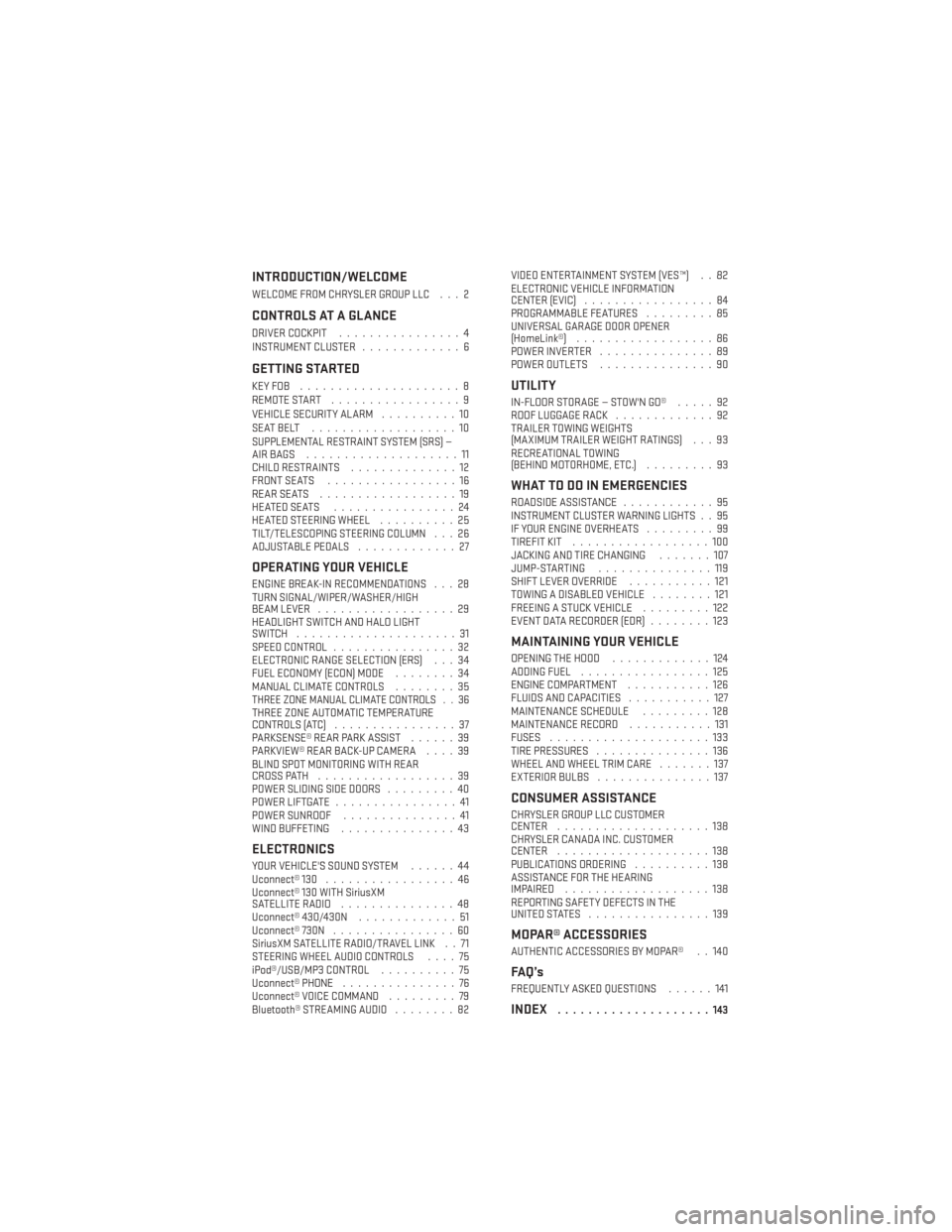
INTRODUCTION/WELCOME
WELCOME FROM CHRYSLER GROUP LLC . . . 2
CONTROLS AT A GLANCE
DRIVER COCKPIT................4
INSTRUMENT CLUSTER .............6
GETTING STARTED
KEYFOB .....................8
REMOTE START.................9
VEHICLE SECURITY ALARM ..........10
SEATBELT ...................10
SUPPLEMENTAL RESTRAINT SYSTEM (SRS) —
AIRBAGS ....................11
CHILD RESTRAINTS ..............12
FRONT SEATS .................16
REARSEATS ..................19
HEATEDSEATS ................24
HEATED STEERING WHEEL ..........25
TILT/TELESCOPING STEERING COLUMN . . . 26
ADJUSTABLE PEDALS .............27
OPERATING YOUR VEHICLE
ENGINE BREAK-IN RECOMMENDATIONS . . . 28
TURN SIGNAL/WIPER/WASHER/HIGH
BEAM LEVER..................29
HEADLIGHT SWITCH AND HALO LIGHT
SWITCH .....................31
SPEED CONTROL ................32
ELECTRONIC RANGE SELECTION (ERS) . . . 34
FUEL ECONOMY (ECON) MODE ........34
MANUAL CLIMATE CONTROLS ........35
THREE ZONE MANUAL CLIMATE CONTROLS . . 36THREE ZONE AUTOMATIC TEMPERATURE
CONTROLS (ATC)................37
PARKSENSE® REAR PARK ASSIST ......39
PARKVIEW® REAR BACK-UP CAMERA ....39
BLIND SPOT MONITORING WITH REAR
CROSS PATH ..................39
POWER SLIDING SIDE DOORS .........40
POWER LIFTGATE ................41
POWER SUNROOF ...............41
WIND BUFFETING ...............43
ELECTRONICS
YOUR VEHICLE'S SOUND SYSTEM ......44
Uconnect® 130 .................46
Uconnect® 130 WITH SiriusXM
SATELLITE RADIO ...............48
Uconnect® 430/430N .............51
Uconnect® 730N ................60
SiriusXM SATELLITE RADIO/TRAVEL LINK . . 71
STEERING WHEEL AUDIO CONTROLS ....75
iPod®/USB/MP3 CONTROL ..........75
Uconnect® PHONE ...............76
Uconnect® VOICE COMMAND .........79
Bluetooth® STREAMING AUDIO ........82VIDEO ENTERTAINMENT SYSTEM (VES™) . . 82
ELECTRONIC VEHICLE INFORMATION
CENTER (EVIC)
.................84
PROGRAMMABLE FEATURES .........85
UNIVERSAL GARAGE DOOR OPENER
(HomeLink®) ..................86
POWER INVERTER ...............89
POWER OUTLETS ...............90
UTILITY
IN-FLOORSTORAGE—STOW'NGO® .....92
ROOF LUGGAGE RACK .............92
TRAILER TOWING WEIGHTS
(MAXIMUM TRAILER WEIGHT RATINGS) . . . 93
RECREATIONAL TOWING
(BEHIND MOTORHOME, ETC.) .........93
WHAT TO DO IN EMERGENCIES
ROADSIDE ASSISTANCE............95
INSTRUMENT CLUSTER WARNING LIGHTS . . 95
IF YOUR ENGINE OVERHEATS .........99
TIREFIT KIT ..................100
JACKING AND TIRE CHANGING .......107
JUMP-STARTING ...............119
SHIFT LEVER OVERRIDE ...........121
TOWING A DISABLED VEHICLE ........121
FREEING A STUCK VEHICLE .........122
EVENT DATA RECORDER (EDR) ........123
MAINTAINING YOUR VEHICLE
OPENING THE HOOD.............124
ADDING FUEL .................125
ENGINE COMPARTMENT ...........126
FLUIDS AND CAPACITIES ...........127
MAINTENANCE SCHEDULE .........128
MAINTENANCE RECORD ...........131
FUSES .....................133
TIRE PRESSURES ...............136
WHEEL AND WHEEL TRIM CARE .......137
EXTERIOR BULBS ...............137
CONSUMER ASSISTANCE
CHRYSLER GROUP LLC CUSTOMER
CENTER....................138
CHRYSLER CANADA INC. CUSTOMER
CENTER ....................138
PUBLICATIONS ORDERING ..........138
ASSISTANCE FOR THE HEARING
IMPAIRED ...................138
REPORTING SAFETY DEFECTS IN THE
UNITEDSTATES ................139
MOPAR® ACCESSORIES
AUTHENTIC ACCESSORIES BY MOPAR® . . 140
FAQ’s
FREQUENTLY ASKED QUESTIONS ......141
INDEX....................143
TABLE OF CONTENTS
Page 5 of 156
VEHICLES SOLD IN CANADA
With respect to any vehicles sold in Canada, the name Chrysler Group LLC shall be deemed
to be deleted and the name Chrysler Canada Inc. used in substitution.
WARNING!
• Pedals that cannot move freely can cause loss of vehicle control and increase therisk of serious personal injury.
• Always make sure that objects cannot fall into the driver foot well while the vehicle is
moving. Objects can become trapped under the brake pedal and accelerator pedal
causing a loss of vehicle control.
• Failure to properly follow floor mat installation or mounting can cause interference
with the brake pedal and accelerator pedal operation causing loss of control of the
vehicle.
• Never leave children alone in a vehicle, or with access to an unlocked vehicle.
Allowing children to be in a vehicle unattended is dangerous for a number of reasons.
A child or others could be seriously or fatally injured. Children should be warned not
to touch the parking brake, brake pedal or the shift lever/gear selector.
• Never use the ‘PARK’ position as a substitute for the parking brake. Always apply the parking brake fully when parked to guard against vehicle movement and possible
injury or damage.
• Do not leave the key fob in or near the vehicle, or in a location accessible to children.
A child could operate power windows, other controls, or move the vehicle.
• Refer to your Owner's Manual on the DVD for further details.
USE OF AFTERMARKET PRODUCTS (ELECTRONICS)
The use of aftermarket devices including cell phones, MP3 players, GPS systems, or
chargers may affect the performance of on-board wireless features including Keyless
Enter-N-Go™ and Remote Start range. If you are experiencing difficulties with any of your
wireless features, try disconnecting your aftermarket devices to see if the situation im-
proves. If your symptoms persist, please see an authorized dealer.
CHRYSLER, DODGE, JEEP, RAM TRUCK, SRT, ATF+4, MOPAR and Uconnect are registered
trademarks of Chrysler Group LLC.
COPYRIGHT ©2014 CHRYSLER GROUP LLC
INTRODUCTION/WELCOME
3
Page 46 of 156
YOUR VEHICLE'S SOUND SYSTEM
1. Uconnect® Voice Command Button pg. 79
2. Uconnect® Phone Button pg. 76
3. Steering Wheel Audio Controls (Left) pg. 75
4. Steering Wheel Audio Controls (Right) pg. 75
ELECTRONICS
44
Page 50 of 156
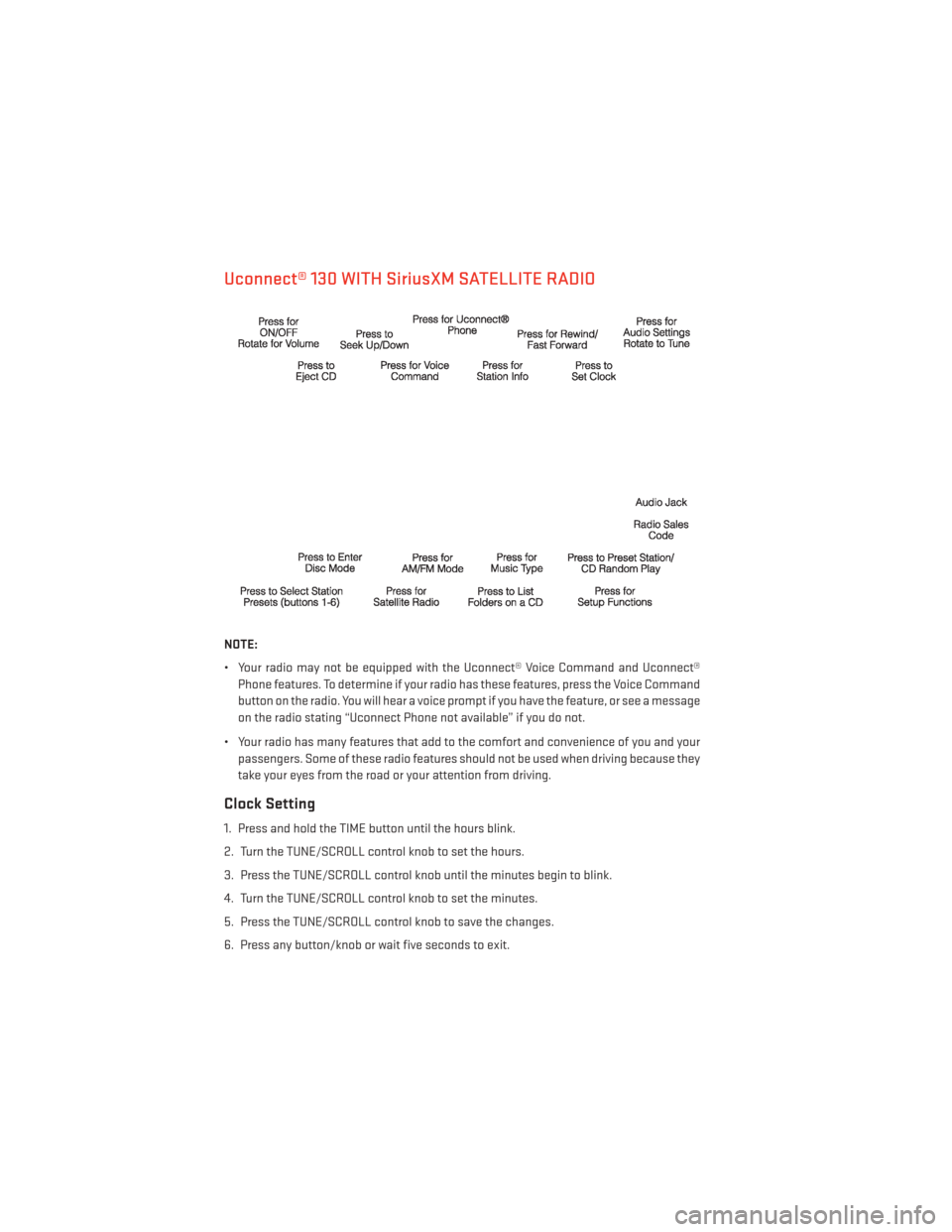
Uconnect® 130 WITH SiriusXM SATELLITE RADIO
NOTE:
• Your radio may not be equipped with the Uconnect® Voice Command and Uconnect®Phone features. To determine if your radio has these features, press the Voice Command
button on the radio. You will hear a voice prompt if you have the feature, or see a message
on the radio stating “Uconnect Phone not available” if you do not.
• Your radio has many features that add to the comfort and convenience of you and your passengers. Some of these radio features should not be used when driving because they
take your eyes from the road or your attention from driving.
Clock Setting
1. Press and hold the TIME button until the hours blink.
2. Turn the TUNE/SCROLL control knob to set the hours.
3. Press the TUNE/SCROLL control knob until the minutes begin to blink.
4. Turn the TUNE/SCROLL control knob to set the minutes.
5. Press the TUNE/SCROLL control knob to save the changes.
6. Press any button/knob or wait five seconds to exit.
ELECTRONICS
48
Page 53 of 156
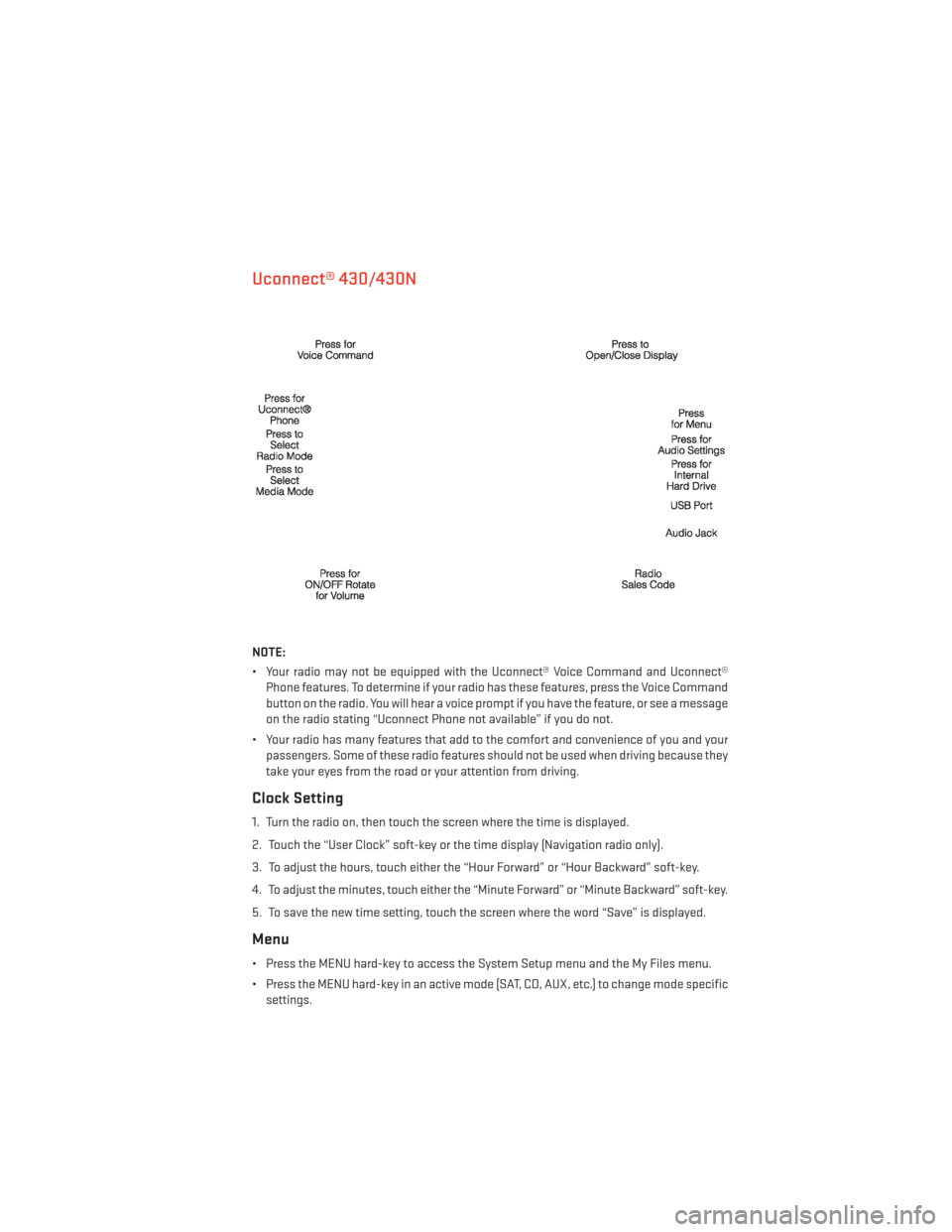
Uconnect® 430/430N
NOTE:
• Your radio may not be equipped with the Uconnect® Voice Command and Uconnect®Phone features. To determine if your radio has these features, press the Voice Command
button on the radio. You will hear a voice prompt if you have the feature, or see a message
on the radio stating “Uconnect Phone not available” if you do not.
• Your radio has many features that add to the comfort and convenience of you and your passengers. Some of these radio features should not be used when driving because they
take your eyes from the road or your attention from driving.
Clock Setting
1. Turn the radio on, then touch the screen where the time is displayed.
2. Touch the “User Clock” soft-key or the time display (Navigation radio only).
3. To adjust the hours, touch either the “Hour Forward” or “Hour Backward” soft-key.
4. To adjust the minutes, touch either the “Minute Forward” or “Minute Backward” soft-key.
5. To save the new time setting, touch the screen where the word “Save” is displayed.
Menu
• Press the MENU hard-key to access the System Setup menu and the My Files menu.
• Press the MENU hard-key in an active mode (SAT, CD, AUX, etc.) to change mode specificsettings.
ELECTRONICS
51
Page 78 of 156
•Non-Touchscreen Radios: To hear audio from devices connected to the USB port, press
the “AUX” button on the radio faceplate.
• Touchscreen Radios: To hear audio from devices connected to the USB port, press the
“MEDIA” hard-key, then touch the “AUX” or “iPod®” soft-key.
• When connected to this feature:
• The iPod® can be controlled using theradio buttons to Play, Browse, and List
the iPod® or external devices contents.
• The iPod® battery charges when plugged into the USB port (if supported
by the specific audio device).
• Compatible iPod® devices may also be controllable using voice commands. Refer to the Owner's Manual on the DVD for
details.
NOTE:
The USB port supports certain Mini, Classic, Nano, Touch, and iPhone® devices. The USB
port also supports playing music from compatible external USB Mass Storage Class
memory devices. For supported audio file formats, refer to the USB Port section in the
Owner's Manual on the DVD. Refer to www.UconnectPhone.com for a list of tested iPod®s.
Some iPod® software versions may not fully support the USB port features. Please visit
Apple’s website for iPod® software updates.
WARNING!
Do not plug in or remove the iPod® or external device while driving. Failure to follow this
warning could result in a collision.
Uconnect® PHONE
Uconnect® Phone
• To determine if your vehicle is equipped with Uconnect® Phone, press the “Uconnect® Phone” button
located on the radio faceplate. If your vehicle has this feature, you
will hear a voice prompt. If not, you will see a message on the radio “Uconnect® Phone not
available.”
• The Uconnect® Phone is a voice-activated, hands-free, in-vehicle communications system with Voice Command Capability (see Voice Command section).
ELECTRONICS
76
Page 79 of 156
NOTE:
To access the tutorial, press the “Uconnect® Phone” button
. After the BEEP, say
“tutorial.” Press any hard-key/button or touch the display (Touchscreen radio) to cancel the
“tutorial.”
• The Uconnect® Phone allows you to dial a phone number with your mobile phone using simple voice commands.
• Refer to your vehicle Owner's Manual on the DVD for further details.
NOTE:
The Uconnect® Phone requires a mobile phone equipped with the Bluetooth® Hands-Free
Profile, Version 1.0 or higher. For Uconnect® Customer Support: U.S. residents - visit
www.UconnectPhone.com or call 1–877–855–8400. Canadian residents - visit
www.UconnectPhone.com or call, 1-800-465–2001 (English) or 1-800-387-9983 (French).
This site will provide specific instructions based on the type of mobile phone being paired.
Phone Pairing
NOTE:
Pairing is a one - time initial setup before using the phone. Prior to starting the pairing
procedure ensure all additional phones within the vehicle have their Bluetooth® disabled.
1. Press the “Phone”
button to begin.
2. Wait for the “ready” prompt and BEEP.
3. After the BEEP, say ”setup” or “Uconnect device setup.”
4. After the BEEP, say “device pairing.”
5. After the BEEP, say “pair a device.”
6. Follow the audible prompts.
• You will be asked to say a four-digit Per- sonal Identification Number (PIN), which
you will later need to enter into your mo-
bile phone. You can say any four-digit PIN.
You will not need to remember this PIN
after the initial pairing process.
• You will then be prompted to give the phone pairing a name (each phone paired should have a unique name).
• Next you will be asked to give this new pairing a priority of 1 through 7 (up to seven phones may be paired); 1 is the highest and 7 is the lowest priority. The system will only connect
to the highest priority phone that exists within the proximity of the vehicle.
• You will then need to start the pairing procedure on your cell phone. Follow the Bluetooth® instructions in your cell phone Owner's Manual to complete the phone pairing
setup.
ELECTRONICS
77
Page 80 of 156
Phonebook
Phonebook Download — Automatic Phonebook Transfer From Mobile Phone
• If equipped and specifically supported by your phone, Uconnect® Phone automaticallydownloads names (text names) and number entries from your mobile phone’s phone-
book. Specific Bluetooth® Phones with Phone Book Access Profile may support this
feature. Automatic Transfer is indicated by a green arrow at the bottom of the screen.
See www.UconnectPhone.com for supported phones.
• Automatic download and update, if sup- ported, begins as soon as the Bluetooth®
wireless phone connection is made to the
Uconnect® Phone. For example, after you
start the vehicle.
NOTE:
The mobile phone may require authorization
prior to download.
• A maximum of 1000 entries per phone will be downloaded and updated every time a phone is connected to the Uconnect® Phone.
• Depending on the maximum number of entries downloaded, there may be a short delay before the latest downloaded names can be used. Until then, if available, the previously
downloaded phonebook is available for use.
• Only the phonebook of the currently connected mobile phone is accessible.
• Only the mobile phone’s phonebook is downloaded. The SIM card phonebook is not part of the Mobile phonebook.
• This downloaded phonebook cannot be edited or deleted on the Uconnect® Phone. These can only be edited on the mobile phone. The changes are transferred and updated
to Uconnect® Phone on the next phone connection.
Making A Phone Call
• Press the “Phone” button.
• After the BEEP, say “dial” (or “call” a name).
• After the BEEP, say number (or name).
Receiving A Call — Accept (And End)
• When an incoming call rings/is announced on Uconnect®, press the “Phone” button
.
• To end a call, press the “Phone” button
.
Mute (Or Unmute) Microphone During Call
• During a call, press the “Voice Command” button.
• After the BEEP, say “mute” (or “mute off”).
ELECTRONICS
78
Page 81 of 156
Transfer Ongoing Call Between Handset And Vehicle
• During a call, press the “Voice Command” button.
• After the BEEP, say “transfer call.”
Changing The Volume
• Start a dialogue by pressing the “Phone” button, then adjust the volume during a
normal call.
• Use the radio ON/OFF VOLUME rotary knob to adjust the volume to a comfortable level while the Uconnect® system is speaking. Please note the volume setting for Uconnect®
is different than the audio system.
WARNING!
• Any voice commanded system should be used only in safe driving conditions follow-
ing applicable laws regarding phone use. Your attention should be focused on safely
operating the vehicle. Failure to do so may result in a collision causing you and others
to be severely injured or killed.
• In an emergency, to use Uconnect® Phone, your mobile phone must be:
• turned on,
• paired to Uconnect® Phone,
• and have network coverage.
Uconnect® VOICE COMMAND
Voice Command Operation
• The Uconnect® Voice Command system allows you to control your AM, FM radio, satelliteradio, disc player, HDD, Uconnect® Phone, a memo recorder, and supported portable
media devices.
• When you press the “Voice Command” button
located on the radio faceplate or
steering wheel, you will hear a beep. The beep is your signal to give a command. If you do
not say a command within a few seconds, the system will present you with a list of
options. If you ever want to interrupt the system while it lists options, press the “Voice
Command” button
, listen for the BEEP, and say your command.
NOTE:
Visit http://www.driveuconnect.com/features/voiceCommand/ for more info on which
voice command features apply to your vehicle.
ELECTRONICS
79