CD player DODGE GRAND CARAVAN 2015 5.G User Guide
[x] Cancel search | Manufacturer: DODGE, Model Year: 2015, Model line: GRAND CARAVAN, Model: DODGE GRAND CARAVAN 2015 5.GPages: 703, PDF Size: 19.83 MB
Page 370 of 703
SEEK Button
Push the right SEEK button for the next selection on the
CD. Push the left SEEK button to return to the beginning
of the current selection, or return to the beginning of the
previous selection if the CD is within the first second of
the current selection. Pushing and holding the SEEK
button will allow faster scrolling through the tracks in
CD and MP3 modes.
TIME Button
Push this button to change the display from a large CD
playing time display to a small CD playing time display.
RW/FF
Push and hold FF (Fast Forward) and the CD player will
begin to fast forward until FF is released or RW or
another CD button is pushed. The RW (Reverse) button
works in a similar manner.
AM/FM Button
Push the button to select either AM or FM mode.
SET/RND Button (Random Play Button)
Push this button while the CD is playing to activate
Random Play. This feature plays the selections on the
compact disc in random order to provide an interesting
change of pace.
Push the right SEEK button to move to the next randomly
selected track.
Push the SET/RND button a second time to stop Random
Play.
Notes On Playing MP3 Files
The radio can play MP3 files; however, acceptable MP3
file recording media and formats are limited. When
writing MP3 files, pay attention to the following restric-
tions.
368 UNDERSTANDING YOUR INSTRUMENT PANEL
Page 374 of 703
Push the INFO button once more to return to#elapsed
time#priority mode.
Push and hold the INFO button for three seconds or more
and the radio will display song titles for each file.
Push and hold the INFO button again for three seconds
to return to#elapsed time#display.
Operation Instructions — Auxiliary Mode
The auxiliary (AUX) jack is an audio input jack which
allows the user to plug in a portable device such as an
MP3 player or iPod® and utilize the vehicle’s audio
system to amplify the source and play through the
vehicle speakers.
Pushing the AUX button will change the mode to auxil-
iary device if the AUX jack is connected.
NOTE:The AUX device must be turned on and the
device’s volume set to the proper level. If the AUX audio
is not loud enough, turn the device’s volume up. If the
AUX audio sounds distorted, turn the device’s volume
down.
TIME Button (Auxiliary Mode)
Push this button to change the display to time of day. The
time of day will display for five seconds (when the
ignition is OFF).
Uconnect® (Satellite Radio) — If Equipped
Satellite radio uses direct satellite-to-receiver broadcast-
ing technology to provide clear digital sound, coast to
coast. The subscription service provider is Sirius Satellite
Radio. This service offers over 130 channels of music,
sports, news, entertainment, and programming for chil-
dren, directly from its satellites and broadcasting studios.
372 UNDERSTANDING YOUR INSTRUMENT PANEL
Page 387 of 703
•Your vehicle may be equipped with either a standard
DVD player or a Blu-ray™ Disc Player. If equipped
with a Blu-ray™ Disc Player, the icon will be present
on the Player.
•Turn on the Player (if equipped on Dual Screen Sys-
tem) by pushing the Power button, located on the far
left, or by pressing the button on the Remote Control.
•When the Video Screen(s) are open and a DVD/Blu-
ray™ Disc is inserted into the VES™ player, the
screen(s) turn(s) on automatically, the headphone
transmitters turn on and playback begins.
•For Dual Video Screen System, Channel 1 on the
Remote Control and Headphones refers to Screen 1
(second row) and Channel 2 on the Remote Control
and Headphones refers to Screen 2 (third row). Refer to
the Dual Video Screen section for more information.
•The system can be controlled by the front seat occu-
pants using either the touchscreen radio, the DVD or
Blu-ray™ Disc Player, or by the rear seat occupants
using the remote control.
Blu-ray™ Disc Player
Play A Blu-ray™ Disc
To view a Blu-ray™ disc, insert the disc into the Blu-
ray™ VES™ disc Player. Playback will begin automati-
cally after the Blu-ray™ is recognized by the disc drive. If
playback does not begin automatically after the disc is
inserted into the Blu-ray™ Player press the play button.
If playback does not begin automatically after the disc is
inserted into Blu-ray™ VES™ disc Player follow these
steps:
Using The Touchscreen Radio
•Push the MENU button on the faceplate, then press the
Rear VES™ button on the touchscreen. If a chapter list
4
UNDERSTANDING YOUR INSTRUMENT PANEL 385
Page 392 of 703
Using The Touchscreen Radio Controls
1. Push the MENU button on the radio faceplate.
2. Press the Rear VES™ button on the touchscreen to
display the Rear VES™ Controls. If a channel list is
displayed, press the HIDE LIST button on the touch-
screen to display the Rear VES™ Controls screen.
3. To listen to an audio source on Channel 2 while a
video is playing on Channel 1, press the 2 button on
the touchscreen and choose an audio source. To exit
press the back arrow button at the top left of the left
screen.
Dual Video Screen
NOTE:Typically there are two different ways to operate
the features of the Video Entertainment System (VES™).
•The Remote Control
•The Touchscreen Radio (If Equipped)
Play A DVD Using The Touchscreen Radio
NOTE:Headunit DVD player does not play Blu-ray™
Discs.
1. Press the OPEN/CLOSE or LOAD button on the radio
faceplate (Touchscreen).
2. Insert the DVD with the label facing up. The radio
automatically selects the appropriate mode after the
disc is recognized and displays the menu screen or
starts playing the first track.
3. To watch a DVD on Screen 1 for second row passen-
gers, ensure the Remote Control and Headphone
switch is on Channel 1.
4. To watch a DVD on Screen 2 for third row passengers,
ensure the Remote Control and Headphone switch is
on Channel 2.
390 UNDERSTANDING YOUR INSTRUMENT PANEL
Page 395 of 703
NOTE:
•To view a DVD on the radio press the RADIO/MEDIA
button on the radio faceplate, then press the DISC tab
button on the touchscreen and then the VIEW VIDEO
button on the touchscreen.
•Viewing a DVD on the Touchscreen radio screen is not
available in all states/provinces. If available, the ve-
hicle must be stopped and the shift lever must be in the
PARK position for vehicles with an automatic trans-
mission. In vehicles with a manual transmission the
parking brake must be engaged.
•Pressing the screen on a Touchscreen radio while a
DVD is playing brings up basic remote control func-
tions for DVD play such as scene selection, Play, Pause,
FF, RW, and Stop. Pressing the X in the upper corner
will turn off the remote control screen functions.
Play A DVD Using The VES™ Player — If
Equipped
1. Insert the DVD with the label facing up. The VES™
player automatically selects the appropriate mode
after the disc is recognized and starts playing the
DVD.
NOTE:The VES™ player has basic DVD control func-
tion such as Menu, Play, Pause, FF, RW and Stop.
2. To watch a DVD on Screen 1 for second row passen-
gers, ensure the Remote Control and Headphone
switch is on Channel 1.
3. To watch a DVD on Screen 2 for third row passengers,
ensure the Remote Control and Headphone switch is
on Channel 2.
4
UNDERSTANDING YOUR INSTRUMENT PANEL 393
Page 398 of 703
NOTE:
•To view a DVD on the radio press the RADIO/MEDIA
button on the radio faceplate, then press the DISC tab
button on the touchscreen and then the VIEW VIDEO
button on the touchscreen.
•Viewing a DVD on the Touchscreen radio screen is not
available in all states/provinces. If available, the ve-
hicle must be stopped and the shift lever must be in the
PARK position for vehicles with an automatic trans-
mission. In vehicles with a manual transmission the
parking brake must be engaged.
Play A Blu-ray™ Disc Using The Blu-ray™ Player
— If Equipped
1. Insert the Blu-ray™ Disc with the label facing up. The
Blu-ray™ Player automatically selects the appropriate
mode after the disc is recognized and starts playing
the Blu-ray™ Disc.
NOTE:The Blu-ray™ Player has basic control functions
such as Menu, Play, Pause, FF, RW and Stop.
2. To watch a Blu-ray™ Disc on Screen 1 for second row
passengers, ensure the Remote Control and Head-
phone switch is on Channel 1.
3. To watch a Blu-ray™ Disc on Screen 2 for third row
passengers, ensure the Remote Control and Head-
phone switch is on Channel 2.
Using The Remote Control
1. Press the SOURCE button on the Blu-ray™ Player
Remote Control.
2. While looking at Screen 1 or 2, highlight Blu-ray™ by
either pressing Up/Down/Left/Right buttons or by
repeatedly pressing the SOURCE button, then press
OK on the Remote Control.
396 UNDERSTANDING YOUR INSTRUMENT PANEL
Page 402 of 703
Important Notes For Dual Video Screen System
•VES™ is able to transmit two channels of stereo audio
and video simultaneously.
•The Blu-ray™ Disc Player can play CDs, DVDs and
Blu-ray™ Discs.
•The DVD Player can play CDs and DVDs.
•In split screen mode the left side equates to Channel 1
and the right side equates to Channel 2.
•Selecting a video source on Channel 1, the video
source will display on the second row screen or Screen
1 and can be heard on Channel 1.
•Selecting a video source on Channel 2, the video
source will display on the third row screen or Screen 2
and can be heard on Channel 2.
•The 2nd row screen and 3rd row screen of the Video
Entertainment System can play two separate discs by
utilizing the touchscreen radio DVD player and Blu-
ray™ Disc Player.
•Audio can be heard through the headphones even
when the screen(s) are closed.
400 UNDERSTANDING YOUR INSTRUMENT PANEL
Page 405 of 703
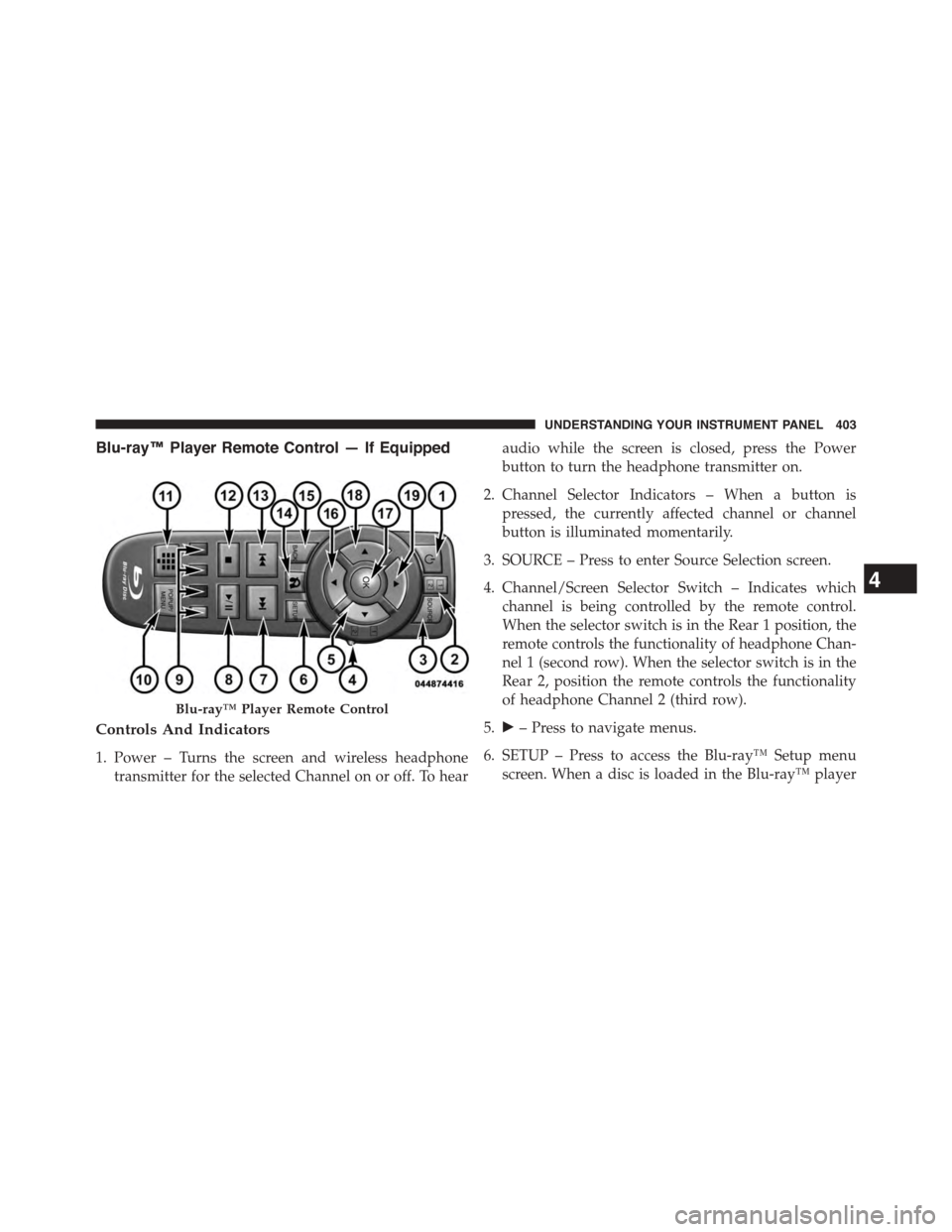
Blu-ray™ Player Remote Control — If Equipped
Controls And Indicators
1. Power – Turns the screen and wireless headphone
transmitter for the selected Channel on or off. To hear
audio while the screen is closed, press the Power
button to turn the headphone transmitter on.
2. Channel Selector Indicators – When a button is
pressed, the currently affected channel or channel
button is illuminated momentarily.
3. SOURCE – Press to enter Source Selection screen.
4. Channel/Screen Selector Switch – Indicates which
channel is being controlled by the remote control.
When the selector switch is in the Rear 1 position, the
remote controls the functionality of headphone Chan-
nel 1 (second row). When the selector switch is in the
Rear 2, position the remote controls the functionality
of headphone Channel 2 (third row).
5.!– Press to navigate menus.
6. SETUP – Press to access the Blu-ray™ Setup menu
screen. When a disc is loaded in the Blu-ray™ player
Blu-ray™ Player Remote Control
4
UNDERSTANDING YOUR INSTRUMENT PANEL 403
Page 408 of 703
Locking The Remote Control
All remote control functionality can be disabled as a
parental control feature.
•To disable the Remote Control from making any
changes, press the Video Lock button on the DVD
player (if equipped). If the vehicle is not equipped
with a DVD player, follow the radio’s instructions to
turn Video Lock on. The radio and the video screen(s)
indicate when Video Lock is active.
•Pressing the Video Lock again or turning the ignition
OFF turns Video Lock OFF and allows remote control
operation of the VES™.
Replacing The Remote Control Batteries
The remote control requires two AAA batteries for op-
eration. To replace the batteries:
•Locate the battery compartment on the back of the
remote, then slide the battery cover downward.
•Replace the batteries, making sure to orient them
according to the polarity diagram shown.
•Replace the battery compartment cover.
406 UNDERSTANDING YOUR INSTRUMENT PANEL
Page 418 of 703
Disc Features control the remote DVD / Blu-ray Disc™
Player’s (if equipped) settings of DVD being watched in
the remote player.
Listening To Audio With The Screen Closed
To listen to only audio portion of the channel with the
screen closed:
•Set the audio to the desired source and channel.
•Close the video screen.
•To change the current audio mode, push the remote
control’s MODE button. This will automatically select
the next available audio mode without using the
MODE/SOURCE Select menu.
If the screen is closed and there is no audio heard, verify
that the headphones are turned on (the ON indicator is
illuminated) and the headphone selector switch is on the
desired channel. If the headphones are turned on, push
the remote control’s power button to turn audio on. If
audio is still not heard, check that fully charged batteries
are installed in the headphones.
Disc Formats
The DVD player is capable of playing the following types
of discs (12 cm or 8 cm diameter):
•DVD-Video discs (MPEG-2 video compression) (see
notes about DVD Region Codes)
•DVD-Audio discs (2 channel audio output only)
•Audio Compact Discs (CDs)
•CD Data discs with MP3 and WMA compressed audio
format files
•Video CDs (MPEG-1 video compression)
416 UNDERSTANDING YOUR INSTRUMENT PANEL