climate control DODGE GRAND CARAVAN 2015 5.G User Guide
[x] Cancel search | Manufacturer: DODGE, Model Year: 2015, Model line: GRAND CARAVAN, Model: DODGE GRAND CARAVAN 2015 5.GPages: 703, PDF Size: 19.83 MB
Page 440 of 703
Economy Mode
If ECONOMY mode is desired, press the A/C button to
turn off the indicator light and the A/C compressor.
Rotate the temperature control knob to the desired tem-
perature. Also, make sure to select only Panel, Bi-Level or
Floor modes.
Max A/C
For maximum cooling use the A/C and Recirculation
mode buttons at the same time.
Rear Manual Climate Control — If Equipped
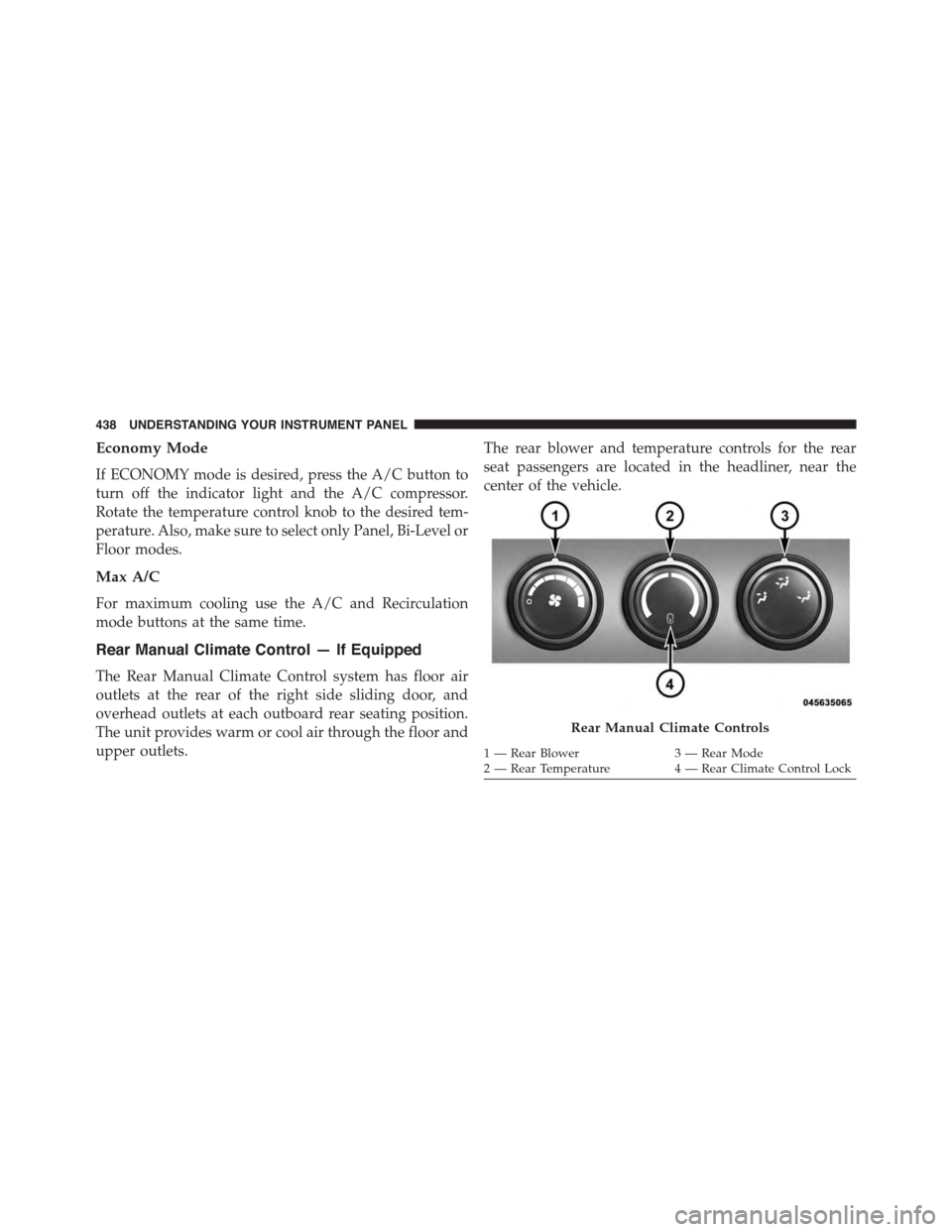
The Rear Manual Climate Control system has floor air
outlets at the rear of the right side sliding door, and
overhead outlets at each outboard rear seating position.
The unit provides warm or cool air through the floor and
upper outlets.
The rear blower and temperature controls for the rear
seat passengers are located in the headliner, near the
center of the vehicle.
Rear Manual Climate Controls
1—RearBlower3—RearMode2 — Rear Temperature4 — Rear Climate Control Lock
438 UNDERSTANDING YOUR INSTRUMENT PANEL
Page 441 of 703
Rear Blower Control
The primary control for the rear blower is on the front
climate control unit, located on the instrument panel.
Only when the front control for the rear blower is in the
REARposition do the second row seat occupants have
control of the rear blower speed.
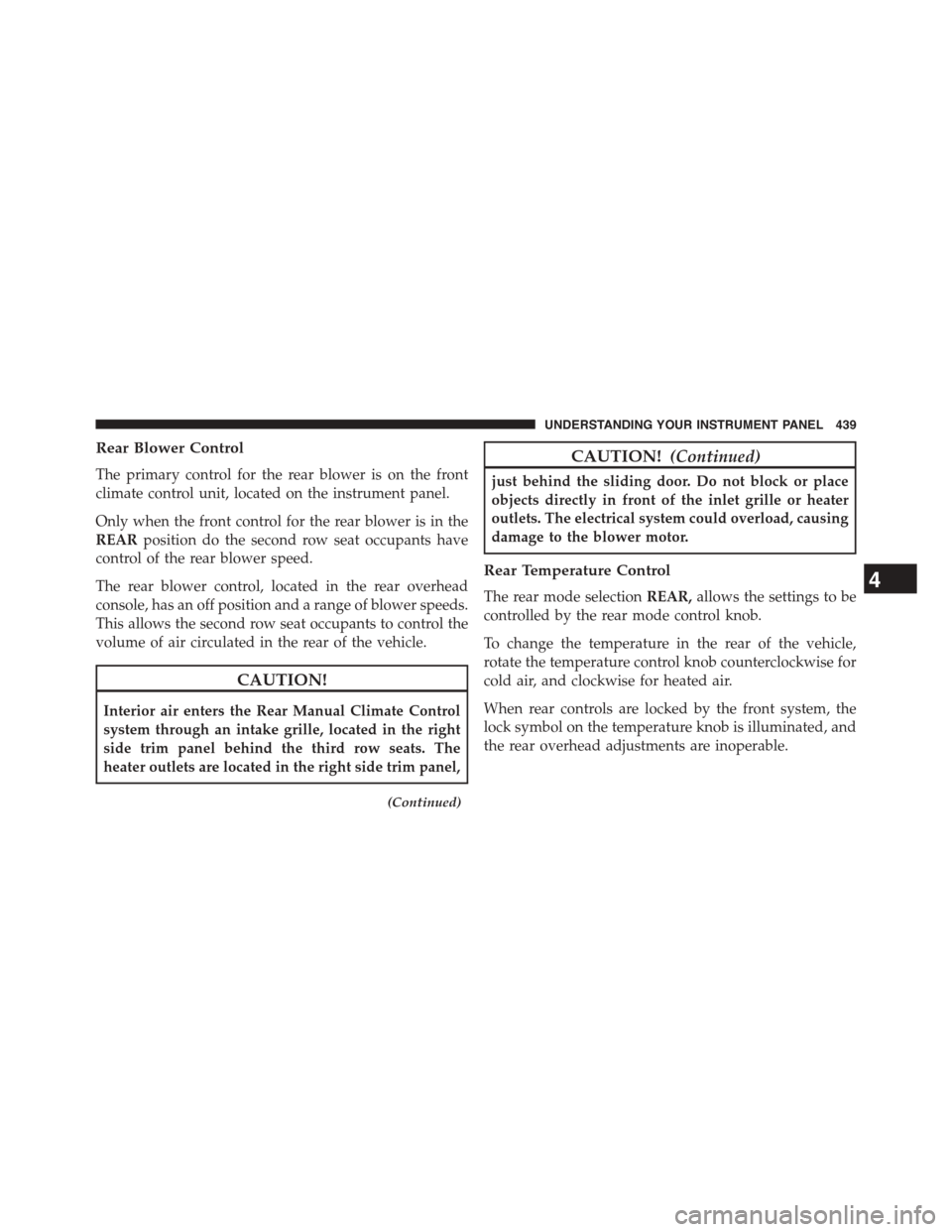
The rear blower control, located in the rear overhead
console, has an off position and a range of blower speeds.
This allows the second row seat occupants to control the
volume of air circulated in the rear of the vehicle.
CAUTION!
Interior air enters the Rear Manual Climate Control
system through an intake grille, located in the right
side trim panel behind the third row seats. The
heater outlets are located in the right side trim panel,
(Continued)
CAUTION!(Continued)
just behind the sliding door. Do not block or place
objects directly in front of the inlet grille or heater
outlets. The electrical system could overload, causing
damage to the blower motor.
Rear Temperature Control
The rear mode selectionREAR,allows the settings to be
controlled by the rear mode control knob.
To change the temperature in the rear of the vehicle,
rotate the temperature control knob counterclockwise for
cold air, and clockwise for heated air.
When rear controls are locked by the front system, the
lock symbol on the temperature knob is illuminated, and
the rear overhead adjustments are inoperable.
4
UNDERSTANDING YOUR INSTRUMENT PANEL 439
Page 444 of 703
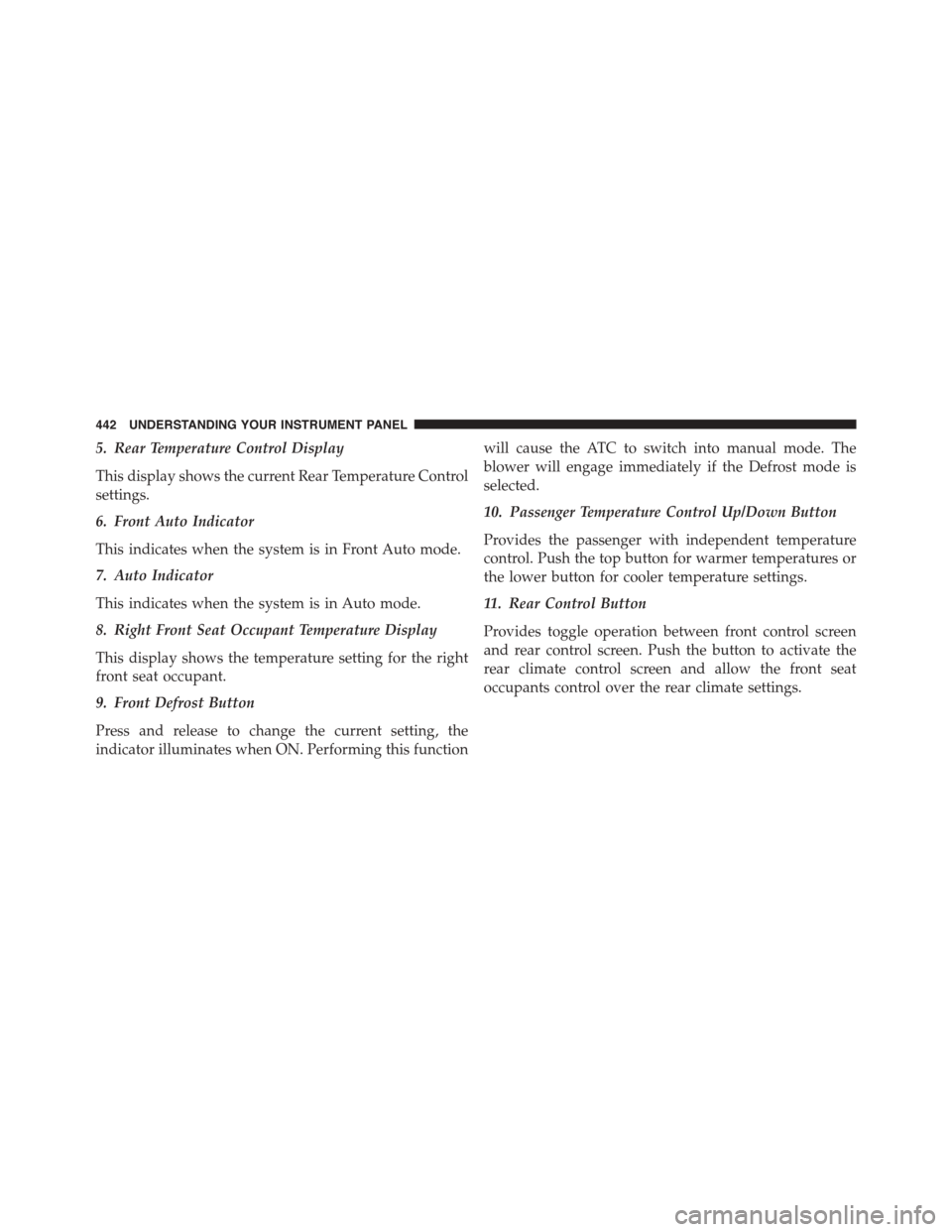
5. Rear Temperature Control Display
This display shows the current Rear Temperature Control
settings.
6. Front Auto Indicator
This indicates when the system is in Front Auto mode.
7. Auto Indicator
This indicates when the system is in Auto mode.
8. Right Front Seat Occupant Temperature Display
This display shows the temperature setting for the right
front seat occupant.
9. Front Defrost Button
Press and release to change the current setting, the
indicator illuminates when ON. Performing this function
will cause the ATC to switch into manual mode. The
blower will engage immediately if the Defrost mode is
selected.
10. Passenger Temperature Control Up/Down Button
Provides the passenger with independent temperature
control. Push the top button for warmer temperatures or
the lower button for cooler temperature settings.
11. Rear Control Button
Provides toggle operation between front control screen
and rear control screen. Push the button to activate the
rear climate control screen and allow the front seat
occupants control over the rear climate settings.
442 UNDERSTANDING YOUR INSTRUMENT PANEL
Page 445 of 703
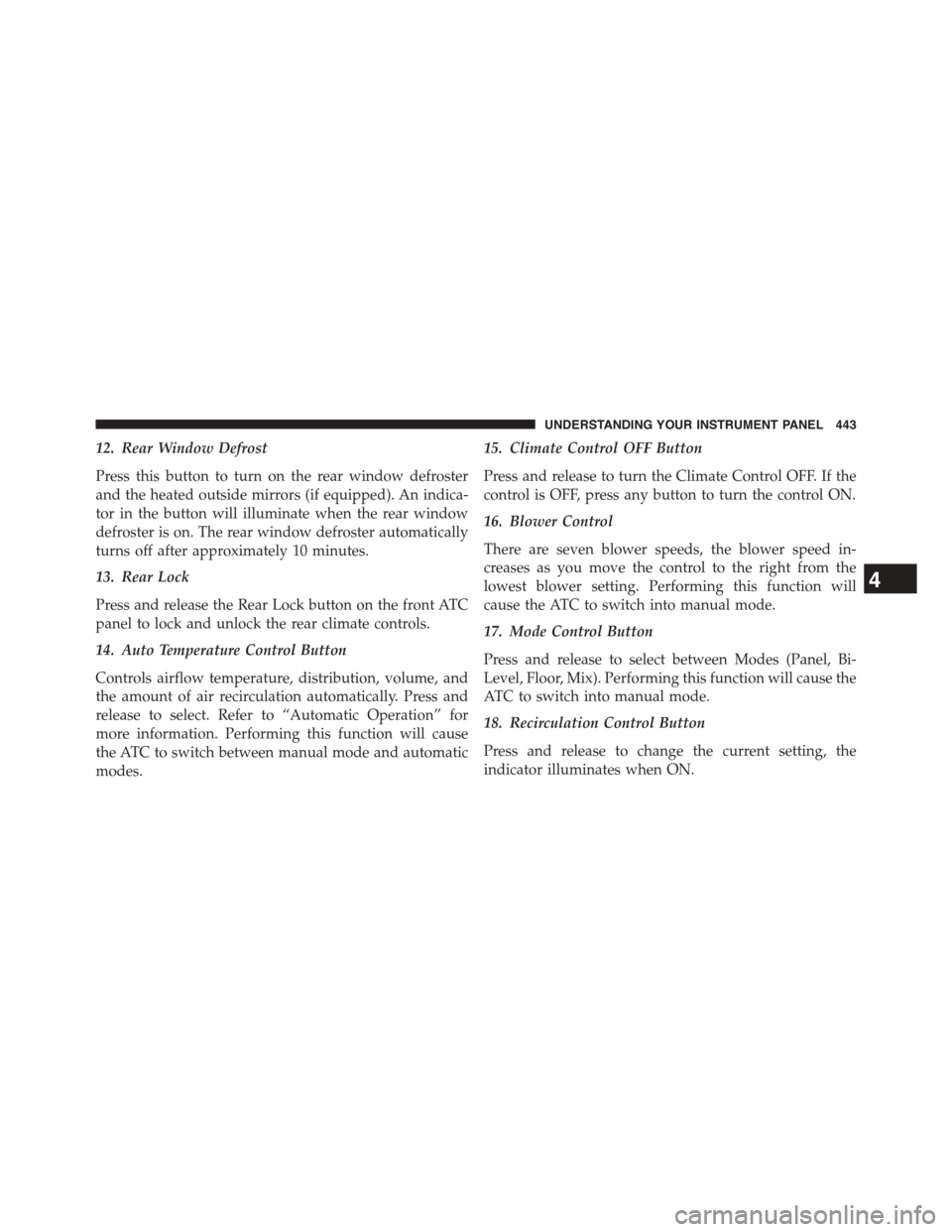
12. Rear Window Defrost
Press this button to turn on the rear window defroster
and the heated outside mirrors (if equipped). An indica-
tor in the button will illuminate when the rear window
defroster is on. The rear window defroster automatically
turns off after approximately 10 minutes.
13. Rear Lock
Press and release the Rear Lock button on the front ATC
panel to lock and unlock the rear climate controls.
14. Auto Temperature Control Button
Controls airflow temperature, distribution, volume, and
the amount of air recirculation automatically. Press and
release to select. Refer to “Automatic Operation” for
more information. Performing this function will cause
the ATC to switch between manual mode and automatic
modes.
15. Climate Control OFF Button
Press and release to turn the Climate Control OFF. If the
control is OFF, press any button to turn the control ON.
16. Blower Control
There are seven blower speeds, the blower speed in-
creases as you move the control to the right from the
lowest blower setting. Performing this function will
cause the ATC to switch into manual mode.
17. Mode Control Button
Press and release to select between Modes (Panel, Bi-
Level, Floor, Mix). Performing this function will cause the
ATC to switch into manual mode.
18. Recirculation Control Button
Press and release to change the current setting, the
indicator illuminates when ON.
4
UNDERSTANDING YOUR INSTRUMENT PANEL 443
Page 448 of 703
3. When the system is set up for your comfort level, it is
not necessary to change the settings. You will experi-
ence the greatest efficiency by simply allowing the
system to function automatically.
NOTE:
•It is not necessary to move the temperature settings for
cold or hot vehicles. The system automatically adjusts
the temperature, mode and fan speed to provide
comfort as quickly as possible.
•The temperature can be displayed in English or Metric
units by selecting the “Display Units of Measure in”
customer-programmable feature. Refer to the “Elec-
tronic Vehicle Information Center (EVIC) — Customer-
Programmable Features” in this Section.
To provide you with maximum comfort in the automatic
mode, during cold start-ups, the blower fan will remain
on low until the engine warms up. The fan will engage
immediately if the Defrost mode is selected, or by chang-
ing the front blower knob setting.
Manual Operation Override
This system offers a full complement of manual override
features. The AUTO symbol in the front ATC display will
be turned off when the system is being used in the
manual mode.
Controlling The Rear Climate Controls From The
Front ATC Panel
The Three-Zone ATC system allows for adjustment of the
rear climate controls from the front ATC panel.
To change the rear system settings:
•Press#REAR#button to change control to rear control
mode, Rear display (below) will appear. Control func-
tions now operate rear system.
446 UNDERSTANDING YOUR INSTRUMENT PANEL
Page 454 of 703
Vacation/Storage
Before you store your vehicle, or keep it out of service
(i.e., vacation) for two weeks or more, run the air
conditioning system at idle for about five minutes, in
fresh air with the blower setting on high. This will ensure
adequate system lubrication to minimize the possibility
of compressor damage when the system is started again.
Window Fogging
Vehicle windows tend to fog on the inside in mild, rainy
and/or humid weather. To clear the windows, select
Defrost or Mix mode and increase the front blower speed.
Do not use the Recirculation mode without A/C for long
periods, as fogging may occur.
Outside Air Intake
Make sure the air intake, located directly in front of the
windshield, is free of obstructions such as leaves. Leaves
collected in the air intake may reduce airflow, and if they
enter the plenum, they could plug the water drains. In
Winter months, make sure the air intake is clear of ice,
slush, and snow.
A/C Air Filter
The climate control system filters out dust and pollen
from the air. Refer to “Air Conditioning” in “Maintaining
Your Vehicle” for filter replacement instructions.
452 UNDERSTANDING YOUR INSTRUMENT PANEL
Page 496 of 703
7. Press the “ESC Off” switch (located in the lower
switch bank below the climate controls) four times
within 20 seconds. The “ESC Activation/Malfunction
Indicator Light” should turn on and turn off two
times.
8. Rotate the steering wheel back to center and then an
additional half-turn to the right.
9. Turn the ignition switch to the OFF position and then
back to the ON position. If the sequence was com-
pleted properly, the “ESC Activation/Malfunction In-
dicator Light” will blink several times to confirm HSA
is disabled.
10. Repeat these steps if you want to return this feature
to it’s previous setting.
Towing With HSA
HSA will provide assistance when starting on a grade
when pulling a trailer.
WARNING!
•If you use a trailer brake controller with your
trailer, your trailer brakes may be activated and
deactivated with the brake switch. If so, when the
brake pedal is released, there may not be enough
brake pressure to hold the vehicle and trailer on a
hill and this could cause a collision with another
vehicle or object behind you. In order to avoid
rolling down the hill while resuming acceleration,
manually activate the trailer brake prior to releas-
ing the brake pedal. Always remember the driver is
responsible for braking the vehicle.
(Continued)
494 STARTING AND OPERATING
Page 648 of 703
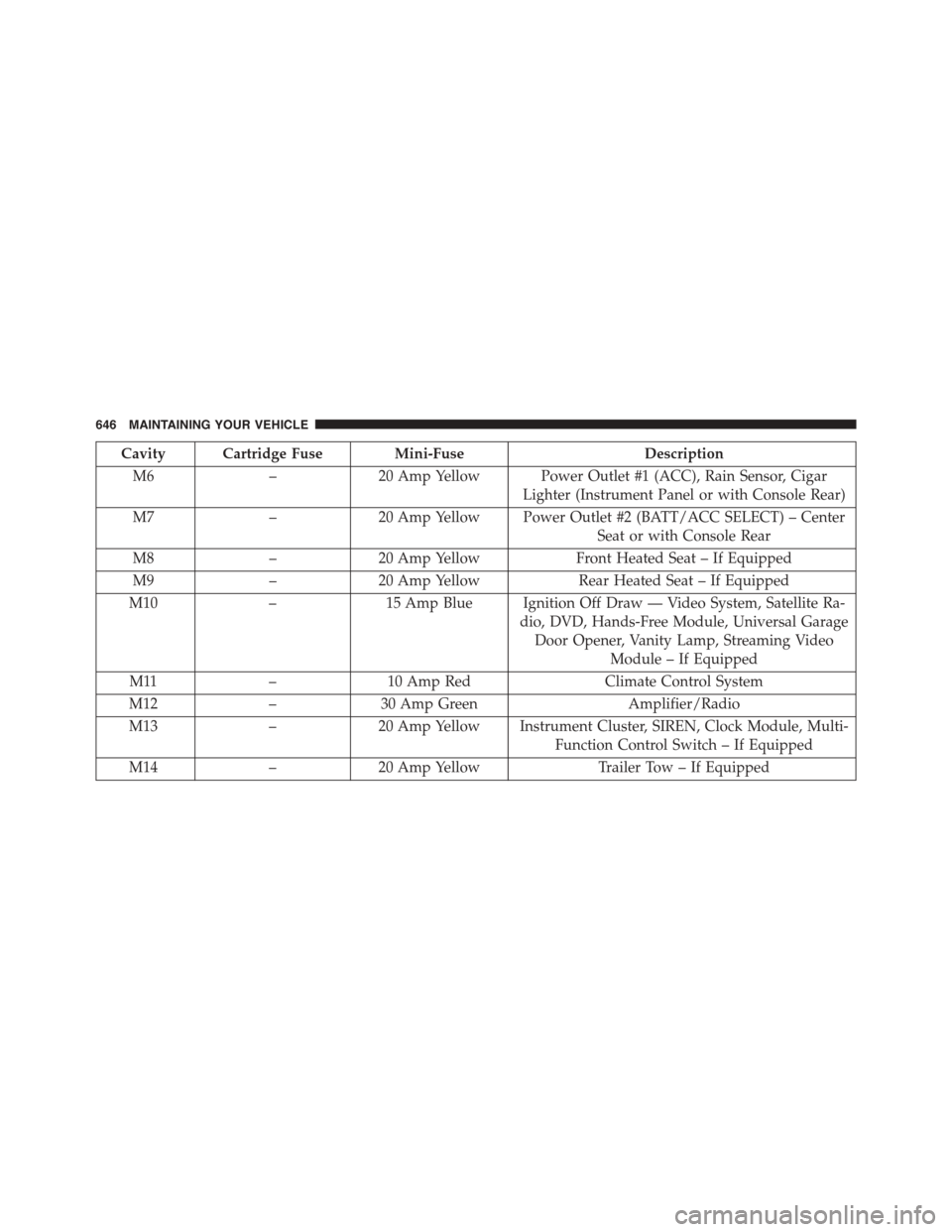
Cavity Cartridge Fuse Mini-FuseDescription
M6–20 Amp Yellow Power Outlet #1 (ACC), Rain Sensor, Cigar
Lighter (Instrument Panel or with Console Rear)
M7–20 Amp Yellow Power Outlet #2 (BATT/ACC SELECT) – Center
Seat or with Console Rear
M8–20 Amp YellowFront Heated Seat – If Equipped
M9–20 Amp YellowRear Heated Seat – If Equipped
M10–15 Amp Blue Ignition Off Draw — Video System, Satellite Ra-
dio, DVD, Hands-Free Module, Universal Garage
Door Opener, Vanity Lamp, Streaming Video
Module – If Equipped
M11–10 Amp RedClimate Control System
M12–30 Amp GreenAmplifier/Radio
M13–20 Amp Yellow Instrument Cluster, SIREN, Clock Module, Multi-
Function Control Switch – If Equipped
M14–20 Amp YellowTrailer Tow – If Equipped
646 MAINTAINING YOUR VEHICLE
Page 650 of 703
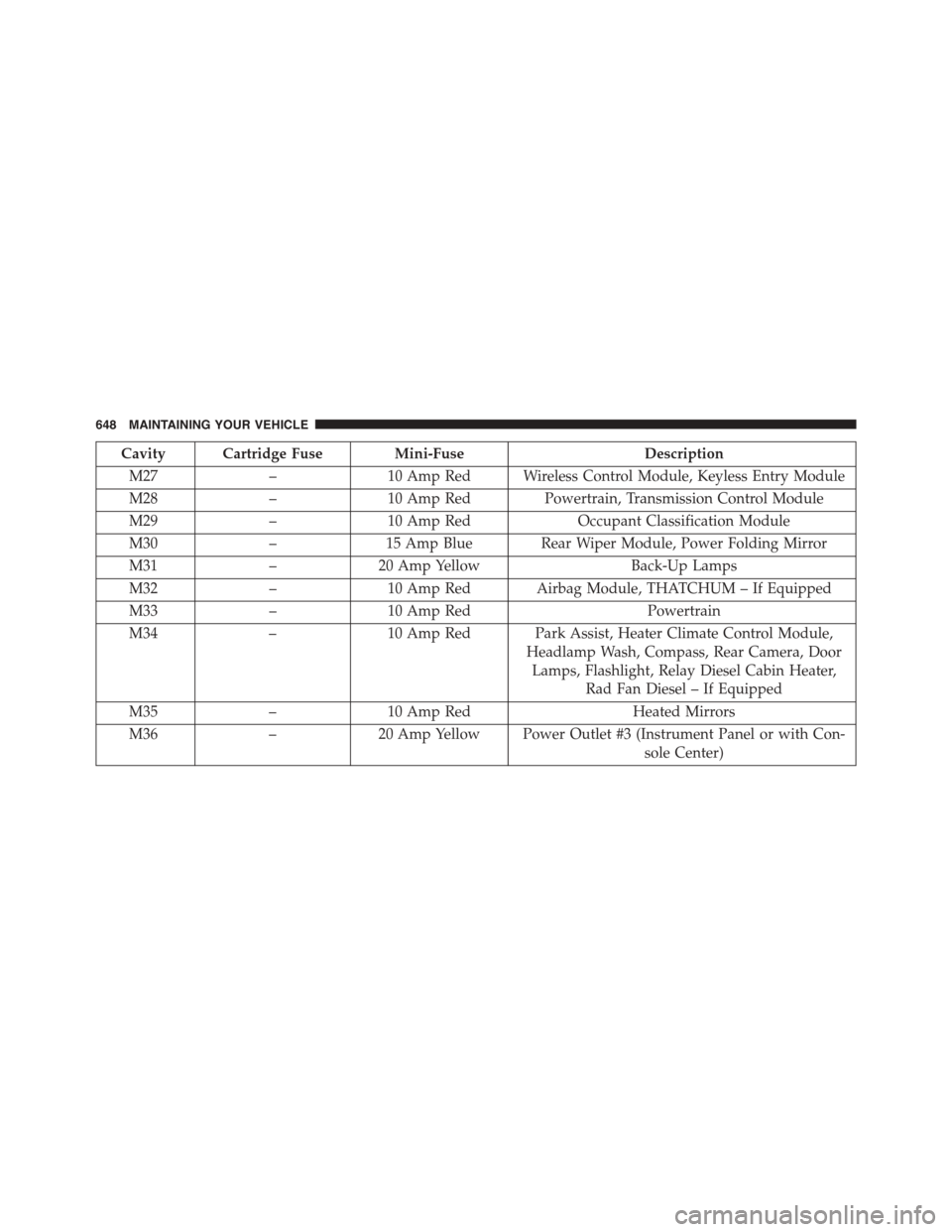
Cavity Cartridge Fuse Mini-FuseDescription
M27–10 Amp Red Wireless Control Module, Keyless Entry Module
M28–10 Amp Red Powertrain, Transmission Control Module
M29–10 Amp RedOccupant Classification Module
M30–15 Amp Blue Rear Wiper Module, Power Folding Mirror
M31–20 Amp YellowBack-Up Lamps
M32–10 Amp Red Airbag Module, THATCHUM – If Equipped
M33–10 Amp RedPowertrain
M34–10 Amp Red Park Assist, Heater Climate Control Module,
Headlamp Wash, Compass, Rear Camera, Door
Lamps, Flashlight, Relay Diesel Cabin Heater,
Rad Fan Diesel – If Equipped
M35–10 Amp RedHeated Mirrors
M36–20 Amp Yellow Power Outlet #3 (Instrument Panel or with Con-
sole Center)
648 MAINTAINING YOUR VEHICLE
Page 679 of 703
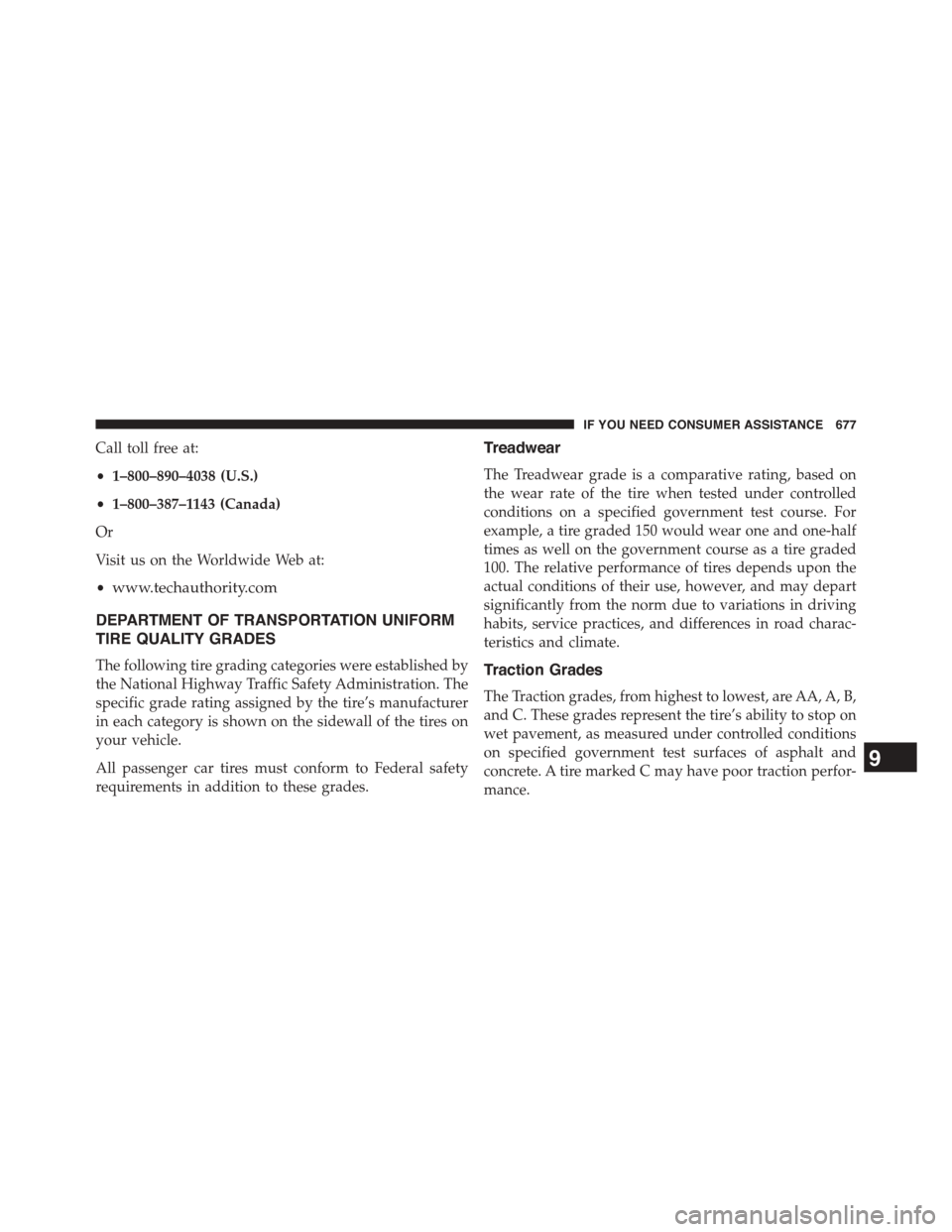
Call toll free at:
•1–800–890–4038 (U.S.)
•1–800–387–1143 (Canada)
Or
Visit us on the Worldwide Web at:
•www.techauthority.com
DEPARTMENT OF TRANSPORTATION UNIFORM
TIRE QUALITY GRADES
The following tire grading categories were established by
the National Highway Traffic Safety Administration. The
specific grade rating assigned by the tire’s manufacturer
in each category is shown on the sidewall of the tires on
your vehicle.
All passenger car tires must conform to Federal safety
requirements in addition to these grades.
Treadwear
The Treadwear grade is a comparative rating, based on
the wear rate of the tire when tested under controlled
conditions on a specified government test course. For
example, a tire graded 150 would wear one and one-half
times as well on the government course as a tire graded
100. The relative performance of tires depends upon the
actual conditions of their use, however, and may depart
significantly from the norm due to variations in driving
habits, service practices, and differences in road charac-
teristics and climate.
Traction Grades
The Traction grades, from highest to lowest, are AA, A, B,
and C. These grades represent the tire’s ability to stop on
wet pavement, as measured under controlled conditions
on specified government test surfaces of asphalt and
concrete. A tire marked C may have poor traction perfor-
mance.
9
IF YOU NEED CONSUMER ASSISTANCE 677