key DODGE GRAND CARAVAN 2015 5.G Owner's Manual
[x] Cancel search | Manufacturer: DODGE, Model Year: 2015, Model line: GRAND CARAVAN, Model: DODGE GRAND CARAVAN 2015 5.GPages: 703, PDF Size: 19.83 MB
Page 36 of 703
•The hazard switch is pushed
•The shift lever is moved out of PARK
•The engine is allowed to run for the entire 15-minute
cycle
•The brake pedal is pushed
To Turn Off The Engine While In Remote Start
Mode
Push and release the REMOTE START button 1 time or
allow the engine to run for the entire 15-minute cycle.
NOTE:To avoid unintentional shutdowns while in the
Remote Start Mode, the system will not allow the Remote
Start button to shut down the engine for two seconds
after receiving a valid Remote Start request.
When To Reset Remote Start
The vehicle can be started remotely up to a maximum of
two times. The vehicle is also allowed a maximum of one
failed start, where the Remote Starting sequence was
initiated but the engine stopped cranking without start-
ing. After either of these conditions, or if the Vehicle
Security Alarm system is alarming, or if the PANIC
button was pushed, the vehicle must be reset. Insert the
Key Fob into the ignition switch and turn the switch to
the ON/RUN position.
DOOR LOCKS
Manual Door Locks
Lock the front doors by pushing down on the lock knobs
on each door trim panel.
34 THINGS TO KNOW BEFORE STARTING YOUR VEHICLE
Page 37 of 703
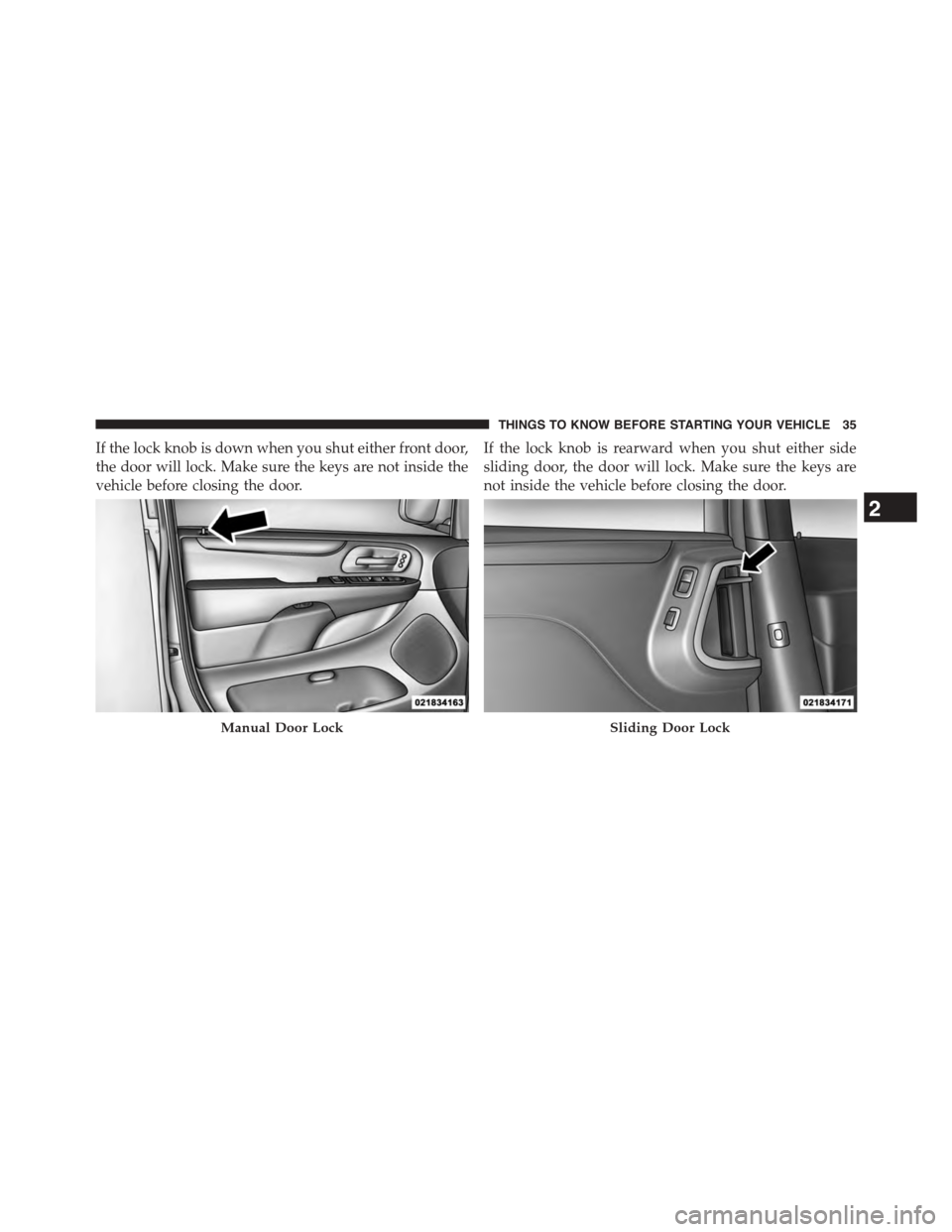
If the lock knob is down when you shut either front door,
the door will lock. Make sure the keys are not inside the
vehicle before closing the door.
If the lock knob is rearward when you shut either side
sliding door, the door will lock. Make sure the keys are
not inside the vehicle before closing the door.
Manual Door LockSliding Door Lock
2
THINGS TO KNOW BEFORE STARTING YOUR VEHICLE 35
Page 38 of 703
WARNING!
•For personal security and safety in the event of a
collision, lock the vehicle doors before you drive as
well as when you park and leave the vehicle.
•Never leave children alone in a vehicle, or with
access to an unlocked vehicle. Allowing children to
be in a vehicle unattended is dangerous for a
number of reasons. A child or others could be
seriously or fatally injured. Children should be
warned not to touch the parking brake, brake pedal
or the transmission gear selector.
•Do not leave the Key Fob in or near the vehicle, or
in a location accessible to children. A child could
operate power windows, other controls, or move
the vehicle.
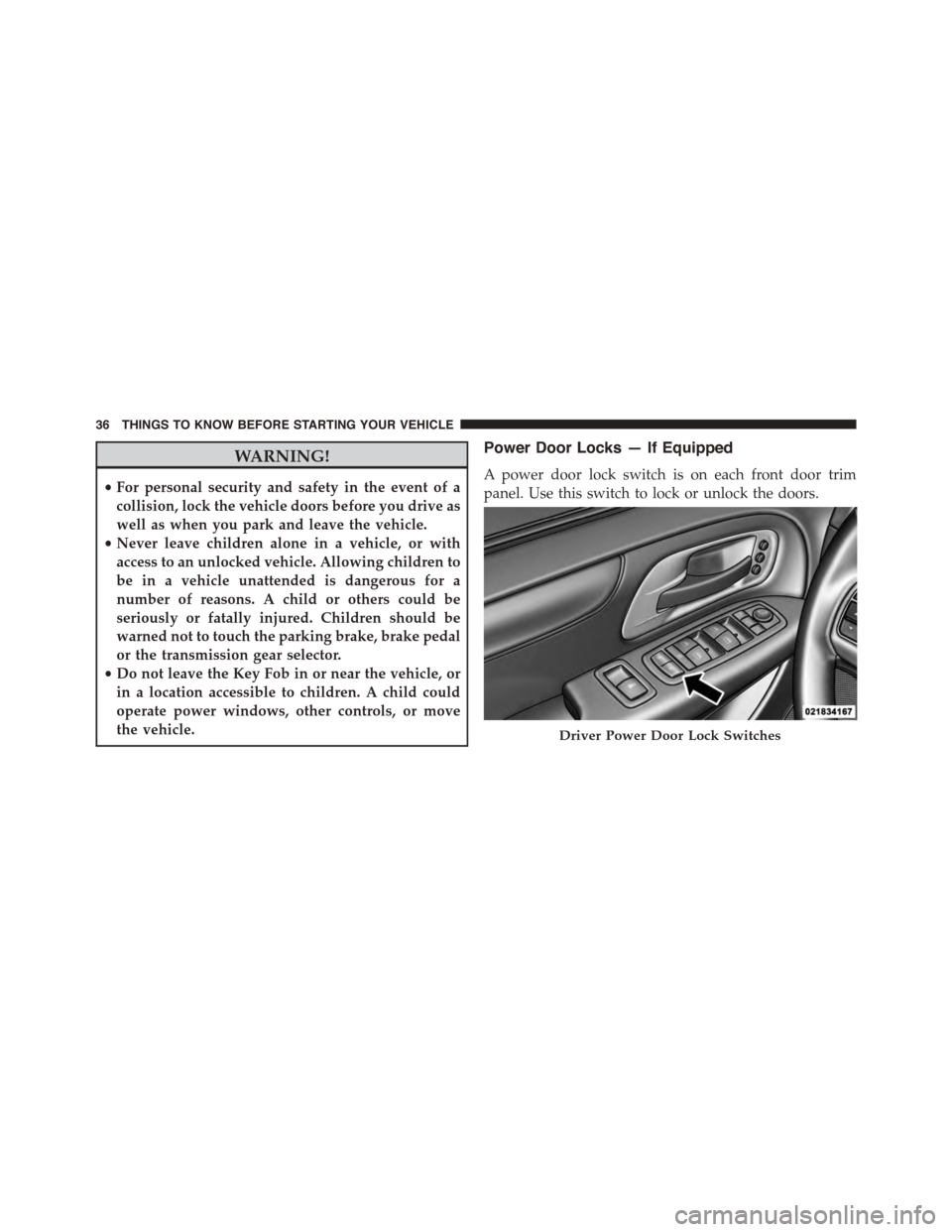
Power Door Locks — If Equipped
A power door lock switch is on each front door trim
panel. Use this switch to lock or unlock the doors.
Driver Power Door Lock Switches
36 THINGS TO KNOW BEFORE STARTING YOUR VEHICLE
Page 39 of 703
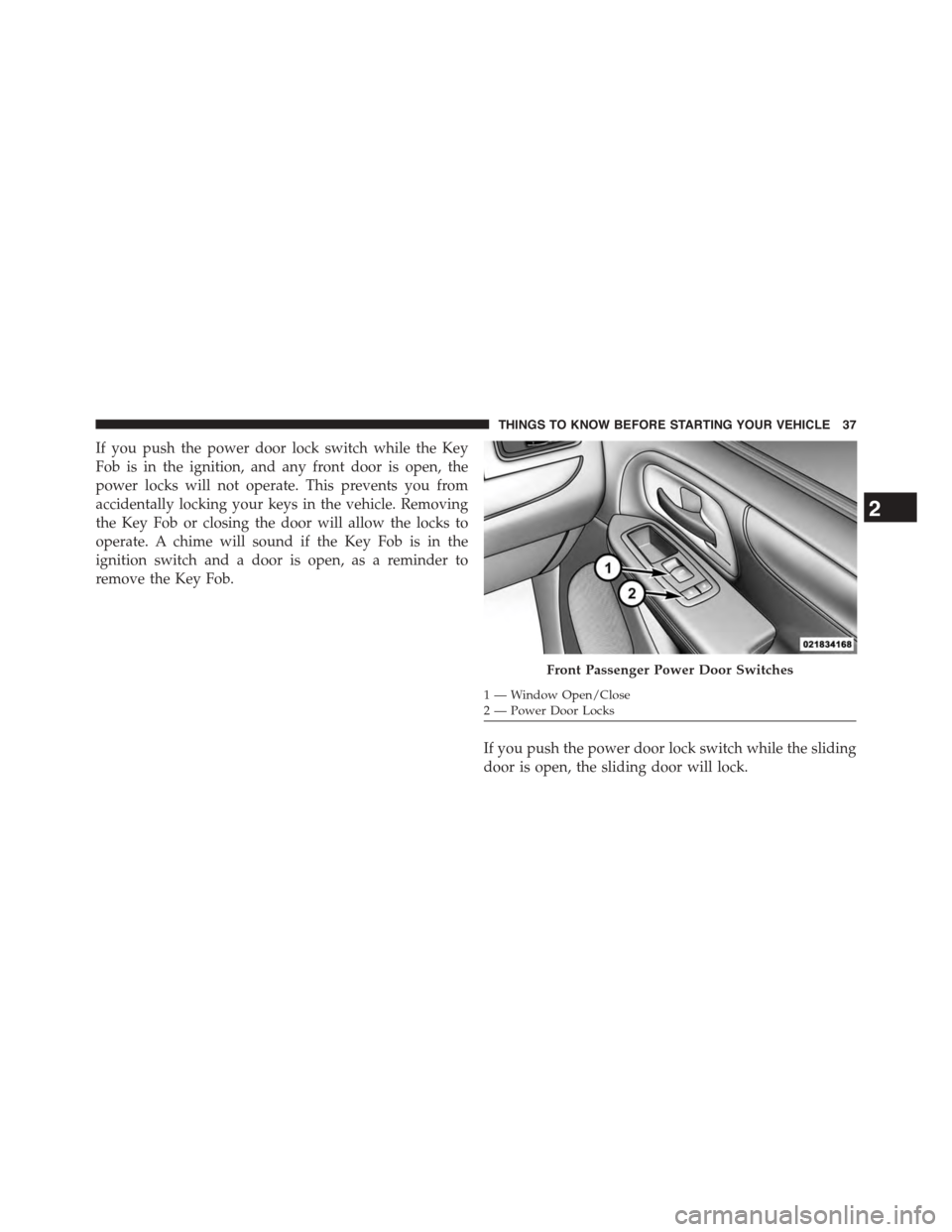
If you push the power door lock switch while the Key
Fob is in the ignition, and any front door is open, the
power locks will not operate. This prevents you from
accidentally locking your keys in the vehicle. Removing
the Key Fob or closing the door will allow the locks to
operate. A chime will sound if the Key Fob is in the
ignition switch and a door is open, as a reminder to
remove the Key Fob.
If you push the power door lock switch while the sliding
door is open, the sliding door will lock.
Front Passenger Power Door Switches
1—WindowOpen/Close2—PowerDoorLocks
2
THINGS TO KNOW BEFORE STARTING YOUR VEHICLE 37
Page 49 of 703
door switch is pushed. To close the door, wait until it
is fully open and then push the switch again.
•If the power sliding door encounters multiple obstruc-
tions within the same cycle, the system will automati-
cally stop, the power sliding door motor will make a
clicking sound until the door has no further move-
ment. This clicking sound can be stopped by pulling
the inside or outside handle. If this condition occurs,
no damage is done to the power sliding door motor.
The power sliding door must be opened or closed
manually.
WARNING!
You, or others, could be injured if caught in the path
of the sliding door. Make sure the door path is clear
before closing the door.
Power Sliding Side Door Open Flash
The left and right exterior hazard lights will flash for 12
seconds when either sliding door is opened. This will
alert other drivers in the area that passenger(s) could be
entering or exiting the vehicle.
The Sliding Side Door Open Flash can be enabled or
disabled by performing the following procedure:
1. Place the Key Fob in the ignition switch.
2. Cycle the ignition switch from ON/RUN to OFF five
times ending in the ON/RUN position(do not start
the engine).
3. Within 10 seconds of the final cycle, push the HAZ-
ARD switch ON.
4. A single chime will sound to signify that you have
successfully completed the programming.
2
THINGS TO KNOW BEFORE STARTING YOUR VEHICLE 47
Page 54 of 703
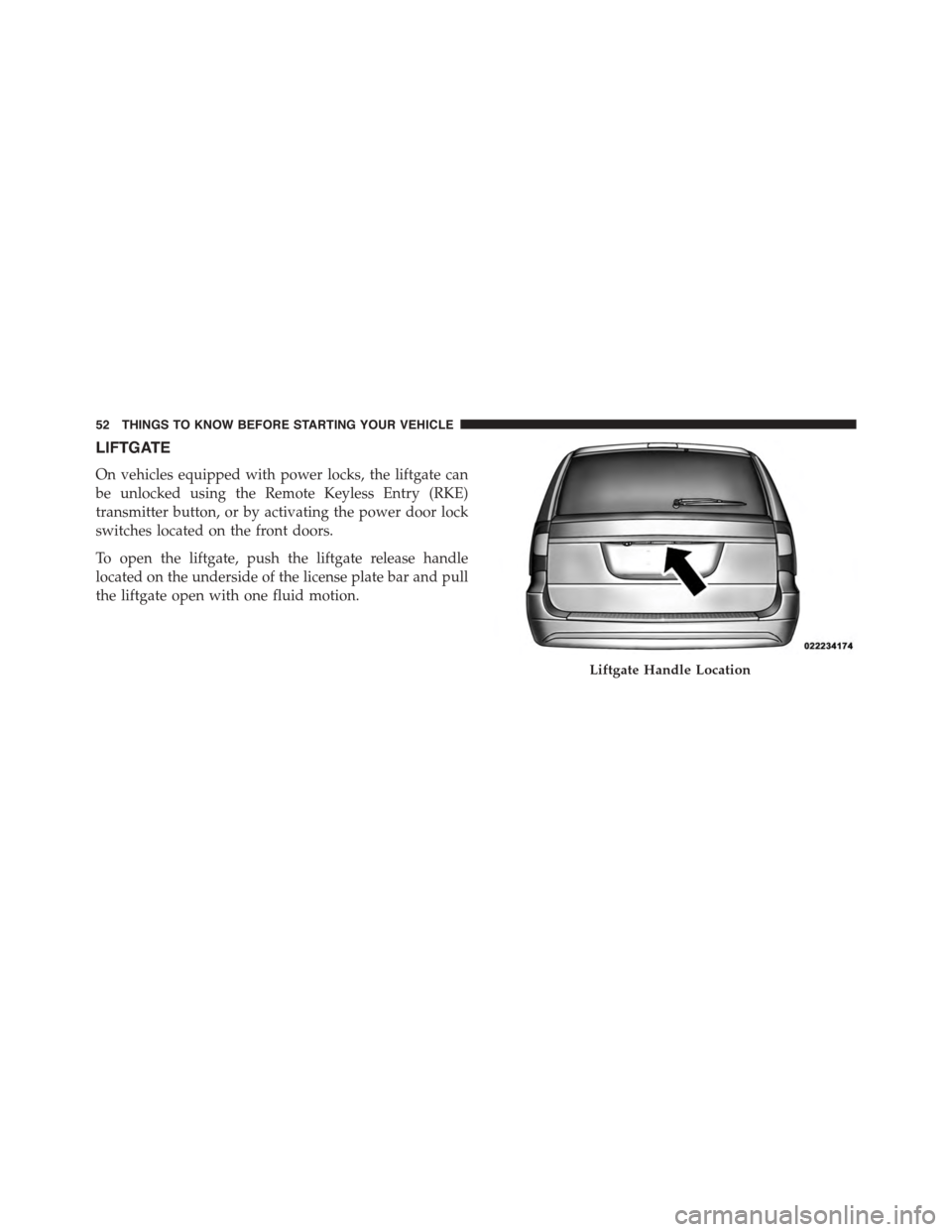
LIFTGATE
On vehicles equipped with power locks, the liftgate can
be unlocked using the Remote Keyless Entry (RKE)
transmitter button, or by activating the power door lock
switches located on the front doors.
To open the liftgate, push the liftgate release handle
located on the underside of the license plate bar and pull
the liftgate open with one fluid motion.
Liftgate Handle Location
52 THINGS TO KNOW BEFORE STARTING YOUR VEHICLE
Page 55 of 703
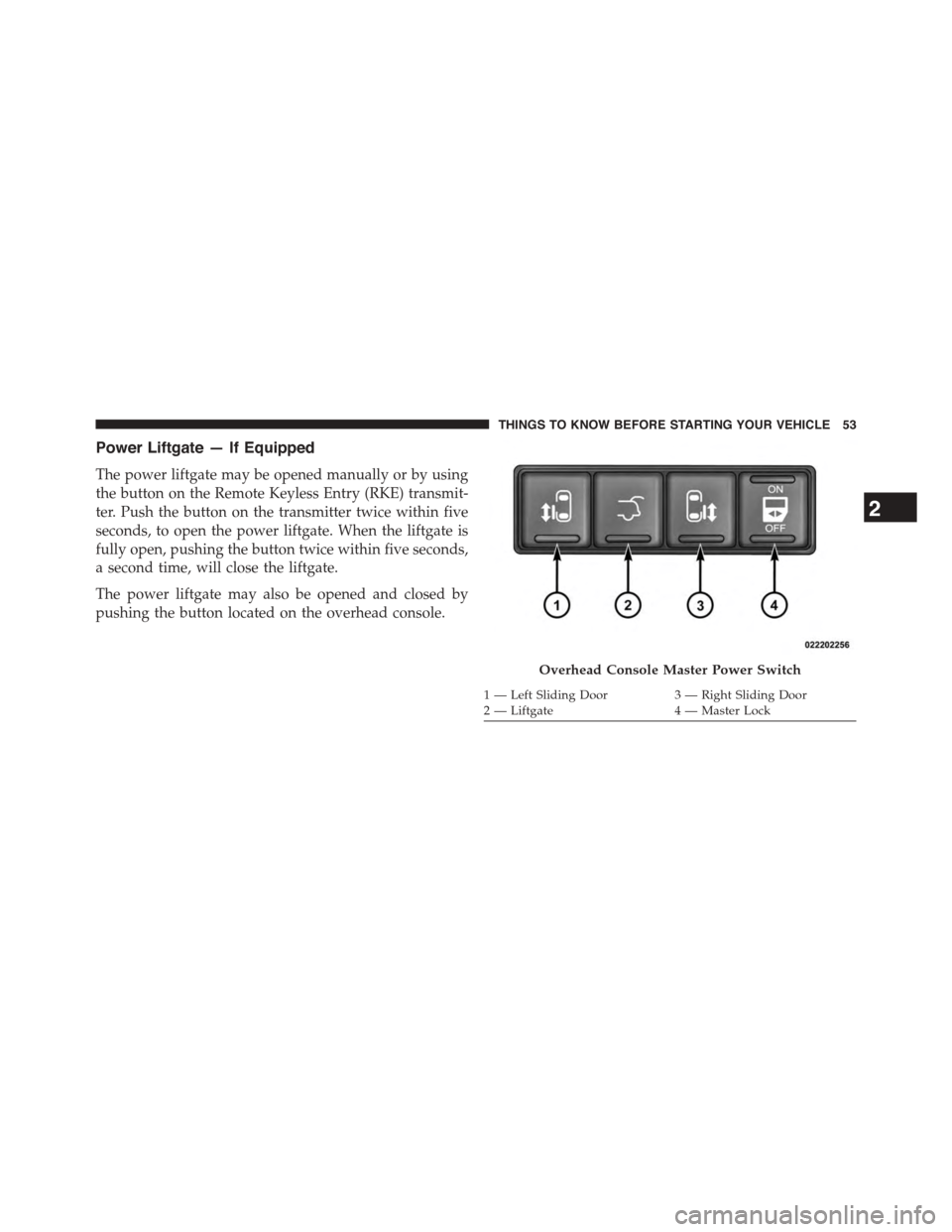
Power Liftgate — If Equipped
The power liftgate may be opened manually or by using
the button on the Remote Keyless Entry (RKE) transmit-
ter. Push the button on the transmitter twice within five
seconds, to open the power liftgate. When the liftgate is
fully open, pushing the button twice within five seconds,
a second time, will close the liftgate.
The power liftgate may also be opened and closed by
pushing the button located on the overhead console.
Overhead Console Master Power Switch
1—LeftSlidingDoor3—RightSlidingDoor2 — Liftgate4 — Master Lock
2
THINGS TO KNOW BEFORE STARTING YOUR VEHICLE 53
Page 130 of 703
▫Advanced Phone Connectivity............165
▫Things You Should Know About Your Uconnect®
Phone..............................167
▫General Information...................178
!VOICE COMMAND — IF EQUIPPED........178
▫Voice Command System Operation.........178
▫Commands.........................180
▫Voice Training.......................184
!SEATS . . . . . . . . . . . . . . . . . . . . . . . . . . . . ..184
▫Power Seats — If Equipped..............185
▫Power Lumbar — If Equipped............188
▫Heated Seats — If Equipped..............188
▫Manual Front/Second Row Seat Adjuster . . . .191
▫Manual Reclining Seats — If Equipped......192
▫Head Restraints......................193
▫Stow ’n Go® Seating — If Equipped........198
▫Quad Seats — If Equipped...............204
▫Second Row Bench Seat — If Equipped......208
▫Third Row Power Recline — If Equipped.....209
▫Third Row Power Folding Seat — If Equipped . .209
▫Manually Folding Third Row Seats — If
Equipped...........................212
▫Plastic Grocery Bag Retainer Hooks.........215
!DRIVER MEMORY SEAT — IF EQUIPPED . . . .215
▫Programming The Memory Feature.........216
▫Linking And Unlinking The Remote Keyless Entry
Transmitter To Memory.................217
128 UNDERSTANDING THE FEATURES OF YOUR VEHICLE
Page 162 of 703
•The Uconnect® Phone will call the last number that
was dialed from your mobile phone.
NOTE:This may not be the last number dialed from the
Uconnect® Phone.
Call Continuation
Call continuation is the progression of a phone call on the
Uconnect® Phone after the vehicle ignition key has been
switched to OFF. Call continuation functionality avail-
able on the vehicle can be any one of three types:
•After the ignition key is switched to OFF, a call can
continue on the Uconnect® Phone either until the call
ends, or until the vehicle battery condition dictates
cessation of the call on the Uconnect® Phone and
transfer of the call to the mobile phone.
•After the ignition key is cycled to OFF, a call can
continue on the Uconnect® Phone for a certain dura-
tion, after which the call is automatically transferred
from the Uconnect® Phone to the mobile phone.
•An active call is automatically transferred to the mo-
bile phone after the ignition key is cycled to OFF.
Uconnect® Phone Features
Language Selection
To change the language that the Uconnect® Phone is
using:
•Push thebutton to begin.
•After the “Ready” prompt and the following beep, say
the name of the language you wish to switch to
English, Espanol, or Francais.
160 UNDERSTANDING THE FEATURES OF YOUR VEHICLE
Page 165 of 703
Working With Automated Systems
This method is used in instances where one generally has
to press numbers on the mobile phone keypad while
navigating through an automated telephone system.
You can use your Uconnect® Phone to access a voice mail
system or an automated service, such as a paging service
or automated customer service line. Some services re-
quire immediate response selection. In some instances,
that may be too quick for use of the Uconnect® Phone.
When calling a number with your Uconnect® Phone that
normally requires you to enter in a touch-tone sequence
on your mobile phone keypad, you can push the
button and say the sequence you wish to enter,
followed by the word “Send.” For example, if required
to enter your PIN followed with a pound, (3 7 4 6 #),
you can push thebutton and say, “3746#Send.”
Saying a number, or sequence of numbers, followed
by “Send,” is also to be used for navigating through an
automated customer service center menu structure,
and to leave a number on a pager.
You can also send stored Uconnect® phonebook entries
as tones for fast and easy access to voice mail and pager
entries. To use this feature, dial the number you wish to
call and then push thebutton and say “Send.” The
system will prompt you to enter the name or number
and say the name of the phonebook entry you wish to
send. The Uconnect® Phone will then send the corre-
sponding phone number associated with the phone-
book entry, as tones over the phone.
3
UNDERSTANDING THE FEATURES OF YOUR VEHICLE 163