phone DODGE GRAND CARAVAN 2015 5.G Service Manual
[x] Cancel search | Manufacturer: DODGE, Model Year: 2015, Model line: GRAND CARAVAN, Model: DODGE GRAND CARAVAN 2015 5.GPages: 703, PDF Size: 19.83 MB
Page 363 of 703
another selection. Holding either button will bypass
stations without stopping, until you release it.
Voice Command System (Radio) — If Equipped
Refer to “Voice Command” for further details.
Voice Command Button Uconnect® Phone — If
Equipped
Press this button to operate the Uconnect® Phone feature
(if equipped). Refer to “Voice Command” for further
details.
If your vehicle is not equipped with or this feature is not
available on your vehicle, a “Not Equipped With
Uconnect Phone” message will display on the radio
screen.
Phone Button Uconnect® Phone — If Equipped
Push this button to operate the Uconnect® Phone feature
(if equipped). Refer to “Uconnect® Phone” for further
details.
If your vehicle is not equipped with or this feature is not
available on your vehicle, a “Not Equipped With
Uconnect Phone” message will display on the radio
screen.
TIME Button
Push the TIME button to alternate display of the time and
radio frequency.
Clock Setting Procedure
1. Push and hold the TIME button until the hours blink.
2. Adjust the hours by turning the right side TUNE/
SCROLL control knob.
4
UNDERSTANDING YOUR INSTRUMENT PANEL 361
Page 379 of 703
Operating Instructions (Uconnect® Phone) — If
Equipped
Refer to “Uconnect® Phone” for further details.
iPod®/USB/MP3 CONTROL — IF EQUIPPED
NOTE:This section is for Uconnect® 130/230 radios
only. For Uconnect® 430/430N, 730N, 731N, 735N or 431
touchscreen radio iPod®/USB/MP3 control feature, refer
to the separate Supplement Manual. iPod®/USB/MP3
control is available only if equipped as an option with
these radios.
This feature allows an iPod® or external USB device to be
plugged into the USB port, located in the glove compart-
ment.
iPod® control supports Mini, 4G, Photo, Nano, 5G iPod®
and iPhone® devices. Some iPod® software versions
may not fully support the iPod® control features. Please
visit Apple’s website for software updates.
NOTE:
•If the radio has a USB port, refer to the appropriate
Uconnect® Multimedia radio User ’s Manual for
iPod® or external USB device support capability.
•Connecting an iPod® or consumer electronic audio
device to the AUX port located in the radio faceplate,
plays media, but does not use the iPod® / MP3 control
feature to control the connected device.
4
UNDERSTANDING YOUR INSTRUMENT PANEL 377
Page 385 of 703
Bluetooth® Streaming Audio (BTSA)
Music can be streamed from your cellular phone to the
Uconnect® phone system.
Refer to the Uconnect® Radio Supplement for further
information on Bluetooth® connectivity.
Controlling BTSA Using Radio Buttons
To enter BTSA mode, push either “AUX” button on the
radio or push the VR button and say “Bluetooth Stream-
ing Audio.”
Play Mode
When switched to BTSA mode, some audio devices can
start playing music over the vehicle’s audio system, but
some devices require the music to be initiated on the
device first, then it will get streamed to the Uconnect®
phone system. Seven devices can be paired to the
Uconnect® phone system, but just one can be selected
and played.
Selecting A Different Audio Device
1. Push the PHONE button to begin.
2. After the#Ready#prompt and following the beep, say
#Setup#, then say#Select Audio Devices.#
3. Say the name of the audio device or ask the
Uconnect® phone system to list the audio devices.
Next Track
Use the SEEK UP button, or push the VR button on the
radio and say “Next Track,” to jump to the next music
track on your cellular phone.
Previous Track
Use the SEEK DOWN button, or push the VR button on
the radio and say “Previous Track,” to jump to the
previous music track on your cellular phone.
4
UNDERSTANDING YOUR INSTRUMENT PANEL 383
Page 386 of 703
Browse
Browsing is not available on a Bluetooth® Streaming
Audio (BTSA) device. Only the current song that is
playing will display info.
Uconnect® MULTIMEDIA — VIDEO
ENTERTAINMENT SYSTEM (VES™) — IF
EQUIPPED
Your rear seat Video Entertainment System (VES™) is
designed to give your family years of enjoyment. You can
play your favorite CDs or DVDs, listen to audio over the
wireless headphones, or plug and play a variety of
standard video games or audio devices. Please review
this Owner’s Manual to become familiar with its features
and operation.
Getting Started
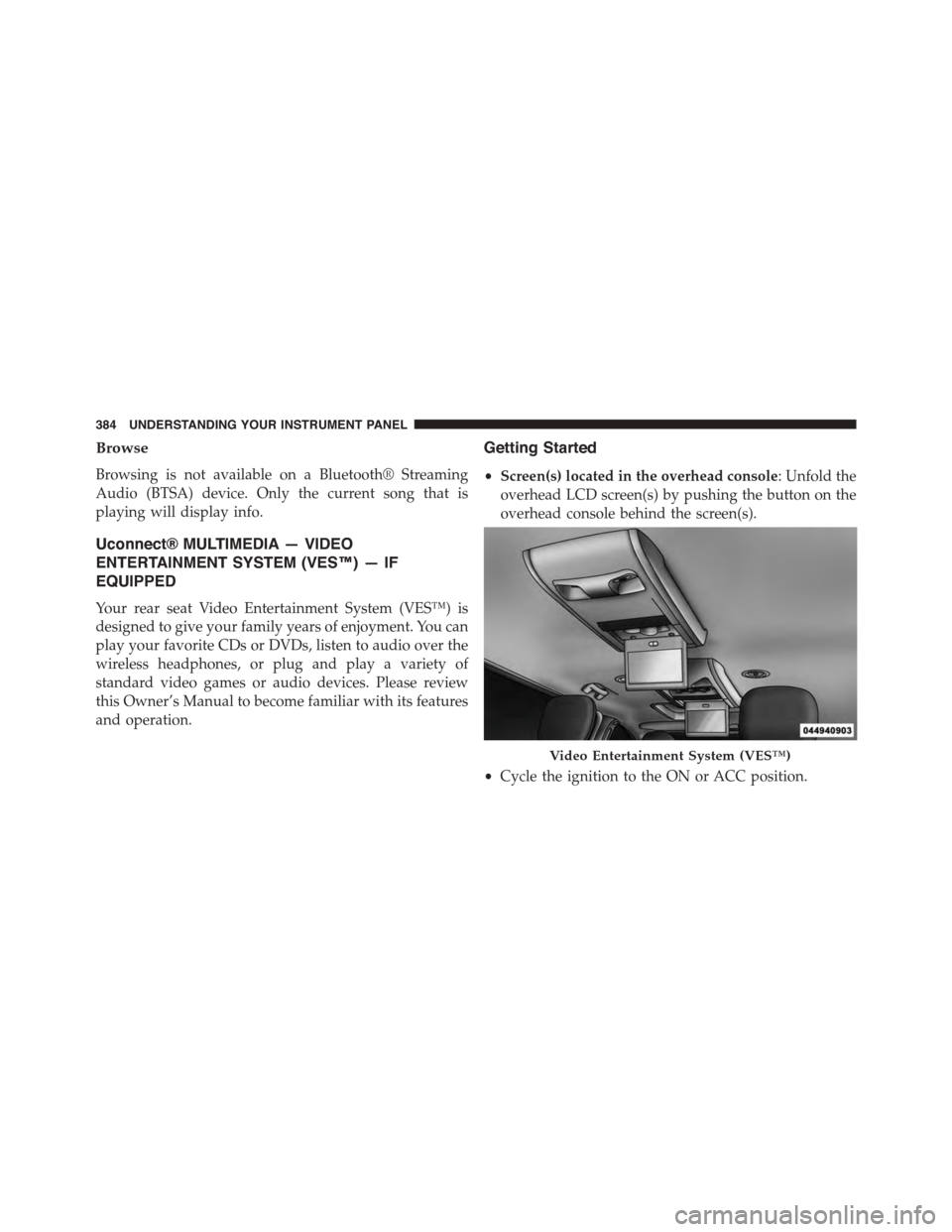
•Screen(s) located in the overhead console: Unfold the
overhead LCD screen(s) by pushing the button on the
overhead console behind the screen(s).
•Cycle the ignition to the ON or ACC position.
Video Entertainment System (VES™)
384 UNDERSTANDING YOUR INSTRUMENT PANEL
Page 387 of 703
•Your vehicle may be equipped with either a standard
DVD player or a Blu-ray™ Disc Player. If equipped
with a Blu-ray™ Disc Player, the icon will be present
on the Player.
•Turn on the Player (if equipped on Dual Screen Sys-
tem) by pushing the Power button, located on the far
left, or by pressing the button on the Remote Control.
•When the Video Screen(s) are open and a DVD/Blu-
ray™ Disc is inserted into the VES™ player, the
screen(s) turn(s) on automatically, the headphone
transmitters turn on and playback begins.
•For Dual Video Screen System, Channel 1 on the
Remote Control and Headphones refers to Screen 1
(second row) and Channel 2 on the Remote Control
and Headphones refers to Screen 2 (third row). Refer to
the Dual Video Screen section for more information.
•The system can be controlled by the front seat occu-
pants using either the touchscreen radio, the DVD or
Blu-ray™ Disc Player, or by the rear seat occupants
using the remote control.
Blu-ray™ Disc Player
Play A Blu-ray™ Disc
To view a Blu-ray™ disc, insert the disc into the Blu-
ray™ VES™ disc Player. Playback will begin automati-
cally after the Blu-ray™ is recognized by the disc drive. If
playback does not begin automatically after the disc is
inserted into the Blu-ray™ Player press the play button.
If playback does not begin automatically after the disc is
inserted into Blu-ray™ VES™ disc Player follow these
steps:
Using The Touchscreen Radio
•Push the MENU button on the faceplate, then press the
Rear VES™ button on the touchscreen. If a chapter list
4
UNDERSTANDING YOUR INSTRUMENT PANEL 385
Page 391 of 703
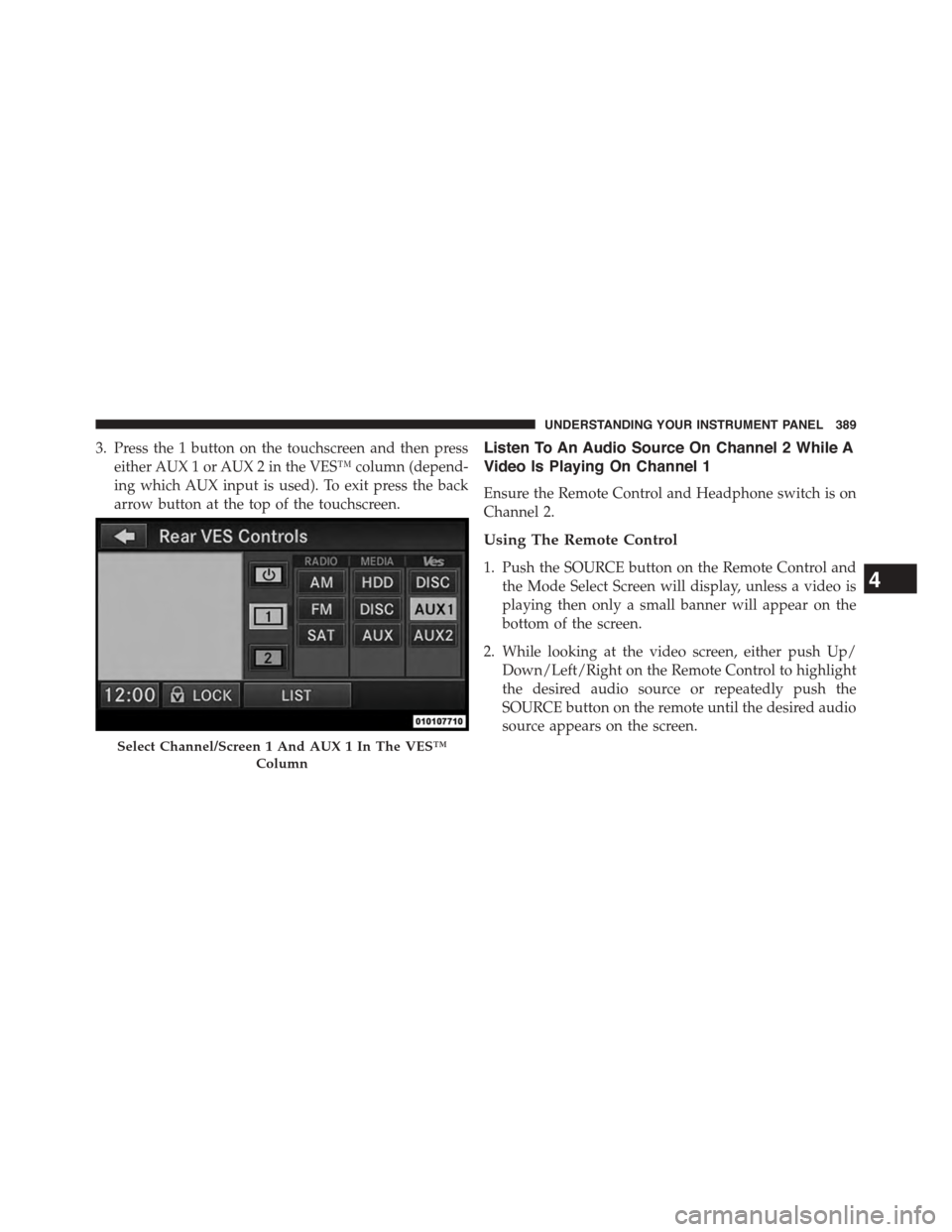
3. Press the 1 button on the touchscreen and then press
either AUX 1 or AUX 2 in the VES™ column (depend-
ing which AUX input is used). To exit press the back
arrow button at the top of the touchscreen.
Listen To An Audio Source On Channel 2 While A
Video Is Playing On Channel 1
Ensure the Remote Control and Headphone switch is on
Channel 2.
Using The Remote Control
1. Push the SOURCE button on the Remote Control and
the Mode Select Screen will display, unless a video is
playing then only a small banner will appear on the
bottom of the screen.
2. While looking at the video screen, either push Up/
Down/Left/Right on the Remote Control to highlight
the desired audio source or repeatedly push the
SOURCE button on the remote until the desired audio
source appears on the screen.
Select Channel/Screen 1 And AUX 1 In The VES™
Column
4
UNDERSTANDING YOUR INSTRUMENT PANEL 389
Page 392 of 703
Using The Touchscreen Radio Controls
1. Push the MENU button on the radio faceplate.
2. Press the Rear VES™ button on the touchscreen to
display the Rear VES™ Controls. If a channel list is
displayed, press the HIDE LIST button on the touch-
screen to display the Rear VES™ Controls screen.
3. To listen to an audio source on Channel 2 while a
video is playing on Channel 1, press the 2 button on
the touchscreen and choose an audio source. To exit
press the back arrow button at the top left of the left
screen.
Dual Video Screen
NOTE:Typically there are two different ways to operate
the features of the Video Entertainment System (VES™).
•The Remote Control
•The Touchscreen Radio (If Equipped)
Play A DVD Using The Touchscreen Radio
NOTE:Headunit DVD player does not play Blu-ray™
Discs.
1. Press the OPEN/CLOSE or LOAD button on the radio
faceplate (Touchscreen).
2. Insert the DVD with the label facing up. The radio
automatically selects the appropriate mode after the
disc is recognized and displays the menu screen or
starts playing the first track.
3. To watch a DVD on Screen 1 for second row passen-
gers, ensure the Remote Control and Headphone
switch is on Channel 1.
4. To watch a DVD on Screen 2 for third row passengers,
ensure the Remote Control and Headphone switch is
on Channel 2.
390 UNDERSTANDING YOUR INSTRUMENT PANEL
Page 395 of 703
NOTE:
•To view a DVD on the radio press the RADIO/MEDIA
button on the radio faceplate, then press the DISC tab
button on the touchscreen and then the VIEW VIDEO
button on the touchscreen.
•Viewing a DVD on the Touchscreen radio screen is not
available in all states/provinces. If available, the ve-
hicle must be stopped and the shift lever must be in the
PARK position for vehicles with an automatic trans-
mission. In vehicles with a manual transmission the
parking brake must be engaged.
•Pressing the screen on a Touchscreen radio while a
DVD is playing brings up basic remote control func-
tions for DVD play such as scene selection, Play, Pause,
FF, RW, and Stop. Pressing the X in the upper corner
will turn off the remote control screen functions.
Play A DVD Using The VES™ Player — If
Equipped
1. Insert the DVD with the label facing up. The VES™
player automatically selects the appropriate mode
after the disc is recognized and starts playing the
DVD.
NOTE:The VES™ player has basic DVD control func-
tion such as Menu, Play, Pause, FF, RW and Stop.
2. To watch a DVD on Screen 1 for second row passen-
gers, ensure the Remote Control and Headphone
switch is on Channel 1.
3. To watch a DVD on Screen 2 for third row passengers,
ensure the Remote Control and Headphone switch is
on Channel 2.
4
UNDERSTANDING YOUR INSTRUMENT PANEL 393
Page 398 of 703
NOTE:
•To view a DVD on the radio press the RADIO/MEDIA
button on the radio faceplate, then press the DISC tab
button on the touchscreen and then the VIEW VIDEO
button on the touchscreen.
•Viewing a DVD on the Touchscreen radio screen is not
available in all states/provinces. If available, the ve-
hicle must be stopped and the shift lever must be in the
PARK position for vehicles with an automatic trans-
mission. In vehicles with a manual transmission the
parking brake must be engaged.
Play A Blu-ray™ Disc Using The Blu-ray™ Player
— If Equipped
1. Insert the Blu-ray™ Disc with the label facing up. The
Blu-ray™ Player automatically selects the appropriate
mode after the disc is recognized and starts playing
the Blu-ray™ Disc.
NOTE:The Blu-ray™ Player has basic control functions
such as Menu, Play, Pause, FF, RW and Stop.
2. To watch a Blu-ray™ Disc on Screen 1 for second row
passengers, ensure the Remote Control and Head-
phone switch is on Channel 1.
3. To watch a Blu-ray™ Disc on Screen 2 for third row
passengers, ensure the Remote Control and Head-
phone switch is on Channel 2.
Using The Remote Control
1. Press the SOURCE button on the Blu-ray™ Player
Remote Control.
2. While looking at Screen 1 or 2, highlight Blu-ray™ by
either pressing Up/Down/Left/Right buttons or by
repeatedly pressing the SOURCE button, then press
OK on the Remote Control.
396 UNDERSTANDING YOUR INSTRUMENT PANEL
Page 399 of 703
NOTE:
•Channel/Screen 1 select mode information is shown
on the left side of the screen.
•Channel/Screen 2 select mode information is shown
on the right side of the screen.
•The VES™ will retain the last setting when turned off.
Using The Touchscreen Radio Controls
1. Press the MENU button on the radio faceplate.
2. Press the Rear VES™ button on the touchscreen to
display the Rear VES™ Controls. If a channel list is
displayed, press the HIDE LIST button on the touch-
screen to display the Rear VES™ Controls screen.
3. Press the 1 or 2 button on the touchscreen and then the
VES™ Disc button on the touchscreen in the VES™
column. To exit press the back arrow button at the top
left of the screen.
NOTE:
•To view a Blu-ray™ Disc on the radio, press the
RADIO/MEDIA button on the radio faceplate, then
press the VES™ Disc tab button on the touchscreen
and then the VIEW VIDEO button on the touchscreen.
•Viewing a Blu-ray™ Disc on the Touchscreen radio
screen is not available in all states/provinces. If avail-
able, the vehicle must be stopped and the shift lever
must be in the PARK position for vehicles with an
automatic transmission. In vehicles with a manual
transmission the parking brake must be engaged.
Listen To An Audio Source While A Video Is
Playing
Ensure the Remote Control and Headphone switch are on
the same channel. If watching a video on Screen 1
4
UNDERSTANDING YOUR INSTRUMENT PANEL 397