phone DODGE GRAND CARAVAN 2015 5.G Owner's Manual
[x] Cancel search | Manufacturer: DODGE, Model Year: 2015, Model line: GRAND CARAVAN, Model: DODGE GRAND CARAVAN 2015 5.GPages: 164, PDF Size: 22.27 MB
Page 86 of 164
Bluetooth® STREAMING AUDIO
If equipped with Uconnect®Voice Command, your Bluetooth®-equipped iPod®devices,
cell phones or other media players, may also be able to stream music to your vehicles
speakers. Your connected device must be Bluetooth®-compatible, and paired with your
radio (see UconnectPhone.com for pairing instructions).
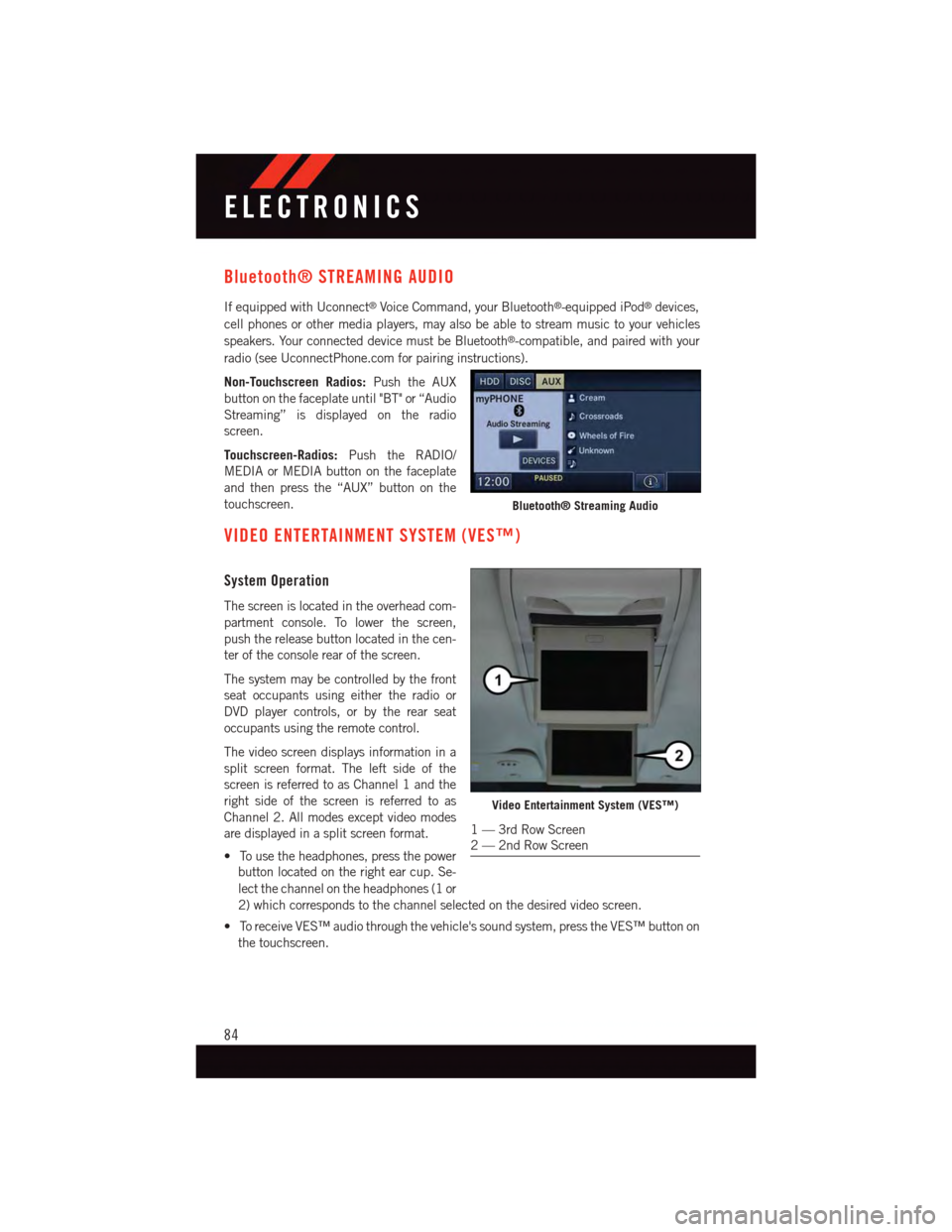
Non-Touchscreen Radios:Push the AUX
button on the faceplate until "BT" or “Audio
Streaming” is displayed on the radio
screen.
Touchscreen-Radios:Push the RADIO/
MEDIA or MEDIA button on the faceplate
and then press the “AUX” button on the
touchscreen.
VIDEO ENTERTAINMENT SYSTEM (VES™)
System Operation
The screen is located in the overhead com-
partment console. To lower the screen,
push the release button located in the cen-
ter of the console rear of the screen.
The system may be controlled by the front
seat occupants using either the radio or
DVD player controls, or by the rear seat
occupants using the remote control.
The video screen displays information in a
split screen format. The left side of the
screen is referred to as Channel 1 and the
right side of the screen is referred to as
Channel 2. All modes except video modes
are displayed in a split screen format.
•Tousetheheadphones,pressthepower
button located on the right ear cup. Se-
lect the channel on the headphones (1 or
2) which corresponds to the channel selected on the desired video screen.
•ToreceiveVES™audiothroughthevehicle'ssoundsystem,presstheVES™buttonon
the touchscreen.
Bluetooth® Streaming Audio
Video Entertainment System (VES™)
1—3rdRowScreen2—2ndRowScreen
ELECTRONICS
84
Page 93 of 164
Using HomeLink®
To o p e r a t e , p u s h a n d r e l e a s e t h e p r o g r a m m e d H o m e L i n k®button. Activation will now
occur for the programmed device (e.g., garage door opener, gate operator, security system,
entry door lock, home/office lighting, etc.,). The hand-held transmitter of the device may
also be used at any time.
WARNING!
•Yourmotorizeddoororgatewillopenandclosewhileyouareprogrammingthe
universal transceiver. Do not program the transceiver if people or pets are in the
path of the door or gate.
•Donotrunyourvehicleinaclosedgarageorconfinedareawhileprogrammingthe
transceiver. Exhaust gas from your vehicle contains Carbon Monoxide (CO) which is
odorless and colorless. Carbon Monoxide is poisonous when inhaled and can cause
you and others to be severely injured or killed.
POWER INVERTER
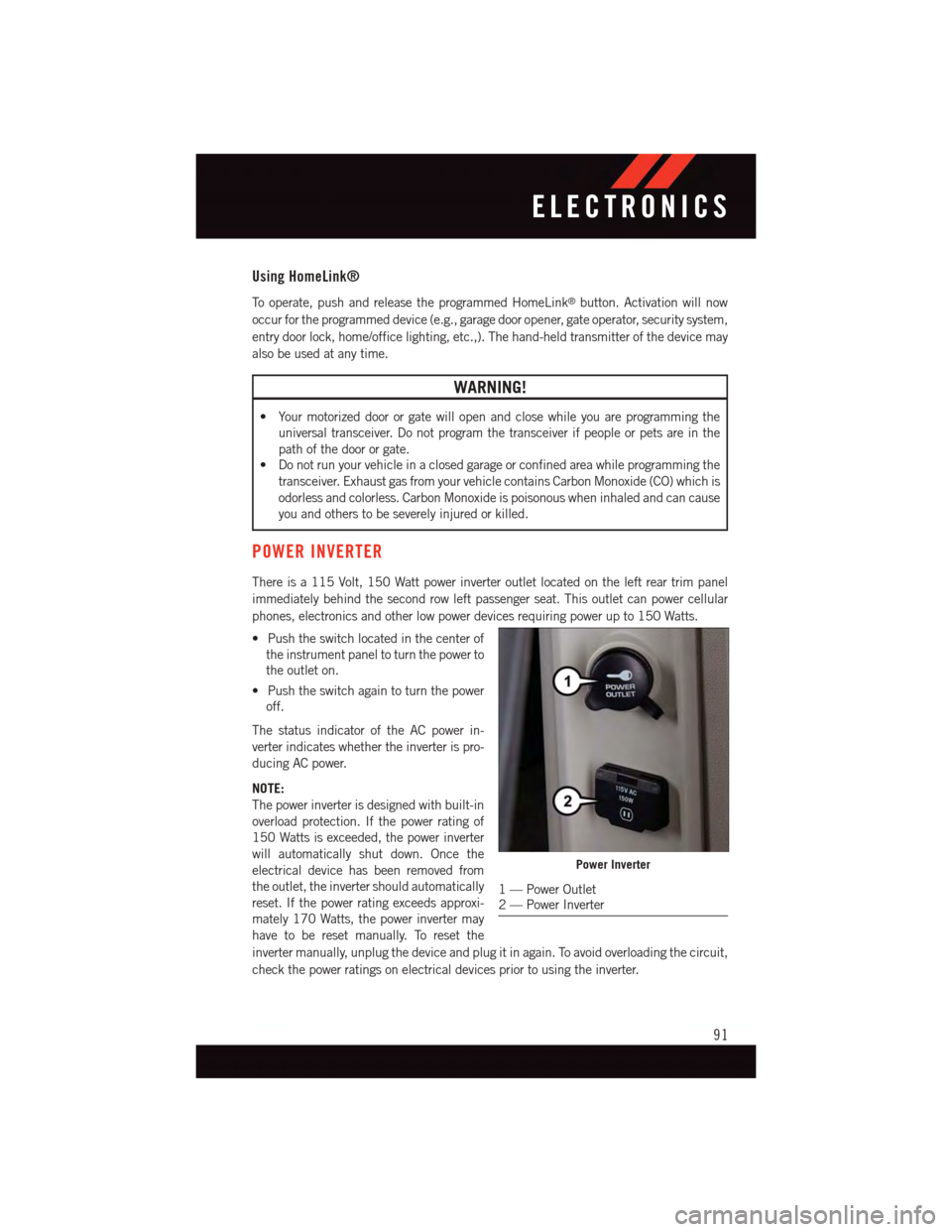
There is a 115 Volt, 150 Watt power inverter outlet located on the left rear trim panel
immediately behind the second row left passenger seat. This outlet can power cellular
phones, electronics and other low power devices requiring power up to 150 Watts.
•Pushtheswitchlocatedinthecenterof
the instrument panel to turn the power to
the outlet on.
•Pushtheswitchagaintoturnthepower
off.
The status indicator of the AC power in-
verter indicates whether the inverter is pro-
ducing AC power.
NOTE:
The power inverter is designed with built-in
overload protection. If the power rating of
150 Watts is exceeded, the power inverter
will automatically shut down. Once the
electrical device has been removed from
the outlet, the inverter should automatically
reset. If the power rating exceeds approxi-
mately 170 Watts, the power inverter may
have to be reset manually. To reset the
inverter manually, unplug the device and plug it in again. To avoid overloading the circuit,
check the power ratings on electrical devices prior to using the inverter.
Power Inverter
1—PowerOutlet2—PowerInverter
ELECTRONICS
91
Page 99 of 164
ROADSIDE ASSISTANCE
Dial toll-free 1-800-521-2779 for U.S. Residents or 1-800-363-4869 for Canadian
Residents.
•Provideyourname,vehicleidentificationnumber,licenseplatenumber,andyour
location, including the telephone number from which you are calling.
•Brieflydescribethenatureoftheproblemandanswerafewsimplequestions.
•Youwillbegiventhenameoftheserviceproviderandanestimatedtimeofarrival.If
you feel you are in an “unsafe situation”, please let us know. With your consent, we will
contact local police or safety authorities.
INSTRUMENT CLUSTER WARNING LIGHTS
-LowFuelWarningLight
This warning light indicates when the fuel level reaches approximately 2.0 gal (7.8 L), this
light will turn on and a single chime will sound.
-ChargingSystemLight
This light shows the status of the electrical charging system. If the charging system light
remains on, it means that the vehicle is experiencing a problem with the charging system.
We recommend you do not continue driving if the charging system light is on. Have the
vehicle serviced immediately.
-OilPressureWarningLight
This light indicates low engine oil pressure. If the light turns on while driving, stop the
vehicle and shut off the engine as soon as possible. A chime will sound when this light
turns on.
We recommend you do not operate the vehicle or engine damage will occur. Have the
vehicle serviced immediately.
-Anti-LockBrake(ABS)Light
This light monitors the Anti-Lock Brake System (ABS).
If the light is not on during starting, stays on, or turns on while driving, we recommend you
contact the nearest authorized dealer and have the vehicle serviced immediately.
-AirBagWarningLight
If the light is not on during starting, stays on, or turns on while driving, have the vehicle
serviced by an authorized dealer immediately.
-ElectronicThrottleControl(ETC)IndicatorLight
This light informs you of a problem with the system.
WHAT TO DO IN EMERGENCIES
97
Page 125 of 164
3. Disconnect the positive(+)end of the jumper cable from the positive(+)post of the
booster battery.
4. Disconnect the opposite end of the positive(+)jumper cable from the positive(+)post
of the vehicle with the discharged battery.
NOTE:
If frequent jump-starting is required to start your vehicle you should have the battery and
charging system inspected at your authorized dealer.
CAUTION!
•Donotuseaportablebatteryboosterpackoranyotherboostersourcewithasystem
voltage greater than 12 Volts or damage to the battery, starter motor, alternator or
electrical system may occur.
•Failuretofollowtheseprocedurescouldresultindamagetothechargingsystemof
the booster vehicle or the discharged vehicle.
•Accessoriesthatcanbepluggedintothevehiclepoweroutletsdrawpowerfromthe
vehicle’s battery, even when not in use (e.g., cellular phones, etc.). Eventually, if
plugged in long enough, the vehicle’s battery discharges sufficiently to degrade
battery life and/or prevent the engine from starting.
WARNING!
•Whentemperaturesarebelowthefreezingpoint,electrolyteinadischargedbattery
may freeze. Do not attempt jump-starting because the battery could rupture or
explode and cause personal injury. Battery temperature must be brought above the
freezing point before attempting a jump-start.
•Takecaretoavoidtheradiatorcoolingfanwheneverthehoodisraised.Itcanstart
anytime the ignition switch is on. You can be injured by moving fan blades.
•Removeanymetaljewelry,suchaswatchbandsorbracelets,thatmightmakean
inadvertent electrical contact. You could be severely injured.
•Batteriescontainsulfuricacidthatcanburnyourskinoreyesandgenerate
hydrogen gas which is flammable and explosive. Keep open flames or sparks away
from the battery.
•Donotallowvehiclestotoucheachotherasthiscouldestablishaground
connection and personal injury could result.
•Failuretofollowthisprocedurecouldresultinpersonalinjuryorpropertydamage
due to battery explosion.
•Donotconnectthecabletothenegativepost(-)ofthedischargedbattery.The
resulting electrical spark could cause the battery to explode and could result in
personal injury.
WHAT TO DO IN EMERGENCIES
123
Page 152 of 164
FREQUENTLY ASKED QUESTIONS
GETTING STARTED
•HowdoIinstallmyLATCHEquippedChildSeat?pg.23
•HowdoIprogrammyFrontSeatMemory?pg.30
OPERATING YOUR VEHICLE
•HowdoestheElectronicRangeSelect(ERS)operate?pg.45
ELECTRONICS
Which radio is in my vehicle?
•Uconnect®130 pg. 58
•Uconnect®130 WITH SiriusXM pg. 60
•Uconnect®430/430N pg. 63
How do I activate the Audio Jack?
•Uconnect®130 pg. 62
•Uconnect®130 WITH SiriusXM pg. 62
•Uconnect®430/430N pg. 67
How do I set the clock on my radio?
•Uconnect®130 pg. 61
•Uconnect®130 WITH SiriusXM pg. 61
•Uconnect®430/430N pg. 64
•HowdoIusetheNavigationfeature?
•Uconnect®430/430N pg. 70
•HowdoIpairmycellphoneviaBluetooth®with the Uconnect®Hands-Free Voice
Activation System? pg. 79
•HowdoIusemyUSBporttolistentoaudiothroughmytouch-screenradio?pg.77
•HowdoIconfiguremyUniversalGarageDoorOpener(HomeLink®)?pg.89
UTILITY
•HowdoIknowhowmuchIcantowwithmyDodgeGrandCaravan?pg.95
FREQUENTLY ASKED QUESTIONS
150
Page 156 of 164
Interior and Instrument Lights......7
Interior Appearance Care.......132
Intermittent Wipers (Delay Wipers) . . .40
Introduction................3
Inverter Outlet (115V)..........91
Inverter, Power..............91
iPod®/USB/MP3 Control........77
Bluetooth®Streaming Audio....84
Jack Location. . . . . . . . . . . . . .110
Jack Operation . . . . . . . . . . . . .110Jump Starting.............122
Key Fob . . . . . . . . . . . . . . . . .10Arm The Alarm . . . . . . . . . . .16Disarm The Alarm..........16Lock The Doors...........10Unlock The Doors..........10Key Fob Programmable Features....87Keyless Enter-N-GoLock/Unlock . . . . . . . . . . . . .12Keyless Enter-N-Go™Key Fob . . . . . . . . . . . . . . .12Keyless Enter-N-Go™ . . . . . . . .12Passive Entry............12Remote Control...........12
Lane Change Assist...........40Liftgate, Power..............10LightsBulb Replacement........146Fog . . . . . . . . . . . . . . . . .101High Beam Indicator . . . . . . .101Low Fuel . . . . . . . . . . . . . .97Seat Belt Reminder.........99Security Alarm...........101Service...............146Ti r e P r e s s u r e M o n i t o r i n g ( T P M S ) . . 9 8Tu r n S i g n a l.............40LocksLiftgate, Tailgate . . . . . . . . . .10Lubrication, Body...........132Luggage Rack (Roof Rack).......94
Maintenance Free Battery . . . . . . .132Maintenance, General.........132Maintenance Procedures.......132Maintenance Record..........136
Maintenance Schedule........132
Malfunction Indicator Light (Check
Engine)...............100
Master Cylinder (Brakes)........132
Media Center Radio...........63
Memory Seat...............30
Mirrors
Heated...........47,48,51
MOPAR®Accessories.........149
Navigation . . . . . . . . . . . . . . . .70Navigation System (Uconnect®gps) . .70Navigation Voice Prompt Volume....70New Vehicle Break-In Period . . . . . .39
Occupant Restraints........20,21Oil Change Indicator..........101Oil, Engine............130, 132Capacity..............130Change Interval..........132Checking..............132Disposal..............132Filter.............130, 132Filter Disposal...........132Materials Added to........132Recommendation......130, 132Viscosity...........130, 132Oil Filter, Selection...........132Oil Pressure Light . . . . . . . . . . . .97OutletPower................92Overheating, Engine..........103
Paint Care . . . . . . . . . . . . . . .132Panic Alarm...............10ParkSense®System, Rear........52Phone (Uconnect®)...........78Placard, Tire and LoadingInformation . . . . . . . . . . . . .141PowerGlass Sunroof............54Inverter . . . . . . . . . . . . . . .91Lift Gate . . . . . . . . . . . . . . .10Outlet (Auxiliary ElectricalOutlet) . . . . . . . . . . . . . . . .92Seats................28Power Steering Fluid..........131Preparation for Jacking........115
INDEX
154