Radio DODGE GRAND CARAVAN 2019 User Guide
[x] Cancel search | Manufacturer: DODGE, Model Year: 2019, Model line: GRAND CARAVAN, Model: DODGE GRAND CARAVAN 2019Pages: 490, PDF Size: 3.84 MB
Page 144 of 490
Headlamps With Wipers (Available With Auto
Headlights Only)
When ON is selected, and the headlight switch is in the
AUTO position, the headlights will turn on approximately
10 seconds after the wipers are turned on. The headlights
will also turn off when the wipers are turned off if they
were turned on by this feature. To make your selection,
push and release therightarrow button until a check-mark
appears next to the setting, showing that the setting has
been selected.
NOTE: Turning the headlights on during the daytime
causes the instrument panel lights to dim. To increase the
brightness, refer to “Interior Lights” in “Getting To Know
Your Vehicle.”
Intermittent Wiper Options — If Equipped
When ON is selected, the system will automatically acti-
vate the windshield wipers if it senses moisture on the
windshield. To make your selection, push and release the
right arrow button until a check-mark appears next to the
feature showing the system has been activated or the
check-mark is removed showing the system has been
deactivated. When the system is deactivated, the system
reverts to the standard intermittent wiper operation. Key-Off Power Delay
When this feature is selected, the power window switches,
radio, Uconnect phone (if equipped), DVD video system (if
equipped), power sunroof (if equipped), and power outlets
will remain active for up to 10 minutes after the ignition
switch is turned OFF. Opening either front vehicle door
will cancel this feature. To make your selection, scroll up or
down until the preferred setting is highlighted, then push
and release the
rightarrow button until a check-mark
appears next to the setting, showing that the setting has
been selected.
Illuminated Approach
When this feature is selected, the headlights will activate
and remain on for up to 90 seconds when the doors are
unlocked with the key fob. To make your selection, scroll
up or down until the preferred setting is highlighted, then
push and release the rightarrow button until a check-mark
appears next to the setting, showing that the setting has
been selected.
Hill Start Assist (HSA) — If Equipped
When on is selected, the HSA system is active. Refer to
“Electronic Brake Control System” in “Safety” for system
142 GETTING TO KNOW YOUR INSTRUMENT PANEL
Page 160 of 490
SAFETY FEATURES
Anti-Lock Brake System (ABS)
The Anti-Lock Brake System (ABS) provides increased
vehicle stability and brake performance under most brak-
ing conditions. The system automatically prevents wheel
lock, and enhances vehicle control during braking.
The ABS performs a self-check cycle to ensure that the ABS
is working properly each time the vehicle is started and
driven. During this self-check, you may hear a slight
clicking sound as well as some related motor noises.
ABS is activated during braking when the system detects
one or more wheels begin to lock. Road conditions such as
ice, snow, gravel, bumps, railroad tracks, loose debris, or
panic stops may increase the likelihood of ABS activa-
tion(s).
You also may experience the following when ABS activates:
•The ABS motor noise (it may continue to run for a short
time after the stop).
• The clicking sound of solenoid valves.
• Brake pedal pulsations.
• A slight drop of the brake pedal at the end of the stop. These are all normal characteristics of ABS.
WARNING!
•
The ABS contains sophisticated electronic equip-
ment that may be susceptible to interference caused
by improperly installed or high output radio trans-
mitting equipment. This interference can cause pos-
sible loss of anti-lock braking capability. Installation
of such equipment should be performed by qualified
professionals.
• Pumping of the Anti-Lock Brakes will diminish their
effectiveness and may lead to a collision. Pumping
makes the stopping distance longer. Just press firmly
on your brake pedal when you need to slow down or
stop.
• The ABS cannot prevent the natural laws of physics
from acting on the vehicle, nor can it increase brak-
ing or steering efficiency beyond that afforded by the
condition of the vehicle brakes and tires or the
traction afforded.
• The ABS cannot prevent collisions, including those
resulting from excessive speed in turns, following
another vehicle too closely, or hydroplaning.
(Continued)
158 SAFETY
Page 171 of 490
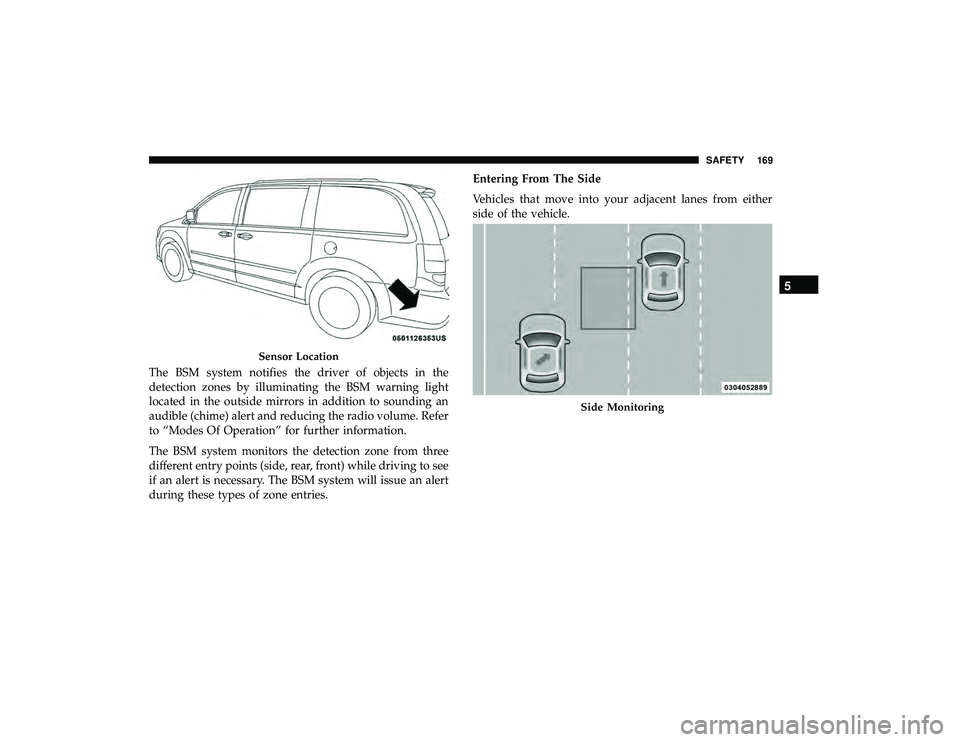
The BSM system notifies the driver of objects in the
detection zones by illuminating the BSM warning light
located in the outside mirrors in addition to sounding an
audible (chime) alert and reducing the radio volume. Refer
to “Modes Of Operation” for further information.
The BSM system monitors the detection zone from three
different entry points (side, rear, front) while driving to see
if an alert is necessary. The BSM system will issue an alert
during these types of zone entries.Entering From The Side
Vehicles that move into your adjacent lanes from either
side of the vehicle.
Sensor Location
Side Monitoring
5
SAFETY 169
Page 175 of 490
(5 km/h), to objects moving a maximum of approximately
20 mph (32 km/h), such as in parking lot situations.
NOTE:In a parking lot situation, oncoming vehicles can be
obscured by vehicles parked on either side. If the sensors
are blocked by other structures or vehicles, the system will
not be able to alert the driver.
When RCP is on and the vehicle is in REVERSE, the driver
is alerted using both the visual and audible alarms, includ-
ing reducing the radio volume.
WARNING!
Rear Cross Path Detection (RCP) is not a back up aid
system. It is intended to be used to help a driver detect
an oncoming vehicle in a parking lot situation. Drivers
must be careful when backing up, even when using
RCP. Always check carefully behind your vehicle, look
behind you, and be sure to check for pedestrians,
animals, other vehicles, obstructions, and blind spots
before backing up. Failure to do so can result in serious
injury or death.
Modes Of Operation
Modes Of Operation With Instrument Cluster Display
Three selectable modes of operation are available in the
instrument cluster display. Refer to “Instrument Cluster
Display” in “Getting To Know Your Instrument Panel” for
further information.
Blind Spot Alert Lights Only
When operating in Blind Spot Alert mode, the BSM system will
provide a visual alert in the appropriate side view mirror based
on a detected object. However, when the system is operating in
RCP, the system will respond with both visual and audible
alerts when a detected object is present. Whenever an audible
alert is requested, the radio volume is reduced.
Blind Spot Alert Lights/Chime
When operating in Blind Spot Alert Lights/Chime mode,
the BSM system will provide a visual alert in the appro-
priate side view mirror based on a detected object. If the
turn signal is then activated, and it corresponds to an alert
present on that side of the vehicle, an audible chime will
also be sounded. Whenever a turn signal and detected
object are present on the same side at the same time, both
the visual and audio alerts will be issued. In addition to the
audible alert the radio (if on) volume will be reduced.
5
SAFETY 173
Page 176 of 490
NOTE:
•Whenever an audible alert is requested by the BSM
system, the radio volume is reduced.
• If the hazard flashers are on, the system will request the
appropriate visual alert only.
When the system is in RCP, the system shall respond with
both visual and audible alerts when a detected object is
present. Whenever an audible alert is requested, the radio
volume is reduced. Turn/hazard signal status is ignored;
the RCP state always requests the chime.
Blind Spot Alert Off
When the BSM system is turned off there will be no visual
or audible alerts from either the BSM or RCP systems.
NOTE: The BSM system will store the current operating
mode when the vehicle is shut off. Each time the vehicle is
started the previously stored mode will be recalled and
used.General Information
The following regulatory statement applies to all Radio
Frequency (RF) devices equipped in this vehicle:
This device complies with Part 15 of the FCC Rules and
with Industry Canada license-exempt RSS standard(s).
Operation is subject to the following two conditions:
1. This device may not cause harmful interference.
2. This device must accept any interference received, in- cluding interference that may cause undesired opera-
tion.
NOTE: Changes or modifications not expressly approved
by the party responsible for compliance could void the
user ’s authority to operate the equipment.
Tire Pressure Monitor System (TPMS)
The Tire Pressure Monitor System (TPMS) will warn the
driver of a low tire pressure based on the vehicle recom-
mended cold placard pressure.
174 SAFETY
Page 180 of 490
Service Tpm System
The TPMS Warning Light will flash on and off for 75
seconds, and remain on solid when a system fault is
detected. The system fault will also sound a chime. If the
ignition switch is cycled, this sequence will repeat, provid-
ing the system fault still exists. The TPMS Warning Light
will turn off when the fault condition no longer exists. A
system fault can occur with any of the following scenarios:
•Jamming due to electronic devices or driving next to
facilities emitting the same radio frequencies as the
TPMS sensors.
• Installing some form of aftermarket window tinting that
affects radio wave signals.
• Accumulation of excessive snow and/or ice around the
wheels or wheel housings.
• Using tire chains on the vehicle.
• Using wheels/tires not equipped with TPMS sensors.
Vehicles With Compact Spare
• The compact spare tire (if equipped) does not have a
TPMS sensor. Therefore the TPMS will not monitor the
pressure in the compact spare tire. •
If you install the compact spare tire in place of a road tire
that has a pressure below the low-pressure warning
limit, upon the next ignition switch cycle, a chime will
sound, a “LOW TIRE PRESSURE” message will be
displayed and the TPMS Warning Light will turn on.
• After driving for up to 20 minutes above 15 mph
(24 km/h), the TPMS Warning Light will flash on and off
for 75 seconds and then remain on solid.
• For each subsequent ignition switch cycle, a chime will
sound, the TPMS Warning Light will flash on and off for
75 seconds and then remain on solid.
• Once you repair or replace the original road tire and
reinstall it on the vehicle in place of the compact spare
tire, the TPMS will automatically update, and the TPMS
Warning Light will turn off as long as no tire pressure is
below the low-pressure warning limit in any of the four
active road tires.
TPMS Deactivation — If Equipped
The TPMS can be deactivated if replacing all four wheel
and tire assemblies (road tires) with wheel and tire assem-
blies that do not have TPMS Sensors, such as when
installing winter wheel and tire assemblies on your vehicle.
178 SAFETY
Page 181 of 490
To deactivate the TPMS, first, replace all four wheel and
tire assemblies (road tires) with tires not equipped with
Tire Pressure Monitoring (TPM) Sensors. Then, drive the
vehicle for 20 minutes above 15 mph (24 km/h). The TPMS
will chime, the TPMS Warning Light will flash on and off
for 75 seconds and then remain on.
Beginning with the next ignition cycle, the TPMS will no
longer chime or flash the TPMS Warning Light.
To reactivate the TPMS, replace all four wheel and tire
assemblies (road tires) with tires equipped with TPM sen-
sors. Then, drive the vehicle for up to 20 minutes above
15 mph (24 km/h). The TPMS will chime, the TPMS Warning
Light will flash on and off for 75 seconds and then turn off.
General Information
The following regulatory statement applies to all radio
frequency (RF) devices equipped in this vehicle:
This device complies with Part 15 of the FCC Rules and
with Industry Canada license-exempt RSS standard(s).
Operation is subject to the following two conditions:
(1) This device may not cause harmful interference, and
(2) This device must accept any interference received,
including interference that may cause undesired operation.NOTE:
Changes or modifications not expressly approved
by the party responsible for compliance could void the
user ’s authority to operate the equipment.
OCCUPANT RESTRAINT SYSTEMS
Some of the most important safety features in your vehicle
are the restraint systems:
Occupant Restraint Systems Features
• Seat Belt Systems
• Supplemental Restraint Systems (SRS) Air Bags
• Supplemental Active Head Restraints
• Child Restraints
Some of the safety features described in this section may be
standard equipment on some models, or may be optional
equipment on others. If you are not sure, ask an authorized
dealer.
Important Safety Precautions
Please pay close attention to the information in this section.
It tells you how to use your restraint system properly, to
keep you and your passengers as safe as possible.
5
SAFETY 179
Page 203 of 490
Seat belts are necessary for your protection in all collisions,
and also are needed to help keep you in position, away
from an inflating air bag.
When the ORC detects a collision requiring the front air
bags, it signals the inflator units. A large quantity of
non-toxic gas is generated to inflate the front air bags.
The steering wheel hub trim cover and the upper passen-
ger side of the instrument panel separate and fold out of
the way as the air bags inflate to their full size. The front air
bags fully inflate in less time than it takes to blink your
eyes. The front air bags then quickly deflate while helping
to restrain the driver and front passenger.
Knee Impact Bolsters
The Knee Impact Bolsters help protect the knees of the
driver and front passenger, and position the front occu-
pants for improved interaction with the front air bags.
WARNING!
•Do not drill, cut, or tamper with the knee impact
bolsters in any way.
• Do not mount any accessories to the knee impact
bolsters such as alarm lights, stereos, citizen band
radios, etc.
Supplemental Driver Knee Air Bag
This vehicle is equipped with a Supplemental Driver Knee
Air Bag mounted in the instrument panel below the
steering column. The Supplemental Driver Knee Air Bag
provides enhanced protection during a frontal impact by
working together with the seat belts, pretensioners, and
front air bags.
Supplemental Side Air Bags
Supplemental Seat-Mounted Side Air Bags (SABs)
This vehicle is equipped with Supplemental Seat-Mounted
Side Air Bags (SABs).
Supplemental Seat-Mounted Side Air Bags (SABs) are
located in the outboard side of the front seats. The SABs are
marked with “SRS AIRBAG” or “AIRBAG” on a label or on
the seat trim on the outboard side of the seats.
5
SAFETY 201
Page 264 of 490
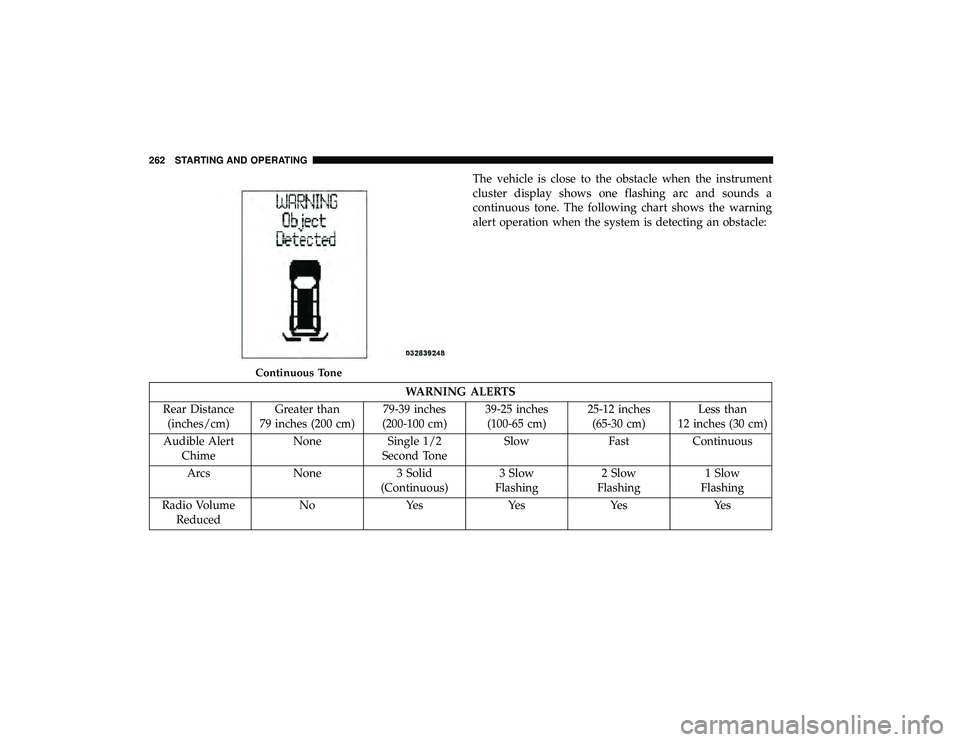
The vehicle is close to the obstacle when the instrument
cluster display shows one flashing arc and sounds a
continuous tone. The following chart shows the warning
alert operation when the system is detecting an obstacle:
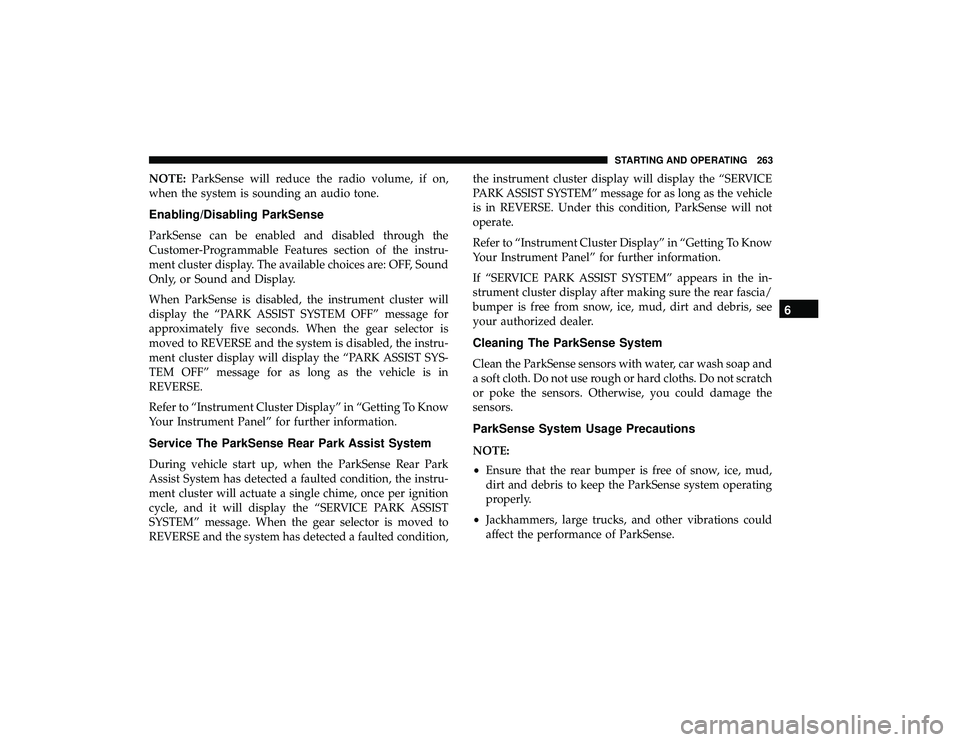
WARNING ALERTS
Rear Distance (inches/cm) Greater than
79 inches (200 cm) 79-39 inches
(200-100 cm) 39-25 inches
(100-65 cm) 25-12 inches
(65-30 cm) Less than
12 inches (30 cm)
Audible Alert Chime None Single 1/2
Second Tone Slow Fast Continuous
Arcs None 3 Solid (Continuous)3 Slow
Flashing 2 Slow
Flashing 1 Slow
Flashing
Radio Volume Reduced No Yes Yes Yes Yes
Continuous Tone
262 STARTING AND OPERATING
Page 265 of 490
NOTE:ParkSense will reduce the radio volume, if on,
when the system is sounding an audio tone.
Enabling/Disabling ParkSense
ParkSense can be enabled and disabled through the
Customer-Programmable Features section of the instru-
ment cluster display. The available choices are: OFF, Sound
Only, or Sound and Display.
When ParkSense is disabled, the instrument cluster will
display the “PARK ASSIST SYSTEM OFF” message for
approximately five seconds. When the gear selector is
moved to REVERSE and the system is disabled, the instru-
ment cluster display will display the “PARK ASSIST SYS-
TEM OFF” message for as long as the vehicle is in
REVERSE.
Refer to “Instrument Cluster Display” in “Getting To Know
Your Instrument Panel” for further information.
Service The ParkSense Rear Park Assist System
During vehicle start up, when the ParkSense Rear Park
Assist System has detected a faulted condition, the instru-
ment cluster will actuate a single chime, once per ignition
cycle, and it will display the “SERVICE PARK ASSIST
SYSTEM” message. When the gear selector is moved to
REVERSE and the system has detected a faulted condition, the instrument cluster display will display the “SERVICE
PARK ASSIST SYSTEM” message for as long as the vehicle
is in REVERSE. Under this condition, ParkSense will not
operate.
Refer to “Instrument Cluster Display” in “Getting To Know
Your Instrument Panel” for further information.
If “SERVICE PARK ASSIST SYSTEM” appears in the in-
strument cluster display after making sure the rear fascia/
bumper is free from snow, ice, mud, dirt and debris, see
your authorized dealer.
Cleaning The ParkSense System
Clean the ParkSense sensors with water, car wash soap and
a soft cloth. Do not use rough or hard cloths. Do not scratch
or poke the sensors. Otherwise, you could damage the
sensors.
ParkSense System Usage Precautions
NOTE:
•
Ensure that the rear bumper is free of snow, ice, mud,
dirt and debris to keep the ParkSense system operating
properly.
• Jackhammers, large trucks, and other vibrations could
affect the performance of ParkSense.
6
STARTING AND OPERATING 263