light DODGE GRAND CARAVAN 2020 Owners Manual
[x] Cancel search | Manufacturer: DODGE, Model Year: 2020, Model line: GRAND CARAVAN, Model: DODGE GRAND CARAVAN 2020Pages: 380, PDF Size: 14.92 MB
Page 344 of 380

342MULTIMEDIA
Turning it counterclockwise (backward)
by one click will jump to the previous
track in the list or push the VR button and
say "Previous Track".
Jump backward in the current track by
pushing and holding the << RW button.
Holding the << RW button long enough will
jump to the beginning of the current track.
Jump forward in the current track by pushing
and holding the FF >> button.
A single push backward << RW or forward FF
>> will jump backward or forward respec -
tively, for five seconds.
Use the << SEEK and SEEK >> buttons to
jump to the previous or next track. Pushing
the SEEK >> button during play mode will
jump to the next track in the list, or push the
VR button and say "Next or Previous Track."
While a track is playing, push the INFO button
to see the associated metadata (artist, track
title, album, etc.) for that track. Pushing the
INFO button again jumps to the next screen
of data for that track. Once all screens have
been viewed, the last INFO button push will
go back to the play mode screen on the radio.
Pushing the Repeat button will change the
audio device mode to repeat the current
playing track or push the VR button and say
"Repeat On" or "Repeat Off".
Push the Scan button to use AUX/USB/MP3
device scan mode, which will play the first 10
seconds of each track in the current list and
then forward to the next song. To stop Scan
mode and start playing the desired track,
when it is playing the track, push the Scan
button again. During Scan mode, pushing the
<< SEEK and SEEK >> buttons will select the
previous and next tracks.
RND button: Pushing this button toggles
between Shuffle ON and Shuffle OFF modes
for the external USB device, or push the VR
button and say "Shuffle On" or "Shuffle Off." If
the RND icon is showing on the radio display,
then the shuffle mode is On.
List Or Browse Mode
During Play mode, pushing any of the buttons
described below will bring up List mode. List
mode enables scrolling through the list of
menus and tracks on the audio device. Tune control knob: The Tune control knob
functions in a similar manner as the scroll
wheel on the audio device or external USB
device.
Turning it clockwise (forward) and counter-
clockwise (backward) scrolls through the
lists, displaying the track detail on the radio
display. Once the track to be played is high-
lighted on the radio display, push the Tune
control knob to select and start playing the
track. Turning the TUNE control knob fast will
scroll through the list faster. During fast
scroll, a slight delay in updating the informa
-
tion on the radio display may be noticeable.
In List mode, the radio Preset buttons are used
as shortcuts to the following lists on the
external USB device:
Preset 1 – Playlists
Preset 2 – Artists
Preset 3 – Albums
Preset 4 – Genres
Preset 5 – Audiobooks
Preset 6 – Podcasts
20_RT_OM_EN_USC_t.book Page 342
Page 347 of 380
MULTIMEDIA345
When connecting an external source to the AUX
input, be sure to follow the standard color
coding for the VES jacks.
NOTE:
Certain high-end video game consoles will
exceed the power limit of the vehicle's Power
Inverter. Refer to “Power Inverter — If Equipped”
in “Getting To Know Your Vehicle” for more
information.
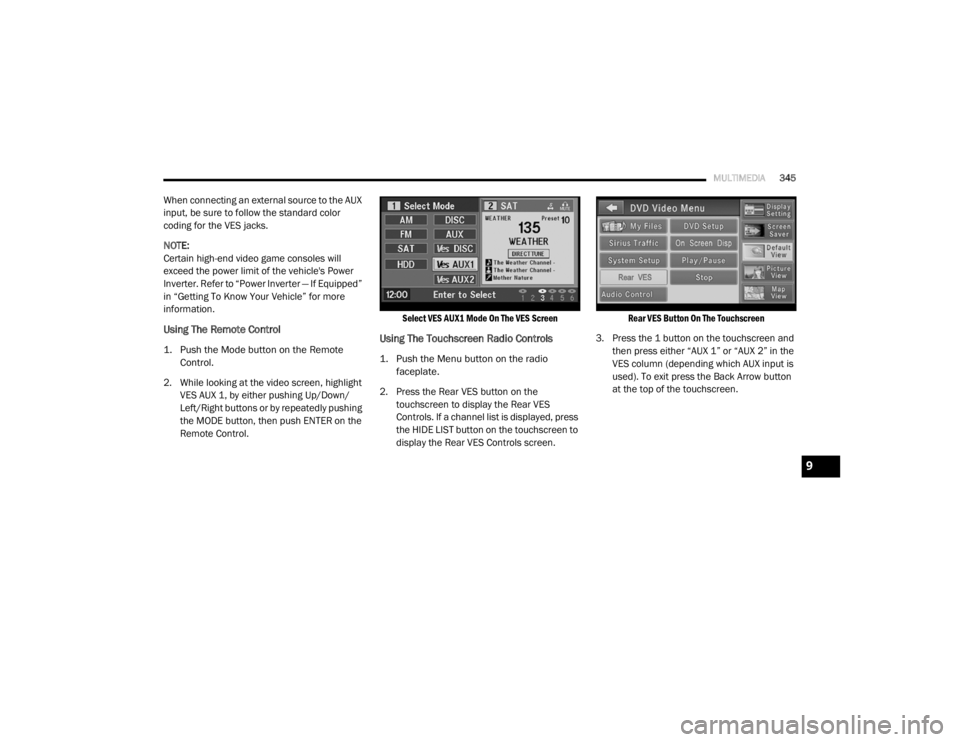
Using The Remote Control
1. Push the Mode button on the Remote
Control.
2. While looking at the video screen, highlight VES AUX 1, by either pushing Up/Down/
Left/Right buttons or by repeatedly pushing
the MODE button, then push ENTER on the
Remote Control.
Select VES AUX1 Mode On The VES Screen
Using The Touchscreen Radio Controls
1. Push the Menu button on the radio
faceplate.
2. Press the Rear VES button on the touchscreen to display the Rear VES
Controls. If a channel list is displayed, press
the HIDE LIST button on the touchscreen to
display the Rear VES Controls screen.
Rear VES Button On The Touchscreen
3. Press the 1 button on the touchscreen and then press either “AUX 1” or “AUX 2” in the
VES column (depending which AUX input is
used). To exit press the Back Arrow button
at the top of the touchscreen.
9
20_RT_OM_EN_USC_t.book Page 345
Page 348 of 380
346MULTIMEDIA
Play A DVD Using The Touchscreen Radio
NOTE:
Headunit DVD player does not play Blu-ray™
Discs.
1. Push the OPEN/CLOSE or LOAD button on
the radio faceplate (Touchscreen).
2. Insert the DVD with the label facing up. The radio automatically selects the appropriate
mode after the disc is recognized and
displays the menu screen or starts playing
the first track.
Using The Remote Control
1. Push the Source button on the Remote Control.
2. Highlight DISC by either pushing Up/Down/ Left/Right buttons or by repeatedly pushing
the Source button, then push “Enter/OK”.
NOTE:
The VES will retain the last setting when turned
off.
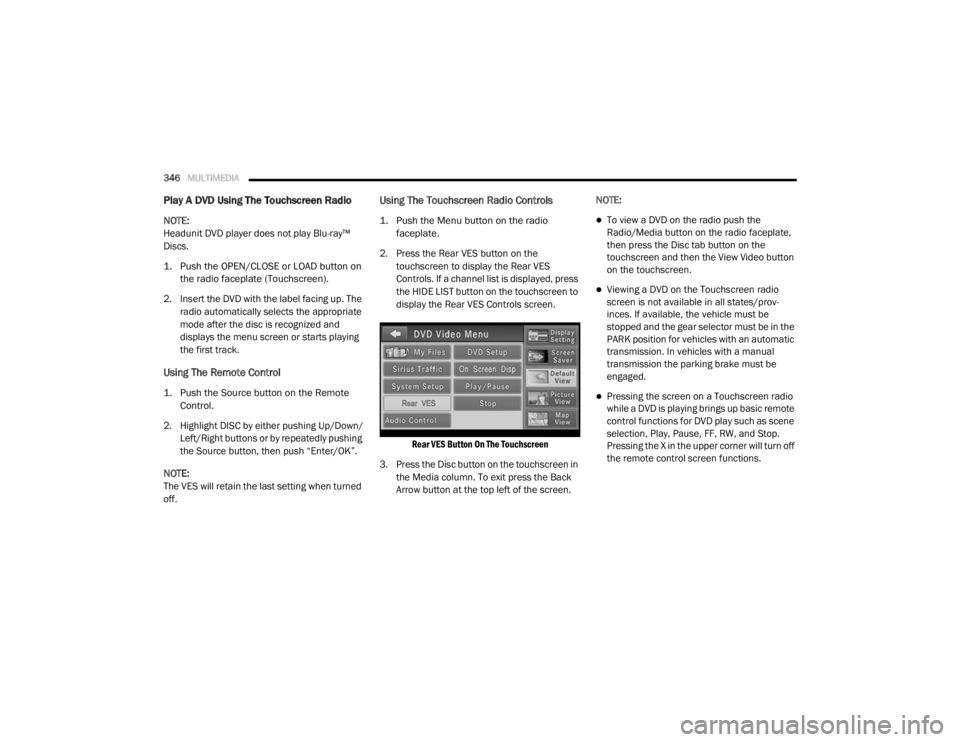
Using The Touchscreen Radio Controls
1. Push the Menu button on the radio faceplate.
2. Press the Rear VES button on the touchscreen to display the Rear VES
Controls. If a channel list is displayed, press
the HIDE LIST button on the touchscreen to
display the Rear VES Controls screen.
Rear VES Button On The Touchscreen
3. Press the Disc button on the touchscreen in the Media column. To exit press the Back
Arrow button at the top left of the screen. NOTE:To view a DVD on the radio push the
Radio/Media button on the radio faceplate,
then press the Disc tab button on the
touchscreen and then the View Video button
on the touchscreen.
Viewing a DVD on the Touchscreen radio
screen is not available in all states/prov
-
inces. If available, the vehicle must be
stopped and the gear selector must be in the
PARK position for vehicles with an automatic
transmission. In vehicles with a manual
transmission the parking brake must be
engaged.
Pressing the screen on a Touchscreen radio
while a DVD is playing brings up basic remote
control functions for DVD play such as scene
selection, Play, Pause, FF, RW, and Stop.
Pressing the X in the upper corner will turn off
the remote control screen functions.
20_RT_OM_EN_USC_t.book Page 346
Page 349 of 380
MULTIMEDIA347
Play A DVD Using The VES Player — If
Equipped
Insert the DVD with the label facing up. The VES
player automatically selects the appropriate
mode after the disc is recognized and starts
playing the DVD.
NOTE:
The VES player has basic DVD control function
such as Menu, Play, Pause, FF, RW and Stop.
Using The Remote Control
1. Push the Source button on the Remote
Control.
2. Highlight VES DISC by either pushing Up/ Down/Left/Right buttons or by repeatedly
pushing the Source button, then push
“Enter/OK” on the Remote Control.
NOTE:
The VES will retain the last setting when turned
off.
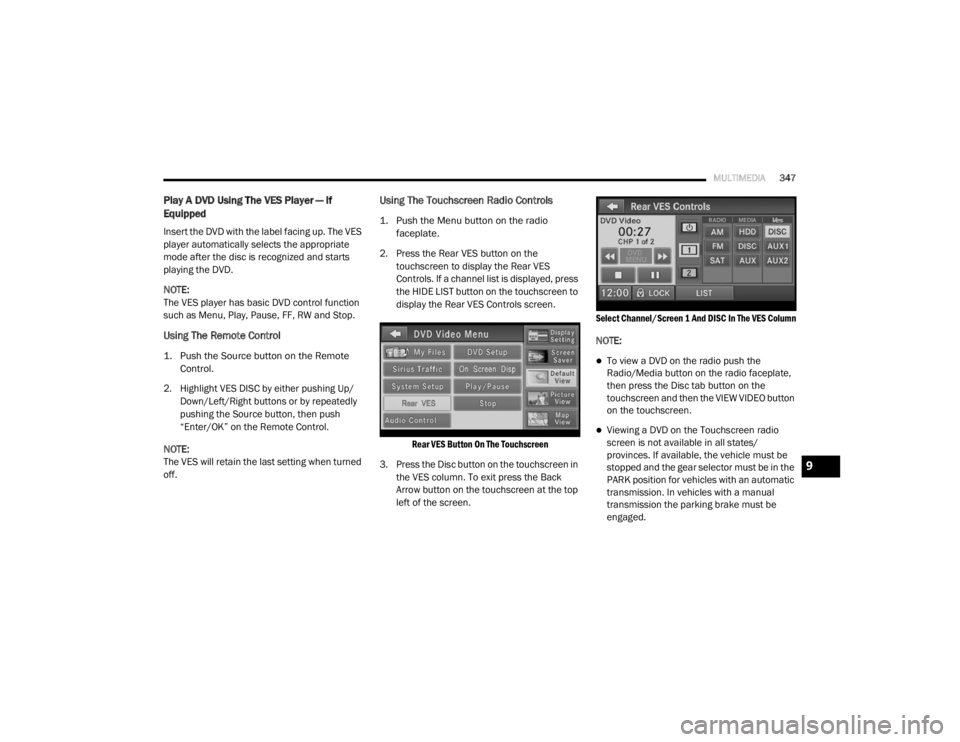
Using The Touchscreen Radio Controls
1. Push the Menu button on the radio faceplate.
2. Press the Rear VES button on the touchscreen to display the Rear VES
Controls. If a channel list is displayed, press
the HIDE LIST button on the touchscreen to
display the Rear VES Controls screen.
Rear VES Button On The Touchscreen
3. Press the Disc button on the touchscreen in the VES column. To exit press the Back
Arrow button on the touchscreen at the top
left of the screen.
Select Channel/Screen 1 And DISC In The VES Column
NOTE:
To view a DVD on the radio push the
Radio/Media button on the radio faceplate,
then press the Disc tab button on the
touchscreen and then the VIEW VIDEO button
on the touchscreen.
Viewing a DVD on the Touchscreen radio
screen is not available in all states/
provinces. If available, the vehicle must be
stopped and the gear selector must be in the
PARK position for vehicles with an automatic
transmission. In vehicles with a manual
transmission the parking brake must be
engaged.
9
20_RT_OM_EN_USC_t.book Page 347
Page 350 of 380
348MULTIMEDIA
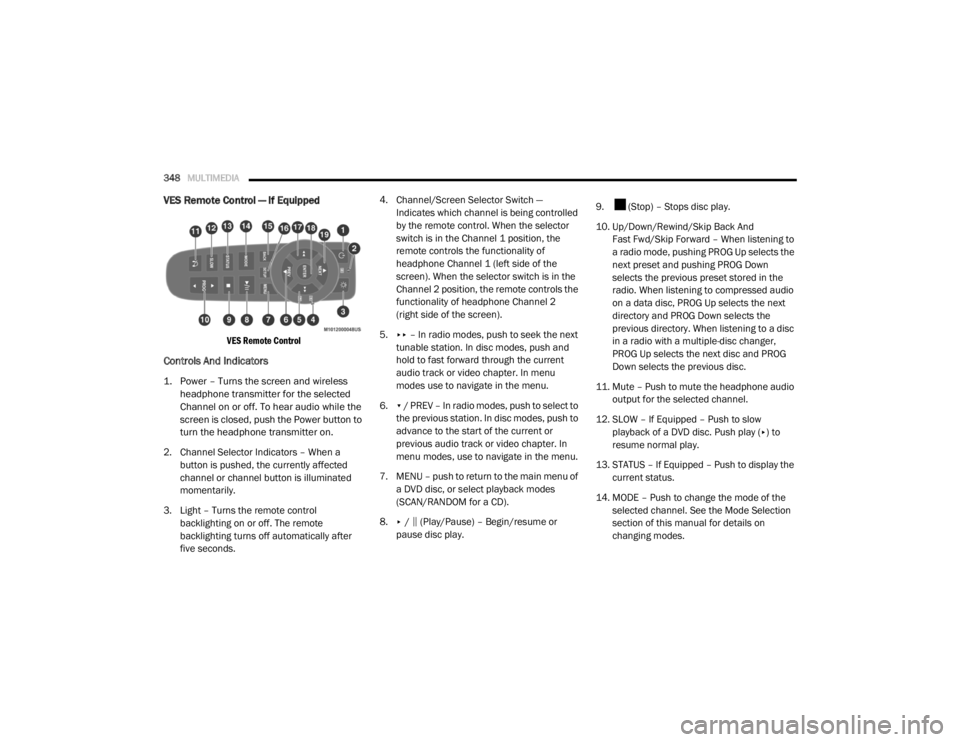
VES Remote Control — If Equipped
VES Remote Control
Controls And Indicators
1. Power – Turns the screen and wireless
headphone transmitter for the selected
Channel on or off. To hear audio while the
screen is closed, push the Power button to
turn the headphone transmitter on.
2. Channel Selector Indicators – When a button is pushed, the currently affected
channel or channel button is illuminated
momentarily.
3. Light – Turns the remote control backlighting on or off. The remote
backlighting turns off automatically after
five seconds. 4. Channel/Screen Selector Switch —
Indicates which channel is being controlled
by the remote control. When the selector
switch is in the Channel 1 position, the
remote controls the functionality of
headphone Channel 1 (left side of the
screen). When the selector switch is in the
Channel 2 position, the remote controls the
functionality of headphone Channel 2
(right side of the screen).
5. ▸▸ – In radio modes, push to seek the next
tunable station. In disc modes, push and
hold to fast forward through the current
audio track or video chapter. In menu
modes use to navigate in the menu.
6. ▾ / PREV – In radio modes, push to select to
the previous station. In disc modes, push to
advance to the start of the current or
previous audio track or video chapter. In
menu modes, use to navigate in the menu.
7. MENU – push to return to the main menu of a DVD disc, or select playback modes
(SCAN/RANDOM for a CD).
8. ▸ / ‖ (Play/Pause) – Begin/resume or
pause disc play. 9. (Stop) – Stops disc play.
10. Up/Down/Rewind/Skip Back And
Fast Fwd/Skip Forward – When listening to
a radio mode, pushing PROG Up selects the
next preset and pushing PROG Down
selects the previous preset stored in the
radio. When listening to compressed audio
on a data disc, PROG Up selects the next
directory and PROG Down selects the
previous directory. When listening to a disc
in a radio with a multiple-disc changer,
PROG Up selects the next disc and PROG
Down selects the previous disc.
11. Mute – Push to mute the headphone audio output for the selected channel.
12. SLOW – If Equipped – Push to slow playback of a DVD disc. Push play ( ▸) to
resume normal play.
13. STATUS – If Equipped – Push to display the current status.
14. MODE – Push to change the mode of the selected channel. See the Mode Selection
section of this manual for details on
changing modes.
20_RT_OM_EN_USC_t.book Page 348
Page 351 of 380
MULTIMEDIA349
15. SETUP – When in a video mode, push the
SETUP button to access the display settings
(see the display settings section) to access
the DVD setup menu, select the menu
button on the radio. When a disc is loaded
in the DVD player (if equipped) and the VES
mode is selected and the disc is stopped,
push the SETUP button to access the DVD
Setup menu.
16. BACK – When navigating in menu mode, push to return to the previous screen. When
navigating a DVD’s disc menu, the
operation depends on the disc’s contents.
17. ◂◂ – In radio modes, push to seek to the
previous tunable station. In disc modes,
push and hold to fast rewind through the
current audio track or video chapter. In
menu modes, use to navigate in the menu.
18. ENTER/OK – Push to select the highlighted option in a menu.
19. ▴ / NEXT – In radio modes, push to select to
the next station. In disc modes, push to
advance to the next audio track or video
chapter. In menu modes, use to navigate in
the menu.Remote Control Storage
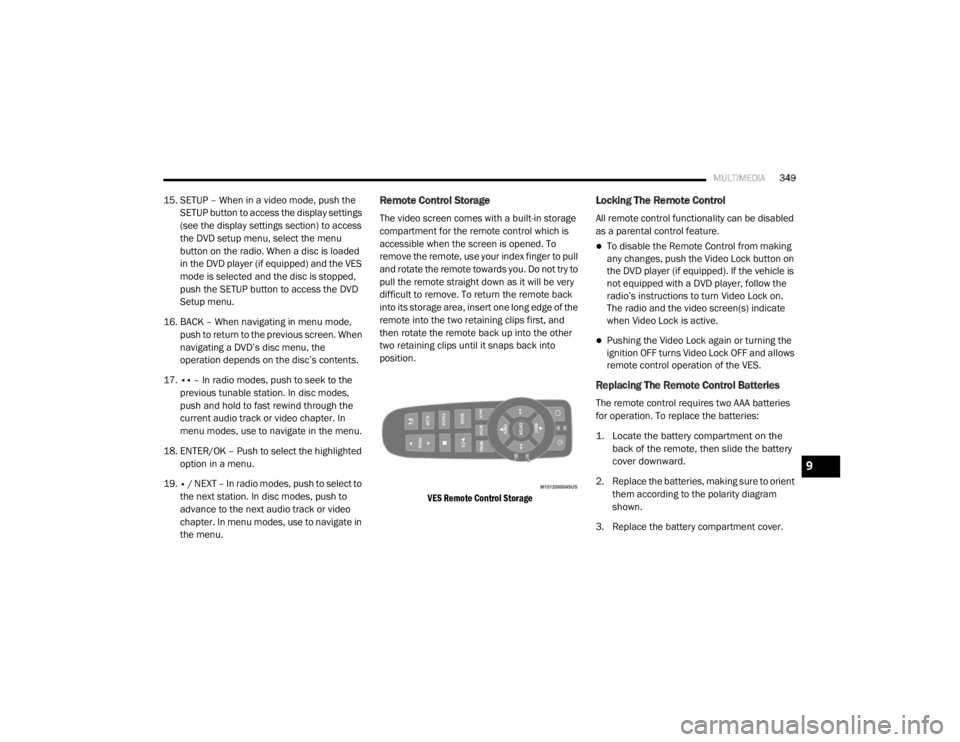
The video screen comes with a built-in storage
compartment for the remote control which is
accessible when the screen is opened. To
remove the remote, use your index finger to pull
and rotate the remote towards you. Do not try to
pull the remote straight down as it will be very
difficult to remove. To return the remote back
into its storage area, insert one long edge of the
remote into the two retaining clips first, and
then rotate the remote back up into the other
two retaining clips until it snaps back into
position.
VES Remote Control Storage
Locking The Remote Control
All remote control functionality can be disabled
as a parental control feature.
To disable the Remote Control from making
any changes, push the Video Lock button on
the DVD player (if equipped). If the vehicle is
not equipped with a DVD player, follow the
radio’s instructions to turn Video Lock on.
The radio and the video screen(s) indicate
when Video Lock is active.
Pushing the Video Lock again or turning the
ignition OFF turns Video Lock OFF and allows
remote control operation of the VES.
Replacing The Remote Control Batteries
The remote control requires two AAA batteries
for operation. To replace the batteries:
1. Locate the battery compartment on the back of the remote, then slide the battery
cover downward.
2. Replace the batteries, making sure to orient them according to the polarity diagram
shown.
3. Replace the battery compartment cover.
9
20_RT_OM_EN_USC_t.book Page 349
Page 357 of 380
MULTIMEDIA355
Display
Other Language Setup
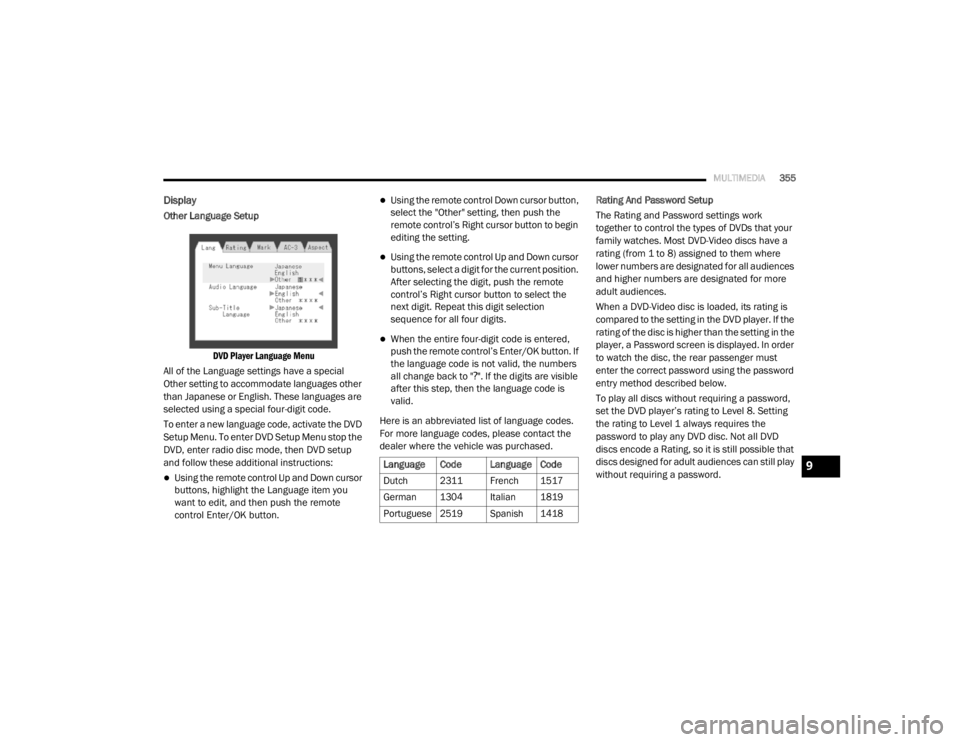
DVD Player Language Menu
All of the Language settings have a special
Other setting to accommodate languages other
than Japanese or English. These languages are
selected using a special four-digit code.
To enter a new language code, activate the DVD
Setup Menu. To enter DVD Setup Menu stop the
DVD, enter radio disc mode, then DVD setup
and follow these additional instructions:
Using the remote control Up and Down cursor
buttons, highlight the Language item you
want to edit, and then push the remote
control Enter/OK button.
Using the remote control Down cursor button,
select the "Other" setting, then push the
remote control’s Right cursor button to begin
editing the setting.
Using the remote control Up and Down cursor
buttons, select a digit for the current position.
After selecting the digit, push the remote
control’s Right cursor button to select the
next digit. Repeat this digit selection
sequence for all four digits.
When the entire four-digit code is entered,
push the remote control’s Enter/OK button. If
the language code is not valid, the numbers
all change back to " ?". If the digits are visible
after this step, then the language code is
valid.
Here is an abbreviated list of language codes.
For more language codes, please contact the
dealer where the vehicle was purchased. Rating And Password Setup
The Rating and Password settings work
together to control the types of DVDs that your
family watches. Most DVD-Video discs have a
rating (from 1 to 8) assigned to them where
lower numbers are designated for all audiences
and higher numbers are designated for more
adult audiences.
When a DVD-Video disc is loaded, its rating is
compared to the setting in the DVD player. If the
rating of the disc is higher than the setting in the
player, a Password screen is displayed. In order
to watch the disc, the rear passenger must
enter the correct password using the password
entry method described below.
To play all discs without requiring a password,
set the DVD player’s rating to Level 8. Setting
the rating to Level 1 always requires the
password to play any DVD disc. Not all DVD
discs encode a Rating, so it is still possible that
discs designed for adult audiences can still play
without requiring a password.
Language Code Language Code
Dutch 2311 French 1517
German 1304 Italian 1819
Portuguese
2519 Spanish 1418
9
20_RT_OM_EN_USC_t.book Page 355
Page 358 of 380
356MULTIMEDIA
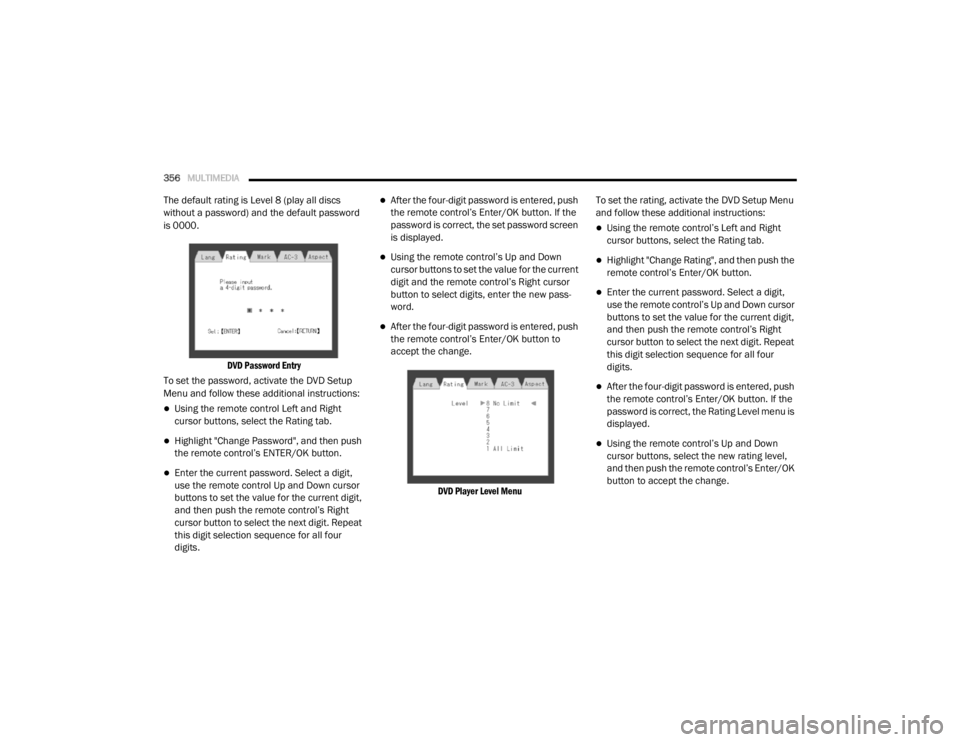
The default rating is Level 8 (play all discs
without a password) and the default password
is 0000.
DVD Password Entry
To set the password, activate the DVD Setup
Menu and follow these additional instructions:
Using the remote control Left and Right
cursor buttons, select the Rating tab.
Highlight "Change Password", and then push
the remote control’s ENTER/OK button.
Enter the current password. Select a digit,
use the remote control Up and Down cursor
buttons to set the value for the current digit,
and then push the remote control’s Right
cursor button to select the next digit. Repeat
this digit selection sequence for all four
digits.
After the four-digit password is entered, push
the remote control’s Enter/OK button. If the
password is correct, the set password screen
is displayed.
Using the remote control’s Up and Down
cursor buttons to set the value for the current
digit and the remote control’s Right cursor
button to select digits, enter the new pass-
word.
After the four-digit password is entered, push
the remote control’s Enter/OK button to
accept the change.
DVD Player Level Menu
To set the rating, activate the DVD Setup Menu
and follow these additional instructions:
Using the remote control’s Left and Right
cursor buttons, select the Rating tab.
Highlight "Change Rating", and then push the
remote control’s Enter/OK button.
Enter the current password. Select a digit,
use the remote control’s Up and Down cursor
buttons to set the value for the current digit,
and then push the remote control’s Right
cursor button to select the next digit. Repeat
this digit selection sequence for all four
digits.
After the four-digit password is entered, push
the remote control’s Enter/OK button. If the
password is correct, the Rating Level menu is
displayed.
Using the remote control’s Up and Down
cursor buttons, select the new rating level,
and then push the remote control’s Enter/OK
button to accept the change.
20_RT_OM_EN_USC_t.book Page 356
Page 367 of 380

CUSTOMER ASSISTANCE365
FCA US LLC Customer Center
P.O. Box 21–8004
Auburn Hills, MI 48321–8004
Phone: (800) 423-6343
FCA Canada Inc. Customer Center
P.O. Box 1621
Windsor, Ontario N9A 4H6
Phone: (800) 465-2001 English / (800)
387-9983 French
In Mexico Contact
Av. Prolongacion Paseo de la Reforma, 1240
Sante Fe C.P. 05109
Mexico, D. F.
In Mexico City: 800-505-1300
Outside Mexico City: + (52) 55 50817568
Puerto Rico And U.S. Virgin Islands
FCA Caribbean LLC
P.O. Box 191857
San Juan 00919-1857
Phone: (800) 423-6343
Fax: (787) 782-3345
Customer Assistance For The Hearing Or
Speech Impaired (TDD/TTY)
To assist customers who have hearing
difficulties, the manufacturer has installed
special TDD (Telecommunication Devices for
the Deaf) equipment at its customer center. Any
hearing or speech impaired customer, who has
access to a TDD or a conventional teletypewriter
(TTY) in the United States, can communicate
with the manufacturer by dialing
1-800-380-CHRY.
Canadian residents with hearing difficulties that
require assistance can use the special needs
relay service offered by Bell Canada. For TTY
teletypewriter users, dial 711 and for Voice
callers, dial 1-800-855-0511 to connect with a
Bell Relay Service operator.
Service Contract
You may have purchased a service contract for
a vehicle to help protect you from the high cost
of unexpected repairs after the manufacturer's
New Vehicle Limited Warranty expires. The
Mopar Vehicle Protection plans are the ONLY
vehicle extended protection plans authorized,
endorsed and backed by FCA US LLC to provide
additional protection beyond your vehicle’s
warranty. If you purchased a Mopar Vehicle Protection Plan, you will receive Plan Provisions
and an Owner Identification Card in the mail
within three weeks of the vehicle delivery date.
If you have any questions about the service
contract, call the manufacturer's Service
Contract National Customer Hotline at
1-800-521-9922 (Canadian residents, call
(800) 465-2001 English / (800) 387-9983
French).
FCA US LLC is not responsible for any service
contract you may have purchased from another
manufacturer. If you require service after the
FCA US LLC New Vehicle Limited Warranty
expires, please refer to the contract documents,
and contact the person listed in those
documents.
We appreciate that you have made a major
investment when you purchased the vehicle. An
authorized dealer has also made a major
investment in facilities, tools, and training to
assure that you are absolutely delighted with
the ownership experience. You will be pleased
with their sincere efforts to resolve any warranty
issues or related concerns.
10
20_RT_OM_EN_USC_t.book Page 365
Page 370 of 380

368
INDEX
A
About Your Brakes......................................... 266Adding Engine Coolant (Antifreeze)............... 240Adding Fuel.................................................... 181Adding Washing Fluid.................................... 232Additives, Fuel............................................... 268AdjustDown........................................................... 28Forward....................................................... 28Rearward..................................................... 28Up................................................................ 28Air Bag........................................................... 132Air Bag Operation...................................... 133Air Bag Warning Light................................ 131Driver Knee Air Bag................................... 134Enhanced Accident Response......... 138, 225Event Data Recorder (EDR)....................... 225If Deployment Occurs................................ 138Knee Impact Bolsters................................ 134Maintaining Your Air Bag System.............. 139Maintenance............................................. 139Side Air Bags............................................. 134Transporting Pets...................................... 159Air Bag Light..................................94, 131, 160Air Cleaner, Engine
(Engine Air Cleaner Filter).............................. 235
Air Conditioner Maintenance........................ 235Air Conditioner Refrigerant........................... 235Air Conditioner System................................. 235Air Conditioning................................................ 56Automatic Rear............................................ 51Rear............................................................. 45Air Conditioning Filter..............................58, 235Air Conditioning, Operating Tips....................... 57Air Filter........................................................ 235Air PressureTires......................................................... 253AlarmArm The System.......................................... 15Disarm The System..................................... 15Security Alarm............................................. 97Alterations/ModificationsVehicle........................................................... 8Antifreeze (Engine Coolant)................. 240, 271Disposal................................................... 242Anti-Lock Brake System (ABS)...................... 103Anti-Lock Warning Light................................... 97Ashtray............................................................. 78Assist, Hill Start............................................. 108Assistance Towing........................................ 312Automatic Dimming Mirror............................... 34Automatic Door Locks............................... 17, 18
Automatic Headlights.......................................38Automatic Transmission....................... 165, 244Adding Fluid..................................... 244, 274Fluid And Filter Change............................. 244Fluid Change............................................. 244Fluid Level Check............................. 243, 244Fluid Type........................................ 243, 274Gear Ranges............................................. 168Special Additives...................................... 244Torque Converter...................................... 172Axle Fluid....................................................... 274Axle Lubrication............................................ 274
B
Battery................................................... 95, 232Charging System Light.................................95Jump Starting........................................... 219Keyless Key Fob Replacement....................10Battery Saver Feature......................................39Belts, Seat.................................................... 160Body Mechanism Lubrication........................ 237B-Pillar Location............................................ 249Brake Assist System..................................... 104Brake Control System, Electronic.................. 104Brake Fluid.................................................... 274
20_RT_OM_EN_USC_t.book Page 368