buttons DODGE GRAND CARAVAN 2020 User Guide
[x] Cancel search | Manufacturer: DODGE, Model Year: 2020, Model line: GRAND CARAVAN, Model: DODGE GRAND CARAVAN 2020Pages: 380, PDF Size: 14.92 MB
Page 66 of 380
64GETTING TO KNOW YOUR VEHICLE
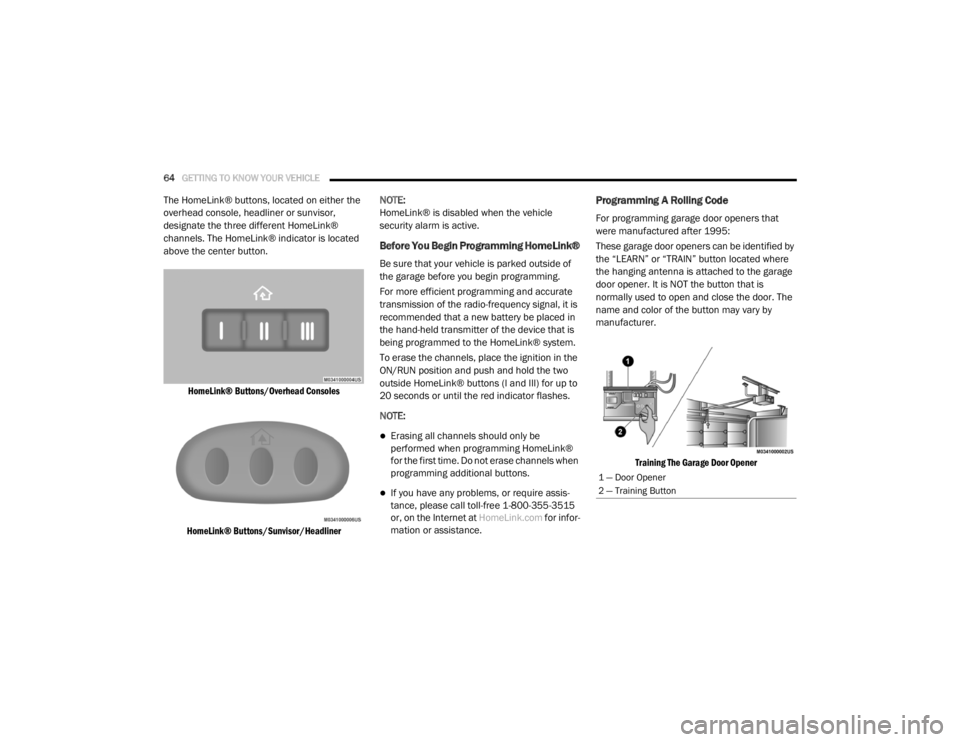
The HomeLink® buttons, located on either the
overhead console, headliner or sunvisor,
designate the three different HomeLink®
channels. The HomeLink® indicator is located
above the center button.
HomeLink® Buttons/Overhead Consoles
HomeLink® Buttons/Sunvisor/Headliner
NOTE:
HomeLink® is disabled when the vehicle
security alarm is active.
Before You Begin Programming HomeLink®
Be sure that your vehicle is parked outside of
the garage before you begin programming.
For more efficient programming and accurate
transmission of the radio-frequency signal, it is
recommended that a new battery be placed in
the hand-held transmitter of the device that is
being programmed to the HomeLink® system.
To erase the channels, place the ignition in the
ON/RUN position and push and hold the two
outside HomeLink® buttons (I and III) for up to
20 seconds or until the red indicator flashes.
NOTE:
Erasing all channels should only be
performed when programming HomeLink®
for the first time. Do not erase channels when
programming additional buttons.
If you have any problems, or require assis
-
tance, please call toll-free 1-800-355-3515
or, on the Internet at HomeLink.com for infor-
mation or assistance.
Programming A Rolling Code
For programming garage door openers that
were manufactured after 1995:
These garage door openers can be identified by
the “LEARN” or “TRAIN” button located where
the hanging antenna is attached to the garage
door opener. It is NOT the button that is
normally used to open and close the door. The
name and color of the button may vary by
manufacturer.
Training The Garage Door Opener
1 — Door Opener
2 — Training Button
20_RT_OM_EN_USC_t.book Page 64
Page 67 of 380
GETTING TO KNOW YOUR VEHICLE65
1. Place the ignition in the ON/RUN position.
2. Place the hand-held transmitter
1 to 3 inches (3 to 8 cm) away from the
HomeLink® button you wish to program
while keeping the HomeLink® indicator
light in view.
3. Push and hold the HomeLink® button you want to program while you push and hold
the hand-held transmitter button.
4. Continue to hold both buttons and observe the indicator light. The HomeLink®
indicator will flash slowly and then rapidly
after HomeLink® has received the
frequency signal from the hand-held
transmitter. Release both buttons after the
indicator light changes from slow to rapid.
5. At the garage door opener (in the garage), locate the “LEARN” or “TRAINING” button.
This can usually be found where the
hanging antenna wire is attached to the
garage door opener/device motor. Firmly
push and release the “LEARN” or
“TRAINING” button. On some garage door
openers/devices there may be a light that
blinks when the garage door opener/device
is in the LEARN/TRAIN mode. NOTE:
You have 30 seconds in which to initiate the
next step after the LEARN button has been
pushed.
6. Return to the vehicle and push the
programmed HomeLink® button twice
(holding the button for two seconds each
time). If the garage door opener/device
activates, programming is complete.
NOTE:
If the garage door opener/device does not
activate, push the button a third time (for two
seconds) to complete the training. To program the remaining two HomeLink®
buttons, repeat each step for each remain -
ing button. DO NOT erase the channels.
Reprogramming A Single HomeLink® Button
(Rolling Code)
To reprogram a channel that has been
previously trained, follow these steps:
1. Place the ignition in the ON/RUN position.
2. Push and hold the desired HomeLink®
button until the indicator light begins to
flash after 20 seconds. Do not release the
button.
3. Without releasing the button , proceed with
“Programming A Rolling Code” step two and
follow all remaining steps.
Programming A Non-Rolling Code
For programming garage door openers
manufactured before 1995:
1. Place the ignition in the ON/RUN position.
NOTE:
For vehicles equipped with Keyless Enter-N-Go,
place the ignition in the RUN position with the
engine on. Make sure while programming
HomeLink® with the engine on that your vehicle
is outside of your garage, or that the garage
door remains open at all times.
2. Place the hand-held transmitter 1 to 3 inches (3 to 8 cm) away from the
HomeLink® button you wish to program
while keeping the HomeLink® indicator
light in view.
2
20_RT_OM_EN_USC_t.book Page 65
Page 68 of 380

66GETTING TO KNOW YOUR VEHICLE
3. Push and hold the HomeLink® button you
want to program while you push and hold
the hand-held transmitter button.
4. Continue to hold both buttons and observe the indicator light. The HomeLink®
indicator will flash slowly and then rapidly
after HomeLink® has received the
frequency signal from the hand-held
transmitter. Release both buttons after the
indicator light changes from slow to rapid.
5. Push and hold the programmed HomeLink® button and observe the
indicator light.
If the indicator light stays on constantly,
programming is complete and the garage
door/device should activate when the
HomeLink® button is pushed.
To program the two remaining
HomeLink® buttons, repeat each step
for each remaining button. DO NOT erase
the channels.
Reprogramming A Single HomeLink® Button
(Non-Rolling Code)
To reprogram a channel that has been
previously trained, follow these steps:
1. Place the ignition in the ON/RUN position.
2. Push and hold the desired HomeLink® button until the indicator light begins to
flash after 20 seconds. Do not release the
button.
3. Without releasing the button , proceed with
“Programming A Non-Rolling Code” step two
and follow all remaining steps.
Canadian/Gate Operator Programming
For programming transmitters in
Canada/United States that require the
transmitter signals to “time-out” after several
seconds of transmission:
Canadian radio frequency laws require
transmitter signals to time-out (or quit) after
several seconds of transmission, which may not
be long enough for HomeLink® to pick up the
signal during programming. Similar to this
Canadian law, some U.S. gate operators are
designed to time-out in the same manner. It may be helpful to unplug the device during the
cycling process to prevent possible overheating
of the garage door or gate motor.
1. Place the ignition in the ON/RUN position.
2. Place the hand-held transmitter
1 to 3 inches (3 to 8 cm) away from the
HomeLink® button you wish to program
while keeping the HomeLink® indicator
light in view.
3. Continue to push and hold the HomeLink® button while you push and release (“cycle”)
your hand-held transmitter every two
seconds until HomeLink® has successfully
accepted the frequency signal. The
indicator light will flash slowly and then
rapidly when fully trained.
4. Watch for the HomeLink® indicator to change flash rates. When it changes, it is
programmed. It may take up to 30 seconds
or longer in rare cases. The garage door
may open and close while you are
programming.
20_RT_OM_EN_USC_t.book Page 66
Page 69 of 380
GETTING TO KNOW YOUR VEHICLE67
5. Push and hold the programmed
HomeLink® button and observe the
indicator light.
NOTE:
If the indicator light stays on constantly,
programming is complete and the garage
door/device should activate when the
HomeLink® button is pushed.
To program the two remaining
HomeLink® buttons, repeat each step
for each remaining button. DO NOT erase
the channels.
If you unplugged the garage door
opener/device for programming, plug it back in
at this time.
Using HomeLink®
To operate, push and release the programmed
HomeLink® button. Activation will now occur for
the programmed device (i.e. garage door
opener, gate operator, security system, entry
door lock, home/office lighting, etc.) The
hand-held transmitter of the device may also be
used at any time.
Security
It is advised to erase all channels before you sell
or turn in your vehicle.
To do this, push and hold the two outside
buttons for 20 seconds until the red indicator
flashes.
NOTE:
All channels will be erased. Individual channels
cannot be erased.
The HomeLink® Universal Transceiver is
disabled when the vehicle security alarm is
active.
Troubleshooting Tips
If you are having trouble programming
HomeLink®, here are some of the most
common solutions:
Replace the battery in the garage door
opener hand-held transmitter.
Push the LEARN button on the garage door
opener to complete the training for a Rolling
Code.
Did you unplug the device for programming
and remember to plug it back in?
If you have any problems, or require assistance,
please call toll-free 1-800-355-3515 or, on the
Internet at HomeLink.com for information or
assistance.
WARNING!
Vehicle exhaust contains carbon monoxide,
a dangerous gas. Do not run your vehicle in
the garage while programming the trans -
ceiver. Exhaust gas can cause serious
injury or death.
Your motorized door or gate will open and
close while you are programming the
universal transceiver. Do not program the
transceiver if people, pets or other objects
are in the path of the door or gate. Only use
this transceiver with a garage door opener
that has a “stop and reverse” feature as
required by Federal safety standards. This
includes most garage door opener models
manufactured after 1982. Do not use a
garage door opener without these safety
features.
2
20_RT_OM_EN_USC_t.book Page 67
Page 88 of 380
86GETTING TO KNOW YOUR INSTRUMENT PANEL
The instrument cluster display menu items
consists of the following:
Fuel Economy
Vehicle Speed
Trip Info
Tire Pressure
Vehicle Info
Messages
Units
System Setup (Personal Settings)
Turn Menu Off
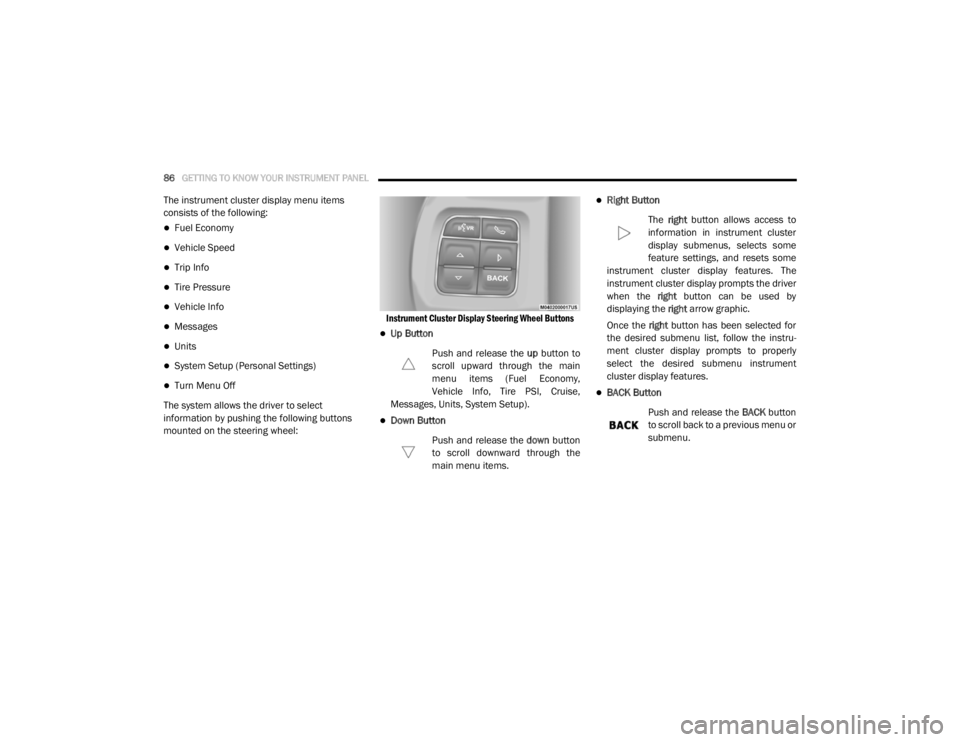
The system allows the driver to select
information by pushing the following buttons
mounted on the steering wheel:
Instrument Cluster Display Steering Wheel Buttons
Up Button
Push and release the up button to
scroll upward through the main
menu items (Fuel Economy,
Vehicle Info, Tire PSI, Cruise,
Messages, Units, System Setup).
Down Button
Push and release the down button
to scroll downward through the
main menu items.
Right Button
The right button allows access to
information in instrument cluster
display submenus, selects some
feature settings, and resets some
instrument cluster display features. The
instrument cluster display prompts the driver
when the right button can be used by
displaying the right arrow graphic.
Once the right button has been selected for
the desired submenu list, follow the instru -
ment cluster display prompts to properly
select the desired submenu instrument
cluster display features.
BACK Button
Push and release the BACK button
to scroll back to a previous menu or
submenu.
20_RT_OM_EN_USC_t.book Page 86
Page 92 of 380
90GETTING TO KNOW YOUR INSTRUMENT PANEL
1. Turn the ignition switch ON.
2. Push and release the up or down arrow
button until the Setup
(Customer-Programmable Features) menu
is reached, then push the right arrow
button.
3. Push and release the down arrow button
until the “Compass Variance” message is
displayed in the instrument cluster display,
then press the right arrow button. The last
variance zone number displays in the
instrument cluster display.
4. Push and release the right arrow button
until the proper variance zone is selected,
according to the map.
5. Push and release the RETURN button to
exit.
Turn Menu OFF
Select from Main Menu using the up or down
arrow button. Pushing the right arrow button
clears the menu display. Pushing any one of the
four Display control buttons will bring the menu
back.
Customer-Programmable Features
(System Setup)
Personal Settings allows you to set and recall
features when the transmission is in PARK. If
the transmission is out of PARK or the vehicle
begins moving, a warning message SYSTEM
SETUP NOT AVAILABLE VEHICLE NOT IN PARK
displays when you try to select “System Setup”
from the main menu.
Push and release the up or down arrow button
until "System Setup" is highlighted in the main
menu of the instrument cluster display. Then,
push and release the right arrow button to enter
the System Setup submenu. Push and release
the up or down arrow button to select a feature
form the following choices.
Language
When in this display you may select one of three
languages for all display screens, including the
trip functions and the navigation system (if
equipped). Push and release the up or down
arrow button while in this display and scroll
through the language choices. Push and release the
right arrow button to
select English, Spanish (Español), or French
(Français). Then, as you continue, the informa -
tion will display in the selected language.
Nav–Turn By Turn
When this feature is selected, the navigation
system utilizes voice commands, guiding you
through the drive route mile by mile,
turn-by-turn, until the final destination is
reached. To make your selection, push and
release the right arrow button until a
check-mark appears next to the feature
showing the system has been activated, or the
check-mark is removed showing the system has
been deactivated.
Auto Lock Doors
When selected, all doors will lock automatically
when the vehicle reaches a speed of 15 mph
(24 km/h). To make your selection, push and
release the right arrow button until a
check-mark appears.
20_RT_OM_EN_USC_t.book Page 90
Page 175 of 380
STARTING AND OPERATING173
Power Steering Fluid Check
Checking the power steering fluid level at a
defined service interval is not required. The fluid
should only be checked if a leak is suspected,
abnormal noises are apparent, and/or the
system is not functioning as anticipated.
Coordinate inspection efforts through an
authorized dealer. If necessary, add fluid to restore to the proper
indicated level. With a clean cloth, wipe any
spilled fluid from all surfaces. Refer to “Fluids
And Lubricants” in “Technical Specifications”
for the correct fluid type.
SPEED CONTROL — IF EQUIPPED
When engaged, the Speed Control takes over
accelerator operations at speeds greater than
25 mph (40 km/h).
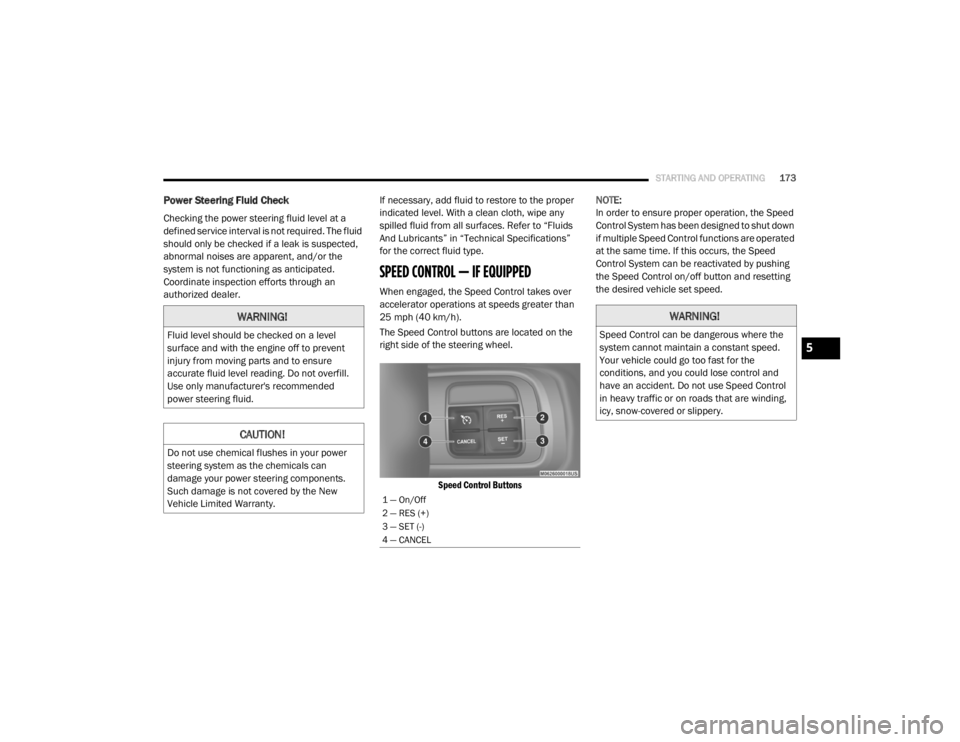
The Speed Control buttons are located on the
right side of the steering wheel.
Speed Control Buttons
NOTE:
In order to ensure proper operation, the Speed
Control System has been designed to shut down
if multiple Speed Control functions are operated
at the same time. If this occurs, the Speed
Control System can be reactivated by pushing
the Speed Control on/off button and resetting
the desired vehicle set speed.
WARNING!
Fluid level should be checked on a level
surface and with the engine off to prevent
injury from moving parts and to ensure
accurate fluid level reading. Do not overfill.
Use only manufacturer's recommended
power steering fluid.
CAUTION!
Do not use chemical flushes in your power
steering system as the chemicals can
damage your power steering components.
Such damage is not covered by the New
Vehicle Limited Warranty.
1 — On/Off
2 — RES (+)
3 — SET (-)
4 — CANCEL
WARNING!
Speed Control can be dangerous where the
system cannot maintain a constant speed.
Your vehicle could go too fast for the
conditions, and you could lose control and
have an accident. Do not use Speed Control
in heavy traffic or on roads that are winding,
icy, snow-covered or slippery.
5
20_RT_OM_EN_USC_t.book Page 173
Page 281 of 380
MULTIMEDIA279
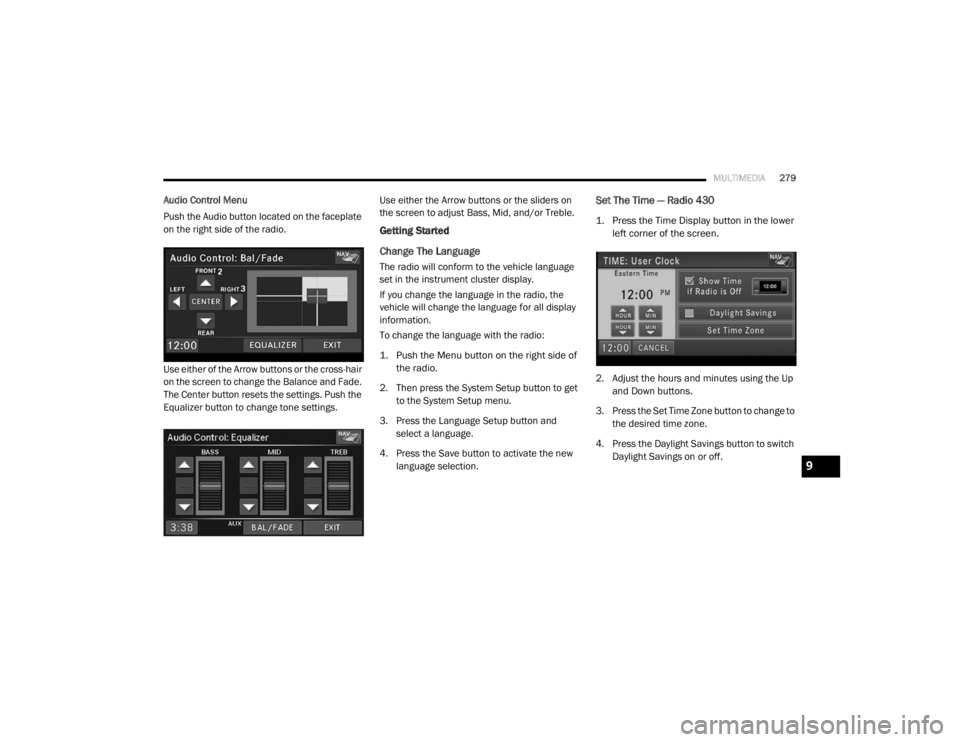
Audio Control Menu
Push the Audio button located on the faceplate
on the right side of the radio.
Use either of the Arrow buttons or the cross-hair
on the screen to change the Balance and Fade.
The Center button resets the settings. Push the
Equalizer button to change tone settings. Use either the Arrow buttons or the sliders on
the screen to adjust Bass, Mid, and/or Treble.
Getting Started
Change The Language
The radio will conform to the vehicle language
set in the instrument cluster display.
If you change the language in the radio, the
vehicle will change the language for all display
information.
To change the language with the radio:
1. Push the Menu button on the right side of
the radio.
2. Then press the System Setup button to get to the System Setup menu.
3. Press the Language Setup button and select a language.
4. Press the Save button to activate the new language selection.
Set The Time — Radio 430
1. Press the Time Display button in the lower left corner of the screen.
2. Adjust the hours and minutes using the Up and Down buttons.
3. Press the Set Time Zone button to change to the desired time zone.
4. Press the Daylight Savings button to switch Daylight Savings on or off.
9
20_RT_OM_EN_USC_t.book Page 279
Page 282 of 380
280MULTIMEDIA
Set The Time — Radio 430 NAV
1. Press the Time Display button in the lower
left corner of the screen.
The time is automatically set by the GPS sys-
tem for the time zone selected. The radio
default is GPS time, where the vehicle time
is automatically set by the GPS system. If
the vehicle is not able to receive the GPS
signals, the vehicle time is only updated
when the GPS satellite signals are being re -
ceived (which requires the vehicle to be out -
side with a clear view to the sky).
2. It is possible to set the time manually (ahead or behind actual GPS time), by
pressing the User Time button. 3. Press the Daylight Savings button to switch
Daylight Savings on or off.
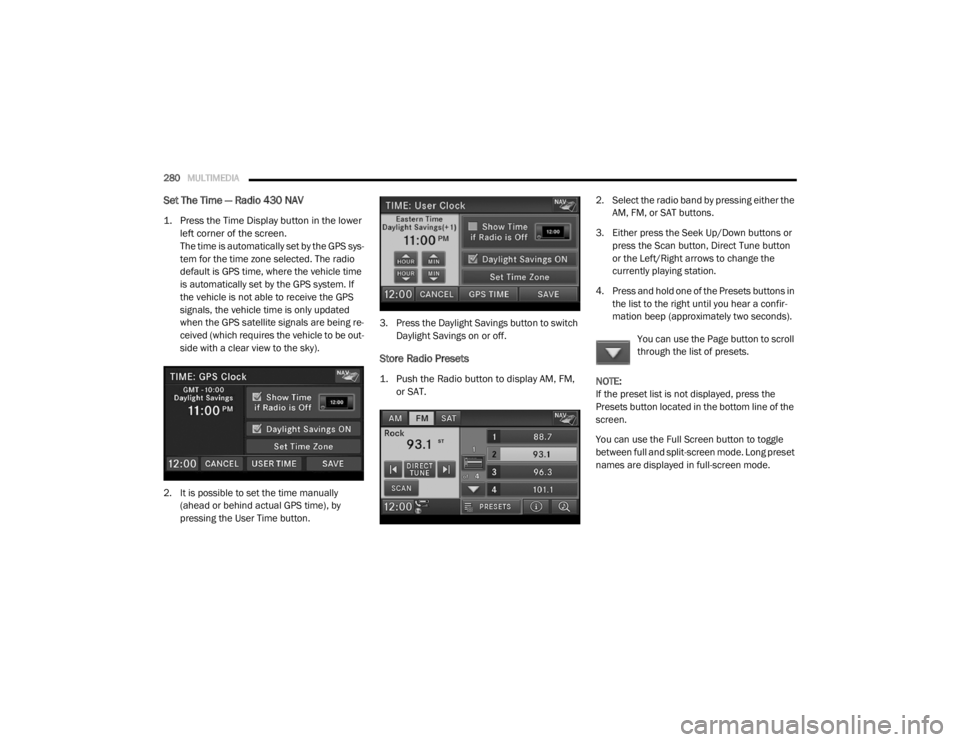
Store Radio Presets
1. Push the Radio button to display AM, FM, or SAT.
2. Select the radio band by pressing either the
AM, FM, or SAT buttons.
3. Either press the Seek Up/Down buttons or press the Scan button, Direct Tune button
or the Left/Right arrows to change the
currently playing station.
4. Press and hold one of the Presets buttons in the list to the right until you hear a confir -
mation beep (approximately two seconds).
You can use the Page button to scroll
through the list of presets.
NOTE:
If the preset list is not displayed, press the
Presets button located in the bottom line of the
screen.
You can use the Full Screen button to toggle
between full and split-screen mode. Long preset
names are displayed in full-screen mode.
20_RT_OM_EN_USC_t.book Page 280
Page 283 of 380
MULTIMEDIA281
Radio Mode
Overview
The radio is equipped with three different
tuners:
FM 87.7 MHz - 107.9 MHz (RBDS capable)
AM 530 kHz - 1710 kHz
SiriusXM® Satellite Radio (if equipped)
Push the Radio button. The different tuner
modes can be selected by pressing the tabs on
the radio touchscreen.
SiriusXM® Satellite Radio
With over 130 channels, SiriusXM® Satellite
Radio brings you more of what you love. Get 69
channels of 100% commercial-free music, plus
all of your favorite sports, news, talk and
entertainment. Hear every NFL® game, every
NASCAR® race, college sports and more. The
biggest and most compelling names in talk with
Howard Stern and Martha Stewart,
laugh-out-loud comedy, plus kids' programming,
wold-class news, local traffic and weather. All of
this with crystal clear, coast-to-coast coverage.
Everything worth listening to is now on SiriusXM®. A one-year SiriusXM® Satellite
Radio subscription is included.
SiriusXM® and all related marks and logos are
trademarks of SiriusXM® Radio Inc. and its
subsidiaries. SiriusXM® Radio requires a
subscription, sold separately after trial
subscription included with vehicle purchase.
Prices and programming are provided by
SiriusXM® and are subject to change.
Subscriptions governed by Terms & Conditions
available at
www.siriusxm.com . SiriusXM®
Radio US service only available to those at least
18 years of age in the 48 contiguous United
States, D.C., and PR. Service available in
Canada; see www.siriusxm.ca .
To receive satellite radio, the vehicle needs to
be outside with a clear view to the sky. If the
screen shows Acquiring Signal, you might have
to change the vehicle position to receive a
signal. In most cases, the satellite radio does
not receive a signal in underground parking
garages or tunnels.
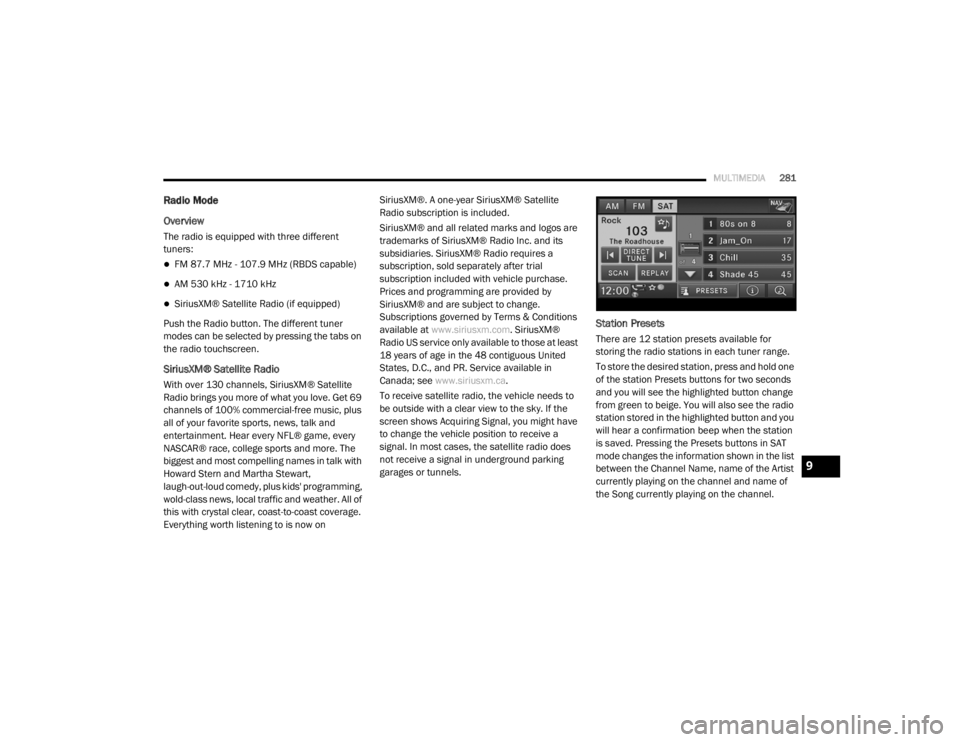
Station Presets
There are 12 station presets available for
storing the radio stations in each tuner range.
To store the desired station, press and hold one
of the station Presets buttons for two seconds
and you will see the highlighted button change
from green to beige. You will also see the radio
station stored in the highlighted button and you
will hear a confirmation beep when the station
is saved. Pressing the Presets buttons in SAT
mode changes the information shown in the list
between the Channel Name, name of the Artist
currently playing on the channel and name of
the Song currently playing on the channel.
9
20_RT_OM_EN_USC_t.book Page 281