buttons DODGE GRAND CARAVAN 2020 Owner's Guide
[x] Cancel search | Manufacturer: DODGE, Model Year: 2020, Model line: GRAND CARAVAN, Model: DODGE GRAND CARAVAN 2020Pages: 380, PDF Size: 14.92 MB
Page 345 of 380
MULTIMEDIA343
Pushing a PRESET button will display the
current list on the top line and the first item in
that list on the second line.
To exit List mode without selecting a track, push
the same Preset button again to go back to
Play mode.
List button: The List button will display the top
level menu of the external USB device.
Turn the Tune control knob to list the
top-menu item to be selected and push the
Tune control knob. This will display the next
sub-menu list item on the audio device, then
follow the same steps to go to the desired
track in that list. Not all external USB device
sub-menu levels are available on this system.
Music Type button: The Music Type button is
another shortcut button to the genre listing on
your audio device.
Bluetooth® Streaming Audio (BTSA)
Music can be streamed from your cellular
phone to the Uconnect phone system.
Refer to the Uconnect Owner’s Manual
Supplement for further information on
Bluetooth® connectivity.
Controlling BTSA Using Radio Buttons
To enter BTSA mode, push either AUX button on
the radio or push the VR button and say
“Bluetooth® Streaming Audio”.
Play Mode
When switched to BTSA mode, some audio
devices can start playing music over the
vehicle’s audio system, but some devices
require the music to be initiated on the device
first. Then, it will get streamed to the Uconnect
phone system. Seven devices can be paired to
the Uconnect phone system, but just one can be
selected and played.
Selecting A Different Audio Device
1. Push the Phone button to begin.
2. After the "Ready" prompt and following the beep, say "Setup", then say "Select Audio
Devices".
3. Say the name of the audio device or ask the Uconnect phone system to list the audio
devices.
Next Track
Use the Seek Up button, or push the VR
button on the radio and say “Next Track,” to
jump to the next music track on your cellular
phone.
WARNING!
Do not plug in or remove the iPod® or
external USB device while driving. Failure to
follow this warning could result in an
accident.
CAUTION!
Leaving the iPod® or external USB device
(or any supported device) anywhere in the
vehicle in extreme heat or cold can alter the
operation or damage the device. Follow the
device manufacturer’s guidelines.
Placing items on the iPod® or external USB
device, or connections to the iPod® or
external USB device in the vehicle, can
cause damage to the device and/or to the
connectors.
9
20_RT_OM_EN_USC_t.book Page 343
Page 347 of 380
MULTIMEDIA345
When connecting an external source to the AUX
input, be sure to follow the standard color
coding for the VES jacks.
NOTE:
Certain high-end video game consoles will
exceed the power limit of the vehicle's Power
Inverter. Refer to “Power Inverter — If Equipped”
in “Getting To Know Your Vehicle” for more
information.
Using The Remote Control
1. Push the Mode button on the Remote
Control.
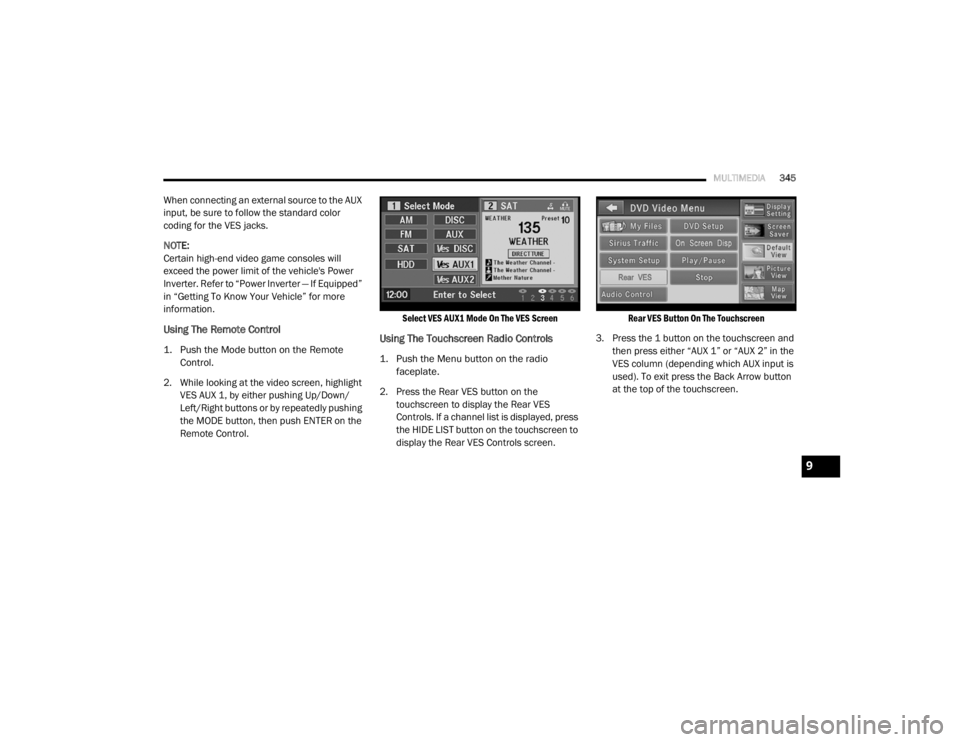
2. While looking at the video screen, highlight VES AUX 1, by either pushing Up/Down/
Left/Right buttons or by repeatedly pushing
the MODE button, then push ENTER on the
Remote Control.
Select VES AUX1 Mode On The VES Screen
Using The Touchscreen Radio Controls
1. Push the Menu button on the radio
faceplate.
2. Press the Rear VES button on the touchscreen to display the Rear VES
Controls. If a channel list is displayed, press
the HIDE LIST button on the touchscreen to
display the Rear VES Controls screen.
Rear VES Button On The Touchscreen
3. Press the 1 button on the touchscreen and then press either “AUX 1” or “AUX 2” in the
VES column (depending which AUX input is
used). To exit press the Back Arrow button
at the top of the touchscreen.
9
20_RT_OM_EN_USC_t.book Page 345
Page 348 of 380
346MULTIMEDIA
Play A DVD Using The Touchscreen Radio
NOTE:
Headunit DVD player does not play Blu-ray™
Discs.
1. Push the OPEN/CLOSE or LOAD button on
the radio faceplate (Touchscreen).
2. Insert the DVD with the label facing up. The radio automatically selects the appropriate
mode after the disc is recognized and
displays the menu screen or starts playing
the first track.
Using The Remote Control
1. Push the Source button on the Remote Control.
2. Highlight DISC by either pushing Up/Down/ Left/Right buttons or by repeatedly pushing
the Source button, then push “Enter/OK”.
NOTE:
The VES will retain the last setting when turned
off.
Using The Touchscreen Radio Controls
1. Push the Menu button on the radio faceplate.
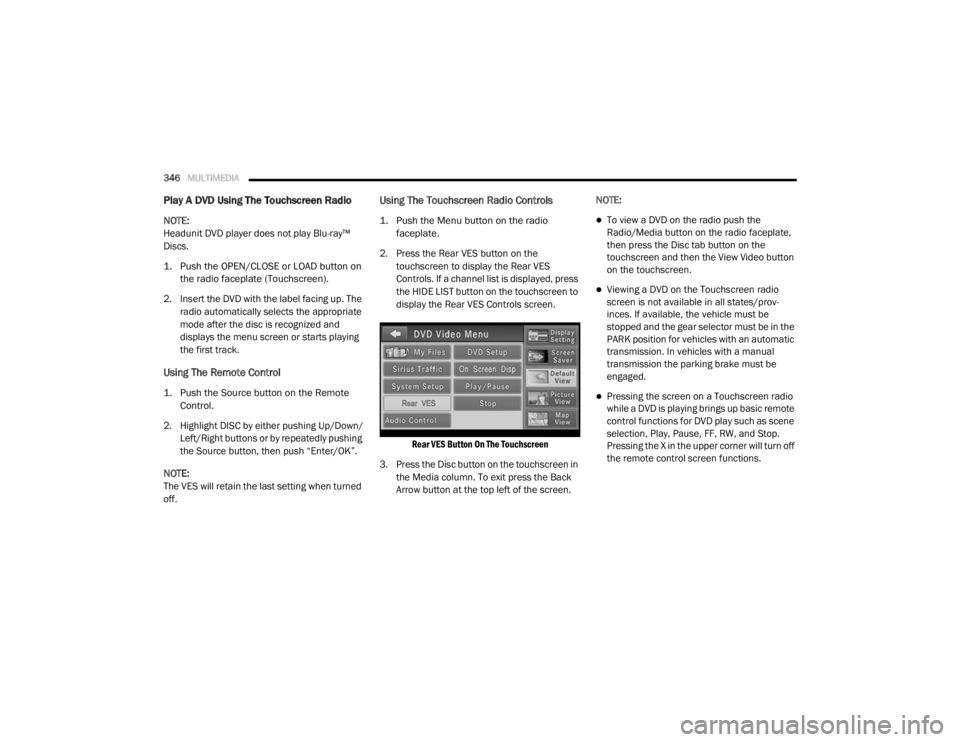
2. Press the Rear VES button on the touchscreen to display the Rear VES
Controls. If a channel list is displayed, press
the HIDE LIST button on the touchscreen to
display the Rear VES Controls screen.
Rear VES Button On The Touchscreen
3. Press the Disc button on the touchscreen in the Media column. To exit press the Back
Arrow button at the top left of the screen. NOTE:To view a DVD on the radio push the
Radio/Media button on the radio faceplate,
then press the Disc tab button on the
touchscreen and then the View Video button
on the touchscreen.
Viewing a DVD on the Touchscreen radio
screen is not available in all states/prov
-
inces. If available, the vehicle must be
stopped and the gear selector must be in the
PARK position for vehicles with an automatic
transmission. In vehicles with a manual
transmission the parking brake must be
engaged.
Pressing the screen on a Touchscreen radio
while a DVD is playing brings up basic remote
control functions for DVD play such as scene
selection, Play, Pause, FF, RW, and Stop.
Pressing the X in the upper corner will turn off
the remote control screen functions.
20_RT_OM_EN_USC_t.book Page 346
Page 349 of 380
MULTIMEDIA347
Play A DVD Using The VES Player — If
Equipped
Insert the DVD with the label facing up. The VES
player automatically selects the appropriate
mode after the disc is recognized and starts
playing the DVD.
NOTE:
The VES player has basic DVD control function
such as Menu, Play, Pause, FF, RW and Stop.
Using The Remote Control
1. Push the Source button on the Remote
Control.
2. Highlight VES DISC by either pushing Up/ Down/Left/Right buttons or by repeatedly
pushing the Source button, then push
“Enter/OK” on the Remote Control.
NOTE:
The VES will retain the last setting when turned
off.
Using The Touchscreen Radio Controls
1. Push the Menu button on the radio faceplate.
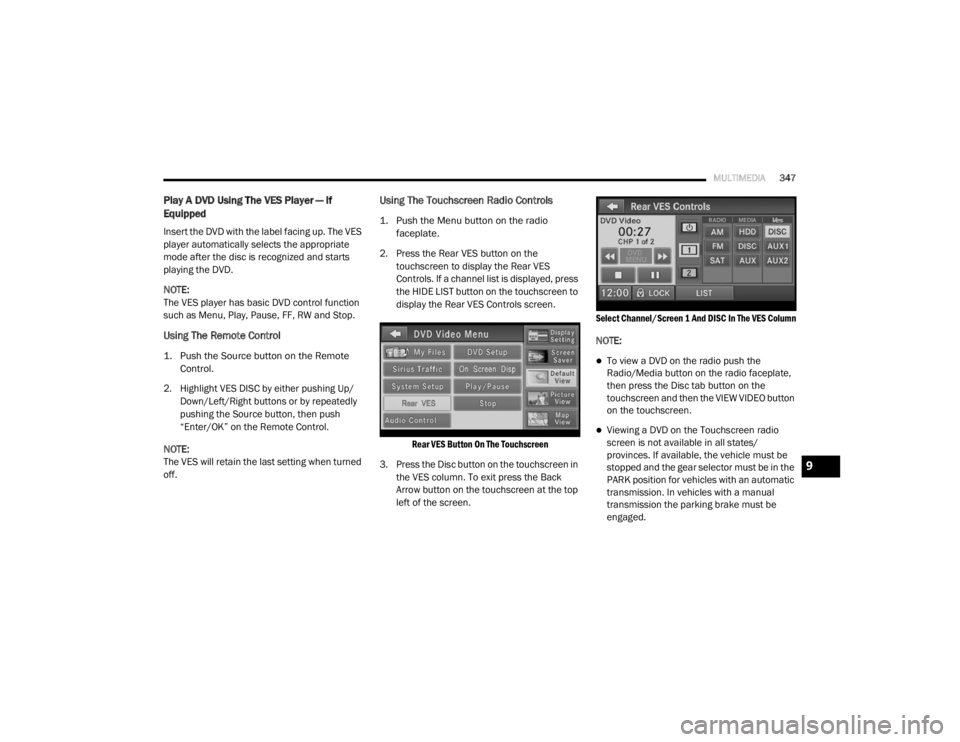
2. Press the Rear VES button on the touchscreen to display the Rear VES
Controls. If a channel list is displayed, press
the HIDE LIST button on the touchscreen to
display the Rear VES Controls screen.
Rear VES Button On The Touchscreen
3. Press the Disc button on the touchscreen in the VES column. To exit press the Back
Arrow button on the touchscreen at the top
left of the screen.
Select Channel/Screen 1 And DISC In The VES Column
NOTE:
To view a DVD on the radio push the
Radio/Media button on the radio faceplate,
then press the Disc tab button on the
touchscreen and then the VIEW VIDEO button
on the touchscreen.
Viewing a DVD on the Touchscreen radio
screen is not available in all states/
provinces. If available, the vehicle must be
stopped and the gear selector must be in the
PARK position for vehicles with an automatic
transmission. In vehicles with a manual
transmission the parking brake must be
engaged.
9
20_RT_OM_EN_USC_t.book Page 347
Page 354 of 380

352MULTIMEDIA
When in shared disc mode both the radio and
the VES have control of the video functions. The
VES has the ability to control the following video
modes:
1. CD: Ability to Fast Forward, Rewind, Scan,
and Track Up/Down.
2. CD Changer (in radio): Ability to Disk Up/Down and program all listed CD controls
(Fast Forward, Rewind, Scan, and Track
Up/Down).
The VES can even control radio modes or video
modes while the radio is turned off. The VES can
access the radio modes or disc modes by
navigating to those modes on the VES and
activating a radio mode or disc mode.
Station List Menu
When listening to Satellite audio, pushing the
remote control’s Pop-Up/Menu button displays
a list of all available channels. Navigate this list
using the remote control’s navigation buttons
(▴, ▾ ) to find the desired station, push the
remote control’s Enter/OK button to tune to
that station. To jump through the list more
quickly, navigate to the Page Up and Page Down
icons on the screen.
Disc Menu
When listening to a CD Audio or CD Data disc,
pushing the remote control’s Pop-Up/Menu
button displays a list of all commands which
control playback of the disc. Using the options
you can activate or cancel Scan play and
Random play.
Display Settings
When watching a video source (DVD Video with
the disc in Play mode, Aux Video, etc.), pushing
the remote control’s Setup button activates the
Display Settings menu. These settings control
the appearance of the video on the screen. The
factory default settings are already set for
optimum viewing, so there is no need to change
these settings under normal circumstances.
To change the settings, push the remote
control’s navigation buttons ( ▴, ▾) to select an
item, then push the remote control’s navigation
buttons ( ▸, ◂) to change the value for the
currently selected item. To reset all values back
to the original settings, select the Default
Settings menu option and press the remote
control’s Enter/OK button. Disc Features control the remote DVD settings
of DVD being watched in the remote player.
Listening To Audio With The Screen Closed
To listen to only audio portion of the channel
with the screen closed:
1. Set the audio to the desired source and
channel.
2. Close the video screen.
3. To change the current audio mode, push the remote control’s Mode button. This will
automatically select the next available
audio mode without using the Mode/Select
menu.
If the screen is closed and there is no audio
heard, verify that the headphones are turned on
(the On indicator is illuminated) and the
headphone selector switch is on the desired
channel. If the headphones are turned on, push
the remote control’s power button to turn audio
on. If audio is still not heard, check that fully
charged batteries are installed in the
headphones.
20_RT_OM_EN_USC_t.book Page 352
Page 356 of 380

354MULTIMEDIA
Compressed Audio Files (MP3 / WMA and ACC)
The DVD is capable of playing MP3 (MPEG-1
Audio Layer 3) and WMA (Windows Media
Audio) files from a CD Data disc (usually a CD-R
or CD-RW).
The DVD player always uses the file extension
to determine the audio format, so MP3 files
must always end with the extension ".mp3" or
".MP3" and WMA files must always end with
the extension ".wma" or ".WMA." AAC files
must always end with the extension "aac" or
"AAC." To prevent incorrect playback, do not
use these extensions for any other types of
files.
For MP3 files, only version 1 ID3 tag data
(such as artist name, track title, album, etc.)
are supported.
Any file that is copy protected (such as those
downloaded from many online music stores)
will not play. The DVD player will automati -
cally skip the file and begin playing the next
available file.
Other compression formats such as AAC,
MP3 Pro, Ogg Vorbis, and ATRAC3 will not
play. The DVD player will automatically skip
the file and begin playing the next available
file.
If you are creating your own files, the recom -
mended fixed bit rate for MP3 files is
between 96 and 192 Kbps and the recom -
mended fixed bit rate for WMA files is
between 64 and 192 Kbps. Variable bit rates
are also supported. For both formats, the
recommended sample rate is either
44.1 kHz or 48 kHz.
To change the current file, use the DVD
player’s ▴ button to advance to the next file,
or the ▾ button to return to the start of the
current or previous file.
To change the current directory, use the
remote control’s PROG UP and Down buttons
or Rewind/skip back and fast fwd/skip
forward. Disc Errors
If the DVD player is unable to read the disc, a
"Disc Error" message is displayed on the Radio
display and the disc is automatically ejected. A
dirty, damaged, or incompatible disc format are
all potential causes for a "Disc Error" message.
If a disc has a damaged track which results in
audible or visible errors that persists for
2.0 seconds, the DVD player will attempt to
continue playing the disc by skipping forward
1 to 3 seconds at a time. If the end of the disc is
reached, the DVD player will return to the
beginning of the disc and attempt to play the
start of the first track.
The DVD player may shut down during extremely
hot conditions, such as when the vehicle’s
interior temperature is above 120°F (49°C).
When this occurs, the DVD Player will display
"High Temp" and will shut off the display until a
safe temperature is reached. This shutdown is
necessary to protect the optics of the DVD.
20_RT_OM_EN_USC_t.book Page 354
Page 357 of 380
MULTIMEDIA355
Display
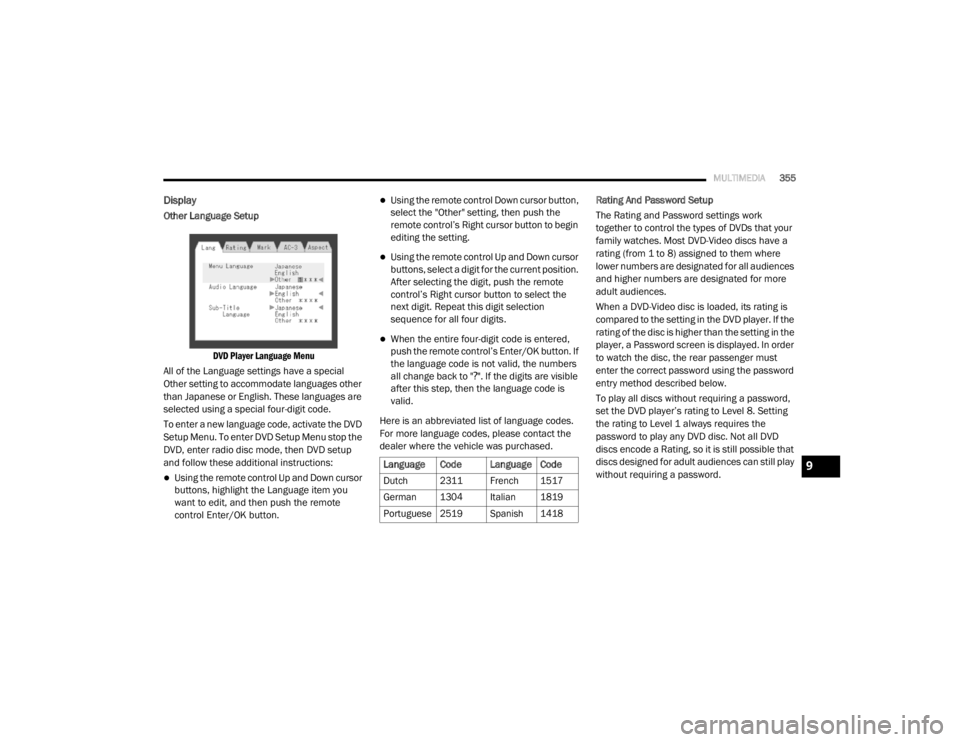
Other Language Setup
DVD Player Language Menu
All of the Language settings have a special
Other setting to accommodate languages other
than Japanese or English. These languages are
selected using a special four-digit code.
To enter a new language code, activate the DVD
Setup Menu. To enter DVD Setup Menu stop the
DVD, enter radio disc mode, then DVD setup
and follow these additional instructions:
Using the remote control Up and Down cursor
buttons, highlight the Language item you
want to edit, and then push the remote
control Enter/OK button.
Using the remote control Down cursor button,
select the "Other" setting, then push the
remote control’s Right cursor button to begin
editing the setting.
Using the remote control Up and Down cursor
buttons, select a digit for the current position.
After selecting the digit, push the remote
control’s Right cursor button to select the
next digit. Repeat this digit selection
sequence for all four digits.
When the entire four-digit code is entered,
push the remote control’s Enter/OK button. If
the language code is not valid, the numbers
all change back to " ?". If the digits are visible
after this step, then the language code is
valid.
Here is an abbreviated list of language codes.
For more language codes, please contact the
dealer where the vehicle was purchased. Rating And Password Setup
The Rating and Password settings work
together to control the types of DVDs that your
family watches. Most DVD-Video discs have a
rating (from 1 to 8) assigned to them where
lower numbers are designated for all audiences
and higher numbers are designated for more
adult audiences.
When a DVD-Video disc is loaded, its rating is
compared to the setting in the DVD player. If the
rating of the disc is higher than the setting in the
player, a Password screen is displayed. In order
to watch the disc, the rear passenger must
enter the correct password using the password
entry method described below.
To play all discs without requiring a password,
set the DVD player’s rating to Level 8. Setting
the rating to Level 1 always requires the
password to play any DVD disc. Not all DVD
discs encode a Rating, so it is still possible that
discs designed for adult audiences can still play
without requiring a password.
Language Code Language Code
Dutch 2311 French 1517
German 1304 Italian 1819
Portuguese
2519 Spanish 1418
9
20_RT_OM_EN_USC_t.book Page 355
Page 358 of 380
356MULTIMEDIA
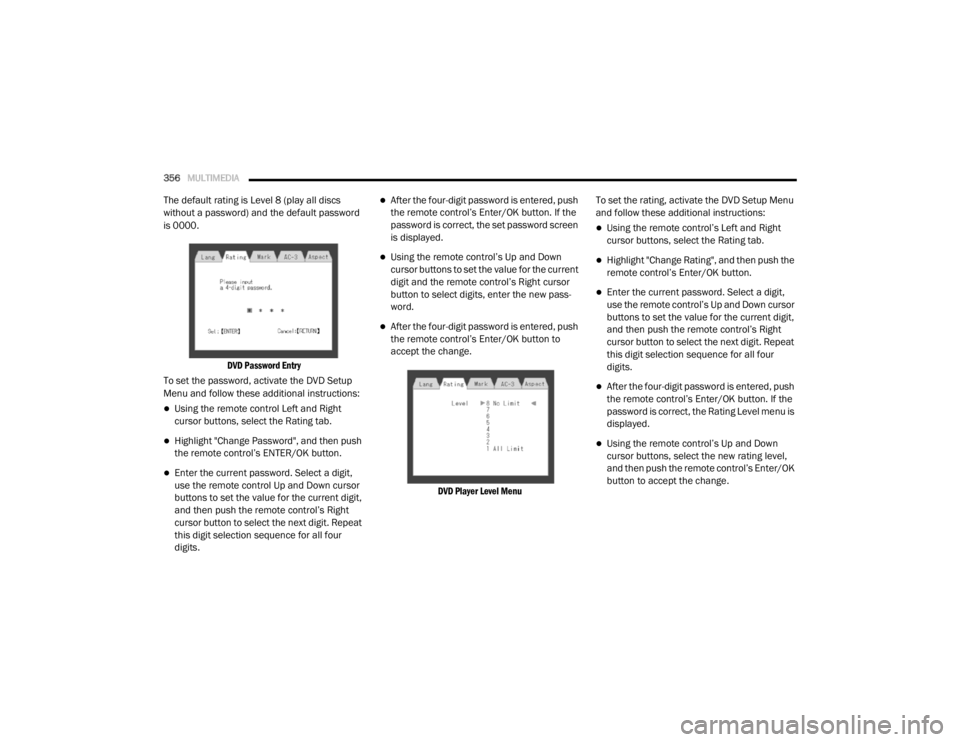
The default rating is Level 8 (play all discs
without a password) and the default password
is 0000.
DVD Password Entry
To set the password, activate the DVD Setup
Menu and follow these additional instructions:
Using the remote control Left and Right
cursor buttons, select the Rating tab.
Highlight "Change Password", and then push
the remote control’s ENTER/OK button.
Enter the current password. Select a digit,
use the remote control Up and Down cursor
buttons to set the value for the current digit,
and then push the remote control’s Right
cursor button to select the next digit. Repeat
this digit selection sequence for all four
digits.
After the four-digit password is entered, push
the remote control’s Enter/OK button. If the
password is correct, the set password screen
is displayed.
Using the remote control’s Up and Down
cursor buttons to set the value for the current
digit and the remote control’s Right cursor
button to select digits, enter the new pass-
word.
After the four-digit password is entered, push
the remote control’s Enter/OK button to
accept the change.
DVD Player Level Menu
To set the rating, activate the DVD Setup Menu
and follow these additional instructions:
Using the remote control’s Left and Right
cursor buttons, select the Rating tab.
Highlight "Change Rating", and then push the
remote control’s Enter/OK button.
Enter the current password. Select a digit,
use the remote control’s Up and Down cursor
buttons to set the value for the current digit,
and then push the remote control’s Right
cursor button to select the next digit. Repeat
this digit selection sequence for all four
digits.
After the four-digit password is entered, push
the remote control’s Enter/OK button. If the
password is correct, the Rating Level menu is
displayed.
Using the remote control’s Up and Down
cursor buttons, select the new rating level,
and then push the remote control’s Enter/OK
button to accept the change.
20_RT_OM_EN_USC_t.book Page 356